Imagine a potential customer browsing your website late at night with a question about your product. Instead of searching for a contact form or sending an email, they tap a button that says “Chat on WhatsApp.” Within seconds, a WhatsApp chat opens and they’re messaging your business directly. No friction, no waiting – just instant, personalized conversation. That’s the power of click-to-chat WhatsApp links in action.
In today’s mobile-first world, offering customers a quick way to reach you on their favorite messaging app can dramatically boost engagement and conversions. In fact, WhatsApp now boasts over 2.2 billion users worldwide (and counting), with around 50 million businesses actively using WhatsApp Business to connect with customers. With open rates for WhatsApp messages as high as 98% (versus ~20% for email), it’s no wonder marketers are embracing this channel.
In this comprehensive guide, we’ll cover what WhatsApp click-to-chat links are, why they’re a game-changer for marketing, and how to create your own WhatsApp chat link step by step. You’ll learn ways to use these links for business growth, best practices to get the most out of them, and get answers to frequently asked questions. By the end, you’ll have a roadmap to harness WhatsApp for instant customer conversations – and an edge over competitors still relying on slower channels. Let’s dive in!
What Are Click-to-Chat WhatsApp Links?
A WhatsApp click-to-chat link is a special URL that instantly opens a chat with your business on WhatsApp when someone clicks it. Think of it as a direct hotline to your business through WhatsApp. The beauty is that customers don’t need to save your phone number in their contacts or navigate any menus – one click and they’re in a conversation with you. This works on both mobile devices and desktops; on phones it launches the WhatsApp app, and on computers it opens WhatsApp Web automatically. All the user needs is an active WhatsApp account, and they’re one tap away from reaching you.
Here’s what happens when someone clicks your WhatsApp link:
WhatsApp opens automatically (the mobile app on a smartphone, or the WhatsApp Web interface in a browser).
A chat window appears with your business number pre-loaded as the contact.
The customer can start typing their message immediately – no need to introduce themselves or dial a number.
You receive the message instantly, just like any other WhatsApp chat, and can reply in real time.
In other words, click-to-chat removes all barriers between the customer and a conversation with your brand. Meta (Facebook) introduced this feature to help businesses engage users more easily on WhatsApp. It’s an official WhatsApp feature, so the links are simple, safe, and reliable. The URL format is provided by WhatsApp itself, meaning there’s no third-party in the middle – the click just triggers WhatsApp to open a chat with your number.
Crucially, customers love the convenience. Instead of filling out a form and waiting hours (or days) for an email reply, they get the instant gratification of a chat. Instead of calling a support line and navigating IVR menus, they send a quick message (often while multitasking). And because it’s WhatsApp, the interaction feels personal and familiar – they can use emojis, share photos, or voice notes, making the experience more human. For businesses, this means higher engagement and happier customers from the very first touchpoint.
Why Use WhatsApp Click-to-Chat for Marketing?
What makes WhatsApp click-to-chat links such a powerful marketing tool? In a nutshell, they meet your customers where they already are (on their phones, using chat apps) and make it extremely easy to start a conversation. Here are some of the key benefits and reasons to incorporate WhatsApp into your marketing strategy:
Instant Personal Engagement: With a click-to-chat link, prospects can jump into a real-time conversation without any hurdles. There’s no need to fill a sign-up form or save a number – they click and chat immediately. This instant access means you can capture their interest at the exact moment they have a query or intent to buy, providing personalized answers on the spot. Speed matters: 74% of consumers say they’re more likely to do business with a company if they can message it instead of calling. You’re giving people the quick, convenient interaction they prefer.
Higher Engagement & Conversions: WhatsApp messages tend to get seen and acted on far more than emails or ads. In fact, messages on WhatsApp have an astonishing 98% open rate, about 5× higher than traditional email or SMS. And it’s not just open – click-to-chat often leads to action. Businesses using WhatsApp links have observed significantly higher conversion rates, with some reporting up to 40% higher conversion compared to using a basic contact form. One industry analysis found WhatsApp marketing messages can achieve 45–60% conversion rates, whereas email or SMS conversions hover around only 2–5%. The immediacy and interactive nature of chat make customers more likely to follow through, whether that means making a purchase, booking an appointment, or providing their details for a lead.
Lead Generation & Better Quality Leads: Every time someone clicks your WhatsApp link, you effectively gain a new lead – you now have a direct line to a potential customer. Plus, these leads are high-intent. If they took the step to message you, they’re likely genuinely interested, not just casual website visitors. You also collect their contact (phone number) effortlessly as part of the chat. Unlike web forms that might get fake email addresses, a WhatsApp conversation is tied to a real user account, reducing false leads. It’s an easy way to build your contact list with warm leads who initiated contact with you.
Global Reach on a Familiar Channel: WhatsApp is the world’s most popular messaging app, used in over 180 countries and by diverse age groups. By using WhatsApp for marketing, you’re tapping into a channel that billions of people already know and trust. This is especially useful if you have an international customer base – one WhatsApp link can allow anyone around the world to reach you without worrying about international calling codes or expensive SMS fees. You’re essentially opening a universal line of communication. And because WhatsApp is mobile-first, you’re meeting customers on the device they use most. It’s a frictionless experience whether they’re on Android, iPhone, or desktop.
Rich Media & Interactive Communication: Marketing isn’t just about text. WhatsApp allows you to share images, videos, PDFs, voice notes, and even interactive elements like product catalogs or location pins in the chat. This means your click-to-chat interactions can go beyond plain text – you can send product photos, demo videos, discount coupons, or any content that helps engage or inform the customer. For example, if a user asks about a product, you can swiftly send back a picture or a brochure PDF in the chat. This rich media capability makes WhatsApp an excellent tool for showcasing offerings and providing better customer support (try that over a phone call or email!). Customers also feel more connected when they can express themselves with emojis or voice messages – it’s a two-way engagement that builds relationships and trust.
Cost-Effective Marketing & Support: Setting up a WhatsApp click-to-chat link is free, and handling customer chats costs little more than your time (and maybe a staff member or two). There’s no additional charge from WhatsApp for using the basic app to chat with customers. Compared to traditional call centers or SMS campaigns, WhatsApp is extremely affordable. For small businesses, it levels the playing field – you can offer real-time support and personalized marketing without needing an expensive infrastructure. Even if you decide to use the more advanced WhatsApp Business API for broad marketing campaigns, the ROI tends to be high given the strong engagement metrics. For most businesses starting out, though, the free WhatsApp Business app plus a click-to-chat link is a low-cost, high-impact solution to get conversations going with your audience.
In short, WhatsApp click-to-chat links can supercharge your marketing by opening a direct, immediate, and personal communication channel with customers. You remove the delay between interest and interaction, which often means higher conversion. You’ll build rapport through conversational selling and support. And you’ll likely stand out from competitors who are slower to respond or stuck in older channels. Next, let’s see how you can create these magic links for your own business.
How to Create a WhatsApp Click-to-Chat Link (Step-by-Step)
Good news: creating a WhatsApp click-to-chat link is incredibly simple. You don’t need to be a tech expert or install special software. WhatsApp provides a straightforward link format you can use, and the WhatsApp Business app even has a built-in tool to generate your link. We’ll cover two easy methods below. In just minutes, you’ll have a working WhatsApp link that you can share with customers.
Method 1: Create a WhatsApp Link Manually (Free)
The basic way to create your WhatsApp chat link is by using a specific URL formula. Here’s the formula and how it works:
Use the official wa.me link format: Start with https://wa.me/ and then add your phone number (in international format) directly after it, with no special characters. This means:
Include the country code, but omit any plus sign, zeros, dashes, or spaces.
Use only numbers. For example, a US number +1 (555) 123-4567 becomes https://wa.me/15551234567. A UK number +44 20 7946 0958 becomes https://wa.me/442079460958.
Double-check that you haven’t included any symbols like “+” or “–”; the link won’t work if there are characters other than digits.
For instance, if your business WhatsApp number is +91 9876543210 (India), your click-to-chat URL would be: https://wa.me/919876543210
As soon as someone clicks that link, it will open a chat with the WhatsApp account associated with +91 9876543210. It’s that easy. You can test it by clicking the link yourself (it should open a chat with your number, which, if it’s your own WhatsApp, means you’ll see your own profile or a self-chat).
Adding a pre-filled message (optional): You also have the option to include a default text message in the link. This pre-populated message will appear in the chat input box automatically when the user clicks your link, which can prompt them to hit send or edit the message as needed. It’s great for nudging customers to provide specific info or just break the ice with a hello. For example, you might want the message to say "Hello! I'm interested in your services."
To add a pre-filled message, use the format: https://wa.me/YourPhoneNumber?text=Your%20Custom%20Message
Everything after ?text= in the URL will become the message in the chat box. Important: the message text must be URL-encoded, which mainly means replacing spaces with %20 (and certain special characters with code). In practice, you can write your message and then replace each space with %20. For example:
Original message: "Hello, I’d like to know more about your services"
So the full WhatsApp link with that message and a sample number would be: https://wa.me/919876543210?text=Hello%2C%20I%E2%80%99d%20like%20to%20know%20more%20about%20your%20services
When a user clicks this link, their WhatsApp will open a chat to +91 9876543210 with the message "Hello, I’d like to know more about your services" already typed out, ready to send. You can customize this text to anything – e.g., "Hi, I want to book an appointment" or "I have a question about [Product Name]". Prefilled messages are helpful if you want to guide the user to provide certain info (like an order number or their name) or simply make it easier for them to initiate the chat.
Pro Tip: Keep your pre-filled message short and friendly. It should feel like a natural first message from a customer, not a marketing script. For example, "Hi! I'm interested in learning more about your products." is welcoming and easy for a user to send.
That’s it for the manual method – copy your wa.me link (with or without pre-text) and you’re ready to use it anywhere.
Method 2: Generate a WhatsApp Link via the WhatsApp Business App
If you use the WhatsApp Business app (the free app for small businesses, available on Android/iOS), it has a built-in feature to create your click-to-chat link without any manual formatting. This can be a bit more user-friendly if you’re not comfortable editing URLs, and it also gives you a QR code version of your link.
To get your WhatsApp link from the Business app:
Open the WhatsApp Business app on your phone (make sure you’re logged into your business number account).
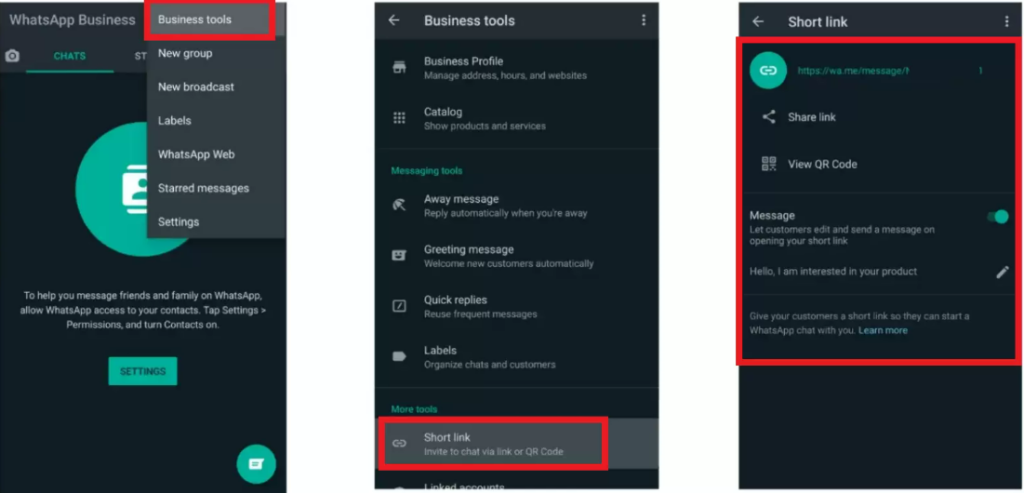
Go to Settings > Business Tools > Short Link. (On some versions, Business Tools might just be under the Settings menu.)
In the Short Link section, you will see your auto-generated short link (it usually looks like https://wa.me/<YourNumber> or sometimes a variant with an alphanumeric code). You can tap “Share Link” to copy or share it.
You can also set a default greeting message here (similar to the pre-filled message above) by editing the message in the short link settings.
Additionally, the app provides a QR code for your WhatsApp contact. Under Short Link, tap “View QR Code”. You can save or screenshot this QR code. When scanned, it functions just like the link – it will open a WhatsApp chat with your business. This is great for printing on posters, flyers, or business cards.
Using the WhatsApp Business app’s short link feature ensures your link is formatted correctly, and you get the handy QR code to use in offline marketing. The link from the app might look slightly different (it may use an API reference or your business ID internally), but it works exactly the same way as the standard wa.me link.
Note: You don’t have to use WhatsApp Business app to have a click-to-chat link – any WhatsApp number can use the wa.me link format from Method 1. The app’s feature is just a convenience. That said, if you are a business, it’s worth using the WhatsApp Business app for additional tools like business profile, greeting messages, quick replies, and stats. The short link it provides is just a bonus.
Other Ways to Create WhatsApp Links
The two methods above are the most direct ways provided by WhatsApp/Meta. There are also third-party tools that can help if you prefer an even simpler route:
WhatsApp Link Generator Tools: Several free online tools will create the WhatsApp link for you – you just input your number (and a preset message if desired), and they output the ready-made URL. Examples include Walink (create.wa.link), Respond.io’s WhatsApp link generator, and others. These can be useful to avoid manual URL encoding for messages. Just be cautious to use reputable ones so you’re not accidentally sharing your number with a shady site. Most simply build the URL string, and you copy it.
Plugins/Widgets: If you run a website on platforms like WordPress or Shopify, there are plugins (often called WhatsApp Chat Button or Click to Chat plugins) that can generate and embed the WhatsApp link for you with a nice button. For instance, the PushEngage WhatsApp widget for Shopify adds a floating WhatsApp icon to your site with a one-click install. Similarly, WordPress has plugins where you just enter your number, and it will display a chat button on your site. These solutions handle the link creation and even some design for you. They are optional – you can always do it manually – but worth considering if you want a quick, polished integration.
Now that your WhatsApp link is ready, the next step is to deploy it in your marketing channels so customers can start clicking and chatting. Let’s look at where and how you can use your WhatsApp click-to-chat link to maximize its impact.
Using WhatsApp Click-to-Chat Links in Your Marketing Strategy
Creating a WhatsApp link is only step one – now you need to put that link where your customers will see it and click it. The versatility of click-to-chat links is that you can integrate them anywhere you interact with your audience. The goal is to make it as easy as possible for a prospect or customer to find that “Chat on WhatsApp” option at the moment they have a question or interest. According to marketing experts, you should incorporate WhatsApp chat links across multiple channels and touchpoints to engage customers on their terms. Here are some of the best places to use your WhatsApp click-to-chat link:
Examples of businesses promoting WhatsApp click-to-chat links on social media. Many brands add WhatsApp chat links in Instagram bios, Facebook posts or ads, and even Twitter posts to invite customers into a direct conversation.
On Your Website: Arguably, the most important spot for a WhatsApp link is your own website. Add a prominent WhatsApp chat button or link on key pages, such as the homepage, contact page, product pages, and support page. For example, you can have a floating WhatsApp icon at the bottom corner of your site that says “Chat with us” (many plugins provide this), or a Call-To-Action button like “Questions? Chat with us on WhatsApp” next to your product details. When clicked, it should open WhatsApp (or WhatsApp Web) to chat with your business. This real-time chat option can significantly boost conversions, as website visitors can quickly get answers or reassurance while considering a purchase. If you have an FAQ page, you might even embed a “Still need help? Message us on WhatsApp” link there. By integrating WhatsApp on your site, you turn passive browsing into interactive shopping. (Tech tip: To add a WhatsApp button manually on a webpage, you can create a hyperlink with your wa.me link. For example, <a href="https://wa.me/<YourNumber>" target="_blank">Chat on WhatsApp</a> will work as a basic link. Wrap it around a WhatsApp icon image or styled button to make it eye-catching.)
Social Media Profiles and Posts: Your social media channels are perfect for promoting your WhatsApp contact. Include your WhatsApp click-to-chat link in places like:
Instagram bio: Instead of just an email, put a “WhatsApp us” link in your profile (you might use a service like Linktree to combine multiple links if needed). Businesses on Instagram often say “📩 WhatsApp us:” followed by the link. This gives interested followers a direct line to inquire about products or services.
Facebook page and posts: On Facebook, you can add a WhatsApp button to your business page (Meta allows linking your WhatsApp Business to your FB page). Also, when creating posts or offers, encourage people to message you on WhatsApp for more info and include the link. Facebook Ads even has a dedicated objective for Click-to-WhatsApp ads, where an ad’s CTA button opens a WhatsApp chat. These are highly effective for generating leads – users seeing your ad can chat immediately without filling any form.
Twitter (X) and other platforms: You can share your WhatsApp link in tweets or pin a tweet like “📱 Contact us on WhatsApp [link] for instant support!” Similarly, on LinkedIn or YouTube descriptions – any platform where a clickable link can be shared, you can invite users to chat with you directly. The image above shows examples of brands using posts with WhatsApp links on Instagram and Twitter – it makes your social engagement more conversational.
Email Newsletters & Signatures: Add WhatsApp as a contact option in your emails. In your email newsletter footer or sidebar, include a section like “Prefer WhatsApp? Chat with our team now” with the link. For one-time campaigns, if you’re announcing a sale or event via email, you could say, “Have questions? Just WhatsApp us [link] and we’ll help you out.” Since emails might be read at various times, make sure you’re prepared to reply on WhatsApp when someone reaches out. Additionally, put your WhatsApp link in your professional email signature (e.g., beneath your name, “WhatsApp: wa.me/YourNumber”). This way, every email you send becomes an opportunity for the recipient to hop on a quick chat if needed. It subtly signals that your business is modern and responsive on chat.
Online Ads and Landing Pages: As mentioned, Click-to-Chat ads are offered on platforms like Facebook and Instagram – take advantage of them. When a user clicks the ad’s CTA, a WhatsApp conversation with your business opens. These ads often lead to higher-quality interactions because the user voluntarily starts a chat (which you can then use to nurture or close a sale). For Google Ads or other ad platforms where you can’t directly integrate WhatsApp, you can still use your landing page effectively. For example, design landing pages with a clear WhatsApp chat button for inquiries. If you run ads for “Free Consultation”, the landing page can say “Schedule your free consultation – chat with us on WhatsApp now!” with the link. This reduces friction in lead capture compared to forms. SMS campaigns can also include a WhatsApp link: e.g., “Reply or message us on WhatsApp {link} for support.” Wherever you ask customers to take an action, consider if chatting might be a better, more instant step than filling a form.
QR Codes for Offline Marketing: Don’t forget offline channels! Since a WhatsApp link can be turned into a QR code, you can bridge real-world marketing with online chat. Print your WhatsApp QR on flyers, posters, brochures, product packaging, business cards, storefront signage – anywhere your customers might see it. For example, a cafe might have a tabletop sign: “Questions or want to order ahead? Scan to WhatsApp us!” When scanned, it opens the chat. This is also great for events and trade shows: include a “Chat with us” QR code on your booth or presentations so interested folks can connect instantly without typing anything. The WhatsApp Business app provides a ready-made QR code, or you can use any free QR generator by inputting your wa.me link. It’s an easy way to let users initiate a chat by just pointing their phone camera at the code.
In summary, deploy your WhatsApp link wherever customers interact with your brand, online and offline. The more visible and accessible it is, the more likely people will use it. Make sure to use a clear call-to-action around the link (like “Chat with us on WhatsApp”) so people know what will happen when they click. Now that your channels are set, let’s cover some best practices to ensure you handle all these incoming WhatsApp conversations effectively and get the best results.
Best Practices for Marketing with WhatsApp Click-to-Chat
While using WhatsApp for customer communication is powerful, it’s important to do it right. Here are some best practices and tips to help you succeed with WhatsApp marketing (and avoid common mistakes):
Make Your WhatsApp Contact Visible and Obvious: Don’t hide the WhatsApp link in a corner. Use contrasting colors or an eye-catching WhatsApp icon to draw attention. On your site, a floating chat button that’s always in view can greatly increase usage. Label it clearly – e.g., “💬 Chat on WhatsApp” – so users know what it is. If people have to hunt for how to contact you, they likely won’t bother. Convenience is key, so display your WhatsApp CTA prominently on high-traffic pages and channels.
Use a Clear Call-To-Action (CTA) Message: The wording around your WhatsApp link should entice users to click. Phrases like “Chat with us for instant support,” “Message us on WhatsApp,” or “WhatsApp us for details” set the expectation that they’ll get a quick response. Avoid vague text like “Contact” or “Submit inquiry” – instead, highlight the conversational nature (e.g,. “Ask us on WhatsApp”). On social posts or ads, explicitly say that they can message you on WhatsApp for more info. This clarity will improve click-through rates, as users immediately understand that help is one message away.
Set Expectations (Business Hours & Response Time): WhatsApp is often seen as an instant channel. If you’re not a 24/7 operation, it’s important to communicate when people can expect a reply. You can do this in a few ways. First, use the WhatsApp Business profile features: set an “Away Message” that auto-replies during off hours (e.g., “Thanks for your message! We’re currently away but will respond tomorrow after 9am.”). Also, consider putting your available chat hours in the greeting message or profile info. If someone messages you at 11 pm, at least they’ll get a note on when you’ll be back. During normal hours, try to respond promptly. The faster you reply, the more impressed the customer will be. In fact, 73% of users say slow responses on WhatsApp would make them stop engaging with a brand. Don’t leave people hanging. If you need a few minutes to look up info, you can send a quick acknowledgement (“Let me check that for you, brb”) so they know you’re on it.
Be Personable and Helpful: WhatsApp is a casual, chatty medium. Adapt your tone to be friendly and human, not overly formal “corporate speak.” Use the customer’s name if you have it, introduce yourself (or the agent’s name) when starting a conversation, and make the user feel heard. You can even use emojis or exclamation points if appropriate, to convey warmth – e.g., “Hi John, thanks for reaching out! 😊 How can I help you today?” Match the tone of the customer: if they’re formal, you can stay more formal; if they use casual language, you can be a bit more relaxed too. Always provide value in your responses – answer their question directly, share relevant info or links, and go the extra mile to help. Great customer service in WhatsApp chats can turn hesitant prospects into happy customers quickly.
Leverage WhatsApp Business Features: If you’re using the WhatsApp Business app, make use of its built-in features to streamline communication. Set up Quick Replies for FAQs (shortcuts for common responses), organize chats with Labels (e.g., “New Lead”, “Order in Progress”), and fill out your Business Profile (including address, description, hours, email, website) so users can see info in your WhatsApp contact. These features help manage conversations efficiently as you scale up. For example, if many people ask, “What are your prices?” you can have a quick reply ready with a price list or a link to your pricing page. This saves time and ensures consistency. Also, utilize Broadcast Lists or Groups carefully to send updates to multiple customers who have opted in – but avoid spamming (broadcasts only deliver to those who saved your number, as a built-in anti-spam measure).
Don’t Spam or Violate Trust: This is critical. Just because someone messages you on WhatsApp doesn’t mean you have the license to bombard them with promotions. Always respect user privacy and preferences. Use the channel primarily to respond to inquiries and provide requested information. If you want to send proactive marketing messages (like a sale alert), make sure the user has consented (perhaps by opting in to a WhatsApp newsletter or updates list). Unsolicited messages can lead to users blocking your number or reporting spam, which can hurt your account. Remember, WhatsApp conversations are end-to-end encrypted and personal – treat that privilege with care. Build trust by being helpful, not overly pushy. This way, customers will welcome your messages instead of ignoring or silencing them.
Train Your Team (or Yourself) for WhatsApp Etiquette: If multiple people will handle the WhatsApp chats, ensure they all follow a consistent and courteous approach. Quick response, friendly tone, accurate information, and knowing when to escalate or offer a phone call if needed – these are all skills to cultivate. You might create a small WhatsApp response handbook with guidelines and example answers to common questions, so your team can provide a seamless experience. Even if you’re a solo entrepreneur, think about how you want to come across on chat. For instance, using proper greetings, being patient if a user is slow to reply, and handling difficult queries calmly will all pay off in better customer relationships.
Use Pre-Filled Messages Smartly: We discussed how to add a pre-filled message to your link. Make sure that if you do use one, it fits the context. For example, if your link is primarily for sales inquiries, a pre-filled message like “Hello, I’m interested in [Product/Service].” can be great. But if it’s for support, maybe “Hi, I need help with…” is more appropriate. Always allow the customer to modify the message – the point is not to force a script, but to help those who aren’t sure what to say get started. Keep the text short so it doesn’t feel too assumptive. And avoid marketing jargon in the pre-fill; it should sound like it’s written from the customer’s perspective (e.g., “I’d like to learn more about your offerings” rather than “Tell me about your esteemed solutions”).
Test Your Link and User Experience: Before blasting your WhatsApp link to everyone, test it yourself, and on multiple devices/browsers. Click it from your mobile (does it correctly open your chat? If you have a dual-SIM or multiple WhatsApp scenario, ensure it opens the intended one). Test it on a desktop – does it redirect properly to web.whatsapp.com with your number? If the user is not logged in to WhatsApp Web, they might be prompted to log in via QR code – that’s normal. Also, verify that the pre-filled message appears if you added one. If using a QR code, scan it from a friend’s phone to ensure it works. It’s better that you catch any formatting errors or broken links than your customers do. Additionally, consider asking a friend or colleague to do a trial chat via the link and give feedback on the experience. Once everything is smooth, you can confidently promote the link.
Monitor and Adapt: Treat your WhatsApp chats like a marketing channel that needs analysis and improvement. Keep an eye on how many people are clicking the link and messaging you. (WhatsApp Business app might show you some statistics like the number of messages sent, received, read, etc. If you use the API through a provider, you’ll get more analytics dashboards.) Notice at what times you get more chats – maybe that’s when to ensure an agent is always online. Pay attention to the questions people ask most – this might inform your marketing copy elsewhere or what content you share. If you find certain campaigns (like an Instagram post vs a website banner) drive more WhatsApp conversations, focus your efforts there. Essentially, treat each chat as valuable feedback from a lead or customer, and use those insights to refine your approach. Over time, you might discover, for example, that people often ask for pricing on WhatsApp – perhaps you can preempt that by sharing a price list proactively or adjusting the pre-filled message to ask for their budget range.
Scale Smartly with Automation (if needed): As your WhatsApp engagement grows, you might reach a point where handling every chat manually becomes challenging. At that stage, consider leveraging automation tools. The WhatsApp Business API (designed for medium/large businesses) allows integration of chatbots and CRM systems. Through the API, you can set up automated greeting flows or connect a chatbot that can answer common questions 24/7. For example, a chatbot could ask “Hi! Are you looking for product info, order status, or support?” and guide the user accordingly, handing off to a human agent if needed. While implementing the API and a chatbot requires some technical setup (often through solution providers), it can significantly enhance response speed and handle volume. Even without a full AI bot, you can use the quick reply templates in the Business app to semi-automate answers. The key is to ensure customers still feel they are getting a personal, helpful service. Automation should assist, not fully replace, the human touch in most cases. When done right, scaling your WhatsApp marketing can lead to thousands of meaningful conversations with customers, without overwhelming your team.
By following these best practices, you’ll create a positive experience for users who reach out via WhatsApp, which in turn boosts your brand reputation and conversion rates. You’ve removed the barrier to conversation; now make every conversation count by being responsive, friendly, and helpful.
Finally, let’s wrap up with a quick recap and a call to action for you (yes, you!) to start leveraging WhatsApp in your marketing, plus an FAQ to answer any lingering questions.
Conclusion: Engage Your Customers – One Click Away
WhatsApp click-to-chat links offer a fresh, powerful way to connect with today’s customers who value convenience and instant communication. We’ve discussed how these simple links allow anyone to start chatting with your business in seconds – no forms, no waiting, just real conversation. You’ve seen that implementing WhatsApp in your marketing can lead to higher engagement, better leads, and even improved sales conversions, thanks to WhatsApp’s phenomenal open rates and personal touch.
Now it’s time to put this into action. Creating a WhatsApp link is easy and free, so the barrier to entry is practically zero. Think about your marketing and customer service setup today: where could a quick chat help answer questions or nudge a hesitant buyer? Whether you’re a small online store, a freelancer, a local service provider, or even a large enterprise, WhatsApp can likely enhance your customer interactions.
Don’t wait for competitors to beat you to it. Take a few minutes today to create your WhatsApp click-to-chat link (using the steps we covered) and add it to at least one place your customers will see. Maybe it’s your website’s contact page, or a social media bio, or the next email campaign you send out. Start small if you need to – you can always expand to more channels as you get comfortable. The key is to open that door for your audience.
Once the messages start coming, be ready to engage. Treat each WhatsApp chat as an opportunity to build a relationship with a potential customer. Provide value, solve problems, and make the chat experience enjoyable. You’ll be pleasantly surprised how these casual conversations can lead to loyal customers and new sales.
In a world where everyone is glued to their smartphones, marketing is no longer a one-way broadcast – it’s a dialogue. WhatsApp is the perfect medium for these dialogues. By embracing click-to-chat links, you’re saying to your customers, “We’re here, we’re reachable, and we care enough to talk with you directly.” That message, in itself, sets you apart.
So go ahead – create your WhatsApp link and make it live! Start engaging your customers on a platform they love. The sooner you do, the sooner you’ll reap the benefits of more conversations, more trust, and more conversions. Your customers are literally one click away from you. It’s time to say hello. 👋
Ready to elevate your marketing? Implement a WhatsApp click-to-chat link now and watch the engagement roll in. Don’t miss out on the chance to chat with your future customers – they’re waiting to talk to you!-> Start using WhatsApp click-to-chat in your marketing today, and give your audience an easy, personal way to connect with your business.
1. What is a WhatsApp click-to-chat link, and how does it work?
A WhatsApp click-to-chat link is a special URL that, when clicked, opens a chat with a specific phone number on WhatsApp, without needing to save that number in contacts. Essentially, it’s a direct invite to message someone. For example, a link like https://wa.me/15551234567 will launch WhatsApp and start a chat with the number +1 555 123 4567. It works on both mobile (opens the WhatsApp app) and desktop (opens WhatsApp Web). The person clicking must have WhatsApp installed or use WhatsApp Web. Once opened, they can type and send messages as usual. It’s an official feature by WhatsApp that makes starting a conversation as easy as clicking a link.
2. Is WhatsApp an effective marketing tool for businesses?
Absolutely. WhatsApp has proven to be a highly effective channel for customer engagement and marketing. The statistics tell the story: WhatsApp messages can have an open rate around 98%, which blows typical email open rates (20% or so) out of the water. Moreover, customers tend to respond and take action more via chat – conversion rates from WhatsApp interactions have been reported in the range of 45–60% in some cases. Customers feel comfortable on WhatsApp because it’s familiar and convenient; they’re more likely to reach out with questions, which gives you a chance to personally guide them to a purchase or solution. Also, 87% of consumers (globally) say they want brands to offer messaging options alongside traditional channels – it’s clear people prefer the ease of texting a business versus making a phone call or waiting for an email. That said, success on WhatsApp depends on how you use it: respond quickly, be helpful (not spammy), and use it to have conversations, not just blast ads. Businesses large and small are using WhatsApp for everything from sales inquiries, customer support, to sending order updates. When done right, it can boost customer satisfaction, increase trust, and yes, drive more sales thanks to that personal touch.
Aditi, a content marketer at SendWo, is a passionate writer and marketing enthusiast. She excels in driving revenue campaigns, building client relationships, and mastering content creation, SEO, customer service, and project management.
SendWo is Meta's official business solution Provider. Broadcast Bulk WhatsApp messages and automate using AI Chatbots.