Every great chatbot needs a solid backbone for handling user interactions, and in SendWo, that backbone is powered by Action Buttons.
Action Buttons in SendWo are pre-defined system triggers that simplify user journeys and make your automation smarter. SendWo’s Action Buttons are directly integrated into the Flow Builder, empowering you to edit, extend, and automate workflows and keeping your automation fully aligned with the business goals.
Action Buttons can be used in several scenarios in real-world automation :
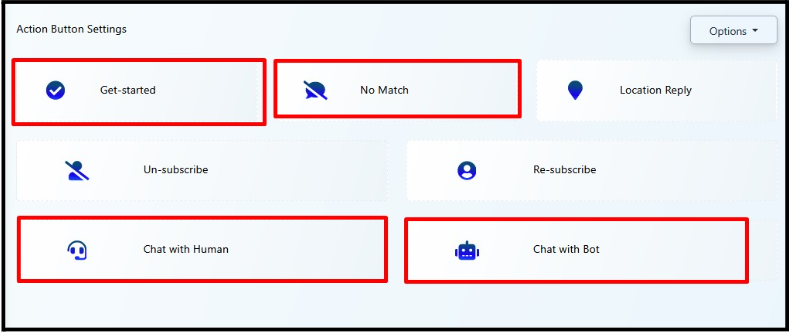
The Get Started button is your chatbot’s welcome handshake. It’s the default entry point when a user interacts with your WhatsApp or Facebook bot for the first time.
Inside SendWo’s Flow Builder, you can:
This button creates a strong first impression and ensures every new user is properly onboarded into your automation journey.
At times, users type something your bot doesn’t recognize. That’s where the No Match button saves the day.
In SendWo:
This ensures users never hit a dead end in conversation.
Perfect for businesses with physical stores or delivery zones. When users share their location on WhatsApp, the Location Reply action triggers an instant response.
You can configure the flow to:
The Unsubscribe button lets users opt out of receiving future messages.
Customize the flow in:
The Resubscribe button helps the user to rejoin with your updates again.
You can:
The Chat with Human button instantly switches control from bot to human agent if needed.
Configure it to:
In SendWo, this is seamlessly managed via the Shared Inbox, where agents can take over conversations from WhatsApp, Instagram, Telegram, or Webchat, all in one place.
After a human chat session, users can be switched back to the automated bot using this button.
You can:
Setting up or customizing Action Buttons takes only a few clicks:
Note: All default Action Button replies in SendWo use plain text nodes which means you can easily personalize them using variables like {{first_name}}, {{phone}}, or connect them to external APIs for advanced logic.
| Button Name | Purpose | Where to Use |
| Get Started | Entry point for new users | WhatsApp, Facebook |
| No Match | Respond to unmatched user inputs | All platforms |
| Chat with Human | Escalate chat to a live agent | Support automation |
| Chat with Bot | Resume automation after human chat | After agent handover |
| Unsubscribe | Allow users to opt out | Compliance & user management |
| Resubscribe | Reactivate unsubscribed users | Re-engagement campaigns |
| Location Reply | Auto-reply when a location is shared | Geo-based or delivery use cases |
The Action Button Settings empowers you with a quick and easy way to manage your core chatbot actions. With just a few clicks, you can greet users, route messages to agents, manage subscriptions, and ensure every user gets a meaningful response.
Configure once. Automate everything. Engage smarter - with SendWo.
No. However, you can leave their responses blank or minimal if it is not required.
Yes. Using SendWo’s Flow Builder, you can connect them to APIs, condition checks, or CRM updates.
Yes. Most are universal (WhatsApp, Instagram, Telegram, Webchat). A few, like Location Reply, work best with WhatsApp.
Resetting restores them to default templates; however, you can re-edit and customize anytime from the Flow Builder.


