
Imagine waking up to find your WhatsApp Business account suddenly banned on the morning of a big promotion. In an instant, you lose access to all your customer chats and leads. Unfortunately, this scenario is all too real for businesses that run afoul of WhatsApp’s rules. WhatsApp Business has become a crucial communication channel for over 200 million businesses each month, but with great reach comes great responsibility.
To keep the platform safe and spam-free, WhatsApp enforces strict policies, and breaking them can result in warnings, feature restrictions, or even permanent bans. Being locked out with the dreaded “Your account can no longer use WhatsApp” message is every business owner’s nightmare.
The good news is that such outcomes are preventable. In this comprehensive guide, we’ll break down what WhatsApp Business policy violations are, why accounts get banned, and how you can avoid common pitfalls. We’ll also cover what to do if you’ve been banned and a few similar challenges. By understanding these rules and best practices, you can keep your WhatsApp Business account in good standing and continue engaging customers without interruption.
Let’s dive in and ensure your WhatsApp business communications stay compliant, effective, and ban-proof.
WhatsApp Business policy violations refer to any use of the platform that breaks WhatsApp’s official rules for businesses. Meta (WhatsApp’s parent company) has outlined clear Business Messaging Policies and Commerce Policies that businesses must follow when using the WhatsApp Business app or API. These policies cover how you obtain customer consent, what kind of messages you send, and what products or services you can promote on WhatsApp. If your account activity goes against these guidelines or the Terms of Service, it’s considered a violation.
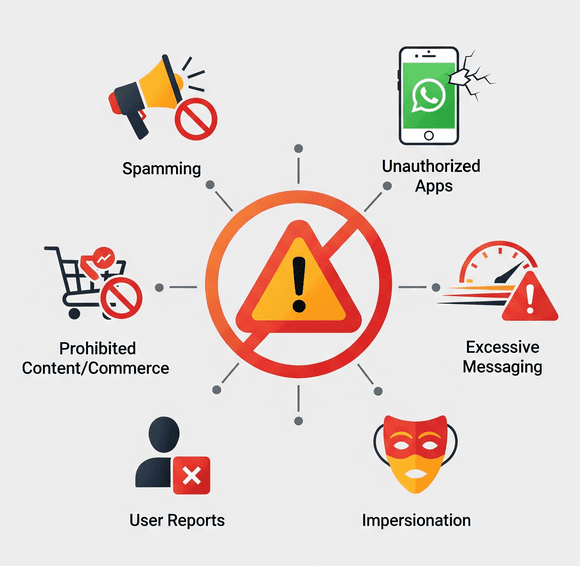
❌Common examples of policy violations include spamming users, sending messages without permission, sharing prohibited content (like illegal products), or using unauthorized automation tools.
WhatsApp actively monitors business accounts for such behavior to keep the user experience positive and safe. Accounts that violate the rules may be limited or banned – sometimes without warning. In fact, WhatsApp explicitly states that it will ban accounts if it believes the activity involves spam, scams, or puts users’ safety at risk. In other words, anything that confuses, deceives, misleads, or harms users is strictly off-limits on WhatsApp.
It’s important to note that WhatsApp’s policies apply globally, and they cover both the WhatsApp Business App and the WhatsApp Business Platform (API).
Even if you’re a small business just using the free app, you are expected to follow the same rules as larger companies. Ignorance of the policies is not an excuse – a violation is a violation, whether intentional or accidental.
They’re there to protect users and ensure a quality experience. Users should only hear from businesses they want to hear from, and they shouldn’t be exposed to fraud or unsafe content. By understanding what counts as a policy violation, you can keep your outreach within acceptable bounds and avoid the risk of an account ban.
One of the fastest ways to violate WhatsApp’s rules is by sending unsolicited messages or spam. WhatsApp’s Business Messaging Policy requires that you only contact users who have given you their phone number AND consent to be messaged.
Adding customers to broadcast lists or groups without their permission, or blasting promotional messages to people who never opted in, is a direct violation. It’s against the rules and can get your number flagged.
WhatsApp uses spam detection algorithms and user reports to identify businesses that send high volumes of unwanted messages. If you send bulk messages to many new contacts in a short time, it can trigger WhatsApp’s systems to mark it as spammy or automated behavior.
❌For example, sending out hundreds of marketing texts within a few minutes, especially to users who haven’t interacted with you before, is a big red flag. Even well-intentioned businesses can get caught by this if they’re not careful. The result? A possible immediate suspension or ban of your account for spam.
Always ensure customers have explicitly opted in to receive your updates (for instance, by ticking a box on your website or agreeing via message) and avoid mass messaging people who haven’t asked for it. Consent-based messaging isn’t just polite – it’s required to stay compliant.
Pro Tip: Focus on quality over quantity. It’s better to message 50 customers who want your updates than 5,000 who never agreed. Unsolicited blasting will only harm your reputation and could cost you your WhatsApp access.
Another common violation is using unofficial methods to access WhatsApp. WhatsApp strictly prohibits using the personal WhatsApp app for commercial purposes, as well as any modified or “cracked” versions of WhatsApp (like GB WhatsApp or WhatsApp Plus). Similarly, using unapproved third-party automation tools or bots to send messages in bulk is a violation of WhatsApp’s terms.
❌These shortcuts might seem convenient for reaching many users, but WhatsApp can detect them and will not hesitate to ban accounts using them.
For example,
✅The safest route is to stick with the official WhatsApp Business app or API solutions provided by Meta and its partners. They have features for automation and broadcasting that comply with policy (more on that later).
Remember, any tool promising to “bypass” WhatsApp limits or send bulk messages freely is likely violating WhatsApp’s policies. Using such tools puts your business account at serious risk. It’s just not worth losing your verified business number and customer trust for a quick spam campaign.
WhatsApp has rules about what you can send, not just how you send it. The Commerce Policy forbids using WhatsApp to promote or sell certain products and services, even to willing customers. If your messages contain banned content, that’s a violation.
Some examples of prohibited content include:
If your business is in a regulated industry, you can still use WhatsApp for customer communication in many cases – you just can’t use certain features for transactions. For instance, a licensed alcohol retailer may chat with customers on WhatsApp and take orders manually, but cannot use WhatsApp’s built-in catalog or payment features to sell alcohol because it’s a restricted product.
WhatsApp has made it clear that commerce features (like product listings or in-app payments) are off-limits for prohibited items, even if selling that item might be legal in your region. Always double-check WhatsApp’s Commerce Policy to see if your goods or services are allowed.
Also, keep your content professional and safe for all audiences. Sending pornography, graphic violence, or harassment violates WhatsApp’s terms and can get you banned.
Pro Tip: Stick to legal, legitimate, and user-friendly content in your business chats. If you wouldn’t put it on a public website, you probably shouldn’t send it on WhatsApp either.
Even if you have user consent and your content is allowed, how you message can trigger policy enforcement. WhatsApp keeps an eye on messaging patterns that look like spam. If your account suddenly shoots out an unusually large number of messages in a short time, it could be flagged.
For example,
✅To avoid this, pace your communications. Use broadcast lists and group messages sparingly and strategically. It’s better to stagger a large campaign over several days than blast everyone at once. Make sure your messages are personalized and provide value, so users are less likely to report or block you.
Pro Tip: Remember, WhatsApp’s systems are very sensitive to spam-like behavior – even if you’re not intentionally spamming, an algorithm might mistake high-volume repetitive activity as a violation. When in doubt, slow down and prioritize meaningful interactions over mass messaging.
Your customers have a powerful tool in their hands: the Report and Block buttons. If many people report your business or block you, it sends a clear signal to WhatsApp that something might be wrong. WhatsApp may then review your recent messages (they get to see a few messages when a user reports a business, despite encryption) to check for policy violations. If they find you’ve been spamming, sending abusive content, or otherwise breaking rules, they can swiftly ban your account.
❌Even if your messages technically follow the content rules, excessive reports can get you in trouble. Each time a user hits “Report” on your chat, it’s logged. When those reports pile up, WhatsApp’s system can decide to temporarily or permanently ban your account as a precaution. This is one of the most common reasons businesses get banned. It usually means the business was messaging people who didn’t want to be contacted or was irritating users with low-quality content. A high report rate also correlates with a poor sender reputation (low quality rating), compounding the risk of enforcement.
The takeaway: keep customers happy and engaged, not annoyed. Respect any requests to stop messaging – if someone asks to unsubscribe or opts out of the platform, remove them from your list immediately. Provide easy ways for users to reach you or manage their preferences. The fewer people feel the need to block or report your business, the safer your account will be. Maintaining trust and relevance in your messaging isn’t just good for business – it literally protects your WhatsApp number from being flagged.
Besides the big ones above, here are a few more policy violations (some obvious, some less so) that can trip up businesses:
Policy violations range from how you message to what you message. By avoiding the traps above, you significantly reduce the chances of your account getting into trouble.
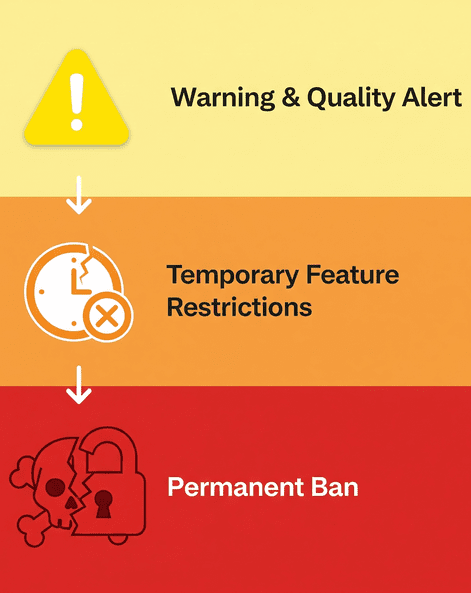
What actually happens if you break the rules? In short, WhatsApp will take action to protect users and its platform. The consequences can escalate if issues aren’t corrected:
For minor or first-time violations, WhatsApp often issues a warning. For example, if your messages are getting poor feedback, you might see a notification in your WhatsApp Business Account Quality dashboard warning you to improve messaging practices. This is your chance to course-correct before harsher action is taken.
Repeated or moderately severe violations can lead to temporary blocks on your account’s capabilities. WhatsApp might impose a 1-day or 3-day send restriction, where you cannot initiate new chats for that period. If problems continue, it can escalate to 5 or 7-day restrictions where you can’t even respond to incoming messages during the ban. These escalating penalties are designed to get your attention and force you to pause problematic behavior.
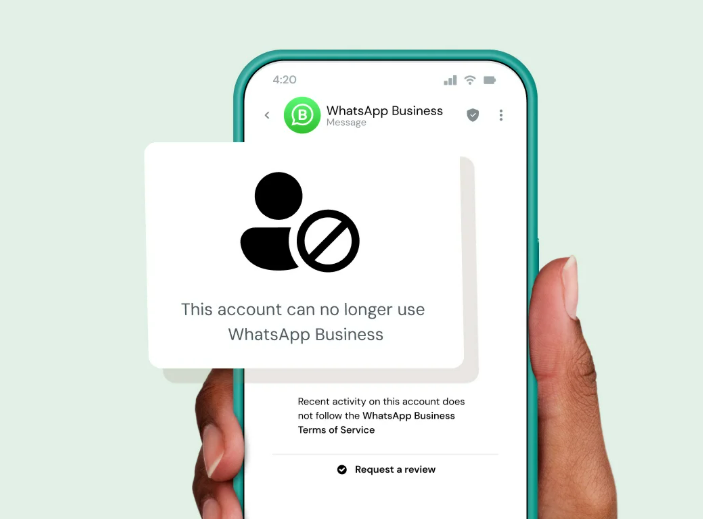
This is the harshest penalty; your WhatsApp Business account is permanently disabled. You’ll know this happened when you open the app and see a message like “This account can no longer use WhatsApp” on your screen. For severe violations, WhatsApp may ban you outright with no warning.
For instance, evidence of child exploitation, terrorism, or the sale of illegal drugs will trigger an immediate and outright ban of the business account. In less extreme cases, a permanent ban might come after multiple warnings and temporary blocks if you fail to address the issues. A banned account cannot be used to send or receive any messages, essentially cutting off that phone number from WhatsApp services.
The impact of a ban goes beyond just lost messages. If your business loses its WhatsApp access, it can severely disrupt operations and damage customer trust. Imagine customers suddenly seeing you “went offline” or can’t reach you – it erodes confidence. Moreover, a banned account that was Meta Verified loses its verified status with no refund, and you won’t get that coveted green check back unless the ban is overturned.
WhatsApp’s enforcement can also affect your business phone number’s reputation. If you try to simply register a new WhatsApp account with the same number, you won’t be able to – the ban is tied to the number. You’d have to get a new phone number to use WhatsApp again if the ban isn’t lifted, which is a major headache for any established business.
So by now, it is very evident that violating WhatsApp’s policies can result in anything from a temporary messaging timeout to a total, permanent loss of your account. The more serious the violation (or the more often you violate), the more serious the punishment. This is why it’s critical to stay on the right side of the rules – the cost of a ban is far too high. Next, we’ll look at how to avoid ever reaching that point.
Always get permission before messaging customers. Use clear opt-in methods (website forms, in-store sign-ups, etc.) to let people agree to hear from you on WhatsApp. Make sure they know what type of content to expect and how often. Only message users who have given you their number and agreed to be contacted. If someone asks to opt-out or blocks your number, honor that immediately – remove them from your contact list to prevent accidental future pings. Consent isn’t a one-time thing; maintain it by respecting user preferences.
If you’re using the WhatsApp Business API, remember that outside of the 24-hour window after a user’s last message, you can only send messages using approved templates. Avoid violating the messaging window, as it’s part of the Business Messaging Policy. Always respond promptly to incoming messages (within a day) to keep conversations open, and use WhatsApp’s template messages correctly for any outreach beyond that timeframe.
Stick to the official WhatsApp Business app or API for all your communications. Avoid using unauthorized modes or automation software, as these can put your account at risk. If you need advanced features like bulk messaging, chatbot automation, or CRM integration, consider upgrading to the official WhatsApp Business API through a trusted provider.
Platforms like Sendwo work as official WhatsApp Business API partners, helping businesses manage bulk sends with approved template messages, integrate with CRMs, and access valuable insights—all while staying fully compliant. By leveraging such official solutions, you ensure secure communication, better support, and improved performance, without risking account suspension.
In short, don’t try to cheat the system; leverage official solutions that are designed for business use.
Always cross-check your messages against WhatsApp’s Commerce Policy. If you’re not sure whether a product is allowed, err on the side of caution. Avoid mentioning or selling banned items (firearms, illegal drugs, endangered animals, etc.) in your WhatsApp communications. Even for allowed products, make sure your message content is truthful and not misleading.
Steer clear of spammy language (e.g., too many ALL CAPS or clickbait claims), which might prompt users to report you. Providing genuine value and assistance in your messages will make users happy to hear from you, rather than reaching for the Block button.
Pace your messages and avoid blasting large volumes in one go. If you need to announce something to many users, consider segmenting your sends or using broadcast lists wisely (note: broadcasts only go to those who have your number saved, which by design targets engaged users). Monitor WhatsApp’s messaging limits for your account tier – new accounts have lower send limits that increase as you build trust.
By gradually scaling your messaging and avoiding sudden spikes, you stay under the radar of WhatsApp’s spam detection. It’s also a good idea to monitor your Account Quality dashboard (available in WhatsApp Manager for API users), which can show if your recent campaigns are generating blocks or reports. Early signs of user dissatisfaction should prompt you to adjust your approach immediately.
At the end of the day, the best way to avoid violations is to treat your customers with respect on WhatsApp. Personalize your messages, provide helpful information, and make it easy for users to ask questions or request support. Encourage two-way conversations instead of just pushing promotions. When users engage back, it actually improves your standing.
Keep an eye on feedback: if you start seeing many people leaving the chat or not responding, reconsider your content strategy. A smaller list of highly engaged customers is far better than a huge list that’s annoyed by your messages. By cultivating positive interactions, you’ll naturally reduce reports and ensure WhatsApp sees your account as a healthy participant.
WhatsApp’s policies can evolve. For instance, they occasionally update what’s allowed in commerce (recently, some health products and digital services got new guidelines). Keep an eye on official WhatsApp announcements or help center articles for any changes in policy. Make sure your team is aware of the latest do’s and don’ts. Being proactive about compliance is much easier than dealing with a ban after the fact.
By implementing the above practices, you’ll create a win-win situation: your customers will receive useful, welcome messages, and your WhatsApp Business account will remain in good standing.
Prevention is key – it’s far better to avoid violations in the first place than to try to fix a banned account.
Let’s say you’re reading this a bit late and your account is already banned – what can you do? Don’t panic; there are steps to take, which we’ll cover in the following section.
Finding out that your WhatsApp Business account has been banned can be alarming, but there is a process to address it. Here’s what you should do if you face an account ban:
1. Understand the Ban Reason
When WhatsApp bans your account, it usually provides a brief explanation in the app. The message “Your account can no longer use WhatsApp” will often be accompanied by a note like “because it violated our policies by [reason].” It might mention spam, unauthorized use, or a commerce policy violation. This clue is important as it guides your next steps.
Determine if the ban was likely due to something you did (unintentionally or otherwise). Sometimes the cause is obvious (e.g., you sent prohibited content or used an unofficial app), and other times, you might be genuinely unsure.
2. Request a Review (Appeal the Ban)
WhatsApp offers a built-in appeals process for banned accounts. Immediately submit a review request through the app – there should be a “Request a review” option on the ban notice screen. Tap that, and you’ll be prompted to add any relevant details. This is your chance to make your case.
Be polite and factual: explain if you believe the ban was a mistake or if you recently took corrective actions. For example, if you suspect you were reported for spam, you might explain that you have since cleaned your contact lists to ensure opt-ins only. Once you submit, WhatsApp’s team will manually review your account activity and decision.
During the review period, check the app periodically. WhatsApp will send a notification with the outcome of your appeal. Reviews typically take a few hours to a couple of days. Do not flood the system with multiple appeals – one thorough request is enough (additional requests won’t speed things up).
3. Outcome of the Appeal – What to Expect
If your appeal is successful, congratulations – your account will be reinstated. This usually happens if WhatsApp determines your account didn’t truly violate policies or if the violation was minor and correctable. You’ll regain access, but take this as a final warning. It’s critical to immediately implement compliance measures (like those discussed above) to avoid another incident. Repeated violations after a reinstatement are far more likely to result in a permanent ban.
If your appeal is denied, WhatsApp has decided the ban was justified. At this point, that phone number is essentially blocked from WhatsApp Business. There is no formal secondary appeal process beyond the first review – you can contact WhatsApp support again, but unless you have new evidence, it’s unlikely to change the outcome. A denied appeal typically means either a serious policy breach was confirmed or multiple violations piled up.
4. Last Resort Options
If you cannot get your original account back, you have a tough decision. One option is to register a new WhatsApp Business account with a different phone number. This gives you a “fresh start,” but proceed with caution:
Another avenue, if applicable, is to work with an official Business Solution Provider (BSP) if you weren’t already. Sometimes BSPs have channels to assist with appeals or migration to the API, which might be more stable. This is more relevant for medium to large businesses.
5. Learn and Improve
A ban (even a temporary one) is a clear sign that something went wrong. Treat it as a learning experience. Analyze what caused it – was it a contact acquisition mistake? An overzealous marketing campaign? A misunderstood policy? Use that insight to strengthen your compliance going forward. Update your team’s training on WhatsApp usage, adjust your messaging strategy, and ensure it doesn’t happen again.
While getting banned is painful, many businesses do recover by appealing and then strictly following the rules. Stay persistent but patient through the review process. If you genuinely did not violate policies, say so with evidence (e.g., “Users opted in via our form on 01/05, here’s proof”). And if you did mess up, acknowledge it and explain how you’ve remedied the situation. There are cases where WhatsApp gives second chances – just make sure to seize that chance to reform your practices.
Navigating WhatsApp Business policies might seem daunting at first, but it boils down to respecting your customers and playing by WhatsApp’s rules. When you provide value, obtain consent, and avoid forbidden content or tactics, you create a win-win environment – customers enjoy hearing from you, and WhatsApp rewards you with continued access to its powerful platform.
WhatsApp Business is a fantastic tool for building relationships, with features that can significantly boost engagement and sales when used correctly. By understanding the guidelines on messaging frequency, content, and appropriate use, you ensure that this tool remains available to you for the long run. Compliance isn’t just about avoiding punishment; it’s about creating a better experience that ultimately benefits your brand’s reputation.
Now it's your time to review your current WhatsApp communication strategy and ask yourself: Are all my contacts genuinely opted in? Am I sending messages that I would welcome as a customer? Am I following the official pathways (Business app/API) for my campaigns? If there’s any doubt, use this guide to make adjustments today. A few changes now can save you from the huge setback of an account ban later.
Remember, every WhatsApp message your business sends is a reflection of your brand. Stay on the right side of the policies, and you’ll not only avoid violations, but you’ll also likely see better customer responses and trust. Keep the conversation going in a compliant, customer-centric way, and WhatsApp will remain one of your most valuable business channels.
Don’t wait for a warning or ban to occur.
Proactively audit your WhatsApp Business practices and implement the best practices outlined above. If you’re unsure about anything, consult WhatsApp’s official policy pages or reach out to a WhatsApp Business Solution Provider for guidance. By investing in compliance, you invest in the longevity and success of your customer relationships. Stay compliant, and watch your business thrive on WhatsApp!
It’s any action that breaks WhatsApp’s Business terms or policies. This includes spamming users without consent, using unauthorized WhatsApp apps or bots, sharing illegal or prohibited content, or otherwise misusing the platform in ways that could harm users. For example, sending messages that involve scams, threats, or violating privacy can all be considered policy violations. Essentially, if it’s forbidden in WhatsApp’s Business Messaging Policy or Commerce Policy, doing it with your account is a policy violation.
If your account is banned, you will be completely unable to use WhatsApp Business. When you open the app, you’ll see an error message such as “This account is not allowed to use WhatsApp” or “Your account can no longer use WhatsApp.”. This message indicates WhatsApp has cut off access to that number. You won’t be able to send or receive any messages, and features will be locked. In many cases, WhatsApp also sends an in-app notice explaining a broad reason (e.g., “account banned due to policy violation: spam activity”). If you see this, unfortunately, your number has been flagged and removed from service.
It depends on the severity of the violation. Some bans are temporary, especially for less serious issues or first-time violations. WhatsApp might ban you for a short duration (e.g., 1 day or 3 days where you can’t send messages) as a warning. With repeated violations, the temporary bans can extend to 7 days. After the specified time, you may regain messaging ability if the ban was truly temporary.
However, serious or repeated violations can lead to a permanent ban, meaning the ban does not expire on its own. In cases of severe policy abuse (like fraud or illegal content), WhatsApp can permanently disable the account immediately. In summary, minor violations might carry a timeout of a few days, but major ones can result in a permanent ban unless successfully appealed.


