WhatsApp has emerged as a powerful marketing channel, connecting businesses directly with over 2 billion users. But with great opportunity comes great responsibility. In 2025, WhatsApp marketing compliance is more crucial than ever as new policies and regulations mean that brands must follow strict guidelines when messaging customers. Non-compliance can result in hefty fines, damage to your reputation, or even getting your WhatsApp Business account banned.
This comprehensive guide will walk you through a WhatsApp Marketing Compliance Checklist for 2025, ensuring your campaigns are both effective and compliant. By the end, you’ll have a clear roadmap to reach your audience safely and successfully. Let’s dive in!
Customers are protective of their personal chats. They only want messages from brands they trust and consented to hear from. Following compliance rules (like obtaining permission and respecting privacy) builds trust, leading to higher engagement.
If you violate that trust through spam or unwanted messages, users will block or report you, hurting your outreach and brand image.
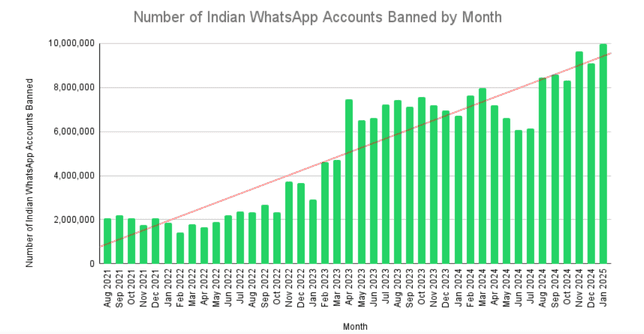
WhatsApp and its parent Meta are serious about protecting users from spam and abuse. The platform actively bans accounts that violate policies. For example, WhatsApp banned over 92 million accounts in India alone during 2024 for policy violations like spam, averaging ~7.7 million bans per month.
WhatsApp will not hesitate to block businesses that don’t comply with its rules. Losing your WhatsApp Business account can be devastating, cutting off customer communication instantly.
Beyond WhatsApp’s own rules, various laws regulate marketing messages. Privacy laws like GDPR (Europe) and CCPA/TCPA (United States) require businesses to get explicit consent before contacting users and to provide opt-outs. Violating these can lead to heavy fines or legal action. In sectors like finance or healthcare, additional regulations (e.g., FINRA, HIPAA) may apply to messaging.
Staying compliant avoids legal penalties and protects your reputation.
Compliance isn’t static, which means rules evolve. Notably, starting April 1, 2025, Meta has paused all WhatsApp marketing messages to U.S. phone numbers. This means businesses can no longer send promotional template messages to customers with U.S. WhatsApp numbers. Only non-marketing messages (like order confirmations, receipts, or support replies) are allowed for U.S. users.
This major change underscores that WhatsApp is cautious about promotional content. Companies must adapt by focusing on transactional messages in the U.S. and ensuring even stricter compliance elsewhere. Keeping up with such policy changes is now a key part of compliance.
Compliance matters because it safeguards your customer relationships, ensures your messages actually get delivered, and keeps your business out of trouble.
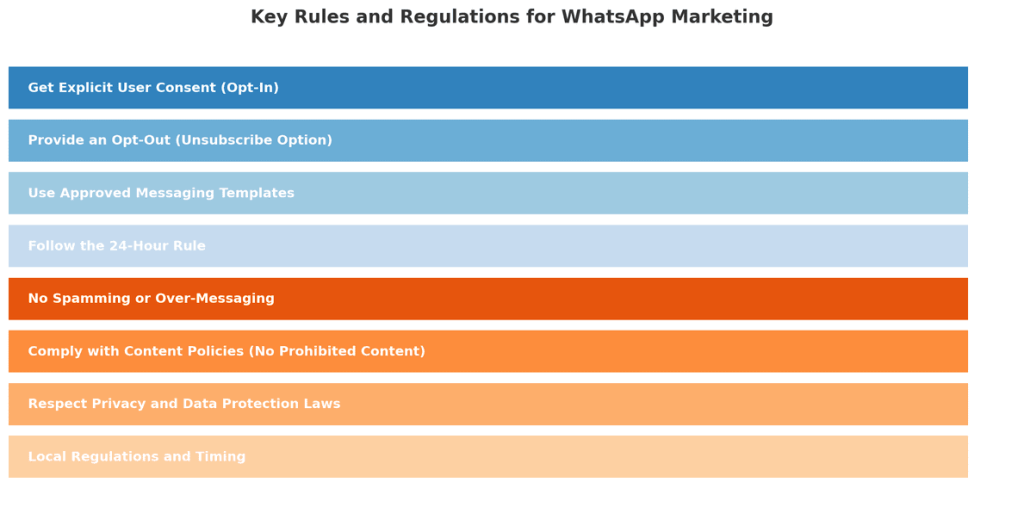
Before we get to the checklist, it’s important to understand the rules and regulations governing WhatsApp marketing. These come from two places: WhatsApp’s official policies and general marketing laws. Here are the key principles you must follow:
Only message people who have specifically opted in to receive WhatsApp messages from your business. This consent must be an explicit, affirmative action (e.g., checking a box, sending you a WhatsApp message, or signing up through a documented method). Keep records of consent for compliance.
No opt-in = no messaging – sending promotional messages to people who never agreed to it is a clear violation.
Every marketing message must provide recipients with a simple way to opt out. Accept opt-out requests received via any channel and promptly honor all unsubscribe requests. Neglecting this increases the risk of user complaints and policy violations.
For proactive or bulk marketing messages (especially outside the 24-hour session window), use only WhatsApp-approved templates, reviewed and authorized by Meta. Do not edit templates for other purposes. All templates must strictly comply with category rules, which were updated in July 2025 (e.g., utility vs. marketing templates have different content restrictions).
Sticking to approved templates ensures your messages meet policy and won’t be automatically blocked.
You may freely respond to users within 24 hours of their last message (“session messaging”). After 24 hours, only use approved templates to initiate contact unless the user replies again. This controls spam and improves user experience.
This rule is meant to prevent spammy follow-ups. Plan your campaigns accordingly and avoid violating the 24-hour support window.
This sounds obvious, but it’s a core rule: Don’t send unsolicited bulk messages or high-frequency messages that annoy users, even to opted-in users.
Maintain sensible frequency, provide relevant value, and avoid contacting disengaged users. Never use unofficial or automated tools outside the sanctioned WhatsApp Business API/app- such use is banned and puts your account at risk.
If too many recipients report or block you, WhatsApp will quickly categorize your number as spammy. Start slow with broadcasts, monitor user feedback, and always prioritize quality over quantity.
Do not send any illegal, obscene, hateful, threatening, or otherwise restricted content. WhatsApp and Meta’s policies prohibit certain industries (e.g., firearms, tobacco, illicit drugs, some financial/gambling services) and any use that violates local laws or encourages unlawful conduct. Always review the latest Meta and WhatsApp content restrictions if in a regulated sector.
According to WhatsApp’s Business Policy, disallowed content includes anything “illegal, obscene, defamatory, threatening, intimidating, harassing, hateful, or racially/ethnically offensive”.
Handle personal data (like phone numbers and names) in compliance with data protection laws (such as GDPR in the EU). Secure user consent, have a clear privacy policy, process data transparently, and honor user requests for deletion or changes. Do not collect sensitive data (financial, health, etc.) over WhatsApp unless permitted by law and WhatsApp policy.
Follow additional local marketing rules (such as the US TCPA, local “Do Not Disturb” registries, and time restrictions on messaging). Penalties for improper use, especially in regulated industries or jurisdictions, are increasingly strict as of 2025.
The bottom line: treat WhatsApp marketing with the same compliance rigor as email or SMS marketing.
Now that we’ve covered the rules, let’s turn this into a practical checklist you can follow.
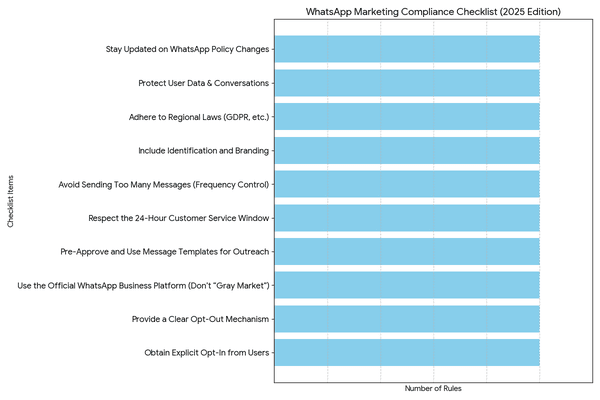
Below is your compliance checklist for WhatsApp marketing in 2025. Use this as a reference each time you plan a campaign or send messages to ensure you tick all the boxes. These steps incorporate both WhatsApp’s policies and general best practices for ethical marketing:
Never add someone to your WhatsApp campaigns without their clear permission. Make sure you have a record of their consent (e.g., via a signup form, a checked box, or a WhatsApp message they initiated). The user should know they are agreeing to receive marketing or updates from your business on WhatsApp. For example, use phrases like “Subscribe to WhatsApp updates” on your website or ask customers in-store if they’d like promo messages.
Remember, “No opt-in? No messaging.” This is the golden rule to stay compliant. WhatsApp’s own terms require that the person give you their number and agree to messages. If you’re ever in doubt about a contact’s consent, don’t message them until you confirm it.
Every message or conversation should give users an easy way to stop receiving future messages. This could be an automated reply that if they send “STOP”, you won’t message them again, or a note in the message like “Text STOP to unsubscribe at any time.” Monitor these replies diligently and honor opt-outs immediately.
Also, if a user blocks your number or deletes their WhatsApp, obviously, cease communication. Include an opt-out option in every outbound campaign as a standard practice. This not only keeps you compliant but also builds trust – users appreciate knowing they’re in control. Make sure your team or your messaging platform regularly updates the opt-out list to avoid any accidental sends to those who opted out (which could look like spam).
Ensure you’re using WhatsApp through official channels – either the WhatsApp Business App or the WhatsApp Business API via an approved provider. Do not use unauthorized third-party blast tools or hacked solutions that promise to send bulk messages, as these often violate WhatsApp’s terms and can lead to immediate bans. If you need to send at scale, go through a verified Business Solution Provider (BSP) who will help with compliance (template approvals, throughput limits, etc.).
Additionally, don’t use personal accounts for business purposes. Using a standard WhatsApp account to message customers is against the terms. Always register a proper business account and get it verified if possible (official business accounts with the green check mark add credibility and might reduce the chance of mistaken blocks). This step is about playing by WhatsApp’s rules, and it gives you the tools you need to comply (like template messaging and quality ratings) and signals to WhatsApp that you’re a legitimate sender.
When sending broadcasts, bulk messages, or re-engaging users after 24 hours, always use approved message templates. Plan your template messages in advance (such as a “Weekly Deal Alert” or “Event Reminder”) and submit them to WhatsApp for approval via your Business app or API provider. Templates must not contain disallowed content or variable fields that could be abused. Once approved, use them exactly as intended.
For instance, if you have an approved template for a delivery update, don’t repurpose it to send a marketing coupon – get a separate coupon template approved. All bulk outbound messages should use these templates and only go to users who opted in. Also, monitor template quality – WhatsApp provides a quality rating for template messages based on user feedback. If a template gets many blocks or negative feedback, its quality will drop, and it could even be disabled. If you see a template’s quality degrading, pause and reassess the content (it might be seen as too spammy or irrelevant).
This is a compliance checkpoint often overlooked. If a user messages you, mark the time. You have a 24-hour window from their last message to send free-form replies (which can include marketing content only if it’s in the context of their inquiry). After 24 hours of no user activity, don’t send unsolicited messages unless it’s via a template. Violating this could flag your number.
So, for example, if a customer asked a question and you answered, don’t follow up days later with a sale announcement unless they opted in and you send it as a template message. The 24-hour rule is enforced by WhatsApp’s API (it won’t deliver messages outside the window without a template), but if you’re using the Business app, you need to be mindful manually. A good practice is to set up automated chatbot responses that remind users to opt in for updates if they contact you, so you have permission to message them later.
Even with consent, bombarding users with messages is a compliance and quality risk. WhatsApp monitors how users react to your messages (they can report spam or block you). If you send too frequently, you’re more likely to annoy people. Instead, stick to a reasonable schedule – e.g., a few messages per week at most, or whatever frequency the user explicitly agreed to. Quality over quantity is key.
Also, consider time of day – send messages at appropriate hours based on the user’s timezone (for example, avoid early morning or late night promotional pings). This isn’t a formal law, but it’s good practice that falls under not “surprising or spamming” users. If using broadcast lists in the WhatsApp app, remember you can only send to contacts who have your number saved, and there’s a cap of 256 contacts per broadcast list.
Trying to skirt these limits by using multiple lists or rapid-fire messages can trigger spam detection. Start small, see how users respond, and increase gradually if things go well. Monitor your opt-out rate – a spike in unsubscribes or blocks indicates you need to dial back.
Make sure users know who is messaging them and what to expect. In your initial message or template (especially the first time you contact a user), introduce your business name and why you’re messaging. For example: “Hi [Name], thanks for signing up for Acme Store updates on WhatsApp- here’s your welcome discount!” Being transparent aligns with both WhatsApp policy and privacy laws (which often require identifying the sender in marketing messages).
If you use the WhatsApp Business profile features, fill out your profile completely with your business name, logo, contact info, and website. A complete profile lends credibility and complies with WhatsApp’s guidelines to maintain an accurate business profile. It also reassures users that this is an official communication. Never impersonate another business or use misleading identities, besides being illegal, it will get you banned swiftly.
As part of your checklist, always cross-check against the local laws of your recipients. For EU residents, ensure you meet GDPR requirements: you have a lawful basis (consent) for messaging, you’ve told them how you’ll use their data, and you’re providing ways to exercise their data rights. For U.S. customers, if you’re in sectors like telemarketing, be mindful of TCPA.
For example, if you collected a phone number for WhatsApp messages, that consent should be written and clearly state you’ll send automated messages- this also covers you under TCPA for that medium.
Canada has CASL (which requires express consent and certain email formalities, some of which can apply to chat messaging too). While WhatsApp is a relatively new channel, regulators treat it similar to SMS or email when it comes to marketing compliance.
Tip: keep logs of consent (as mentioned) and a copy of the messages you send, in case you need to demonstrate compliance.
WhatsApp is end-to-end encrypted, but you must still handle any data you extract with care. If you’re saving customer info (like exporting chat details to a CRM), secure it properly. Publish a privacy policy for your WhatsApp interactions, and if possible, link to it in your WhatsApp profile or the first message. WhatsApp’s policy requires a published privacy policy and that you only use data obtained from WhatsApp for the purpose of messaging that person.
Don’t use WhatsApp chats as an opportunity to fish for extra personal data you don’t need. Never share a user’s chat content publicly or with other customers, as this violates trust and WhatsApp rules. For example, if a customer sends you a photo or personal info over WhatsApp, do not broadcast that elsewhere without consent. Keep WhatsApp conversations as confidential as you would phone calls or emails with that customer.
As we saw with the 2025 U.S. marketing pause, WhatsApp’s policies can change, and you are responsible for keeping up. Regularly check official updates from WhatsApp or your BSP. Join WhatsApp Business developer forums or follow credible blogs for news. For instance, the April 2025 change means if you’re a U.S. business or have U.S. subscribers, you must adjust your strategy (focus on transactional messages or encouraging users to initiate chats).
Meta might introduce new features or rules in the future- such as new message categories, additional restrictions, or verification requirements. By staying informed, you can update your compliance checklist proactively. It’s also wise to periodically audit your WhatsApp practices against the latest guidelines. Set a reminder each quarter to review WhatsApp’s Business Policy and ensure nothing you’re doing falls afoul of an update.
To bring it all together, let’s look at some best practices and examples that illustrate compliant WhatsApp marketing in action:
By following this checklist and best practices, you’ll achieve high engagement, protect user trust, and comply with all WhatsApp and legal requirements for marketing in 2025.
Compliance isn’t a hindrance to WhatsApp marketing, it’s the foundation of success on this channel. When you respect your audience’s consent, privacy, and time, you build trust that translates into better results, from higher open rates to stronger customer loyalty. In 2025, with WhatsApp tightening its policies and regulators watching closely, there’s no shortcut around compliance.
The good news is that by following this WhatsApp Marketing Compliance Checklist, you’re not just avoiding problems, you’re actively improving your marketing effectiveness.
Always put this checklist into practice with your team. Start by auditing your current WhatsApp contact list and confirming you have consent for everyone. Review your message templates to ensure they meet guidelines. Update your workflows to automatically handle opt-outs and to prevent any non-compliant sends (especially if you have U.S. contacts, given the recent changes). Educate your staff or colleagues about the do’s and don’ts. When planning new campaigns, use the checklist as a guide at each step.
Staying compliant might require a bit of effort and vigilance, but the payoff is worth it: you’ll maintain access to one of the world’s most popular messaging platforms and keep your customer relationships strong and positive. Don’t wait for an account ban or a warning letter to make changes. Start implementing the compliance steps today. Whether it’s setting up a proper opt-in form on your website or checking the latest WhatsApp policy update, every action helps protect your business and your customers. Commit to being a compliant communicator, and you’ll reap the rewards of higher customer trust and more effective campaigns.
Yes, WhatsApp marketing is legal if you obtain users’ explicit consent before messaging them, use the official WhatsApp Business platforms (App or API), and follow both WhatsApp’s and local laws (e.g., GDPR, TCPA). Messaging without consent, or violating content/privacy rules, is not compliant and risks penalties.
Ask users directly and clearly for permission (e.g., an unchecked checkbox at checkout, a Click-to-WhatsApp link, or an in-store request). Explain what messages they’ll receive. Consent must be explicit and specific to WhatsApp- keep a record of how and when it was given.


