Create your powerful WhatsApp chatbots with SendWo’s Flow Builder, without any coding language. Its intuitive drag-and-drop feature empowers businesses, marketers, entrepreneurs, and support teams to design customized, human-like chat experiences within minutes.
Let’s explore how SendWo Flow Builder helps you craft dynamic, intelligent WhatsApp conversations that boost engagement and conversions.
What is Flow Builder in SendWo?
The Flow Builder in SendWo is an easy-to-use visual editor that lets you design chatbot conversations step-by-step using blocks and connections.
It is your conversation map with each block representing a message, question, or action that your chatbot performs. You can drag, drop, and connect these blocks to create logical conversational paths responding to user inputs in real time.
Key USP of SendWo’s Flow Builder
Build chatbots visually using drag-and-drop simplicity with no code interface.
Capture responses like name, email, or product interest directly from WhatsApp chats.
Define how your bot reacts based on user replies or data.
With its multi-channel integration, it seamlessly connects with Google Sheets, Webhooks, or CRM systems to automate workflows.
Keep your WhatsApp inbox 24/7 active even when your team is offline.
Why Flow Builder Matters
A well-designed chatbot flow can increase engagement by up to 60%, according to business automation studies.
SendWo Flow Builder empowers businesses to:
Reduce manual effort through automated replies and routing.
Personalize every chat based on user data or previous interactions.
Convert leads faster with instant follow-ups and recommendations.
Enhance satisfaction by providing quick, accurate, and consistent answers.
Key Components of SendWo Flow Builder
1. Start Node
Defines how your chatbot begins a conversation, i.e, triggered by a keyword, button click, or template message.
2. Message Blocks
Send WhatsApp texts, images, or buttons. Personalize them with variables like {{name}} for human-style communication.
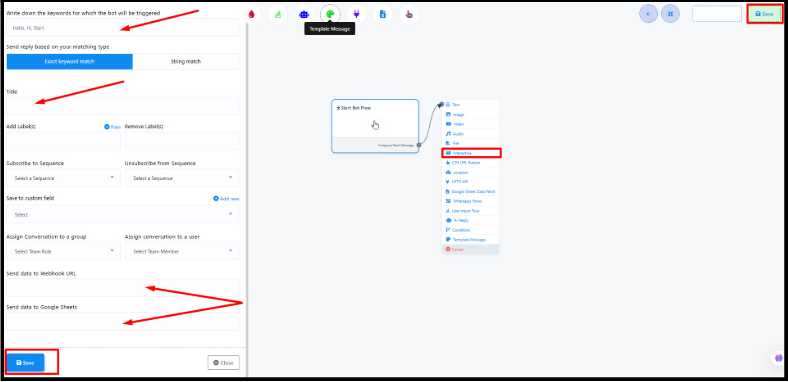
Decide which keywords will start the conversation automatically. Example: “Hi,” “Hello,” “Start,” or “Help.” Whenever a customer sends one of these to your WhatsApp Business number, SendWo activates the assigned flow instantly.
Step 2: Choose Matching Type
Exact Match: The bot triggers only when the message matches the keyword exactly.
String Match: The bot triggers if the keyword appears anywhere in the message, great for natural chats.
Step 3: Add a Title
Give your flow an identifiable descriptive name such as “Welcome Flow,” “Order Flow,” or “Lead Capture Flow.”
Step 4: Build the Conversation Flow
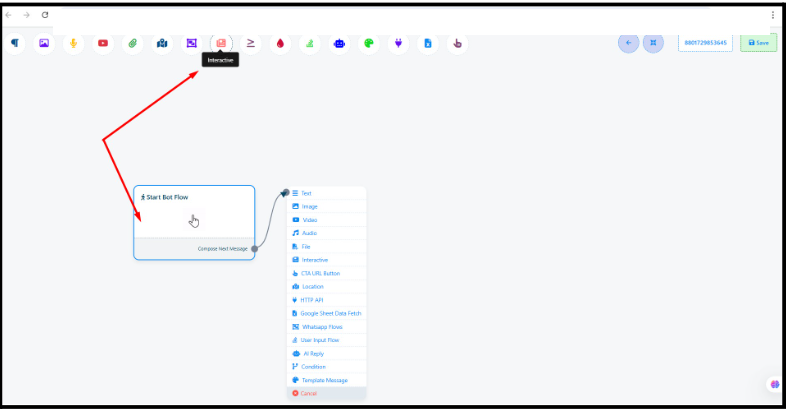
Click Start Bot Flow inside the builder.
In the right-side panel, drag and drop elements such as Text, Image, Interactive Buttons, Google Sheet Data Fetch, or Condition Blocks.
Connect them accordingly to define your conversation path.
Step 5: Save and Publish
When finished, click on Save & Publish. And this will make your chatbot go live immediately and start engaging users on WhatsApp, 24/7.
From the left-side menu, open Chatbot Manager > WhatsApp Chatbot.
Click Create Flow to open the Flow Builder interface.
Design your chatbot using the blocks described above.
Save & Publish your flow — it’s ready to run!
Best Practices for Designing Chatbot Flows
Start simple: Build one goal per flow (e.g., collect leads or answer FAQs).
Keep messages short: Easy-to-read text improves user retention.
Use buttons: Simplify navigation and avoid typing fatigue.
Personalize messages: Insert variables like {{name}}.
Test before publishing: Ensure smooth logic.
Monitor analytics: Optimize your flows based on user responses.
Final Words
SendWo’s Flow Builder simplifies chatbot creation for everyone with no technical/coding skills required. Its drag-and-drop feature creates simplicity, conditional logic, and seamless integrations, allowing you to transform WhatsApp into a 24/7 sales and support assistant.
Snehil Prakash is an expert WhatsApp consultant with SendWo. He has expertise in implementing WhatsApp API for enterprise businesses and built automation, chatbot and AI powered solution.
SendWo is Meta's official business solution Provider. Broadcast Bulk WhatsApp messages and automate using AI Chatbots.