Ever wondered if you could turn a simple WhatsApp chat into your next big sale? In 2025, this popular messaging app isn’t just for texting friends – it’s a lead generation goldmine for businesses. With nearly 3 billion active users across 50+ countries, WhatsApp has become a key channel for finding prospects and boosting conversions. Businesses worldwide are embracing WhatsApp to connect with customers in a more personal, immediate way – and seeing amazing results. In fact, WhatsApp messages boast open rates around 98% (versus ~20% for email), meaning your marketing messages actually get seen. Some companies even saw a 138% increase in lead generation after introducing WhatsApp chatbots into their strategy.
WhatsApp’s unique advantages make it a powerhouse for marketing in 2025. It offers one-on-one, personalized communication that builds trust, sky-high engagement rates, and real-time chat for instant responses. You can share rich media (images, videos, PDFs) to showcase products dynamically, and even let customers browse catalogs or complete purchases without leaving the app. Plus, WhatsApp is cost-effective and feels more conversational (not spammy) compared to traditional channels. All these factors combine to deliver higher conversion rates – making WhatsApp an essential part of any modern lead gen strategy.
In this comprehensive guide, we’ll explore 10 powerful WhatsApp lead generation tactics that leverage the latest features and trends of 2025. From chatbots and QR codes to broadcast lists and status updates, each tactic is packed with practical tips, examples, and best practices. Let’s dive in and see how you can start turning WhatsApp conversations into conversions!
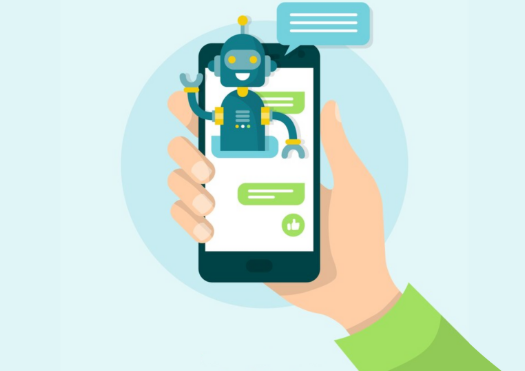
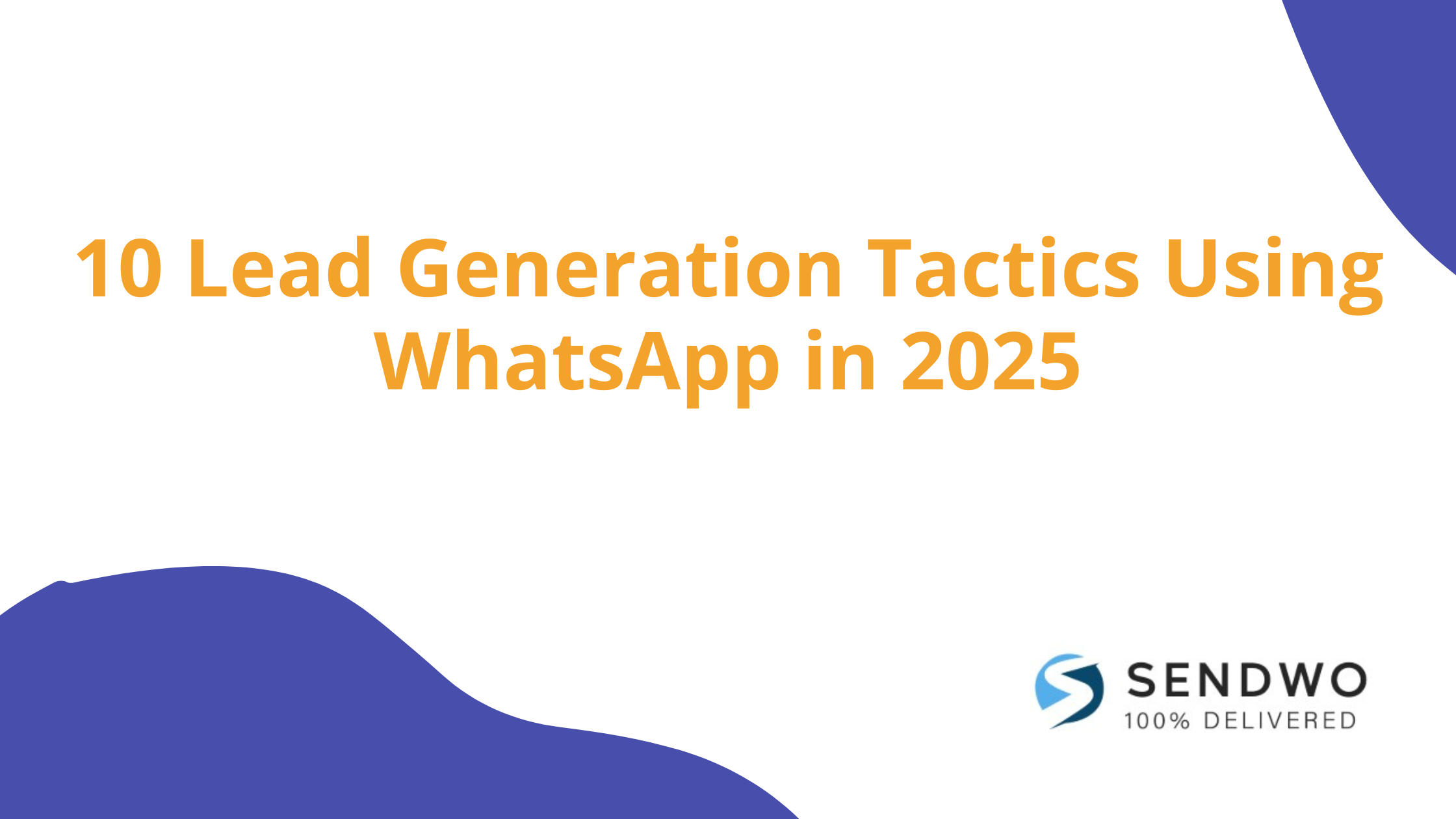
A WhatsApp chatbot interacts with a new lead, automating responses to FAQs and collecting user info.
A WhatsApp chatbot is a powerful tool to automate customer interactions and capture leads even while you sleep. By integrating an AI or rule-based chatbot via WhatsApp Business, you can provide instant answers to inquiries, qualify prospects, and collect essential details (like name, email, or preferences) without any human intervention. This means potential customers get immediate attention anytime – a huge plus, since fast responses keep leads from losing interest.
For example, a fitness studio’s chatbot might greet new prospects, ask about their fitness goals and schedule, then offer a tailored membership plan based on the answers. Similarly, a study abroad agency’s bot can let users choose a language and inquiry type, answer FAQs, or seamlessly hand off to a human agent for complex questions. The key is to design your chatbot script to be engaging and helpful: start with a friendly welcome message and use quick-reply buttons or menus to guide the conversation. You can even program the bot to share your product catalog, schedule appointments, or send personalized offers automatically.
Beyond saving time, chatbots significantly boost lead generation. They ensure no inquiry falls through the cracks and can nurture multiple prospects simultaneously. It’s no surprise that businesses leveraging WhatsApp chatbots have reported dramatic gains – one brand saw a 138% jump in leads after deploying a chatbot to engage customers. To maximize success, keep refining your bot’s responses based on real conversations and integrate AI features (like voice message handling) to make interactions smoother. A well-crafted WhatsApp chatbot can become your hardest-working sales rep, converting curious visitors into qualified leads around the clock.
Read More: Ready to Create Your WhatsApp Chatbot with Sendwo
A WhatsApp chat widget on a website (bottom-right) offers visitors instant help, turning web traffic into WhatsApp leads.
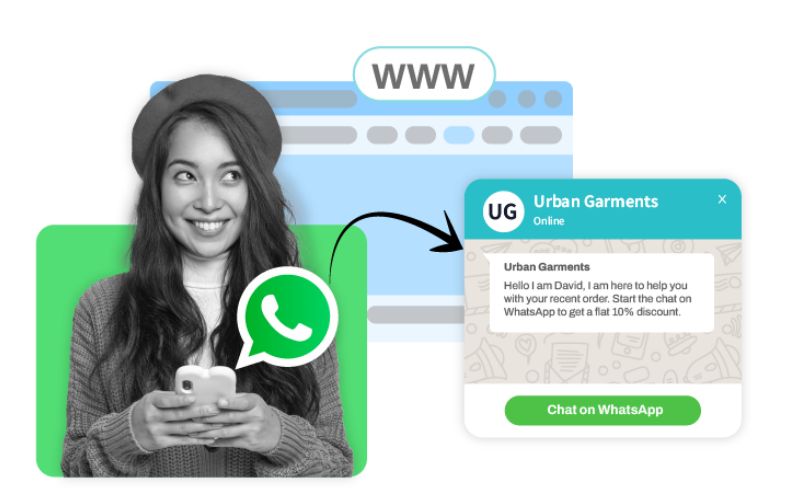
Don’t make interested prospects hunt for ways to contact you – bring WhatsApp to them. By embedding a WhatsApp chat widget or using click-to-chat WhatsApp links on your website and landing pages, you give visitors a one-click path to start a conversation. This strategy drives high-intent leads directly into chat with minimal friction. For instance, you can add a WhatsApp “Chat with us” button that pops up a conversation window, allowing users to ask questions or request a quote in real time.
A WhatsApp widget can be customized with a friendly welcome message or call-to-action to encourage engagement (“Hi! 👋 Questions? Chat with our team now.”). When a visitor taps it, they’re instantly connected to your business on WhatsApp – no forms or emails needed. This personal, immediate touch often converts curious web visitors into warm leads. An online clothing store, for example, used a chat widget on its product pages so shoppers could inquire about sizing and stock; the team responded with style advice and even exclusive discount codes, successfully turning browsers into buyers.
Besides your website, deploy WhatsApp click-to-chat links across multiple channels. You can place a short WhatsApp link (wa.me/yournumber) in your social media profiles, email signatures, blog posts, or digital ads. When clicked, it opens a chat with a preset message like “Hi, I’d like to learn more about [Your Business]!” – prompting the user to hit send. Personalizing these links with a pre-filled greeting or question makes it even easier for prospects to reach out. Whether someone discovers you on LinkedIn or from a marketing email, a handy WhatsApp link lets you capture the lead in a chat at the peak of their interest. Make sure any chat links or widgets are prominently displayed (especially on mobile) and include a compelling text like “Chat Now for an Instant Quote” to draw clicks. By meeting customers where they are and inviting them to talk, you’ll see more inbound leads sliding right into your WhatsApp inbox.
Starbucks India shared a WhatsApp QR code on Instagram, inviting followers to join its Rewards program via chatbot.
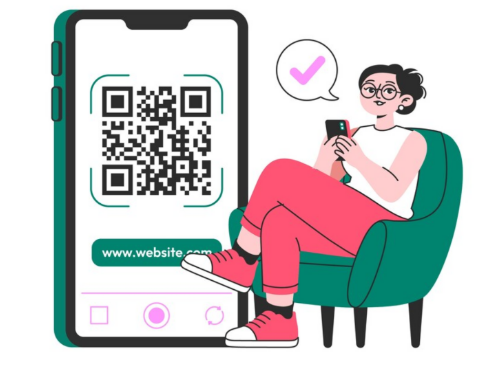
Bridging your offline and online marketing is seamless with WhatsApp QR codes. These scannable codes instantly open a chat with your business, making it effortless for someone to connect with you from any medium. Companies are using WhatsApp QR codes on printed materials (business cards, flyers, brochures, storefront posters) and digital channels to capture leads everywhere. For example, if you run a booth at an event, a poster with your WhatsApp QR code can encourage visitors to scan and message you for a free demo or coupon – converting foot traffic into online leads on the spot.
When scanned using a phone camera or WhatsApp, the QR code can include a pre-written intro message, such as “Hello, I’d like to know more about your services.” This saves the user time and lowers the barrier to reaching out. Get creative with placement: add your WhatsApp QR in product manuals, ads, or even on product packaging so customers can easily ask questions or reorder. Starbucks India demonstrated a clever use of this tactic on social media – they posted a QR code on Instagram inviting people to join their WhatsApp-based loyalty program. Scanning the code launched a chat with Starbucks’ chatbot, which then guided users through joining the rewards program and getting personalized offers.
To make the most of QR codes, give people a compelling reason to scan. For instance, “Scan to get 10% off your first order!” or “Scan to chat with our expert now” can entice action. Place the code somewhere highly visible and explain the benefit (in a caption or small text) so users know what they’ll get. Because it’s so quick and convenient, WhatsApp QR codes are a great way to capture leads anywhere – merging real-world interest with an instant messaging conversation. By meeting potential customers in seconds through a scan, you convert casual interest into direct engagement with your business.
An Instagram ad with a Click-to-WhatsApp CTA leads users into an instant chat and even auto-subscribes them to a campaign.
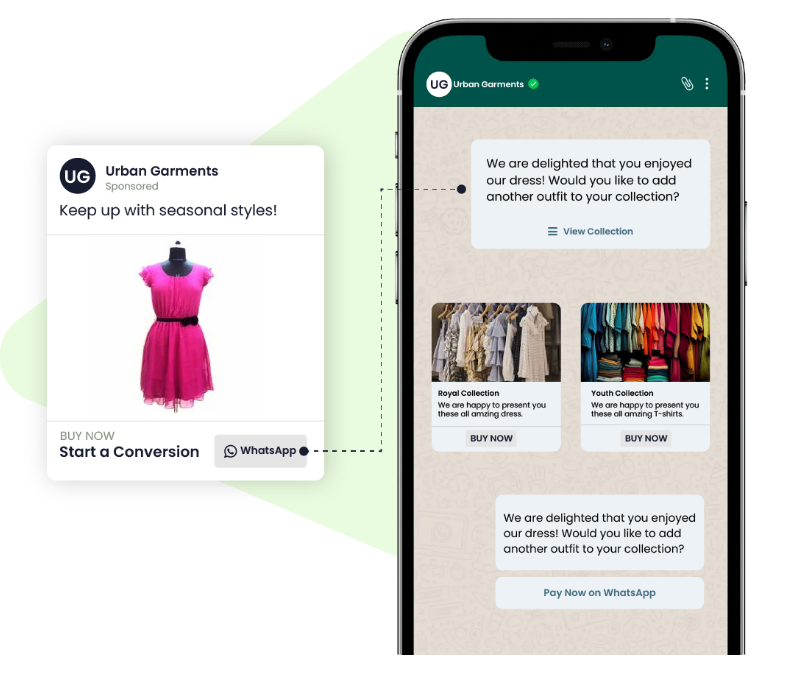
Why make customers fill out forms when you can start a conversation with one tap? Click-to-WhatsApp ads allow you to do exactly that. These are ads on Facebook, Instagram, or other Meta platforms with a special “Send Message on WhatsApp” button. When someone clicks the ad, it immediately opens a WhatsApp chat with your business – no phone number typing needed. This smooth transition from ad to chat drastically shortens the lead capture process.
Click-to-WhatsApp ads are highly effective because they target users where they already scroll and invite them into a personal dialogue. You can refine your ad targeting by location, age, interests, etc., to reach your ideal prospects at specific stages of the buyer journey. For example, a travel agency might run a Facebook ad showcasing a holiday package with the CTA “Message us on WhatsApp for exclusive deals.” When interested users tap the ad, they’re taken to WhatsApp where an agent (or bot) is ready with trip details and an easy booking process. This real-time engagement helps convert ad clicks into qualified inquiries instantly.
To get the best results, optimize your ad content and chat experience together. Make sure your WhatsApp Business profile is fully set up with a friendly greeting and business info (so users trust they’re chatting with a legit company). It’s smart to set up an automated welcome message or chatbot for these ad-sourced chats. For instance, upon clicking an ad, a user could receive: “Hi there! 👋 Thanks for your interest. Let us know what questions you have, or type a number to see options.” This ensures no one is left waiting and helps gather initial info before a human steps in. One real example is a kitchen design brand that ran an Instagram giveaway ad – to enter, users had to subscribe to the brand’s WhatsApp newsletter, facilitated through the ad’s click-to-chat CTA (as shown above). The campaign not only grew their contact list but also sparked one-on-one conversations with each entrant, i.e., new leads!
The numbers speak for themselves: 175 million+ people message businesses on WhatsApp every day, and click-to-chat ads make it easier than ever to join that crowd. By using click-to-WhatsApp ads, you combine the broad reach of social platforms with the high conversion potential of direct messaging. It’s a fast-track to fill your pipeline – turning passive ad impressions into active WhatsApp conversations with prospective customers.
While one-on-one chats are great, don’t overlook the power of WhatsApp Groups (and the new Communities feature) for lead generation. A WhatsApp group lets you gather up to 256 interested people in a single chat, creating a mini-community around your brand or topic. By creating and managing targeted groups (for example, a group for real estate investment tips or a VIP customer group for new product sneak peeks), you can share valuable insights, spark discussions, and nurture members into leads. The key is to make the group highly relevant to your audience so they’re eager to join and engage.
For instance, a marketing consultant could run a free 5-day challenge or workshop via a WhatsApp group – participants join to get daily tips, ask questions, and ultimately learn about the consultant’s paid programs. Throughout the week, the consultant builds trust and demonstrates expertise, converting many active group members into clients by the end. WhatsApp Communities, introduced recently, take this further by allowing you to organize multiple related groups under one umbrella (like sub-groups for different subtopics or local chapters). This can expand your reach while keeping conversations more focused for each subset of users.
To leverage groups effectively, set clear rules and provide consistent value. People will stay (and convert) if your group isn’t just a sales pitch. Encourage member introductions, moderate spam, and regularly post useful content – be it tips, industry news, or answers to popular questions. Position yourself as a helpful facilitator of the community. Over time, as members find value, they’ll naturally trust your offerings. You can occasionally share a call-to-action: e.g., “We’re launching a new course next week – group members get early access, message me if interested!” This creates opportunities to take the conversation to a private chat or landing page for conversion.
Keep in mind that blasting promos in a group can turn people off, so use groups primarily for engagement and education. Think of it as fostering relationships at scale. Even though group chats aren’t private, they feel more intimate than public social media. Participants see you interacting directly and see others’ enthusiasm, which builds social proof. Over time, a well-run WhatsApp group can become a pipeline of warm leads who are already familiar with and fond of your brand. By building a community, you’re not just generating leads – you’re cultivating brand advocates.
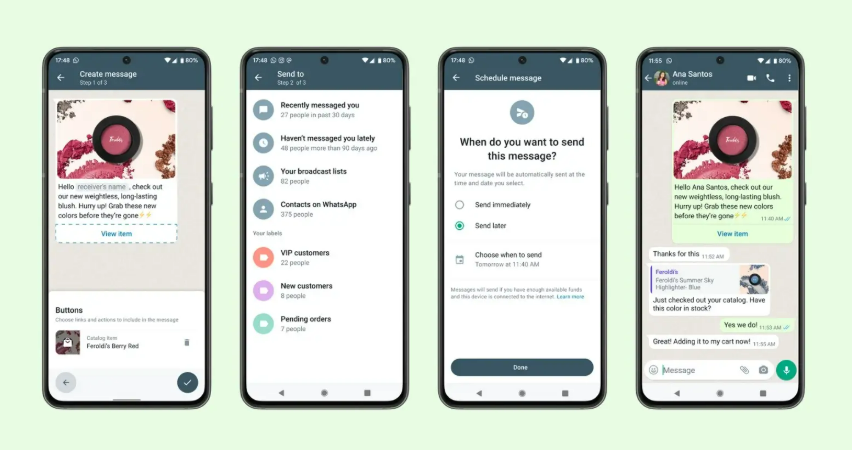
Not ready for managing group chats? WhatsApp’s Broadcast Lists offer a powerful alternative to reach many people personally and at scale. A broadcast list lets you send the same message to multiple contacts at once, without them seeing each other. To the recipient, it appears as a one-on-one message in their chat with you, maintaining that personal touch. This feature is fantastic for sending out newsletters, announcements, or promotions to a large number of leads who have opted in. In fact, WhatsApp broadcasts can achieve open rates 5× higher than email campaigns, making them an efficient way to stay top-of-mind.
Using broadcast lists, you can create segmented groups of contacts (e.g., by interest, location, or lead source) and tailor your messages accordingly. For example, a retail brand might maintain a “New Arrivals” broadcast list for fashion-savvy leads. When new products drop, they send a personalized update like: “Hi [Name], we just got a new summer dress collection 😍. Here’s a sneak peek [link] – check it out before it sells out!” Because it’s a broadcast, hundreds of subscribers receive it in one go, yet each person feels like you messaged them individually. This combination of scale and personalization is gold for lead nurturing.
To do broadcasts right, follow best practices: Only message users who have given consent (to comply with WhatsApp policies and avoid being spammy). Always provide value in your broadcasts – useful info, exclusive discounts, early access, etc. – so people are happy to be on your list. Use their first name and any relevant details you know to make the content feel tailored. Also, keep messages concise and include a clear CTA (e.g., “Tap to shop now,” “Reply to book a spot”). Since broadcasts are one-way (recipients can reply to you privately, but they don’t see each other’s replies), you maintain a direct line of communication like email, but with much higher engagement.
One huge benefit: broadcasts are private and spam-free (users won’t get notifications of others replying or leaving, as happens in groups). This means leads are more likely to stay subscribed if your content is good. Monitor responses and follow up individually when someone shows interest (e.g., clicks a link or asks a question). In summary, WhatsApp broadcasts let you scale your outreach while feeling one-on-one, helping you convert warm leads into customers en masse without losing that personal touch.

WhatsApp Status isn’t just for personal updates – it’s a hidden gem for marketers. The Status feature (similar to Instagram/Facebook Stories) allows you to post images, short videos, text, or links that disappear in 24 hours. How does this help with lead generation? High visibility and engagement. Only users who saved your number can see your Status, meaning this audience is already interested in your brand. As a result, WhatsApp Status posts often get much higher engagement since you’re not competing with a noisy news feed. In fact, WhatsApp’s content feed is less saturated with ads and random posts, so your updates stand out more.
Use Status to nurture leads and drive action in a casual, authentic way. Because Status feels informal (it’s where people share daily moments), your content can have a more personal tone. Some effective ideas for businesses:
The beauty is that viewers can reply directly to your Status update, instantly opening a chat with you. This is where the magic happens: a passive viewer becomes an active lead by initiating conversation. For instance, a follower might reply “Interested!” to your limited-time offer Status – giving you the chance to engage and close the sale right in WhatsApp. It’s essentially another funnel entry point.
To maximize reach, post Status updates consistently (but don’t overdo it – quality over quantity). Use eye-catching visuals, add captions or stickers to grab attention, and always include a simple call-to-action in your Status (like “Message us now to learn more!”). Since Status posts vanish after a day, they create urgency and FOMO, which can spur leads to act quickly (“I better message them now before the deal is gone!”). By leveraging WhatsApp Status as part of your lead gen mix, you engage your audience in a channel they check frequently, in a format that feels fun and organic – all while subtly guiding viewers toward becoming customers.
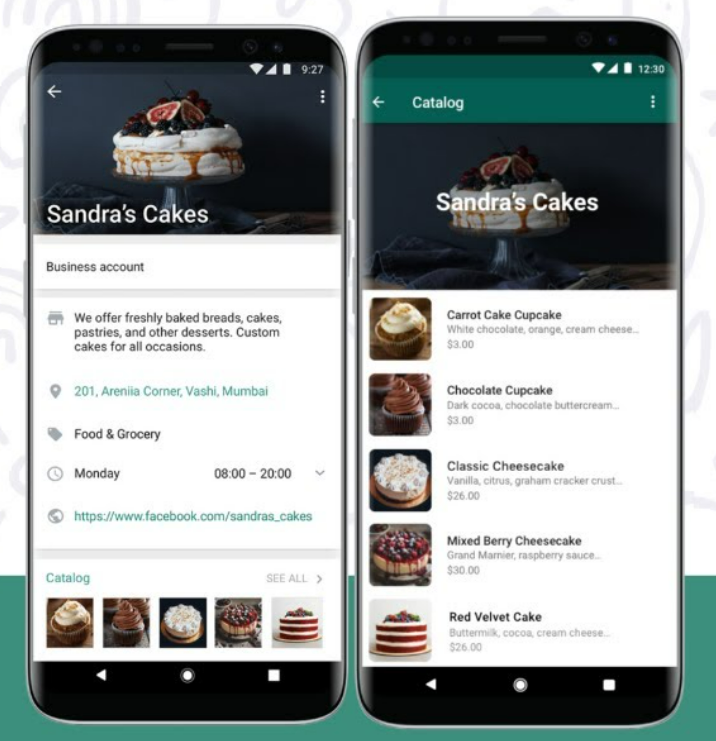
If you’re selling products (or even service packages), make use of the WhatsApp Business Catalog feature to generate and convert leads. The catalog functions like a mini storefront inside WhatsApp – you can display product images, descriptions, and prices, and users can browse and inquire about items they’re interested in. This streamlines the buying process by keeping everything within the chat app. Leads don’t have to click out to a website to see what you offer; fewer steps mean less drop-off and a smoother path to purchase.
Setting up a WhatsApp catalog is easy through the Business app: add your items with images (high-quality photos are a must), add details, and organize them into categories if needed. Now, when chatting with a potential customer, you can quickly send them an item from your catalog. For example, if someone messages a home bakery asking about cakes, you can reply with, “Sure! Here are some of our popular cake options,” and share 3-4 catalog listings (each appears with a thumbnail, price, and title). The customer can tap any item to see the full description and then message you, “I want this one!” This makes the experience interactive and visual, almost like they’re shopping on an e-commerce site, but with the convenience of chat.
WhatsApp catalogs also shine in broadcasts and group contexts. You could broadcast a “New Arrivals” message with direct catalog links to products, allowing interested leads to browse on their own. In groups, if someone asks “Do you have X product?”, you can drop the catalog entry that answers their question and shows off the product instantly.
The result of using catalogs? Higher conversion rates and more impulse purchases, because you remove friction. Customers can see and decide quickly, and even check out within WhatsApp using integrated payment links (available in some regions). As Zoko (a WhatsApp solution provider) notes, an in-app catalog improves product visibility and keeps the experience within WhatsApp, which significantly reduces drop-offs in the sales funnel. It caters to today’s impatience – people want info now, and a catalog delivers that without any waiting or extra browsing.
To get the most lead gen value, keep your catalog updated (nothing worse than a lead asking about an out-of-stock item), and highlight your best-sellers or lead magnets in the first few items. Treat it like a showcase window for your business. It not only helps convert active chats into sales, but also impresses new leads who see you have a professional, convenient setup on WhatsApp. It signals that contacting you on WhatsApp will be easy and productive, which encourages more prospects to reach out in the first place.
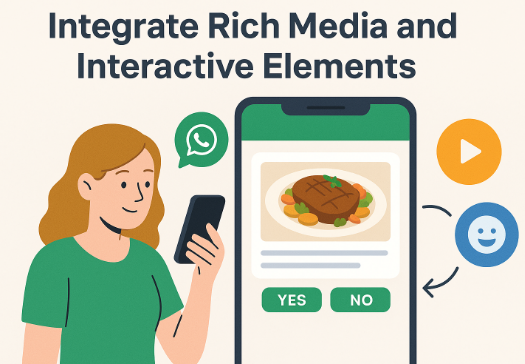
In the digital age, speed matters. When a new lead messages you on WhatsApp, responding quickly can make the difference between a hot lead and a lost opportunity. That’s where automated greetings and quick reply templates come in. WhatsApp Business allows you to set an instant greeting message that’s automatically sent to anyone who texts you for the first time or after a long silence. It’s a simple step that makes leads feel seen and attended to right away. For example, your greeting might be: “Hi there! Thanks for contacting [Your Business]. We’ll reply shortly. In the meantime, can you let us know what you’re looking for?” This kind of prompt, friendly hello establishes a professional tone and reassures the prospect that their message went through and that you care. It helps reduce drop-offs – instead of waiting in silence, the user gets an immediate touchpoint and often will respond with more info.
Quick Replies take speedy service to another level. These are saved response templates for FAQs or common queries (set up in WhatsApp Business settings with a shortcut like “/price” or “/hours”). With quick replies, you can address routine questions in a snap, ensuring consistency in your answers. Say a lead asks, “What are your consulting rates?” – you could type “/rate” and WhatsApp will paste your pre-saved answer: “Our rates depend on the package. For example, 5 hours of consulting is $500. Let me know if you’d like the full pricing sheet. 🙂”. The lead gets info immediately rather than waiting hours for someone to manually type it out. This boosts efficiency and keeps leads engaged in real time. You can still personalize a quick reply on the fly (e.g., add their name or tweak details), but having the base ready is a huge time-saver.
Combined, auto-greetings and quick replies ensure that no WhatsApp lead falls through the cracks. Every new contact gets a warm hello, and every frequently asked question gets a prompt, polished answer. This is crucial in maintaining momentum – a fast response dramatically increases your chances of converting a lead, because it capitalizes on their peak interest. Conversely, if a lead is left waiting a day for an answer, they may lose interest or contact a competitor.
By setting up these features:
Keep your quick reply templates up to date (revise them if you notice new common questions, or if details change). And even though auto-messages are used, monitor chats and jump in with a human touch as soon as possible for high-priority leads. Ultimately, speedy, helpful communication wins leads, and WhatsApp’s automation features let you deliver that at scale.

One clever way to generate leads is by making WhatsApp not just a communication channel, but a privileged space where people get something special. This means using exclusive content, lead magnets, or contests delivered through WhatsApp to attract and capture prospects. The idea is simple: if folks have a reason to message you or opt into your WhatsApp updates (beyond just “contact us”), you’ll pull in more leads. Here are a few approaches:
The unifying theme here is providing value upfront. When you give prospects a good reason to initiate a WhatsApp conversation (valuable info, chance to win, special treatment), you’re not just chasing them – they’re coming to you. It flips the dynamic and usually results in higher-quality leads, since they genuinely want what you’re offering. Just be sure to deliver on the promise (send that PDF quickly, run a fair contest, continue to share good content) so you build trust. With their permission, you can then continue the conversation, gradually educating them about your offerings and moving toward a sale. In essence, turn WhatsApp into a lead magnet hub: a place where leads happily engage because they get something out of it, and where you get to convert them in a friendly, interactive way.
By now, it’s clear that WhatsApp isn’t just a messaging app – it’s a powerful marketing platform where conversations lead to conversions. We’ve covered 10 actionable tactics – from chatbots and click-to-chat ads to broadcast lists and beyond – that you can start implementing today. The common thread among all these strategies is building genuine, timely, and valuable interactions with your prospects. When you meet customers on a channel they love (and trust) like WhatsApp, you remove barriers and make it easy for them to engage with your business.
Now it’s your turn. How will you apply these tactics? You might begin by adding a WhatsApp widget to your homepage or setting up a friendly auto-reply so no lead goes unattended. Perhaps you’ll launch a small WhatsApp campaign – say, a broadcast to recent inquiries with a helpful tip or an exclusive discount – and see the responses pour in. The key is to start somewhere and be consistent. Monitor what works, gather feedback, and refine your approach as you go. Even implementing a few of these WhatsApp lead generation strategies can dramatically increase your engagement and lead flow.
Remember, success on WhatsApp (as with any marketing) comes from putting the customer first. Be responsive, be personal, and above all, deliver value in every chat. Do this, and you’ll not only generate more leads – you’ll cultivate loyal customers who appreciate the human touch of your outreach. So don’t wait: turn those WhatsApp chats into your competitive advantage. Start today by embracing WhatsApp’s tools to capture new leads, nurture them with care, and watch as casual conversations grow into lasting customer relationships. Happy connecting, and here’s to your lead generation success on WhatsApp!
Ready to supercharge your lead generation? Open WhatsApp and engage your next potential customer – your first message could be the start of your next big deal.
Yes. WhatsApp is highly effective for lead generation because it enables direct, personal communication with potential customers. You can use WhatsApp to capture new leads (for example, via click-to-chat links or QR codes that bring prospects into a conversation) and to nurture leads by sending updates, answering inquiries instantly, and building trust through one-on-one chat. With features like chatbots, broadcast lists, and rich media sharing, businesses can guide prospects through the sales funnel entirely on WhatsApp. The app’s huge user base and high engagement (messages are almost always read) make it a powerful channel to generate and convert leads, often outperforming traditional email or cold calls in engagement and response rates. In short, if you integrate WhatsApp into your marketing strategy – providing value and quick responses – it can absolutely bring in more leads and sales.
To get customers to initiate chats (opt in) on WhatsApp, you need to make it easy and appealing for them. Here are a few effective ways:
1. Promote your WhatsApp channel everywhere: Add WhatsApp click-to-chat links or buttons on your website, social media profiles, email newsletters, and ads. For example, include a “Chat with us on WhatsApp” button on your contact page or a direct link in your Instagram bio.
2. Offer an incentive or value: Give people a reason to message you. This could be a lead magnet (“Message us for a free guide/ebook”), a discount or coupon (“Chat with us to get 15% off your first order”), or entry into a contest or giveaway. Exclusive WhatsApp-only deals or early access to content also work well.
3. Use QR codes for offline audiences: If you have physical touchpoints (stores, events, product packaging), print a WhatsApp QR code with a call-to-action (like “Scan to ask questions on WhatsApp”). This connects offline customers to you with one scan.
4. Highlight the convenience: Let customers know they can get fast, personal service via WhatsApp. For instance, mention in your marketing, “Have questions? WhatsApp us for instant assistance!” People are more likely to reach out if they expect quick answers and easy conversation.
5. Build awareness: Announce on your other channels that you’re available on WhatsApp. Some businesses send an email blast saying, “We’re now on WhatsApp – chat with us for any help!” or create a social post about it.
By combining these tactics, you reduce friction for the customer and actively invite them into a WhatsApp conversation. Once they message you, remember to be responsive and helpful (using tools like auto-greetings can help) so they have a great experience and stay engaged.


