Here is a complete step-by-step guide on how to setup WhatsApp business API. WhatsApp API can only be used if you follow the compliances according to the business and commerce policy of WhatsApp. In this easy and quick blogpost, I will explain the step-by-step process of setting up the API yourself and link that to Sendwo or any other WhatsApp official API-supporting application.
You need to have a few things beforehand in order to start using the WhatsApp API. Lets look into what you need to have in order to start your setup for WhatsApp API.
Only registered entity can be eligible for using the API. Since API setup needs to be done only over verified business manager. So, in order to verify business manager, you need to submit your business certificates.
While we are verifying the business manager account of facebook, it will ask you for official website of your company. They check the terms and condition page and privacy policy page on your company website.
These pages should show the policy that is 100% in compliance with WhatsApp business policy and commerce policy. If you don’t fall into the category of allowed business, then your business manager verification will be rejected.
This phone number should be your business phone number which must be also mentioned in your business document.
When we do business verification, it ask your business documents like business registration certificates to prove that you are an official government-approved business. In that same document, Meta expects to have your business phone number also mentioned. But, in case the phone number is not mentioned, then it ask, “whether your business document contain phone number or not. If it doesn’t have that, then it ask you to upload any other government separately forwarded letter like a utility bill or bank statement that has both business name as well as your business phone number mentioned.
With these prerequisite, you can ask your WhatsApp integration consultant to help you in getting started with setup of WhatsApp API.
Now, lets go to step by step process
Want Us To Help?
In order to setup the WhatsApp API, either you can start the setup from developers.facebook.com right away or 1st you can choose to get your Facebook business manager account verified.
Now, a lot of people will get stuck at this point. Why? Because here are two loops that stop people from DIY of WhatsApp API.
Loop 1: Setting up API and then going for business verification. [Right path]
Loop 2: Getting business verification done before setting up the API. [Wrong path]
Please note: Only Loop 1 is the right path to follow when you are setting up your WhatsApp API yourself.
Let’s talk about this in detail because everyone will get stuck at this place.
In order to follow this path. You will follow the below step
STEP 1: Go to developers.facebook.com and login with your facebook credentials.
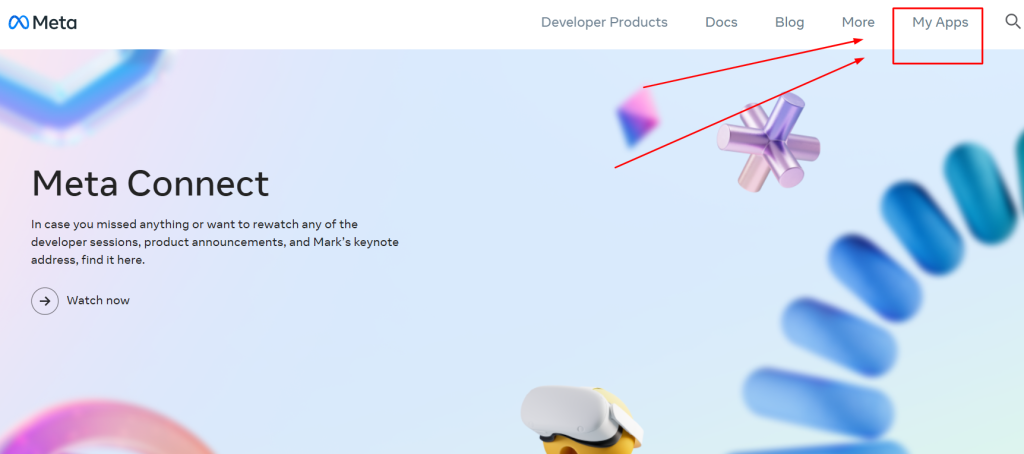
STEP 2: Go to My Apps. This section will take you to create a new app dashboard.
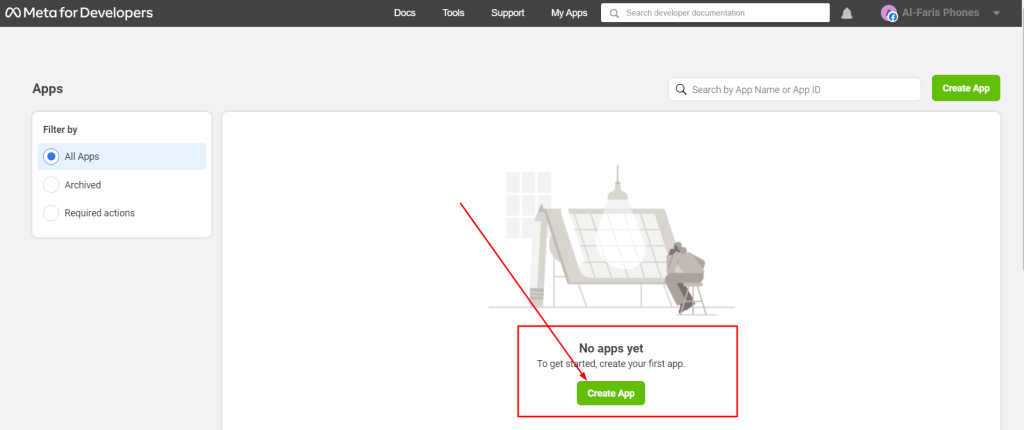
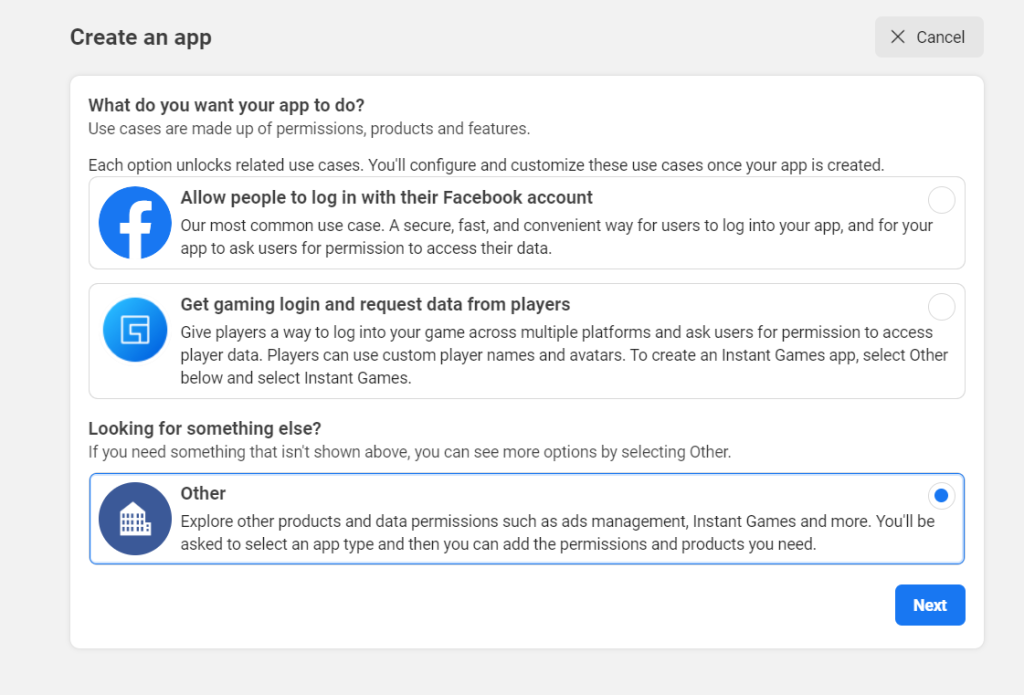
STEP 3: The next step is to click on Create App and then proceed by clicking Others and then click Next.
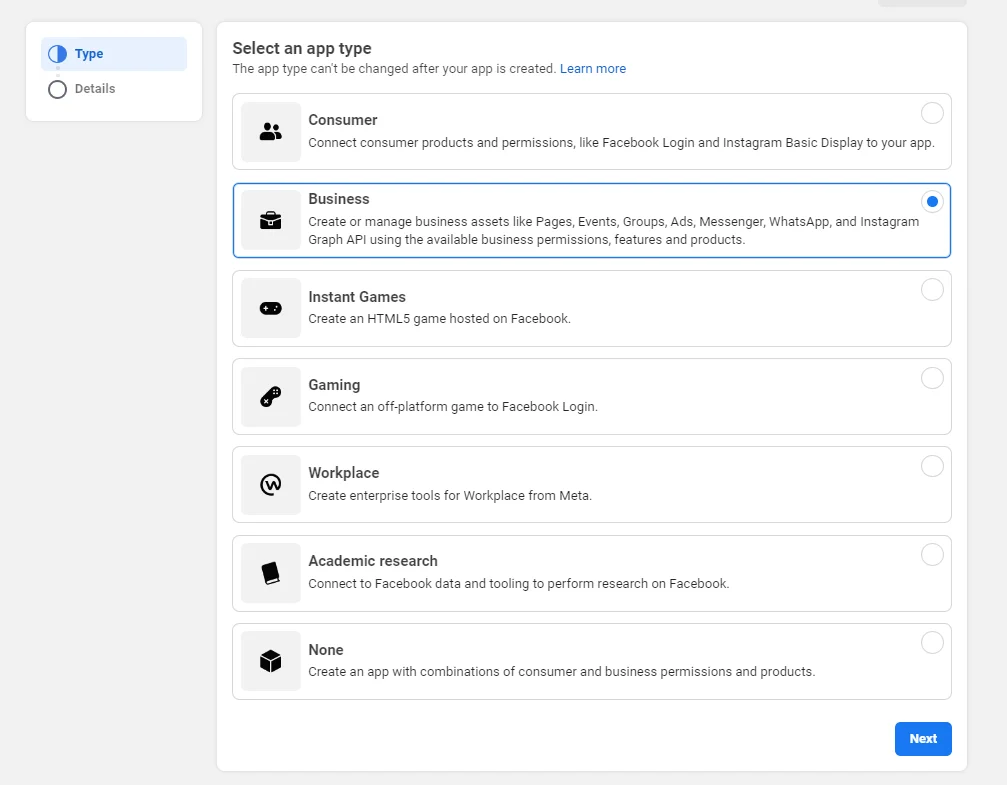
STEP 4: Select the App type in your next step. It should be business because you are going to use the API. Then click next.
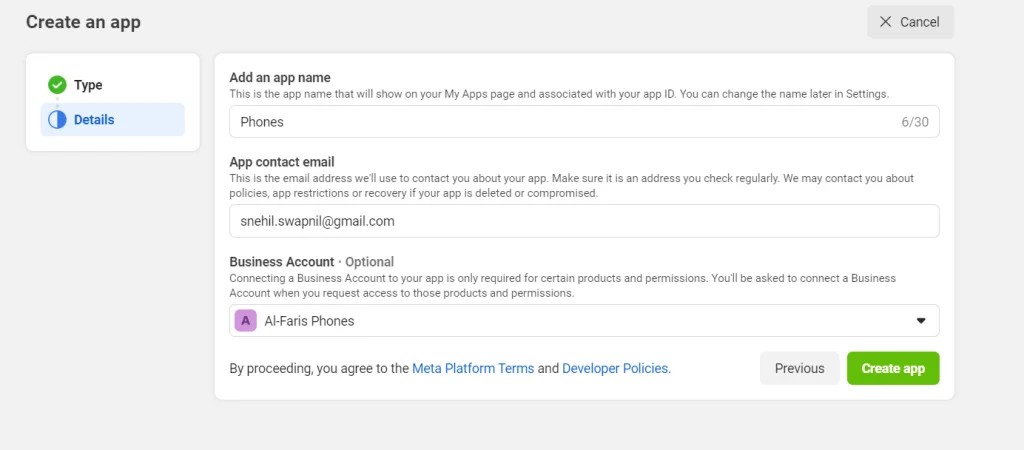
STEP 5: Give name to your App. You can write any name. This is only for reference number and won't be displayed anywhere. If you have multiple business account then choose the once into which you are planning to setup the api. Make sure you choose the right business account. It is written optional but if you are serious about using WhatsApp api then you must choose the business account. Because then only you will become eligible for business verification.
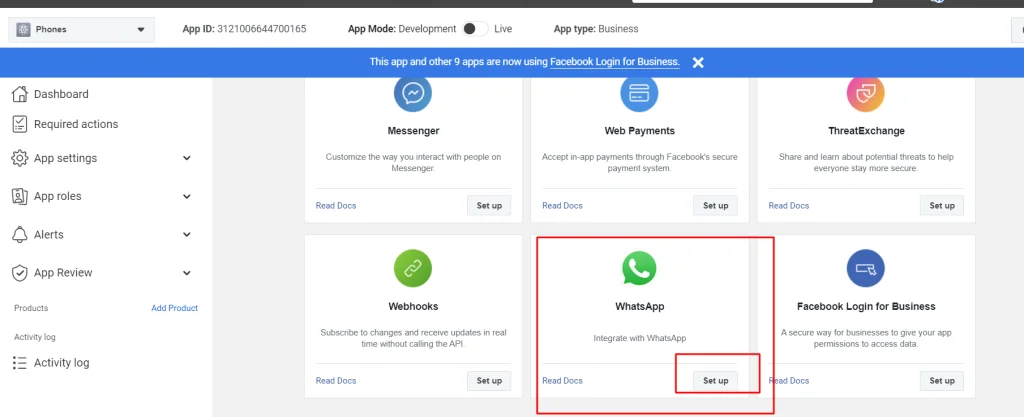
STEP 6: It will take you to your app dashboard where you have to scroll down to choose WhatsApp setup. Click on setup to procced to configure your WhatsApp API. Click continue in the next step and proceed.
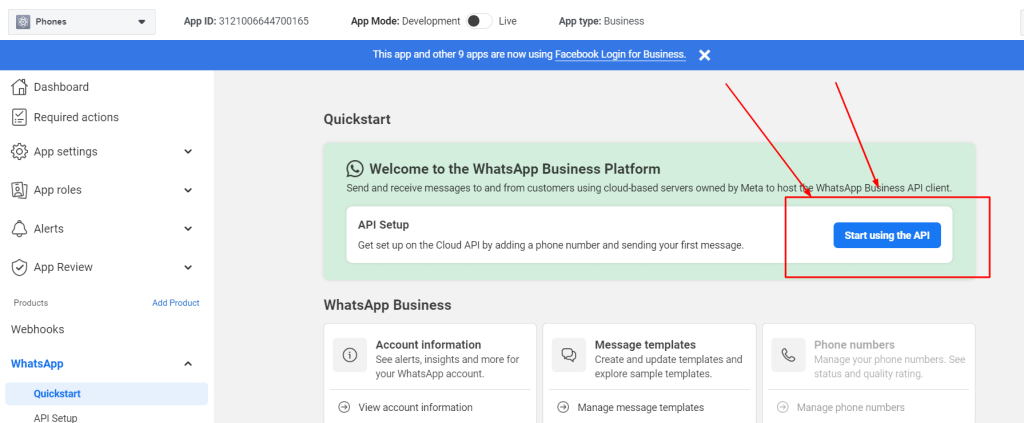
STEP 7: Complete configuration setup. Click start using WhatsApp API
STEP 8: Add Phone numbers to your WhatsApp API. For this you need to scroll down and add your number. You are initially allowed to add only two WhatsApp numbers. Also make sure that you add your payment methods right away at this place. This is 100% required if you want to run your WhatsApp marketing campaign.
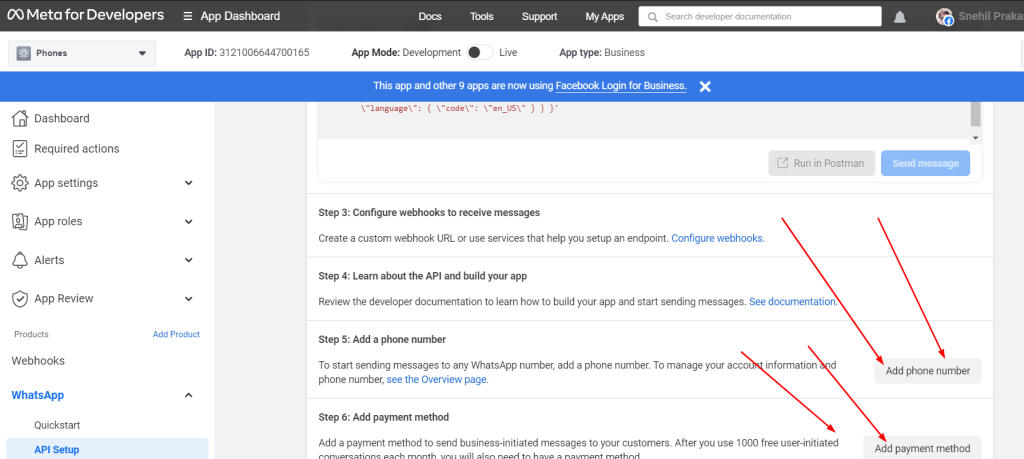
When adding phone numbers, you will have to enter your business name. Business website or profile page. [Recommended to add business website since it will also be added during business verification.
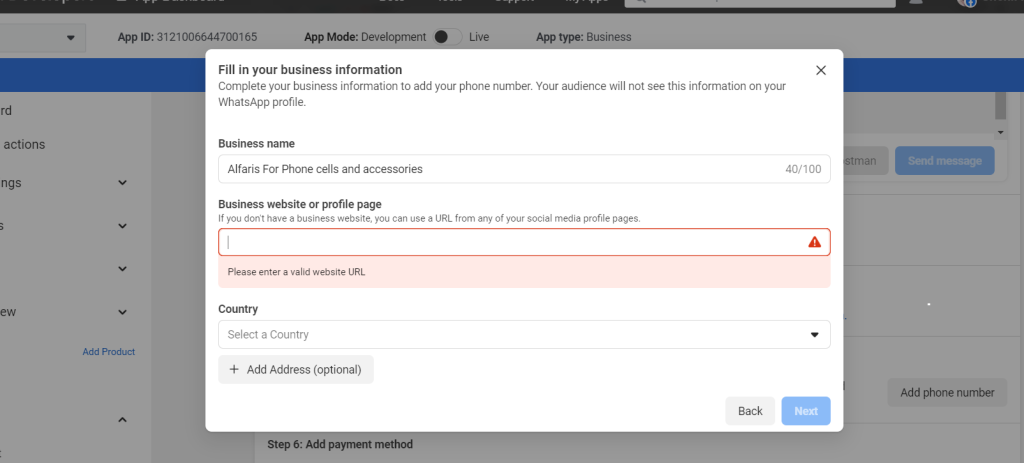
STEP 9: This is a very critical step. You must not do anything wrong in entering your info. In this step, you will add your WhatsApp Business Profile Display Name. This name should be your brand name. Business name is different, brand name is different. When you apply for a green tick, WhatsApp ask if your brand name is notable or not. They confirm this by asking you to share those website links from high authority sites that have mentioned this same WhatsApp Business Profile Display Name. It is your brand name. Enter the correct timezone because scheduled messages will go according to this time zone.
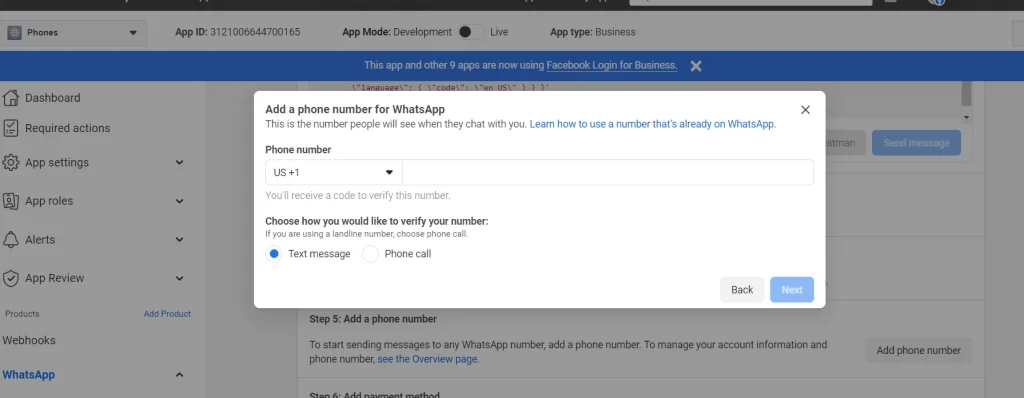
STEP 10: Enter your phone number and verify it with a security code sent to you via text message or call.
Once the number is added, you will be shown with an alert message on your API dashboard.
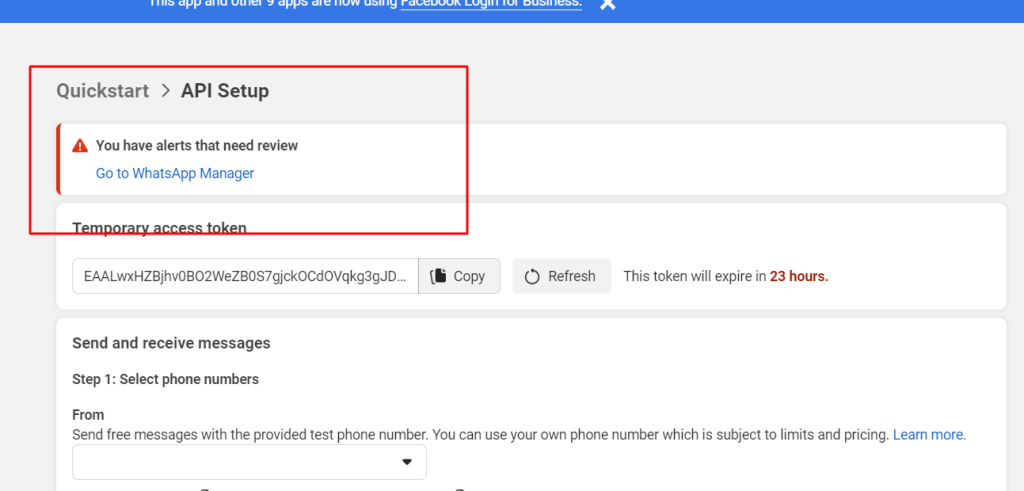
This happens because you have not verified your Facebook business manager account so you won't be able to use the API.
So, now go to the procedure explained in the LOOP below to complete your business verification process.
Want Us To Help?
In order to follow this path. You will follow the below step
STEP 1: Go to your business info page insider your business manager account of facebook. Click here business info [If you have multiple business facebook account then please choose the one over which you need to setup your api and also get your business verification done.
STEP 2: Here you need to enter all your business details. Don't skip any info. Your chances of rejection will increase. Also make sure that the information matches 100% as per your business registration document that you will be uploading during your business verification process.
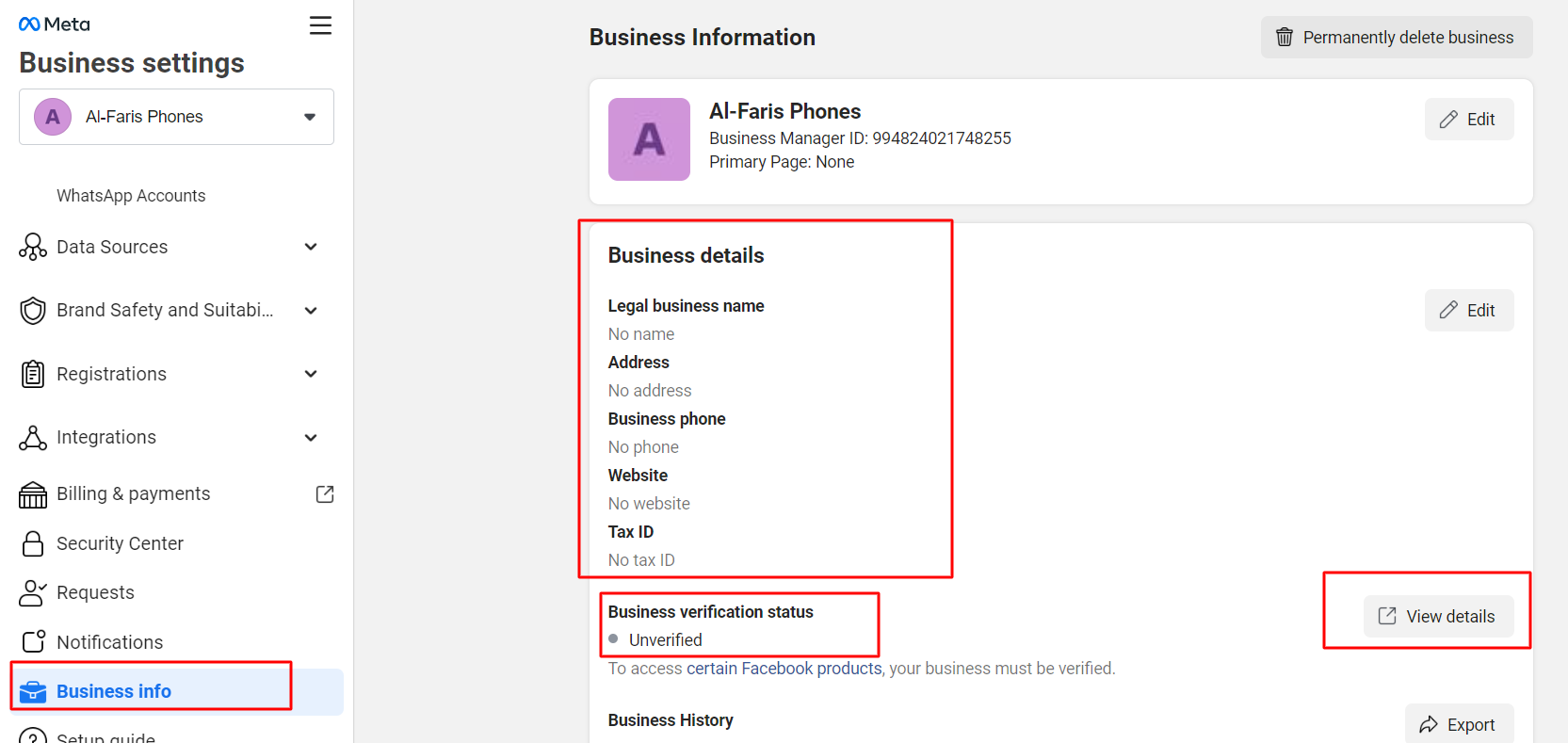
Once you enter all these details. You will have to click "View details" button that will take you to the page where you will begin the document submission.
But, as i said, if you follow loop 2, you will be shown that you are ineligible for business verification. Something like below.
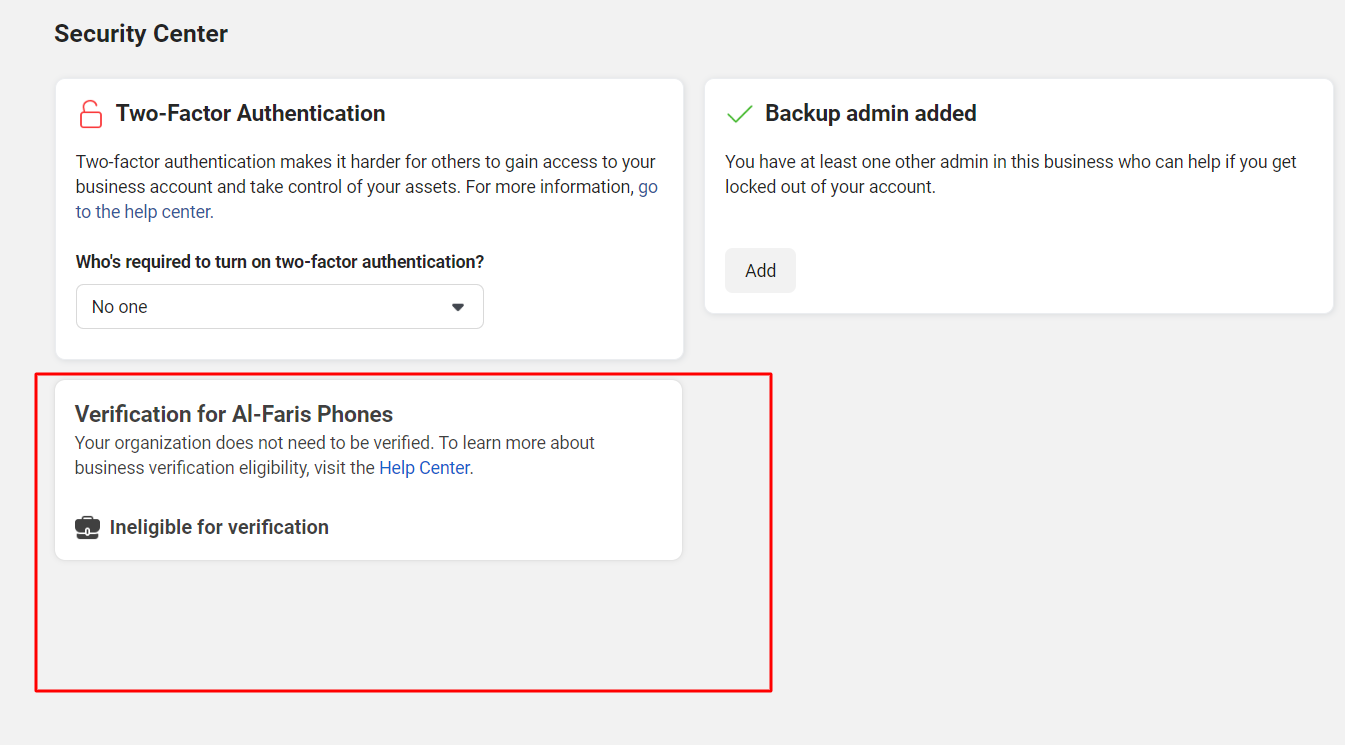
You will face this error and won't be able to submit your documents for business verification. The reason is, people are eligible for busines verification only when you are trying to use advanced features of meta company like using an API.
So, if you follow this Loop 2, you wont be able to get your business verification done. This path is 100% wrong when you are planning to setup your Whatsapp API.
You will get stuck and look for solution or integration consultant at this point to solve this problem. While the solution is hidden in the Loop 1 process which I already explained above.
I am asusming that you followed the above loop 1 process that I explained. You have to visit the security center page of your facebook business manager account in order to complete your business verification process.
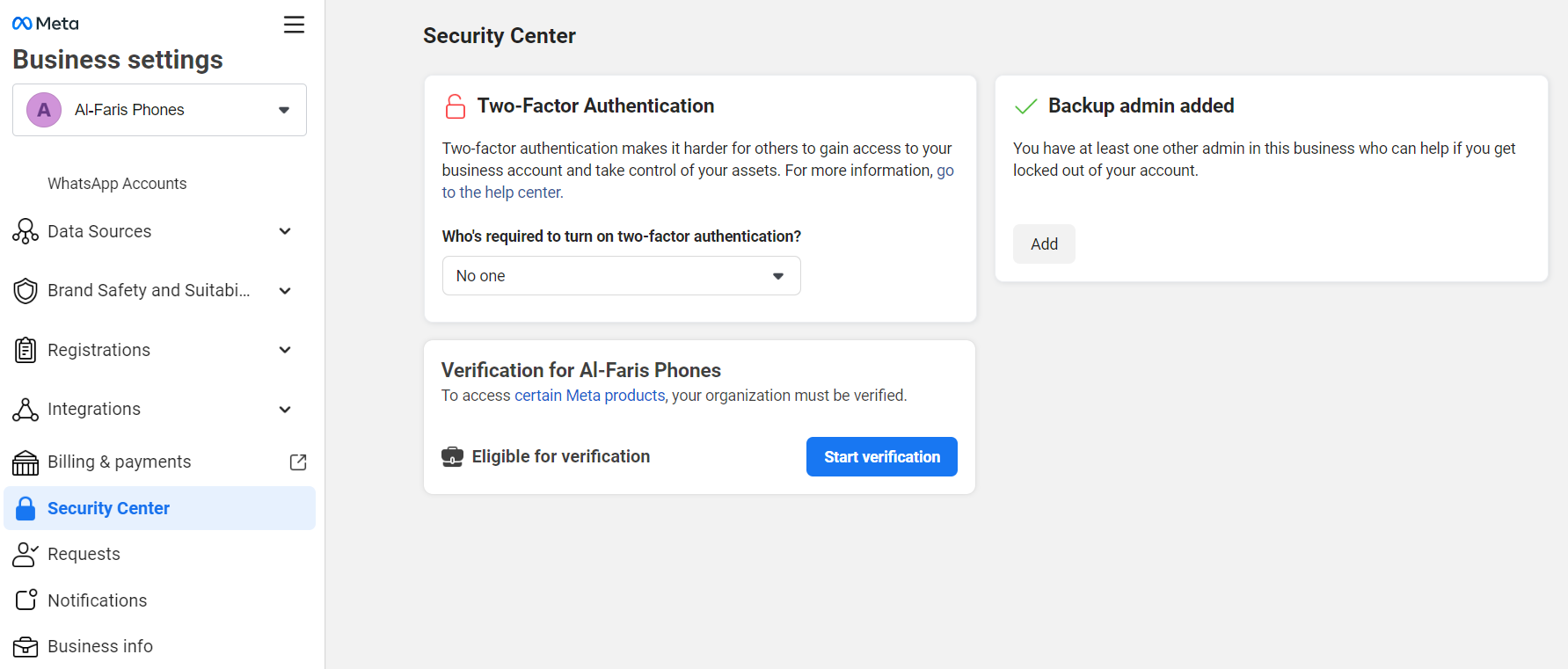
STEP 1: Click start verification and go to next dashboard. Choose your country and click next to enter all your business info correctly according to your business registration document.
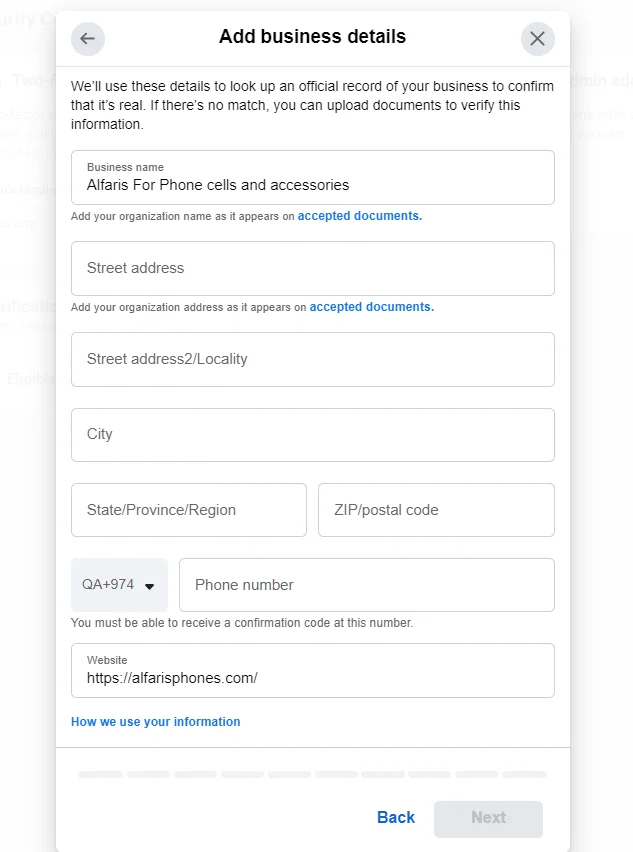
There are multiple supported languages for business verification. So, if your business documents are in your regional language, you can upload them also.
The primary document types that are acceptable for business verification are as follows. Make sure these documents are not expired and are issued by the relevant authorities.
Please make sure to add your business website. As I already mentioned in the pre-requisite for starting the business verification in the beginning of this blogpost.
All these steps will help you to complete your business verification steps. You can submit the request. In less than 2 working days, your business will be marked as verified if you follow all compliance and policies correctly. If it gets rejected, you will get up to 3 chances to raise a request for re-review. If all those chances fails, you won't be able to get your business manager verified and using WhatsApp API will be impossible.
Now I assume that your business manager is verified. In the next steps, you have to implement your API with the WhatsApp marketing software.
It is important to note that you cannot run WhatsApp API-approved numbers in your WhatsApp mobile app. You must have to subscribe to a WhatsApp API-supporting application that will help you send WhatsApp messages and receive replies.
We are taking the example of the Sendwo Official API platform to setup your dashboard.
STEP 1: Signup to Sendwo official API application here
STEP 2: Go to WhatsApp feature to add your number. Click on "Add new account"
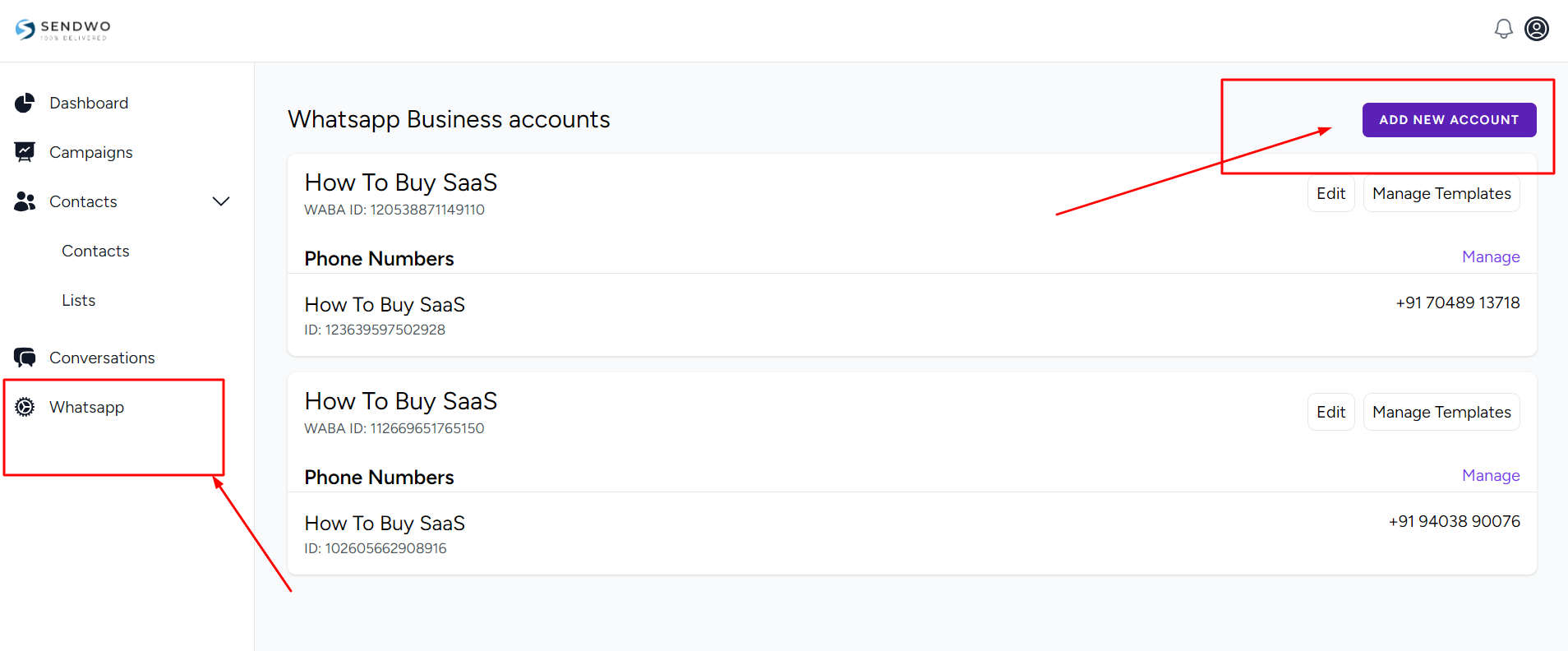
STEP 3: In order to add new number, you need to add your WABA ID and access token.
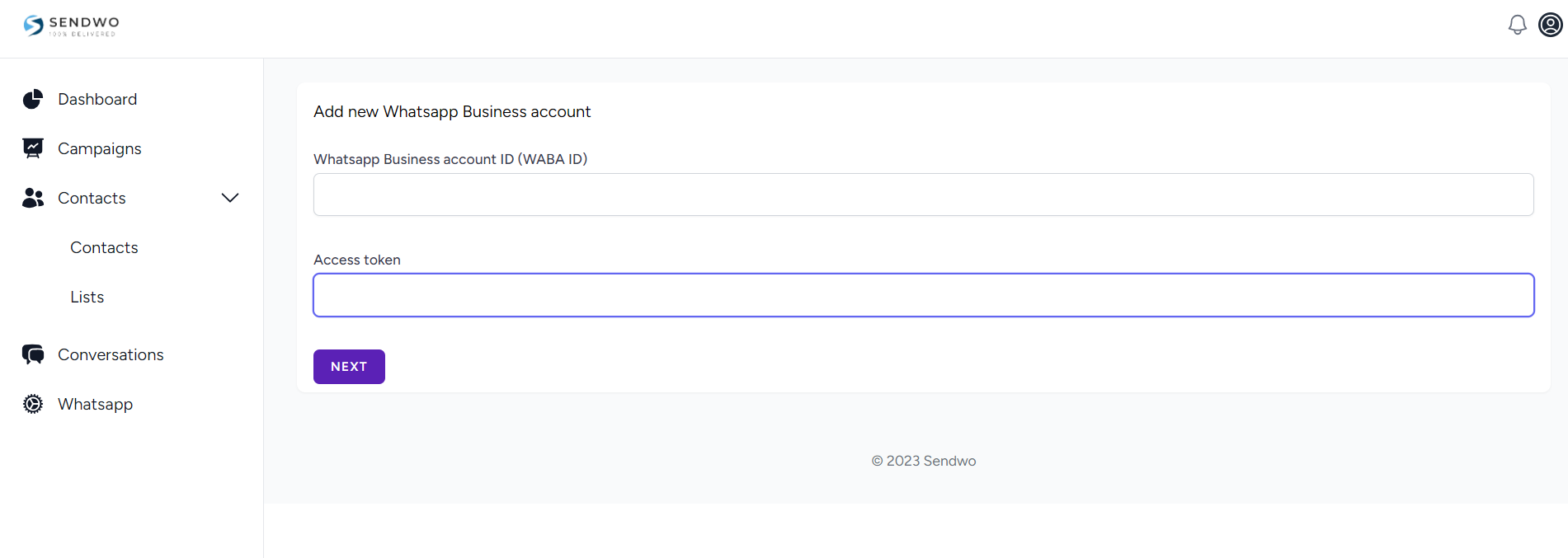
STEP 4: How to get the WABA ID and access token? Please follow the below step.
Go to your WhatsApp Manager dashboard from here
Here, choose the number which you want to link as per the image below, copy the WABA ID
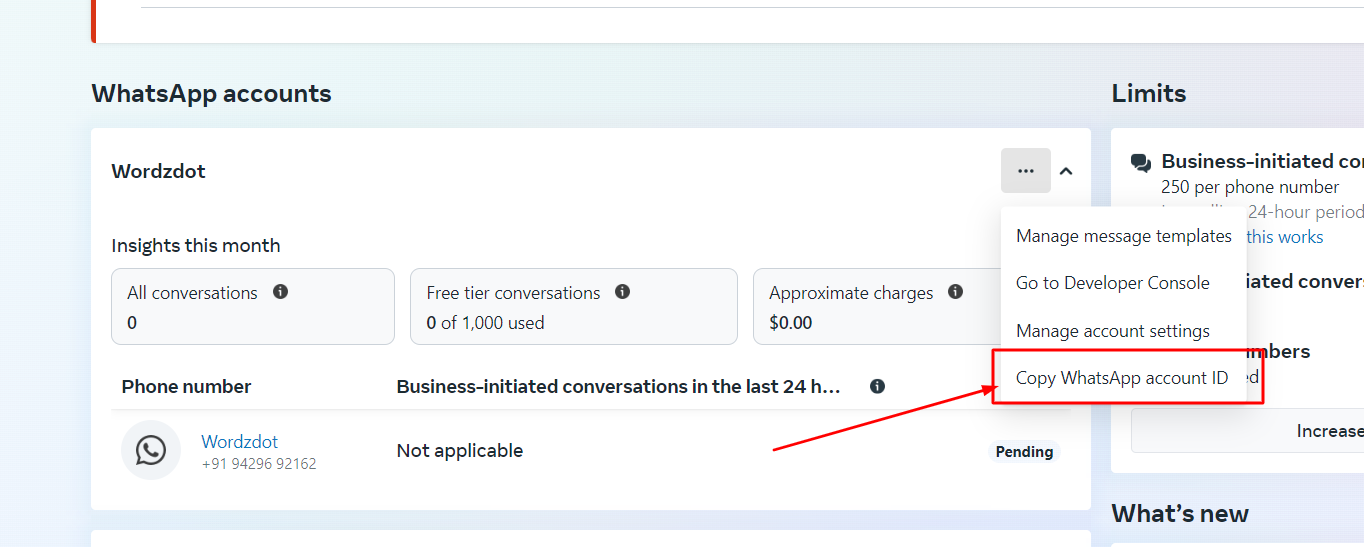
STEP 5: Get the Access Token by following the step below.
In order to generate an access token, you need to add a system user. You may already have one. If not, check the screenshot below to understand how to create a system user and then generate the access token.
Go to the system user option inside your business manager from here
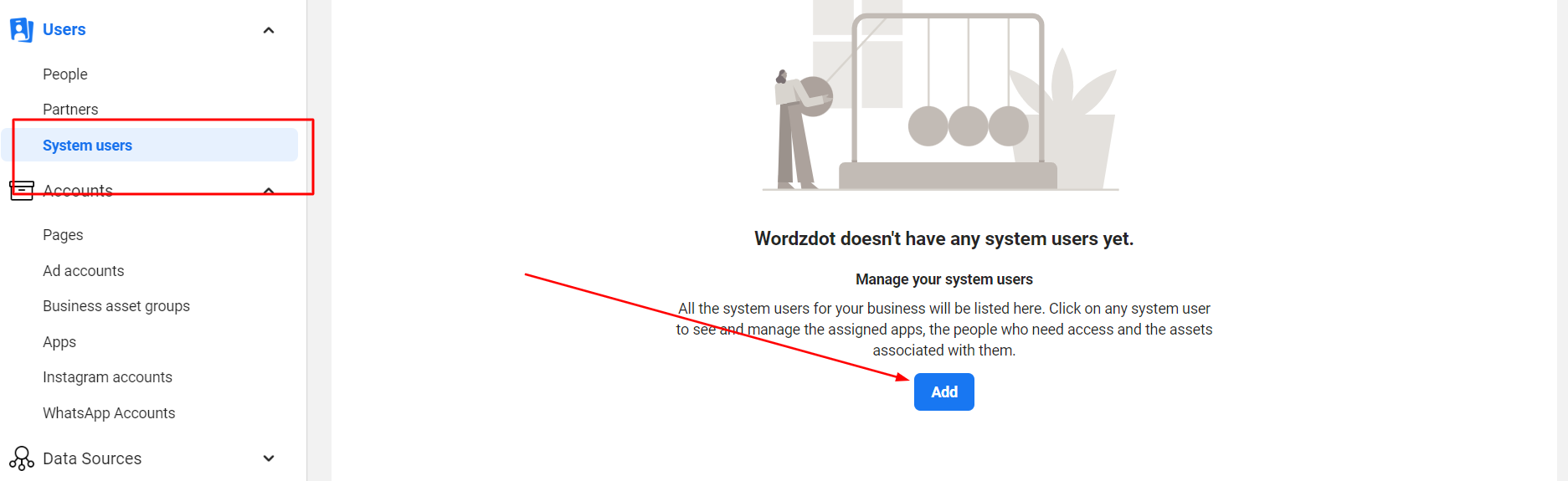
When you click on add, you have to click next and then a new dialogue box will open. Give a system user name and set it to admin.
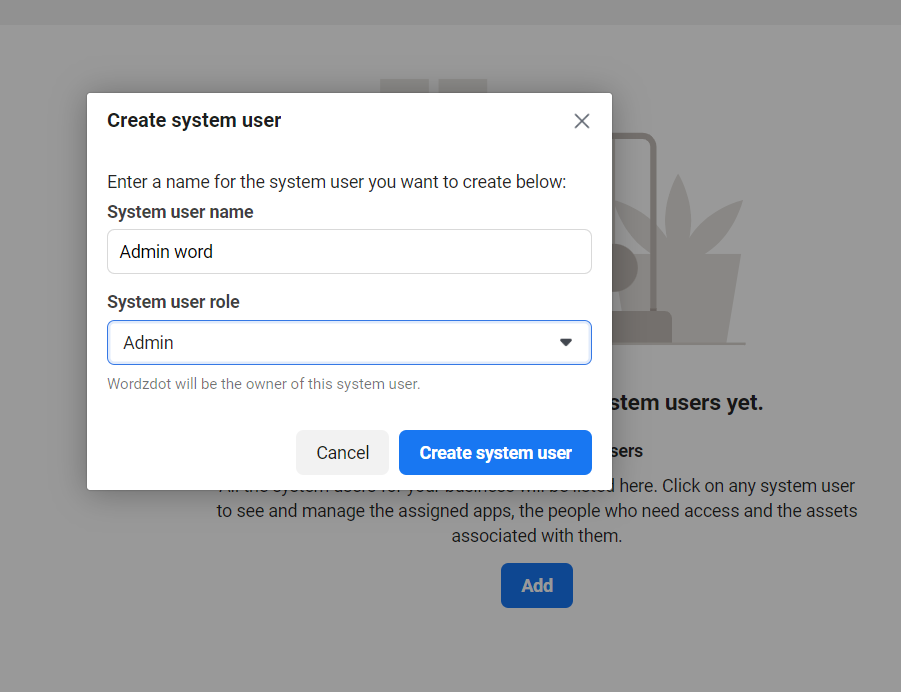
So, this will create a new dashboard that will help you generate your access token.
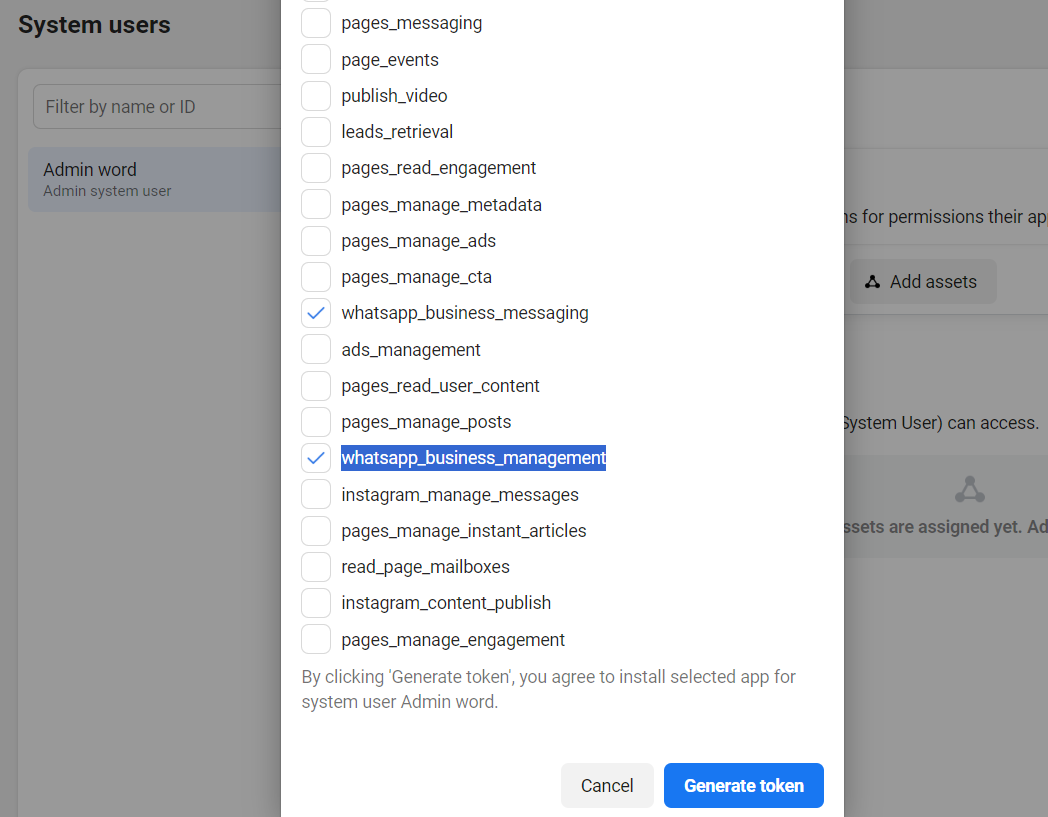
Click Generate access token, and select the app that you have created in the earlier step above on your business manager account. Then select the token expiration time to never and tick mark the option named as "whatsapp_business_messaging" and "whatsapp_business_management" just like the screenshot below and click generate the token.
Copy the new access token that will be generated and paste it inside the Sendwo dashboard just below the WABA ID.
Once you complete this process then your WhatsApp manager accounts get linked to Sendwo. In the next step, you need to fetch all the numbers that you have added inside your WhatsApp manager. So, lets go to STEP 6.
STEP 6: Fetching phone numbers inside dashboard. Click the "get phone number from facebook"
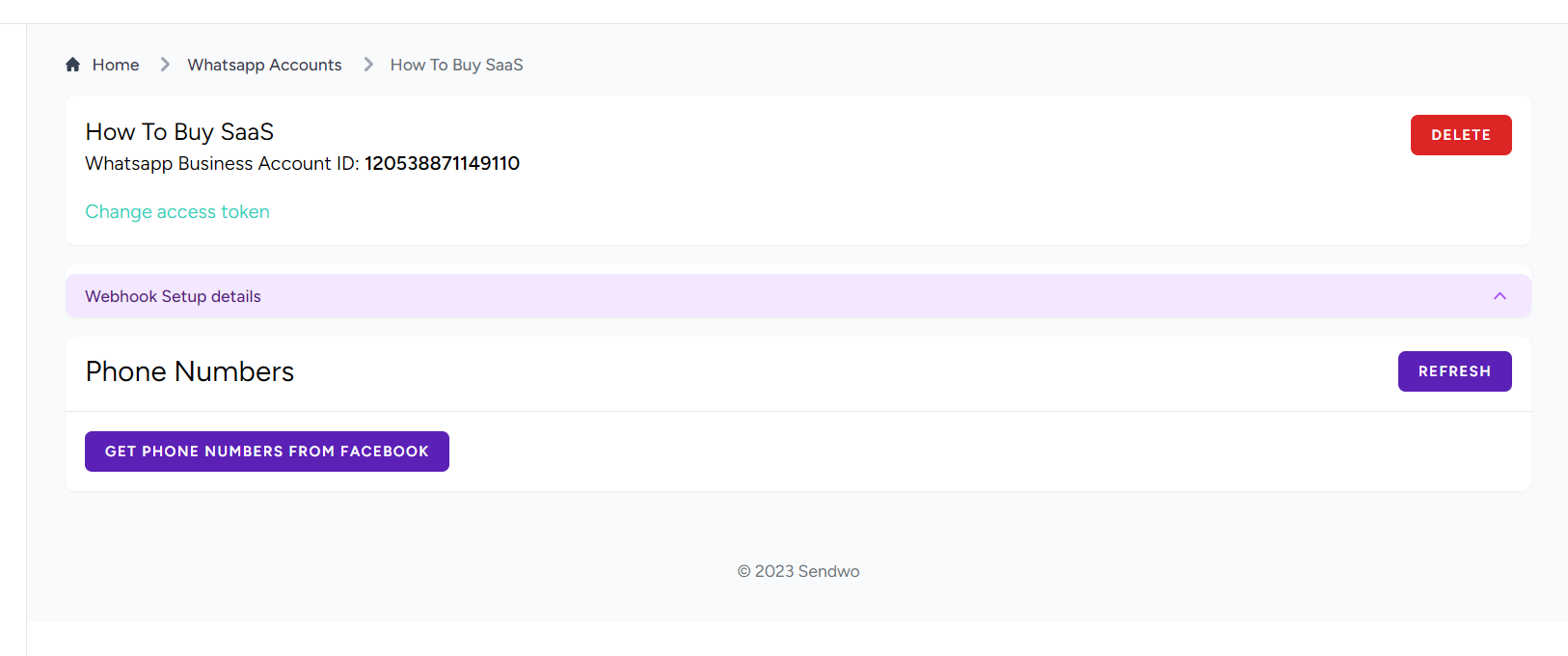
It will fetch the phone numbers that we have earlier added while setting up the phone numbers over API.
Click on ADD for the phone numbers that have been fetched from Facebook.
Now we need to setup inbox so that we can receive replies and send reply while having conversations over WhatsApp API-enabled phone numbers.
STEP 1: Go to WhatsApp menu inside Sendwo dashboard.
STEP 2: Click manage, over the phone number for which you want to setup inbox.
STEP 3: Click on webhook details and copy URLs and verification codes.
STEP 4: Go to your developer console of facebook where you have created the app for your API and go to configration option. Check the screenshot below to understand better
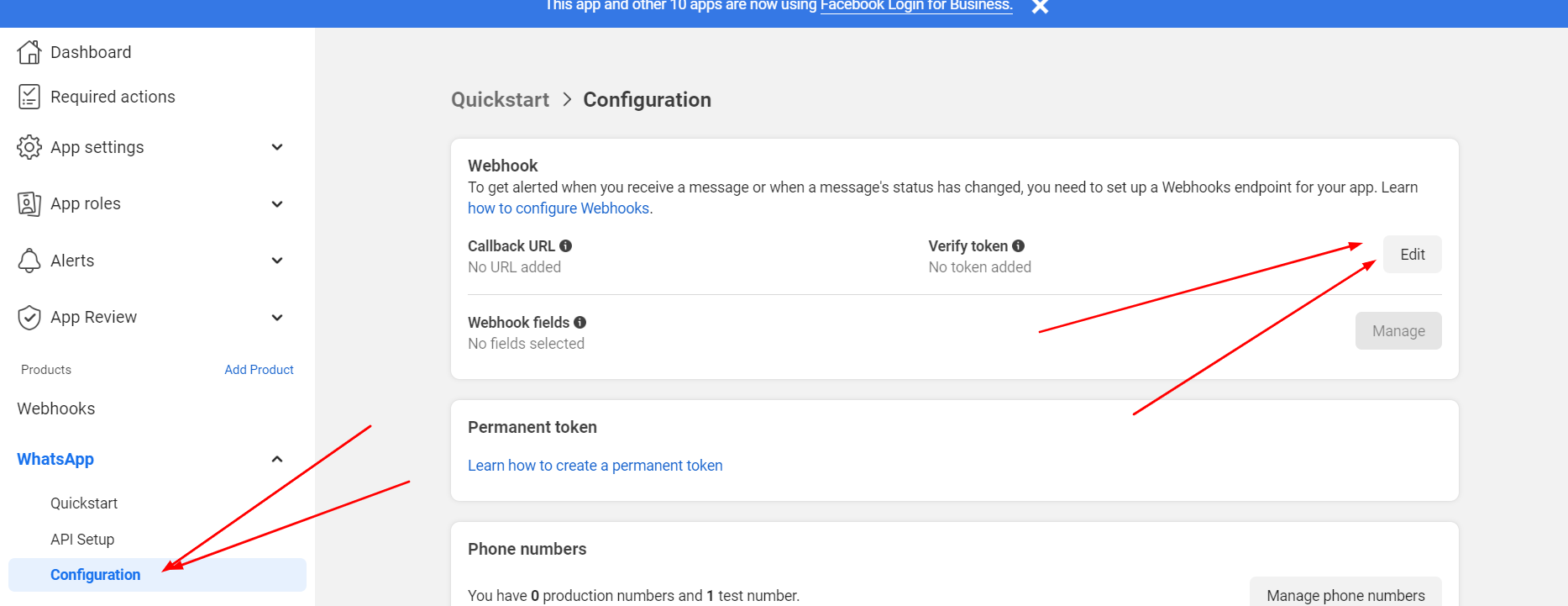
Here you have to click on edit as above and enter the webhook URL in the callback URL and webhook verification code inside the verify token option and then hit save.
You also have to click on manage button as in the above screenshot beside the "Webhook fields" and click on all check boxes to subscribe to all as in the screenshot below.
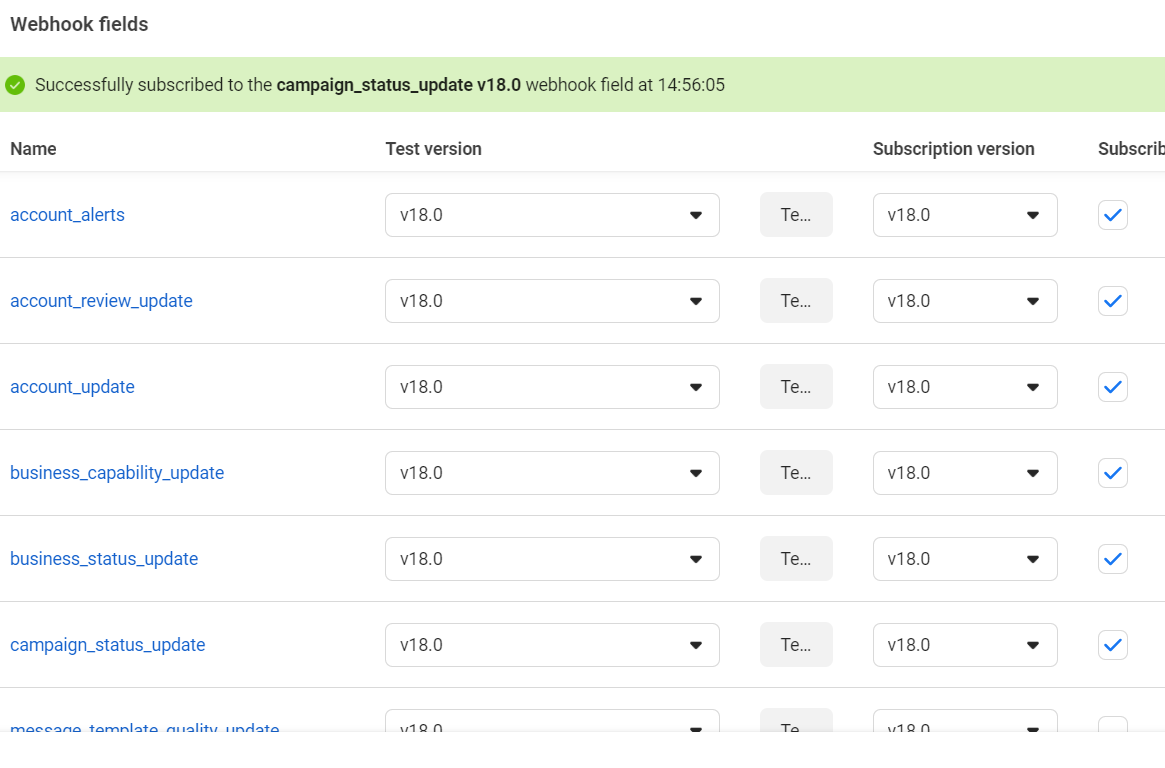
Hit done and you are all set.
This way you have setup your WhatsApp API and integrated it inside sendwo. Now you can easily create campaigns inside sendwo and run your WhatsApp marketing show.
Contact us if you are not able to setup the API and implement it over Sendwo or any other software. We will help.
Want Us To Help?
Are you a WhatsApp business account owner trying to increase your sales?
You're in for a treat!
In today's digital era, where everyone is constantly on their smartphones, WhatsApp promotional messages have revolutionized the marketing world. These messages enable you to directly engage with your customers in a personal and convenient manner, making it simpler than ever to boost your sales.
In this blog, we'll share 42 examples of WhatsApp promotional messages that will captivate your customers and motivate them to take action. These messages feature irresistible offers, exclusive discounts, compelling product descriptions, and limited-time deals - everything you need to boost your sales.
Each example has been carefully crafted to maximize engagement and conversion rates, giving your marketing strategy a powerful edge. Prepare to elevate your sales with these impactful WhatsApp promotional messages!
As a WhatsApp business account owner, the power of creating WhatsApp promotional messages that truly convert is no secret to you. With countless WhatsApp promotional messages flooding users' inboxes daily, it's essential to find a way to stand out and make an impact.
Fortunately, we've curated 42 incredibly effective WhatsApp promotional messages examples that have been proven to boost sales and deliver results. To make it useful for every use-case, we have divided these examples into different categories:

Introducing new products is an exciting event for both businesses and customers. To ensure your customers are well-informed and eager about your latest offerings, it's important to craft engaging WhatsApp promotional messages. These messages not only create anticipation but also help drive sales for your new products.
With that in mind, here are some examples of WhatsApp promotional messages you can use to effectively promote your new product alerts:
Hello [Customer’s Name], 😃
We’re thrilled to introduce our latest creation – the [Product Name]! 🚀
Explore its amazing features and be among the first to own it.
Check it out now: [Product URL] 🛍️
Don’t miss out on this exciting addition to our lineup!
Hi [Customer's Name], 🎉
It's that time of the year, and we've got a surprise for you – the [Product Name] is here, just in time for [Season/Event]! 🌟
Get ready to elevate your [Product Type] game. Click below to discover more:
[Product URL] 🛒
Hurry, it's already creating a buzz!
Hey [Customer's Name], 👋
We're excited to unveil our latest innovation – the [Product Name]! 🆕
This [Product Type] is a game-changer, and we think you'll love it. Get all the details here:
[Product URL] 🛍️
Grab yours now and be the first to experience excellence!

WhatsApp business accounts can effectively engage with their customers and build excitement for upcoming events. By utilizing WhatsApp promotional messages, businesses can create a sense of urgency and exclusivity that leads to increased sales and customer loyalty. These personalized messages allow direct communication with the audience, keeping them informed about upcoming events and motivating them to take action.
Hey [Customer], 😃👋
Get ready for an electrifying evening of music and dance at our exclusive [Summer Soiree] on [June 15th]. 🎉🎶
Save the date and be the first to experience our latest collection of [summer fashion]. 😍
Limited spots available, so RSVP now to secure your entry! ✅
CTA- RSVP Now
Hey [Customer], 😄
The wait is over! Get ready for the biggest sale event of the year, [Black Friday Bonanza], on [November 26th]. 🛍️
We've got jaw-dropping discounts, exclusive offers, and exciting giveaways lined up just for you!
Mark your calendars and be prepared to shop till you drop!
CTA- Save the Date
Hey [Customer], 😊
We're brewing something special for all the coffee lovers out there! ☕
Join us at our exclusive [Coffee Expo] on [October 10th] and discover a world of unique flavors and brewing techniques. 😍
Limited tickets available, so don't miss out on this aromatic extravaganza!
CTA- Get Your Tickets

Seasonal sales present a great opportunity for businesses to attract customers through appealing offers and discounts. These events are not only about clearing inventory; they also provide a chance to cultivate customer loyalty, increase revenue, and embrace the festive atmosphere. To maximize the impact of these sales, here are some WhatsApp promotional messages templates specifically designed for seasonal promotions:
Hello [Customer's Name], 🌞
Get ready for some sunshine savings! Our [Seasonal Sale] is here, offering you incredible discounts on your favorite products.
Shop now and enjoy up to [Discount Percentage]% off! 🛍️
Don't miss out – visit [Website Link] today!
Hi [Customer's Name],
Winter is here, and so is our exclusive [Seasonal Sale]! ❄️ Get cozy with amazing deals on [Product Category].
You can save up to [Discount Percentage]% on selected items. Start shopping now:
[Online Store Link]
Hey [Customer's Name], 🌸
Spring into savings with our [Seasonal Sale]! Discover fresh deals on [Product Range] and enjoy discounts of up to [Discount Percentage]%. 🌷
Shop today at [Shop Now Link] and embrace the season with style!
Festivals are not only about following traditions, but they also provide businesses with a chance to engage with their customers on a personal level. By sending sincere festive wishes, businesses can strengthen their relationships with customers and express gratitude for their support. Here are some WhatsApp promotional messages templates for sending festive wishes during these special occasions:
Hello [Customer's Name],
As Thanksgiving approaches, we want to express our gratitude for having you as part of our extended family. 🍁
May your Thanksgiving be filled with joy, laughter, and delicious feasts! 🥧
Warm wishes from [Your Company Name].
Hi [Customer's Name], 🎄
It's the season to be jolly! Wishing you a Merry Christmas filled with love, laughter, and the warmth of family and friends.
May your heart be light and your days be merry and bright! 🎁
With festive cheer, [Your Company Name].
Hey [Customer's Name], 🎉
As the New Year dawns, may it bring you new opportunities, new aspirations, and boundless happiness. 🌅
Cheers to a year filled with success and growth! 🥂
Best wishes from [Your Company Name].
Rebranding is a major milestone for any business. It involves updating your brand's identity, messaging, and sometimes even your entire image. Effectively communicating this change to your customers is vital. Utilizing WhatsApp can be a valuable tool for sharing your rebranding news. To help you announce your rebrand, here are some WhatsApp promotional messages for rebranding:
Hello [Customer's Name], 👋
Exciting news! We've undergone a transformation to better serve you. Say hello to the new [Your Rebranded Name]! 🎉
Our commitment to quality and excellence remains unchanged. Explore our fresh look at [Website Link].
Hi [Customer's Name], 😃
To celebrate our rebranding, we're offering you an exclusive [Discount Percentage]% discount on your next purchase. 🎁
Experience the new [Your Rebranded Name] and shop now at [Online Store Link]. Don't miss out!
Hey [Customer's Name], 🙏
We're thrilled to introduce our rebranded identity – [Your Rebranded Name]. 🚀
Thank you for being a part of our journey. Enjoy [Rebranding Offer] as a token of our appreciation. Shop now at [Website Link].

Order confirmation messages are an essential part of the customer journey. They provide customers with assurance that their purchase was successful and include important order details. By sending these confirmations through WhatsApp, customers have easy access to the information they need, which builds trust and enhances satisfaction. Below are some sample templates for order confirmation WhatsApp promotional messages:
Hello [Customer's Name], 👋
Your order #[Order Number] has been successfully placed! 🛒
Items: [List of Ordered Items]
Total Amount: [Total Cost]
Estimated Delivery Date: [Delivery Date]
Thank you for choosing [Your Company Name].
Hi [Customer's Name], 😊
We're thrilled you chose us for your recent order #[Order Number]. 🌟
We appreciate your trust in [Your Company Name]. Here are your order details:
[List of Ordered Items]
Total: [Total Cost]
Expected Delivery: [Delivery Date]
Hey [Customer's Name], 🎁
Great news! Your order #[Order Number] is on its way. 🚚
As a token of our appreciation, enjoy a [Discount Percentage]% discount on your next purchase. Use code: [Discount Code] at checkout. 🛍️
We hope you love your order from [Your Company Name].

One common challenge that e-commerce businesses face is cart abandonment. Many customers add items to their shopping carts but ultimately leave without making a purchase. Recovering these potential sales is essential for the success of any business. Utilizing WhatsApp as a communication channel can be an effective way to remind customers about their abandoned carts and motivate them to complete their purchases. Here are some useful WhatsApp promotional messages for sending reminders regarding cart abandonment:
Hello [Customer's Name], 😊
We noticed you left something special in your cart! 🛒 Don't miss out – your items are waiting for you. Complete your purchase now:
[Cart Link]
Happy shopping with [Your Company Name]!
Hi [Customer's Name], 🎁
Good news! Your items are still in your cart. 🛍️ We're offering you an extra [Discount Percentage]% off to sweeten the deal. Use code: [Discount Code] at checkout:
[Cart Link]
Shop smart with [Your Company Name]!
Hey [Customer's Name], 👋
We noticed you had items in your cart but didn't complete your order. If you have any questions or need assistance, feel free to reach out to our support team:
[Customer Support Link]
We're here to help at [Your Company Name].

Recharge reminders play a crucial role for businesses in industries like telecommunications, utilities, and subscription services. These reminders are essential to ensure that customers do not face any service disruptions due to expired subscriptions or low balances. WhatsApp provides a direct and effective channel for sending these recharge reminders. Below are some WhatsApp promotional messages you can use for recharge reminders:
Hello [Customer's Name],
We hope you're doing well. It's time to recharge your mobile to stay connected. Don't forget to top up your balance today! 📶
Need assistance? Feel free to reach out. We're here to help!
Hi [Customer's Name], 🌟
Stay connected and enjoy a bonus! Recharge your mobile now, and we'll add an extra [Bonus Amount] to your balance. 💰
Recharge here: [Recharge Link]
Don't miss out on this special offer!
Hey [Customer's Name], 👋
We noticed your mobile balance is running low. Stay connected hassle-free – recharge now! 📶
It's easy: [Recharge Link]
Thank you for choosing us for your mobile needs.

Using WhatsApp for appointment reminders is incredibly useful for businesses across different industries. Whether it's a scheduled medical check-up, salon appointment, or an important business meeting, these reminders play a crucial role in helping customers stay organized and ensuring they don't miss any significant events. To make things easier for you, here are some handy WhatsApp promotional messages templates that you can use for sending appointment reminders:
Hello [Customer's Name],
Just a friendly reminder about your upcoming appointment with us on [Appointment Date and Time]. We look forward to seeing you! 🤝
If you need to reschedule or have any questions, please let us know.
Hi [Customer's Name],
Your appointment is confirmed for [Appointment Date and Time]. Please arrive a few minutes early, and don't forget to bring [Required Documents/Items]. 📋
We're here to ensure a smooth and pleasant experience.
Hey [Customer's Name], 🌟
Thank you for scheduling your appointment with us on [Appointment Date]. To show our appreciation, enjoy a [Discount Percentage]% discount on your services when you arrive as scheduled! 🎉
We can't wait to serve you.

To engage and satisfy customers, personalization is crucial. By sending customized offers like birthday messages or product recommendations based on customer behavior, businesses can greatly influence customer loyalty and boost sales. Below are some examples of WhatsApp promotional messages templates for personalized offers:
Hello [Customer's Name], 🎂
It's your special day! 🥳 [Your Company Name] wishes you a fantastic birthday. As a gift, enjoy [Discount Percentage]% off on your next purchase. Use code: [BirthdayCode] at checkout. 🛍️
Have an amazing day!Hi [Customer's Name],
We've noticed your interest in [Product Category]. How about exploring our latest arrivals in this category? You might find something you love! ❤️
Shop now: [Product Link]
Happy shopping!
Hey [Customer's Name], 👋
You've been a loyal customer, and we appreciate it! To thank you, here's an exclusive [Discount Percentage]% discount on your next purchase. Use code: [DiscountCode] at checkout. 🎁
We're grateful for your continued support.
Using upselling offers can be an effective strategy to increase sales and the overall value of each transaction. These offers provide customers with tempting incentives to upgrade their purchase or add on additional products or services. By utilizing upselling offers, both the customer and the business can benefit. If you're looking for some ideas, here are a few WhatsApp promotional messages examples that you can use for your upselling offers:
Hello [Customer's Name],
We hope you're enjoying your [Product/Service]. How about upgrading to our [Premium/Advanced] package? You'll get [Additional Features] for just [Upgrade Price]. Don't miss out on this opportunity! 🚀
Upgrade now: [Upgrade Link]Hi [Customer's Name], 👋
Want more value for your money? Check out our exclusive bundle offer! Get [Product A] and [Product B] together and save [Discount Percentage]% on the total price. 🛒
Shop the bundle: [Bundle Link]
Hey [Customer's Name], 😃
We appreciate your loyalty! As a token of our gratitude, here's a special offer: Get [Discount Percentage]% off your next purchase when you spend [Minimum Amount]. Use code: [DiscountCode] at checkout. 🎁
Start shopping: [Shop Now]

Businesses can greatly benefit from using back-in-stock notifications to keep customers informed about the availability of desired products. By promptly notifying customers when previously out-of-stock items are back on the shelves, businesses can improve customer satisfaction and increase the chances of successful sales. Here are some useful WhatsApp promotional messages templates for sending back-in-stock notifications:
Hello [Customer's Name], 🛍️
Great news! Your favorite [Product Name] is back in stock. Don't miss the chance to grab it before it's gone again. 🎉
Shop now: [Product Link]Hi [Customer's Name], 👋
You're among the first to know! Our popular [Product Name] is back. Get exclusive access to it now and enjoy free shipping on your order. 🆕
Explore now: [Product Link]
Hey [Customer's Name], 😃
Act fast! Our high-demand [Product Name] is back in limited quantities. Secure yours today and experience the quality you love. ⏳
Order now: [Product Link]

Loyalty programs are a valuable asset for businesses aiming to retain customers and cultivate enduring relationships. These programs offer incentives and rewards to frequent patrons, serving as motivation for continued engagement. Through exclusive discounts, personalized experiences, and special perks, companies can convey appreciation and foster a sense of value among their customers. To assist you with implementing loyalty programs effectively, here are some ready-to-use WhatsApp promotional messages templates:
Hello [Customer's Name], 👋
We're thrilled to introduce our loyalty program! As a valued customer, you'll now earn points with every purchase. Redeem them for exciting rewards and discounts. 🌟
Learn more: [Loyalty Program Link]Hi [Customer's Name], 😊
It's loyalty appreciation month! Enjoy an extra [10%] off on your next purchase as a loyal member. Your support means the world to us. 💎
Shop now: [Shop Link]
Hey [Customer's Name], 🎉
Happy Birthday! 🎂 As part of our loyalty program, here's a special gift just for you. Enjoy [20%] off your birthday purchase. Have an amazing day! 🎁
Redeem now: [Birthday Offer Link]
Adding fun and interactive games and challenges to your business strategy can have a significant impact. These activities not only entertain but also create a sense of community and excitement around your brand. Moreover, they allow you to gather important customer data and boost customer engagement. Take a look at the following WhatsApp promotional messages templates for engaging games and challenges:
Hello [Customer's Name],
Ready for some brain-teasing fun? Participate in our trivia quiz challenge and stand a chance to win exciting prizes! 🏆
Join now: [Quiz Link]Hi [Customer's Name],
Capture your best moments with our products and enter our photo contest. The most creative entry wins a [prize]! 📷
Submit your entry: [Photo Contest Link]
Hey [Customer's Name], 🔍
Put on your detective hat! Join our scavenger hunt and follow the clues to uncover hidden discounts and surprises. 🕵️♂️
Start hunting: [Hunt Link]
WhatsApp was originally introduced as a personal messaging platform, but it has undergone significant developments since September 2021. Businesses are now allowed to send promotional messages to users who have opted-in. This means that businesses can directly share discount vouchers, promotional offers, product launch updates, and more through WhatsApp. However, it is crucial for businesses to use this feature responsibly. Before sending any promotional messages, businesses should ensure the following:
It's crucial to strike a balance and ensure that while promoting, the essence of personal communication on WhatsApp remains intact.
For businesses using the free version of WhatsApp Business, there is a daily limit of 1,000 messages. If they exceed this limit, they are required to switch to the WhatsApp Business API. While the official WhatsApp Business API charges for every message sent beyond the 1,000 daily limit, which can be expensive for some businesses, there is an alternative. Some businesses choose unofficial WhatsApp Business APIs because they are cheaper. However, it is important to exercise caution as using the unofficial API recklessly may result in a ban from WhatsApp. To avoid such risks, it is recommended to stick with the official API.
If you find the setup process intimidating, especially if you're not tech-savvy, don't worry. The Sendwo team is here to help guide businesses through both official and unofficial API setups. Additionally, with Sendwo's user-friendly dashboard, businesses can effortlessly make the most of all the features offered by the WhatsApp Business API.
Use official WhatsApp Business API With SENDWO to send PDFs in bulk
For any support on setting up the API, you can directly contact Sendwo support over live website chat or contact us page.
You have two options to choose from: either the official API or the unofficial WhatsApp Business API.
Our Recommendation: Use a mix of both to reduce your net WhatsApp marketing budget.

Sendwo helps in sending promotional messages in bulk using both official WhatsApp business API and unofficial API. Once you get your API registered, here's how to send WhatsApp promotional messages to your customers using Sendwo.
Sign up on Sendwo API-based WhatsApp marketing software to send WhatsApp Promotional Messages in bulk
If you are using the official WhatsApp Business API, you have to get the marketing message template 1st approved from the WhatsApp Manager Dashboard, or you can create a message template inside Sendwo as well and send it to approval. But in case you're using the unofficial API, the whole process remains same, the only different thing is you don't need to send message template for approval to WhatsApp.
Though initially designed as a personal messaging platform, ever since Meta has taken over WhatsApp, it has become one of the most versatile business tools and unleashed digital growth like none before. The end to end encryption and user-friendly interface of Whatsapp helps in creating brand identity and customer loyalty.
With trusted tools like Sendwo, businesses can now use the Whatsapp Business platform to send ideal promotional messages to their consumers with the aim of better reach, greater engagement and enhanced brand communication. Sendwo can help businesses to grow, proliferate and make the complete use of WhatsApp Business to earn the maximum benefit out of it.
WhatsApp has grown to be an established platform for both personal and professional conversations. Creating a room for all types of communication, including audio messages, text messages, audio calls, and video calls, WhatsApp offers various methods for sharing different forms of media as well.
However, sending PDFs on WhatsApp can sometimes become challenging due to several factors. At times, the application might reject files, or perhaps users can't seem to locate the files in their devices that they want to transfer to other mobile devices. Whichever the circumstance might be, this blog lists step-by-step instructions on how to send PDF in WhatsApp effectively.
Let's dive in!
Irrespective of the type of file you wish to send; a compressed PDF, an image, or any other supported file; on WhatsApp, the process is quite simple and easy to follow. Below is a step-by-step process to send a PDF via WhatsApp on iPhone, Android, and PC/Web.
Here are the steps for how to send PDF in WhatsApp on an iPhone:
Now, let's understand how to send PDF in WhatsApp on Android:

If you're using WhatsApp web, then here are the steps for how to send PDF in WhatsApp on a PC:
Step 1: Open the WhatsApp app and chat page where you want to share a PDF file.
Step 2: Tap on the plus icon at the bottom left corner of the conversation. This will show you all the file-sharing options.

Step 3: Next, choose the Document option.

Step 4: Select the desired PDF and click the send icon at the lower right corner of the window. This will send your PDF to the designated contact or group.

However, it is important that you connect your desktop/PC or laptop to your mobile WhatsApp. This is a mandate before sending a PDF via WhatsApp on the web or a computer.
To connect the devices, open WhatsApp Web or your desktop WhatsApp. A QR code will appear on the screen. Open your mobile WhatsApp. Go to the 'Settings' option. Choose 'Linked Devices' from the option. Next, click 'Link a Device'. Point the mobile camera on the screen and scan the QR code on the computer screen. This will connect your mobile WhatsApp to your web WhatsApp.
If you don't know about it, WhatsApp Business steals the show for a myriad of reasons. Unlike the regular WhatsApp, WhatsApp Business allows businesses to send multiple messages to multiple recipients simultaneously. What's more, is that it is completely free to use for basic messaging needs.
If you are a business and want to send PDFs to your customers via WhatsApp, you must have a WhatsApp Business account first. Once you set that up, follow the steps below to send PDF files.
Although you can use the free version of WhatsApp Business to send PDFs to your customers, but in a limited manner. If you want to send PDFs through bulk messaging without getting banned, you will have to get your hands on the WhatsApp Business API extended by Meta.
Getting a WhatsApp Business API helps your business marketing strategies shine like none other. You can send unlimited PDF files, texts, and documents to an unlimited number of customers. However, it costs quite more for every message you send. That’s where you can use the unofficial WhatsApp Business API provided by Sendwo.
Sign up on Sendwo API-based WhatsApp marketing software to send PDFs on WhatsApp in bulk.
Meta has certain restrictions with regard to the use of unofficial WhatsApp Business API and might ban your business number in case they detect excessive use. To avoid such disruptions to your business, it is always advisable to get the official WhatsApp Business API.
Sendwo is the only application in the market that supports both official and unofficial WhatsApp Business API.
Now, integrating the WhatsApp Business API can undoubtedly be a technical challenge for lots of businesses that have just started/are small. Or, there are lots of businesses that have not got their hands on a WhatsApp Business account yet.
Under such circumstances, Sendwo is here to assist. Our team of technical experts can guide you throughout the integration process, thereby ensuring a smooth transition to WhatsApp Business with the accurate API functionality.
Furthermore, if you are a business and have already got the API, you must be aware that you will need an interface or dashboard to make the most of it. This is where Sendwo enters the picture again. We provide a user-friendly dashboard that does nothing but simplify your WhatsApp Business operations smoothly.
Once you get your API registered, here's how to send PDF in the easiest way possible.
WhatsApp Business is a robust platform for businesses to offer seamless customer communication. However, to harness the advantages and capabilities and stay within the guidelines of Meta, it is imperative to consider the official WhatsApp Business API and leverage the expertise of Sendwo to avoid potential pitfalls.
Use official WhatsApp Business API With SENDWO to send PDFs in bulk
For any support on setting up the API, you can directly contact Sendwo support over live website chat or contact us page.
You have two options to choose from: either the official API or the unofficial WhatsApp Business API.
Our Recommendation: Use a mix of both to reduce your net WhatsApp marketing budget.
WhatsApp is one of the most preferred and the most terrific ways to exchange PDF files within seconds while maintaining the excellent standard of the text and visuals. We hope this blog pretty much sums up all the essential steps to send a PDF file via WhatsApp effectively. Not to forget, if you want extra security, you can enable the fingerprint feature in WhatsApp. This will protect your folders and files and you can rest assured that no one using your smartphone can share them via WhatsApp.
No, the recipient's mobile device should have a PDF reader. The mobile device will fail to view and access the PDF file without one. However, there is no need to install any reader on a PC.
Yes, you can choose to send a PDF to 5 contacts at once, irrespective of what device you are using (mobile WhatsApp or web WhatsApp).
There might be a number of reasons why you are unable to transfer a PDF file on WhatsApp. Some include,
- Your PDF document is corrupt.
- Your WhatsApp is outdated. You have not updated it to the latest version.
- You crossed the file size limit.
- The PDF you are sharing might contain sensitive information or copyright information. WhatsApp enforces strict privacy policy to prevent copyright violations.
You can have a preview of the first page of your PDF on WhatsApp mobile app. However, you cannot have a preview of the file while sharing it through the WhatsApp web.
WhatsApp has become a popular messaging app that has gained a massive user base around the world. This popularity has made it an attractive platform for businesses to use for marketing purposes. WhatsApp marketing involves reaching out to customers through personalized messages, multimedia, and other interactive content. In 2023, WhatsApp marketing is expected to become even more critical for businesses of all sizes.
To execute WhatsApp marketing campaigns effectively, it is essential to have the right tools. One such tool is WhatsApp marketing software. This software enables businesses to send bulk messages to their customers, target specific audiences, and analyze campaign performance. In this article, we will explore the best WhatsApp marketing software available in 2023 that businesses can use to send bulk messages to their customers.
In the following sections, we will discuss the criteria for selecting the best WhatsApp marketing software, review the top software available in 2023, and provide tips for choosing the right software for your business. By the end of this article, you will have a better understanding of the importance of WhatsApp marketing software and be equipped with the knowledge to choose the best option for your business.
| Software Name | Pricing | Best For | Features | Reasons to Choose |
| Sendwo | Starts at $30 | Small Startups, Medium size businesses | Bulk messaging, Whatsapp Chatbot, Autoresponders, Spintax, Export Group Contacts, Scheduling, contact management, media management & more | Start quick, easy to use, bulk messaging on whatsapp, cloud based, completely automated. |
| Brevo [sendinblue] | Starts at $25/month | Small to large businesses | Automated messaging, message personalization, message scheduling, message analytics, API integration | Easy-to-use interface, affordable pricing, and advanced automation features |
| Vepaar. | Starts $50 | Small business | Bulk messaging, reporting and analytics | |
| WATI | Starts at $25/month | Small to large businesses | Two-way messaging, message templates, message analytics, API integration | User-friendly interface, team collaboration tools, and seamless integration with CRM software |
| NovoChat | Custom pricing | Small to large businesses | Multi-channel messaging, chatbot building, message analytics, API integration | Advanced chatbot building capabilities, highly customizable, and excellent customer support |
| Ameyo | Custom pricing | Large businesses | Two-way messaging, message personalization, message analytics, API integration | Highly scalable and customizable, excellent integration with other marketing tools, and enterprise-level security |
| respond.io | Starts at $39/month | Small to large businesses | Multi-channel messaging, chatbot building, message analytics, API integration | Easy-to-use interface, seamless integration with multiple messaging channels, and advanced chatbot building capabilities |
| MessageBird | Custom pricing | Small to large businesses | Two-way messaging, message templates, message analytics, API integration | Reliable and secure messaging platform, advanced reporting and analytics, and excellent customer support |
| Twilio | Starts at $0.0075/message | Small to large businesses | Two-way messaging, message personalization, message analytics, API integration | Highly customizable, excellent integration with other marketing tools, and advanced automation capabilities |
| WebEngage | Custom pricing | Large businesses | Multi-channel messaging, chatbot building, message analytics, API integration | Advanced personalization features, highly scalable and customizable, and excellent integration with other marketing tools |
| WhatSender | Starts at $9.99/month | Small to large businesses | Two-way messaging, message personalization, message scheduling, API integration | Affordable pricing, user-friendly interface, and easy scheduling of bulk messages |
| Whatso | Starts at $49/month | Small to large businesses | Two-way messaging, message templates, message scheduling, API integration | Affordable pricing, easy-to-use interface, and advanced automation features |
| SendApp | Starts at $9.99/month | Small to large businesses | Two-way messaging, message templates, message scheduling, API integration | Affordable pricing, user-friendly interface, and easy scheduling of bulk messages |
When selecting the best WhatsApp marketing software, businesses should consider the following criteria to ensure they choose a tool that meets their specific needs:
By evaluating software based on these criteria, businesses can choose the best WhatsApp marketing software for their specific needs. In the following section, we will review the top WhatsApp marketing software available in 2023.
These WhatsApp Marketing Software have been selected based on their features, pricing, and overall reputation in the market. We hope this comparison table helps you to choose the best WhatsApp Marketing Software for your business needs.
Sendwo is a powerful bulk WhatsApp marketing software that enables you to efficiently manage and schedule your WhatsApp messaging campaigns. If you possess an exceptional contact list, employ a well-designed WhatsApp marketing strategy, and utilize captivating text and image communication, Sendwo is the ideal solution for your WhatsApp marketing needs.

Additionally, you can take advantage of our 1-day free trial, which allows you to send 100 bulk messages without any cost.
Discover the power of Sendwo for your WhatsApp marketing endeavors.
Positive
Negatives
Sendinblue is an all-in-one marketing platform that provides a suite of tools for businesses to communicate with their customers, including email marketing, SMS marketing, and WhatsApp marketing. With Sendinblue, you can easily create and send messages to your WhatsApp contacts and automate your communication with them.

Sendinblue offers flexible pricing plans tailored to businesses of all sizes. Pricing is based on the number of contacts you have and the features you require. They also provide a free plan with limited features to get you started.
Positive
Negatives
Vepaar is an advanced WhatsApp marketing tool designed to streamline and enhance your marketing efforts on the popular messaging platform. With its wide range of features and user-friendly interface, WhatsHash empowers businesses to connect with their target audience effectively and drive engagement.
Vepaar offers flexible pricing plans to cater to businesses of all sizes. The pricing structure is designed to provide affordability and scalability based on your specific needs. Contact Vepaar directly to get detailed pricing information.
Positive
Negatives
WATI is a comprehensive WhatsApp Business API integration platform that empowers businesses to effectively engage with their customers on WhatsApp. With a range of powerful features and seamless integration capabilities, WATI enables businesses to leverage the full potential of WhatsApp for their marketing, customer support, and communication needs.

WATI offers flexible pricing plans to accommodate businesses of all sizes. The pricing structure is tailored to your specific needs and usage requirements.
They have 3 Pricing model
Contact WATI directly to get detailed pricing information based on your business needs.
Positive
Negatives
Unlock the power of WhatsApp Business API integration with WATI. Leverage this comprehensive platform to enhance your customer interactions, streamline communication, and drive business growth.
NovoChat is an advanced WhatsApp Business solution that empowers businesses to efficiently manage their customer interactions on WhatsApp. With a range of powerful features and seamless integration, NovoChat helps businesses enhance their customer support, marketing, and communication strategies.

NovoChat offers flexible pricing plans to cater to businesses of all sizes. The specific pricing details may vary based on your requirements, usage volume, and additional services. For detailed and up-to-date pricing information, it is best to visit the official website of NovoChat or contact their sales team directly. They will provide you with specific pricing details tailored to your business needs.
Positive
Negatives
Experience the power of NovoChat for efficient customer interactions on WhatsApp. Leverage its advanced features to enhance customer support, streamline communication, and drive business growth.
Get NovoChat
Ameyo is an advanced omnichannel customer engagement platform that enables businesses to deliver exceptional customer experiences across various communication channels. With its robust features and seamless integrations, Ameyo empowers organizations to streamline their customer engagement processes and drive customer satisfaction.
Ameyo offers customized pricing plans based on specific business requirements. The pricing structure takes into account factors such as the number of agents, channels, integrations, and additional services. For detailed and accurate pricing information, it is recommended to visit the official website of Ameyo or contact their sales team directly.
Positive
Negatives
Unlock the power of Ameyo’s omnichannel customer engagement platform to deliver exceptional customer experiences and drive business growth.
Get AMEYO
Respond.io is a powerful conversational customer engagement platform that helps businesses effectively connect and engage with their customers across multiple messaging channels. With its comprehensive features and intuitive interface, Respond.io enables businesses to deliver personalized and seamless customer experiences.

Respond.io offers flexible pricing plans tailored to the specific needs of businesses. The pricing structure may vary based on factors such as the number of users, messaging channels, and additional features. For detailed and up-to-date pricing information, it is recommended to visit the official website of Respond.io or contact their sales team directly.
Positive
Negatives
Unlock the power of Respond.io’s conversational customer engagement platform to deliver exceptional customer experiences and foster meaningful connections.
Get RESPOND
MessageBird is a leading cloud communications platform that enables businesses to communicate with their customers through various channels, including SMS, voice, and chat. With its robust features and global reach, MessageBird empowers businesses to deliver seamless and personalized customer experiences.
MessageBird offers flexible pricing plans based on your specific communication needs and usage requirements. The pricing structure may include factors such as message volumes, channels used, and additional features. For detailed and up-to-date pricing information, it is recommended to visit the official website of MessageBird or contact their sales team directly.
Positive
Negatives
Experience the power of MessageBird’s cloud communications platform to effectively engage with your customers, deliver personalized experiences, and drive business growth
Get MessageBird
Twilio is a leading cloud communications platform that enables businesses to build and deploy scalable communication solutions using APIs. With a wide range of communication channels and powerful features, Twilio empowers businesses to enhance customer engagement, automate workflows, and deliver exceptional experiences.
Twilio offers flexible pricing options based on specific communication needs and usage requirements. The pricing structure may include factors such as message volumes, voice minutes, video usage, and additional features. For detailed and up-to-date pricing information, it is recommended to visit the official website of Twilio or contact their sales team directly.
Positive
Negatives
Experience the power of Twilio’s cloud communications platform to build scalable and customizable communication solutions, enhance customer engagement, and drive business success.
WebEngage is a robust customer engagement platform that empowers businesses to build personalized and meaningful customer relationships. With a suite of powerful tools and features, WebEngage enables businesses to engage customers across various channels, analyze user behavior, and drive impactful marketing campaigns.

WebEngage offers customized pricing plans based on specific business requirements and the scale of operations. The pricing structure considers factors such as the number of active users, engagement channels used, and additional features required. For detailed and accurate pricing information, it is recommended to visit the official website of WebEngage or contact their sales team directly.
Positive
Negatives
Unlock the power of WebEngage’s customer engagement platform to deliver personalized experiences, drive customer loyalty, and achieve business growth.
Get WEBENGAGE
WhatSender is a powerful bulk WhatsApp messaging software that allows businesses and marketers to send large volumes of WhatsApp messages easily and efficiently. With its user-friendly interface and advanced features, WhatSender simplifies the process of reaching a wide audience through the popular messaging platform.
WhatSender offers various pricing plans to cater to different business needs. The pricing structure may depend on factors such as the number of licenses, features included, and customer support options. For detailed and up-to-date pricing information, it is recommended to visit the official website of WhatSender or contact their sales team directly.
Positive
Negatives
Unlock the potential of WhatSender’s bulk WhatsApp messaging software to expand your reach, engage with your audience, and drive effective communication campaigns.
Whatso is a comprehensive WhatsApp marketing software designed to streamline and enhance your marketing efforts on the WhatsApp platform. With its range of features and intuitive interface, Whatso enables businesses to efficiently manage their WhatsApp marketing campaigns and engage with their target audience effectively.
Key Features of Whatso:
Whatso offers different pricing plans tailored to suit various business requirements. The pricing structure may depend on factors such as the number of licenses, features included, and customer support options. For detailed and up-to-date pricing information, it is recommended to visit the official website of Whatso or contact their sales team directly.
Pros and Cons of Whatso:
Pros:
Cons:
Experience the power of Whatso’s WhatsApp marketing software to streamline your marketing efforts, engage with your audience effectively, and drive business growth.
SendApp is a powerful WhatsApp marketing software that enables businesses and marketers to leverage the potential of WhatsApp for effective communication and marketing campaigns. With its range of features and intuitive interface, SendApp simplifies the process of reaching and engaging with your target audience through the popular messaging platform.
Key Features of SendApp:
Pricing of SendApp:
SendApp offers various pricing plans tailored to meet different business needs and requirements. The pricing structure may consider factors such as the number of licenses, features included, and customer support options. For precise and up-to-date pricing information, it is recommended to visit the official website of SendApp or contact their sales team directly.
Pros and Cons of SendApp:
Pros:
Cons:
Unlock the potential of SendApp’s WhatsApp marketing software to connect with your audience, boost engagement, and drive successful marketing campaigns.
Choosing the right WhatsApp Marketing Software can be a daunting task, especially with so many options available in the market. To make the process easier, here are some factors to consider when selecting the right WhatsApp Marketing Software for your business:
Features: Consider the features you need in a WhatsApp Marketing Software. Do you need two-way messaging, message personalization, message scheduling, chatbot building, or message analytics? Make sure the software you choose has the features that match your business needs.
Pricing: Evaluate your budget and the pricing of the software. Does the software fit within your budget, and is the pricing structure reasonable for the features offered? Look for a software that offers a good balance between price and features.
Scalability: Consider the size and growth of your business. Is the software scalable enough to accommodate the growth of your business, or will you need to switch to a different software as your business expands?
User–friendliness: Look for software that is easy to use and has an intuitive interface. This will help you and your team to navigate the software and make the most of its features.
Integration: Check if the software integrates with other marketing tools you are already using, such as your CRM or email marketing software. This will help streamline your marketing efforts and reduce the time and effort needed for manual data entry.
Customer support: Evaluate the level of customer support provided by the software. Do they offer reliable and prompt customer support, or do they have a history of poor customer service? Look for a software that provides excellent customer support to help resolve any issues that may arise.
By considering these factors, you can choose the right WhatsApp Marketing Software that best fits your business needs and helps you achieve your marketing goals.
WhatsApp Marketing is a powerful tool for businesses to reach and engage with their customers. With the right WhatsApp Marketing Software, businesses can automate their messaging, personalize their messages, and analyze their performance to improve their marketing efforts.
In this article, we’ve discussed the top WhatsApp Marketing Software available in the market, their pricing, features, and the reasons to choose them for your business. We’ve also outlined the factors to consider when choosing the right WhatsApp Marketing Software, such as features, pricing, scalability, user-friendliness, integration, and customer support.
By carefully evaluating these factors and choosing the right WhatsApp Marketing Software, businesses can improve their marketing efficiency and effectiveness, and stay ahead of the competition in today’s fast-paced digital world.
WhatsApp does not allow businesses to spam messages. You can only send WhatsApp message templates 24 hours from the last text sent by the customer. In this article we will understand in detail regarding the message templates from knowing what they, are to creating them, to learning how to best use them.
So, let’s begin.
Table of Contents
Table of Contents
WhatsApp message templates are pre-approved messages with Quick reply, Call-to-action buttons, media headers and customizable Placeholders. WhatsApp only allows you to reply to your customers last message after 24 hours with a message template in order to avoid spamming and to refrain businesses from messaging customers anytime they want.
There are certain use cases of message templates that are approved by WhatsApp. They are:
There are four types of messages that WhatsApp doesn’t allow businesses to send their customers:
WhatsApp message templates can be created using WhatsApp manager. Alternatively, you can also use your WhatsApp Business Account – Message Templates endpoint to create them.
You may send URLs in a template, e.g., “Thanks for contacting us : know more about us on ‘wyz.com’. If you have a WhatsApp Business Account, recipients will see a link preview in the message.
Once you have created your template you can submit it for approval. It can take up to 24 hours for an approval decision to be made. Once a decision has been made, you will be notified on WhatsApp Manager or an email will be sent to your business manager admins.
If your message template is approved, it’s status will be set to Active – Quality pending and you can begin sending it to customers. If it is rejected, you can edit it and resubmit for approval, or appeal the decision.
Message templates can be edited on either WhatsApp Manager or Message Template endpoint. Do note that if you edit your template and resubmit it for approval, it’s status will be changed to ‘In Review’ and you cannot send it to your customers until it’s status is set to ‘Active’.
Your message template’s status can change automatically, you will be notified on your WhatsApp manager or via email. You are allowed to send message templates to customers once your template receive ‘Active’ status. Whenever you change your template messages, the status of your messages will change.
An ‘Active’ message template is categorized into four quality type. The quality type of the WhatsApp message template is highlighted next to the ‘Active’ status. The four types are:
You can send your message templates if its in ‘Active’ status, it does not matter if it’s of the highest or lowest quality. The quality of message template is decided on the basis of customer feedbacks.
Your WhatsApp message templates are paused once they reach the lowest quality. It will be automatically paused for a certain time period to protect the quality rating of phone numbers that have used the templates. The pausing durations are:
WhatsApp does not allow businesses to send their message templates when they are paused. You can edit your message templates to make sure it’s better than last message and resubmit it for approval. Remember when you submit it for approval it’s status will change to ‘In Review’ and you still cannot send your message templates until it is re-approved.
You will notified when your WhatsApp message templates are paused either on WhatsApp Manager or via email.
You can appeal the decision if your submission is rejected. You must include a sample in your appeals. Follow these steps to appeal any decision on WhatsApp Manager:
Your appeal will be reviewed and you will be notified of the decision withing 24hours.
Let us now see some of the benefits of WhatsApp Message Template.
WhatsApp message templates helps to save time by allowing businesses to send quickly pre-written messages to customers instead of writing new messages each time.
WhatsApp message templates allows you to send the right messages to customers when needed. It can be a payment or order confirmation, shipping information, cart abandonment reminders etc. It helps in improving your customer service.
The template feature helps businesses respond to customer inquiries quickly and efficiently, which can improve customer satisfaction.
With WhatsApp message templates you can avoid spamming your customers with sending them all the information on one go and also helps in preventing sending useless information to customers.
It allows businesses to quickly and easily send messages to many customers, which can increase reach and impact.
You can include dynamic localized information, personalize them using customer details and connect better with customers.
WhatsApp allows you to message customers after a 24 hours service window. You can send customers useful messages after this 24 hours window to keep the customers involved and engaged.
Till now it is very evident that WhatsApp message templates can help businesses improve customer service, increase efficiency, and enhance their marketing efforts. But it also have few limitations discuss below ;

To overcome these limitations, businesses can use SendWo, a cloud-based WhatsApp marketing solution It provides advanced customization, analytics and tracking, and automation capabilities. It also allows businesses to segment the audience and send targeted messages to different groups of customers, which can increase the effectiveness of messaging campaigns. Additionally, it can help businesses to automate and schedule messages, which can save time and increase efficiency. Some of its advanced features include : 1. Send Bulk WhatsApp Messages 2. WhatsApp Chatbot 3. WhatsApp Autoresponders 4. Export Group Contacts 5. Track Campaigns Analytics 6. Media Files Management 7. Multiple WhatsApp Account. 8. Virtual Mobile Numbers Start a free trial with SendWo for 24 Hours with full features.

WhatsApp is a great tool for business but using normal WhatsApp App for business does not have much impact and that and that is why WhatsApp launched the WhatsApp Business service. This is a set of features exclusive for business owners to run their businesses on WhatsApp without much hassle.
Now let’s understand all about WhatsApp Business.
Table of Contents
Table of Contents
WhatsApp Business is a platform for business owners to set-up and expand their business no matter how small or large it may be. This feature was launched in 2018 when WhatsApp discovered that a lot of businesses where using personal app for business purposes.
This realization led to the introduction of WhatsApp Business which is now used by 50 million businesses worldwide.
Some of the major benefits are o
WhatsApp as you might already know is one of the widely used messaging app of our times. Over 175 million people message a business everyday, so why not set-up you business on WhatsApp to turn some part of that 175 million people into your own customers.
WhatsApp is a powerful tool for marketing. You can run WhatsApp approved ads with Click to Chat ad links, or using WhatsApp Template messaging or through WhatsApp Broadcasting. All this with a already set-up WhatsApp catalog is bound to bring you new customers.
WhatsApp allows you to provide customers with quick replies, specifically curated messages and more for any queries or doubts they might have. You can provide customers with contact number of agents to contact the in case of queries. Also you can conduct customer feedback surveys to know what improvements you need to make to your business or what new items or products your customers want your business to launch.
WhatsApp Yellow Pages are a business directory developed by WhatsApp in which customers in close proximity to your business can visit your business profile, read your business details that you mention and interact with you.
All you have to do is to get your business registered on this business directory to stay ahead of your competitors.
The feature helps businesses to streamline their operations by allowing employees to communicate and collaborate more efficiently.
It is a cost-efficient feature since it eliminates or reduces the cost of SMS and phone calls.
There are two types of accounts that businesses can use:
This account is usually used by businesses who are small or medium i.e. businesses with 1-10 employees maximum and not a large customer base. In this account, you can set-up Quick Replies and automated greeting messages.
You can use up to 5 devices on this account i.e. 1 phone and 4 additional devices and if you subscribe to WhatsApp Business Premium, you can connect maximum of 10 devices. Remember that you can connect to your account with only a single phone and the rest of devices need to be connected via WhatsApp Web.
WhatsApp API accounts are for large organizations who primarily focus on marketing, broadcasting, running ad campaigns, setting up their catalogs and using third party software’s to automate their businesses. You can set-up Chatbots, automated greeting messages, abandoned cart recoveries, product recommendations and more.
‘SendWo’ is one such WhatsApp software that provides all the solutions to your troubles and helps you in getting your Business automated via all the features mentioned above and to be a step above your competition.

Let us explore some of the features of SendWo
Avail the 24 Hours Full features Free Trial with SendWo. No credit card required.
Now that you have understood the different types of accounts and their features, let’s understand their pricings.
This type of account is free to use just like the WhatsApp App for personal messaging. The only costs you may incur is to buy a new sim card to set-up a new account or a new phone if needed. Else there’s no charges that need to be paid to WhatsApp to use their services.
To use WhatsApp API you have to pay various charges. The first is the rate that BSPs(Business Service Provides) charge you. Sometimes BSPs charge more to earn themselves a good margin of profit. If you use Cloud API directly from Meta then you have to pay WhatsApp according to your conversations. There are two types of charges : user – initiated conversations and business – initiated conversations.
User initiated rates are charged when users message the business first which opens a 24 hour window during which businesses are charged this rate.
Business initiated rates are charged when businesses initiated a conversation with customers after the 24 hour messaging window.
WhatsApp Business is a pretty special application but why? We have informed you all about what it is, it’s types, it’s prices but what is it that really makes it an ideal platform for businesses? We’ll tell you:
This feature allows customers to make transactions via WhatsApp only and without any third party interference. This feature though is not available in every country due it’s rules and regulations. It’s only used right now in Brazil, India and for some selected users in US.
WhatsApp Catalog allows customers to display their products with a detailed description of up to 5000 words and 10 images per item. This allows businesses to encourage customers who are in conversation with them to window shop their products, leading to a potential sale.
Customers can add the products they like to the cart and buy the products by confirming it with the business. They can make payment through either WhatsApp pay(if available) or via any third-party payment gateway to confirm their purchase.
WhatsApp Broadcasting is a feature where businesses are allowed to broadcast any form of content to 256 people per broadcast list at a time. Using labels provided in WhatsApp Business apps allow you to send your broadcast to the right set of customers.So, to conclude WhatsApp Business is the platform you need to make most of to compete and stand apart from your competitors. It makes managing, marketing and monetizing your business far easier as compared to any other application or platform.
WhatsApp Ads are one of the most efficient tools provided by WhatsApp to generate and diversify your marketplace. It allows businesses to reach potential customers through the WhatsApp messaging platform and encourages them to contact your business.
We will discuss in-depth the concept and the ways it helps to promote products or services, increase brand awareness, and drive sales.
The article will unfold all your questions. Let’s Begin!!
WhatsApp does not allow businesses to start a conversation with customers in order to prevent spam. Customers have to contact the businesses first by adding them to their contacts. What WhatsApp does allow is for you to run ads and generate click to Chat links and click to Chat ads.
WhatsApp allows you to generate links that direct your customers straight to a conversation with your business. You can include these links in your website, emails, publicity posters, etc. Click to Chat Links are great to connect with customers that already have a fair idea about your business, like the customers who visit your websites or those who follow you.
WhatsApp provides the option to generate Click to Chat WhatsApp Ads that take your customers to a new conversation with your business. You can post these ads in various places in order to expand your marketplace and be in the limelight of your customers. It allows you to showcase why customers should prefer your business over your competitors.
Whenever a customer clicks on one of your WhatsApp Ads, he will be directed to a conversation with your business while desktop users they will be directed to a WhatsApp webpage with the option to either continue on their WhatsApp desktop App or to log into WhatsApp Web.
WhatsApp click-to-chat ads come with pre-filled messages i.e. if a customer contacts you through one of your WhatsApp Ads, it will display a pre-filled message like I saw this on Instagram with a link to the ad. These pre-filled messages can be modified or removed according to customers’ preferences.
WhatsApp is proven to help businesses tap into widespread marketplaces and deliver great results. Various statistics back this claim:
You can display your WhatsApp Catalog and offer certain deals and offers that can be availed only using WhatsApp ads promoted on Facebook and Instagram.
You can take pre-bookings and orders of products that are to be launched or for some limited-edition products by displaying them on WhatsApp ads and creating a buzz among your customers by being smarter and capturing your customer’s interest in the to-be-launched items.
You can set up your ads re-targeting to recover abandoned carts. You can start a conversation with customers to offer them help and suggest them products similar to the products they abandoned in the carts to capture their sales.
The very first requirement is for you to get started on WhatsApp Business and set-up a profile for your business. Add your profile photo, address, business name etc. Create your catalog, QR codes and more before setting-up click to WhatsApp ads.
After you have completed setting up your Business account, add your number to your Facebook page which will automatically connect it with your Instagram account as well. Following are the steps to be followed to connect your account:
Your WhatsApp business account will be connected with your Facebook page once you are done with these steps.
Before creating your WhatsApp Ads it is important for any business to establish their goals and objectives for the ad campaign. It might be to boost your customer engagement, increase your brand awareness or to generate more leads.
WhatsApp Ads are restricted to only some certain social media platforms i.e. Instagram and Facebook. You can place your ads on Instagram and Facebook stories, news feed etc. Make sure to create ads that helps audience connect and be curious about your business which will prompt them to contact your business.
Ads need to be designed in such a way that attract, highlight and help customers visualize your business. You need to create at-least two versions of your ad campaign so that you can keep them fresh and prevent ad exhaustion to keep your conversion rates high.
Following are the steps to set up your ads in Facebook ads manager:
As soon as you have set-up your WhatsApp Ads and go live be ready for a lot of conversations. To make sure you don’t get overwhelmed by the sudden rise in the number of conversations and to ensure that you are on top of every conversation there are certain workflows that we would recommend you should automate.
After setting up as mentioned above you are good to go live. Publish your WhatsApp Ads and measure the performance of your ad campaign. Analyze how much difference it brings to your business and how it measures against your business goals.
Look into how many conversations are initiated, conversation length, conversion rate, and actual sales.
Create ads directly from WhatsApp Business App that will run directly on Meta suite by following these steps:
You can view and study your ad’s status and results under Manager ads on Facebook.
‘SendWo‘ a bulk WhatsApp Marketing Software helps businesses scale by providing them with a range of tools and features to automate and streamline communication with customers on WhatsApp. This includes features such as automated messages, quick replies, and labels which can help businesses operate more efficiently. SendWo helps businesses to create ads, run campaigns, send promotions, and communicate with customers directly through the WhatsApp platform, which increases engagement and drives sales.
Do check it out!!

Scaling your business through WhatsApp can be a valuable asset for businesses. It grow the business not only by increasing customer base but also generating revenues . Any business running on WhatsApp should completely utilize the marketing features provided by WhatsApp. It helps you to divert your traffic from your website or other social media to WhatsApp and build different interface. And SendWo is on such WhatsApp Marketing tool that helps businesses to scale different operations with a powerful and efficient communication channel . It can help reach, engage, and retain more customers, with the ability to measure and analyse customer interactions, and also automate the workflows.
So, what are you waiting for !!
WhatsApp Business App owners have constants doubts regarding whether they can connect their business app to WhatsApp Business web. The answer to that question is yes you can and we will be discussing every aspect related to it in this article . So stay with us till the end.
WhatsApp Business Web is an extension of WhatsApp Business App where you can use the Business App from your browser. It links all your messages and media on your Business App to your WhatsApp Web and you can operate all you business app dealings on your pc. It is specially designed for small and medium-sized businesses to interact with their customers.
Follow these simple steps to use WhatsApp Web:
All your message and media will be synced to your WhatsApp Web. Now you can use the WhatsApp Web to run your business.
The answer to it is YES, for sure. It offers end-to-end same as Business App. WhatsApp Web contains a code verify security feature to control the security of your web browser.
Unfortunately Meta hasn’t launched a dedicated app for desktops, you can also use WhatsApp Web on your desktops. WhatsApp Web makes the process of interacting with a large number of customers easier and it’s set-up is same as your Business App.
Some of the key features that make WhatsApp Business Web an efficient tool for business owners are:
1. Four people can log in from different pc’s and laptop’s at the same time, allowing your team to tackle large number of customers quickly and efficiently.
2. It is very useful if your business has shared devices for communications.
3. You can provide multi-agent customers support directly from PCs.
4. WhatsApp Business Web has all the feature and functionalities of Business App.
5. You can set ‘AWAY’ and Greeting messages on WhatsApp web.
6. Also you can set personalized labels for your conversations.
7. Your phone doesn’t need to be online to use WhatsApp web after you have linked your devices.
8. Using WhatsApp Web gives you the flexibility and convenience of using WhatsApp Business web for communication and other work related tools simultaneously.
WhatsApp Business Web helps business to grow and streamline it operations by allowing convenient and efficient way to communicate with customers. Let us see how :
You can simply download WhatsApp Desktop App on your desktop by going to the app store and installing it on your laptop or PC.
Follow these steps to install and use WhatsApp Web App for Windows Desktop:
1. Download the WhatsApp Desktop app from Microsoft Store. Open the App on your desktop. A QR code will be displayed on your screen similar to the WhatsApp Business Web login.
2. Open the WhatsApp Business Application on your phone and go to Linked Devices and click on Link a Device.
3. Scan the QR Code on your phone and all your chats and media will be linked to your WhatsApp Desktop App.
1. Download the WhatsApp Desktop app from The App Store. Open the App and you will see a QR code on your screen.
2. Open the WhatsApp Business Application on your phone and go to Linked Devices and click on Link a Device.
3. Scan the QR code on your phone and get started.
1. Go to http://web.whatsapp.com/ . A WhatsApp Business Web QR code will be displayed on the screen for you.
2. Open the WhatsApp Business Application on your phone, go to Linked Devices and click on Link a Device.
3. Use your phone to scan the QR code shown on your desktop screen. Once your account is connected, you can start using WhatsApp Web for Business account on your browser.
WhatsApp Business Web is great for small businesses where 5 devices are sufficient. However, as your business grows and you need more people to manage your WhatsApp Business Account, you’ll have to sign up for WhatsApp Business API.
There’s not much difference between the dedicated app on Windows and Mac as compared to the WhatsApp web. The interface is same just the dedicated apps have the options of using the keyboard shortcuts, also making voice and video calls.
1. Limited number of WhatsApp Broadcast : Through WhatsApp Web you can only broadcast messages to 256 recipients. It’s a relatively low number if you are looking to expand your business and explore new markets.
2. Restriction on number of login devices : WhatsApp Business Web only allows you to log in from 4 devices and one phone device. A brand though may require more number of devices to manage their services.
3. No greater options for scheduling messages : You can only schedule greeting and away messages on WhatsApp Business web.
4. Limitation of Chat Automation : You cannot integrate a chatbot to answer all the FAQs, sales, support queries and others on WhatsApp Business web. You can only automate canned replies in a very small number.
5. Integrations With CRMs & third-party apps : WhatsApp Web does not allow integration of CRM and Chat automation apps.
6.No interactive messaging :WhatsApp Web does not include the option to list messages or reply buttons which are available on WhatsApp Business app.
To overcome the limitations faced by businesses pointed out above, SendWo is a great tool offering WhatsApp Marketing Solutions like Bulk Sender, Auto Responders, Chatbots and many more
You can avail the services of ‘SendWo‘ to automate and improve your conversations, contact management, ads etc. If you want to build your brand on WhatsApp then SendWo is the perfect solution to all your problems.

WhatsApp Business App is used by companies, generally small businesses to optimize their presence and operations on the social media and to connect with customers on a greater scale. Let’s discuss in detail what it is , how it actually helps businesses of all size to grow and the most important of all as to how can you set-up your business on WhatsApp and use the world’s biggest messaging app in your Favour!!
Let’s delve into the article.
Table of Contents
Since long companies have used WhatsApp as a means to expand their business, the accounts used by them were normal personal accounts and this led to WhatsApp creating a special app just for businesses.
The WhatsApp business app is a business messaging app specifically for small businesses. But at the same time the app can be useful for businesses of all sizes, from small local shops to large multinational companies. It offers additional features as compared to WhatsApp which helps in strong interaction with the customers through improve communication.
WhatsApp is a messenger app used for day to day, personal communications with friends and families while WhatsApp Business is used by small business to communicate with their customers and set-up orders. WhatsApp Business API on the other hand is designed for larger SMB teams who are managing more customer requests.
You can create a WhatsApp Business App Account by following these steps:
We will discuss as how WhatsApp Business helps businesses to interact with customers easily by using tools to automate, sort, and quickly respond to messages which ultimately helps to drive sales and grow business.
Establishing powerful connections with customers is the key to building their brand for any business, WhatsApp provides you with a opportunity for one on one, personal and meaningful conversations with your customers that help your customers connect with your brand and feel a part of your campaign.
Compared to previous generations, nowadays the conversation has entirely shifted to social media platforms as compared to telephones, SMS or email. Customers now prefer to text you regarding any concern or compliment they might have rather than call you for the same. So approaching customers at a place they feel comfortable in works for both of you.
WhatsApp is one of the most widely used messaging app in the world. It has over 2 billion active users worldwide, 100 billion messages are sent each day, a average user spends around 38 – 40 minutes on WhatsApp everyday, making it the most used mobile messenger app in the world and with such a huge reach why should you not use it for your own advantage?
Conversations are always a two way street, both the entities need to participate in it to make it meaningful. WhatsApp offers you that facility which allows you to interact with your customers and have a direct conversation with them regarding their needs and how you can help them without them having to place a call, send a email or even look at your website.
WhatsApp is one of most secure messaging apps with its end to end encryption and strict attention to protecting subscriber privacy. It provides customers with a familiar yet secure to interact with your business without having any safety concern and helps in building a trust with your business.
Lets discuss some of the driving go crazy features of WhatsApp business app.
This feature allows support teams to set-up keyboard shortcuts for simple, repetitive questions – so that teams do not have to waste time and resources on same problems.
WhatsApp business allows businesses to set-up a catalog to display their products. It is a easy to use feature which helps you display your products without having to build a e-commerce website from scratch. WhatsApp allows you to add 500 products with a 5000 word description each, attach a link, display their price, organize by item code.
WhatsApp business app allows you to send customers greetings to welcome them to to let them know that their messages were acknowledged. It can also be used to send messages to customers to let them know when they will receive a response to their questions if the agents are busy in the moment.
According to statistics 85 percent of customers like to receive proactive communications i.e. they like to be informed status of their orders, track it’s arrival, know about sales and discounts etc. So as a small business on WhatsApp it helps to keep your customers informed about your forthcoming events and make them feel a part of your brand.
Conversations filled with rich media like images, documents, audio, stickers, videos make it more customer friendly.
Customer service is one of the key area a business must improve upon if it wants to build a trust with their customers and retain them. Chatbots ensure that customers get a instant response to customers queries whenever the agent is busy or not available, this helps in making the customer feel valued.

‘SENDWO‘ a WhatsApp marketing software provides you with all these and many more features to help your business grow. It is trusted by over 1500 businesses and if you want to optimize your business consider visiting our website to know more.
WhatsApp business app though has it’s features gaining customers on it is a difficult and crucial question for any small business. Here we’ll tell you how you can gain customers using means that will attract your customers to communicate with your business on WhatsApp.
WhatsApp and Facebook being under one umbrella corporation i.e. Meta Platforms your WhatsApp business account can be linked to your Facebook page to divert whatever traffic is being generated there to your WhatsApp business account to interact with your customers.
You can display your WhatsApp link using the short links provided by WhatsApp Business App on your website pages to funnel the traffic present on your website to your WhatsApp Business App.
QR codes can be displayed if you have physical stores where a considerable amount of foot traffic is available on day to day basis. You can place a printout of your QR code which will help customers to add your number on WhatsApp and start a conversation without any hassle.
To create a QR, go to Settings->Business Tools->Short link->QR Code. You can also generate QR code using other websites like ‘QRTIGER’.
Yes WhatsApp business is a free to download App available on Android and IOS.
Yes one can use WhatsApp Business app and WhatsApp Messenger simultaneously till the accounts are linked to different phone numbers.
There are no costs to set-up a WhatsApp Business Account.
No there is no way to hide your number on WhatsApp.
Yes you will require a different business number for your WhatsApp business account but you can use both the apps on the same device.
No, WhatsApp business does not update status activity of user on business profile.
So that is all regarding WhatsApp Business App, hope this article helped with whatever query you had. If you are a small business looking to build your brand on social media platforms especially on WhatsApp then do visit our website i.e. ‘sendwo.com’ to learn more about the services we provide and how we can help you set-up your business on WhatsApp.
WhatsApp has quickly become one of the most popular messaging apps in the world, with over 2 billion monthly active users. This presents a huge opportunity for businesses to reach potential customers and boost sales. One way to do this is through the use of a WhatsApp Catalog.
A WhatsApp Catalog is a feature that allows businesses to showcase their products or services within the app, making it easy for customers to browse and purchase directly from the chat. This feature can be accessed through a WhatsApp Business account and enables businesses to create a visually appealing and user-friendly catalog of products or services.
The rise of messaging apps and mobile technology has made it more convenient for customers to browse and purchase products on the go. A WhatsApp Catalog allows businesses to tap into this convenience and reach a wider audience. By providing customers with the ability to view products and make purchases directly through WhatsApp, businesses can increase sales and improve the customer experience.
In this blog post, we will go over the benefits of using a WhatsApp Catalog, the steps to creating one, and strategies for promoting and managing it effectively.
Creating a WhatsApp Catalog is a simple process that can be done through a WhatsApp Business account. Here is a step-by-step guide on how to set up a catalog:
It’s important to keep in mind that having a visually appealing and user-friendly catalog is crucial to attracting and retaining customers. The cover photo and product images should be high-quality and reflect your brand, and the product information should be clear and concise.
Additionally, keep in mind that your catalog can be updated at any time, so you can always add new products or services, change prices, and update images as needed.
The setup process is easy and simple, but it’s important to make sure that the catalog is well-designed and user-friendly. This will increase the chances of customer engagement, conversion, and ultimately sales.
Once your WhatsApp Catalog is set up, it’s time to start promoting it to your audience. Here are some strategies for effectively promoting and managing your catalog:
Share your catalog with existing customers: Share the link to your catalog with your existing customers through WhatsApp chats or by adding it to your WhatsApp Business account’s bio. This will give them easy access to your catalog and make it easy for them to purchase from you.
Use social media: Share your catalog on your business’s social media accounts. This will give your followers easy access to your catalog and encourage them to purchase from you.
Promoting and managing a WhatsApp Catalog is an important step to increasing visibility and sales. By sharing the catalog with existing customers, using social media and WhatsApp API, using QR codes, and analyzing the catalog’s performance, businesses can effectively reach potential customers and boost sales.

WhatsApp Catalog is not only a sales tool but also a great way to enhance the customer experience. Here are some ways to enhance the customer experience with WhatsApp Catalog:
Enhancing the customer experience with WhatsApp Catalog can increase customer satisfaction, and loyalty, and also increase sales. By providing personalized recommendations, offering exclusive deals and discounts, using WhatsApp Catalog for customer service, and creating a sense of community, businesses can provide an exceptional customer experience.
Once you have set up and implemented your WhatsApp Catalog, it’s important to measure its success to see if it’s meeting your business goals. Here are some metrics to track:
By measuring the success of your WhatsApp Catalog, you can identify areas for improvement and optimize them to better meet your business goals. Additionally, these metrics can be used to justify the investment in WhatsApp Catalog to key stakeholders.
In conclusion, WhatsApp Catalog is a powerful tool for businesses of all sizes. With its easy setup and seamless integration with WhatsApp, it allows businesses to reach customers where they already are, increase sales, and enhance the customer experience. By creating an engaging catalog, targeting specific customer segments, enhancing the customer experience, and measuring the success of your catalog, you can maximize the benefits of WhatsApp Catalog for your business. It’s a great way to increase sales, customer satisfaction, and customer loyalty. With this guide, you can set up your own WhatsApp Catalog and start reaping the benefits.
Though WhatsApp Catalog is a powerful tool for businesses it does have some limitations too. However, with the help of WhatsApp marketing solutions like SendWo, businesses can overcome these limitations and scale their operations effectively.


