WhatsApp is one of the most popular messaging apps, currently used by around 2.7 billion people worldwide. With regular updates and upgrades, it is providing us with a more seamless messaging experience. Did you know that now you can send blank messages on WhatsApp? You must know how to send a blank message in WhatsApp. WhatsApp is introducing several exciting updates for you to have a fun chatting experience with your peers, and this one is surely one of them. We will guide you on how to send blank messages in WhatsApp. So keep reading to know more.
A blank message does not contain any alphabet or numerical characters, and no special characters as well. It is completely blank, with no text at all.
So, is there any particular reason to send a blank message to someone? Not really. But it surely is a fun update, and therefore you should know how to send blank message in WhatsApp.
Why would you send a blank text to someone? Well, you can send it to check if your internet connection is working. Besides such technicalities, you might have personal reasons as well.
Let us quickly understand some of the reasons:
WhatsApp does not allow sending messages that are just empty spaces. But you can use invisible Unicode characters that look blank, yet WhatsApp treats as valid text.
Steps:
Several free websites let you generate a blank message with just one click. Just search for an “invisible text generator” or “blank WhatsApp message tool” in your browser.
Steps:
If you want to send multiple-line blank messages or automate the process, dedicated apps like "Blank Text" or "Invisible Text" can help. These apps let you create custom blank messages for WhatsApp with different lengths.
Note: Always download well-reviewed apps and be cautious with permissions.
Absolutely Yes
No, they are not. Disappearing messages are very different from blank texts. It is also a feature on WhatsApp that many users avail for privacy purposes.
For this feature, you are required to set a timer that can range from 24 hours, 7 days, to 90 days, after which your messages will disappear unless they are kept. This feature will apply only to the messages you send after switching it on, and not to the previous messages you have already sent.
Note: The person you are chatting with, will be notified that you have switched on Disappearing Messages.
Sending a blank message on WhatsApp is a quick way to spark curiosity, play a harmless prank, or simply keep your chat fun and mysterious.
As per survey, blank messages got 27% higher curiosity-driven responses in group chats compared to regular texts. This shows why blank messages are more than just a prank—they can actually boost engagement.
So what are you waiting for? Use one of the tricks above and enjoy the benefits in personal messaging, while also boosting your marketing outreach with higher engagement, instant reach, and attention-grabbing conversations.
Yes. Just copy and paste an invisible Unicode character (like U+200E) into your WhatsApp chat box.
Unlikely, since Unicode characters are valid inputs. WhatsApp only blocks normal space-only messages.
Imagine you’re chatting on WhatsApp and suddenly see “This message was deleted” pop up. Curiosity kicks in – was it something important, or a juicy secret? You’re not alone in wondering how to read those deleted WhatsApp messages. It’s common to encounter the “delete for everyone” feature. WhatsApp introduced this feature a few years ago to let users unsend messages (now up to a 2-day window after sending). Officially, once deleted, the message is gone from the chat.
But the good news is that there are workarounds to retrieve or view deleted WhatsApp messages.
In this comprehensive guide, we’ll explore how to see deleted messages on WhatsApp using several proven methods. We’ll cover solutions for both Android and iPhone, ranging from built-in notification logs to chat backups and clever tricks. You’ll learn 6 effective ways to read deleted WhatsApp texts. Let’s get started!
Before diving into the solutions, it helps to know what happens when a message is deleted on WhatsApp. The Delete for Everyone feature (introduced in 2017) allows a sender to remove a message from both their own and the recipient’s chat. When they do, WhatsApp replaces the original text with a placeholder that says “This message was deleted.” On the sender’s side, it shows “You deleted this message”.
Importantly, WhatsApp’s servers and your app won’t show the deleted content in chat again by default. However, this deletion is often not truly permanent: the message data may still exist in your phone’s notification history or in a backup file. That’s why the methods below work – they tap into those residual data sources. It’s also worth noting the time limit for deletions.
As of now, WhatsApp lets users delete messages for everyone within roughly 48 hours of sending.
This extended window means you might frequently encounter deleted-message notices in both personal and group chats. Human nature being what it is, we’re inclined to find out what was erased. Thankfully, if you act in time or have the right settings in place, you can recover that info. From Android’s notification logs to chat backups and third-party tools, let’s explore all the options step by step.
Use these methods responsibly – remember that messages are often deleted for a reason (typos, wrong chat, or second thoughts), so respect privacy and use these tricks mainly to recover important information.

Android's Notification History setting, which can be accessed via system settings. Many Android phones have a built-in Notification History feature that can log incoming WhatsApp messages even if they are later deleted by the sender. Essentially, if your device recorded the message in a notification, you can still read it after deletion by checking this log. This method does not require any additional app – it’s a native Android feature.
Keep in mind, you must have had notifications enabled for WhatsApp (and not opened the chat immediately) for the message to appear in the history. Also, notification logs are time-limited (usually 24 hours) on Android, so promptness is key.
How to check WhatsApp deleted messages via Notification History (Android):
Limitations: This method works only for Android devices, since iPhones do not have an equivalent notification log feature. Additionally, the message must have triggered a notification (i.e., your phone wasn’t actively on that chat at the time). If you had WhatsApp open or the chat muted, no notification would be logged.

If the deleted message is something you absolutely must retrieve (and you suspect it was important), leveraging WhatsApp’s chat backup is a reliable method. WhatsApp on Android can back up chats daily, weekly, or monthly to Google Drive (or local storage). If a message was deleted, but it was included in a recent backup, you can restore that backup to get the message back. Essentially, you’re turning back time on your WhatsApp to the moment of the last backup.
This method works on both Android and iPhone, but the process differs slightly. We’ll cover Android/Google Drive here, and iPhone/iCloud in the next method.
Important: This method can only recover messages that were backed up before they were deleted. If the message was deleted before the last backup ran, it will not reappear from backup. Likewise, any new messages received after that backup will be lost when you restore. Use this method when the deleted message is worth the trade-off of possibly losing some recent messages (or you can warn friends you might lose recent texts during the restore).
How to recover deleted WhatsApp messages via Google Drive backup (Android):
Once you’ve recovered the deleted message, you might consider saving its content elsewhere if needed. Note that any messages or media sent after the backup time (and before restoration) will not be present now.
WhatsApp might attempt to re-download media from links if available, but recent messages from contacts will be missing. You can ask contacts to resend any important recent messages that got lost. This backup-restore method works best if the deleted message was recent and you haven’t had a newer backup overwrite the data.

iPhone users can also take advantage of WhatsApp’s backup system – on iOS, WhatsApp backs up chats to iCloud (if enabled). The concept here is the same: if the deleted message exists in an iCloud backup, you can restore that backup to recover the message. The process will be similar to Android’s, with the main difference being that iCloud is used instead of Google Drive. Make sure you’re signed into the correct iCloud account that has the WhatsApp backup.

How to see deleted WhatsApp messages via iCloud backup (iPhone):
Tip: In the future, to avoid losing messages, consider enabling daily backups for WhatsApp. Many people keep it on daily auto-backup so that even if something is deleted, the nightly backup might catch it. Just remember that backups themselves can consume iCloud/Google Drive space and data, so adjust settings according to your needs.
This method is a bit technical, but some users have reported success with it. If you use WhatsApp Web on your computer (the web.whatsapp.com interface), there’s a chance that a deleted message’s content might still be retrievable from the web page’s code. Essentially, WhatsApp Web might not immediately purge the message text from the HTML code even though it shows “This message was deleted” in the chat window. By using your browser’s Developer Tools (Inspect Element), you might find the deleted text hidden in the page.
How to attempt reading deleted messages via WhatsApp Web:
Keep in mind: This trick may not always work. It’s a bit of a loophole, and WhatsApp could patch it such that the content is removed from the web code immediately.
A WhatsApp chat showing "This message was deleted" in one bubble, and a quoted reply revealing the original message text ("Hello") in the gray box. Sometimes, the easiest way to see a deleted message is if someone replied to that message before it was deleted. WhatsApp’s reply/quote feature includes the original message text in the reply bubble.
If a user deletes their message, the quoted text in any replies remains visible. In group chats, any participant might quote your message or someone else’s. Those quotes are not removed even if the original message is deleted. So by scrolling up, you might find that the message content is still readable as part of a reply thread.
How to use this trick: simply look for any replies around the time of the deleted message. For example, in a group chat, John sends a message, Jane quickly hits reply and says, “What do you mean by this?” quoting John’s message. If John then deletes his original message, the group will see “This message was deleted” in place of it – but Jane’s reply will still show the quoted text John wrote.
By reading the quote in Jane’s message, everyone can infer what John’s deleted message was. This works similarly in one-on-one chats if you had quoted the other person’s message in a reply before they deleted it.
Steps to check for quoted deleted messages:
This method doesn’t require any settings or apps – it’s a natural part of WhatsApp’s functionality. Of course, it only helps if someone indeed replied to the message before it was deleted. In fast-paced group chats, this happens more often than you’d think. People tend to respond quickly, so the window to delete may not erase the memory from everyone’s screen.
Also note, if you are the one who deleted a message you sent, and someone had replied to you, you yourself will still see your text in their quote. So, even to check your own deleted message, you could look at the chat from your recipient’s replies (if any). It’s a bit of a loophole in how deletion works: the quote is effectively a separate message that isn’t erased. Use it to your advantage when possible!
Several third-party apps claim to help you view deleted WhatsApp messages by capturing notifications or even monitoring WhatsApp data directly. Apps like Notisave, WhatsRemoved+, WAMR, and others are popular on Android for this purpose.
Here’s how they generally work: once installed, you grant the app notification access. The app runs in the background, and whenever a WhatsApp message arrives, it logs that message (from the notification). If the sender deletes the message, you can open the logging app to still find the original content. Some of these apps even save media (images, videos) that were deleted, by immediately downloading or keeping copies of them.
While this sounds convenient, there are important risks and caveats. Privacy and security are the biggest concerns.
These apps usually require extensive permissions – reading all your notifications (which may include OTPs, personal chats, etc.), accessing storage, and more. The data they collect could be sensitive. Not all apps are trustworthy; some might be littered with ads or even malware. In fact, many such apps have been called out as scams that don’t truly recover messages.
WhatsApp’s end-to-end encryption means no external app can directly pull messages out of WhatsApp – they can only grab what’s shown in notifications. If a message didn’t trigger a notification (e.g., chat open or muted), these apps won’t have it either.
That said, if you still want to try this route (on Android only), here’s a general approach:
Always remember: using third-party apps to intercept messages comes with trade-offs. Your personal data might be exposed, and these apps can be heavy on battery since they run continuously. WhatsApp’s official stance is likely against using such tools, and they could stop working if WhatsApp changes how notifications work or encrypts them. Also, iPhone users don’t really have this option – iOS is restrictive and doesn’t allow apps to read other apps’ notifications in the same way.
Security tip: After you’re done, you might want to revoke the app’s notification access or uninstall it if you don’t need it constantly. This minimizes exposure of your data. Official methods (like using WhatsApp’s backups or built-in notification history) are generally safer, so treat third-party apps as a last resort.
Deleted WhatsApp messages don’t have to remain mysteries. We’ve covered multiple strategies – from checking Android’s notification history and using chat backups, to clever tricks like WhatsApp Web inspect and quoted replies – that empower you to retrieve or read messages even after they’ve been deleted. With a bit of preparation and know-how, you can stay one step ahead and ensure important information isn’t lost in the ether.
That said, always remember to use these powers responsibly. There’s a reason WhatsApp doesn’t make deleted messages easy to access – it’s respecting the sender’s intent. It’s best to use these methods for recovering useful or critical information, not for snooping or violating someone’s trust. Also, be mindful of security when using third-party solutions or when restoring backups (which can expose old messages).
Try out these techniques next time you encounter a “This message was deleted” in your conversation. By enabling notification history or keeping backups handy, you’ll be prepared. No more FOMO (fear of missing out) over erased texts! If you found this guide helpful, share it with your friends or anyone who might have the same question.
Knowledge is power – now you have the tools to never miss a beat in your WhatsApp conversations. Happy chatting, and may no important message ever escape your eyes again!
Yes, there are built-in ways to read deleted messages without third-party software. On Android, you can use the notification history feature to find messages that were received via notification and later deleted. Additionally, restoring from a recent WhatsApp chat backup (Google Drive on Android or iCloud on iPhone) will recover messages that were deleted after the backup. These methods don’t require installing any additional apps. Just make sure you have notifications enabled or a backup available from before the deletion.
No, WhatsApp Web and the Desktop app do not show deleted messages. Once a message is deleted for everyone, the change is reflected on all devices linked to that WhatsApp account, including Web and PC. You will only see “This message was deleted” in place of the message. There is a technical trick (using browser Inspect Element) that some users try – occasionally, the message text might be found hidden in the page code if the web session hasn’t been refreshed. But this is not a reliable or official method. In general, assume that WhatsApp Web functions the same as your phone: it will not show the content of deleted messages.
WhatsApp business greeting messages are an excellent fill-in to a warm handshake and a welcoming smile.
If you are a business, you must already be aware of the power of greeting messages. However, if you have just begun, you should know the importance of WhatsApp business greeting messages.
Long story short, these messages are sent specifically to customers when they start a WhatsApp discussion with a certain company. Now, considering that these greetings are the customer's initial point of contact with your brand, they are extremely crucial in building a good first impression.
Let's look into it briefly!
WhatsApp greeting messages help clients feel acknowledged and valued, which eventually promotes a positive relationship with your business.
In other words, when you send greetings on WhatsApp, you humanize your brand by demonstrating that there are actual people behind it, which in turn boosts your customer engagement. That said, here are 40 WhatsApp introduction messages that ensure a smooth and lasting impression.
Let's begin!

This category helps to set the tone for any conversation. By sending these messages, you can make your customers feel welcome and valued.
Hello!
Greetings from [Your Business Name].
How can we assist you today?
Greetings from [Your Business Name].
We are overjoyed to have you here!
Greetings!
We appreciate your interest in [Your Business Name].
Explore our products and services here in detail.
Hello and welcome to [Your Business Name]!
We're delighted to have you here. How can we assist you today?
Feel free to ask any questions or share your needs with us.
Well, as they say, first impressions are the last impressions. Send these special texts to your new customers today and show your appreciation.
Thank you for visiting our online store, [Customer Name].
Got questions?
Feel free to look around and drop a question!
We are thrilled to have you aboard, [Customer Name]!
Make your first purchase ASAP and grab an exclusive 20% discount right away!
Hello there, new friend!
Tap here and unlock your ticket to a mind-blowing discount as our token of appreciation.
Yours Truly, [Your Business Name].

Opt-in messages are basically a polite way to invite customers to engage further with your business. Here's how to do it.
Want to stay updated with our latest offers?
Reply "YES" and join the list of receiving exclusive updates right away!
Ready for personalised recommendations?
Reply "START" to enhance your shopping experience within a click!
Hey [Customer Name]!
Join our VVIP club and get access to our exclusive perks and early offers way before!
Reply "VVIP" and be our early bird.
Celebrate festivals, spread holiday cheers, share thoughtful messages, and ring special events with positive messages. Here are a few examples!
Wishing you a Diwali filled with joy, light and prosperity [Customer Name].
Happy sparkling Diwali from [Your Business Name].
May the festival of Diwali illuminate your life with joy and success, [Customer Name].
Warm wishes from [Your Business Name].
This Diwali, let's come together to celebrate the triumph of light over darkness!
Best wishes from [Your Business Name].
Merry Christmas, [Customer Name].
May your day be merry, bright, and cheerful!
Ho Ho Ho! [Customer Name]
Wishing you a magical Christmas filled with love, warmth, and happiness.
From all of us at [Your Business Name].
It's that time of the year [Customer Name].
Spread love, laughter, and joy this Christmas!
Merry Christmas from [Your Business Name].
As we step into 2023, may it bring you immense success, happiness, and endless possibilities.
Happy New Year from [Your Business Name]!
Raise a toast to new beginnings!
Wishing you a Happy New Year filled with success and happiness.
[Your Business Name].
May the upcoming year be filled with exciting adventures and achievements.
Happy 2023 from [Your Business Name],
[Customer Name].

This is the most important message that you need to send if you are an online business. Send these order confirmation messages to your customers and give them the ultimate peace of mind.
Your order #[Order Number] has been confirmed!
Sit tight and expect the delivery within [Delivery Time (days)].
Thanks for choosing [Your Business Name].
Your package of surprise #[Order Number] is on its way!
Order received, [Customer Name]
#[Order Number] is being processed.
Track your delivery status here at ease!

Reward your customers with a welcoming message and discount when they choose your business.
BREAKING NEWS!
Your order is on its way.
Meanwhile, tap here to unlock a discount of 15% on your next purchase.
Hi [Customer Name].
Thank you for trusting us!
As a token of appreciation, we are offering you 15% off your next order at [Your Business Name].
Enjoy!
Thanks for choosing us, [Customer Name]!
Your 20% welcome discount is ready to be redeemed on your next purchase.
ORDER NOW.
This category helps you to enhance your customer understanding and tailor your services with the collected information.
Hey, [Customer Name].
To serve you better, we have created a survey sheet for you!
Could you please share your preferences with us?
Help us personalize your experience, [Customer Name]!
Share your interests and preferences with [Your Business Name] by tapping on the survey link below!
We value your feedback!
Take a moment to tell us about your preferences and interests.
Tap to participate in the survey now!

This helps you to keep your customers informed about your availability with clear business hour messages.
Hi, [Customer Name].
Our business hours are [Business Hours].
Feel free to reach out during these times.
Need assistance?
Reach us during our operating hours, [Business Hours], and get immediate support.
Thank you for contacting us, [Customer Name]!
We are available to assist you from [Business Hours].
By sending these compelling messages, you can gather valuable leads for your business right away.
Interested in our newsletter?
Drop your email/subscribe to our channel and stay updated with our latest offers.
Grab the exclusive content and offers right away by sharing your email.
Join our community today.
Ready to receive [Your Business Name] updates?
Share your email ID and be an early bird to access special promotions and offers.
These friendly and helpful greeting messages for WhatsApp will show the exceptional customer support that your business provides.
Welcome to our customer support!
How can we assist you today, [Customer Name]?
Hello [Customer Name]!
We heard you needed our help!
Our support team is right here to help.
What can we do for you?
Need assistance?
We're just a message away.
How can we make your day better?

This is to inform customers that you are temporarily away.
Hi.
We are currently away but will get back to you as soon as possible.
Feel free to browse our website in the meantime.
Thank you for reaching out!
Our team is away at the moment, but we will be back shortly to assist you.
Apologies for the delay.
We will be back to help you in [Expected Time].
In the meantime, you might want to explore our FAQ section for answers!

Moving forward, while businesses may send these WhatsApp greeting messages with ease, sometimes it gets a little challenging when it comes to the technicalities. This is where Sendwo comes into the picture.
In a nutshell, Sendwo is your go-to tool for sending WhatsApp business introduction messages. It streamlines the entire procedure and makes sure that your messages create a lasting impression on your customers.
Irrespective of the WhatsApp Business API you've got (official or unofficial), Sendwo assists in sending bulk messages without getting banned on WhatsApp. In case you have not registered for the API yet, Sendwo is just a call away!
The team will help you in getting it at ease. That said, follow the steps below to send WhatsApp Greeting messages to your clients upon registering your API.
Note: In case you are using the official WhatsApp Business API, you will have to obtain approval for the WhatsApp message template via the WhatsApp Manager Dashboard. Alternatively, you can also create the template inside Sendwo and request for the official approval. However, if you're using an unauthorized API, you can send your messages instantly. You do not have to wait for WhatsApp to approve your greeting messages.
Sign up on Sendwo API-based WhatsApp marketing software to send WhatsApp Business Greeting Messages in bulk.
In today's time, WhatsApp Business Greeting Messages are a kick-start way to create a lasting impression and develop long-lasting customer relationships. We hope these messages will help you build excellent relations with your customers and ultimately leverage your customer engagement. Good luck!
In today's digital marketing landscape, building direct, personal connections with customers is gold. WhatsApp, with its over 2.24 billion monthly active users, offers an unparalleled opportunity for brands to engage their audience where they spend their time. One feature in particular – the WhatsApp Group Link – can unlock a whole new level of customer engagement and business growth.
Imagine being able to gather hundreds of interested customers into a single conversation with just one click. No more tedious manual ads or hoping people open your emails; instead, you have a captive community in a chat, eager to hear from your business in real time. This article will show you how to leverage WhatsApp group links to boost your business, with practical tips, examples, and the latest best practices for 2025.
A WhatsApp Group Link is a special invite URL (or QR code) that allows anyone to join a specific WhatsApp group chat with a single tap or scan. In the past, group admins had to save every contact and add members one by one – a slow and tedious process. WhatsApp changed the game by introducing invite links that instantly bring people into your group without manual approval.
In simple terms, it's a doorway to your WhatsApp group: share the link with your customers or audience, and anyone who clicks it can join the group conversation immediately.
Only a group admin can generate the invite link for a WhatsApp group. The link is unique to your group, and you can obtain it in your group settings (usually by tapping the group name and selecting "Invite to Group via Link"). Once generated, the link can be copied, shared, or even converted into a QR code for easy scanning. Both your existing contacts and people not yet in your contacts can join via this link, which makes it perfect for inviting customers en masse.
⚠️Keep in mind that anyone with the link can join (and it can be forwarded around), so it's wise to share it with your targeted audience and reset the link (which invalidates the old one) if you ever need to regain control.
It's simple, shareable, and powerful – click the link, and you're in! Next, let's explore why this little link can have a big impact on your business growth.
WhatsApp messages land straight in your customers' pockets, often with notification alerts. This means higher visibility and engagement than many other channels. In fact, about 99% of WhatsApp messages are opened (versus ~20% for emails), and most users respond within minutes. When you share updates or offers in a group, you can be confident your message will actually be seen and acted on quickly.
With support for up to 1,024 members per group, a single WhatsApp group can host a huge audience. Yet conversations still feel intimate and personal. Group chats foster a sense of exclusivity, immediacy, and community that generic social media posts or ads often lack. This personal touch builds trust and loyalty. You can address customers by name, answer questions in real time, and humanize your brand.
A WhatsApp group essentially creates a community around your brand. Customers who join via your link are typically your most interested audience – they want to be there. By sharing valuable content, tips, and timely support in the group, you nurture a tribe of loyal customers. Members can interact not just with you but with each other – sharing experiences, giving testimonials, and amplifying enthusiasm for your business. This peer-to-peer engagement is incredibly powerful for cultivating brand advocates who spread the word.
WhatsApp groups allow two-way communication. You don’t just talk to customers; you converse with them. Need quick feedback on a new product or immediate insight into an issue? Post a question in the group and watch the responses flow in. This real-time feedback loop helps you refine your offerings and customer experience. Plus, customers appreciate the quick support – resolving queries in a group setting can show others that you’re responsive and transparent, enhancing your reputation.
Using WhatsApp is essentially free – there are no ads to pay for or SMS fees, just internet access. For small businesses and startups with limited budgets, groups offer a low-cost marketing channel. You can share promotions, images, videos, and PDFs of your products/services at no cost. Compared to traditional channels, WhatsApp can deliver a better ROI by reducing marketing expenses while targeting customers who are most likely to convert (since they've opted into your group).
The combination of personal engagement and high visibility often translates into better conversion. Customers in a WhatsApp group feel like insiders. When you drop an exclusive discount code or a flash sale announcement in the group, you’re likely to see swift action. Businesses have reported that having a direct line to customers on WhatsApp led to faster conversions and even increased repeat purchases. The immediacy creates a sense of urgency that can boost sales.
Ultimately, WhatsApp group links help you move beyond transactions into relationships. By consistently interacting and providing value in the group – be it useful information, helpful advice, or just friendly conversation – you build rapport. Customers start to see your brand as a friend or partner, not just a vendor. This can lead to improved customer retention and lifetime value. Loyal communities lead to long-term sales and growth.
Creating a WhatsApp group link is straightforward. Follow these steps to generate an invite link for your own group:

That's it! You now have a WhatsApp group invite link ready to go. Be sure to save that link somewhere handy.
Creating a group link is only half the battle – you also need people to click it! To maximize your group membership, use these proven tactics to share and promote your WhatsApp group link:
Place a prominent call-to-action on your website (homepage, footer, or a dedicated landing page) inviting visitors to “Join our WhatsApp Group for [value proposition]”. This could be a button or banner that uses your invite link.
For example, an e-commerce site might say, "Join our WhatsApp group for flash sale alerts and coupons." You can even embed a WhatsApp icon for a visual touch. If possible, use a short URL or a WhatsApp short link (WhatsApp Business accounts offer a wa.me short link) to make it clean.
Leverage your existing social media channels (Facebook, Instagram, Twitter, LinkedIn) to invite followers to your WhatsApp group. Create an enticing post like: "📢 We just launched a VIP WhatsApp group for our customers! Join via this link to get exclusive updates, tips, and support." Include the link in the post. You can periodically remind followers about the group, especially when promoting a new campaign. Pinning the invite link post to your profile can increase visibility.
If you have an email subscriber list, announce your WhatsApp group in an upcoming newsletter. Explain the benefits of joining (e.g., they’ll get faster updates, insider deals, or a direct line to ask questions). Provide a clear, clickable button with the invite link, e.g., "Join our WhatsApp Community Now". Since email is more static, highlight that WhatsApp group members get real-time info and interaction that they might otherwise miss.
Write a blog post about your new group or mention it in relevant blog content. For instance, "We discuss tips like these daily in our WhatsApp group – [Click here to join]." If someone is already reading your content, they might be interested enough to join your community. Embedding the link in context can drive quality sign-ups.
After a customer makes a purchase or signs up on your site, direct them to join your WhatsApp group. The confirmation page or thank-you email can include a note: "Join our customer WhatsApp group for order updates and special offers." Since these users are already engaged, they're more likely to click through. This is a key moment to capture loyalty.
If you have a physical location or do in-person events, utilize the QR code version of your group link. Print a small flyer or poster that says "Scan to join our WhatsApp Group for VIP perks!" and display it at your checkout counter, window, or event booth. You can also include the QR or link on business cards, receipts, or product packaging. This merges offline and online marketing – customers in your store can join your digital community on the spot.
Share your WhatsApp group in relevant online communities or listings, where appropriate. For example, if your group is about fitness tips and you run a gym, you might share the invite link in local health forums or Facebook groups, with a genuine invitation (avoid being spammy – always explain the value of the group). There are also "WhatsApp group directories" and platforms where people search for groups to join. Listing your group there under the proper category (business, education, etc.) can attract interested members. Just ensure you have the capacity to manage new members coming from these public listings.
Essentially, treat your WhatsApp group like a product you're promoting. Mention it in all customer touchpoints: social bios ("💬 Join our WhatsApp community [link]"), YouTube video descriptions, podcast outros, at the end of webinars, etc. The more places you place the invitation, the more your most engaged followers will see it and join. Always clarify what’s in it for them – whether it's exclusive content, direct support, or first dibs on offers, make the value clear to encourage clicks.
Pro Tip: Create urgency or exclusivity around your group. For example, "Limited spots available" (if you're capping the group at, say, 200 members for manageability) or "Join by [date] to participate in our giveaway in the group." This can prompt faster action. Also, when people do join, welcome them warmly and deliver on your promises so they stay and invite others.
Set the tone from day one by clearly defining the group’s purpose and rules. Let members know what kind of content will be shared, how often posts will appear, and what behavior is expected. For example: “This group is for weekly coaching tips and Q&A. Promotional posts on Mondays only. Please keep discussions respectful.”
This kind of structure avoids confusion, prevents spam, and ensures the group remains professional and valuable for all.
The key to engagement is giving more than you ask. Stick to a simple formula: for every promotional post, share two to three valuable, non-promotional ones. These can be helpful tips, tutorials, case studies, or motivational insights.
For instance, if you sell baking supplies, share recipes, baking hacks, or answer member questions throughout the week, and then introduce a weekend discount or new product. By prioritizing value first, members see your group as a helpful resource - not just an advertising channel.
Consistency builds trust, but over-posting can backfire. Find the right rhythm—perhaps one meaningful post per day or a few high-quality updates per week. Use interactive formats like polls, questions, or challenges to encourage responses. A quick reaction, reply, or @mention can go a long way in showing you’re present and listening.
The goal is balance: active enough to keep interest alive, but controlled enough to avoid becoming noise.
As the admin, protect the group’s quality. Remove spam, address inappropriate posts quickly, and remind members of the rules when needed. At the same time, highlight and appreciate valuable contributions—thank engaged members, celebrate good questions, or showcase helpful answers.
If your group grows large, consider appointing trusted co-admins to share moderation duties. A safe, respectful group atmosphere strengthens your brand credibility and keeps people engaged.
If your business covers multiple topics, avoid overwhelming members with mixed content. Instead, create focused groups—for example, one dedicated to SEO Tips and another for Social Media Strategies. This ensures members only see what’s relevant to them, driving more engagement.
WhatsApp’s Communities feature makes this easier, enabling you to organize up to 50 sub-groups (with a combined capacity of 50,000 members). This structure keeps discussions targeted as your audience grows.
The WhatsApp Business app includes features that can support group management:
If a group member asks about pricing, for instance, you can quickly send them a catalog link in a private chat. You can also share your business short link or QR code for easier customer onboarding. These tools help you deliver faster, more efficient service alongside your group efforts.
Remember:
For advanced needs (scheduled posts, automated greetings, or analytics), consider WhatsApp Business API integrations. These provide tools for broadcasting, performance tracking, and automation at scale.
Never add people to groups without their permission—instead, share the invite link. Some members may want minimal notifications, so consider setting the group to “Admins Only” if your main goal is announcements. Then, either occasionally open it for discussions or run a separate chat group for conversations.
Most importantly, respect member requests to leave or not be contacted, and comply with privacy regulations to protect trust.
A successful WhatsApp group blends structure, value-driven content, consistent engagement, and respect for privacy. When used strategically, WhatsApp groups become not just a channel for updates, but a thriving community that strengthens your brand and deepens customer relationships.
WhatsApp group links have unlocked a new frontier in business-customer relationships. What started as a simple chat invite can evolve into one of your most powerful marketing channels when used strategically. We've seen that by fostering community, delivering real value, and engaging directly, businesses can boost customer loyalty, drive sales, and even gather invaluable feedback – all in a casual, chat-based setting. It's marketing that feels more like a friendly exchange and less like a hard sell, and that's exactly what modern customers appreciate.
Now it's your turn. If you haven't already, create a WhatsApp group link for your business today and generate your invite link. Share it with your audience using the tips above, and start the conversation. Whether you run a home bakery, a boutique agency, or an online store, there's a place for you to build a community on WhatsApp. The key is to stay authentic and responsive – treat your group members like VIPs, and they'll reward you with engagement and loyalty.
Ready to unlock that power and boost your business? Set up your group, invite your customers, and start nurturing those relationships. The sooner you begin, the sooner you'll see the results in customer satisfaction and your bottom line. Watch your business thrive through the power of community and conversation.
If you’re a group admin, open the group chat → tap the group name → go to Group Info → select “Invite via Link.” WhatsApp will generate a unique link (and QR code) that you can copy or share. Note: Anyone with the link can join, so only share it with the right audience.
WhatsApp groups build a loyal, engaged community where messages get ~99% open rates. They allow direct interaction, feedback, and sharing of tips or promotions—boosting engagement, sales, and customer trust. In short, groups turn marketing into a two-way conversation that drives growth.
With over 3 billion users worldwide sending more than 100 billion messages every day, WhatsApp is a bustling hub of communication.
In this sea of texts, making your message stand out is key. One way to do this is by changing your font style in WhatsApp. Whether you want to emphasize an important point in bold, add a subtle emphasis in italics, or strike through text for humor, WhatsApp’s built-in text formatting features let you add personality and clarity to your chats.
In this comprehensive guide, we’ll show you exactly how to change font style in WhatsApp – covering bold, italics, strikethrough, and monospace, on any device without any third-party apps.
Let’s dive in and make your chats pop with style!
In an age of information overload, using different font styles on WhatsApp can instantly draw attention to your message. Imagine you’re coordinating a team meeting in a group chat, and sending a reminder with bold text for the date and time ensures no one misses it. Or perhaps you want to add emphasis or a personal touch to a friendly message – italics can convey a light, conversational tone. Strikethrough text can be used for a playful oops, never mind effect or to show edits and revisions in real-time. Monospace font (the typewriter-like text) not only looks unique but also helps align text or share code snippets clearly.
In short, font styles help your messages stand out and communicate tone. With WhatsApp supporting these formatting options across Android, iPhone, and even Web/Desktop, everyone in your chat will see the styled text as intended. By mastering these tricks, you ensure your important points shine through and your chats remain engaging and easy to read.
WhatsApp offers four built-in text formatting styles for messages, available to all users without any extra apps. These are the core options for changing your font style within the app:
These formatting styles are built directly into WhatsApp and work on all platforms. No third-party apps or plugins are needed – WhatsApp has you covered with native features.
Making text bold in WhatsApp is a great way to highlight important words or phrases in your message.
To bold a word or sentence, simply place an asterisk (*) on both sides of the text you want to embolden.
For example, if you type *Hello* in the chat box, it will appear as Hello when sent. As shown above, the word “bold” in the sample message appears darker and stands out from the rest of the text.
This bold formatting works for any part of your message – whether it’s a single word or an entire sentence.
Tip: Make sure there is no extra space between the asterisk and the text. For instance, use *Important* (without spaces), not * Important *, or the formatting won’t apply.
Alternate method
Italics are useful for adding emphasis in a softer way or for titles and foreign phrases.
To italicize text in WhatsApp, place an underscore (_) on both sides of the word or phrase.
For example, typing _Good morning_ will send as Good morning in the chat. The text will appear slanted to the right, just like in typical italic formatting.
Just as with bold, don’t leave spaces immediately after the underscore or before it. Write it snug against the first and last letter of the section you want italicized (e.g., _hello_ not _ hello _).
Mobile shortcut: On Android or iOS, after selecting the text by holding/dragging, choose Italic from the formatting toolbar (often labelled BIU on iPhone or via the three-dot menu on Android). This will wrap the text with underscores automatically.
Strikethrough text places a horizontal line through your message, which can convey crossed-out words, corrections, or a humorous tone.
To format text with a strikethrough, enclose the text in tilde symbols (~) on both sides.
For example, if you type ~Sold Out~, it will appear as Sold Out in the chat, with a line through “Sold Out”. This is useful for indicating something is cancelled or deprecated while still showing the original text.
As always, ensure there’s no space between the ~ and the text for the effect to work. Once you add the tildes, WhatsApp will preview the strikethrough formatting in your compose box.
Mobile shortcut: Using the app’s menu, select your text and look for Strikethrough (you might need to tap a More or ⋮ options button to find it, as it’s usually hidden behind additional options). Tapping that will automatically apply the ~~ formatting. All participants in the chat will see the strikethrough text, since this is an official feature, not just a gimmick on your phone.
Monospace font gives your text a typewriter-style, evenly spaced look – every character occupies the same width. WhatsApp’s monospace is great for sharing code snippets, tech discussions, or just giving a message a distinct style.
To use a monospace font, surround your text with three backtick “```” characters on each side. For example, typing Hello (three backticks, your text, then three backticks) will display as Hello in a monospace font when sent. Notice that the Hello in monospace appears in a separate font that’s different from WhatsApp’s default chat font.
On most keyboards, the backtick (`) is the grave accent symbol often found near the top-left, and you’ll need to type it three times in a row before and after your text. Make sure not to include spaces between these backticks and your text for it to work.
Mobile shortcut: After highlighting text on Android or iPhone, tap Monospace in the formatting menu (again under BIU or the More options if you’re on Android). This will insert the triple backticks automatically around the text.
Monospace can’t be mixed with other styles (you can’t have bold + monospace together), so it will always appear on its own. It’s perfect for formatting technical information or even creating a neat, aligned list, since each character (including spaces) takes equal space in this font.
One powerful trick is that you can apply more than one style to the same text (except with monospace). WhatsApp allows combining bold, italic, and strikethrough together for even richer formatting. The rule is to simply stack the respective symbols at the start and end of the text, in the correct order. For example:
Keep in mind that monospace cannot be combined with bold/italic/strikethrough – it’s a standalone style.
Typing symbols like * _ ~ is quick once you get used to it, but WhatsApp also provides a more visual way to change font styles, especially handy on mobile. Here’s how to use the built-in formatting menu on Android and iPhone:
On desktop WhatsApp, as mentioned earlier, you can use keyboard shortcuts instead: Ctrl+B for bold, Ctrl+I for italics, etc., and on Mac, use the Command (⌘) key similarly. If you forget the shortcuts, don’t worry – you can still manually type the symbols on desktop, or refer to WhatsApp’s help menu.
Note: These formatting features work consistently across all platforms. Whether someone views your message on an Android phone, an iPhone, or WhatsApp Web on a PC.
WhatsApp isn’t limited to just font style changes; it has recently expanded its text formatting capabilities to make messages even more structured and clear. In early 2024, WhatsApp introduced four new formatting options to the platform:
These new text formatting options joined the existing bold, italic, strikethrough, and monospace formats already available. In other words, WhatsApp’s text styling has grown more robust, allowing for message formatting similar to what you might do in an email or document. The best part is that these features are available on Android, iOS, Web, and Desktop – no matter how you use WhatsApp, you can take advantage of them as long as your app is updated to the latest version.
Pro Tip: Always keep your WhatsApp app updated to the latest version to enjoy these new features and formatting options. Updates often bring new capabilities (like the ones above) and ensure that you and your recipients can see the formatted text as intended.
Changing the font style in WhatsApp is an easy yet powerful way to make your conversations more engaging, clear, and personal. We’ve covered how to use bold text for urgent highlights, italics for emphasis, strikethrough for tongue-in-cheek moments, and monospace for a distinctive look – all built right into WhatsApp with no extra apps needed. We also explored combining styles and even the newest list and quote features that turn WhatsApp into a mini word-processor for your chats.
Now it’s time to put these tips into practice. The next time you send a WhatsApp message, try spicing it up with a bit of formatting: make a key detail bold, or italicize a phrase for effect. Your friends, family, or colleagues will notice the difference, and your messages could become more memorable.
Ready to level up your messaging? Go ahead and try out these WhatsApp font styles right now in your next chat.
Happy chatting!
To adjust the font size of messages (for your own screen), WhatsApp provides a setting. Go to Settings > Chats > Font Size. There, you can choose Small, Medium, or Large as per your preference. This will change how big text appears on your device. Note that this does not affect how your message appears on your recipient’s phone – it only changes your viewing size. (There’s currently no way to change the actual font style or size that others see, apart from the formatting tricks we discussed.)
Unfortunately, WhatsApp does not support underlining text in chats as a built-in feature. The app’s formatting options are limited to bold, italic, strikethrough, and monospace – there is no underline option available. Some third-party apps or websites let you generate underlined letters or text using special Unicode characters, which you could copy and paste into WhatsApp. However, these aren’t true underlines (they’re usually combining characters that simulate an underline) and can be clunky. They also require using external tools, which we generally don’t recommend for privacy and security. So, in short, you cannot directly underline text in WhatsApp natively.
In the age of instant communication, businesses are constantly seeking innovative ways to connect with customers. WhatsApp, with over 2.5 billion users globally, has become one of the most powerful channels for business-customer interaction. One feature in particular, the WhatsApp QR Code, is transforming how brands engage with their audience. This simple scannable code can instantly launch a chat with your business on WhatsApp, removing all friction for the customer.
👉RESULT - Higher engagement, stronger branding, and more sales opportunities.
In this comprehensive guide, we’ll explore why WhatsApp QR codes are a game-changer for branding and business growth, how to use them effectively, and best practices to stay ahead of the competition.
So get ready to elevate your business communication strategy with this powerful tool.
A WhatsApp QR Code is a unique, scannable code that instantly connects a user to a specific WhatsApp chat. When customers scan your business’s WhatsApp QR code with their phone camera or WhatsApp scanner, it opens a chat with your company on WhatsApp, with no need to manually add contacts or dial numbers.
WhatsApp itself describes these QR codes as “digital front doors” in the physical world, allowing customers to walk straight into a conversation with your brand. In essence, a WhatsApp QR code bridges offline and online engagement, making it effortless for people to reach you.
From a branding perspective, WhatsApp QR codes elevate your business’s accessibility and modern image.
They signal that your brand is available on a platform customers already love and use daily. WhatsApp messages have an astounding 98% open rate, and it’s no surprise that over 50 million businesses worldwide use WhatsApp Business today, and 175 million people message a business on WhatsApp every single day.
💡WhatsApp QR codes matter because they make customer engagement immediate, convenient, and highly effective.
Creating your WhatsApp QR code is simple if you’re using the WhatsApp Business app (free to download for any business). Here’s how to get started:
If you haven’t already, download the WhatsApp Business app and register your business number. This version of WhatsApp provides special tools for companies, including the QR code feature and business profile settings.

Once you see your QR code, you can share it directly from the app (via email, social media, etc.) or download it as an image. Many businesses choose to print the QR code and place it on storefronts, product packaging, posters, or business cards for maximum visibility. You can even add a note like “Scan to chat with us on WhatsApp” to entice customers to reach out.
When a customer scans your WhatsApp QR code using their phone (via the WhatsApp camera or any QR scanner), it will instantly open a chat with your business. You’ve now made it as easy as possible for them to start a conversation, whether it’s an inquiry, support request, or even a purchase order.
Using the WhatsApp QR code is as versatile as your marketing strategy. You can include it on digital channels (your website, emails, social media posts) and offline media (flyers, billboards, store signage).

A WhatsApp QR code allows immediate chat initiation and scanning, which means prospects can message a business without barriers. Displaying these codes in stores or on marketing materials converts physical or digital engagement into qualified leads and customer interactions.
WhatsApp’s format supports personalized, one-to-one communication, increasing conversion potential. QR codes can be set to autofill introductory messages, making initial contacts easy and tailored, promoting higher engagement rates.
WhatsApp QR codes fit into any channel, like in-store displays, product packaging, print materials, events, digital media, and ads, serving as a universal, direct access point for customers regardless of where they encounter the brand.
Customers gain instant access to customer support via WhatsApp by scanning the QR code, ensuring fast responses and building trust, especially when using verified WhatsApp Business accounts and chatbots for 24/7 service.
WhatsApp’s global user base means a single QR code can connect a brand with customers worldwide, eliminating geographic barriers and supporting consistent engagement across languages and regions.
Chat-based marketing drives higher open and response rates (often exceeding 98%) and increases conversions through direct engagement, interactive product sharing, and seamless order or payment processes on WhatsApp, with some brands reporting a sales uplift of over 100%.
👉Bottom line: a WhatsApp QR code can become a revenue engine by funnelling customers into a chat where your sales and marketing messages are most effective.
WhatsApp Business and API tools provide analytics on message engagement and QR code scans, enabling continuous improvement by optimizing code placement and marketing strategies based on data.
To truly understand the power of WhatsApp QR codes, let’s look at a few real-world examples and success stories where brands elevated their business using this tool:
Electronics giant Panasonic leveraged WhatsApp QR codes in an omnichannel marketing campaign, including QR codes in stores and click-to-WhatsApp digital ads. When customers scanned the code, they were connected to Panasonic’s WhatsApp chat for 24/7 customer support and interactive product guides.
The result was astounding – this campaign led to a whopping 500% increase in sales conversions for the company. This example shows how integrating QR codes with WhatsApp can directly boost revenue by streamlining customer interactions and purchase journeys.
Coffeehouse giant Starbucks used WhatsApp QR codes to enhance its loyalty program campaign. They placed QR codes on promotional materials that, when scanned, led customers to Starbucks’ WhatsApp Business chat. There, customers could join a WhatsApp-based loyalty program for a chance to win rewards and get personalized offers. By using WhatsApp (a platform customers use daily) instead of a separate app or website for the loyalty program, Starbucks achieved higher participation and engagement. This not only drove sales through repeat purchases but also deepened customer loyalty to the brand.
The above real-world examples underscore a common theme, i.e., WhatsApp QR codes make interactions immediate, personalized, and effective. Whether it’s boosting conversions by hundreds of percent or turning a mundane process into a delightful one, the impact on branding and business metrics is tangible.
Always place your QR code where your customers are most likely to see it and feel inclined to scan. High-traffic touchpoints like storefront doors, product packaging, checkout counters, and website headers are ideal. For printed codes, ensure they are at eye level and large enough for easy scanning. For digital placements, make sure they’re prominent on the screen and accompanied by instructions.
Encourage people to scan by telling them why they should. Add a short note or call-to-action next to the QR code. For example: “Scan to chat with us on WhatsApp and get a 10% discount!” or “Scan to get instant support on WhatsApp.” Offering a clear benefit (discount, free quote, quick help) motivates customers to take that step. This not only increases scans but also sets the expectation for the kind of interaction they’ll have (e.g., a deal or support session).
While WhatsApp provides a standard black-and-white QR code, you can make it more aligned with your brand’s look. Using third-party QR code generators, you can create a custom WhatsApp QR code that includes your logo in the center or uses your brand colors. For instance, QRCodeChimp and other services allow you to design the QR code with a logo and a decorative frame or caption. A branded QR code image on your marketing materials can be more attractive and reassure users that scanning it will indeed connect to your official business.
Take advantage of WhatsApp Business tools to complement your QR strategy. Set up a greeting message and quick replies in WhatsApp Business so that when someone messages you (whether via QR code or otherwise), they get a prompt and helpful response. For example, have an automatic greeting like, “Hi there, thanks for reaching out on WhatsApp! How can we assist you today?” This ensures no one feels ignored, even if you reply manually a bit later. Also, if you anticipate common queries, set up away messages or quick reply shortcuts for FAQs to save time. These touches improve the customer experience and reinforce your responsiveness.
It’s best practice to use one WhatsApp number for all customer interactions. Don’t confuse customers by having different QR codes for different numbers or departments (unless absolutely necessary). Tools like WhatsApp Business API solutions can help route chats from one number to multiple team members while keeping the experience seamless on the customer’s end. One number means one QR code everywhere – which simplifies your branding and ensures customers always reach the right place.
Simply having a WhatsApp QR code won’t do much if people don’t know about it. Regularly remind and encourage your audience to connect with you on WhatsApp. Post about it on social media (“We’re just one scan away on WhatsApp – try it!”), include it in email footers, mention it during webinars or live events, and so on. Over time, as more customers start contacting you via WhatsApp, word of mouth will spread, and more people will prefer that channel for its convenience. Make WhatsApp a prominent part of your omnichannel strategy.
Treat your WhatsApp engagement like any other marketing campaign – monitor its performance. Keep an eye on metrics such as the volume of WhatsApp inquiries per day/week, the conversion rate of those inquiries (e.g., how many lead to sales or issue resolution), and feedback from customers about the experience.
If you use a dynamic QR code generator, check the scan statistics. Use these insights to refine your approach. For example, if you notice a lot of after-hours scans, maybe implement a chatbot to handle off-hour questions. Or if a particular promotion shared via WhatsApp isn’t getting traction, experiment with different messaging. Continuous improvement will help you stay ahead and ensure WhatsApp remains a high-performing channel for your business.
Implementing WhatsApp QR codes and managing chats can be even more effective with the right tools. SendWo is one example of a platform that helps businesses integrate WhatsApp into their marketing and customer service seamlessly. As an official WhatsApp Business API solution provider, SendWo offers features such as a WhatsApp chat widget for your website and built-in QR code generation for WhatsApp contacts.

Platforms like SendWo can help automate and amplify your WhatsApp marketing, from generating QR codes to handling large volumes of chats, so you can focus on crafting the right messages for your audience.
WhatsApp QR codes are more than just tech gimmicks – they are powerful gateways to customer engagement, trust, and growth. By making it effortless for people to reach your business on a platform they use daily, you remove barriers and invite more conversations. Those conversations, when handled well, lead to higher customer satisfaction, stronger brand loyalty, and increased sales.
Now it’s your turn to incorporate WhatsApp QR codes into your branding and marketing strategy today. Add them to your storefront, your packaging, your social media – wherever your customers are looking. Encourage people to scan and say hello. Every scan is an opportunity to delight a customer and win a new advocate for your brand.
Don’t miss out on this trend – open the door for your customers with a WhatsApp QR code, and watch your business reach new heights. (Scan, connect, and grow!)
A WhatsApp QR code is a scannable code that instantly opens a chat with your business on WhatsApp, removing the need for manual number entry. This simplifies customer connection, increases accessibility, boosts satisfaction, and can lead to more inquiries and sales.
Use the WhatsApp Business app on Android or iOS. Go to Settings > Business Tools > Short Link to find and share your auto-generated QR code, which you can then print or post online. Resetting the code is possible within app settings if needed.
Yes, while WhatsApp provides a standard code, you can use third-party QR code generators to add brand colors and logos for a customized look. Ensure the design maintains scanability for reliable use.
Imagine launching a WhatsApp marketing campaign where every lead receives instant follow-ups, your CRM updates itself with each customer reply, and appointment reminders go out automatically, all without you lifting a finger. With WhatsApp’s massive reach (over 2.78 billion users globally as of 2024) and sky-high engagement rates (~98% open rates versus ~25% for email), the potential is huge. But to fully tap into WhatsApp’s power, you need more than just the app; you need integration and automation. That’s where webhooks come in.
In this beginner-friendly guide, we’ll demystify what webhooks are, how they supercharge WhatsApp campaigns, and how you can use them without being a tech expert. We’ll also share real examples and best practices about using webhooks with WhatsApp.
By the end, you’ll see how even non-developers can build smarter, more responsive WhatsApp campaigns – and be ready to put it into action!
Webhooks are like a postal service for your apps – when something important happens in one app, it sends a “letter” of information to another app’s “mailbox” (a URL).
In simpler terms, a webhook is a simple automatic notification. You set up a URL to receive data, and whenever a specified event occurs, WhatsApp (or any service) calls that URL immediately to deliver the details. This means you don’t have to constantly check or “poll” WhatsApp for updates; it notifies you in real time whenever the event happens.
For example, if a customer sends your WhatsApp Business number a message, a webhook can instantly send that message data to your server or another application. Think of it as WhatsApp saying, “Hey, a new message just arrived – here it is!” This instantaneous, event-driven communication is the backbone of automation for WhatsApp Business API and many modern apps.
In essence, webhooks let different software talk to each other automatically, so that when X happens (like a new message or a button click in WhatsApp), Y instantly happens in response (like logging that message in a spreadsheet or sending an auto-reply).

Using webhooks with WhatsApp campaigns can be a game-changer. They bring speed, efficiency, and connectivity that elevate your marketing efforts. Here’s why webhooks are worth it:
Webhooks enable you to respond instantly to customer actions. For instance, the moment a customer replies “✅ Interested” to your campaign message, a webhook can trigger an immediate follow-up or thank-you message. This real-time responsiveness makes your business look ultra-fast and attentive.
In fact, the WhatsApp Business Platform allows businesses to automate responses to messages in real time via webhooks- meaning customers get immediate info or acknowledgments without waiting. Quick responses aren’t just convenient; they build trust and keep customers engaged.
Webhooks act as bridges between WhatsApp and your other apps. Running a campaign often involves multiple platforms like CRM, e-commerce store, Google Sheets, you name it. With webhooks, WhatsApp can talk to all of them. For example, when a customer interacts with your WhatsApp message (like clicking a button or sending a reply), a webhook can instantly send that data to your CRM or email marketing tool.
This keeps all your systems up-to-date automatically. No more manual exporting of contacts or copying chats. The webhook pipes the info wherever it needs to go. One common use: logging incoming WhatsApp inquiries into a spreadsheet or ticket system so no customer query slips through the cracks.
Every marketer loves saving time. Webhooks help eliminate repetitive tasks. Instead of your team manually monitoring WhatsApp and updating lists or sending follow-ups, webhooks do it for you in the background. They can trigger personalized WhatsApp messages, update customer records, or even start a workflow in another app instantly.
This not only frees up your team from boring tasks but also reduces human error (no more forgetting to update that customer profile or send that reminder). In short, you get to focus on strategy and content, while the “busywork” is handled automatically.
Because webhooks can carry detailed data, they allow you to send more personalized WhatsApp messages at scale. For instance, a webhook from your e-commerce site can include a customer’s name and purchase details, enabling your WhatsApp campaign to greet them by name and reference their recent order. You can integrate with CRM data to tailor messages based on a customer’s interests or history.
Webhooks can feed events back to your analytics systems in real time. Want to know how many people clicked your WhatsApp message’s button or how many responded to a promo? A webhook can send those interaction events to a dashboard or Google Analytics. By tracking these events (message delivered, read, buttons clicked, replies received, etc.), you gain immediate insights into your campaign performance.
This helps you tweak your strategy on the fly and demonstrate ROI. Essentially, webhooks turn WhatsApp into a part of your marketing data pipeline, not a black box.
Webhooks supercharge WhatsApp campaigns by making them smarter and more connected. You’ll engage customers faster, keep all your tools synchronized, and run campaigns that practically manage themselves.
Don’t be intimidated by the term “webhook” – setting one up for WhatsApp can be quite straightforward, especially with beginner-friendly tools. Let’s walk through the basic steps to get started:
1. Get WhatsApp Business API Access: First, you’ll need a WhatsApp Business API-enabled account. The WhatsApp Business App (the one you download on your phone) doesn’t support custom webhooks on its own. Webhooks are available through the WhatsApp Business API or WhatsApp Cloud API. You have two main routes:
2. Prepare a Webhook URL (Endpoint): Next, decide where you want WhatsApp to send the data. This could be your own server URL (if you have a website or backend that can receive data) or a third-party integration URL. If you’re not a developer, don’t worry – many platforms can provide a webhook URL for you. For instance, some users create a Zapier webhook URL (Zapier can catch the data and then route it to another app) or use a tool like Pipedream.
Essentially, you need a URL that will listen for incoming HTTP POST requests from WhatsApp. If you’re using a provider like SendWo, you might find a Webhooks or Integrations section in their dashboard that gives you a ready-made URL or allows you to simply select what to do (e.g., “send data to Google Sheets”).
The good news: no coding is required if you use the right tools – many no-code platforms offer easy webhook setup.
3. Configure the Webhook in WhatsApp Settings: Once you have your endpoint ready, you need to tell WhatsApp about it. If you’re using the official API or Cloud API, you’d go into the WhatsApp Business App settings on Facebook Developers and add a Webhook URL. You’ll also select which events to subscribe to (e.g., messages received, message status updates, etc.). For example, you might subscribe to message received events if you want to get inbound messages, and message status events to know when your outgoing messages are delivered or read.
Tip: For the official API, WhatsApp will verify your webhook by sending a challenge code – your endpoint needs to echo back that code to confirm it’s listening. Many guides cover this, and providers handle it automatically. If you’re using a platform like SendWo, the configuration is often simpler: within their dashboard, you may just enable certain webhook triggers or enter the URL of the app you want to notify. SendWo’s interface, for instance, allows you to define custom event triggers and the URLs to notify, all in a user-friendly way.
4. Test the Setup: With everything configured, it’s time to test your webhook. This step is crucial to ensure it’s working as intended. You can trigger a test event, for example, send a message from a personal WhatsApp number to your business number (if you set up an inbound message webhook). If all is well, your endpoint (or integrated app) should receive data instantly. Check your logs or the third-party tool’s dashboard for any incoming data. Look for key info like the phone number, message text, timestamp, etc. If you see it, success!
If not, double-check that your webhook URL is correct and publicly accessible (if you’re hosting your own, something like ngrok can expose a local server to the internet for testing). Most importantly, ensure your endpoint returns an HTTP 200 status on receiving the webhook – that tells WhatsApp “I got it”. WhatsApp will retry sending the webhook if it doesn’t get a 200 OK, so you want to handle that to avoid duplicate retries.
5. Automate Actions Based on the Webhook: Capturing a webhook is half the fun- the next part is doing something useful with it! Plan out what you want to happen when a webhook fires. For instance, if a new message webhook comes in, do you want to send an automated reply? If a form submission webhook triggers a WhatsApp message, what should that message say? This might involve a bit of workflow setup.
With SendWo, you can often do this with low-code or no-code: e.g., create a “flow” that says when webhook X is received, send Y message, or add a contact to Z campaign. If you’re using Zapier, you’d create a Zap with “Webhook trigger” -> “WhatsApp action” (through a WhatsApp API or provider). Test the whole flow end-to-end: e.g., submit a dummy form and see if you get the WhatsApp message. Tweak as needed. Once done, you’ve essentially linked WhatsApp with your other system, and it all runs on autopilot!
6. Keep It Secure & Maintainable: This is a bonus best-practice step. Always use HTTPS for your webhook URL (WhatsApp requires it for security). If your webhook carries sensitive data, you might set up a verification token or signature check (WhatsApp Business API allows adding a token to verify the source). Also, document what you’ve set up. If you have teammates, they should know a WhatsApp webhook is active and what it’s doing. Luckily, if you rely on a platform like SendWo or Zapier, a lot of this is handled or simplified for you. Those platforms also offer dashboards where you can see recent webhook calls, making debugging easier.
Lastly, periodically review your webhook integration as your campaign needs evolve – you might find new events to subscribe to (WhatsApp may add new features) or new automations to implement as you get more comfortable.
Using webhooks is powerful, and a few best practices will ensure you get the most out of them:
In the fast-paced world of messaging, webhooks are the secret sauce that can turn a basic WhatsApp campaign into a smart, automated, and engaging experience. They empower you to reach customers at the right moment with the right message, all while keeping your data and systems in sync. For businesses running WhatsApp campaigns in 2025 and beyond, embracing webhooks isn’t just a techie nice-to-have – it’s increasingly a must for staying competitive and responsive.
The best part? You don’t need to be a developer to leverage this. As we’ve shown, even a beginner can get started with the help of user-friendly platforms, and platforms like SendWo offer an especially accessible route, letting you plug in webhook integrations and WhatsApp automation with just a few clicks. In fact, many businesses are already using SendWo’s outbound webhook and integration features to connect WhatsApp with their CRMs, online stores, and more – creating a cohesive marketing ecosystem without writing a single line of code.
It’s time to take your WhatsApp marketing to the next level. Imagine the hours you’ll save and the customers you’ll delight by responding instantly and personally at scale. Webhooks can help you get there. So, as a next step, consider identifying one aspect of your campaign that could be automated or improved with a webhook- and give it a try!
Your audience is on WhatsApp- now make sure your business is there for them in real time. Happy campaigning!
Only through the WhatsApp Business API (including Cloud API). The regular WhatsApp and WhatsApp Business apps do not support webhooks. API platforms let you configure webhooks for events like incoming messages and status updates, usually via Facebook’s developer portal or Business Solution Providers (e.g., Twilio, SendWo).
Yes. No-code tools like SendWo, Zapier, and Make.com allow you to set up and manage WhatsApp webhooks through user-friendly interfaces and pre-built connectors, so you don’t need programming experience for basic setups.
WhatsApp has emerged as a powerful marketing channel, connecting businesses directly with over 2 billion users. But with great opportunity comes great responsibility. In 2025, WhatsApp marketing compliance is more crucial than ever as new policies and regulations mean that brands must follow strict guidelines when messaging customers. Non-compliance can result in hefty fines, damage to your reputation, or even getting your WhatsApp Business account banned.
This comprehensive guide will walk you through a WhatsApp Marketing Compliance Checklist for 2025, ensuring your campaigns are both effective and compliant. By the end, you’ll have a clear roadmap to reach your audience safely and successfully. Let’s dive in!
Customers are protective of their personal chats. They only want messages from brands they trust and consented to hear from. Following compliance rules (like obtaining permission and respecting privacy) builds trust, leading to higher engagement.
If you violate that trust through spam or unwanted messages, users will block or report you, hurting your outreach and brand image.
WhatsApp and its parent Meta are serious about protecting users from spam and abuse. The platform actively bans accounts that violate policies. For example, WhatsApp banned over 92 million accounts in India alone during 2024 for policy violations like spam, averaging ~7.7 million bans per month.
WhatsApp will not hesitate to block businesses that don’t comply with its rules. Losing your WhatsApp Business account can be devastating, cutting off customer communication instantly.
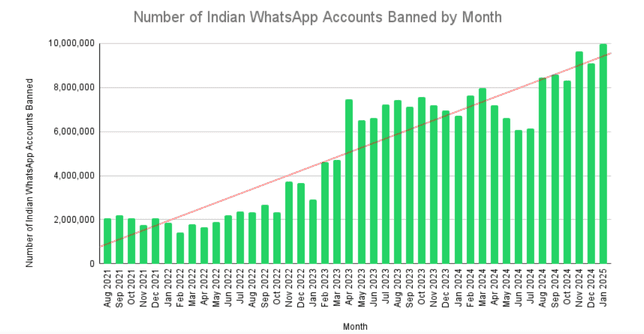
Beyond WhatsApp’s own rules, various laws regulate marketing messages. Privacy laws like GDPR (Europe) and CCPA/TCPA (United States) require businesses to get explicit consent before contacting users and to provide opt-outs. Violating these can lead to heavy fines or legal action. In sectors like finance or healthcare, additional regulations (e.g., FINRA, HIPAA) may apply to messaging.
Staying compliant avoids legal penalties and protects your reputation.
Compliance isn’t static, which means rules evolve. Notably, starting April 1, 2025, Meta has paused all WhatsApp marketing messages to U.S. phone numbers. This means businesses can no longer send promotional template messages to customers with U.S. WhatsApp numbers. Only non-marketing messages (like order confirmations, receipts, or support replies) are allowed for U.S. users.
This major change underscores that WhatsApp is cautious about promotional content. Companies must adapt by focusing on transactional messages in the U.S. and ensuring even stricter compliance elsewhere. Keeping up with such policy changes is now a key part of compliance.
Compliance matters because it safeguards your customer relationships, ensures your messages actually get delivered, and keeps your business out of trouble.
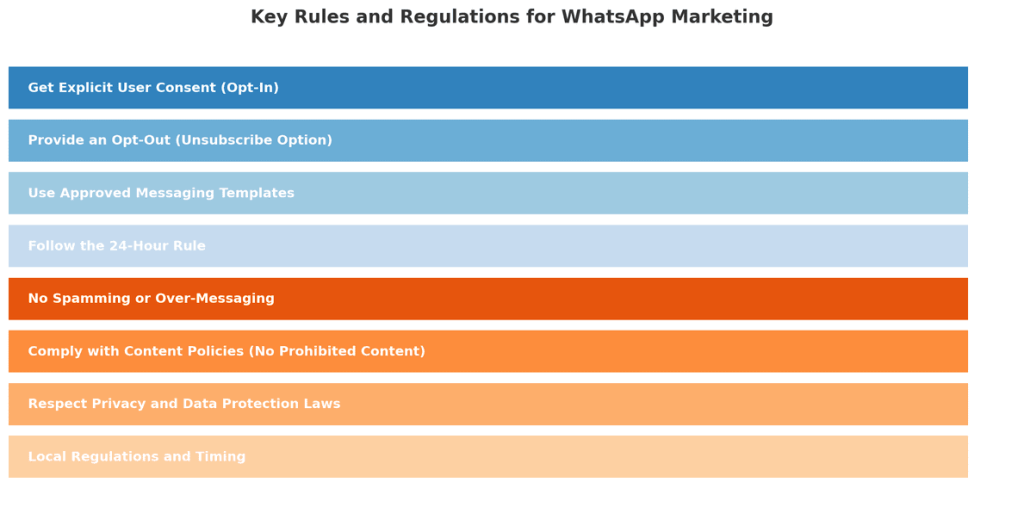
Before we get to the checklist, it’s important to understand the rules and regulations governing WhatsApp marketing. These come from two places: WhatsApp’s official policies and general marketing laws. Here are the key principles you must follow:
Only message people who have specifically opted in to receive WhatsApp messages from your business. This consent must be an explicit, affirmative action (e.g., checking a box, sending you a WhatsApp message, or signing up through a documented method). Keep records of consent for compliance.
No opt-in = no messaging – sending promotional messages to people who never agreed to it is a clear violation.
Every marketing message must provide recipients with a simple way to opt out. Accept opt-out requests received via any channel and promptly honor all unsubscribe requests. Neglecting this increases the risk of user complaints and policy violations.
For proactive or bulk marketing messages (especially outside the 24-hour session window), use only WhatsApp-approved templates, reviewed and authorized by Meta. Do not edit templates for other purposes. All templates must strictly comply with category rules, which were updated in July 2025 (e.g., utility vs. marketing templates have different content restrictions).
Sticking to approved templates ensures your messages meet policy and won’t be automatically blocked.
You may freely respond to users within 24 hours of their last message (“session messaging”). After 24 hours, only use approved templates to initiate contact unless the user replies again. This controls spam and improves user experience.
This rule is meant to prevent spammy follow-ups. Plan your campaigns accordingly and avoid violating the 24-hour support window.
This sounds obvious, but it’s a core rule: Don’t send unsolicited bulk messages or high-frequency messages that annoy users, even to opted-in users.
Maintain sensible frequency, provide relevant value, and avoid contacting disengaged users. Never use unofficial or automated tools outside the sanctioned WhatsApp Business API/app- such use is banned and puts your account at risk.
If too many recipients report or block you, WhatsApp will quickly categorize your number as spammy. Start slow with broadcasts, monitor user feedback, and always prioritize quality over quantity.
Do not send any illegal, obscene, hateful, threatening, or otherwise restricted content. WhatsApp and Meta’s policies prohibit certain industries (e.g., firearms, tobacco, illicit drugs, some financial/gambling services) and any use that violates local laws or encourages unlawful conduct. Always review the latest Meta and WhatsApp content restrictions if in a regulated sector.
According to WhatsApp’s Business Policy, disallowed content includes anything “illegal, obscene, defamatory, threatening, intimidating, harassing, hateful, or racially/ethnically offensive”.
Handle personal data (like phone numbers and names) in compliance with data protection laws (such as GDPR in the EU). Secure user consent, have a clear privacy policy, process data transparently, and honor user requests for deletion or changes. Do not collect sensitive data (financial, health, etc.) over WhatsApp unless permitted by law and WhatsApp policy.
Follow additional local marketing rules (such as the US TCPA, local “Do Not Disturb” registries, and time restrictions on messaging). Penalties for improper use, especially in regulated industries or jurisdictions, are increasingly strict as of 2025.
The bottom line: treat WhatsApp marketing with the same compliance rigor as email or SMS marketing.
Now that we’ve covered the rules, let’s turn this into a practical checklist you can follow.
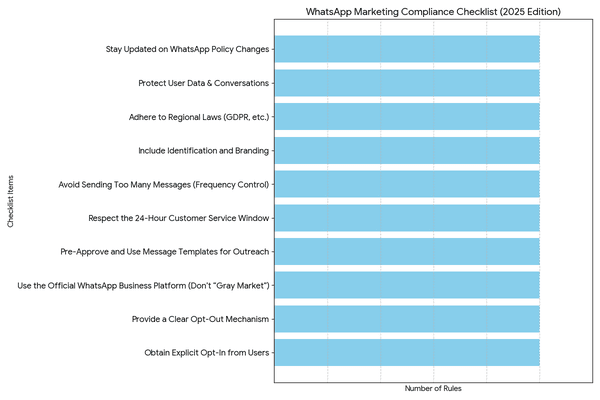
Below is your compliance checklist for WhatsApp marketing in 2025. Use this as a reference each time you plan a campaign or send messages to ensure you tick all the boxes. These steps incorporate both WhatsApp’s policies and general best practices for ethical marketing:
Never add someone to your WhatsApp campaigns without their clear permission. Make sure you have a record of their consent (e.g., via a signup form, a checked box, or a WhatsApp message they initiated). The user should know they are agreeing to receive marketing or updates from your business on WhatsApp. For example, use phrases like “Subscribe to WhatsApp updates” on your website or ask customers in-store if they’d like promo messages.
Remember, “No opt-in? No messaging.” This is the golden rule to stay compliant. WhatsApp’s own terms require that the person give you their number and agree to messages. If you’re ever in doubt about a contact’s consent, don’t message them until you confirm it.
Every message or conversation should give users an easy way to stop receiving future messages. This could be an automated reply that if they send “STOP”, you won’t message them again, or a note in the message like “Text STOP to unsubscribe at any time.” Monitor these replies diligently and honor opt-outs immediately.
Also, if a user blocks your number or deletes their WhatsApp, obviously, cease communication. Include an opt-out option in every outbound campaign as a standard practice. This not only keeps you compliant but also builds trust – users appreciate knowing they’re in control. Make sure your team or your messaging platform regularly updates the opt-out list to avoid any accidental sends to those who opted out (which could look like spam).
Ensure you’re using WhatsApp through official channels – either the WhatsApp Business App or the WhatsApp Business API via an approved provider. Do not use unauthorized third-party blast tools or hacked solutions that promise to send bulk messages, as these often violate WhatsApp’s terms and can lead to immediate bans. If you need to send at scale, go through a verified Business Solution Provider (BSP) who will help with compliance (template approvals, throughput limits, etc.).
Additionally, don’t use personal accounts for business purposes. Using a standard WhatsApp account to message customers is against the terms. Always register a proper business account and get it verified if possible (official business accounts with the green check mark add credibility and might reduce the chance of mistaken blocks). This step is about playing by WhatsApp’s rules, and it gives you the tools you need to comply (like template messaging and quality ratings) and signals to WhatsApp that you’re a legitimate sender.
When sending broadcasts, bulk messages, or re-engaging users after 24 hours, always use approved message templates. Plan your template messages in advance (such as a “Weekly Deal Alert” or “Event Reminder”) and submit them to WhatsApp for approval via your Business app or API provider. Templates must not contain disallowed content or variable fields that could be abused. Once approved, use them exactly as intended.
For instance, if you have an approved template for a delivery update, don’t repurpose it to send a marketing coupon – get a separate coupon template approved. All bulk outbound messages should use these templates and only go to users who opted in. Also, monitor template quality – WhatsApp provides a quality rating for template messages based on user feedback. If a template gets many blocks or negative feedback, its quality will drop, and it could even be disabled. If you see a template’s quality degrading, pause and reassess the content (it might be seen as too spammy or irrelevant).
This is a compliance checkpoint often overlooked. If a user messages you, mark the time. You have a 24-hour window from their last message to send free-form replies (which can include marketing content only if it’s in the context of their inquiry). After 24 hours of no user activity, don’t send unsolicited messages unless it’s via a template. Violating this could flag your number.
So, for example, if a customer asked a question and you answered, don’t follow up days later with a sale announcement unless they opted in and you send it as a template message. The 24-hour rule is enforced by WhatsApp’s API (it won’t deliver messages outside the window without a template), but if you’re using the Business app, you need to be mindful manually. A good practice is to set up automated chatbot responses that remind users to opt in for updates if they contact you, so you have permission to message them later.
Even with consent, bombarding users with messages is a compliance and quality risk. WhatsApp monitors how users react to your messages (they can report spam or block you). If you send too frequently, you’re more likely to annoy people. Instead, stick to a reasonable schedule – e.g., a few messages per week at most, or whatever frequency the user explicitly agreed to. Quality over quantity is key.
Also, consider time of day – send messages at appropriate hours based on the user’s timezone (for example, avoid early morning or late night promotional pings). This isn’t a formal law, but it’s good practice that falls under not “surprising or spamming” users. If using broadcast lists in the WhatsApp app, remember you can only send to contacts who have your number saved, and there’s a cap of 256 contacts per broadcast list.
Trying to skirt these limits by using multiple lists or rapid-fire messages can trigger spam detection. Start small, see how users respond, and increase gradually if things go well. Monitor your opt-out rate – a spike in unsubscribes or blocks indicates you need to dial back.
Make sure users know who is messaging them and what to expect. In your initial message or template (especially the first time you contact a user), introduce your business name and why you’re messaging. For example: “Hi [Name], thanks for signing up for Acme Store updates on WhatsApp- here’s your welcome discount!” Being transparent aligns with both WhatsApp policy and privacy laws (which often require identifying the sender in marketing messages).
If you use the WhatsApp Business profile features, fill out your profile completely with your business name, logo, contact info, and website. A complete profile lends credibility and complies with WhatsApp’s guidelines to maintain an accurate business profile. It also reassures users that this is an official communication. Never impersonate another business or use misleading identities, besides being illegal, it will get you banned swiftly.
As part of your checklist, always cross-check against the local laws of your recipients. For EU residents, ensure you meet GDPR requirements: you have a lawful basis (consent) for messaging, you’ve told them how you’ll use their data, and you’re providing ways to exercise their data rights. For U.S. customers, if you’re in sectors like telemarketing, be mindful of TCPA.
For example, if you collected a phone number for WhatsApp messages, that consent should be written and clearly state you’ll send automated messages- this also covers you under TCPA for that medium.
Canada has CASL (which requires express consent and certain email formalities, some of which can apply to chat messaging too). While WhatsApp is a relatively new channel, regulators treat it similar to SMS or email when it comes to marketing compliance.
Tip: keep logs of consent (as mentioned) and a copy of the messages you send, in case you need to demonstrate compliance.
WhatsApp is end-to-end encrypted, but you must still handle any data you extract with care. If you’re saving customer info (like exporting chat details to a CRM), secure it properly. Publish a privacy policy for your WhatsApp interactions, and if possible, link to it in your WhatsApp profile or the first message. WhatsApp’s policy requires a published privacy policy and that you only use data obtained from WhatsApp for the purpose of messaging that person.
Don’t use WhatsApp chats as an opportunity to fish for extra personal data you don’t need. Never share a user’s chat content publicly or with other customers, as this violates trust and WhatsApp rules. For example, if a customer sends you a photo or personal info over WhatsApp, do not broadcast that elsewhere without consent. Keep WhatsApp conversations as confidential as you would phone calls or emails with that customer.
As we saw with the 2025 U.S. marketing pause, WhatsApp’s policies can change, and you are responsible for keeping up. Regularly check official updates from WhatsApp or your BSP. Join WhatsApp Business developer forums or follow credible blogs for news. For instance, the April 2025 change means if you’re a U.S. business or have U.S. subscribers, you must adjust your strategy (focus on transactional messages or encouraging users to initiate chats).
Meta might introduce new features or rules in the future- such as new message categories, additional restrictions, or verification requirements. By staying informed, you can update your compliance checklist proactively. It’s also wise to periodically audit your WhatsApp practices against the latest guidelines. Set a reminder each quarter to review WhatsApp’s Business Policy and ensure nothing you’re doing falls afoul of an update.
To bring it all together, let’s look at some best practices and examples that illustrate compliant WhatsApp marketing in action:
By following this checklist and best practices, you’ll achieve high engagement, protect user trust, and comply with all WhatsApp and legal requirements for marketing in 2025.
Compliance isn’t a hindrance to WhatsApp marketing, it’s the foundation of success on this channel. When you respect your audience’s consent, privacy, and time, you build trust that translates into better results, from higher open rates to stronger customer loyalty. In 2025, with WhatsApp tightening its policies and regulators watching closely, there’s no shortcut around compliance.
The good news is that by following this WhatsApp Marketing Compliance Checklist, you’re not just avoiding problems, you’re actively improving your marketing effectiveness.
Always put this checklist into practice with your team. Start by auditing your current WhatsApp contact list and confirming you have consent for everyone. Review your message templates to ensure they meet guidelines. Update your workflows to automatically handle opt-outs and to prevent any non-compliant sends (especially if you have U.S. contacts, given the recent changes). Educate your staff or colleagues about the do’s and don’ts. When planning new campaigns, use the checklist as a guide at each step.
Staying compliant might require a bit of effort and vigilance, but the payoff is worth it: you’ll maintain access to one of the world’s most popular messaging platforms and keep your customer relationships strong and positive. Don’t wait for an account ban or a warning letter to make changes. Start implementing the compliance steps today. Whether it’s setting up a proper opt-in form on your website or checking the latest WhatsApp policy update, every action helps protect your business and your customers. Commit to being a compliant communicator, and you’ll reap the rewards of higher customer trust and more effective campaigns.
Yes, WhatsApp marketing is legal if you obtain users’ explicit consent before messaging them, use the official WhatsApp Business platforms (App or API), and follow both WhatsApp’s and local laws (e.g., GDPR, TCPA). Messaging without consent, or violating content/privacy rules, is not compliant and risks penalties.
Ask users directly and clearly for permission (e.g., an unchecked checkbox at checkout, a Click-to-WhatsApp link, or an in-store request). Explain what messages they’ll receive. Consent must be explicit and specific to WhatsApp- keep a record of how and when it was given.
Imagine messaging a local store on WhatsApp, asking about a product, getting a personalized recommendation, and completing the purchase right in the chat. This scenario is no longer futuristic; it’s happening every day on WhatsApp as conversational commerce takes off.
Conversational commerce, the blend of shopping and messaging, has surged in popularity on platforms like WhatsApp, transforming how businesses and customers interact. In fact, consumers are increasingly using messaging apps for every stage of the buying journey, from inquiry to payment.
By 2025, global spending via conversational commerce channels is expected to reach a staggering $290 billion, underscoring that chat-based shopping is becoming mainstream. WhatsApp, with its enormous user base and seamless chat interface, is at the heart of this revolution.
This article explores how WhatsApp is fueling the rise of conversational commerce, why it matters for businesses, and how you can leverage it to boost sales and customer engagement.
Conversational commerce on WhatsApp is the use of WhatsApp chats to market, sell, and support products or services. Coined by Chris Messina in 2015, the idea is to let customers complete the entire shopping journey—discovery, inquiry, purchase, and support—directly in a chat, without switching to websites or call centers.
Using the WhatsApp Business app or Business API, companies can:
This makes it possible for customers to browse, ask questions, get recommendations, place orders, and even pay—all within the same conversation.
Beyond transactions, WhatsApp conversational commerce focuses on personalized engagement, such as answering pre-purchase queries, offering tailored advice, sharing updates, and providing post-purchase support.
In short, WhatsApp turns a chat thread into a digital storefront and service desk, where the conversation itself becomes the shopping interface.
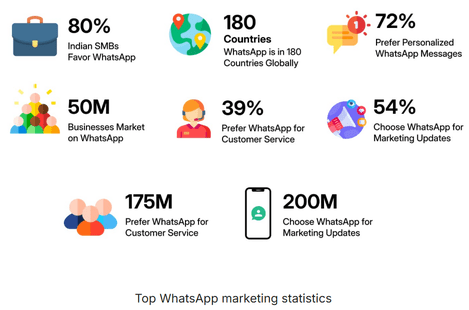
WhatsApp has become the leading platform for conversational commerce due to a mix of scale, engagement, consumer behavior, and evolving platform tools.
WhatsApp combines global scale, incredible engagement, consumer preference, fast-growing business use, and integrated commerce tools. This rare blend makes it the backbone of conversational commerce and a must-have sales channel, with over two-thirds of online shoppers already purchasing through chat apps.
WhatsApp wasn’t originally built for shopping, but over the years, it has added powerful features that turn a simple chat into a full-fledged commerce experience. It has transformed from a simple messaging app into a robust commerce channel by combining massive reach, high engagement, and business-friendly tools.
This combination of global reach and personal conversation helps brands scale customer interactions without losing the human touch.
The key is that customers never feel forced to jump to a different app or website – everything flows in one continuous conversation, which greatly reduces drop-offs.
In short, WhatsApp offers a high-impact channel without a high price tag, leveling the playing field for small businesses to compete with creative conversational strategies.
WhatsApp conversational commerce delivers scale, engagement, convenience, personalization, low cost, and trust, turning chats into complete shopping journeys from discovery to payment.
Conversational commerce on WhatsApp isn’t just a theory – many businesses have already reaped its benefits. Let’s look at a few examples and use cases that illustrate the power of this approach:
Across retail, hospitality, services, and beyond, WhatsApp conversational commerce delivers higher conversions, abandoned-cart recovery, stronger customer satisfaction, and leaner operations.
The common thread: meeting customers on WhatsApp leads to smoother journeys and measurable bottom-line impact.
For businesses ready to tap into this trend, the good news is that starting with WhatsApp conversational commerce is relatively straightforward. Here are some practical steps and best practices to help you ace commerce on WhatsApp:
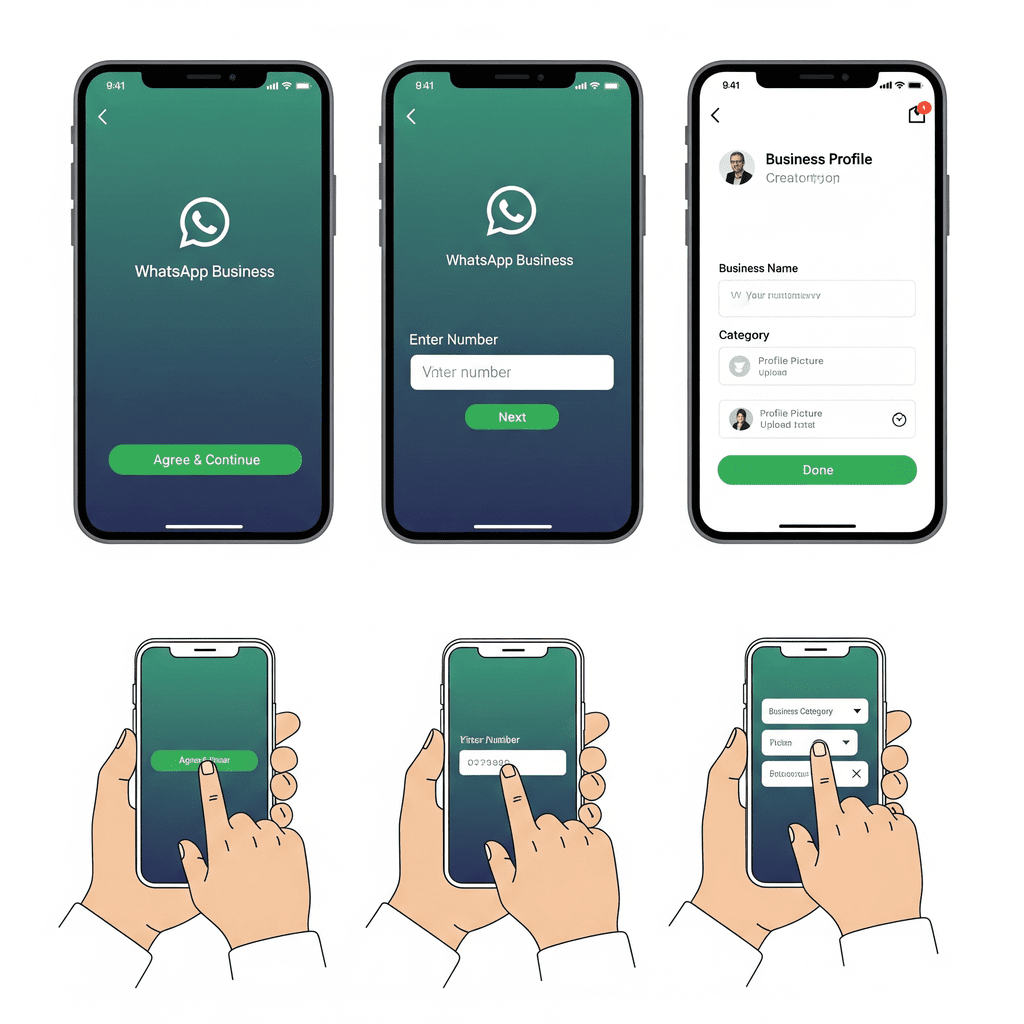
2. Leverage Product Catalogs: One of the first things to do in WhatsApp Business is to set up your Product Catalog. Think of this as your storefront on WhatsApp. Add high-quality photos of your products or services, with clear titles, descriptions, prices, and any relevant details (e.g., sizes, dimensions). Organize items into categories if you have many offerings. The catalog allows customers to browse what you offer right from your WhatsApp profile or via a link you can send in chat. Having a robust catalog means customers can help themselves with basic info, and it makes it easy for you to share product info in a conversation (you can send product cards from the catalog into the chat). Keep the catalog updated – if something goes out of stock or you add new products, maintain your listings so customers aren’t seeing outdated info.
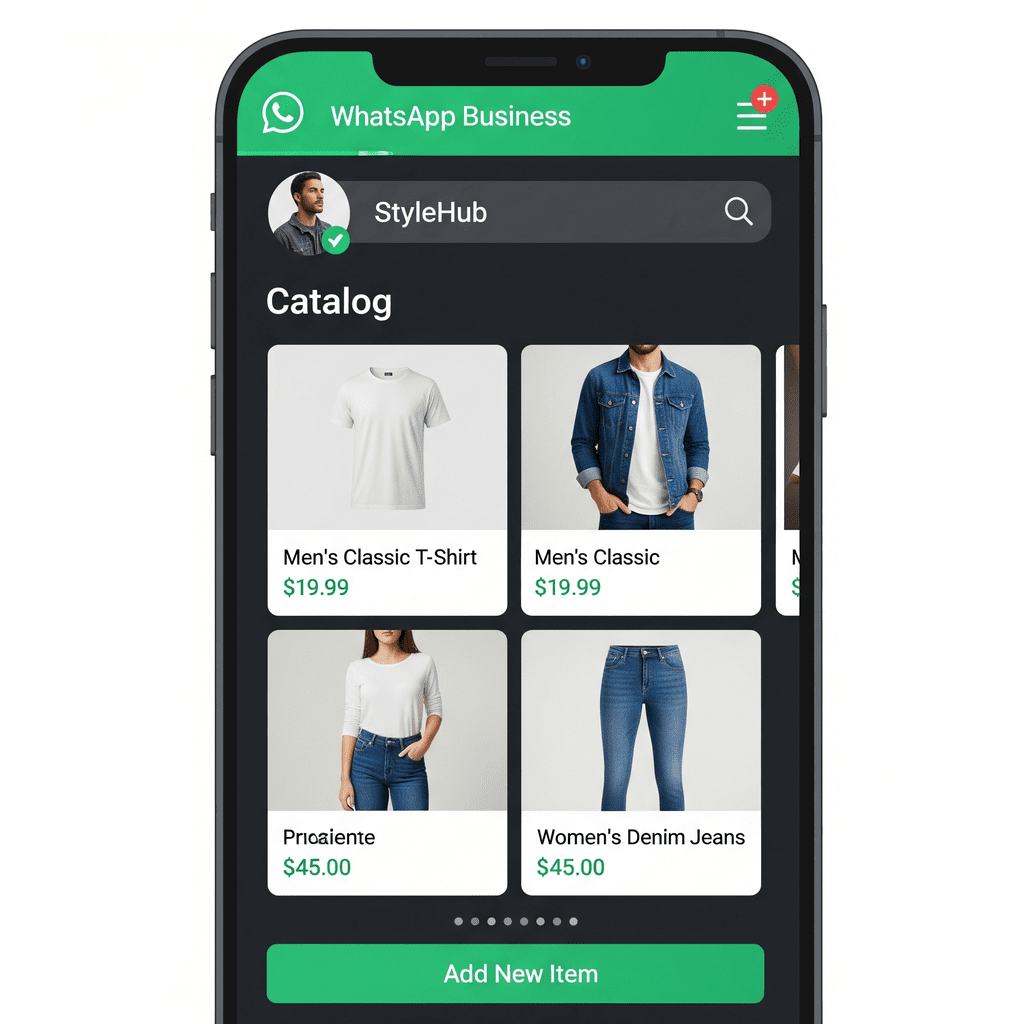
3. Use Chatbots (Automation) Wisely: To scale your conversational commerce, consider deploying a WhatsApp chatbot or automated flows. Many third-party solutions (no-code chatbot builders) can connect with WhatsApp Business API and allow you to create automated question-and-answer flows. For example, a simple bot can greet users with “Hi! Let me know how I can help: 1) Browse products, 2) Track order, 3) Talk to support.” This initial triage can answer common queries or collect info (like the user’s email or order number) before handing off to a human.
Bots are excellent for handling FAQs, taking orders, sending order updates, and collecting feedback. They ensure customers get instant responses even at 2 AM. Just be sure to design the bot with a friendly tone and always offer an option to reach a human agent. A blend of AI and human service tends to work best: let bots tackle repetitive tasks, while humans handle complex or high-value conversations. As AI advances (think Gen AI), these bots can even make personalized product suggestions or upsell complementary items based on what the customer is looking for – mimicking a knowledgeable sales associate in chat.
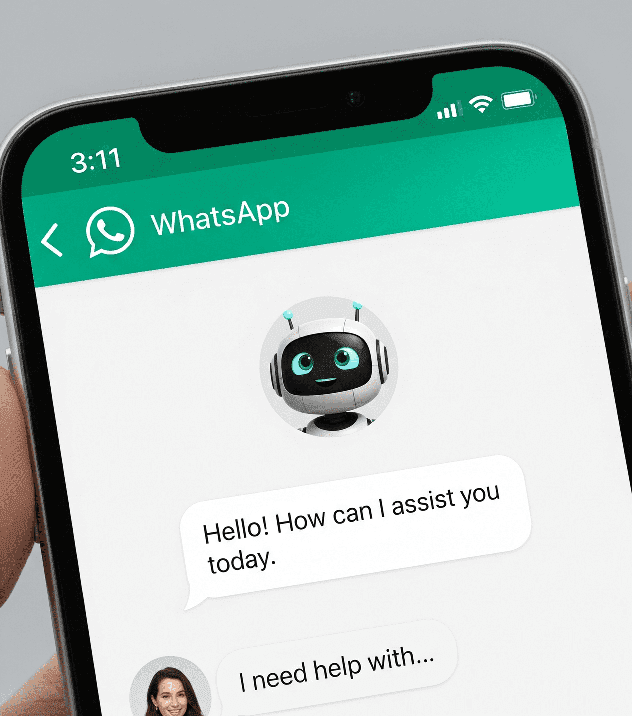
4. Enable Payments and Streamline Checkout: If you operate in a country where WhatsApp Pay or in-chat payments are available (like India or Brazil), definitely integrate that feature. It can be a game-changer. Link your business’s bank or payment account so you can send/receive money on WhatsApp. For everyone else, you can still streamline checkout: use payment links or invoices.
Many payment gateways allow you to generate a web link for a specific amount – you can send that in the chat when the customer is ready to pay. Or use WhatsApp’s integration with catalogs: after a customer confirms an order, you can send an invoice or payment request in chat. The key is to make payment as easy as clicking a link (which opens a secure payment page) or a one-tap in-app pay. The fewer steps, the better. Also, clearly confirm the order and payment received with the customer in the chat, so they have peace of mind that their purchase is complete.
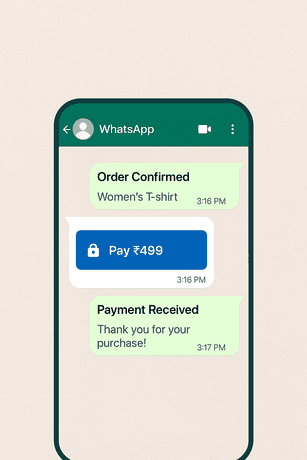
5. Promote Your WhatsApp Channel: “Build it and they will come” doesn’t apply – you need to let customers know they can chat with you on WhatsApp. Promote your WhatsApp contact or chat link everywhere appropriate: on your website (add a WhatsApp chat button or a QR code that opens a chat), on your social media profiles, in email newsletters, and even on physical signage or receipts in-store. Facebook and Instagram allow you to add a WhatsApp contact button on your pages if you connect your accounts. You might run a “Click-to-WhatsApp” ad campaign targeting your audience, which invites people to start a WhatsApp conversation with a single tap from the ad.
This can be very effective for generating leads or inquiries. Consider offering an incentive for customers to message you – for example, “WhatsApp us to get a 10% off coupon” – to kickstart engagement. Once the conversation starts, make sure to be responsive (fast replies are expected!). Over time, as customers get used to the convenience, many will prefer WhatsApp as their main way of interacting with your business.
6. Be Responsive and Human: One of the golden rules of conversational commerce is to respond promptly. Users on WhatsApp expect quick replies – if they message a business and get silence for hours, it hurts the experience. Try to have someone monitoring your WhatsApp during business hours, or use autoresponders to acknowledge messages received off-hours (“Thanks for reaching out! We’ll get back to you first thing in the morning.”). During the critical 24-hour window after a user message (when WhatsApp allows free-form responses), aim to reply as soon as possible.
Studies show that responding to leads within 15 minutes can boost conversion rates by 80% or more. Speed matters, but so does tone. Keep the conversation professional yet friendly and human. Use the person’s name, introduce yourself or your role, and use a conversational tone as you would in person. Emojis are even acceptable in moderation to convey warmth 🙂. The beauty of WhatsApp is that it allows a less formal vibe than email, so you can build rapport. If using templates or automation, customize them so they do not sound robotic. The goal is to make the customer feel like they have a helpful friend on the other end.
7. Follow WhatsApp’s Commerce Policies: When engaging in commerce on WhatsApp, it’s important to adhere to WhatsApp’s rules and best practices (both to avoid getting your number blocked and to respect customers). Ensure you get opt-in consent from customers before messaging them with promotions or newsletters. This can be as simple as them messaging you first (which is an implied opt-in) or them checking a box on your website saying “I want updates on WhatsApp.” Never add someone to WhatsApp blasts without consent – it can lead to complaints.
Use official message templates for initiating chats outside the 24-hour window (WhatsApp requires using approved templates for things like shipping updates, appointment reminders, etc., so get your templates submitted and approved in the WhatsApp Business console). And of course, respect user privacy and preferences: if someone asks to unsubscribe or stop messages, honor it immediately. Avoid sending too frequent or spammy messages – quality over quantity is key to keep users from blocking you. As long as you focus on being helpful, relevant, and conversational, users will welcome your WhatsApp messages rather than see them as spam.
By following these steps, you set a strong foundation for conversational commerce on WhatsApp.
Tip: Start small (e.g., support via chat), then scale with catalogs, automation, and marketing campaigns. Track engagement and refine based on feedback.
Conversational commerce on WhatsApp is not a passing fad, it marks a fundamental shift in how we shop and communicate. As we move into 2025 and beyond, several trends are shaping the future of this space, promising even richer interactions and more opportunities for businesses:
7. Ad-to-Chat and the New Marketing Funnel
The surge of conversational commerce on WhatsApp is reshaping the customer experience. It’s making buying as easy as sending a text. Customers love the convenience, personalization, and instantaneity of chatting with businesses, and increasingly, they will gravitate toward brands that offer this ease.
For businesses, this shift opens up exciting opportunities: higher engagement, better conversion rates, and more meaningful customer relationships built through dialogue rather than one-way broadcasts. It’s a chance to bring back the personal touch of the corner store owner who knows every customer, but to do it at internet scale with the help of technology.
The data and examples are clear: conversational commerce on WhatsApp drives results, from increased sales percentages to stronger loyalty. But beyond the numbers, it aligns with a broader trend in digital behaviour, and people want to communicate in the same natural, conversational ways with businesses as they do with friends. WhatsApp provides the perfect medium for that, and it’s rapidly becoming a commerce powerhouse as a result.
Now is the time to embrace this change. If you haven’t already, make WhatsApp a core part of your customer journey. Set up that business account, train your team (or your chatbot) to be conversational and helpful, and start turning chats into conversions. Whether you’re a small boutique or a large enterprise, conversational commerce can level up your customer experience and revenue.
Don’t let your business get left on read. The rise of conversational commerce on WhatsApp is here, and it’s only gaining momentum. By acting now, you can ride this wave and outperform competitors who stick to old channels. Open that chat with your customer – it just might open the door to your next big sale. Your customers are ready to talk – are you?
Start leveraging WhatsApp in your sales and support strategy today and see the difference. The future of commerce is happening one chat at a time, and make sure your business is part of it.
It’s time to turn those WhatsApp notifications into opportunities and conversations into conversions.
It’s the use of WhatsApp chats to handle the entire shopping journey, from browsing and asking questions to getting recommendations, placing orders, and making payments. Businesses engage customers through live agents or chatbots, making shopping more conversational, convenient, and interactive within the app.
Set up a WhatsApp Business account, add a product catalog, and share your WhatsApp link with customers. Use chat to answer queries, send product details, confirm orders, and accept payments via WhatsApp Pay (where available) or payment links.
WhatsApp has become a powerhouse for business communication, boasting nearly 3 billion users worldwide and exceptionally high engagement. In fact, WhatsApp messages enjoy about a 98% open rate, compared to only ~20% for email. This means almost every message you send on WhatsApp is seen by the recipient.
Such potential comes with a catch: if bulk messaging is done incorrectly, your deliverability can suffer – or worse, your number could be banned.
Meta (WhatsApp’s parent) is serious about curbing spam and misuse; for example, over 8.4 million WhatsApp accounts in India were banned in just one month (August 2024) for policy violations like spamming and bulk unsolicited messaging. In other words, poor practices can kill your reach, derail your marketing, and even get your account shut down.
Deliverability in WhatsApp bulk messaging refers to your messages actually reaching the intended audience without being blocked, filtered out, or ignored. High deliverability means your messages land in customers’ WhatsApp chats (and not as a single grey tick or not at all) and are welcomed rather than reported. Improving this deliverability is crucial to leverage WhatsApp’s real-time engagement (95% of WhatsApp messages are read within 3 minutes) while staying compliant with WhatsApp’s rules.
(Quick fact: Personalized, relevant messaging isn’t just safer – it’s more effective. Businesses using WhatsApp see conversion rates of 45-60%, far higher than typical email campaigns. Deliverability and engagement go hand-in-hand!)
In this comprehensive guide, we’ll explore how to improve deliverability in WhatsApp bulk messaging. You’ll learn proven strategies – from using the WhatsApp Business API to crafting quality content – that ensure your bulk messages reach your audience safely, effectively, and at scale. We’ll also cover the latest WhatsApp policy updates (like new message limits and restrictions) and answer frequently asked questions. By the end, you’ll have a complete roadmap to run WhatsApp marketing campaigns that get seen and drive results, without getting banned. Let’s dive in!
WhatsApp bulk messaging refers to sending a message (or a set of messages) to a large number of users at once, for example, a promotion to thousands of customers. Deliverability refers to the likelihood that messages will be delivered to recipients’ WhatsApp inboxes without being filtered out by WhatsApp or ignored due to being flagged as spam. Unlike email, where “deliverability” often concerns spam folders, on WhatsApp it’s about avoiding bans, blocks, or policies that prevent your message from showing up at all.
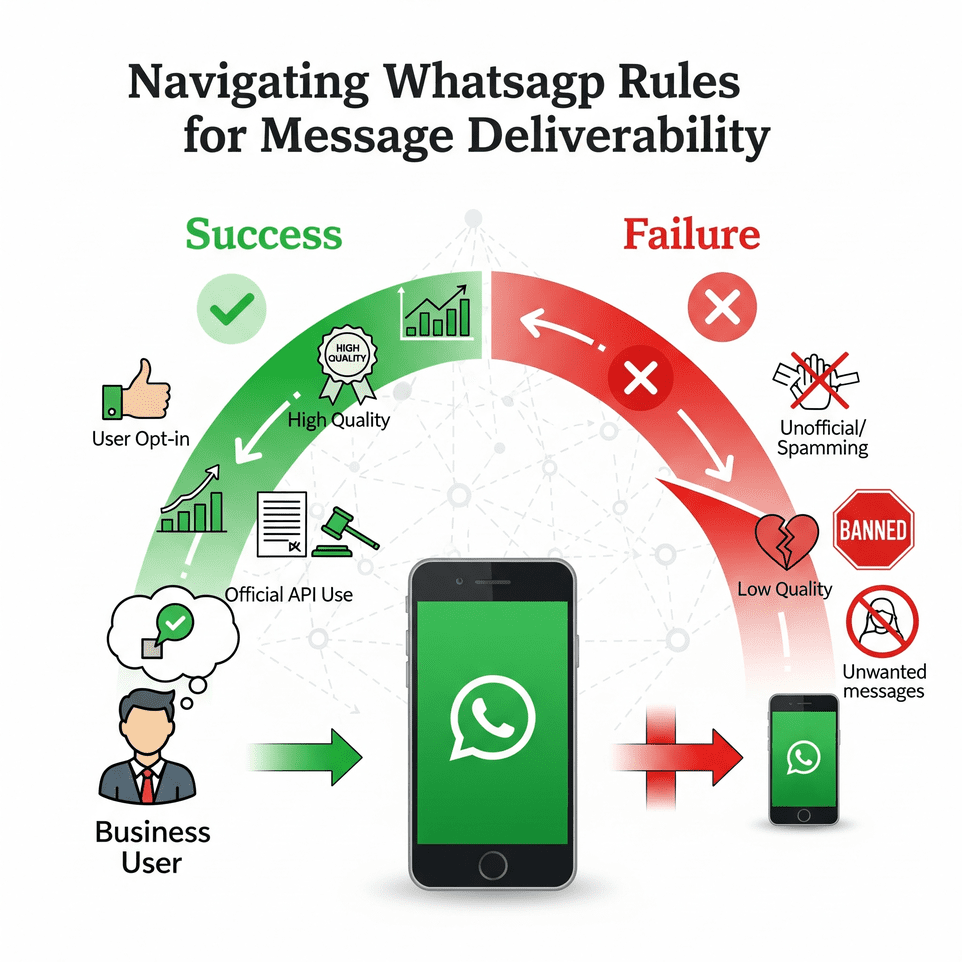
WhatsApp is a highly personal channel. If users haven’t consented (opted in) to receive your messages, they might report or block you immediately. WhatsApp monitors user feedback closely; a spike in blocks or “report spam” actions will hurt your number’s reputation and can lead to delivery restrictions or bans.
✅In short, messaging people who aren’t expecting to hear from you is a sure recipe for deliverability problems.
WhatsApp has strict policies to maintain a good user experience. Unsolicited bulk messages, use of unauthorized apps, or sending harmful content are all violations of WhatsApp’s terms. The platform uses both algorithms and user reports to identify spam or abuse. If you send too many messages too quickly from a regular account, or use tools that automate sends in non-compliant ways, WhatsApp will likely flag it.
Deliverability can drop as your messages get throttled – or stop entirely if your number is banned. Simply put, WhatsApp will favour businesses that play by the rules and penalize those who don’t.
For those using the WhatsApp Business API or WhatsApp Business Platform, WhatsApp assigns a Quality Rating to your phone number (High, Medium, or Low quality). This rating reflects recent user feedback on your messages (blocks, reports, read rates, etc.). If your quality rating dips to Low (red), WhatsApp will flag your number and may impose sending limits. A flagged or restricted status means you cannot send further bulk notifications until quality improves, directly hurting deliverability.
On the other hand, maintaining a High (green) quality rating keeps your deliverability strong and even allows you to scale to larger messaging tiers.
There’s a right way and a wrong way to send bulk WhatsApp messages. The right way is using WhatsApp-approved methods – either the WhatsApp Business App’s broadcast feature for small lists or the WhatsApp Business API for large-scale messaging.
The wrong way is using unauthorized third-party apps, scripts, or “WhatsApp bomber” tools that blast messages. Using unofficial methods might seem to work briefly, but WhatsApp’s systems often detect them. Accounts using unauthorized tools risk immediate bans, meaning zero deliverability because your messages (and account) are shut down. In contrast, using the official channels (app or API) ensures WhatsApp knows you’re abiding by their rules, which significantly safeguards your deliverability.
Even if you have permission to message customers, how you message them affects deliverability. If your bulk messages are irrelevant, overly promotional, or too frequent, users might ignore them or delete them, or worse, complain.
WhatsApp’s new policies even include frequency capping per user to reduce overload. For instance, WhatsApp has introduced a limit on the number of marketing messages a user can receive from all businesses in a given time frame. If a user has hit the limit (say, they’ve already received 5 marketing blasts that day), any further messages – including yours – will simply not be delivered. This means brands are now effectively competing for limited slots in a customer’s daily WhatsApp marketing messages.
✅The takeaway: you must make your messages valuable and engaging to be among those that actually get through to the user.
“Deliverability” also depends on where your audience is and what type of message you send. Recent updates show this clearly: as of April 1, 2025, Meta disallows WhatsApp marketing messages to any U.S. (+1) numbers. Promotional or broadcast templates categorized as marketing will be blocked for U.S. recipients, no matter how good your content is. Only transactional or customer service messages are allowed through to U.S. WhatsApp users. So if your bulk campaign includes U.S. phone numbers, marketing content will not deliver at all.
Additionally, WhatsApp requires business-initiated messages outside the 24-hour customer service window to use approved message templates. If you try to send a non-template message to a user you haven’t chatted with recently, it won’t deliver. And if your template content is overly spammy or gets negative feedback, WhatsApp can reclassify or reject templates, hurting future deliverability. Always ensure you use the correct template type (e.g., mark it as transactional vs promotional appropriately) to avoid unnecessary filtering.
Next, we’ll explore how to put this knowledge into practice and overcome the challenges – so your WhatsApp campaigns reach every customer’s chat as intended.
Before jumping into the solutions, it’s important to recognize the key challenges that often hurt WhatsApp message deliverability. Knowing these pitfalls will you avoid them proactively:
WhatsApp frequently bans accounts for spammy or non-compliant activity, such as sending unsolicited promotions, misleading content, or using unofficial apps.
Solution:
A single gray tick means undelivered. Beyond offline recipients, bulk sends can fail because:
Solution:
Excessive blocks or complaints lower your quality score, hurting deliverability and brand trust.
Solution:
API-based outbound messages require WhatsApp-approved templates. Poorly written, overly promotional, or misleading templates risk rejection or misclassification.
Solution:
WhatsApp updates policies often, such as introducing user-level frequency caps or regional restrictions (e.g., marketing messages currently blocked for U.S. users).
Solution:
One of the cornerstones of high deliverability (and successful WhatsApp marketing in general) is using the WhatsApp Business API. If you’re serious about bulk messaging, relying on manual sending or using the basic WhatsApp app is not only inefficient – it also comes with limitations that can hurt deliverability.
WhatsApp Business App vs WhatsApp Business API: The regular WhatsApp Business App (available on mobile) is great for small businesses interacting with dozens of customers. It even has a Broadcast Lists feature that lets you send a message to up to 256 contacts at once. However, as noted, those contacts must have your number saved or they won’t receive the broadcast. This is a built-in anti-spam safeguard.
If you have, say, 1000 customers, you’d have to split them into 4 lists, and even then, delivery is only guaranteed to those who saved you. There’s also no automation in the app – every message or list sent is manual, personalization is minimal, and you risk getting blocked if you send too many broadcasts that people don’t expect (even via the app, users can report spam). In short, the app is fine for small, organic outreach, but it struggles for large-scale campaigns.
By contrast, the WhatsApp Business API (also known as the WhatsApp Business Platform) is designed for bulk messaging at scale. Through the API (accessed via official providers known as Business Solution Providers or BSPs), you can send messages to thousands or even millions of users reliably. There’s no 256-recipient cap – instead, you have messaging tier limits based on quality.
New API-enabled numbers start at Tier 1 (1,000 unique recipients per 24 hours), and can climb to Tier 2 (10k/day), Tier 3 (100k/day) and beyond as your quality remains high. This tiered ramp-up is effectively a built-in “warm-up” mechanism. And crucially, with the API, recipients do not need to save your number to get your messages. As long as you obtained their consent and have their number, you can reach them. This dramatically improves deliverability for marketing use-cases like reaching new leads or customers who haven’t chatted with you yet.
Overall, the WhatsApp Business API is the foundation for reliable bulk messaging. By migrating to the API (or starting with it outright), you put yourself on the “approved highway” for WhatsApp communication. You won’t need to worry about weird limits or getting banned just for being successful in messaging your customers.
Of course, the API does come with some costs (WhatsApp charges per conversation, and BSPs may have platform fees), and there’s an initial setup/verification process. But the ROI is worth it, considering the massive engagement WhatsApp provides. Later in this article we’ll provide a call-to-action on how you can get started with the API easily.
Next, let’s get into the best practices that will improve your deliverability regardless of channel (app or API) – though you’ll see many of these are much easier to implement if you are using the API and an automation platform.
Improving deliverability isn’t a mystery – it comes down to following a set of best practices consistently. Below are the most important strategies, each building on the others. Adopt these, and you’ll find your WhatsApp campaigns not only deliver to more people, but also drive better engagement and results.
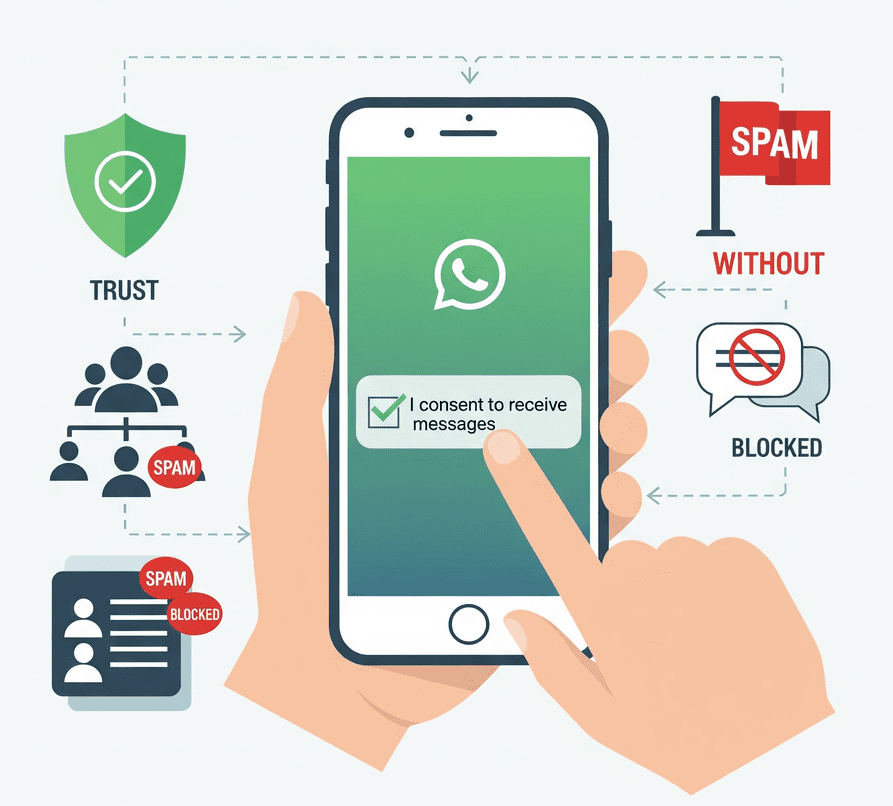
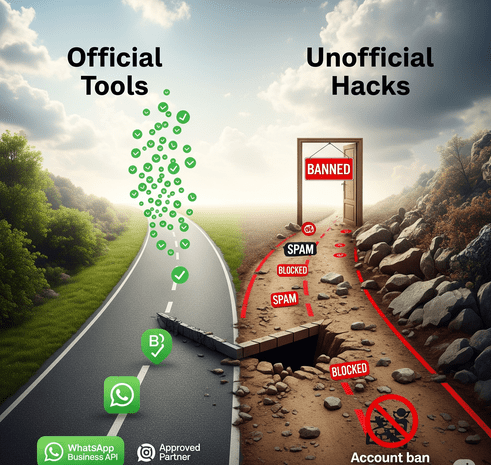
Actionable tips for personalization: Use the customer’s name in the greeting. Mention context (“Thanks for your last purchase of X, we have a related offer you’ll love”). Segment by behaviour – e.g., send a different message to those who clicked the last campaign vs. those who didn’t (for the latter, you might try a different angle to re-engage them). If you have location info, promote store events or services available in their area. The key is making the recipient feel like the message was crafted for them.
Modern WhatsApp marketing software makes this easy with merge fields and conditional messaging. It may require a bit more setup than a one-size-fits-all blast, but the payoff is huge in both deliverability and conversion. As you personalize and segment, you’ll likely see metrics improve across the board – higher read rates, higher replies, and minimal negative feedback.
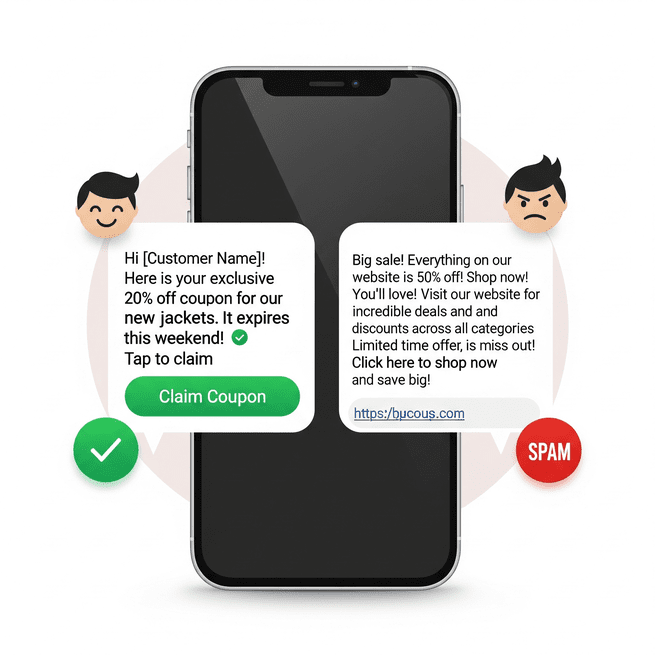
Focusing on quality over quantity also means don’t spam with too many messages. It’s better to send one highly valuable message a week than three mediocre ones per day. Overloading users will lead to fatigue and opt-outs, hurting your long-term deliverability. In light of the new per-user limits, it’s wise to save your WhatsApp messages for when they matter most. Make each campaign count so that if a user only sees a handful of brand messages a day, yours is one they actually appreciate.
When your content consistently delivers value, users begin to trust your messages – they might even look forward to them. This positive relationship is the ultimate deliverability boost: WhatsApp will have no reason to restrict you, and your audience will stay engaged rather than tuning you out.
In summary, think of warming up as building a reputation gradually. Just like an email domain builds sender reputation over time, your WhatsApp number builds a reputation. A slow and steady start leads to a strong finish (i.e., high deliverability when you do reach big volumes). Patience in the early stage will pay off with a robust channel that can reliably hit all your customers’ inboxes when it counts.
You can implement all the best practices above, but you also need to continuously monitor how your WhatsApp campaigns are performing. Deliverability isn’t a set-and-forget thing – it’s an ongoing process of tuning and responding to feedback.
Key metrics and signals to watch:
The mantra here is be proactive. Don’t wait for a serious issue (like a ban or a dramatic drop in delivery) to take action. By keeping an eye on the health of your WhatsApp campaigns, you can catch trends early. For example, suppose you notice each successive campaign is getting slightly fewer reads and a couple more opt-outs – that could indicate fatigue; maybe scale back frequency or refresh your content approach before it escalates to complaints.
Also, when WhatsApp introduces a new rule or feature (like the per-user cap or the US ban on marketing messages), monitor how it affects your metrics. You might observe that after the cap rule, your delivery to heavy WhatsApp users in India went down if your messages were less engaging. If so, double down on engaging content for that segment.
Finally, treat monitoring as a learning loop. WhatsApp marketing is still relatively new for many businesses, and user behaviours can change. Perhaps you’ll find your customers love receiving a quick tip of the week via WhatsApp and your engagement soars – that’s a sign to keep doing it. Or you might find no one clicks videos but they respond to voice notes – who knows! Every audience is different. Use your metrics to discover what your customers prefer, and lean into that. The happier your audience, the better your deliverability and outcomes.
In summary, empower the user. WhatsApp marketing should be permission-based from start to finish. If the user’s preferences change and they no longer want to hear from you on WhatsApp, graciously let them go. It’s the right thing to do and it keeps your deliverability ecosystem healthy.
Improving your WhatsApp bulk messaging deliverability isn’t just a technical tweak – it’s a fundamental strategy for successful WhatsApp marketing. When your messages consistently reach the intended audience and resonate with them, you unlock the true power of WhatsApp as a channel: immediate engagement, high visibility, and interactive communication that can drive conversions at a rate other platforms hardly match.
Let’s quickly recap the journey to better deliverability:
Ultimately, high deliverability means your messages land where they should – in your customer’s chat, building a relationship. Low deliverability, on the other hand, means wasted effort and missed opportunities. By following the guidance in this blog, you’re stacking the odds in your favour that your WhatsApp campaigns will land successfully every time.
Always put these tips into practice. Whether you’re launching your first WhatsApp campaign or optimizing an existing one, take a moment to apply what you’ve learned. Maybe start by auditing your contact list for proper opt-ins, or drafting a more personalized message template, or reaching out to sign up for a WhatsApp API provider if you haven’t yet. Small steps can make a big difference. For example, simply adding an opt-out line or the customer’s name in your next bulk message can improve its reception markedly.
If you’re serious about WhatsApp as a marketing channel, consider taking the next step and explore the WhatsApp Business API solutions and SendWo is one such one stop solution that fits your needs. Having an official platform will not only boost deliverability but also save you time with automation and insights.
Ready to supercharge your WhatsApp outreach? Start implementing these deliverability strategies today. Your audience will notice the difference – more relevant messages – and you’ll notice the results in higher read rates, better customer interactions, and ultimately, more conversions. In the world of WhatsApp marketing, deliverability is king. Master it, and you’ll stay ahead of the competition.
Your customers are just a message away – let’s make sure it’s a message they’ll appreciate and act on.
Happy (and successful) WhatsApp messaging!
Regular WhatsApp accounts have no official limits but sending unsolicited messages, even a few dozen, can cause bans. For WhatsApp Business API, new numbers start with a 1,000-message daily limit (Tier 1) and can scale to 10,000 or more as quality improves. Always send messages only to opted-in users, start with small volumes, and prioritize relevant content to avoid bans.
Yes. Bulk messaging is allowed if you follow WhatsApp’s policies and relevant laws. You must have user consent and send relevant, non-spammy content. Sending unsolicited messages or abusive content violates WhatsApp’s rules and legal regulations like GDPR. Always message only opted-in users to stay legal and avoid penalties.


