Analytics & Reporting for WhatsApp Broadcasting Campaigns in SendWo
Learn all the steps for analytics and reporting for WhatsApp broadcasting campaigns in SendWo that optimize your WhatsApp marketing performance.
 By Snehil Prakash
Published: October 13, 2025
Updated: October 16, 2025
4 min read
By Snehil Prakash
Published: October 13, 2025
Updated: October 16, 2025
4 min read
Learn all the steps for analytics and reporting for WhatsApp broadcasting campaigns in SendWo that optimize your WhatsApp marketing performance.
SendWo’s Analytics & Reporting feature steps in, empowering you with real-time visibility into every message sent, delivered, opened, and missed, and to optimize every campaign for maximum impact.
This tutorial walks you through every step on how to access, analyze, and download detailed WhatsApp broadcast reports in SendWo.
1. Accessing WhatsApp Broadcast
Getting to your broadcast analytics in SendWo is straightforward:
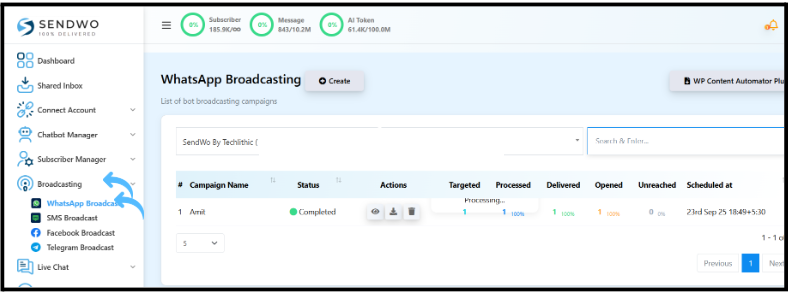
2. From the left-side menu, click on Broadcasting.
3. Select WhatsApp Broadcast to open your campaign management panel, where you can monitor all campaigns in one place.
2. Selecting the Bot Account
Tip: SendWo allows you to manage multiple WhatsApp numbers (bot accounts) under one workspace.
- From the dropdown menu, choose the WhatsApp Bot Account you want to review.
- Instantly, the system filters and displays all the broadcast campaigns that are linked to the specific account.
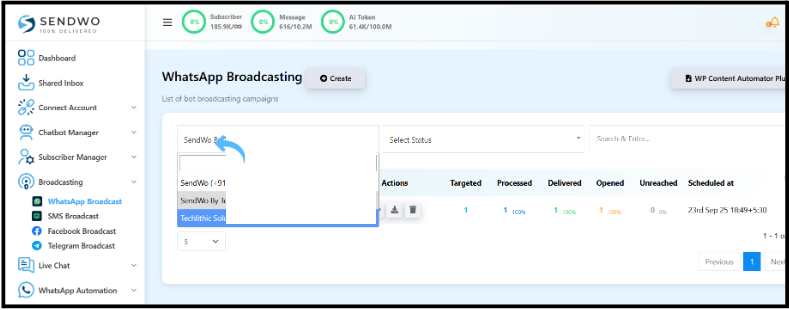
This feature helps you keep your analytics organized, especially if you’re managing separate WhatsApp accounts for different brands, clients, or departments.
3. Campaign Overview
This will allow you to see a concise and powerful campaign summary table with the following details:
| Metric | Description |
| Campaign Name | Unique name given for easy identification. |
| Status | Real-time progress — Completed, Processing, Pending, On-hold, or Paused. |
| Total Contacts | Number of recipients targeted in the campaign. |
| Messages Sent | Total messages sent. |
| Delivered | Messages that successfully reached recipients. |
| Opened | Number of users who viewed your message. |
| Unreachable | Contacts where delivery failed. |
| Scheduled Date &Time | The exact date and time the broadcast was set to go live. |
This bird’s-eye view lets you instantly gauge performance without opening individual reports.
4. Managing Campaigns
SendWo offers complete control over your broadcasting history, ensuring that managing hundreds of campaigns is effortless.
1. Filter Campaigns
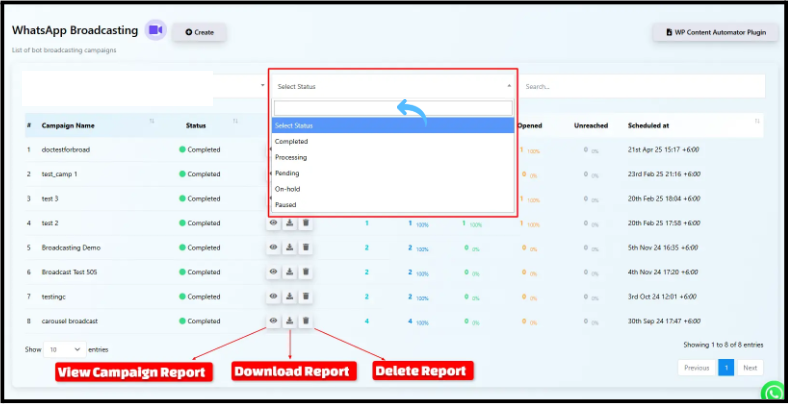
Use the Status dropdown (e.g., Completed, Processing, Pending) to filter down campaigns based on progress quickly.
2. Search Campaigns
Type the campaign name in the search bar and quickly locate a specific campaign. This feature is perfect for busy marketers with multiple campaigns every week.
3. View Campaign Report
Click the Eye icon under Actions to open the Detailed Analytics Page.
This will help you find advanced reporting charts and timestamps for every message interaction.
Turn this learning into your next WhatsApp campaign.
Start with Sendwo’s free plan, explore WhatsApp broadcasts, automation, AI chatbot flows, and upgrade only when your business needs more power.
4. Download Reports
SendWo’s this feature lets you export reports in Excel or CSV formats with just one click, ensuring data portability for audits, analysis, or CRM imports.
5. Delete Campaigns
Keep your workspace tidy by deleting outdated or test campaigns using the Trash bin icon.
5. Understanding Detailed Campaign Reports
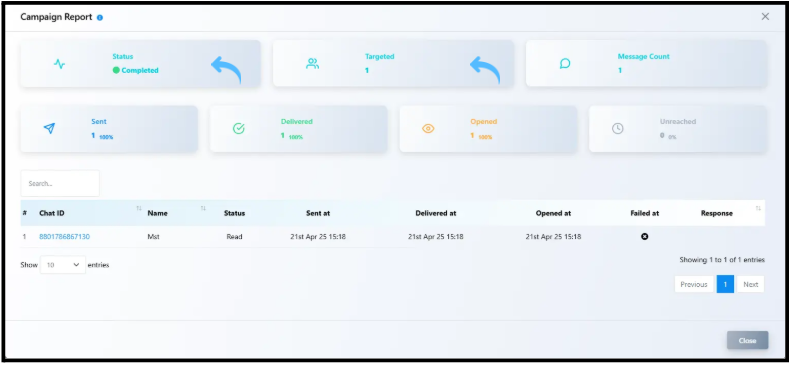
Clicking into any campaign’s analytics page reveals every small data to understand how your messages performed.
1. Campaign Status
Shows if the campaign is complete, processed or still in progress.
2. Targeted Contacts
Displays the total number of recipients the broadcast was sent to, helping you verify your audience reach.
3. Message Count
Shows the total number of messages successfully sent during the campaign.
4. Delivery Status Breakdown
Each broadcast report contains a clear breakdown of how your messages performed:
- Sent: Total number of messages pushed from your account.
- Delivered: Messages successfully delivered to recipient inboxes.
- Opened: Recipients who actually opened the message.
- Unreached: Contacts that didn’t receive the message.
5. Timestamps
Every event for the broadcast — sent, delivered, opened, failed — includes an exact timestamp.
These logs are crucial for identifying when engagement happens and adjusting future campaign timings accordingly.
Pro Tip: Combine your SendWo report insights with Google Sheets automation to track conversions and leads generated per campaign.
Data is the backbone of successful marketing. With SendWo’s advanced analytics and reporting, you’re not guessing; in fact, you’re growing with precision.
SendWo is not just a broadcasting tool, but a complete WhatsApp marketing intelligence system.
Start your next WhatsApp campaign in SendWo and make every message count.
FAQs
1. How can I track message delivery and open rates in SendWo?
Simply go to Broadcast > WhatsApp Broadcast > Eye icon under Actions. The detailed report shows delivery, open, and sent counts with timestamps.
2. Can I download WhatsApp broadcast analytics in SendWo?
Yes, you can export reports in Excel (.xlsx) or CSV format.
3. How frequently is campaign data updated?
Campaign analytics in SendWo update in real time, giving you the latest delivery and engagement stats as messages go out.
Snehil Prakash
Snehil Prakash is an expert WhatsApp consultant with SendWo. He has expertise in implementing WhatsApp API for enterprise businesses and built automation, chatbot and AI powered solution.