
Black Friday + Cyber Monday: 50% off annual subscriptions only50% off annual onlyBFCM50Get offer
Sendwo
Sendwo WhatsApp Payments

Let customers shop and pay inside WhatsApp

Let customers open your business catalog, add products to their cart, review the order and pay in the same WhatsApp conversation. With supported native payment setups, there is no separate website checkout to complete.

Catalog to cartSupported in-chat paymentsOrder follow-up

In-chat payment availability depends on your country, business eligibility and payment configuration.
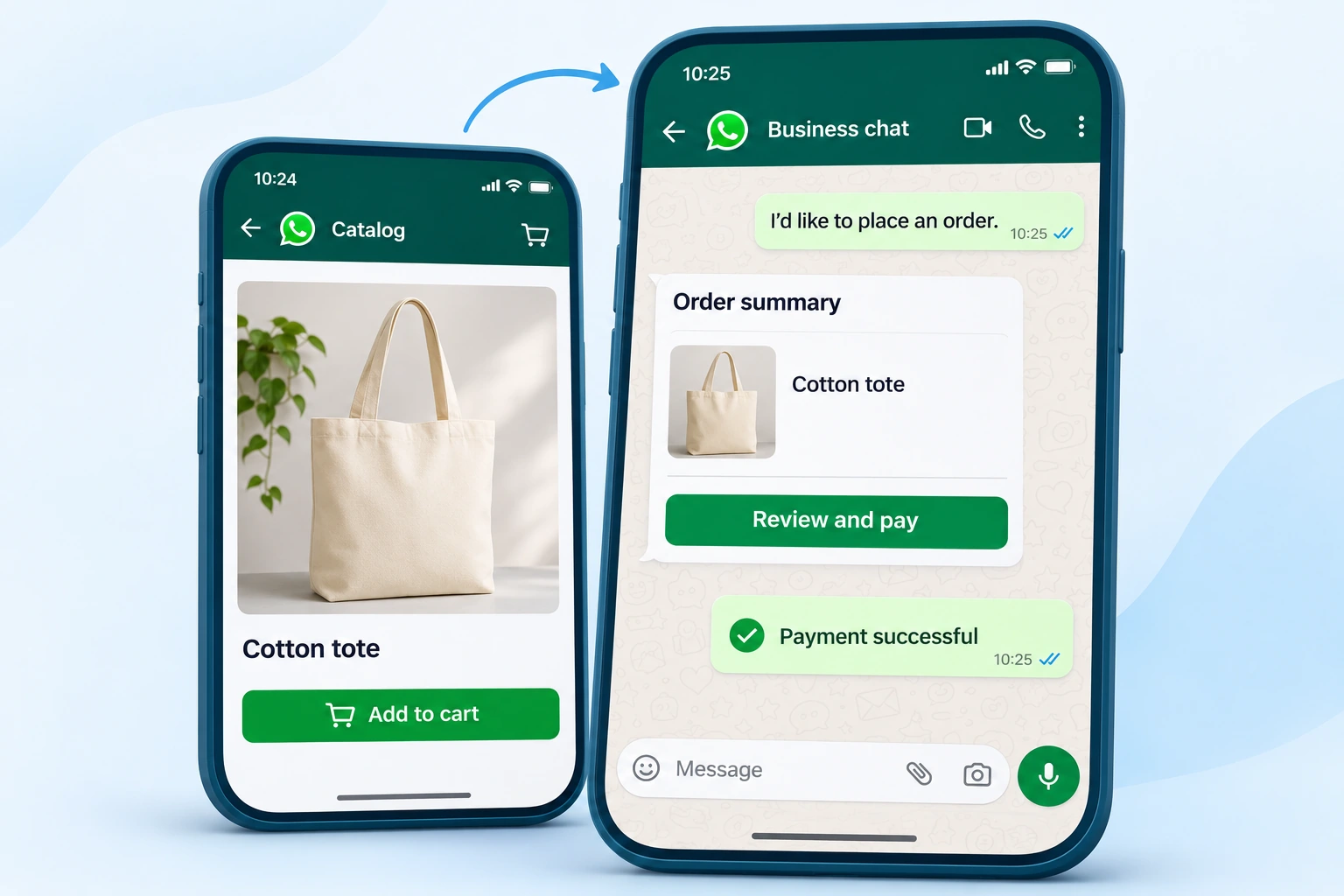

Illustration of a customer adding a catalog product to a cart and completing payment inside WhatsApp
Shorter path to payment Bring product discovery, cart review and supported in-chat payment into the customer conversation.
Built for WhatsApp commerce Connect catalog orders with cart reminders, COD confirmation, ecommerce automation and customer support.
Brands that have used Sendwo
Why WhatsApp Payments matter

Keep the purchase moving from product questions to payment

A customer should not have to restart their purchase after asking a question. Bring catalog browsing, cart review and supported in-chat checkout into the conversation, then keep the order moving with reminders and follow-up.

Without payment workflows

  • Customer asks for price but does not receive a quick checkout path.
  • Sales team manually copies payment links again and again.
  • Cart reminders and payment reminders are inconsistent.
  • COD confirmation is handled manually and creates order confusion.
  • Teams do not know who needs payment follow-up.

With Sendwo payment journeys

  • Let eligible customers review catalog orders and pay through supported native checkout in WhatsApp.
  • Send payment links, checkout links, or payment instructions inside WhatsApp journeys.
  • Automate reminders for pending payments, carts, and order confirmations.
  • Use labels and custom fields to track payment status and customer intent.
  • Connect ecommerce catalog, Shopify, WooCommerce, APIs, and workflows.
  • Move paid, unpaid, COD, and follow-up customers into the right next step.
What you can build

Create WhatsApp payment journeys for sales, ecommerce, bookings, and repeat purchases

Make catalog purchases easier to complete, then support the rest of the order journey with templates, automation, COD confirmation and follow-ups.

Catalog to in-chat checkout

Help customers choose products, add them to a cart and pay through supported native checkout. Keep catalog messages, order updates, cart reminders and post-purchase follow-ups connected.

COD confirmation journeys

Confirm COD orders through WhatsApp, reduce fake orders, collect customer intent, and move confirmed orders forward.

Payment automation flows

Use flows, forms, templates, labels, webhooks, and APIs to create payment reminders and confirmation journeys.

Payment journey

From your WhatsApp catalog to a paid order

Customers choose what they want, review the cart and complete a supported payment in WhatsApp. Your team can then manage confirmation, delivery and follow-up from the same conversation.

1

Browse the catalog

The customer opens the catalog from your WhatsApp business profile or from products shared in the chat.

2

Add to cart

The customer chooses products, adds them to the cart and sends the order to your business.

3

Review and pay

With supported native checkout, the customer reviews the order and completes payment inside WhatsApp.

4

Confirm and support

Send payment confirmation, delivery updates and support replies. Use the shared inbox when a person needs to help.

5

Continue the relationship

Move customers into repeat purchase, loyalty, review, upsell or reactivation campaigns.

Payment features

Keep checkout, confirmation and follow-up connected

Bring inquiry, catalog selection, cart review, payment, order updates and support into one customer journey. Connect the payment status available from your setup with labels, custom fields and follow-up workflows.

Native checkout inside WhatsApp

For supported business and payment configurations, customers can review a catalog order and pay inside WhatsApp without opening a separate checkout website.

  • Browse products from the business profile or a catalog message
  • Add selected products to the cart and send the order
  • Review the order and complete the supported payment flow
  • Keep payment confirmation and order communication in the chat

Additional payment links and checkout paths

Where native checkout is unavailable, or your workflow needs another payment route, you can also share supported payment and checkout links. These are separate paths and may open the provider's checkout.

  • Share payment links inside WhatsApp messages
  • Send checkout links after customer interest
  • Use template messages for payment reminders
  • Support manual or automated payment instructions
  • Guide users from chat to payment completion
  • Use links with broadcasts, flows, or live chat

Catalog and order payment journeys

  • Connect WhatsApp ecommerce catalog journeys
  • Use catalog orders and manual payment orders
  • Send checkout success messages
  • Use cart reminder workflows
  • Trigger new order notifications
  • Manage customer order communication

Payment reminders and recovery

  • Send abandoned cart payment reminders
  • Follow up on pending payment customers
  • Use drip campaigns for recovery
  • Use labels for unpaid or partially interested users
  • Send reactivation offers
  • Move warm customers to sales agents

COD and confirmation workflows

  • Confirm COD orders through WhatsApp
  • Reduce fake or low-intent orders
  • Collect customer confirmation replies
  • Send delivery and order updates
  • Tag confirmed and unconfirmed customers
  • Trigger agent follow-up where needed

Start journeys when customers ask for a price, click an ad, submit a form, open a catalog or abandon a cart. Use labels, custom fields, notes and workflow status to organize paid, pending, COD and failed orders.

Ecommerce and integrations

Connect payments with Shopify, WooCommerce, catalog orders, APIs, and workflows

Payment workflows become powerful when connected with store events, order status, cart reminders, catalog checkout, APIs, and Google Sheets.

Shopify and WooCommerce

  • Connect store automation
  • Send order notification messages
  • Recover abandoned carts
  • Use payment reminders after cart events
  • Send customer updates through templates
  • Trigger post-purchase follow-ups

WhatsApp catalog commerce

  • Catalog manager
  • Catalog orders
  • Manual payment orders
  • Checkout link settings
  • Checkout success workflow
  • Cart reminder delay

API-connected payments

  • HTTP API workflows
  • Outbound webhooks
  • Inbound webhook workflows
  • Google Sheet Data Fetch
  • External payment status updates
  • CRM and order system connections

Customer support after payment

  • Route paid customers to support
  • Use shared inbox for payment queries
  • Add internal notes
  • Assign agent or manager
  • Use AI Assistant for replies
  • Track follow-up status
Best-fit use cases

Use WhatsApp Payments across ecommerce, services, bookings, education, and repeat sales

Any business that sells through WhatsApp can reduce manual payment follow-up and create a cleaner checkout journey.

Ecommerce stores

Send checkout links, recover carts, confirm COD orders, send payment reminders, and update customers after purchase.

Checkout Cart recovery Orders

Local businesses

Collect payments for products, services, bookings, deliveries, reservations, or advance confirmation.

Local sales Payment link Reminders

Coaches and consultants

Send payment links for sessions, courses, webinars, appointments, workshops, and digital products.

Bookings Courses Follow-up

Education institutes

Collect admission fee, demo class payments, course installments, reminder payments, and enrollment confirmations.

Admissions Fee reminders Enrollment

Healthcare and clinics

Send payment instructions, appointment confirmation, consultation fee reminders, and follow-up messages.

Appointments Consultation Reminders

Agencies

Help clients build WhatsApp payment journeys for campaigns, ecommerce stores, lead funnels, and service bookings.

Client workflows Campaigns Automation

Payment availability depends on your setup

Native WhatsApp payments depend on the country, business eligibility, Meta configuration and payment partner. A supported native checkout can keep payment inside WhatsApp; other payment methods may use a provider-specific authentication or checkout flow. Payment links, checkout links and COD remain optional workflows and do not all provide the same in-chat experience.

Why Sendwo WhatsApp Payments

More useful than just sending a payment link manually

Sendwo connects payment conversations with campaigns, automation, contact data, ecommerce workflows, and customer follow-up.

Payment link or checkout link sharing

Manual process: Manual copy-paste.

Connected with campaigns, templates, flows, and inbox.

Pending payment follow-up

Manual process: Easy to miss.

Use reminders, labels, drips, and automation.

COD confirmation

Manual process: Manual and inconsistent.

Create structured confirmation workflows.

Ecommerce cart and order connection

Manual process: Separate from chat.

Connect catalog, Shopify, WooCommerce, and cart reminders.

Customer segmentation

Manual process: No clear status tracking.

Use paid, unpaid, COD, cart, buyer, and repeat-purchase labels.

Team follow-up

Manual process: Scattered across chats.

Use shared inbox, assigned agents, notes, and AI Assistant.

Customer stories

How businesses use Sendwo

Customer conversations, follow-ups and service journeys across industries.

Dhillon Dairy UK

Customer communications, promotions and follow-ups.

Dilbagh SinghDilbagh Singh

PamV Estates

Resort inquiries, booking questions and chatbot-assisted responses.

Mr. Philip Mensah, CEOMr. Philip Mensah, CEO

EZ35

Click-to-WhatsApp advertising, lead qualification and customer conversations.

Ingo LedererIngo Lederer

Aura International

Education communications, class reminders and student updates.

Daren HuntDaren Hunt
View All Customer Case Studies
FAQs

Frequently asked questions about Sendwo WhatsApp Payments

Quick answers for businesses exploring payment links, checkout journeys, COD confirmation, cart recovery, and payment follow-ups through WhatsApp.

What is Sendwo WhatsApp Payments?
Sendwo helps businesses connect WhatsApp catalog orders with supported native in-chat checkout, payment confirmation, order updates and customer follow-up. Payment links, COD confirmation, reminders, labels and automation can support additional payment journeys.
Can customers pay without opening a separate website?
Yes, when your business uses a supported native in-chat payment configuration. Customers can browse the business catalog, add products to the cart, review their order and complete the supported checkout inside WhatsApp. Availability and payment authorization steps depend on your country, eligibility and payment partner.
Can ecommerce stores use Sendwo for payment reminders?
Yes. Ecommerce stores can use Sendwo for abandoned cart reminders, checkout links, order notifications, payment follow-ups, COD confirmation, catalog orders, and post-purchase journeys.
Does Sendwo support COD confirmation?
Yes. Sendwo can support COD confirmation journeys through WhatsApp messages, templates, flows, labels, and follow-up automation to help reduce fake orders and improve order confirmation.
Can I track paid and unpaid customers?
Yes. You can use labels, custom fields, notes, contact management, and automation workflows to organize customers as paid, unpaid, COD confirmed, cart abandoned, buyer, or follow-up required.
Can WhatsApp Payments connect with Shopify or WooCommerce?
Sendwo supports ecommerce automation workflows for Shopify and WooCommerce, including abandoned cart recovery, order notification messages, cart reminders, and customer follow-ups that can support payment journeys.
Are WhatsApp-native payments available everywhere?
No. Native payment availability depends on the country, Meta eligibility, business setup and payment partner. Other payment methods may involve a provider-specific authorization or checkout flow. Sendwo can also support payment links, checkout links, COD, APIs and follow-up workflows where appropriate.
How do I get started with WhatsApp Payments?
Start by connecting your WhatsApp business account, preparing your product catalog and checking the payment configuration available for your business. Then set up order confirmation, payment-status handling and follow-up messages in Sendwo. The native payment experience requires a supported business and payment setup.