How to Check Bot Error Logs and Custom Variables in SendWo
Learn how to check bot error logs and custom variables in SendWo. Debug flow issues, fix JSON errors, and personalize WhatsApp conversations.
 By Snehil Prakash
Published: October 29, 2025
4 min read
By Snehil Prakash
Published: October 29, 2025
4 min read
Learn how to check bot error logs and custom variables in SendWo. Debug flow issues, fix JSON errors, and personalize WhatsApp conversations.
No matter how advanced your automation is, even the best WhatsApp bots need monitoring and debugging to run smoothly. And here comes SendWo’s Bot Error Logs and Custom Variables.
These tools not only help you identify issues instantly but also fix broken flows and create personalized user experiences without coding headaches. This tutorial will make you understand how to use both features efficiently in SendWo.
Use Cases
Here are some live examples where Bot Error Logs and Custom Variables make life easier for WhatsApp automation builders:
- Detect why a bot message failed to send.
- Debug API and JSON syntax issues in seconds.
- Monitor failed user interactions in real time.
- Personalize conversations using dynamic variables.
- Store and manage user-specific data inside bot replies.
These features together ensure your automation stays accurate, responsive, and contextual.
Step 1: Open the Bot Error Logs Panel
- Log in to the SendWo Dashboard.
- In the sidebar, navigate to Bot Manager and select your connected WhatsApp Number, which could be, for example, your Brand Support.
- Click on Bot Reply to open your bot flow list.
- In the top-right corner, select Options and click Bot Error Logs. You’ll be able to see an orange badge showing the total error count.
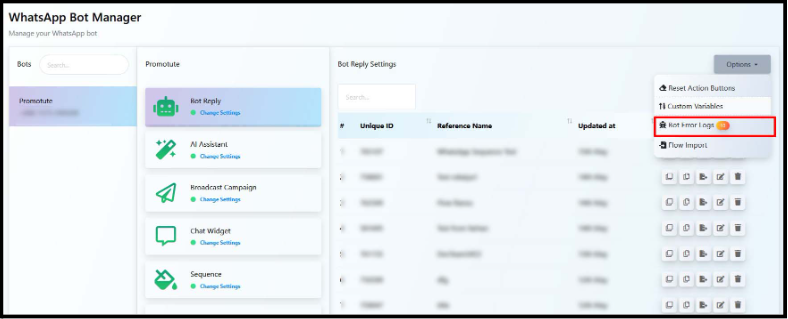
This section gives you a transparent view of every flow issue detected in real time.
Step 2: View and Understand the Error Log
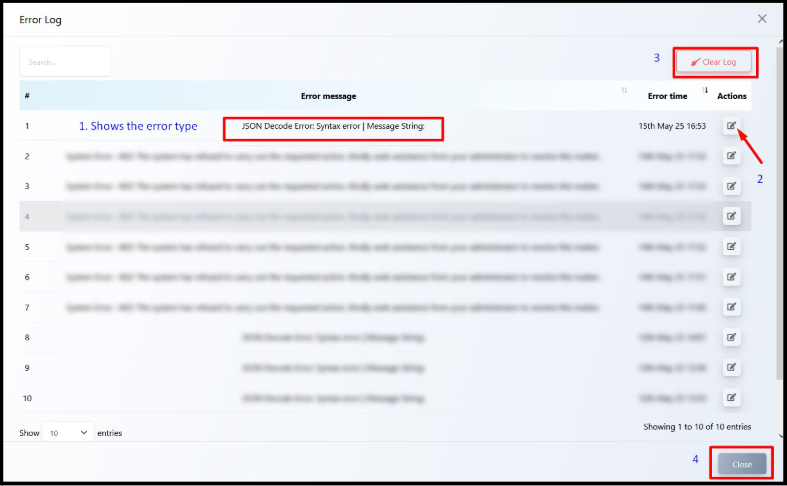
Now, you could easily see the Error Log Panel. Here you’ll be able to identify structured columns that make debugging effortless:
| Column | Description |
| # | Error index number |
| Error Message | Describes the error cause (e.g., JSON Decode Error) |
| Error Time | Identify when the error occurred |
| Actions | ✏️ icon lets the user jump straight to the faulty flow |
Common Error Types
- JSON Decode Error: Caused when the bot receives an invalid or malformed JSON body — often during API calls.
- System Error (403 / 404): Usually triggered by broken URLs, missing permissions, or expired API tokens.
- Invalid Variable Reference: Occurs when a flow tries to use a variable that doesn’t exist or hasn’t been set.
Step 3: Clear or Close the Log
- Click Clear Log located on the top-right to delete all the current error entries.
- Click Close, which will be on the bottom-right, to exit the log view without clearing.
Tips: It’s best practice to review and fix all listed issues before clearing the logs, ensuring no important detail is lost.
Step 4: View and Manage Custom Variables
Custom Variables enable the user to create personalized WhatsApp experiences in SendWo.
To view or edit them, go through the steps below:
- Go back to the Options dropdown.
- Click on Custom Variables.
- You’ll now see all user-specific data fields your bot has stored.
These variables look like:
{{first_name}}
Turn this learning into your next WhatsApp campaign.
Start with Sendwo’s free plan, explore WhatsApp broadcasts, automation, AI chatbot flows, and upgrade only when your business needs more power.
{{email}}
{{order_id}}
{{membership_status}}
{{tracking_number}}
Use them to personalize your messages output dynamically.
Custom variables in SendWo are automatically updated through user inputs, API responses, or “Set Variable” actions within flows.
Summary Table
| Feature | Location | Purpose |
| Bot Error Logs | Options > Bot Error Logs | Debug flow execution and other system issues |
| Edit Flow from Log | ✏️ Icon beside each log panel | Jump directly to fix the faulty |
| Clear Logs | Top-right in error log modal | Remove old or resolved logs |
| Custom Variables | Options > Custom Variables | Manage dynamic user data |
| Set Variable Action | Inside Flow Builder | During chats, update user data |
Why These Tools Matter
- According to WhatsApp marketing benchmarks, bots with real-time monitoring reduce flow failure rates by up to 48%.
- Similarly, personalized messages (powered by custom variables) see conversion lifts of 30–40%, especially in e-commerce and service-based businesses.
That means SendWo isn’t just helping you debug faster. In fact, it’s helping you build smarter, high-performing automations that drive results.
Final Words
SendWo gives you two powerful features to ensure your WhatsApp automation is error-free, intelligent, and highly personalized.
Track every failed flow, debug API issues effortlessly, and build experiences that feel human - all from a single dashboard.
1. What does a JSON Decode Error mean?
It means the bot received a response that’s not valid JSON, usually due to improper formatting from an external API.
2. Will clearing logs delete my bot or customer data?
No. Clearing logs only removes the list of past error entries. Your flows, templates, and user data remain safe.
3. Are custom variables shared across users?
No. Each user has their own individual variable set, making personalization safe and precise.
4. How to update variable values automatically?
Variables can be updated via User Input Flows, Webhook Data, or the Set Variable action inside your Flow Builder in SendWo.
Snehil Prakash
Snehil Prakash is an expert WhatsApp consultant with SendWo. He has expertise in implementing WhatsApp API for enterprise businesses and built automation, chatbot and AI powered solution.