WhatsApp Embedded Signup Setup / WhatsApp Coexistence Setup in SendWo
Learn how to set up WhatsApp Embedded Signup (Coexistence Setup) in SendWo. Follow the steps to connect your WhatsApp Business API seamlessly.
 By Snehil Prakash
Published: October 15, 2025
4 min read
By Snehil Prakash
Published: October 15, 2025
4 min read
Learn how to set up WhatsApp Embedded Signup (Coexistence Setup) in SendWo. Follow the steps to connect your WhatsApp Business API seamlessly.
Whether you’re a startup or an enterprise managing multiple brands, SendWo’s Embedded Signup flow empowers you with faster integration, simpler, and fully compliant with Meta’s latest guidelines.
This feature is Meta’s streamlined way to connect your WhatsApp Business Account (WABA) directly to SendWo, without needing external configurations, long approval chains, or third-party developers.
This tutorial will help you understand:
- How WhatsApp Embedded Signup works in SendWo.
- Step from prerequisites to final verification.
- Tips for seamless coexistence setup with catalog permission.
Let’s get started.
Prerequisites
Always make sure you have the following essentials ready for your WhatsApp Embedded Signup setup in SendWo:
1. Facebook Business Manager Account
The first and mandatory prerequisite is to have a verified Facebook Business Manager with admin-level access. This helps in managing your WhatsApp Business API and granting permissions during setup.
Tip: If your business is not yet verified, go to business.facebook.com/settings/info and complete the verification process before starting.
2. WhatsApp Business Account Linked to Facebook
Ensure your WhatsApp Business Account (WABA) is already connected to your Business Manager. This will allow SendWo to fetch your WhatsApp details automatically during connection.
3. Active SendWo Account
Log in/ Sign up for a SendWo account with your registered credentials to start your integration process.
Integration and Connection Steps
The main setup process involves.
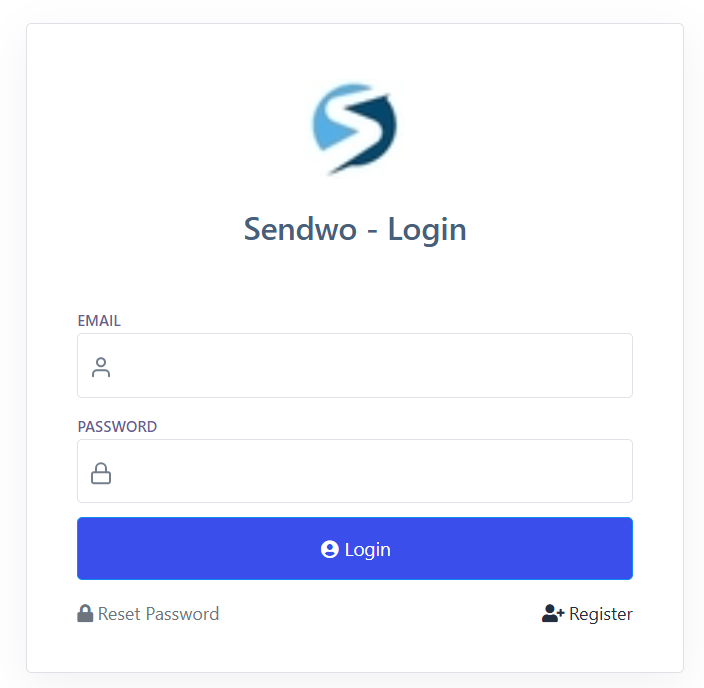
Step 1: Log in to SendWo
Navigate to the SendWo Dashboard and log in with your credentials. Once logged in, you’ll be on the main dashboard.
Step 2: Navigate to Connect Account
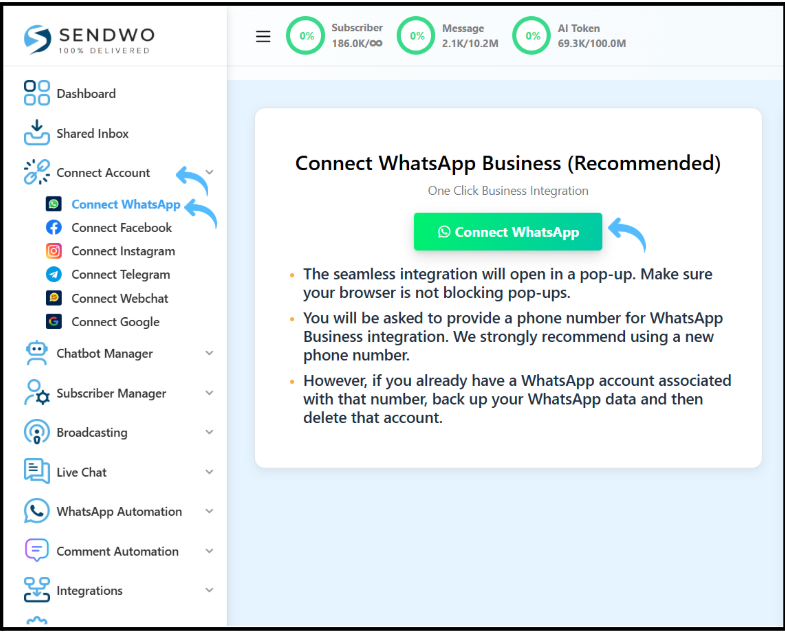
On the left-side menu, click on Connect Account.
This is the interface where you’ll manage integrations with Meta, WhatsApp, and other services.
Step 3: Click Connect WhatsApp
Inside the Connect Account page, click on the Connect WhatsApp button to start the integration flow within SendWo.
Step 4: Choose Connection Type
SendWo empowers your business with flexibility for different business needs:
- With Catalog Permission: For eCommerce or retail brands wanting to sync product catalogs directly.
- Without Catalog Permission: For service businesses that don’t need product listings.
Choose the best that fits your use case.
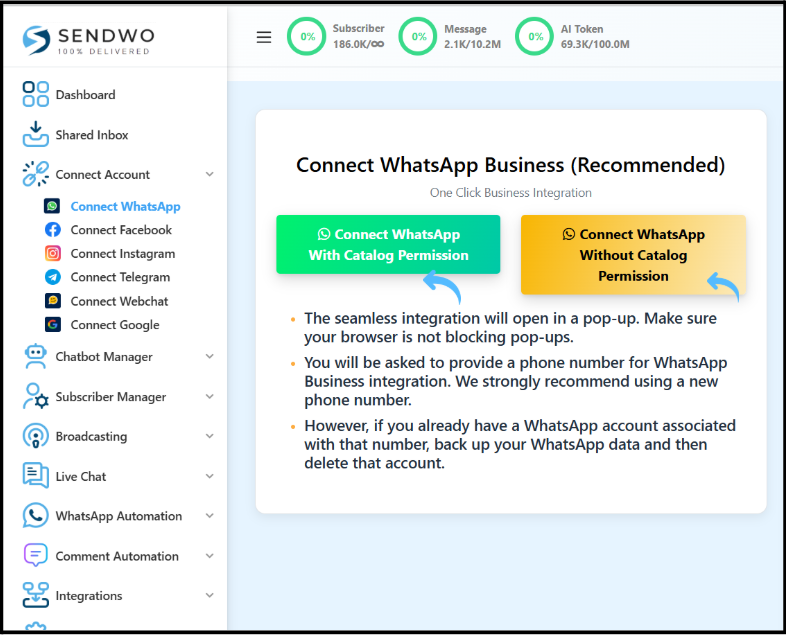
Step 5: Initiate Connection / Authorization
Click Continue with Facebook or Connect Now.
You’ll be redirected to Facebook’s secure login page to authorize the integration.
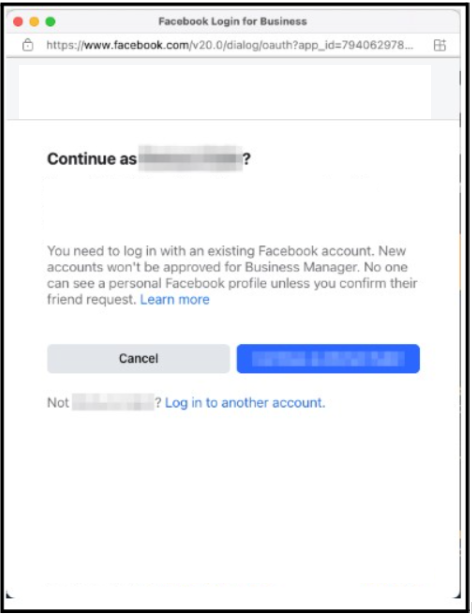
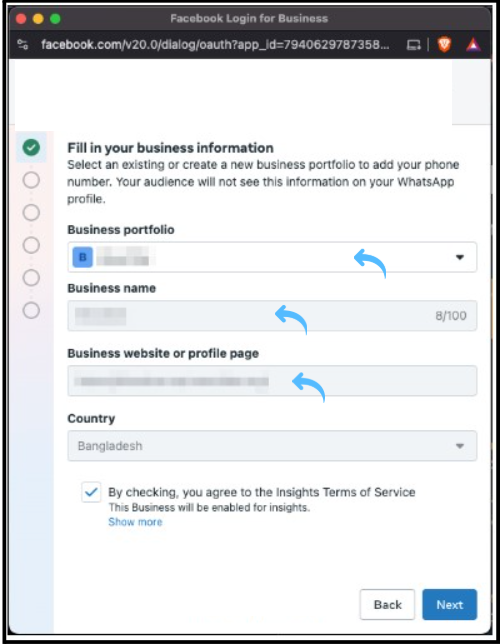
Step 6: Provide Facebook Business Information
Log in to your Facebook Business Manager having an admin account.
Meta will prompt you to confirm the following:
Turn this learning into your next WhatsApp campaign.
Start with Sendwo’s free plan, explore WhatsApp broadcasts, automation, AI chatbot flows, and upgrade only when your business needs more power.
- Select your Business portfolio
- Add your Business name
- Add your Business website or profile page
- Select your country
Approve all necessary permissions for smooth integration.
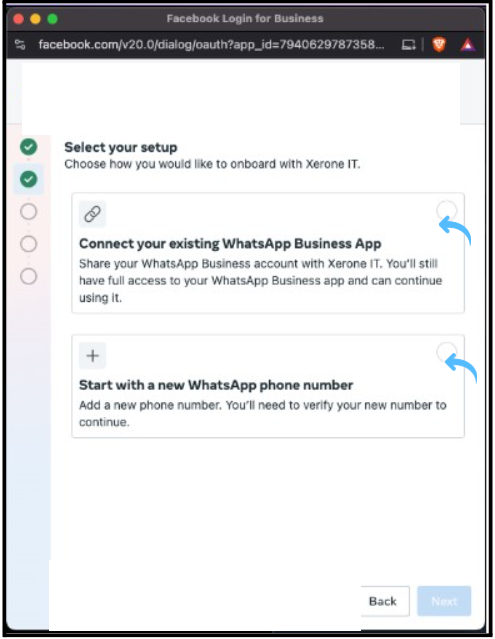
Step 7: Select WhatsApp Setup Method
Meta gives you two options here:
- Connect an Existing WhatsApp Number: Ideal if you already have an active WhatsApp Business API setup.
- Create a New WhatsApp Number: Use this if you’re setting up WhatsApp API for the first time.
Choose the one that best suits you and proceed.
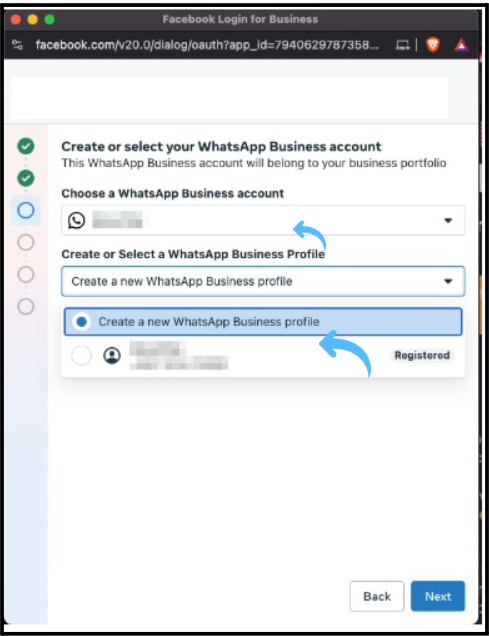
Step 8: Pick the WhatsApp Business Account
If your Business Manager contains multiple WhatsApp Business Accounts, select the one you want to integrate with SendWo.
Click Continue to confirm your selection on SendWo.
Permissions and Verification
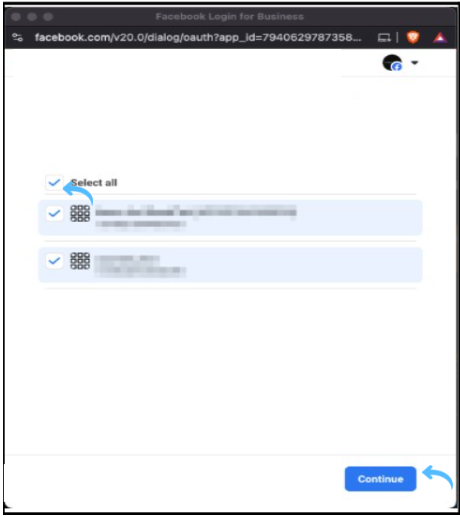
1. Handle Catalog Permissions
If you selected “with catalog permission” earlier, Meta will ask you to:
- Verify your business phone number
- Select an existing product catalog
- Accept Meta’s Terms of Service
Follow all the instructions popping up carefully to complete this process.
2. Save and Finalize Connection
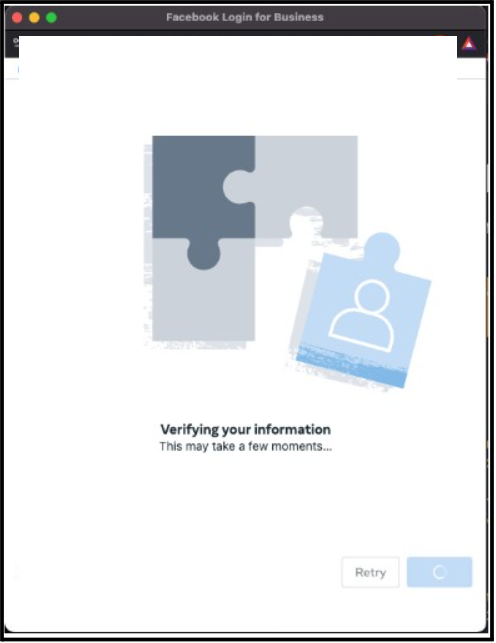
After completing verification, SendWo will automatically finalize the link between your Facebook Business Manager and WhatsApp API.
Before closing the window:
- Save any prompts or settings shown.
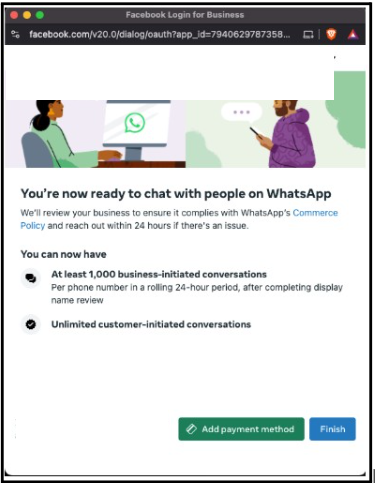
- Confirm that the connection is marked as Successful.
Verification Check
Now, confirm the connection inside the SendWo dashboard. The WhatsApp account will now appear as linked.
Post-Connection Actions
Once your WhatsApp Embedded Signup is complete, you can start leveraging SendWo’s automation and marketing tools.
Create WhatsApp Chatbots and Automation Flows
Design conversational bots that can reply to customer queries instantly, capture leads automatically, and guide users to products, links, or bookings.
Use SendWo’s drag-and-drop Chatbot Builder to get started within minutes.
Also, you can automate recurring messages like welcome messages, abandoned cart reminders, appointment confirmations, etc. SendWo’s automation tools integrate seamlessly with Google Sheets, WPForms, and CRMs.
Final Words
Whether you’re managing a small business or multiple client accounts, this Meta feature ensures maximum uptime with better scalability, and effortless management.
With SendWo, you’re not just connecting WhatsApp, you’re unlocking the future of conversational marketing.
Start your free WhatsApp API setup today at SendWo and experience how effortless automation can be.
1. What is WhatsApp Embedded Signup?
WhatsApp Embedded Signup is Meta’s official onboarding method, allowing businesses to connect their WhatsApp Business API to a Business Solution Provider (like SendWo) directly within the platform, without needing complex manual approval.
2. How long does the SendWo WhatsApp connection process take?
Usually, it takes 5–10 minutes if your Facebook Business Manager and WhatsApp number are ready.
3. Can I use multiple WhatsApp numbers in SendWo?
Yes. SendWo supports WhatsApp coexistence, which means you can connect and manage multiple numbers or accounts under a single SendWo dashboard.
4. Is SendWo an official Meta Business Partner?
Yes, and it ensures compliance, stability, and high deliverability for all your WhatsApp campaigns.
Snehil Prakash
Snehil Prakash is an expert WhatsApp consultant with SendWo. He has expertise in implementing WhatsApp API for enterprise businesses and built automation, chatbot and AI powered solution.