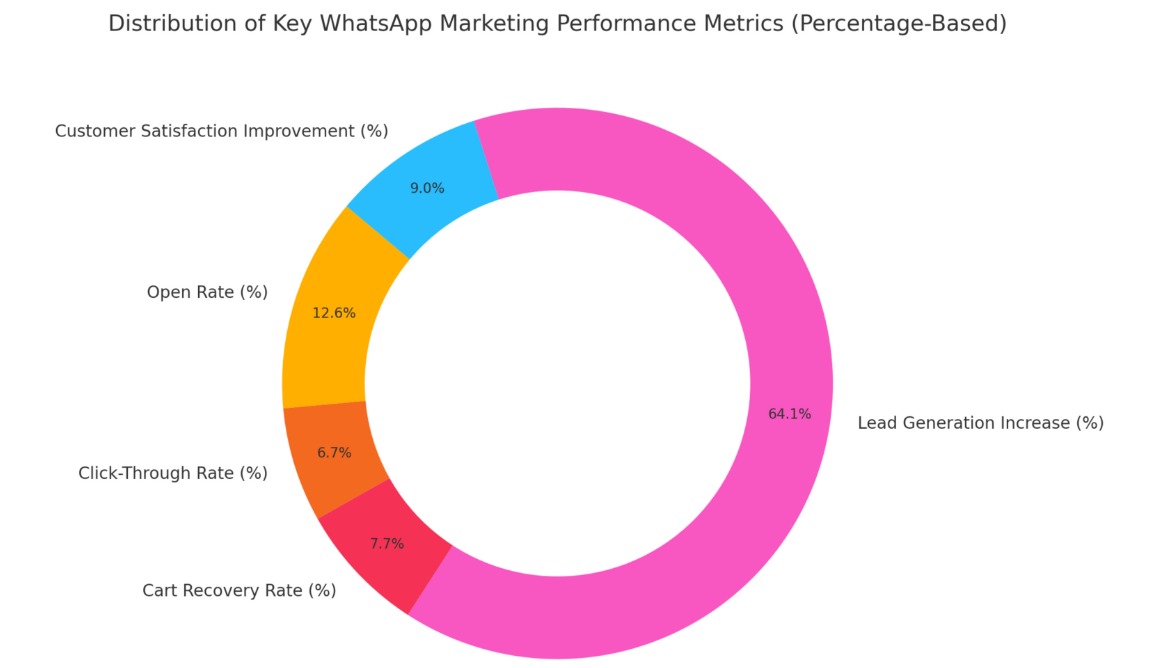
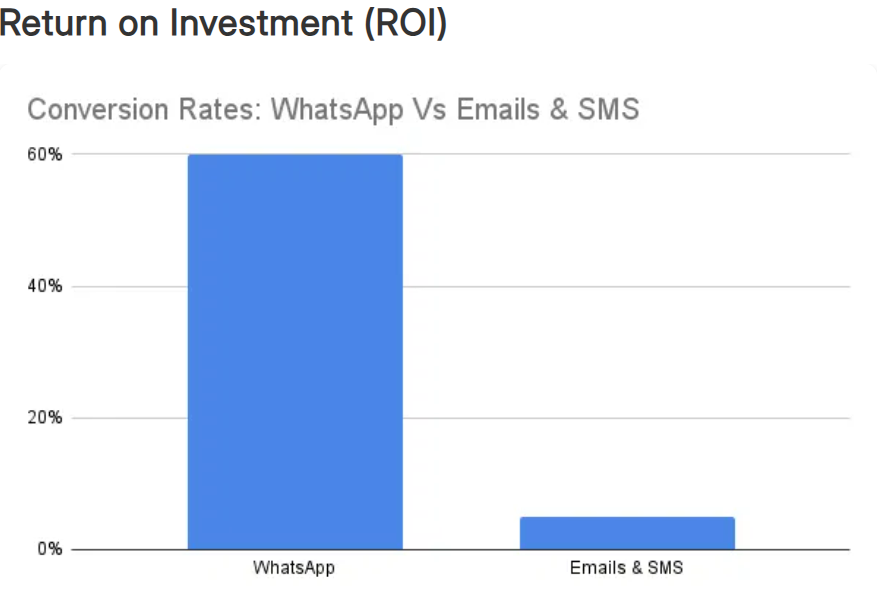
Imagine closing a property deal without a single phone call. You send a quick WhatsApp message to a prospect with a short video tour of a new listing, answer their questions in real-time, and schedule a viewing – all within a single chat. This isn’t a far-fetched scenario, it’s the reality of real estate marketing in 2025. With nearly 3 billion people using WhatsApp monthly, the platform has become a goldmine for realtors aiming to connect with clients instantly and personally. WhatsApp messages boast open rates as high as 98%, about five times higher than email, and WhatsApp marketing campaigns achieve conversion rates between 45% and 60%, far outperforming traditional methods. In an industry where response speed and personal rapport can make or break a sale, WhatsApp emerges as a game-changer. This comprehensive guide will walk you through powerful WhatsApp marketing campaign ideas for real estate that truly convert – backed by stats, examples, and best practices to elevate your strategy.
Why WhatsApp is a Game-Changer for Real Estate Marketing
Real estate is all about timely communication and trust-building. WhatsApp’s unique advantages align perfectly with these needs:
Massive User Base & Reach: WhatsApp is the world’s most popular messaging app, with usage in over 180 countries and more than 2.5–3 billion active users globally. Chances are, your prospects are already on WhatsApp daily. Using a channel they already trust and use removes friction in communication.
Sky-High Engagement: WhatsApp messages are almost guaranteed to be seen. They have an astonishing 98% open rate (versus ~20% for email) and users typically respond within seconds. In fact, 67% of consumers prefer messaging over email or calls when talking to businesses. This means leads are more likely to engage with your property updates or promotions on WhatsApp than via other channels.
Higher Conversion Potential: The immediacy and interactive nature of WhatsApp pay off in conversions. Marketing campaigns on WhatsApp see 45–60% conversion rates on average, drastically higher than the single-digit conversion rates of email or web forms. Prospects who start a WhatsApp chat are often deeper in the decision process, leading to more qualified leads and faster deals.
Personalized, Two-Way Communication: Unlike one-way ads or emails, WhatsApp enables real-time conversations. You can answer questions, send property photos/videos, and build rapport in a chat, replicating that personal touch of a face-to-face meeting. This conversational marketing fosters trust and reduces barriers to buying.
Instant Notifications & Read Receipts: When you send a new listing or an appointment reminder on WhatsApp, the recipient gets a push notification, and you can see if it’s read. This ensures time-sensitive real estate opportunities (like a hot new listing or price drop) are noticed immediately, increasing the chance of quick action.
In short, WhatsApp combines the wide reach of mass marketing with the personal touch of a phone call. It’s fast, interactive, and customer-friendly, making it an ideal tool to capture and convert real estate leads in today’s mobile-driven world.
Getting Started: WhatsApp Business Basics for Realtors
To run effective WhatsApp campaigns, start by setting up the right foundation with WhatsApp Business (a free app) or the WhatsApp Business API for larger teams. Here’s how to lay the groundwork:
Professional Business Profile: WhatsApp Business allows you to create a branded profile with your company name, logo, address, website, and even business hours. This makes you look professional and credible to prospects from the first hello. It’s like an interactive business card that lives in a client’s phone.
Organize Contacts & Labels: As a realtor, you’ll interact with buyers, sellers, renters, etc. WhatsApp Business lets you label contacts (e.g., “Buyer-High Budget”, “Seller-Listing Prospect”) and sort chats, so you can easily manage leads. Use segmentation to tailor your approach – for instance, send bulk updates about luxury condos only to your high-end investors list.
Leverage Messaging Tools: Take advantage of built-in features like Quick Replies (pre-saved answers to FAQs), greeting messages for new inquiries, and away messages after hours. For example, if someone messages you at 10 PM, an automatic reply might say, “Thanks for reaching out! I’ll get back to you first thing in the morning.” This instant acknowledgement shows responsiveness.
Catalogs for Property Showcase: WhatsApp Business has a Catalog feature where you can list properties with images, price, and description. This acts as a mini in-app brochure for your listings. Clients can browse your catalog right within the chat – a convenient way to showcase multiple properties without constantly sending photos. It’s an interactive experience that can spark conversations (e.g., “I saw Property A in your WhatsApp catalog, can you tell me more about it?”).
WhatsApp Business API for Scale: If you are a brokerage or run large campaigns, the API allows integration with CRM systems and third-party tools. This enables broadcasting messages to thousands of opted-in contacts, using chatbots, and multi-agent support. (Note: API access requires approval and usually working with a provider, but it unlocks powerful automation and analytics for high-volume marketing.)
Compliance and Opt-In: Make sure you obtain consent before messaging prospects. Perhaps encourage website visitors or open house attendees to “Subscribe on WhatsApp for property updates.” This keeps your outreach compliant and targets people who actually want to hear from you. Nothing kills a lead faster than being spammy – always provide value and respect boundaries (like offering an opt-out option in broadcasts).
With your WhatsApp Business set up and contacts primed, you’re ready to deploy targeted campaigns. Next, let’s dive into specific WhatsApp marketing campaign ideas for real estate that drive engagement and conversions.
SendWo: To simplify adoption, platforms like SendWo offer an all-in-one WhatsApp marketing solution built specifically for high-volume real estate marketers. With SendWo, you can launch personalized broadcasts, automate lead nurturing sequences, manage multiple agent logins, and ensure compliance – all from a single, intuitive dashboard. Unlike starting from scratch with raw APIs, SendWo provides instant access to WhatsApp Business API features without technical complexity, making it ideal for fast-moving real estate teams.
High-Converting WhatsApp Marketing Campaign Ideas for Real Estate
Below are actionable campaign ideas, each designed to engage prospects and gently push them down the funnel – from initial interest to closing the deal. These ideas blend creative use of WhatsApp’s features with real estate marketing savvy.
1. Click-to-WhatsApp Ads for Instant Lead Capture
An example of a Click-to-WhatsApp ad for real estate: A user sees a property ad on Instagram and taps the WhatsApp button, instantly opening a chat with the agent to schedule a site visit. This seamless transition from ad to chat removes the usual friction of lead forms and waiting times. Prospects jump straight into conversation while their interest is hot.
How to execute: Run Facebook or Instagram ads with a “Send Message on WhatsApp” CTA instead of a traditional lead form. For example, advertise a new listing with a stunning photo, and when users click, it opens a WhatsApp chat with a pre-filled greeting like “Hi, I’m interested in [Property Name].” Your team (or chatbot) can respond instantly with details and invite them to a viewing.
Why it converts: By engaging prospects in real time, you capitalize on their peak interest. There’s evidence that Click-to-WhatsApp ads dramatically boost conversions – such campaigns delivered up to 40% higher conversion rates compared to traditional web lead forms. It makes sense: instead of filling a form and waiting hours for a call back, the prospect is chatting with you within seconds. This immediacy builds trust and momentum. Plus, you skip the inbox clutter; all communication stays in a single WhatsApp thread that’s easy for the client to follow.
Pro Tip: Use an auto-reply template for inbound ad traffic. For example, the moment someone messages from your ad, have WhatsApp Business send an instant reply: “Thanks for your interest in 123 Maple Street Home. Are there any specific questions I can answer, or would you like to schedule a tour?”. Prompting an action keeps the conversation flowing. Remember, speed is crucial – responding to a new lead within 5 minutes can make them 21× more likely to convert, and WhatsApp helps you achieve that lightning-fast response.
2. Broadcast New Listings & Open House Invites via WhatsApp
Every time you get a new listing or plan an open house, consider your WhatsApp contacts as an exclusive audience to announce it to. A WhatsApp Broadcast lets you send a message to many recipients individually (they receive it like a private message, not in a group). This is perfect for blasting out “Just Listed” alerts, price reductions, or upcoming open house events to all interested leads at once.
How to execute: Segment your contact list by buyer preferences and create broadcast lists (WhatsApp allows broadcast to up to 256 contacts per list). For instance, have a list for “Downtown Condos Prospects” and another for “Suburban Family Homes Leads.” When you get a property that fits a segment, send a concise broadcast: include a catchy description, one great photo, and a call-to-action like “Message me to book a viewing this week!” Because it’s a broadcast, replies come back individually, letting you handle inquiries one-on-one.
Why it converts: Broadcasting ensures no one misses out on a new opportunity. Unlike email blasts that might sit unread, WhatsApp messages likely get seen immediately (with ~70–80% open rates for broadcasts). It creates a sense of exclusivity and urgency – your contacts feel they’ve received a personal tip. For example, “New 4-Bedroom Listing just hit the market in [Neighborhood] at $X. Be among the first to see it – open house this Sat!” Such timely alerts can drive quick action, especially in a competitive market. One real estate campaign even saw a 33% boost in leads by adding WhatsApp QR codes to “For Sale” signs and print flyers – showing that when you make it easy for people to get info via WhatsApp, more of them convert into inquiries.
Best Practice: Don’t overdo the broadcasts. Limit them to truly new or important updates (nobody wants daily pings of stale inventory). Always provide value: include something useful like a video tour link, a limited-time offer (“pre-book your slot”), or valuable info (“This area’s homes are up 5% YoY, great investment potential!”). And of course, ensure the recipients have opted in to these updates, so your messages are welcome.
3. Virtual Property Tours Through WhatsApp
When buyers can’t physically attend a showing, virtual tours via WhatsApp can bridge the gap and win them over. Use WhatsApp to send video walkthroughs of properties, 360° photos, or even do live video calls from the property. This campaign idea is especially powerful for out-of-town buyers or busy professionals – they can tour a home right from their phone.
How to execute: For each key listing, prepare a short video tour (1–2 minutes) showcasing the highlights – e.g., driving up the curb, panning through each beautiful room, and the backyard view. When a prospect expresses interest in that type of property, offer to WhatsApp them the video. You can also proactively broadcast a “Virtual Open House”: e.g., “Can’t visit 123 Maple Street in person? Reply TOUR and I’ll send you a virtual walkthrough!”. On WhatsApp, you can send up to 16 MB videos (a few minutes in decent quality) – or share a link to a longer video hosted elsewhere if needed. For a live experience, schedule a WhatsApp video call and walk the client through in real time, letting them ask questions (“Could you show the view from the balcony again?”).
Why it converts: Visuals are compelling – listings with video get 49% more qualified leads on average. By delivering that video directly in WhatsApp, you ensure it gets seen and not lost in an email spam folder. A virtual tour helps buyers picture themselves in the home, creating an emotional connection. It also qualifies leads faster: serious buyers will engage after seeing the tour (setting up next steps), while window-shoppers may opt out – saving you time. Clients appreciate the convenience and personal touch; even remote buyers can say “I feel like I’ve walked through the house already.” This increased confidence leads to quicker decisions – one stat found video walkthroughs increased buyer confidence by 28%, meaning your WhatsApp video tours can nudge indecisive prospects towards making an offer or at least a physical visit.
Pro Tip: Optimize your videos for mobile viewing – use good lighting, keep the camera steady, and highlight unique features quickly (don’t assume viewers will watch a 10-minute slow tour). You might even add captions or voice-over pointing out key specs (“3BR, 2BA, 2,000 sqft – Newly renovated kitchen”). Also, consider using WhatsApp Status (the Stories-like feature) to post short teaser clips or panorama photos of your best listings – your contacts browsing their WhatsApp may see the status and be enticed to inquire.
4. 24/7 Chatbot for Lead Qualification and FAQs
Think of a WhatsApp chatbot as your always-on assistant that can engage new prospects instantly, even at 2 AM. Setting up a simple automated chatbot can qualify leads (by asking what they’re looking for) and answer common questions. This ensures no lead falls through the cracks when you’re not available to reply immediately.
How to execute: Using the WhatsApp Business API (or third-party tools), configure a chatbot flow for new chats or specific keywords. For example, when someone messages “Hello” or scans your WhatsApp QR code, the bot can greet them: “Hi! Welcome to [Your Realty]. Are you looking to buy, sell, or rent?” – and then branch accordingly. For buyers, it might ask budget, preferred location, bedrooms, etc., just like a pre-qualification form. It can also handle FAQs: If a user asks a common question like “What’s the process to buy a home?” or “What are your fees?”, the bot instantly provides a helpful answer or link. You can program buttons/menu for easy navigation (e.g., “1️⃣ See current listings, 2️⃣ Schedule a call, 3️⃣ Our office location”).
Why it converts: Speed and convenience. In real estate, response time is critical – a study showed replying to inquiries within 5 minutes can massively boost conversion odds. A chatbot ensures instant engagement even if you’re busy. It can capture the lead’s key details and intent on the spot, so you can prioritize hot leads. For example, if the bot finds out someone has a $500k budget and is pre-approved for a loan, that’s a high-value lead to call first thing in the morning. Additionally, a well-designed bot provides value by answering questions right away – improving customer satisfaction. It’s like having a receptionist who never sleeps. Some businesses report huge improvements in lead generation efficiency; one analysis found implementing WhatsApp chatbots can boost lead generation by over 500% (by automating initial outreach and follow-ups). While 500% is extreme, even a fraction of that means more leads nurtured without extra human effort.
Tip: Make sure the bot handoff to a human is smooth. For instance, if the prospect indicates high interest or types something the bot can’t handle (“Can I see the property tomorrow?”). The bot should politely say a human agent will get back ASAP. Also, periodically review chatbot transcripts to refine it – ensure it’s asking relevant questions and not losing users. A friendly tone goes a long way (e.g., “I’m Zoe, the virtual assistant for XYZ Realty!” gives a humanized touch).
Not every lead will be ready to convert immediately. This is where a WhatsApp drip campaign comes in – a series of scheduled, personalized messages to nurture your leads over time. Done right, these follow-ups keep you on the prospect’s radar and gently guide them toward a decision, all while feeling personal rather than pushy.
How to execute: Say you meet prospects at a property expo or they sign up on your website. Instead of one-and-done contact, set up a follow-up sequence. For example:
Day 1: “Hi [Name], it was great chatting today at the Home Expo. Here’s the link to the properties we discussed. Let me know if anything catches your eye!”
Day 3: Send a helpful resource, like “Buying your first home: 5 things to know” (showing you care about educating them, not just selling).
Day 7: Share a client success story or testimonial via WhatsApp: “Thought you might find this inspiring – we just helped a family find their dream home in [Neighborhood] after 2 months of searching. We can do the same for you when you’re ready!”
Day 10: A direct nudge: “We have a couple of new listings that fit what you’re looking for. Interested in a quick chat or tour this week?”
Use WhatsApp Business’s labels and broadcast lists to manage this. You can manually send these or use automation if available. Always personalize with their name and any specific criteria (e.g., “that 3-bedroom near the park you liked is still available”).
Why it converts: People often need multiple touches before committing in real estate. WhatsApp drips keep the conversation warm without requiring a phone call each time. Because messages feel one-to-one, they don’t come off as spammy as mass emails. The key is each message should add value – whether it’s useful info, a new opportunity, or a friendly check-in. Over time, this builds trust and positions you as a helpful expert, not just a salesperson. By the time the lead is ready to act, you’ll be the agent they remember because you stayed in touch. Consider bolding key info or questions in your messages to draw attention (WhatsApp supports bold text formatting). Also, include CTAs like “Would you like to schedule a viewing? Just let me know.” to prompt the next step.
Stat to note: WhatsApp’s high engagement means your follow-ups are more likely to be read – recall that WhatsApp messages have ~75–80% average open rates (often within minutes). Compare that to how many drip marketing emails go straight to trash. By nurturing leads in the chat app they use daily, you dramatically increase the odds of conversion when the timing is right.
6. Client Testimonials & Referral Campaigns via WhatsApp
Nothing builds trust like social proof. Turn your happy clients into your advocates by sharing their success stories on WhatsApp – and encourage referrals through a friendly campaign. Real estate is a referral-heavy business, and WhatsApp is an intimate way to request and reward those valuable word-of-mouth leads.
How to execute (testimonials): After a successful closing, ask your client if they’d mind sharing a brief review or audio message about their experience. Then, with permission, share this testimonial with prospects in your WhatsApp conversations or broadcasts. For instance, you might send a voice note from a satisfied buyer (or a screenshot of their kind words) to a lead who’s on the fence: “Hi [Lead], I know buying a home is a big decision. One of my recent clients, [Name], had a similar situation – here’s what they said after finding their home with our help… [attach audio clip or quote].” This personal touch can reassure anxious buyers that you deliver results.
How to execute (referrals): Create a WhatsApp message campaign for past clients, e.g., “Hi [Name], hope you’re loving your new home! If you know anyone looking to buy or sell in [Area], let me know – I’d love to help them (and I have a small thank you gift for any referral).” The message is friendly and low-pressure. You can even make it a mini referral program announcement: “This month, we’re giving $100 gift cards to clients who refer someone that becomes awhoer or seller. It’s our way of saying thanks for your trust!” Because it’s WhatsApp, it feels like a personal outreach rather than a mass email blast.
Why it works: People are more likely to trust recommendations from friends or reviews from real customers. Seeing or hearing a genuine testimonial over WhatsApp can tip the scales – it’s real and unedited, coming through the same channel as messages from one’s friends and family. As for referrals, WhatsApp is perfect because your past clients likely still have you saved in their contacts and perhaps occasionally view your Status updates. A gentle nudge via chat keeps you top-of-mind. Even if they don’t have a referral right away, you’ve reopened a line of communication (maybe they themselves will become repeat clients). Many realtors find that a significant chunk of business comes from referrals, so a periodic WhatsApp outreach here can pay off.
Note: Always be courteous and genuine in these messages. Use the client’s name, be warm, and avoid sounding like a corporate chain message. Something like, “Hi John! It’s been a few months since you moved – hope you and the family are settled in. I wanted to drop a quick note…” is a nice opener. This human-friendly tone aligns with WhatsApp being a casual platform, and it increases the likelihood of a positive response.
7. Exclusive WhatsApp Group for VIP Clients
For agents dealing with high-end clients or a strong base of repeat investors, consider forming an exclusive WhatsApp Group as a VIP club. This group could be a space where you share off-market listings, investment opportunities, or early-bird alerts before they go public. The idea is to make members feel special and in-the-know, driving loyalty and conversions for these top-tier leads.
How to execute: Invite a select list of trusted clients (with their consent) to a WhatsApp group named something like “Premium Property Insider Club” or “Top Deals [CityName].” In this group, post occasional curated content: e.g., “Investment Deal: 4-unit apartment building coming to market next week, not listed online yet. Cap rate ~6%. Ping me if interested for details.” or “VIP Preview: Townhouse hitting MLS Friday at $800k, sharing here first in case it fits what you’re looking for.” Group members can ask questions, and you or your team can respond for everyone’s benefit (if one person asks, others might be wondering too).
Why it converts: Exclusivity creates urgency and value. Members feel they have a competitive edge by being in the group. When you drop a hot offer, you may get immediate bites like “I’m interested, let’s talk,” converting to viewings or bids before the broader market even knows about it. It leverages FOMO (fear of missing out) in a positive way – if someone sees others in the group expressing interest, they may act faster too. Moreover, the group fosters a community vibe among your clients, who may even share insights or network with each other, all facilitated by you. This strengthens your relationship with them; they’re more likely to stick with you for transactions because you’ve given them this added value service.
Manage it well: Set clear group rules to prevent spam or off-topic chatter. Perhaps keep the group announce-only (you as the admin post, others can only message you privately), if you worry about noise. Or moderate discussions politely. Since these are VIPs, response quality matters – be ready to promptly address questions posted in the group. Finally, keep the content high quality and not too frequent – you might share something once or twice a week at most, ensuring every post is worth their attention.
Those are some of the most effective WhatsApp campaign ideas tailored for real estate. From capturing fresh leads instantly to nurturing and closing deals, WhatsApp can be present at every stage of the customer journey. But beyond specific campaigns, success often comes down to following best practices, which we’ll touch on next.
Best Practices for WhatsApp Real Estate Marketing Success
Implementing the above ideas will yield results, but keep these overarching best practices in mind to truly excel:
Be Responsive and Timely: WhatsApp is about instant communication. Aim to reply to inquiries as fast as possible. Research shows that fast response can multiply your conversion rate dramatically. Even a quick “Got it, I’ll get back with details shortly” is better than radio silence. Consider setting notification alerts or using WhatsApp Web/Desktop to ensure you see messages and respond promptly during business hours.
Keep It Personal (but Professional): Address contacts by name, use a friendly tone, and tailor messages to their interests. Emojis 👍 can be appropriate to convey warmth, but don’t overuse them. The beauty of WhatsApp is that it feels like a personal chat, so avoid copy-paste corporate jargon. However, maintain professionalism – correct spelling, clear info, and respect boundaries (e.g., avoid messaging at odd hours unless expected).
Optimize Message Length & Format: Long walls of text can be off-putting on a phone screen. Keep messages concise and scannable. Use line breaks, bullet points, or numbered lists for multiple points (WhatsApp supports these to some extent). For example, when sending property details, break it into key bullet points (✅ price, ✅ location, ✅ key features) rather than one long paragraph. This improves readability and engagement.
Use Rich Media Wisely: Enhance your messages with photos, videos, or even voice notes – a picture of a beautiful living room or a quick voice explanation can be more engaging than text alone. WhatsApp supports rich media, so take advantage of it. Just ensure media is high-quality and relevant. Blurry images or extremely large videos that won’t download quickly can frustrate users. Always provide context with your media (“Attached is the floor plan PDF for Unit 5A”).
Respect Privacy & Consent: Only message users who have given permission or clearly expect to hear from you via WhatsApp. Always include your name and brokerage (especially on first contact) so they know who they’re speaking with. If someone asks to stop messages, honor that immediately. Not only is this ethical, but it also keeps your sender reputation healthy. WhatsApp can ban accounts that receive too many spam complaints.
Leverage WhatsApp Status & Stories: Use the Status feature to post engaging content like short videos of a property, client testimonials, or market tips (“Did you know interest rates just dropped? Good news for buyers!"). Status updates are passive – they don’t send notifications, but interested contacts often check them. It’s an extra touchpoint that keeps you in their sights without being intrusive.
Measure and Iterate: WhatsApp Business offers some metrics (like number of messages sent, delivered, read) and, if you use an API solution, you can track even more (click rates on links, chatbot drop-off points, etc.). Pay attention to what’s working. If broadcast messages about certain content get more responses (e.g., videos might get more replies than plain text), adjust your strategy to do more of that. Always refine your message templates over time – A/B test different wording for your introductions or CTAs to see what resonates best with your audience.
By adhering to these best practices, you ensure that your WhatsApp marketing remains effective, professional, and appreciated by your contacts. Now, let’s wrap up with a quick recap and a call-to-action for you.
Conclusion
WhatsApp isn’t just another communication tool – it’s rapidly becoming the preferred channel for real estate engagement. By tapping into its enormous user base and real-time capabilities, savvy agents and brokers can nurture leads more naturally and close deals faster than ever. We’ve explored how strategies like click-to-chat ads, broadcast listings, virtual tours, chatbots, and personalized follow-ups can create a powerful sales funnel entirely within WhatsApp. The common thread is clear: convenience and personalization convert. When you make it effortless for prospects to reach you, get information, and build a relationship – all on their mobile devices – you remove the typical barriers that slow down deals.
It’s time to put these ideas into action. Start with one or two campaigns (for example, set up a broadcast for your next open house or integrate a WhatsApp link in your Facebook ad) and see the difference in response. Monitor the engagement, refine your approach using the best practices provided, and gradually expand your WhatsApp strategy.
Ready to elevate your real estate marketing? Don’t wait for competitors to beat you to it. Embrace WhatsApp as your secret weapon for higher conversions. Whether you’re an independent realtor or a large agency, these WhatsApp campaign ideas can help you turn casual chats into signed contracts. Implement them today, and watch your client responses and closing rates soar. In the age of instant communication, be the agent who’s just a WhatsApp message away – your future clients will love the experience, and your bottom line will too.
Start your WhatsApp marketing campaign now and join the ranks of realtors who are sealing deals in their WhatsApp chats. Happy selling! 🚀
1. Is WhatsApp an effective marketing tool for real estate?
Absolutely. WhatsApp’s effectiveness lies in its widespread use and high engagement. Clients are comfortable chatting on WhatsApp, and messages have extremely high open and read rates (often above 90%). Realtors report that prospects respond faster and more frequently on WhatsApp than via email or voicemail. Its multimedia features also make it easy to share property photos, videos, and documents instantly. In short, WhatsApp enables real-time, personal communication, which is key in real estate dealings. When used correctly (with permission-based contacts and valuable content), it can significantly boost lead conversion and client satisfaction.
2. How can I generate real estate leads through WhatsApp?
There are several proven ways to get leads via WhatsApp:
a. Click-to-Chat Ads: Run Facebook/Instagram ads that open a WhatsApp conversation. These capture leads in real time as interested viewers message you directly. b. WhatsApp QR Codes: Place a WhatsApp QR on your website, flyers, or “For Sale” signs. When scanned, it lets potential buyers instantly message you. This reduces friction – one campaign saw a 33% increase in leads by using QR codes on physical signage. c. Broadcast Value Content: Offer something valuable via WhatsApp signup – like “Subscribe on WhatsApp for hot new listings and price drops.” By promoting this on your social media or website, you attract people to opt in. Once they do, you can nurture them with targeted broadcasts. d. Networking & Referrals: Simply let your circle know you’re available on WhatsApp. Add a WhatsApp contact button in your email signature and on business cards. Happy past clients can easily forward your WhatsApp contact or messages to friends who might be looking, generating referral leads.
Imagine a potential customer browsing your website late at night with a question about your product. Instead of searching for a contact form or sending an email, they tap a button that says “Chat on WhatsApp.” Within seconds, a WhatsApp chat opens and they’re messaging your business directly. No friction, no waiting – just instant, personalized conversation. That’s the power of click-to-chat WhatsApp links in action.
In today’s mobile-first world, offering customers a quick way to reach you on their favorite messaging app can dramatically boost engagement and conversions. In fact, WhatsApp now boasts over 2.2 billion users worldwide (and counting), with around 50 million businesses actively using WhatsApp Business to connect with customers. With open rates for WhatsApp messages as high as 98% (versus ~20% for email), it’s no wonder marketers are embracing this channel.
In this comprehensive guide, we’ll cover what WhatsApp click-to-chat links are, why they’re a game-changer for marketing, and how to create your own WhatsApp chat link step by step. You’ll learn ways to use these links for business growth, best practices to get the most out of them, and get answers to frequently asked questions. By the end, you’ll have a roadmap to harness WhatsApp for instant customer conversations – and an edge over competitors still relying on slower channels. Let’s dive in!
What Are Click-to-Chat WhatsApp Links?
A WhatsApp click-to-chat link is a special URL that instantly opens a chat with your business on WhatsApp when someone clicks it. Think of it as a direct hotline to your business through WhatsApp. The beauty is that customers don’t need to save your phone number in their contacts or navigate any menus – one click and they’re in a conversation with you. This works on both mobile devices and desktops; on phones it launches the WhatsApp app, and on computers it opens WhatsApp Web automatically. All the user needs is an active WhatsApp account, and they’re one tap away from reaching you.
Here’s what happens when someone clicks your WhatsApp link:
WhatsApp opens automatically (the mobile app on a smartphone, or the WhatsApp Web interface in a browser).
A chat window appears with your business number pre-loaded as the contact.
The customer can start typing their message immediately – no need to introduce themselves or dial a number.
You receive the message instantly, just like any other WhatsApp chat, and can reply in real time.
In other words, click-to-chat removes all barriers between the customer and a conversation with your brand. Meta (Facebook) introduced this feature to help businesses engage users more easily on WhatsApp. It’s an official WhatsApp feature, so the links are simple, safe, and reliable. The URL format is provided by WhatsApp itself, meaning there’s no third-party in the middle – the click just triggers WhatsApp to open a chat with your number.
Crucially, customers love the convenience. Instead of filling out a form and waiting hours (or days) for an email reply, they get the instant gratification of a chat. Instead of calling a support line and navigating IVR menus, they send a quick message (often while multitasking). And because it’s WhatsApp, the interaction feels personal and familiar – they can use emojis, share photos, or voice notes, making the experience more human. For businesses, this means higher engagement and happier customers from the very first touchpoint.
Why Use WhatsApp Click-to-Chat for Marketing?
What makes WhatsApp click-to-chat links such a powerful marketing tool? In a nutshell, they meet your customers where they already are (on their phones, using chat apps) and make it extremely easy to start a conversation. Here are some of the key benefits and reasons to incorporate WhatsApp into your marketing strategy:
Instant Personal Engagement: With a click-to-chat link, prospects can jump into a real-time conversation without any hurdles. There’s no need to fill a sign-up form or save a number – they click and chat immediately. This instant access means you can capture their interest at the exact moment they have a query or intent to buy, providing personalized answers on the spot. Speed matters: 74% of consumers say they’re more likely to do business with a company if they can message it instead of calling. You’re giving people the quick, convenient interaction they prefer.
Higher Engagement & Conversions: WhatsApp messages tend to get seen and acted on far more than emails or ads. In fact, messages on WhatsApp have an astonishing 98% open rate, about 5× higher than traditional email or SMS. And it’s not just open – click-to-chat often leads to action. Businesses using WhatsApp links have observed significantly higher conversion rates, with some reporting up to 40% higher conversion compared to using a basic contact form. One industry analysis found WhatsApp marketing messages can achieve 45–60% conversion rates, whereas email or SMS conversions hover around only 2–5%. The immediacy and interactive nature of chat make customers more likely to follow through, whether that means making a purchase, booking an appointment, or providing their details for a lead.
Lead Generation & Better Quality Leads: Every time someone clicks your WhatsApp link, you effectively gain a new lead – you now have a direct line to a potential customer. Plus, these leads are high-intent. If they took the step to message you, they’re likely genuinely interested, not just casual website visitors. You also collect their contact (phone number) effortlessly as part of the chat. Unlike web forms that might get fake email addresses, a WhatsApp conversation is tied to a real user account, reducing false leads. It’s an easy way to build your contact list with warm leads who initiated contact with you.
Global Reach on a Familiar Channel: WhatsApp is the world’s most popular messaging app, used in over 180 countries and by diverse age groups. By using WhatsApp for marketing, you’re tapping into a channel that billions of people already know and trust. This is especially useful if you have an international customer base – one WhatsApp link can allow anyone around the world to reach you without worrying about international calling codes or expensive SMS fees. You’re essentially opening a universal line of communication. And because WhatsApp is mobile-first, you’re meeting customers on the device they use most. It’s a frictionless experience whether they’re on Android, iPhone, or desktop.
Rich Media & Interactive Communication: Marketing isn’t just about text. WhatsApp allows you to share images, videos, PDFs, voice notes, and even interactive elements like product catalogs or location pins in the chat. This means your click-to-chat interactions can go beyond plain text – you can send product photos, demo videos, discount coupons, or any content that helps engage or inform the customer. For example, if a user asks about a product, you can swiftly send back a picture or a brochure PDF in the chat. This rich media capability makes WhatsApp an excellent tool for showcasing offerings and providing better customer support (try that over a phone call or email!). Customers also feel more connected when they can express themselves with emojis or voice messages – it’s a two-way engagement that builds relationships and trust.
Cost-Effective Marketing & Support: Setting up a WhatsApp click-to-chat link is free, and handling customer chats costs little more than your time (and maybe a staff member or two). There’s no additional charge from WhatsApp for using the basic app to chat with customers. Compared to traditional call centers or SMS campaigns, WhatsApp is extremely affordable. For small businesses, it levels the playing field – you can offer real-time support and personalized marketing without needing an expensive infrastructure. Even if you decide to use the more advanced WhatsApp Business API for broad marketing campaigns, the ROI tends to be high given the strong engagement metrics. For most businesses starting out, though, the free WhatsApp Business app plus a click-to-chat link is a low-cost, high-impact solution to get conversations going with your audience.
In short, WhatsApp click-to-chat links can supercharge your marketing by opening a direct, immediate, and personal communication channel with customers. You remove the delay between interest and interaction, which often means higher conversion. You’ll build rapport through conversational selling and support. And you’ll likely stand out from competitors who are slower to respond or stuck in older channels. Next, let’s see how you can create these magic links for your own business.
How to Create a WhatsApp Click-to-Chat Link (Step-by-Step)
Good news: creating a WhatsApp click-to-chat link is incredibly simple. You don’t need to be a tech expert or install special software. WhatsApp provides a straightforward link format you can use, and the WhatsApp Business app even has a built-in tool to generate your link. We’ll cover two easy methods below. In just minutes, you’ll have a working WhatsApp link that you can share with customers.
Method 1: Create a WhatsApp Link Manually (Free)
The basic way to create your WhatsApp chat link is by using a specific URL formula. Here’s the formula and how it works:
Use the official wa.me link format: Start with https://wa.me/ and then add your phone number (in international format) directly after it, with no special characters. This means:
Include the country code, but omit any plus sign, zeros, dashes, or spaces.
Use only numbers. For example, a US number +1 (555) 123-4567 becomes https://wa.me/15551234567. A UK number +44 20 7946 0958 becomes https://wa.me/442079460958.
Double-check that you haven’t included any symbols like “+” or “–”; the link won’t work if there are characters other than digits.
For instance, if your business WhatsApp number is +91 9876543210 (India), your click-to-chat URL would be: https://wa.me/919876543210
As soon as someone clicks that link, it will open a chat with the WhatsApp account associated with +91 9876543210. It’s that easy. You can test it by clicking the link yourself (it should open a chat with your number, which, if it’s your own WhatsApp, means you’ll see your own profile or a self-chat).
Adding a pre-filled message (optional): You also have the option to include a default text message in the link. This pre-populated message will appear in the chat input box automatically when the user clicks your link, which can prompt them to hit send or edit the message as needed. It’s great for nudging customers to provide specific info or just break the ice with a hello. For example, you might want the message to say "Hello! I'm interested in your services."
To add a pre-filled message, use the format: https://wa.me/YourPhoneNumber?text=Your%20Custom%20Message
Everything after ?text= in the URL will become the message in the chat box. Important: the message text must be URL-encoded, which mainly means replacing spaces with %20 (and certain special characters with code). In practice, you can write your message and then replace each space with %20. For example:
Original message: "Hello, I’d like to know more about your services"
So the full WhatsApp link with that message and a sample number would be: https://wa.me/919876543210?text=Hello%2C%20I%E2%80%99d%20like%20to%20know%20more%20about%20your%20services
When a user clicks this link, their WhatsApp will open a chat to +91 9876543210 with the message "Hello, I’d like to know more about your services" already typed out, ready to send. You can customize this text to anything – e.g., "Hi, I want to book an appointment" or "I have a question about [Product Name]". Prefilled messages are helpful if you want to guide the user to provide certain info (like an order number or their name) or simply make it easier for them to initiate the chat.
Pro Tip: Keep your pre-filled message short and friendly. It should feel like a natural first message from a customer, not a marketing script. For example, "Hi! I'm interested in learning more about your products." is welcoming and easy for a user to send.
That’s it for the manual method – copy your wa.me link (with or without pre-text) and you’re ready to use it anywhere.
Method 2: Generate a WhatsApp Link via the WhatsApp Business App
If you use the WhatsApp Business app (the free app for small businesses, available on Android/iOS), it has a built-in feature to create your click-to-chat link without any manual formatting. This can be a bit more user-friendly if you’re not comfortable editing URLs, and it also gives you a QR code version of your link.
To get your WhatsApp link from the Business app:
Open the WhatsApp Business app on your phone (make sure you’re logged into your business number account).
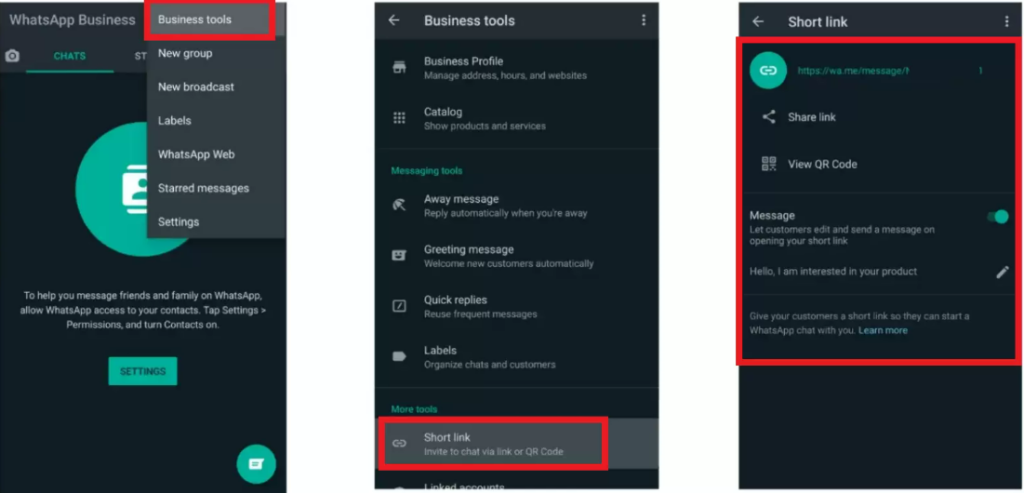
Go to Settings > Business Tools > Short Link. (On some versions, Business Tools might just be under the Settings menu.)
In the Short Link section, you will see your auto-generated short link (it usually looks like https://wa.me/<YourNumber> or sometimes a variant with an alphanumeric code). You can tap “Share Link” to copy or share it.
You can also set a default greeting message here (similar to the pre-filled message above) by editing the message in the short link settings.
Additionally, the app provides a QR code for your WhatsApp contact. Under Short Link, tap “View QR Code”. You can save or screenshot this QR code. When scanned, it functions just like the link – it will open a WhatsApp chat with your business. This is great for printing on posters, flyers, or business cards.
Using the WhatsApp Business app’s short link feature ensures your link is formatted correctly, and you get the handy QR code to use in offline marketing. The link from the app might look slightly different (it may use an API reference or your business ID internally), but it works exactly the same way as the standard wa.me link.
Note: You don’t have to use WhatsApp Business app to have a click-to-chat link – any WhatsApp number can use the wa.me link format from Method 1. The app’s feature is just a convenience. That said, if you are a business, it’s worth using the WhatsApp Business app for additional tools like business profile, greeting messages, quick replies, and stats. The short link it provides is just a bonus.
Other Ways to Create WhatsApp Links
The two methods above are the most direct ways provided by WhatsApp/Meta. There are also third-party tools that can help if you prefer an even simpler route:
WhatsApp Link Generator Tools: Several free online tools will create the WhatsApp link for you – you just input your number (and a preset message if desired), and they output the ready-made URL. Examples include Walink (create.wa.link), Respond.io’s WhatsApp link generator, and others. These can be useful to avoid manual URL encoding for messages. Just be cautious to use reputable ones so you’re not accidentally sharing your number with a shady site. Most simply build the URL string, and you copy it.
Plugins/Widgets: If you run a website on platforms like WordPress or Shopify, there are plugins (often called WhatsApp Chat Button or Click to Chat plugins) that can generate and embed the WhatsApp link for you with a nice button. For instance, the PushEngage WhatsApp widget for Shopify adds a floating WhatsApp icon to your site with a one-click install. Similarly, WordPress has plugins where you just enter your number, and it will display a chat button on your site. These solutions handle the link creation and even some design for you. They are optional – you can always do it manually – but worth considering if you want a quick, polished integration.
Now that your WhatsApp link is ready, the next step is to deploy it in your marketing channels so customers can start clicking and chatting. Let’s look at where and how you can use your WhatsApp click-to-chat link to maximize its impact.
Using WhatsApp Click-to-Chat Links in Your Marketing Strategy
Creating a WhatsApp link is only step one – now you need to put that link where your customers will see it and click it. The versatility of click-to-chat links is that you can integrate them anywhere you interact with your audience. The goal is to make it as easy as possible for a prospect or customer to find that “Chat on WhatsApp” option at the moment they have a question or interest. According to marketing experts, you should incorporate WhatsApp chat links across multiple channels and touchpoints to engage customers on their terms. Here are some of the best places to use your WhatsApp click-to-chat link:
Examples of businesses promoting WhatsApp click-to-chat links on social media. Many brands add WhatsApp chat links in Instagram bios, Facebook posts or ads, and even Twitter posts to invite customers into a direct conversation.
On Your Website: Arguably, the most important spot for a WhatsApp link is your own website. Add a prominent WhatsApp chat button or link on key pages, such as the homepage, contact page, product pages, and support page. For example, you can have a floating WhatsApp icon at the bottom corner of your site that says “Chat with us” (many plugins provide this), or a Call-To-Action button like “Questions? Chat with us on WhatsApp” next to your product details. When clicked, it should open WhatsApp (or WhatsApp Web) to chat with your business. This real-time chat option can significantly boost conversions, as website visitors can quickly get answers or reassurance while considering a purchase. If you have an FAQ page, you might even embed a “Still need help? Message us on WhatsApp” link there. By integrating WhatsApp on your site, you turn passive browsing into interactive shopping. (Tech tip: To add a WhatsApp button manually on a webpage, you can create a hyperlink with your wa.me link. For example, <a href="https://wa.me/<YourNumber>" target="_blank">Chat on WhatsApp</a> will work as a basic link. Wrap it around a WhatsApp icon image or styled button to make it eye-catching.)
Social Media Profiles and Posts: Your social media channels are perfect for promoting your WhatsApp contact. Include your WhatsApp click-to-chat link in places like:
Instagram bio: Instead of just an email, put a “WhatsApp us” link in your profile (you might use a service like Linktree to combine multiple links if needed). Businesses on Instagram often say “📩 WhatsApp us:” followed by the link. This gives interested followers a direct line to inquire about products or services.
Facebook page and posts: On Facebook, you can add a WhatsApp button to your business page (Meta allows linking your WhatsApp Business to your FB page). Also, when creating posts or offers, encourage people to message you on WhatsApp for more info and include the link. Facebook Ads even has a dedicated objective for Click-to-WhatsApp ads, where an ad’s CTA button opens a WhatsApp chat. These are highly effective for generating leads – users seeing your ad can chat immediately without filling any form.
Twitter (X) and other platforms: You can share your WhatsApp link in tweets or pin a tweet like “📱 Contact us on WhatsApp [link] for instant support!” Similarly, on LinkedIn or YouTube descriptions – any platform where a clickable link can be shared, you can invite users to chat with you directly. The image above shows examples of brands using posts with WhatsApp links on Instagram and Twitter – it makes your social engagement more conversational.
Email Newsletters & Signatures: Add WhatsApp as a contact option in your emails. In your email newsletter footer or sidebar, include a section like “Prefer WhatsApp? Chat with our team now” with the link. For one-time campaigns, if you’re announcing a sale or event via email, you could say, “Have questions? Just WhatsApp us [link] and we’ll help you out.” Since emails might be read at various times, make sure you’re prepared to reply on WhatsApp when someone reaches out. Additionally, put your WhatsApp link in your professional email signature (e.g., beneath your name, “WhatsApp: wa.me/YourNumber”). This way, every email you send becomes an opportunity for the recipient to hop on a quick chat if needed. It subtly signals that your business is modern and responsive on chat.
Online Ads and Landing Pages: As mentioned, Click-to-Chat ads are offered on platforms like Facebook and Instagram – take advantage of them. When a user clicks the ad’s CTA, a WhatsApp conversation with your business opens. These ads often lead to higher-quality interactions because the user voluntarily starts a chat (which you can then use to nurture or close a sale). For Google Ads or other ad platforms where you can’t directly integrate WhatsApp, you can still use your landing page effectively. For example, design landing pages with a clear WhatsApp chat button for inquiries. If you run ads for “Free Consultation”, the landing page can say “Schedule your free consultation – chat with us on WhatsApp now!” with the link. This reduces friction in lead capture compared to forms. SMS campaigns can also include a WhatsApp link: e.g., “Reply or message us on WhatsApp {link} for support.” Wherever you ask customers to take an action, consider if chatting might be a better, more instant step than filling a form.
QR Codes for Offline Marketing: Don’t forget offline channels! Since a WhatsApp link can be turned into a QR code, you can bridge real-world marketing with online chat. Print your WhatsApp QR on flyers, posters, brochures, product packaging, business cards, storefront signage – anywhere your customers might see it. For example, a cafe might have a tabletop sign: “Questions or want to order ahead? Scan to WhatsApp us!” When scanned, it opens the chat. This is also great for events and trade shows: include a “Chat with us” QR code on your booth or presentations so interested folks can connect instantly without typing anything. The WhatsApp Business app provides a ready-made QR code, or you can use any free QR generator by inputting your wa.me link. It’s an easy way to let users initiate a chat by just pointing their phone camera at the code.
In summary, deploy your WhatsApp link wherever customers interact with your brand, online and offline. The more visible and accessible it is, the more likely people will use it. Make sure to use a clear call-to-action around the link (like “Chat with us on WhatsApp”) so people know what will happen when they click. Now that your channels are set, let’s cover some best practices to ensure you handle all these incoming WhatsApp conversations effectively and get the best results.
Best Practices for Marketing with WhatsApp Click-to-Chat
While using WhatsApp for customer communication is powerful, it’s important to do it right. Here are some best practices and tips to help you succeed with WhatsApp marketing (and avoid common mistakes):
Make Your WhatsApp Contact Visible and Obvious: Don’t hide the WhatsApp link in a corner. Use contrasting colors or an eye-catching WhatsApp icon to draw attention. On your site, a floating chat button that’s always in view can greatly increase usage. Label it clearly – e.g., “💬 Chat on WhatsApp” – so users know what it is. If people have to hunt for how to contact you, they likely won’t bother. Convenience is key, so display your WhatsApp CTA prominently on high-traffic pages and channels.
Use a Clear Call-To-Action (CTA) Message: The wording around your WhatsApp link should entice users to click. Phrases like “Chat with us for instant support,” “Message us on WhatsApp,” or “WhatsApp us for details” set the expectation that they’ll get a quick response. Avoid vague text like “Contact” or “Submit inquiry” – instead, highlight the conversational nature (e.g,. “Ask us on WhatsApp”). On social posts or ads, explicitly say that they can message you on WhatsApp for more info. This clarity will improve click-through rates, as users immediately understand that help is one message away.
Set Expectations (Business Hours & Response Time): WhatsApp is often seen as an instant channel. If you’re not a 24/7 operation, it’s important to communicate when people can expect a reply. You can do this in a few ways. First, use the WhatsApp Business profile features: set an “Away Message” that auto-replies during off hours (e.g., “Thanks for your message! We’re currently away but will respond tomorrow after 9am.”). Also, consider putting your available chat hours in the greeting message or profile info. If someone messages you at 11 pm, at least they’ll get a note on when you’ll be back. During normal hours, try to respond promptly. The faster you reply, the more impressed the customer will be. In fact, 73% of users say slow responses on WhatsApp would make them stop engaging with a brand. Don’t leave people hanging. If you need a few minutes to look up info, you can send a quick acknowledgement (“Let me check that for you, brb”) so they know you’re on it.
Be Personable and Helpful: WhatsApp is a casual, chatty medium. Adapt your tone to be friendly and human, not overly formal “corporate speak.” Use the customer’s name if you have it, introduce yourself (or the agent’s name) when starting a conversation, and make the user feel heard. You can even use emojis or exclamation points if appropriate, to convey warmth – e.g., “Hi John, thanks for reaching out! 😊 How can I help you today?” Match the tone of the customer: if they’re formal, you can stay more formal; if they use casual language, you can be a bit more relaxed too. Always provide value in your responses – answer their question directly, share relevant info or links, and go the extra mile to help. Great customer service in WhatsApp chats can turn hesitant prospects into happy customers quickly.
Leverage WhatsApp Business Features: If you’re using the WhatsApp Business app, make use of its built-in features to streamline communication. Set up Quick Replies for FAQs (shortcuts for common responses), organize chats with Labels (e.g., “New Lead”, “Order in Progress”), and fill out your Business Profile (including address, description, hours, email, website) so users can see info in your WhatsApp contact. These features help manage conversations efficiently as you scale up. For example, if many people ask, “What are your prices?” you can have a quick reply ready with a price list or a link to your pricing page. This saves time and ensures consistency. Also, utilize Broadcast Lists or Groups carefully to send updates to multiple customers who have opted in – but avoid spamming (broadcasts only deliver to those who saved your number, as a built-in anti-spam measure).
Don’t Spam or Violate Trust: This is critical. Just because someone messages you on WhatsApp doesn’t mean you have the license to bombard them with promotions. Always respect user privacy and preferences. Use the channel primarily to respond to inquiries and provide requested information. If you want to send proactive marketing messages (like a sale alert), make sure the user has consented (perhaps by opting in to a WhatsApp newsletter or updates list). Unsolicited messages can lead to users blocking your number or reporting spam, which can hurt your account. Remember, WhatsApp conversations are end-to-end encrypted and personal – treat that privilege with care. Build trust by being helpful, not overly pushy. This way, customers will welcome your messages instead of ignoring or silencing them.
Train Your Team (or Yourself) for WhatsApp Etiquette: If multiple people will handle the WhatsApp chats, ensure they all follow a consistent and courteous approach. Quick response, friendly tone, accurate information, and knowing when to escalate or offer a phone call if needed – these are all skills to cultivate. You might create a small WhatsApp response handbook with guidelines and example answers to common questions, so your team can provide a seamless experience. Even if you’re a solo entrepreneur, think about how you want to come across on chat. For instance, using proper greetings, being patient if a user is slow to reply, and handling difficult queries calmly will all pay off in better customer relationships.
Use Pre-Filled Messages Smartly: We discussed how to add a pre-filled message to your link. Make sure that if you do use one, it fits the context. For example, if your link is primarily for sales inquiries, a pre-filled message like “Hello, I’m interested in [Product/Service].” can be great. But if it’s for support, maybe “Hi, I need help with…” is more appropriate. Always allow the customer to modify the message – the point is not to force a script, but to help those who aren’t sure what to say get started. Keep the text short so it doesn’t feel too assumptive. And avoid marketing jargon in the pre-fill; it should sound like it’s written from the customer’s perspective (e.g., “I’d like to learn more about your offerings” rather than “Tell me about your esteemed solutions”).
Test Your Link and User Experience: Before blasting your WhatsApp link to everyone, test it yourself, and on multiple devices/browsers. Click it from your mobile (does it correctly open your chat? If you have a dual-SIM or multiple WhatsApp scenario, ensure it opens the intended one). Test it on a desktop – does it redirect properly to web.whatsapp.com with your number? If the user is not logged in to WhatsApp Web, they might be prompted to log in via QR code – that’s normal. Also, verify that the pre-filled message appears if you added one. If using a QR code, scan it from a friend’s phone to ensure it works. It’s better that you catch any formatting errors or broken links than your customers do. Additionally, consider asking a friend or colleague to do a trial chat via the link and give feedback on the experience. Once everything is smooth, you can confidently promote the link.
Monitor and Adapt: Treat your WhatsApp chats like a marketing channel that needs analysis and improvement. Keep an eye on how many people are clicking the link and messaging you. (WhatsApp Business app might show you some statistics like the number of messages sent, received, read, etc. If you use the API through a provider, you’ll get more analytics dashboards.) Notice at what times you get more chats – maybe that’s when to ensure an agent is always online. Pay attention to the questions people ask most – this might inform your marketing copy elsewhere or what content you share. If you find certain campaigns (like an Instagram post vs a website banner) drive more WhatsApp conversations, focus your efforts there. Essentially, treat each chat as valuable feedback from a lead or customer, and use those insights to refine your approach. Over time, you might discover, for example, that people often ask for pricing on WhatsApp – perhaps you can preempt that by sharing a price list proactively or adjusting the pre-filled message to ask for their budget range.
Scale Smartly with Automation (if needed): As your WhatsApp engagement grows, you might reach a point where handling every chat manually becomes challenging. At that stage, consider leveraging automation tools. The WhatsApp Business API (designed for medium/large businesses) allows integration of chatbots and CRM systems. Through the API, you can set up automated greeting flows or connect a chatbot that can answer common questions 24/7. For example, a chatbot could ask “Hi! Are you looking for product info, order status, or support?” and guide the user accordingly, handing off to a human agent if needed. While implementing the API and a chatbot requires some technical setup (often through solution providers), it can significantly enhance response speed and handle volume. Even without a full AI bot, you can use the quick reply templates in the Business app to semi-automate answers. The key is to ensure customers still feel they are getting a personal, helpful service. Automation should assist, not fully replace, the human touch in most cases. When done right, scaling your WhatsApp marketing can lead to thousands of meaningful conversations with customers, without overwhelming your team.
By following these best practices, you’ll create a positive experience for users who reach out via WhatsApp, which in turn boosts your brand reputation and conversion rates. You’ve removed the barrier to conversation; now make every conversation count by being responsive, friendly, and helpful.
Finally, let’s wrap up with a quick recap and a call to action for you (yes, you!) to start leveraging WhatsApp in your marketing, plus an FAQ to answer any lingering questions.
Conclusion: Engage Your Customers – One Click Away
WhatsApp click-to-chat links offer a fresh, powerful way to connect with today’s customers who value convenience and instant communication. We’ve discussed how these simple links allow anyone to start chatting with your business in seconds – no forms, no waiting, just real conversation. You’ve seen that implementing WhatsApp in your marketing can lead to higher engagement, better leads, and even improved sales conversions, thanks to WhatsApp’s phenomenal open rates and personal touch.
Now it’s time to put this into action. Creating a WhatsApp link is easy and free, so the barrier to entry is practically zero. Think about your marketing and customer service setup today: where could a quick chat help answer questions or nudge a hesitant buyer? Whether you’re a small online store, a freelancer, a local service provider, or even a large enterprise, WhatsApp can likely enhance your customer interactions.
Don’t wait for competitors to beat you to it. Take a few minutes today to create your WhatsApp click-to-chat link (using the steps we covered) and add it to at least one place your customers will see. Maybe it’s your website’s contact page, or a social media bio, or the next email campaign you send out. Start small if you need to – you can always expand to more channels as you get comfortable. The key is to open that door for your audience.
Once the messages start coming, be ready to engage. Treat each WhatsApp chat as an opportunity to build a relationship with a potential customer. Provide value, solve problems, and make the chat experience enjoyable. You’ll be pleasantly surprised how these casual conversations can lead to loyal customers and new sales.
In a world where everyone is glued to their smartphones, marketing is no longer a one-way broadcast – it’s a dialogue. WhatsApp is the perfect medium for these dialogues. By embracing click-to-chat links, you’re saying to your customers, “We’re here, we’re reachable, and we care enough to talk with you directly.” That message, in itself, sets you apart.
So go ahead – create your WhatsApp link and make it live! Start engaging your customers on a platform they love. The sooner you do, the sooner you’ll reap the benefits of more conversations, more trust, and more conversions. Your customers are literally one click away from you. It’s time to say hello. 👋
Ready to elevate your marketing? Implement a WhatsApp click-to-chat link now and watch the engagement roll in. Don’t miss out on the chance to chat with your future customers – they’re waiting to talk to you!-> Start using WhatsApp click-to-chat in your marketing today, and give your audience an easy, personal way to connect with your business.
1. What is a WhatsApp click-to-chat link, and how does it work?
A WhatsApp click-to-chat link is a special URL that, when clicked, opens a chat with a specific phone number on WhatsApp, without needing to save that number in contacts. Essentially, it’s a direct invite to message someone. For example, a link like https://wa.me/15551234567 will launch WhatsApp and start a chat with the number +1 555 123 4567. It works on both mobile (opens the WhatsApp app) and desktop (opens WhatsApp Web). The person clicking must have WhatsApp installed or use WhatsApp Web. Once opened, they can type and send messages as usual. It’s an official feature by WhatsApp that makes starting a conversation as easy as clicking a link.
2. Is WhatsApp an effective marketing tool for businesses?
Absolutely. WhatsApp has proven to be a highly effective channel for customer engagement and marketing. The statistics tell the story: WhatsApp messages can have an open rate around 98%, which blows typical email open rates (20% or so) out of the water. Moreover, customers tend to respond and take action more via chat – conversion rates from WhatsApp interactions have been reported in the range of 45–60% in some cases. Customers feel comfortable on WhatsApp because it’s familiar and convenient; they’re more likely to reach out with questions, which gives you a chance to personally guide them to a purchase or solution. Also, 87% of consumers (globally) say they want brands to offer messaging options alongside traditional channels – it’s clear people prefer the ease of texting a business versus making a phone call or waiting for an email. That said, success on WhatsApp depends on how you use it: respond quickly, be helpful (not spammy), and use it to have conversations, not just blast ads. Businesses large and small are using WhatsApp for everything from sales inquiries, customer support, to sending order updates. When done right, it can boost customer satisfaction, increase trust, and yes, drive more sales thanks to that personal touch.
In the fast-paced world of messaging, WhatsApp has emerged as a powerhouse for marketing with over 2 billion users worldwide. WhatsApp messages boast astonishing engagement, with roughly 80% read within 5 minutes, and open rates averaging around 98%, significantly outperforming email metrics. But with great reach comes great competition for attention. People's attention spans on chat are fleeting, and long, unformatted messages often go ignored. To captivate customers, savvy marketers are turning to WhatsApp's text formatting features to make their messages pop. Well-structured, visually distinctive texts are not only easier to read but can improve message recall by up to 30%.
In this guide, we’ll explore 10 powerful WhatsApp text formatting tricks that marketers can use to highlight key points, convey offers with clarity, and boost engagement. From bolding urgent announcements to using bullet points for clarity, these tips will help your messages stand out in a crowded chat inbox and drive action.
Are you ready to elevate your WhatsApp marketing game? Let’s dive in!
WhatsApp offers simple text formatting options – like bold, italic, strikethrough, and monospace – to help emphasize and organize your messages. In the above image, you can see how adding special characters (such as * for bold, _ for italic, ~ for strikethrough, and triple backticks for monospace) changes the appearance of text. Marketers can harness these styling tricks to ensure important details stand out, making messages more visually engaging and easier to digest.
1. Bold Text – Make Key Information Stand Out
When it comes to grabbing attention, bold text is your best friend. Bolding a word or line instantly draws the eye and signals “this is important”. In fact, studies show bold text is noticed more quickly than italics for highlighting information. Marketers can use this to their advantage by bolding critical details like offers, discounts, or deadlines. For example, instead of a plain announcement, you might write: “Get ready for our BIG 50% OFF SALE tomorrow!” – the bold phrase ensures the offer isn’t missed.
First-line impact: Consider making your first line bold if possible. WhatsApp displays only the first snippet of a message in notifications and chat previews. A bold, intriguing first line can significantly increase open rates, much like an email subject line. E.g., “🔥 FLASH SALE TODAY! 🔥” as a bold opener will pique curiosity in the chat list. According to marketing experts, if the first sentence is compelling and highlighted, more people will open and read the message. Even though WhatsApp messages are almost always opened, you still want to hook the reader early.
How to do it: To bold text on WhatsApp, surround your word or phrase with *asterisks*. For instance, typing *Limited Time Offer* will appear as Limited Time Offer in the chat. You can bold entire sentences or just the key phrase, but avoid overusing bold. If everything is bold, nothing stands out – and it can look “messy” or shouty. Use bold sparingly for maximum impact on the words that matter most.
Bold formatting is perfect for emphasizing value propositions and CTAs in your WhatsApp marketing messages. Think product names, sale percentages, or calls-to-action (e.g., “Buy Now”). By highlighting a few critical words in bold, you make your message hard to ignore. As one WhatsApp marketing guide notes, when you highlight important words in bold, the message is less likely to be ignored – just be cautious not to bold everything, or it loses effect. In short, bold text is a simple trick that can instantly direct your customer’s focus to what you want them to see first.
2. Italic Text – Add Emphasis with a Personal Touch
While bold shouts, italicswhispers – offering a softer emphasis for secondary details. Italic text is great for highlighting names, subtle remarks, or conversational tone elements without stealing the spotlight from the main message. Marketers can use italics to add a personal, human feel to messages, almost like adding a gentle aside or friendly note that complements the main text. For example: “Hi Jane, we have an exclusive offer just for you today.” Here, italicizing "exclusive offer" adds a subtle emphasis that feels personal and friendly.
Use cases: Italics work well for titles, names, or disclaimers. If you’re mentioning a product name or an event title, italicizing it can make it stand out in a stylish yet understated way. It’s also useful for words in a different language, or for adding a bit of flair to your tone. Marketers often italicize parts of a message to add a casual or conversational tone, which can make the message feel more personal. For instance, “Don’t forget, offer ends midnight!” gives a friendly nudge feel. You might also italicize a short customer testimonial or a slogan within your message to distinguish it from the rest of the text.
How to do it: To italicize on WhatsApp, place an underscore _ on both sides of the text. For example, typing _New Arrivals_ will show as New Arrivals. As with bolding, ensure there are no spaces between the underscores and the text for it to work correctly. Once applied, the underscores will disappear, and your text will slant.
Italics provide gentle emphasis – they’re noticeable but not as in-your-face as bold. This makes them perfect for highlighting secondary information: perhaps the name of the customer (personalization), a coupon code, or a short tagline. According to WhatsApp formatting tips, italics lend a creative, relaxed feel to your message, helping it feel fun and personal. Keep in mind that italics are more subtle – ideal for when you want to stress a point without dominating the message. In combination with bold (for the main point) and italics (for the supporting point), your messages will convey a clear hierarchy of information that resonates with readers.
3. Strikethrough – Showcase Discounts & Updates
Strikethrough text is a handy formatting trick that draws attention by crossing out text. It might seem counterintuitive – why cross out your own words? But for marketers, strikethroughs are gold when you want to show a change or a “before-and-after”. A classic example is indicating a price drop: $99 $79. By striking through the original price and placing the new price next to it, you visually highlight the discount – the contrast practically screams “sale!” to the reader. This technique immediately lets customers see what deal they’re getting.
Use cases:Showcasing discounts is the #1 use of strikethrough in marketing. You can write something like: “Now only $399 +$499+!” (without the plus signs, which are added here just to show formatting) and WhatsApp will display it as “Now only $399 $499!”. The old price appears crossed out, emphasizing the new lower price. Beyond pricing, you can use a strikethrough to indicate something is no longer applicable or has been corrected. For example, if you sent a time-sensitive offer that expired, a follow-up might say, "Oops, the promo code SAVE20 (expired). Use NEW20 instead.*" This shows transparency and clarity in your communication.
How to do it: To strikethrough text on WhatsApp, place a tilde ~ on both sides of the word or phrase. For instance, typing ~Limited Stock~ will appear as Limited Stock. As always, ensure no extra spaces around the tildes. Many users aren’t even aware this feature exists, so a strikethrough text can really catch the eye as something different.
According to marketing experts, the strikethrough effect is underutilized and often surprises readers, which can work in your favor. It’s perfect for highlighting what’s been “removed” or changed in an offer. Customers see the comparison instantly. For example: “Your reward: ₹500 ₹1000 cashback!” shows an increased reward, doubling the impact. Or “Buy 1 Get 1 50% 100% FREE”, showing an offer improvement. Strikethroughs add a sense of urgency and correction, implying that things have changed (often for the better deal). Just be sure the context is clear – you don’t want to confuse users. When used wisely, strikethrough formatting can make your discounts and updates unmissable.
4. Monospace Font – Highlight Codes & Create Contrast
Monospace is a special font style where every character occupies the same width (like old typewriters or code editors). WhatsApp’s monospace text option is fantastic for making certain text segments stand out in a blocky, technical-looking font. Why would marketers care about a “code” font? Because it’s perfect for things like coupon codes, order numbers, or any text you want to separate from normal conversational text. For example: “Use code SAVE50 at checkout.” The code inside triple backticks will appear in a monospace block, immediately drawing attention to it as a unique element.
Use cases:Coupon or promo codes are a top use case – monospace formatting makes them unambiguous and easy to copy. If you send Here is your coupon: ```SUMMER2025````, it will show as: Here is your coupon: SUMMER2025`. This way, the code stands out and is clearly distinct from the rest of the message (no one will mistake it as part of a sentence). Monospace is also great for technical info: Wi-Fi passwords, product SKUs, serial numbers, or any data that needs to be clearly read. Additionally, because of its fixed-width nature, monospace text can be used to create a rudimentary alignment or table. For example, you could list items and prices in columns using spaces, and in monospace, they will line up neatly, e.g., Item Price on separate lines will align like a mini table. This can make information like menu lists or fee breakdowns easier to read.
How to do it: To format text in monospace on WhatsApp, surround your text with three backticks ( ). For instance, typing Latest Offer (with three backticks on each side of Latest Offer, no spaces) will display as Latest Offer in a monospace font. On most keyboards, the backtick is the grave accent mark (`). If you’re on mobile and can’t find the triple backtick easily, WhatsApp also provides an alternative: you can select the text and choose monospace from the formatting menu (on Android, after tapping the three-dot menu when text is selected).
Monospace text immediately gives a techie, clipboard-friendly look. Users perceive monospace text as something to copy exactly (useful for codes or commands) or something that carries technical authority. As one guide notes, this formatting keeps text neat and easy to read, preventing any alignment issues. Marketers can leverage this by using monospace for parts of the message that should stand apart. For example, including Order ID: ```AB12345XYZ``` in a support or confirmation message ensures the customer easily identifies their order number. It’s all about creating contrast. In a sea of regular WhatsApp font, a monospace snippet looks different enough to catch the eye and convey importance. Just remember, monospace will not combine with other formatting (you can’t bold or italicize inside monospace – it will literally show the symbols), so use it solely for the specific text you want isolated. Done right, this trick adds a layer of professionalism and clarity to your WhatsApp communications.
5. Bulleted Lists – Organize Information for Easy Scanning
Ever receive a WhatsApp message that was a giant block of text listing multiple points, and you just skimmed it or gave up? For marketers, clarity is king. Thankfully, in early 2024, WhatsApp introduced bulleted lists as a formatting feature. This is a game-changer for making messages with multiple points much more readable. Instead of writing a long sentence with commas or line breaks, you can now send a neat bulleted list right within a single message.
Use cases: Bulleted lists are ideal when you want to share multiple benefits, features, or tips in one go. For example, if you’re promoting a product, you might list its top three features in bullet form:
High-quality organic ingredients
50% off for first-time buyers
Free shipping worldwide Each point is concise and starts on a new line with a bullet, making it super easy for the reader to scan. You can also use bullets for listing steps (if order isn’t critical) or highlighting multiple options available. For instance, a boutique might message: "Here are our new arrivals:" followed by a bulleted list of items. From a marketing perspective, well-structured lists help ensure no key point gets lost in the mix.
How to do it: Creating a bulleted list in WhatsApp is simple: start each new line with a hyphen (-) or an asterisk (*) followed by a space. For example, typing:
- Point One
- Point Two
- Point Three
will appear as a nice list:
Point One
Point Two
Point Three WhatsApp will automatically format these with bullet points (•) in the chat. Make sure to put each item on a new line. This feature works on updated versions of WhatsApp across devices, so both you and your recipients should see the bullets.
Using bulleted lists improves readability dramatically. Research shows that lists break info into clear, bite-sized chunks, helping readers focus on each idea. Instead of sending a chunky paragraph of features or instructions, bullet points let your customers quickly absorb each benefit or step. This formatting trick also conveys a sense of professionalism and organization, which can boost your brand’s impression. As a pro tip, keep each bullet point brief (one or two lines). That way, your WhatsApp message looks clean and is easy to scroll, increasing the likelihood that the customer will read all your points. In a nutshell, when you have multiple points to make, use bullets – your audience will thank you for the clarity.
6. Numbered Lists – Step-by-Step Guidance
Similar to bulleted lists, numbered lists let you organize information sequentially. They are perfect for situations where order matters – think step-by-step instructions, countdowns, or ranked lists. For marketers, this is incredibly useful when you want to guide a customer through a process (like redeeming an offer or setting something up) or when presenting a list of reasons/features in order of importance. Numbered lists ensure the reader follows the intended sequence.
Use cases:Step-by-step guides are a natural fit. For example, if you’re telling a user how to claim a promo:
Click the link above to visit our site.
Add your favorite item to the cart.
Enter code SAVE50 at checkout for 50% off. This numbered list clearly walks the customer through the exact flow, making it easy for them to follow and act. Another use might be a "Top 3 benefits of our service" where you number them 1, 2, 3 to imply ranking (with 1 being the most compelling benefit). Or during a campaign, you might use a countdown: "3...2...1... 🎉 Offer Live!" spread over multiple lines with numbers to build anticipation. Numbered lists bring an inherent structure and progression that can psychologically encourage a reader to complete all the steps or read all points (nobody likes stopping at 2 when a 3 is expected!).
How to do it: To create a numbered list in WhatsApp, start a line with the number and a period (e.g., 1.) followed by a space. For example:
1. Step One
2. Step Two
3. Step Three
WhatsApp will format this automatically as:
Step One
Step Two
Step Three Just ensure each item is on a new line and that you use the proper "number, period, space" format. The numbering will display exactly as typed (WhatsApp doesn’t auto-increment the numbers, so you should number them manually in order).
Numbered lists in WhatsApp are excellent for clarity and guidance. They add a sense of order and can make your message feel like a helpful checklist or set of instructions. This is great in marketing messages where you may be instructing the user, e.g., how to apply a discount or the steps to sign up for an event. Users are more likely to follow through when instructions are clear and broken down. In fact, using numbered steps can improve comprehension because it sets expectations on the length of the process and groups the actions logically. From a strategic standpoint, numbered lists also imply a logical rationale (for example, "5 Reasons to Try Our Product" suggests there’s a thoughtful order, perhaps from most to least important reason). So whenever your WhatsApp communication needs a sequence or a hierarchy, remember you can now use numbered formatting to present it cleanly.
7. Block Quotes – Highlight Testimonials or Key Statements
Sometimes you want a line of text to stand apart as a quote or a highlighted note. Block quotes in WhatsApp let you indent a paragraph with a vertical line, indicating it's a quoted text or special highlight. For marketers, this is a brilliant way to showcase a customer testimonial, a review snippet, or even a slogan/tagline you want to emphasize. Visually, it breaks the flow of your message and draws attention due to the indent and unique styling.
Use cases: One powerful use case is customer testimonials or endorsements. Imagine you’re chatting with a prospect and you drop in a glowing one-liner from a satisfied customer:
"This product increased our sales by 30% in a month! – Happy Client" This quote, formatted as a block quote, immediately stands out and adds credibility without you directly tooting your own horn. Another use is highlighting a key insight or tip in a series of messages. For instance, if sharing a marketing tip of the day, you might quote an expert: "Content is king, but engagement is queen, and the lady rules the house." Block quotes can also call out terms and conditions or an important note in an otherwise promotional message (though typically you might prefix "Note:" instead). Essentially, use block quotes when you want a section of text to catch eyeballs and be set apart from your main message body.
How to do it: To create a block quote in WhatsApp, start a new line with > followed by a space. For example:
> This is a quoted text.
When you send it, it will appear indented with a vertical line, like:
This is a quoted text. If you continue typing on the next line without >, that text will return to normal formatting. So ensure to put > at the start of each line that you want in the quote block (or use a line break within the quote as needed). This feature was introduced alongside lists in 2024, so make sure your app is updated to see the proper formatting.
Block quotes make messages stand out and seem special. They naturally draw the reader’s attention because they break the alignment and look of the chat bubble. For marketers, this is an opportunity to inject social proof or important takeaways in a way that catches the eye. According to messaging tips, block quotes are great for highlighting key ideas or inspiring quotes, making them more memorable to the reader. The visual separation also helps in not overwhelming the reader with too much promotional text at once – it’s like a breath in the message where a different voice or important note comes through. So, if you have a golden testimonial quote or a phrase you really want your audience to remember, set it as a block quote. It adds variety to your message format and elevates the perceived importance of that text snippet.
8. Combining Formatting Styles – Double the Emphasis
Once you’re comfortable with basic formatting, you can get creative and combine styles for extra emphasis. WhatsApp allows certain formatting to be applied together on the same text – for example, bold + italic or bold + strikethrough. This means you can make a word both bold and italic at the same time, which could be useful for something you want to really stand out in context. Marketers might use a combination for an ultra-important keyword or phrase in a message that absolutely must catch attention – think of it as the text equivalent of bolding, underlining, and highlighting a phrase in print (though WhatsApp doesn’t have underline by default).
Use cases: One practical example is when announcing a major limited-time offer. You might want to convey urgency and importance: "Hurry, 50% OFF ends tonight!". The phrase "50% OFF ends tonight" here would appear both bold and italic, which visually sets it apart even more than just bold alone. Another example: if something is new and important, you could do "Check out our NEW Feature Update" – where "NEW Feature Update" is bold+italic, screaming for attention. Combining bold with strikethrough could be used in a playful way for crossing out a sarcastic word in bold, although in marketing, you might rarely need bold+strikethrough unless to emphasize the part that’s being negated strongly. The key is not to overuse combinations, but they can be handy for that one very important part of your message.
How to do it: To combine styles, you simply put both markup symbols around the text. The order of symbols generally doesn’t matter, but the closing symbols should mirror the opening order to work correctly. For example, to do bold + italic, you can write *_Great Deal_*. An asterisk and underscore before Great and an underscore then asterisk after Deal will output Great Deal (bold and italic). Similarly, *~text~* would give you text (bold and strikethrough simultaneously). WhatsApp’s formatting supports bold, italics, and strikethrough combinations freely. One combination not possible is with monospace – you cannot do bold or italic inside a monospace block (monospace will cancel other formatting). But aside from that, feel free to mix bold/italic/strikethrough. A quick test: when you’re typing the message, WhatsApp will preview the formatting by slightly fading the symbols if done correctly.
Combining formats should be used strategically and sparingly. It can make a word really stand out, but if you make too many things multi-formatted, the message can become chaotic. According to messaging best practices, mixing bold, italics, and strikethrough adds extra focus and makes messages more interesting; it's a way to visually differentiate multiple layers of importance. For example, in one sentence, you might have one keyword bold, another keyword italic, and maybe one in both to create a visual hierarchy of emphasis. This guides the reader on what to look at first, next, and last. For marketers, the ability to combine formats is an advanced trick: use it for the single most critical element in your message (like a deadline: Today Only, or a Final Warning on an expiring offer). It adds a bit of flair and ensures that even if someone is skimming, their eyes land on that doubly-highlighted phrase. Just remember the golden rule – if everything is special, nothing is special. So reserve combo-formatting for the can't-miss words.
9. Emojis and Symbols – Enrich Text with Visual Cues
Strictly speaking, emojis and symbols aren’t “text formatting” in the sense of bold or italic, but they are crucial text elements that can transform the tone and engagement level of your WhatsApp messages. For marketers, using emojis strategically can make messages more relatable and help important points pop. Think of emojis as colorful annotations to your formatted text: a well-placed 🔥 fire emoji can emphasize a hot deal, a ✅ check mark can serve as a bullet point or signify completion, and a 🚀 rocket can hype up a new launch. Emojis break the monotony of plain text and can draw the eye to specific parts of your message. In a way, they function like visual bolding for certain concepts, and they make your message feel more friendly and modern.
Use cases: Emojis can be used to highlight specific words or serve as bullet icons. For example, “Get 50% off everything in our Summer Sale! Don’t miss out 🌟” – the star emoji adds excitement. Or if listing out a few items without using the official bullet format, you might manually use emoji bullets:
✅ Free Shipping
✅ 24/7 Support Emojis like ✅ or ⭐ in front of each item act as attractive bullet points. Another great use is to emphasize a CTA or urgency: “Sale ends today ⏰ – act fast!” where the clock emoji reinforces urgency. If you have a link, an arrow 👉 can point to it and say "click here". For a more personal touch, you can even use emojis to mimic a friendly tone, e.g., "Hi John 😊". The key is to use emojis that align with your brand voice and the message context – they should enhance, not distract.
Best practices:Don’t overdo it. A handful of well-chosen emojis can boost engagement, but a swarm of them can look unprofessional or be hard to read. Pick emojis that match the emotion or concept of your message (🔥 for hot/new, 🎁 for offers, 💡 for tips, etc.). According to WhatsApp marketing experts, emojis can make messages feel less promotional and more conversational, bridging the gap between brand and user. They humanize your message. In fact, some brands strategically place emojis around a word to draw focus. For example, a lightning emoji before and after the word Sale – “Our ⚡Sale⚡ is live!” – to create a sense of energy.
Emojis also serve a functional role: since WhatsApp doesn’t support colored text or custom fonts (beyond monospace), emojis bring color and personality into the text. A red ❤️ heart or a green ✅ check can convey meaning at a glance. Especially on mobile, where users are used to emoji-rich communication with friends, a message from a business that includes a relevant emoji can feel more natural and engaging. It shows that your brand “speaks the language” of chat. Just ensure the emojis make sense and add clarity (or emotional value) to the message. For instance, saying "We have an exclusive deal for you 🎉" sets a celebratory tone, implying something good. Whereas "Important update ❗" with the exclamation emoji stresses urgency.
In summary, sprinkle emojis thoughtfully to accentuate your formatted text. They can act as visual signposts that highlight offers, segment information, or simply add warmth. A/B testing different emojis is also wise – see which ones resonate with your audience. Done right, emojis and symbols will make your WhatsApp marketing messages feel more human and attention-grabbing, leading to higher engagement.
10. Line Breaks & Short Messages – Keep It Concise and Readable
Last but certainly not least: the way you break up your text in a WhatsApp message is a formatting trick in itself. Even with all the bold or italics in the world, a message that’s a wall of text can intimidate or bore readers. WhatsApp is inherently a quick-chat platform – people expect short, digestible messages. For marketers, this means you should format your message with line breaks, spacing, and brevity in mind. In fact, one marketing study suggests that WhatsApp messages should ideally take no more than 8–10 seconds to read. If your message looks like a lengthy email, chances are the user will skim or skip it.
Use short paragraphs: Break your message into 1-2 sentence paragraphs or even single-line sentences where appropriate. On WhatsApp, pressing “Enter” will send the message by default on mobile, but you can insert a new line by using Shift + Enter (on WhatsApp Web/Desktop) or toggling off the "Enter is send" option on mobile to add line breaks. Use this to create natural pauses. For example, instead of:
"Hi John, our big end-of-season sale is now live. We’re offering 50% off on all items in our catalog for the next 48 hours. Shop now and save big on your favorite products! Visit our website to grab the deals before they’re gone."
which is a long paragraph, you could send:
Hi John! Our **Big End-of-Season Sale** is now live.
Enjoy *50% OFF* on all items for the next 48 hours.
Shop now and save on your favorites – don’t miss out!
[Visit our site](https://example.com) to grab the deals before they’re gone.
See how the message is split into multiple lines and even multiple paragraphs (denoted by an extra blank line for a new paragraph). This is far more readable on a phone screen. The first line is a greeting and headline, the second line states the offer, then a spaced break, then a call-to-action line with a link.
Front-load important info: Because of WhatsApp’s preview nature (and short attention spans), put the most critical information in the first line or two. If the key offer or call-to-action only appears at the end of a long message, many might not see it without scrolling. As mentioned earlier, only the first part of your message shows in notifications and chat list previews. So make that part count – for example, start with "50% OFF Today Only!" or "[Brand Name]: New Feature Alert". Then you can provide details in subsequent lines. This way, even if someone doesn’t open the message immediately, they glean the main point from the preview.
Be concise and clear: Given WhatsApp’s informal setting, brevity boosts engagement. Users often check messages on the go, so they appreciate it when you get to the point quickly. If something can be said in 5 words instead of 10, go for 5. Use simple language and short sentences. Also, consider sending multiple shorter messages rather than one enormous message if you have multiple points – it can feel more conversational and less daunting. But don’t overdo one-liners either; you don’t want to spam a customer with 10 separate bubbles where 1 or 2 well-structured bubbles would do. It’s a balance.
Remember the wise words from marketing gurus: even with a 99% open rate on WhatsApp, your job isn’t done until the customer reads and acts on your message. Formatting and brevity help ensure that once opened, your message gets read fully and understood. One technique is to use whitespace effectively – a blank line (extra line break) can signal a new thought and give breathing room, much like in an email or blog post. This prevents the message from feeling like a text blob. Also, maintain a casual, conversational tone (as if you’re chatting with a friend) – this keeps the user comfortable and more likely to read through.
In summary, less is more on WhatsApp. By writing crisp messages and using line breaks to structure them, you respect your audience’s time and capture their interest. As a result, your key points – enhanced by all the formatting tricks above – will shine through without overwhelming the reader. A short, well-formatted WhatsApp message can deliver the punch of a much longer message because it’s direct and user-friendly. This leads to higher retention of information and better response rates.
Actionable Tip: Next time you draft a WhatsApp campaign message, read it aloud to yourself. Does it sound like something you’d quickly tell someone in person? If not, try trimming and breaking it into chat-sized chunks. Your customers will find it much more appealing to read a concise, nicely formatted message – and a message that’s read is a message that can convert!
Conclusion
WhatsApp’s text formatting features might seem simple, but as we’ve seen, they are powerful tools for marketers. By using bold text for key offers, italics for nuance, strikethroughs for discounts, monospace for codes, and the newly added lists and quotes for structure, you can transform a basic message into a compelling marketing piece. These formatting tricks help your message cut through the noise, making important information unmissable and improving overall readability. Remember, people respond to messages that are clear, engaging, and relevant. A well-formatted message not only grabs attention but also builds trust, showing that you care about the details and professionalism of your communication.
Now it's your turn to put these tips into practice. Imagine the impact of a WhatsApp broadcast where the first line of each message hooks the reader, the core details stand out in bold or bullets, and the tone feels friendly and approachable. It could mean the difference between a message that gets instant replies and clicks and one that gets lost in the chat history. Don’t let your WhatsApp marketing fall flat due to plain, boring text. Apply these formatting tricks in your next campaign and watch the engagement improve – higher read-through rates, more clicks on your links, and better customer feedback.
Ready to elevate your WhatsApp marketing game? Try out at least 2–3 of these formatting tricks this week in your customer communications. For example, send your next promotional offer with a bold headline and a few bullet points, or text a VIP customer with their name in italics and a personalized emoji. See how they respond! You’ll likely notice a boost in both customer interest and response quality. And if you found these tips useful, feel free to share this guide with your team or fellow marketers. Let’s raise the bar for WhatsApp marketing messages across the board. Happy WhatsApp marketing!
1. How do I format text in WhatsApp (bold, italic, strikethrough, etc.)?
WhatsApp uses simple markup characters to format text. For bold, add * before and after the word (e.g., *hello* → hello). For italics, use _ underscores (e.g. _hello_ → hello). For strikethrough, use ~ tildes (e.g. ~hello~ → hello). To get the monospace font, wrap text in three backticks ( hello ). Additionally, as of 2024, you can create bulleted lists by starting lines with - or * , and numbered lists with 1. , 2. , etc. You can also add > at the start of a line to make a block quote. These formatting options are available on all updated versions of WhatsApp. (On mobile, you can also long-press the text you’ve typed and use the BIU or More menu to apply bold, italic, etc., without manually typing the symbols.)
2. Does WhatsApp support bullet points and lists in messages?
Yes! As of a February 2024 update, WhatsApp allows users to format bulleted and numbered lists natively. To add a bullet point, start a new line with a hyphen or asterisk followed by a space (e.g., "- Item 1"). To create a numbered list, start lines with "1. ", "2. ", etc., followed by a space. The app will display them as indented lists with actual bullet symbols or numbers. This is very useful for sharing multiple points or steps in an organized way. If you don’t see this formatting, make sure your WhatsApp is updated to the latest version (the feature is available across Android, iOS, and Web). Prior to this feature, people often manually used emoji like "•" or "-" to indicate bullets, but now WhatsApp will do the formatting for you, making lists cleaner and more uniform.
3. Are WhatsApp formatting features visible to everyone (Android, iOS, Web)?
Yes, all of WhatsApp’s formatting features are designed to be visible across platforms. Whether your recipient is on Android, iPhone (iOS), or WhatsApp Web/Desktop, they will see the bold, italic, strikethrough, lists, and other formatting just as you intended. The formatting is part of the message itself (not an added overlay), so it renders consistently. However, both you and the recipient need to be using relatively up-to-date versions of WhatsApp that support these features. The bold/italic/strikethrough/monospace have been around for a while (since ~2016), so virtually all users can see those. The list and quote features rolled out in 2024, but as long as the app is updated, those will show correctly, too. If someone is on a very old WhatsApp version that doesn’t support lists, they might just see the raw text (e.g., hyphens instead of bullets). But given WhatsApp’s auto-updates and the ubiquity of these features now, it’s rare to encounter a user who can’t see them. In summary, you can confidently use text formatting, knowing that your audience will see the styled text as intended, regardless of device. It’s always a good idea, though, to test your formatted message on your own phone or with a colleague to ensure it looks right (especially if using any unusual characters or third-party fonts). Once you see it works, you can hit send to your customers with peace of mind!
Looking for the best WhatsApp marketing, customer engagement, and automation platforms in 2025? You’re not alone. WhatsApp boasts over 2+ billion users with a staggering 98% open rate on messages. Tools like Interakt have helped businesses tap into this potential by automating customer engagement on WhatsApp.
However, Interakt isn’t one-size-fits-all – its feature set or pricing may not suit every company’s unique needs. The good news is there are excellent Interakt alternatives offering omnichannel marketing, richer features, better pricing, and top-notch support.
In this comprehensive guide, we’ll explore the top 10 Interakt alternatives in 2025 – including their standout features, pricing models, integrations, and ideal use cases. Whether you need WhatsApp Business API tools, customer communication platforms, or advanced automation for WhatsApp, these alternatives have you covered. Let’s dive in!
Table of Contents
Compare different Interakt Alternatives
Tool
Best For
WhatsApp API
Omnichannel
Broadcasting
Chatbots
Ecommerce Integration
Pricing
Sendwo
Best overall WhatsApp automation & marketing
✅
❌
✅
✅ (AI-powered)
✅ (Shopify, WooCommerce, Zapier)
Free forever plan, paid from ~$29/month
Wati
SMBs with multi-agent support needs
✅
❌
✅
✅ (No-code builder)
✅
From ~$49/month
MessageBird
Omnichannel enterprises
✅
✅ (SMS, Telegram, etc.)
✅
✅ (Flow Builder)
✅
Custom/usage-based
Twilio Flex
Customizable enterprise-grade contact center
✅
✅ (Voice, SMS, etc.)
✅
✅ (Autopilot AI)
✅ (via API)
$1/agent-hour or $150/agent-month
Zoko
WhatsApp commerce & large teams
✅
✅ (Facebook, IG)
✅
✅
✅ (Shopify, WooCommerce)
From $34.99/month + usage
Freshchat
Unified live chat + WhatsApp support
✅
✅ (Messenger, Apple Chat, etc.)
✅
✅ (Freddy AI)
✅
Free plan; Paid from ~$18/month/user
AiSensy
No-code WhatsApp marketing with strong support
✅
❌
✅ (Unlimited)
✅
✅
From ₹999 (~$12)/month
DelightChat
E-commerce teams using Shopify
✅
✅ (IG, Email, FB)
✅
❌
✅ (Shopify focus)
From ₹2250 (~$30)/month
Trengo
Omnichannel customer service teams
✅
✅ (SMS, Email, Chat, etc.)
✅
✅
✅
From $113/month (5 users)
Infobip
Enterprise-grade multi-channel messaging
✅
✅ (All major channels)
✅
✅ (Answers Bot)
✅
Custom enterprise pricing
1. Sendwo – Best Overall WhatsApp Marketing & Automation Platform
Sendwo takes the #1 spot as the best Interakt alternative for 2025. It’s a powerful WhatsApp Business API platform that enables global businesses to broadcast messages, engage customers, and automate conversations – all in one place. What makes Sendwo shine is its combination of rich features and an incredibly friendly pricing model.
Key Features
Free Forever Plan: Sendwo offers a free plan for basic use (no credit card required), making it ideal for startups and small businesses. You can send up to 500 messages/month and manage one WhatsApp account at no cost. The software itself is free to use forever, with no added commission on WhatsApp API conversation fees. This means you only pay WhatsApp’s own charges as you scale.
Bulk WhatsApp Broadcasting: Easily send out bulk WhatsApp campaigns to thousands of customers without getting banned. Sendwo uses the official WhatsApp Business API, so you can send templated broadcasts (promotions, alerts, updates) compliantly. For example, a retailer can blast a new sale announcement to its subscriber list in one go.
AI-Powered Chatbot Automation: With Sendwo’s built-in AI chatbot (OpenAI integration), you can automate responses 24/7. The chatbot can answer FAQs, share product links or payment requests, and smoothly hand off to a human agent when needed. This chatbot automation helps businesses provide instant customer support and capture leads even outside office hours.
Multi-Agent Inbox & CRM Integration: Sendwo provides a unified WhatsApp Inbox for your team, so multiple agents can manage conversations seamlessly. All customer chats, leads, and sales can be managed in one dashboard. It also integrates with e-commerce and CRM platforms (Shopify, WooCommerce, Zapier, HubSpot, etc.), allowing automated notifications for orders, payments, and abandoned cart recovery to boost conversions.
Rich Media and Interactive Messaging: Engage customers with more than plain text – Sendwo supports carousel messages, product catalogs, images, videos, and even WhatsApp payment links. For instance, an online store can send a carousel of product images with buy buttons directly in WhatsApp, creating an interactive shopping experience.
Why Sendwo?
If you want a full-stack WhatsApp marketing solution that’s easy to use, scalable, and cost-effective, Sendwo is hard to beat. It caters to businesses of all sizes – from a local shop just starting with WhatsApp promotions to an enterprise sending millions of messages. With Sendwo’s free plan and affordable paid tiers (Starter at ~$29/month for 100k messages), you get enterprise-grade features without the hefty price tag. In short, Sendwo empowers you to launch and automate WhatsApp campaigns quickly while saving on costs, making it our top recommended Interakt alternative.
2. Wati – WhatsApp API Platform for Team Inbox & Chatbot Automation
Wati (WhatsApp Team Inbox) is another leading Interakt competitor, particularly popular among small and medium businesses. Wati is an end-to-end WhatsApp API solution designed to enhance customer communication through automation and multi-agent support. Over 8,000 brands in 100+ countries use Wati to streamline their sales, marketing, and support on WhatsApp – from ecommerce stores to service providers.
Key Features:
Shared Multi-Agent Inbox: Wati’s core offering is a shared team inbox for WhatsApp. Your support or sales team can collaborate on customer chats in real-time, with features like assigning chats to specific agents and internal comments. This ensures no customer query slips through the cracks and enables faster responses.
Customizable Chatbots: Without any coding, you can deploy chatbots on Wati to handle common inquiries or lead capture. These AI-powered chatbots can automatically reply to FAQs, book appointments, or collect customer info – freeing up agents for complex issues. For example, a clinic can use a Wati bot to let patients check available slots and schedule appointments via WhatsApp.
Broadcast Campaigns & Templates: Like Interakt, Wati allows broadcast messaging using approved WhatsApp templates. You can send promotional messages, alerts, and newsletters to thousands of contacts at once. Businesses have reportedly generated millions in sales through such WhatsApp campaigns on Wati.
Integrations & Analytics: Wati integrates with CRM and ecommerce platforms (HubSpot, Shopify, etc.) to trigger automated notifications (e.g., order confirmations, shipping updates). It also provides analytics dashboards for tracking message delivery, open rates, and team performance, so you can continually improve engagement strategies.
Scalability and Reliability: Wati’s cloud infrastructure ensures reliable message delivery even at large scale. The platform claims significant improvements for its users – e.g. some saw customer response rates increase by 72% and support costs drop by $10k after adopting Wati. This underscores Wati’s capability to grow with your business.
Pricing & Ideal Use:
Wati offers a 7-day free trial, after which paid plans start around $49–$59/month for the basic Growth plan (pricing varies by region). Higher tiers (Pro, Business) unlock more advanced features and higher message volumes. Wati’s pricing is on the higher side compared to some competitors, so it tends to suit established businesses more than very small startups. However, if you need a proven WhatsApp-centric platform with a robust team inbox and chatbot capabilities, Wati is an excellent choice. It’s especially useful for companies that rely heavily on WhatsApp for daily customer support and want to keep all conversations organized.
3. MessageBird – Omnichannel Customer Communication Platform
MessageBird is a globally recognized communications platform and a Meta official partner that goes beyond WhatsApp to provide a true omnichannel messaging solution. If your business wants to connect with customers on every channel (WhatsApp, SMS, Facebook Messenger, Instagram, Telegram, etc.), MessageBird is a top contender. It unifies all these channels into one interface, making it easy to engage customers wherever they are.
Key Features:
Unified Omnichannel Inbox: MessageBird’s Conversations API and Inbox product allow your team to manage all customer messages in one place, whether they come from WhatsApp or other apps. This centralizes communication and ensures a consistent customer experience. For example, an agent can see if a customer who emailed later reaches out on WhatsApp, all in one thread.
Flow Builder for Automation: With MessageBird’s drag-and-drop Flow Builder, you can create automated workflows and chatbots that work across channels. Set up rules to send an automatic WhatsApp reply outside business hours, or forward a Messenger inquiry to WhatsApp if the user prefers. The Flow Builder enables sophisticated chatbot automation and integration with your backend systems without coding.
Multi-Channel Marketing Campaigns: MessageBird supports marketing outreach on SMS and WhatsApp with rich media. You can run WhatsApp marketing campaigns (promotions, product launches, surveys) and track responses. Its strength lies in combining channels – e.g. send a WhatsApp message first, and if not delivered, fall back to an SMS – maximizing reach.
Integrations and API Access: As a developer-friendly platform, MessageBird easily integrates with CRM, ecommerce, or any system via API. There are pre-built integrations and plugins for platforms like Shopify, Zendesk, etc. If you have an in-house tech team, MessageBird’s APIs offer immense flexibility to build custom communication solutions.
Enterprise-Grade Features: MessageBird is built with large-scale use in mind. It offers high reliability, GDPR compliance for EU users, 2FA (two-factor authentication) via WhatsApp, and detailed analytics. Many large enterprises use MessageBird to send OTPs, alerts, and customer notifications globally.
Pricing & Use Case:
MessageBird’s pricing is usage-based and varies by channel and region. There’s no fixed low-cost plan – you pay per message or have monthly commitments, which can be costly for small businesses. Mid-to-large companies that need omnichannel communication and have the budget find great value in MessageBird. For instance, a multinational could handle WhatsApp support, SMS order updates, and Facebook inquiries all through MessageBird. If your primary focus is multi-channel customer engagement and you require a robust, scalable platform (and are willing to invest time learning it), MessageBird is a superior alternative to Interakt.
(Note: For very small teams with just WhatsApp needs, MessageBird might feel overwhelming or pricey. In such cases, a specialized WhatsApp tool like Sendwo or AiSensy could be more cost-effective.)
4. Twilio Flex – Highly Customizable Contact Center Solution
Twilio is a giant in cloud communications, and Twilio Flex is its flagship programmable contact center platform. While Interakt focuses only on WhatsApp, Twilio Flex lets you build a bespoke contact center that integrates voice calls, SMS, WhatsApp, web chat, email, and more on one platform. If you need ultimate flexibility and scalability in your customer communication stack, Twilio (and Flex) is a compelling alternative.
Key Features:
All-in-One Channel Support: Twilio Flex natively supports almost every communication channel. You can handle phone calls, WhatsApp messages, SMS, Facebook Messenger, in-app chat, and others side by side. This omnichannel approach ensures your agents can reach customers on their preferred channel without juggling separate tools.
Fully Programmable & Customizable: The biggest advantage of Twilio Flex is customization. It’s essentially a framework you can mold to your needs – design custom agent dashboards, routing workflows, and even UI components. Want a bespoke WhatsApp CRM popup when a customer messages? With Twilio’s APIs, you can build it. This level of customization and automation is beyond what standard platforms offer.
Scalability for Enterprise: Twilio’s infrastructure handles massive scale – whether you have 5 agents or 5000. Because it’s cloud-based and usage-priced, it can grow as you grow. It’s battle-tested for high-volume messaging (including WhatsApp) and can support rapid expansion or spiking traffic (for example, during a product launch campaign) without performance issues.
Advanced Features: With Flex, you get features like smart routing (directing WhatsApp inquiries to specialized teams), real-time dashboards, and AI-assisted suggestions for agents. Twilio also offers Autopilot, an AI chatbot builder that can plug into WhatsApp to handle routine queries. Additionally, their analytics and reporting are very detailed, so managers can monitor every aspect of customer interactions.
Developer Ecosystem: Twilio has a vast ecosystem and support. There are plenty of sample templates and tutorials to set up a WhatsApp workflow or integrate Twilio with CRMs like Salesforce. If something isn’t out-of-the-box, chances are a developer can code it on Twilio. This makes Twilio Flex future-proof – any new channel (say, a new social app) can potentially be integrated when needed.
Pricing & Considerations:
Twilio Flex pricing is usage-based and modular. There is a $1/agent-hour option or $150/agent-month option, plus additional costs for message sending (WhatsApp conversation fees, etc.). For pure WhatsApp marketing, this might not be the cheapest route unless you need the full contact center capabilities. Twilio is best suited for mid-to-large enterprises or tech-savvy startups that have development resources and want a tailored solution. For example, a fintech company that needs to send WhatsApp transaction alerts and handle support calls in the same system could benefit enormously from Twilio Flex.
If you simply want a plug-and-play WhatsApp tool, Twilio might be overkill. But if you foresee needing a scalable, multi-channel platform with deep customization, Twilio Flex is arguably the most powerful Interakt alternative on the market. It bridges marketing and customer service across channels in a way few others can.
5. Zoko – WhatsApp Commerce and Engagement Platform
Zoko is a specialized WhatsApp platform geared toward commerce and large-team interactions. Think of Zoko as a command center for all your WhatsApp-centric sales, marketing, and support activities, especially if you run an online store or a business with a sizable support team. It’s an official WhatsApp Business Solution Partner like Interakt, but with a stronger focus on e-commerce use cases.
Key Features:
WhatsApp-Centric Sales Hub: Zoko turns WhatsApp into a full sales channel. You can list products, send catalogs, and even accept payments via WhatsApp. It’s great for D2C brands – e.g., a fashion boutique can showcase new arrivals with images and take orders right in the chat. Zoko also supports broadcasting promotions and sending out coupon codes or flash sale alerts to drive sales.
Multi-Agent, Multi-Team Support: Designed for businesses with many agents, Zoko offers robust team management. You can have multiple agents handling chats simultaneously and even create departments (sales, support, etc.). Supervisors can monitor conversations, and chats can be reassigned or tagged for follow-ups. This makes Zoko suitable for scaling your WhatsApp operations as your team grows.
Multi-Channel Integration: Beyond WhatsApp, Zoko lets you manage Facebook Messenger and Instagram Direct messages from the same dashboard. This is useful for an omnichannel social commerce strategy – for instance, an inquiry from Instagram can be responded to on WhatsApp if the user prefers, since Zoko unifies those channels. It’s not as broad as MessageBird or Twilio, but it covers key social messaging apps alongside WhatsApp.
No-Code Chatbots & Automation: Zoko includes chatbot and automation features to handle repetitive tasks. Without coding, you can set up quick reply bots, FAQ bots, or workflow automations (like greeting new customers or gathering feedback post-purchase). While it may not have as advanced AI as some larger platforms, it’s sufficient to automate common interactions on WhatsApp.
E-commerce Integrations: A big selling point for Zoko is its seamless integration with e-commerce platforms like Shopify, WooCommerce, PrestaShop, and popular payment gateways. It can pull your product catalog into WhatsApp chats and push WhatsApp orders back to your store’s system. This CRM integration of customer and order data means you can track WhatsApp-driven sales easily. For example, abandoned cart WhatsApp notifications through Zoko can recover potentially lost sales.
Pricing: Zoko’s pricing is tiered by plan (Starter, Plus, Elite, Max) and includes a combination of fixed fees and conversation-based charges. The Starter is around $34.99/month + usage, suitable for small businesses, while higher plans ($59.99 to $399+ monthly) cater to bigger teams with more features and included conversations. It’s not the cheapest, but it provides value by potentially replacing other tools (like a live chat and an email marketing tool) with WhatsApp.
Ideal Use Case:
If you run an online business that wants to leverage WhatsApp as a storefront and support channel, Zoko is built for you. For example, an ecommerce brand using Shopify can plug in Zoko to handle customer inquiries, send promotions, and even complete sales through WhatsApp. Unlike Interakt, which is more general, Zoko is tailored for online businesses and shopping experiences. It’s an excellent Interakt alternative for companies that prioritize WhatsApp commerce features and need to coordinate a large number of agents or conversations concurrently.
6. Freshchat (Freshworks) – Multichannel Customer Messaging Service
Freshchat (by Freshworks) is a modern customer messaging platform that enables businesses to have conversations with customers across various channels (web, mobile, WhatsApp, social). It originated as part of the Freshworks suite (alongside Freshdesk helpdesk), and over time has become a full-fledged omnichannel chat and messaging solution. If you’re looking for an Interakt alternative that extends beyond WhatsApp to a unified support solution, Freshchat is a strong candidate.
Key Features:
Multiple Channels in One: With Freshchat, you can manage live chat on your website or app, WhatsApp messages, Facebook Messenger, Apple Business Chat, SMS, and more from one inbox. This centralized communication ensures your support agents don’t have to switch tools. For instance, a customer might start on your website’s live chat and later continue the conversation via WhatsApp – Freshchat keeps the context unified.
Proactive & AI-Powered Chatbots: Freshchat comes with AI chatbots (powered by Freshworks’ Freddy AI) that can handle common customer queries on any channel, including WhatsApp. These bots can greet users, answer FAQs, collect information, and even hand off to humans when necessary. The AI can also provide agents with suggested answers or identify lead opportunities from conversations.
Rich Messaging Features: On WhatsApp, Freshchat enables sending rich media, quick reply buttons, and template messages just like Interakt. Additionally, for live chat it offers features like co-browsing, screen sharing, and even video chat for high-touch support scenarios. Such features are useful for technical support or demoing a product to a customer in real-time.
Integrations with CRM & Knowledge Base: Freshchat easily integrates with Freshdesk (helpdesk software) and other CRM or knowledge base systems. Agents can see customer details or past tickets alongside the WhatsApp conversation. This context helps in providing personalized support. Freshchat also allows linking to your FAQ knowledge base so the bot or agents can quickly fetch help articles to answer customer questions.
User-Friendly and Scalable: Freshchat is known for an intuitive interface that teams find easy to adopt. It also offers flexible pricing plans from free to enterprise, so you can scale up as your needs grow. Interakt, in contrast, focuses mainly on WhatsApp and might require you to use separate tools for other channels, whereas Freshchat covers a broad range out-of-the-box.
Pricing:
Freshchat (Freshworks) has a Free tier (limited features), and paid plans like Growth, Pro, Enterprise with per-agent pricing. For example, the Growth plan might be around ₹1,499/user/month (approx $18) in some regions. The plans scale up based on additional bot sessions, AI, and advanced capabilities. If you’re a small business, you might even get by with the free plan (which supports a limited number of agents and chats) to start.
Ideal Use:
Freshchat is ideal if you want a holistic customer communication platform rather than a WhatsApp-only tool. A SaaS company, for instance, could use Freshchat to manage website chats for sales, WhatsApp for support follow-ups, and email or phone all in one system. If you’ve used Freshdesk or other Freshworks products, Freshchat integrates seamlessly, creating an end-to-end support ecosystem. In summary, Freshchat offers far more channels and features than Interakt (live chat, in-app, etc.). For businesses aiming for omnichannel customer engagement (not just WhatsApp) with an easy UI and AI assistance, Freshchat is a fantastic Interakt alternative.
7. AiSensy – No-Code WhatsApp Marketing Platform with Great Support
AiSensy is a rising star in the WhatsApp API space, notable for its no-code platform and emphasis on top-notch customer support. It’s an official WhatsApp Solution Provider and positions itself as a more affordable, feature-rich alternative for businesses frustrated with Interakt. AiSensy makes it easy to get started with WhatsApp Business API and scale your engagement to thousands of users quickly.
Key Features:
Fast Onboarding & No-Code Setup: AiSensy prides itself on speed – you can get approved on the WhatsApp Business API in as fast as 10 minutes and start messaging right away. The platform requires no coding to use. Everything from building chatbot flows to sending broadcasts is handled in a user-friendly interface, making it accessible to non-technical marketers.
Unlimited WhatsApp Broadcasts: Unlike some platforms that limit your contact lists or charge per contact, AiSensy allows you to broadcast messages to unlimited users (you’re only limited by WhatsApp’s own session rules). This is huge for growing businesses – for example, a retailer can send a promo to 100k customers in one go without worrying about hitting a cap.
Automation & CRM Integrations: With AiSensy, you can automate a variety of messages: payment confirmations, abandoned cart alerts, order updates, appointment reminders, etc. by integrating your existing CRM or e-commerce platform. It offers native integrations and webhooks to connect with Shopify, WooCommerce, Razorpay, HubSpot and more. This means WhatsApp can be woven into your other workflows easily – e.g., an abandoned cart on your site triggers an automatic WhatsApp reminder with a discount link.
Chatbot and Live Chat Hybrid: AiSensy provides an AI-powered WhatsApp chatbot capability for 24x7 instant responses. At the same time, it supports unlimited live agent dashboards for human agents to take over chats when needed. This mix ensures customers always get an answer – bot for off-hours or simple FAQs, and human for complex queries. You can even have multiple agents handle different chats simultaneously, great for customer support teams.
Outstanding Support and Guidance: One of AiSensy’s differentiators is its customer support. Users frequently praise AiSensy’s team for being very hands-on and helpful (via call, email, or WhatsApp). They even offer a free onboarding call when you purchase a plan to help you get set up, as well as assistance with template message strategy and chatbot integration. If Interakt’s support felt lacking, AiSensy aims to fill that gap with a “white glove” approach.
Pricing:
AiSensy is quite cost-effective. It has plans starting as low as ₹999/month ($12) for the Basic plan (unlimited broadcasts included). The Pro plan at ₹2399 ($29) adds features like broadcast scheduling and click tracking. All plans allow unlimited contacts and agents, which is a significant value compared to per-seat pricing models. There’s also an Enterprise tier for custom needs. Additionally, AiSensy helps you apply for the WhatsApp Green Tick verification for free (the coveted green checkmark badge) – a nice perk if you qualify.
Ideal For:
AiSensy is perfect for small to mid-sized businesses that want full WhatsApp marketing capabilities without breaking the bank. For example, a growing D2C brand or an edu-tech startup can use AiSensy to send bulk WhatsApp updates, automate student/lead notifications, and manage support – all on a lean budget. Its no-code, user-friendly approach means you won’t need a developer to implement complex workflows. And if you ever need help, their support is right there. In summary, AiSensy delivers the complete WhatsApp marketing solution (broadcasts, notifications, chatbots, live chat) with reliable support and a low cost, making it one of the best Interakt alternatives for 2025.
8. DelightChat – Omnichannel Support and WhatsApp Marketing for E-commerce
DelightChat is a customer support and WhatsApp marketing platform tailored primarily for e-commerce businesses, particularly those on Shopify and similar platforms. It positions itself as an easy-to-use tool for small teams that need to manage customer conversations across channels and leverage WhatsApp for marketing. If you run an online store and need an Interakt alternative focused on efficient support + marketing on WhatsApp, DelightChat deserves a look.
Key Features:
Shared Team Inbox (Omnichannel): DelightChat provides a unified inbox where you can handle customer messages from WhatsApp, email, Instagram, Facebook Messenger, and more. This is great for an e-commerce support team that gets inquiries on multiple platforms. The team inbox comes with collaboration features (assigning tickets, tagging, internal notes) to ensure smooth handling of customer queries about orders, returns, etc.
WhatsApp Broadcasting & Campaigns: Similar to Interakt, DelightChat lets you create and send WhatsApp broadcast messages to customers (with template approval). You can notify all customers about a flash sale, or send targeted messages like “we miss you” offers to lapsed shoppers. For Shopify stores, it even has plug-and-play flows for things like abandoned cart WhatsApp messages to recover lost sales.
Mobile App for Support on the Go: A unique perk of DelightChat is that it offers a mobile app for iOS/Android. This means your support team can reply to customers from their phone, which is handy for small businesses where employees might not be at a desk 24/7. You can quickly respond to a WhatsApp query or check a conversation thread right from the mobile app, maintaining speedy service.
Analytics & ROI Tracking: DelightChat includes analytics to track team performance (response times, resolution times) and message engagement. It also emphasizes ROI tracking – for instance, if you send a WhatsApp campaign with a discount code, DelightChat can help track how many sales that campaign generated. This is useful for understanding the impact of your WhatsApp marketing efforts on revenue.
E-commerce Integrations: It offers one-click integration with Shopify (its strongest integration), and also supports WooCommerce to a degree. This allows pulling customer order info into conversations. For example, when a customer messages “Where is my order?”, the agent can see their order details from Shopify right in the DelightChat dashboard and respond immediately. This tight coupling with e-commerce systems helps resolve issues faster.
Pricing:
DelightChat’s pricing is a bit different – it’s contact-based. Plans might start around ₹2250/month for up to 2,500 contacts (approximately $30), and scale up for more contacts (e.g., ₹19,530 for 30k contacts). All plans include the full feature set (no feature gating), which is nice. They also offer a 14-day free trial for you to test everything. The contact-based model means if you have a large list of customers, it can get pricey, but for many small stores it remains affordable. One thing to note is that each plan has a cap on the number of support tickets per month (if you exceed, there may be extra charges).
Ideal Use Case:
DelightChat is ideal for direct-to-consumer brands, Shopify merchants, and small e-commerce teams that want to streamline support and marketing. Suppose you run an online fashion store: with DelightChat, your team can answer customer questions (size inquiries, shipping issues) across email, Instagram, and WhatsApp in one place, and also send WhatsApp marketing blasts for new collections or restocks. It’s essentially a Shopify helpdesk + WhatsApp campaign tool in one, optimized for e-commerce workflows
However, if your business is outside of e-commerce, DelightChat might feel limited – they don’t integrate with other CRMs or support non-commerce use cases as deeply (and they currently lack a chatbot feature). Also, if you require a WhatsApp chatbot or extensive integrations (like with custom systems), you might prefer other platforms. But for many online retailers, DelightChat hits a sweet spot by covering all key channels and making customer communication delightfully simple.
9. Trengo – Unified Customer Communication Inbox with WhatsApp
Trengo is an omnichannel customer engagement platform that provides a powerful unified inbox for all your communication channels, including WhatsApp. If your business handles a high volume of customer queries on email, WhatsApp, social media, etc., Trengo can greatly simplify your workflow by funneling everything into one collaborative space. It’s a great alternative to Interakt for those who need multi-channel support capabilities in addition to WhatsApp marketing.
Key Features:
All Channels, One Inbox: Trengo’s hallmark is that it brings email, WhatsApp, Facebook Messenger, Instagram, SMS, voice calls, and live chat together. Your team can see and respond to all incoming messages from these channels on a single dashboard. For example, an agent can reply to an email and the next ticket could be a WhatsApp message, without leaving Trengo. This unified view prevents the chaos of managing separate platforms for each channel.
Team Collaboration & Assignment: Trengo offers a shared inbox with features like tagging, assigning conversations to team members, and leaving internal notes. If a WhatsApp inquiry is better handled by sales, it can be assigned to that team. Everyone sees which messages are in progress, preventing duplicate responses. This collaborative environment is excellent for efficiency and team transparency.
Automation and Chatbots: You can set up automation rules in Trengo to handle repetitive tasks. For instance, you might automatically send an FAQ article link if a WhatsApp message contains the phrase “pricing”. Trengo also supports chatbot integration (and has its own simple bot builder) to deal with common questions or gather info before a human steps in. These bots can work on WhatsApp and other channels, providing 24/7 first-line support.
Integration with Other Tools: Trengo integrates with popular CRMs, e-commerce platforms, and productivity tools (e.g., HubSpot, Shopify, Slack, etc.). You can connect your CRM to view customer data next to a WhatsApp conversation, or push conversations into a ticketing system if needed. Trengo’s open API also allows custom integrations. This means your WhatsApp conversations can be linked with your customer database or order system, ensuring agents have context like order history when chatting.
Customer Satisfaction Features: Going beyond Interakt’s scope, Trengo includes features like customer satisfaction surveys, a knowledge base module, and analytics on team performance. For example, after a WhatsApp support interaction, Trengo can send a quick “How was your experience?” survey. These extra features help businesses measure and improve their service quality.
Pricing:
Trengo is priced per team (pack of 5 users) with plans such as Essentials, Premium, Enterprise. As of 2025, Essentials might be around $113/month (for 5 users) when billed annually, which includes core channels. Higher plans unlock more channels and features (e.g., WhatsApp and automation come in at the Premium tier ~$170/month for 5 users). While not the cheapest, the cost is justified for companies that truly use the multichannel capabilities – it can replace separate subscriptions for email, chat, and social messaging tools.
Ideal Use:
Trengo is best for customer support-focused teams and mid-sized companies that handle inquiries on many platforms. For instance, an online travel agency could use Trengo to manage booking questions coming in via email, WhatsApp, and Facebook, all in one queue. Agents can work together to ensure fast responses, and managers get a clear overview of all customer communications. Trengo also appeals to businesses that want to add WhatsApp into their channel mix while keeping operations consolidated – it’s one of the top alternatives for WATI users looking for more channels beyond just WhatsApp.
Compared to Interakt, Trengo offers a broader communication suite: Interakt is mostly WhatsApp-centric, whereas Trengo covers the entire spectrum of customer communication (email to WhatsApp to voice). If your goal is to build an omnichannel helpdesk with WhatsApp included, Trengo is a fantastic choice.
Infobip is a global cloud communications provider known for its carrier-grade platform used by enterprises worldwide. As an official WhatsApp Business Solution Provider, Infobip offers a comprehensive WhatsApp Business API solution alongside a suite of customer engagement products. If you are an enterprise or a rapidly scaling business looking for a reliable, all-in-one communications platform, Infobip stands out as a top Interakt alternative.
Key Features:
Conversational Customer Journey Platform: Infobip enables you to design and deploy conversational marketing, commerce, and support use cases across the entire customer journey on WhatsApp. This means from the first promotional message to transactional updates to post-purchase support, Infobip’s platform (via modules like Moments for campaigns, Answers for chatbots, Conversations for contact center) can handle it. For example, you can run a WhatsApp ad campaign, capture leads via a bot, then have your team follow up – all through Infobip.
Omnichannel Reach: While Infobip’s WhatsApp solution is robust, it also connects with other channels: SMS, RCS, Telegram, Facebook Messenger, email, voice, and more. It’s truly omnichannel. You can orchestrate customer communications so that WhatsApp is integrated with your other touchpoints (maybe start with an SMS and then continue on WhatsApp once the user opts in, etc.). This flexibility ensures you meet customers on their preferred channel at each stage.
Advanced WhatsApp Features: Infobip supports all the advanced features of the WhatsApp API – from interactive message templates (with buttons, lists) to rich media sending. Additionally, Infobip has introduced special features like native payments via WhatsApp in certain regions and two-way customer authentication flows. Essentially, anything WhatsApp API allows, Infobip stays at the forefront of offering it.
Analytics and Optimization: Being enterprise-focused, Infobip provides detailed analytics: delivery reports, campaign performance, funnel drop-off rates, agent performance stats, etc. You can A/B test message templates or analyze what time of day gets the best response. This data-driven approach helps large businesses continually optimize their WhatsApp engagement for better ROI.
Security and Reliability: Infobip’s platform is known for its reliability (with data centers worldwide) and compliance. They handle sensitive financial OTP messages, government service messages, etc., so security is top-notch. If your use case involves critical notifications (bank alerts, healthcare messages), Infobip’s infrastructure is well-suited. Additionally, they offer 24/7 support and even on-premise solutions for enterprise clients who need it.
Pricing:
Infobip typically offers custom pricing for its solutions, especially for WhatsApp. They’ll tailor a package based on your messaging volume and feature needs. While they might not publish fixed prices, user discussions indicate Infobip can be on the higher end, comparable to other enterprise solutions.
However, they do have solutions for smaller businesses too, including self-service sign-up for WhatsApp in some cases. For any significant volume, expect to engage with their sales for a quote. The first 1,000 WhatsApp conversations per month are free (as per WhatsApp’s policy) regardless, and Infobip doesn’t mark up WhatsApp fees heavily; you mainly pay for their platform capabilities.
Ideal Use:
Infobip is ideal for large companies, enterprises, or tech-savvy businesses that want a one-stop platform for customer communications. For example, a bank or an airline might use Infobip to send WhatsApp boarding passes or transaction alerts, run promotional campaigns, and manage customer support – all integrated with their backend systems. Infobip can handle massive scale (millions of messages daily) which is beyond the scope of smaller players. If you’re currently using Interakt and finding it doesn’t scale or lacks certain enterprise features, Infobip could be the answer. It’s trusted by over 2,000 brands worldwide for WhatsApp connectivity, showing its credibility.
In summary, Infobip offers an enterprise-grade, omnichannel engagement solution with WhatsApp at its core. While it may be more power (and cost) than a small business needs, it absolutely excels for high-volume, mission-critical WhatsApp use cases, making it a top competitor in 2025.
Conclusion:Choosing the Right WhatsApp Engagement Platform for 2025
Finding the perfect WhatsApp marketing and engagement platform comes down to your business’s specific needs – your budget, the channels you use, and the features you can’t live without. We’ve covered ten top Interakt alternatives ranging from all-in-one omnichannel platforms to specialized WhatsApp tools. Now it’s decision time:
If you’re looking for the best overall value with powerful features, Sendwo is our #1 pick. It offers enterprise-level WhatsApp automation with a free-forever plan, making it easy to start small and scale up risk-free.
For e-commerce brands, solutions like DelightChat or Zoko can boost your WhatsApp sales and support, thanks to their commerce integrations.
If you need a unified inbox for multiple channels, consider Freshchat or Trengo to centralize all customer conversations (WhatsApp included) in one hub.
Enterprise or high-growth business? Platforms like Twilio Flex and Infobip provide the heavy-duty customization and scalability you’ll need to serve millions of customers securely.
And if top-notch support and ease-of-use are your priority, AiSensy offers a very friendly on-ramp with lots of guidance to maximize your WhatsApp ROI.
Ultimately, the goal is to elevate your customer communication. The right platform will help you respond faster, engage smarter, and convert more customers via WhatsApp and beyond. Take advantage of free trials (many of these tools offer them) and see which interface and features fit your workflow best.
Ready to supercharge your WhatsApp marketing? Don’t wait for competitors to win over your customers on chat – pick an alternative from this list and start delighting your audience on WhatsApp. For instance, you can sign up for Sendwo’s free plan today and launch your first WhatsApp campaign in minutes. Here’s to transforming your customer engagement and achieving new heights in 2025!
Empower your business with the right WhatsApp platform and watch your customer relationships thrive. 🚀
Gupshup is a conversational messaging platform that enables businesses to build chatbots and manage customer interactions across channels like WhatsApp. It’s one of the world’s leading WhatsApp Business API providers, trusted by over 45,000 brands for marketing and customer engagement. Despite Gupshup’s prominent position, many users in 2025 are exploring alternatives. Why? Some find Gupshup’s interface complex or limiting for multi-agent support, others seek more features (like advanced chatbot builders or multi-channel support), and many are looking for cost-effective business messaging tools with better pricing transparency.
Fortunately, the conversational messaging landscape has exploded with options. Whether you’re a developer needing flexible APIs, a marketer wanting an easy WhatsApp Campaign tool, or an e-commerce brand seeking an AI-powered chatbot platform, there’s a Gupshup competitor tailored to your needs. This article will dive into the top 10 Gupshup alternatives in 2025 – with Sendwo leading the pack as the best overall choice – and compare their features, pricing, pros & cons, and ideal use cases.
Table of Contents
Comparison Table: Best Gupshup Alternatives (2025)
To kick off, here’s a quick comparison of the top 10 alternatives to Gupshup, highlighting key factors at a glance:
Platform
Free Plan
Starting Price
Markup Fee
Multi-Channel Support
AI/Automation
Sendwo
Yes
$0 (Free) / Paid from $29/mo
No
WhatsApp, Webchat
Yes – AI Chatbots & Flows
WATI
Trial (14-day)
~$25/mo
Yes
WhatsApp only
Basic Bots & Automation
Twilio
No (trial credits)
Pay-as-you-go
Yes
SMS, WhatsApp, Voice
Custom (Code-driven)
MessageBird
No
~$50/mo
Yes
SMS, WA, Messenger, etc.
Basic Flow Builder
Vonage API
No
Pay-as-you-go
Yes
WhatsApp, SMS, Viber
Limited (Dev-driven)
Infobip
No
Custom
Yes
WA, SMS, Email, etc.
Yes – Bot Builder
Interakt
Trial (14-day)
~$10/mo
Yes
WhatsApp, Instagram
Yes – AI FAQ Bot
DelightChat
Yes
$49/mo
No
WA, IG, FB, Email, Live Chat
Basic Chatbots
Freshchat
Yes
~$19/agent/mo
No
Web, Mobile, WA, FB
Yes – AI Chatbots
Yellow.ai
Freemium
Custom (Enterprise)
No
WA, Web, Voice, etc.
Yes – Advanced AI/NLP
Table Key:“Markup Fee” indicates if the provider charges any additional fee on top of WhatsApp’s conversation costs. “Multi-Channel” notes whether other messaging channels (SMS, Facebook, etc.) are supported besides WhatsApp. “AI/Automation” highlights if built-in chatbot or automation features are available.
Next, let’s examine each of these Gupshup competitors in detail.
1. Sendwo – #1 Gupshup Alternative for Cost & Support
Sendwo is our top pick among Gupshup alternatives, particularly for businesses seeking a WhatsApp API provider that’s affordable and user-friendly. Sendwo offers a robust WhatsApp Business solution without the high costs or complexities that some other platforms impose.
Features
Free Forever Plan: Sendwo stands out by providing a free-forever plan (no credit card required) with support for one WhatsApp Business account. This lets small businesses start engaging customers on WhatsApp at no cost, something Gupshup doesn’t offer out-of-the-box.
No WhatsApp Markup Fees: Unlike many providers, Sendwo does not add any markup on WhatsApp’s conversation charges. You pay only the official WhatsApp fees, saving ~30% compared to providers that sneak in per-message fees.
AI-Powered Chatbots & Automation: Sendwo includes an AI chatbot builder and automation flows. You can design conversational flows for FAQs, lead generation, or support, and even leverage GPT-powered replies for smarter interactions. This means advanced chatbot capabilities are available out-of-the-box, without needing separate AI tools.
Multichannel & Integrations: While Sendwo is WhatsApp-focused, it does provide a web chat widget and integration options (e.g. Shopify, WooCommerce, Zapier). This helps businesses unify customer chats from WhatsApp and their website in one inbox.
24/7 Customer Support: Sendwo is renowned for its responsive support team. Users get round-the-clock help via chat, email, or phone. This high-touch support accelerates onboarding and troubleshooting, crucial for businesses relying on real-time messaging.
Pros & Cons
Pros:
Cost-Effective: Generous free plan and affordable paid plans (starts at $29/month for 3 users). No hidden fees or WhatsApp markup, which dramatically lowers messaging costs.
User-Friendly: Intuitive interface and quick setup. Non-technical users can easily broadcast messages, manage contacts, and build chatbots via drag-and-drop.
Rich Feature Set: Offers advanced features like click-to-WhatsApp ad integration, automated flows, ecommerce integrations (Shopify, WooCommerce), and AI bots even on lower tiers. You get enterprise-grade capabilities without enterprise pricing.
Excellent Support: 24/7 live support and even bot development assistance if needed – a big plus for teams that might need guidance using WhatsApp API effectively.
Cons:
WhatsApp-Centric: Sendwo is primarily focused on WhatsApp. It’s great at what it does, but it’s not a full multi-channel inbox yet (aside from the web chat widget). If you need extensive channels like SMS or email in the same tool, you might need an additional platform.
Relatively New: As a newer entrant, it may not have the same long track record as older providers. However, it’s rapidly evolving and adding features. Enterprises might do extra due diligence (though many have adopted it successfully).
Pricing
Sendwo’s pricing is straightforward and transparent. The Free Forever plan allows 1 WhatsApp Business account, 1 user, and up to 100 contacts/month to get you started. Paid plans include:
Starter – $29/month: Supports 2 WhatsApp numbers and 3 users, with up to 20,000 contacts and 100k messages per month. This is ideal for growing small businesses.
Pro – $59/month: Supports 5 users and higher limits (5 WhatsApp accounts, 100k+ contacts) – good for larger teams or agencies.
Enterprise – Custom: For organizations needing more volume or custom solutions, Sendwo offers enterprise packages upon request.
Importantly, no additional per-message fees apply on any plan – you only pay WhatsApp’s own conversation fees as you go. This makes Sendwo extremely budget-friendly, especially for high-volume messaging where other platforms’ markups would really add up.
Best For
Sendwo is best for startups, small-to-mid businesses, and even enterprises that want a full-featured WhatsApp Business solution at low cost. It’s perfect if you:
Have a limited budget but need a reliable WhatsApp API platform.
Want to avoid coding – Sendwo’s no-code chatbot builder and GUI make it easy for marketers or support teams.
Need e-commerce integrations (Shopify, WooCommerce) to send order updates, cart reminders, etc., via WhatsApp.
Require strong support and guidance. Teams new to WhatsApp API will appreciate Sendwo’s hand-holding to get campaigns running.
Are tired of paying extra fees on other platforms – Sendwo will cut your WhatsApp messaging bills significantly with its no-markup policy.
In short, Sendwo delivers tremendous value and support, making it an attractive Gupshup alternative for 2025 and beyond.
2. WATI – WhatsApp Team Inbox for Support
WATI (WhatsApp Team Inbox) is a popular Gupshup alternative known for its easy-to-use team inbox built specifically for WhatsApp. If your business customer communications revolve around WhatsApp, WATI provides a ready-made solution for multi-agent support and basic automation.
Features
Shared Team Inbox: WATI’s core feature is a collaborative inbox for WhatsApp. Multiple agents can log in and respond to customers through a single WhatsApp Business number, with features like internal notes and assignment. This is great for customer support teams handling high volumes of WhatsApp chats.
Quick Setup & Simplicity: WATI offers one of the quickest onboarding processes. You can get your WhatsApp API account approved and start messaging via WATI’s interface without extensive training. The UI is designed for non-tech users, minimizing learning curve.
Basic Chatbot & Automation: WATI includes a rule-based chatbot builder for FAQs and auto-replies. You can set up simple flows or quick replies (e.g., greeting messages, away messages). However, advanced workflows require extra tools – notably, WATI’s own flow builder is an add-on that costs extra. So out-of-the-box automation is somewhat limited.
Broadcast & Notifications: You can send broadcast messages (WhatsApp newsletter blasts) to customer lists and automated notifications like order updates through WATI. It covers the essentials for WhatsApp marketing and alerts.
CRM Integrations: WATI supports integration with CRM systems to sync contacts and chats. This helps in maintaining customer context. For instance, you can connect Shopify or HubSpot to personalize messages.
Pros & Cons
Pros:
WhatsApp Specialized: WATI is built purely around WhatsApp, so all features are tailored for that channel (UI, templates, etc.). This focus means it’s very polished for WhatsApp support use-cases.
User-Friendly Interface: Non-technical teams praise WATI’s clean interface and short learning curve. Agents can be up to speed quickly, unlike some complex platforms.
Multi-Agent Support: The ability for up to 5 agents (or more on higher plans) to handle chats simultaneously is a big win for support teams. Conversations can be assigned, tagged, and resolved collaboratively.
Stable and Managed API: WATI handles all the backend WhatsApp API integration and hosting for you. You don’t need to worry about servers or Meta approvals – they manage that, which is convenient if you lack technical resources.
Cons:
WhatsApp-Only: WATI does not support other messaging channels. If you later want to add Facebook Messenger, Telegram, etc., you’d need a separate solution. It’s a single-channel platform by design.
No Free Plan: WATI is paid-only – there’s no free tier and even the trial is limited (14 days). This means a higher barrier to entry for very small businesses or those wanting to try before buying.
Costs Can Add Up: The pricing is tiered per user, and it’s not the cheapest (starts around ₹1,999/month, ~$25, for 5 agents). For larger teams or additional features (like the advanced flow builder), costs increase further. If you exceed user counts or need more automation, you might end up on a pricier plan.
Limited Automation: Out-of-the-box chatbot capabilities are fairly basic. WATI can handle simple question-answer bots, but anything more complex may require purchasing their add-on or integrating an external bot platform. There’s no native AI-driven bot included.
Pricing
WATI’s pricing in 2025 is structured in tiered subscriptions (denominated in local currency for some regions). Key points:
Growth Plan: ~₹1,999/month (approximately $25) for up to 5 users. This includes the team inbox and basic features.
Pro Plan: ₹4,499/month ($55) for 5 users, with additional features like multiple WhatsApp numbers or advanced integrations.
Business Plan: ₹13,499/month ($165) for 5 users, geared toward larger companies (more bots, analytics, etc.).
Each additional agent beyond the included 5 typically incurs an extra fee. There is no free plan or permanent free tier, and trial accounts are time-limited. Also note: WATI, like others, passes through WhatsApp’s conversation charges (and may include a small markup on those), so you will pay per message session as per Meta’s rates.
In summary, WATI’s cost is moderate for a dedicated WhatsApp tool – acceptable for SMBs, but not the cheapest alternative, especially as your team or message volume grows.
Best For
WATI is best for small and mid-sized businesses that operate heavily on WhatsApp and need a straightforward support tool. You’ll benefit most if you:
Run customer support on WhatsApp: If WhatsApp is your main support channel (e.g. for D2C e-commerce or local services), WATI provides structure and efficiency for your team to manage inquiries.
Have a support team (up to ~5-10 agents) that needs collaboration: WATI shines in multi-agent scenarios where multiple people need to handle one WhatsApp line.
Don’t require multi-channel right now: Businesses focusing only on WhatsApp (at least in the near term) will find WATI sufficient.
Value ease of use over deep customization: If you prefer an off-the-shelf solution that works with minimal setup, WATI delivers. There’s no coding, and the features cover typical needs without requiring you to configure too much.
Are okay with a paid solution for WhatsApp: Companies willing to invest a bit for a polished WhatsApp experience (and who can justify the monthly cost with the volume of conversations or sales generated) will find WATI worth the expense.
On the other hand, if you need more channels or have a tiny budget (or want advanced chatbot logic included), you might lean toward other options like Sendwo or DelightChat. But for a focused, reputable WhatsApp team inbox, WATI remains a top alternative to Gupshup.
3. Twilio – Developer-Friendly Messaging API
Twilio is a heavyweight in the cloud communications space and a strong Gupshup competitor for those who need ultimate flexibility. Twilio isn’t a plug-and-play chatbot platform; it’s an API-first communication platform where you can build custom messaging solutions spanning SMS, WhatsApp, voice, and more. For developers or larger businesses with technical teams, Twilio offers unparalleled power.
Features
Omnichannel Communications APIs: Twilio provides APIs for a wide range of channels – WhatsApp, SMS, MMS, voice calls, email, Facebook Messenger, etc. This means you can integrate Twilio into your applications to send notifications, run two-factor authentication, or chat with users on virtually any channel from one service.
Highly Customizable: With Twilio, you’re essentially getting a toolkit to build your own messaging platform. You have control to design custom workflows, integrate with your database or CRM, and create bespoke chatbot logic. For example, you can program automated appointment reminders or trigger marketing messages based on specific user actions.
Scalability: Twilio is known to handle enormous volumes of messages reliably. It’s the backbone for messaging in many large apps and services worldwide. If you need to send millions of messages or support a global user base, Twilio’s infrastructure can scale to that demand.
Developer Tools & Ecosystem: Twilio offers extensive documentation, SDKs in multiple languages, and even higher-level products like Twilio Studio (a flow builder) and Twilio Flex (a contact center platform) for those who want some level of pre-built functionality. Developers appreciate the well-documented APIs and the ability to prototype quickly with tools like the Twilio Console and test credentials.
Multi-Channel Integration: For WhatsApp specifically, Twilio provides the WhatsApp Business API integration. You still need to create or approve a WhatsApp Business account, but Twilio simplifies sending WhatsApp messages via its API. If you also want fallback to SMS or parallel messaging on other channels, Twilio can unify that logic – something few others offer so seamlessly.
Pros & Cons
Pros:
Maximum Flexibility: You can integrate Twilio with almost anything and tailor it exactly to your needs. If out-of-the-box platforms don’t offer a feature, you can build it yourself on Twilio. This is ideal for unique use cases or complex multi-channel strategies that one-size platforms can’t handle.
Global Reach & Reliability: Twilio has local phone numbers and connections in 180+ countries. It’s battle-tested, so deliverability and uptime are top-notch. Global businesses trust Twilio for mission-critical messaging (OTP codes, alerts, etc.).
Rich Feature Ecosystem: Beyond basic messaging, Twilio offers add-ons like sentiment analysis, message translation, and integrations (e.g., <span title="For example, Twilio can integrate with CRM systems or customer databases via its APIs">CRM connectors</span>). If you need voice calls, video (Twilio Video), or email (SendGrid, owned by Twilio), those are available too under one umbrella.
No Fixed Subscription Fee: Twilio’s pay-as-you-go pricing means you don’t pay if you’re not sending messages. This can be cost-effective for low volumes or sporadic usage, since there’s no monthly license cost just to have the service. It also easily scales with usage.
Cons:
Requires Coding & Technical Know-how: Twilio is not a turnkey solution for a non-technical user. Implementing Twilio’s WhatsApp API (or any API) requires writing code or using their Studio flows, which still assumes some technical skill. Small businesses without developers may struggle with Twilio’s complexity.
Higher Cost at Scale: While pay-go is great at small scale, heavy usage can become expensive. Twilio charges per WhatsApp message (a small fee on top of WhatsApp’s fee). For example, at very high volumes, companies have found Twilio “too pricey for large volumes of messages”. There are often cheaper providers for bulk messaging if you don’t need all of Twilio’s features.
No Native UI for Agents: Twilio is API-first, which means it doesn’t come with a built-in agent dashboard or CRM out-of-the-box. You’d have to build a custom interface or integrate Twilio with a third-party inbox if you want human agents to respond to WhatsApp messages. (Twilio Flex is a separate product that provides an interface but at a high cost for contact-center scenarios.)
Support and Hand-holding: Twilio’s support is robust, but largely developer-oriented. You might not get the personalized guidance a smaller SaaS would provide. Businesses that want more “white glove” onboarding might find Twilio’s scale a bit impersonal. In short, you’re expected to know what you’re doing or be willing to figure it out via docs and community forums.
Pricing
Twilio uses a pay-as-you-go model for WhatsApp and other channels. Key points on pricing:
No Monthly Fee for WhatsApp API: You don’t pay to have the WhatsApp integration itself; instead you pay per conversation/message. Twilio charges a small fee per WhatsApp message sent in addition to the underlying WhatsApp conversation cost. For instance, if WhatsApp (Meta) charges $0.005 per template message to a certain country, Twilio might charge an additional $0.005 on top. This markup is relatively low but does exist.
Volume Impact: For occasional messages or low volume, Twilio might end up cheaper than a fixed subscription elsewhere. But if you’re sending thousands of messages daily, those per-message fees can add up to more than what a flat-rate platform might charge. Always run the math for your expected volume – Twilio can be cost-efficient up to a point, after which other alternatives (like Sendwo with no markup, or 360dialog with flat fees) could save money.
Other Channels Pricing: If you use SMS, you pay per SMS (varies by destination). Email via SendGrid might be per block of emails. Voice calls are per minute. The good thing is you can dip into these channels as needed without separate contracts – just be mindful each has its own cost structure.
Free Trial: Twilio offers a limited free trial – you get some starting credits (around $15) to test the APIs, and you can even send WhatsApp test messages to sandbox numbers without paying, during development. This is great for trying out Twilio’s capabilities before committing any budget.
In summary, Twilio’s costs scale with usage. There’s no upfront fee, but messaging isn’t free – you pay per use. For a developer building a prototype or an app that sends low-volume notifications, Twilio can be very cost-effective. For a call center blasting WhatsApp promos, you’d want to watch the spending or consider a plan with volume discounts.
Best For
Twilio is best for companies with tech resources or unique requirements. Scenarios where Twilio shines as a Gupshup alternative include:
Developers & Custom App Builders: If you’re a developer or have an engineering team wanting to embed WhatsApp or SMS into your app/workflow, Twilio is ideal. For example, adding WhatsApp order alerts in your custom app or building a multi-channel chatbot from scratch.
Multi-Channel Customer Engagement: Enterprises that need a unified API for SMS, WhatsApp, voice, etc. will benefit. Twilio can power a holistic communication strategy (say, send an SMS if WhatsApp fails, or follow up an email with a WhatsApp message).
Large Scale or Global Reach Needs: If you operate globally and need reliable delivery, Twilio’s infrastructure is proven. Also, if you plan to handle millions of messages or rapid scaling, Twilio can handle the load (with appropriate cost considerations).
Cases Where Off-the-Shelf Tools Fall Short: Perhaps you need a very specific integration – e.g., triggering WhatsApp from an IoT device alert, or customizing chat logic in a way no SaaS allows. Twilio is a “blank canvas” for such innovative use-cases.
Enterprises with Security/Compliance Requirements: Twilio is a mature platform with compliance certifications and the ability to deploy in VPC or secure environments if needed. If Gupshup’s cloud or others don’t meet your IT policies, Twilio might (or at least you can control more of the setup).
However, non-technical users or small businesses that just want to “plug in and send WhatsApp broadcasts” will likely find Twilio overwhelming. Those users are better served by simpler tools like Sendwo, Interakt, or WATI, which provide a ready UI and features without coding. Twilio is like the powerful engine under the hood – extremely capable, but you need to be able to drive it.
4. MessageBird – Omnichannel Messaging with a Unified Platform
MessageBird is another major player often mentioned alongside Twilio and Gupshup. Hailing from the Netherlands, MessageBird offers a robust omnichannel communications platform that not only covers APIs for SMS, voice, and WhatsApp, but also provides tools like a unified inbox and built-in CRM features.
It’s a great Gupshup alternative for businesses that want multi-channel capabilities with some out-of-the-box solutions layered on top.
Features
Omnichannel Hub: MessageBird’s platform is designed to manage customer conversations across channels in one place. Through their Inbox product, you can handle WhatsApp, SMS, Facebook Messenger, Telegram, WeChat, email, and more from a single dashboard. This is ideal for support teams who don’t want separate systems for each channel.
Flow Builder: For automation, MessageBird provides a visual Flow Builder that lets you create message workflows without coding. For example, you can build a flow that sends an automatic WhatsApp reply, then a follow-up SMS if there’s no response. This covers a similar need as Gupshup’s workflow builder but in a more user-friendly manner.
Built-in CRM & Contacts: Unlike pure APIs, MessageBird includes a basic CRM system. It keeps a database of your contacts, conversation history, and attributes. This is useful for personalized messaging – e.g., using stored user preferences in an automated campaign.
WhatsApp Official Partner: MessageBird is an official WhatsApp Business Solution Provider (BSP). They help with the WhatsApp onboarding process, display templates in their dashboard, and handle the compliance bits, so you can focus on messaging. Their interface allows one-click sending of WhatsApp templates, media messages, etc.
Integrations: They offer integrations with popular platforms (Shopify, Zendesk, Slack, etc.) to connect your communications. For instance, you can have WhatsApp messages create tickets in Zendesk, or receive an alert in Slack when a VIP customer messages your WhatsApp line.
Pros & Cons
Pros:
Multi-Channel Excellence: If you need to juggle many channels, MessageBird shines. It provides a centralized inbox for all channels, which Gupshup (being more WhatsApp-centric) doesn’t natively do. This is great for a consistent customer experience.
Enterprise-Ready Features: The inclusion of a CRM, rich messaging capabilities (interactive buttons, attachments), and team collaboration tools means MessageBird can replace several point solutions at once. You get a more complete customer communication platform.
Strong API + UI Combination: You have the flexibility of APIs (like Twilio) but also the convenience of ready-made dashboards and automation flows (like more user-friendly SaaS tools). This hybrid approach suits teams that have mixed needs – some developer projects and some non-tech user operations.
Global Infrastructure: Like other CPaaS providers, MessageBird has a global network. It’s reliable for international messaging and offers features like local phone numbers, number lookup services, etc. This ensures high deliverability whether you’re sending WhatsApp in Asia or SMS in Europe.
Cons:
Complex for New Users: While MessageBird offers no-code tools, the platform can still feel complex due to its breadth. There are many options and settings, which might be overwhelming for a small business owner just wanting to send a quick campaign. The learning curve for the API is noted as steep for developers too.
Pricing and Fees: MessageBird’s pricing is competitive for enterprise features, but it may be prohibitive for very small businesses. They have a base WhatsApp plan (Essentials ~$50/month) and then charge per message. Additionally, some users note that there’s no free trial specific to WhatsApp – you get a €10 credit for any MessageBird service, which might not be enough to fully evaluate their WhatsApp API. The lack of a generous trial means a higher cost to test.
Less Flexibility than Pure APIs: While you can code with MessageBird, some very specific customizations might be harder compared to Twilio. For example, their APIs are powerful but if you run into a limitation, you’re stuck with it (whereas with Twilio you might build a workaround since it’s more low-level). In other words, certain advanced customizations may feel restrictive – though this mostly affects edge cases.
Support: MessageBird offers support, but some users have mentioned response times could improve. Also, because it’s a large platform, smaller customers might not get as much attention unless on higher plans.
Pricing
MessageBird’s pricing for WhatsApp typically involves a monthly platform fee plus conversation/message costs:
Plans: As of 2025, MessageBird had an Essentials plan around $50/month for WhatsApp API access (billed annually). Higher plans (Pro, Enterprise) come with more features or volume discounts, but also higher monthly fees.
Conversations Fees: In addition to the plan, you pay WhatsApp conversation fees (which depend on user-initiated vs business-initiated and region) plus a small MessageBird markup (~$0.005 per conversation). This markup is similar to Twilio’s and is how MessageBird makes usage-based revenue.
No Free WA Tier: There isn’t a free-forever tier for WhatsApp. If you want to explore the WhatsApp channel with MessageBird, you’ll need at least the base plan. They do allow testing other API channels with a small free credit, but that’s limited.
Volume Discounts: For large enterprise deals, MessageBird can offer custom pricing. If you’re sending high volume, it’s worth negotiating. They also bundle channels – e.g., you might get a better rate if you use their SMS and WhatsApp together under a contract.
Omnichannel Suite: If you use their Inbox and omnichannel features, note that some may incur extra costs (for example, using SMS in the inbox will incur SMS fees, etc.). But the platform fee covers using the software interface itself across channels.
In essence, MessageBird is positioned a bit upmarket: the pricing is justifiable for businesses that actively use multiple channels and need those advanced features, but it’s likely overkill in cost for a tiny business that only needs WhatsApp messaging.
Best For
MessageBird is best for mid-sized to large businesses or tech-savvy startups that want a unified communications platform. You might choose MessageBird over Gupshup if:
You need Omnichannel Support: For companies that handle support on WhatsApp, Instagram DMs, web chat, etc., and want one tool for all, MessageBird is ideal. A retail brand, for example, can manage customer queries from multiple social messengers in one inbox.
You want some built-in agent tooling plus APIs: If you have a support team that will use a dashboard, and a dev team that will use the API for other features, MessageBird caters to both. Gupshup’s interface is not multi-agent friendly, whereas MessageBird’s Inbox is designed for teams.
Global or Multi-country presence: Enterprises operating in various countries (with different messaging preferences) can consolidate on MessageBird. It handles WhatsApp in one region and, say, WeChat or Line in another – all centrally.
Use Case: Customer Engagement & Marketing: With MessageBird, you can do things like trigger a WhatsApp message when a customer abandons cart (via integration with Shopify), then if they don’t respond, send an SMS – all automated. If those kind of multi-step campaigns are your need, MessageBird provides the tools to execute them without building from scratch.
Medium to High Budget: Let’s be frank – if you’re on a shoestring budget, MessageBird might not be your first choice due to the monthly fees. But if you have budget allocated for customer communication software, the ROI from consolidating channels and improving response times can be worth it.
In summary, MessageBird competes with Gupshup by offering a more comprehensive platform. It’s like getting a contact center plus messaging APIs in one. Companies ready to leverage that will find it a powerful alternative, while others might opt for leaner solutions.
5. Vonage (Nexmo) – Enterprise CPaaS with Multi-Channel Reach
Vonage (formerly known as Nexmo for its API platform) is another strong alternative to Gupshup, especially for enterprises and developers. It provides a suite of Communication APIs for messaging, voice, and video, similar to Twilio, with reliable global infrastructure. Vonage has also invested in conversational commerce and AI (through acquisitions), making it a well-rounded business messaging tool.
Features
Messages API (WhatsApp, SMS, MMS, etc.): Vonage’s Messages API allows you to integrate WhatsApp, Facebook Messenger, Viber, SMS, and more via a unified API. This means with one integration, you can send and receive messages on multiple channels, switching routes as needed. For example, send a WhatsApp message, and if not delivered, fall back to SMS automatically.
Voice and Video Integration: Beyond messaging, Vonage offers Voice API and Video API (through Vonage Video, formerly OpenTok). If your use case extends to phone calls or live video (say, for customer support or consultations), Vonage can handle that under the same platform.
Conversation API & AI Studio: Vonage has a Conversation API that helps manage multi-channel conversations and context. Additionally, they introduced an AI Studio (a no-code bot builder) that lets you design chatbots and IVR flows with some AI capabilities for voice and messaging. This is a newer feature targeting the chatbot space that Gupshup also plays in.
Security & Compliance: Vonage emphasizes enterprise-grade security and compliance (ISO 27001, GDPR compliance, etc.). This is important for businesses in regulated industries (finance, healthcare) that need their messaging solution to meet strict standards.
Conversational Commerce (Jumper): Vonage acquired Jumper.ai, a conversational commerce platform. As a result, Vonage now enables businesses to do things like run sales and shopping experiences through WhatsApp and other chat apps. For example, you can showcase a product catalog and accept orders/payments within WhatsApp – a feature that Gupshup’s Conversation Cloud also aims to provide.
Pros & Cons
Pros:
Multi-Channel & Omnichannel: Vonage supports a wide array of channels (WhatsApp, SMS, MMS, RCS, Messenger, Viber, LINE, etc.), making it ideal if you want to expand beyond WhatsApp easily. You won’t need separate providers for each channel.
Reliable API Platform: Similar to Twilio, Vonage’s APIs are known for reliability and scalability. They have direct carrier connections and data centers globally. For mission-critical messaging (OTP codes, banking alerts), Vonage is a trusted name.
Value-Added Tools: The addition of AI Studio and Jumper conversational commerce means Vonage isn’t just a low-level API; they are providing higher-level solutions too. You can build chatbots or shopping flows with minimal coding, leveraging Vonage’s infrastructure. This brings them closer to Gupshup’s domain of chatbots and interactive messaging.
Enterprise Support: Vonage, being an established telecom/CPaaS company, offers strong enterprise support and account management for larger clients. They can do custom agreements, on-premise deployments (in some cases), and have experience handling large enterprise needs (like regulatory compliance, custom integrations).
Cons:
Not the Cheapest Option: Vonage’s pricing, particularly for smaller usage, might be on the higher side. They typically charge a per-message fee (much like Twilio) and possibly a small monthly fee for WhatsApp. For small businesses, the costs can be less straightforward or more expensive than using a focused WhatsApp platform or a WhatsApp BSP with no markup.
Requires Technical Effort: Vonage is still very much a developer platform when it comes to implementation. While they have added no-code tools, getting the most out of Vonage may require a developer’s involvement to integrate APIs or set up the flows properly. Non-technical users would likely need a separate frontend or service (Vonage does not have its own multi-agent inbox by default, aside from the Jumper.ai interface for commerce).
Limited Free Options: Vonage doesn’t really have a free tier for its API services (beyond maybe a limited trial credit). So, similar to Twilio/MessageBird, you need to pay as you start using it – no forever free plan to play around with. This can deter very small teams.
Overkill for WhatsApp-Only Needs: If WhatsApp is all you care about and you need a simple way to send broadcasts or respond to customers, Vonage might be more complex (and costly) than necessary. Its strength is in breadth and integration, which you might not fully utilize if you only stick to one channel.
Pricing
Vonage’s pricing for WhatsApp and messaging is usage-based:
WhatsApp Conversation Fees: Vonage charges the standard WhatsApp conversation rates (as set by Meta per country/category) plus a platform fee per conversation. For example, Vonage’s documentation noted ~€0.0415 per business-initiated conversation in Europe, plus a tiny per-message fee in some cases. The exact figures vary, but expect a small fraction-of-a-cent fee per message on top of WhatsApp costs.
Monthly Fees: Vonage might require a monthly commitment for WhatsApp API access (some BSPs do). It could be around $0.99/month for the WhatsApp number (just as a hosting fee) as one snippet suggests, but this is relatively negligible.
Pay-as-You-Go: For SMS and other channels, Vonage is pay-go as well. SMS has per-message fees depending on country (e.g., $0.0065 per SMS to US, etc.). They usually don’t bundle a bunch of messages in a plan; it’s purely usage.
Tiered Discounts: Large volumes can get cheaper rates. If you engage sales, Vonage can set you up with a pricing tier that lowers costs per message at scale.
No Markup Option: One differentiator – some sources indicate Vonage’s model changed to conversation-based without extra per-message fee for WhatsApp (just the conversation charge). But newer info shows they introduced a default $0.0058 per outbound message for some customers as well. Clarifying: you might pay, for instance, $0.007 per message plus the WhatsApp fee. It’s worth checking the latest pricing on their site because it has evolved with WhatsApp’s pricing updates.
Overall, expect Vonage to be in a similar price bracket as Twilio and MessageBird. It’s optimized for quality and features, not for being the lowest cost. If budget is your main concern, Vonage may not be the first pick, but if you value its capabilities, the cost can be justified.
Best For
Vonage is best for enterprises, developers, or businesses aiming for a broad communication strategy. You’d consider Vonage as a Gupshup alternative if you:
Plan to use multiple communication channels: e.g., a fintech company that sends WhatsApp alerts, SMS OTPs, and has a voice hotline – Vonage can do all under one roof.
Need an enterprise-grade solution: Large organizations with strict requirements (security, SLAs, data privacy) will appreciate Vonage’s pedigree and support. It’s the kind of platform you can present to an enterprise IT department with confidence.
Are building conversational commerce flows: If you want to enable customers to browse products and make purchases via chat (on WhatsApp or Instagram), Vonage (with Jumper) is a strong contender. It helps create a seamless shopping chat experience, which can directly drive revenue.
Have developer resources but want future flexibility: Perhaps you start with WhatsApp now, but foresee integrating more channels later. Choosing Vonage means you won’t have to migrate if you add new channels. It’s a long-term platform choice.
Value reliability highly: For use cases like critical notifications or two-factor auth, you might not want a newer or smaller provider. Vonage’s network quality is a plus here (as would be Twilio’s or Infobip’s).
In contrast, if you’re a small business just using WhatsApp for basic marketing or support, Vonage could be overkill – a simpler WhatsApp-focused provider or an SMB-friendly tool might serve you better and cheaper. But for those needing a comprehensive CPaaS (Communications Platform as a Service) with WhatsApp as one component, Vonage is an excellent Gupshup alternative.
6. Infobip – Scalable Messaging for Global Enterprises
Infobip is a global communications platform (based out of Europe) that often flies a bit under the radar in discussions but is a giant in messaging. It’s an official WhatsApp API provider and offers an all-in-one omnichannel customer engagement platform. If Gupshup is strong in emerging markets, Infobip is strong in enterprise and telecom circles. It’s a top alternative for organizations needing massive scalability and a rich feature set beyond just WhatsApp.
Features
Omnichannel Messaging: Infobip supports WhatsApp, SMS, Email, RCS, Messenger, Telegram, Viber, LINE, push notifications, and even in-app chat – virtually every digital channel. Their platform “Moments” allows creating campaigns across these channels. This is ideal for a multi-channel marketing strategy.
Conversations & Contact Center: Infobip offers a product called Conversations, which is a digital contact center solution. It provides a unified agent inbox for all channels (similar in concept to MessageBird’s inbox or Freshchat), plus routing, queues, and all the features a support center needs. Essentially, Infobip can serve as your customer support software that handles WhatsApp and others.
Chatbot Building (Answers): Infobip’s Answers is a chatbot builder that lets you create automated flows on channels like WhatsApp without coding. It supports keyword-based and AI-powered interactions, handing off to agents in Conversations when needed. This directly competes with Gupshup’s chatbot capabilities, giving an option for advanced self-service bots.
Identity and Security: Infobip also provides authentication services (like SMS 2FA, phone number verification, etc.). So, if you need not only messaging but also things like one-time passcodes, Infobip covers that. This is an edge over Gupshup if you want both customer communication and security messages in one place.
Global Reach and Localization: With offices and infrastructure worldwide, Infobip has direct connections to carriers and local messaging services. It can handle localized sender IDs (for SMS) and offers high throughput. Companies like Uber and Barclays have used Infobip for its scalability and reliability in sending high volumes.
Pros & Cons
Pros:
Comprehensive Platform: Infobip is like a one-stop shop for customer communications – from marketing blasts to customer support to security alerts. The depth of their platform means you can consolidate a lot of communication needs with them.
Scalability: Infobip is known to handle very high volumes (think millions of messages daily) without breaking a sweat. It’s built for scale, suitable for telecom-grade throughput. If you’re a rapidly growing enterprise, Infobip can grow with you.
Enterprise Features: You get features like advanced campaign automation, segmentation, scheduling (via Moments), detailed analytics, and even A/B testing for messages. These marketing automation features can outperform what Gupshup’s basic campaign tools offer. Infobip also excels in security (ISO certifications) which large enterprises often require.
Global Support and Presence: Infobip provides localized support in many regions and has dedicated account managers for larger clients. If your operations are global, you might get better on-the-ground support from them. They also handle local compliance (like WhatsApp template registration quirks in different countries) smoothly.
Cons:
Complexity and Learning Curve: Because Infobip’s platform is so expansive, it can be overwhelming for new users. There are multiple modules (Moments, Conversations, Answers, etc.), each with a lot of options. Small businesses might find it too complex compared to a simple tool focused on one or two channels.
Not SMB-Focused in Pricing: Infobip historically works on a more enterprise sales model. While they have self-serve options now, they might not advertise clear pricing on the website for all features. Often it’s a “contact us for pricing” situation, which implies custom or higher pricing. Smaller users might not get the best rates or could find minimum monthly commitments that are high.
Minimal Free Tier: Infobip isn’t known for free plans. They might offer free trials or demos, but generally you start paying once you start sending messages. The costs are usage-based, but if you want access to premium features like Conversations (contact center) or Answers (chatbot), those might come in higher-tier packages.
UI Not Very Beginner-Friendly: Some users have noted that Infobip’s web interface, while powerful, isn’t the slickest or simplest. It’s designed with enterprises in mind, so it assumes a certain level of tech savvy. Setting up a WhatsApp chatbot, for example, might involve more steps than on a streamlined SMB tool.
Pricing
Infobip’s pricing is not publicly detailed in full (as of 2025) because it often depends on use-case and region. However, some general aspects:
Usage-Based Messaging Fees: Like others, Infobip charges per WhatsApp conversation (or message) based on Meta’s pricing plus possibly a slight markup. For SMS, they charge per SMS with rates per country. Typically, Infobip is ready to match or offer competitive rates for large volume clients – they might beat Twilio’s pricing in some cases for SMS or WhatsApp to win big deals.
Monthly/Platform Fees: To use certain products (Conversations, Answers), Infobip might require a platform fee or a license. For example, using the contact center might be priced per seat or per agent logged in, similar to how Freshchat or Zendesk charges. They might bundle some messaging volume with it or charge separately.
Minimums: Enterprise contracts sometimes have minimum monthly spends or commitments. If you go through sales, you might encounter that. However, Infobip has been opening up to small businesses more recently, so you may also simply pay-as-you-go via their portal without large minimums – this can vary.
Comparison: In general, Infobip is ideal when you have moderate to high volumes. For low volumes, you may not see cost advantages. For high volumes, they can tailor pricing that might be more cost-effective than piecing together multiple smaller services (e.g., one provider for SMS, one for WhatsApp, etc.).
Best For
Infobip is best for medium to large enterprises, tech-savvy businesses, and any organization aiming to unify all communications. You’d go with Infobip if:
You need a full-stack communication platform: From marketing campaigns to support chats to chatbots, Infobip can do it all. A bank or airline, for instance, could use Infobip to send promotional WhatsApp messages, transactional SMS, and have a chatbot + live agent for customer service – all integrated.
High volume messaging is your reality: If you send millions of messages or reach tens of millions of customers, Infobip’s infrastructure and cost model is built for that scale. They’re used to dealing with telecom-scale traffic.
Global enterprise with diverse needs: Companies operating in many countries with various messaging apps (WhatsApp in some, RCS or SMS in others, Telegram in some markets) will benefit from Infobip’s extensive channel support. It keeps things simpler having one provider.
Require advanced features: If you find Gupshup’s tooling limited (maybe you want better segmentation, or multi-step journeys across channels), Infobip likely has those capabilities via Moments. Similarly, if you need a robust contact center solution around WhatsApp, Infobip’s Conversations might be more fully featured than Gupshup’s basic dashboard.
Dedicated support and account management: Enterprises that expect a higher level of service (like 24/7 dedicated support lines, solution architects, etc.) will find Infobip more accommodating than smaller vendors.
On the flip side, if you’re a small business or startup just dipping your toes into WhatsApp marketing, Infobip might be too hefty. The onboarding and scale might be unnecessary for you, and a simpler, cheaper Gupshup alternative like AiSensy or WATI could suffice. But for large-scale conversational messaging platforms, Infobip is a top-tier competitor in 2025.
7. Interakt – WhatsApp CRM & Marketing Platform for SMBs
Interakt is a WhatsApp Business API platform backed by Jio Haptik, geared towards small and medium businesses (SMBs), especially in the e-commerce and D2C space. It positions itself as a complete WhatsApp CRM and sales automation tool, making it a direct alternative to Gupshup for businesses that want to do marketing, support, and commerce on WhatsApp without coding.
Features
All-in-One WhatsApp Dashboard: Interakt provides an all-in-one web dashboard where you can manage customer conversations, send marketing campaigns, and track sales – all via WhatsApp. The interface is built for business users to easily broadcast messages, reply to chats, and monitor interactions.
E-commerce Integrations: A highlight of Interakt is its integration with platforms like Shopify and WooCommerce. This allows you to sync your store catalog and automate messages like order confirmations, shipping updates, and abandoned cart reminders via WhatsApp. Essentially, Interakt can serve as your WhatsApp-based extension of your online store.
AI-Powered AnswerBot: Leveraging Haptik’s AI background, Interakt includes an AI AnswerBot that can handle frequently asked questions automatically. It’s like a FAQ chatbot that can field common queries (order status, refund policy, etc.) and free up your team’s time. This is a step above Gupshup’s basic bot capabilities for SMBs.
Multi-agent Support & CRM: Interakt supports multiple agents and provides a mini-CRM – you can see customer profiles, tag chats, and assign conversations. All WhatsApp conversations are centrally logged, so your sales or support team can collaborate. It’s designed so that even as you automate, a human can jump in seamlessly when needed.
Campaigns and Template Management: You can create WhatsApp broadcast campaigns within Interakt easily, using approved templates. It also has a template manager to submit and organize your message templates. Scheduling campaigns or segmenting customers (e.g., send a promo to those who bought product X) is built-in, making it a marketer-friendly tool.
Pros & Cons
Pros:
E-commerce Friendly: If you run an online store, Interakt is tailor-made for you. The direct Shopify/WooCommerce integration is a huge plus – you can automate all those retail messages (order placed, delivered, cart reminders) with little effort. This drives engagement and sales via WhatsApp, which is powerful for D2C brands.
No-Code Automation: You get chatbot functionality without coding. The AnswerBot can deflect common queries, and setting up broadcast flows or quick-reply bots is mostly configuration, not programming. This lowers the barrier for small businesses to use WhatsApp intelligently.
Affordable for Feature Set: Interakt’s pricing is fairly affordable given the features (around ₹799 per month on annual plan, roughly $10). For that price, you get CRM + automation + messaging. It offers a lot of bang for the buck, often cheaper than piecing together a separate chatbot + CRM + BSP.
Backed by Haptik/Reliance: Being backed by a major player (Jio Haptik, which is part of Reliance Industries) gives Interakt credibility. They are an official Meta Business Partner, and you can expect continuous development. It’s not a fly-by-night startup; it has robust support behind it.
Cons:
WhatsApp (and IG) Only: Interakt focuses on WhatsApp and recently added Instagram messaging. Beyond that, it doesn’t handle other channels like SMS or Telegram. If you require email or other channels integrated, you’d need additional tools.
Annual Commitment for Best Price: The attractive ₹799/month pricing requires annual payment upfront. There’s no forever-free tier (only a 14-day trial), and monthly billing is higher. So you have to commit to get the best value, which might be a hurdle for some very small businesses trying to minimize expenses.
Limited Scalability: While great for SMBs, larger enterprises or very high-volume use might find Interakt’s features limiting. For example, its segmentation might not be as advanced as Infobip’s, and the analytics are likely simpler. It’s aimed at SMB needs; pushing its limits might require upgrading to more enterprise tools later.
No Multi-Channel Inbox: If you also get queries on email or other platforms, Interakt won’t unify those. It lacks a multi-channel agent console (aside from WhatsApp/IG). Businesses with multi-channel support teams might prefer a tool like Freshchat or MessageBird for a single inbox.
Pricing
Interakt’s pricing (India-focused but available globally) works on a subscription model with annual discounts:
Starter Plan: ~₹9,588 per year (which comes to ₹799/month). This entry plan includes essential features for one WhatsApp number, and possibly limits on broadcast counts or bot usage. It’s very competitive at roughly $10/month (paid annually).
Growth Plan: Higher tier around ₹30,000 per year (~₹2,499/month) for more features, higher message volume, or multiple WhatsApp accounts. This might include things like more AnswerBot queries or advanced analytics.
No Per-Message Markup: Interakt does not add its own markup to WhatsApp conversation charges; however, WhatsApp’s conversation fees still apply (as with all BSPs). So you’ll pay Meta’s fees for each conversation session with a user. Interakt’s value is that you’re mainly paying a flat software fee to use their platform and not extra per message on top of WhatsApp.
Free Trial: 14-day free trial is offered. But after that, to continue, you must choose a paid plan – there isn’t a free tier beyond the trial.
For a small business, ₹799/month (~$10) is quite accessible, considering Gupshup itself might charge similar or more just for API access without the nice UI/CRM that Interakt provides.
Best For
Interakt is best for small and medium businesses, especially e-commerce and D2C brands, that want to leverage WhatsApp for sales and support. You should consider Interakt if:
You run an online store: The features for cart recovery, order alerts, and product catalog on WhatsApp are ideal for improving your conversion rates and customer retention.
You want a mini-CRM in WhatsApp: If managing customer data and chat history is important, Interakt gives you that CRM layer so you can see context for each WhatsApp conversation (useful for sales follow-ups, etc.).
You are not a developer: Interakt is built for business owners and marketers. You don’t need to write code or have technical expertise to use its full range of features. It’s mostly plug-and-play once your WhatsApp API is approved.
Cost-sensitive, but need functionality: Interakt covers a lot (broadcasts, bots, support inbox) for a relatively low flat fee. If you were to assemble these capabilities via Gupshup + a separate CRM + a chatbot tool, you might spend more or have more hassle. Interakt is cost-effective consolidation.
Based in emerging markets: Companies in India (where WhatsApp is huge) and similar markets will find Interakt aligns well with their needs (and pricing in local currency is a plus). Of course, it works globally in English as well.
In summary, Interakt is like an SMB-friendly version of a WhatsApp customer engagement platform. It brings enterprise-like WhatsApp capabilities down to a small business level. As a Gupshup alternative, it offers a more intuitive interface and additional sales-driven features, whereas Gupshup might require custom development to achieve the same. If WhatsApp is central to your growth strategy as an SMB, Interakt is definitely worth a look.
8. DelightChat – Omnichannel Customer Support for E-commerce
DelightChat is a customer support and marketing platform built initially around WhatsApp and Shopify integration. It has since evolved to support multiple channels, positioning itself as an omnichannel inbox for small businesses, particularly those in e-commerce. As a Gupshup alternative, DelightChat offers a more holistic view of customer conversations (not just WhatsApp) with an easy UI and some marketing automation features.
Features
Unified Inbox (WhatsApp, Email, Social): DelightChat provides a shared inbox that brings together WhatsApp messages, Instagram DMs, Facebook Messenger, email inquiries, and even live chat from your website. Your team can see all customer communications in one place, avoiding the siloed approach of handling each channel separately.
E-commerce Automation: The platform was built with Shopify store owners in mind. It offers one-click WhatsApp template sending for common e-com scenarios, and built-in flows like abandoned cart reminders, order confirmations, delivery updates, and COD (Cash on Delivery) verification via WhatsApp. These ready-made automation save time for businesses to implement high-value use cases without coding.
Team Collaboration: DelightChat’s interface allows team members to collaborate on conversations, leave internal notes, and avoid collision (so two agents don’t reply to the same customer unknowingly). This is important for providing organized support – something Gupshup’s basic tool lacks, but Freshchat or Interakt provide in their own ways.
Basic Chatbot & Quick Replies: While not an AI powerhouse, DelightChat does support rule-based chatbots for simple FAQ automation. You can set it to automatically answer common questions or send instant greetings. It’s more of a autoresponder; complex decision-making might require an external bot integration. Still, combined with quick reply templates, it covers common needs.
Integrations and Extensions: Currently, DelightChat directly integrates deeply with Shopify (and soon WooCommerce). This means agents can see order details right inside a conversation and even refund or update orders from the chat interface if needed. It’s very commerce-centric. They likely plan or have integrations for other helpdesk or CRM tools as well.
Pros & Cons
Pros:
True Omnichannel Focus: Unlike Gupshup, which is WhatsApp-first, DelightChat truly unifies multiple customer touchpoints. If a customer emails then later WhatsApps, your team sees one thread (if you unify identity). This improves customer experience and support efficiency because you have context from all channels.
E-commerce Superpowers: For D2C or Shopify brands, DelightChat is extremely handy. It basically acts as a CRM+support tool that understands e-commerce needs. The automated WhatsApp flows for carts and orders can boost sales on autopilot, and saving COD confirmations can reduce failed deliveries – tangible ROI for merchants.
Easy to Use: The interface is modern and designed with non-tech users in mind. Many small business owners have praised it for being clean and user-friendly. Minimal training is needed for your team, which is great for fast-growing startups onboarding new support staff.
Free Tier Available: DelightChat offers a free plan for very small teams (1 WhatsApp + 1 other channel, limited agents). This is great for trying it out or for a small business that’s just starting and has low volume. It’s something Gupshup doesn’t provide and many competitors don’t either. It lowers the barrier to entry.
Rich Collaboration Features: Things like internal notes, collision detection, tagging conversations, assigning to certain team members, etc., are all built-in. This brings structure to your support process, which is often lacking if you just use WhatsApp via a BSP without a specialized tool.
Cons:
Shopify-Centric (for now): DelightChat’s deep integration is primarily with Shopify. If you’re not using Shopify or WooCommerce, you might not get as much value from some features. For example, a custom-built website might not connect to provide order info in the chat. They may expand integrations, but currently it’s tailored mostly to common e-com platforms.
Pricing for Growing Teams: The paid plans (Startup $49/mo, Growth $99/mo, etc.) are in USD. While reasonable for established businesses, they can become expensive for very small businesses in emerging markets or those just starting out, especially as you need more agents or features. In comparison, local-focused solutions like Interakt (₹799/mo) or AiSensy (₹999/mo) might seem cheaper at equivalent scale (though they lack channels).
Limited Advanced Features: The chatbot function is basic (no advanced AI). It also lacks some marketing features like audience segmentation beyond simple filters, or built-in click-to-WhatsApp ad integration (you’d do that via Facebook directly). It covers essentials but isn’t as programmable or AI-driven as some others – by design, as it’s focused on simplicity.
No Mobile App: As of latest info, DelightChat primarily has a web app (and maybe desktop). There wasn’t a mention of a mobile agent app. That means your support agents need a computer to use it; you can’t just reply on the go via a phone app (aside from using WhatsApp app itself, which defeats the tracking/unified purpose). This could be a drawback for on-the-move teams.
Pricing
DelightChat’s pricing is tiered by capability and team size, offered in USD (targeting global SMBs):
Free Plan: $0 forever for up to 100 conversations/month (for instance) with 1 WhatsApp + 1 other channel, and maybe 1-2 agents. Good for testing or very low volume businesses.
Startup Plan: $49/month – includes a few agents (maybe 3-5), WhatsApp and a couple of other channels, and basic automation.
Scale Plan: $99/month – more agents (say 5-10), all channels, priority support.
Growth Plan: $299/month – for larger teams (unlimited agents) and advanced needs like a dedicated account manager, etc..
These prices are on the higher side compared to some single-channel solutions, but you’re paying for multi-channel convenience. Also, DelightChat typically doesn’t charge a per-message markup for WhatsApp; you just pay WhatsApp fees directly (through their BSP partner, which might be 360dialog or another with no markup). So the subscription covers the software, and usage costs are separate but at cost.
For a small business handling a few hundred inquiries a month and wanting omnichannel, the $49 plan might suffice. If you have a bigger support operation, $99 or $299 is still cheaper than some established helpdesks like Zendesk (and those might charge extra for WhatsApp integration).
Best For
DelightChat is best for small to mid-sized e-commerce brands and customer-centric startups that want to streamline support and engagement across multiple channels. You’d pick DelightChat over Gupshup if:
You communicate on multiple platforms: If your customers reach out via WhatsApp, Instagram, and email, for example, DelightChat will save you the headache of juggling apps. Gupshup alone can’t do that, so you’d otherwise have needed multiple systems.
Customer support is a priority: Companies that pride themselves on responsive, personalized customer support will benefit from the unified view and team features. It helps you answer faster and avoid dropping conversations.
You want to automate common e-com messages easily: Without coding, you can turn on abandoned cart recovery on WhatsApp and potentially reclaim lost sales. For a small shop, that’s a quick win with minimal setup.
Your team is small and non-technical: If you don’t have a dedicated IT team, you can still set up and use DelightChat effectively. It’s plug-and-play for the most part.
You’re willing to invest in customer experience: The ROI comes in improved customer satisfaction and possibly more sales (due to better engagement). If you see the value in that, the pricing is justified. It’s targeting those who are beyond the scrappy phase and are now focusing on scaling service quality.
In conclusion, DelightChat provides a user-friendly, multi-channel alternative to Gupshup. While Gupshup might offer raw WhatsApp API access and basic tools, DelightChat layers a whole support system on top of WhatsApp (and other channels). For businesses where WhatsApp is just one piece of the support puzzle, DelightChat is a compelling choice in 2025.
9. Freshchat (Freshdesk Messaging) – Live Chat and Messaging with WhatsApp Integration
Freshchat (part of the Freshworks suite, and also referred to as Freshdesk Messaging) is a modern customer messaging software from Freshworks. It enables live chat on web/mobile, in-app messaging, and integrates social channels including WhatsApp.
If you’re considering Gupshup for its chatbot or messaging capabilities but also need a robust live chat and support system, Freshchat offers a more feature-rich, multi-channel customer support platform.
Features
Live Chat for Web and Mobile: At its core, Freshchat provides live chat widgets for websites and in-app chat for mobile apps. This allows real-time customer engagement on your site, which Gupshup doesn’t natively do. You can converse with site visitors, capture leads, or provide support instantly.
WhatsApp and Social Integration: Freshchat natively integrates WhatsApp Business API, Facebook Messenger, Apple Business Chat, LINE, Telegram and more into its inbox. Agents can respond to WhatsApp messages from the same interface they handle chat and email, turning Freshchat into a unified communications hub.
AI and Bots (Freddy): Freshworks has an AI engine nicknamed Freddy AI. Freshchat leverages Freddy for features like Intent Detection, Automated Answers, and chatbot flows. Essentially, you can create FAQ bots that deflect common questions on chat or WhatsApp, and even AI-powered suggestions to agents for replies. This gives you some NLP capabilities to rival Gupshup’s chatbot (and likely more advanced, given Freshworks’ focus on AI).
Rich Context and CRM Integration: Freshchat is part of a larger CRM/helpdesk ecosystem. It can integrate with FreshCRM or others to show customer data alongside chats. You get features like user profiles with their past interactions, behavior (pages visited), and any open tickets. This context helps agents personalize support.
Team Management and Productivity: Features like IntelliAssign (automatic conversation routing), canned responses, private notes, and analytics are built-in. Freshchat is designed to handle support at scale, with queues and agent performance tracking. It’s truly a support team tool, not just an API or simple dashboard.
Pros & Cons
Pros:
Full Customer Engagement Suite: Freshchat goes beyond messaging – it’s essentially a support platform. If you implement it, you cover live chat on your site, messaging apps like WhatsApp, and even can convert chats to support tickets. It’s a more comprehensive solution for customer engagement than Gupshup alone.
Easy to Start, Free Tier: Freshchat offers a free forever plan for up to 10 agents, which is generous. This makes it easy for small teams to start using it without cost. As needs grow, you can upgrade gradually. Gupshup doesn’t offer such an interface or free plan, so this is a big plus for Freshchat.
Affordable and Scalable: Paid plans start relatively low (Freshchat’s paid plans start around $15-19/agent/month for basic and go up to $69-95/agent for enterprise with all features). This is competitive for the software you get. And because it’s per agent, if you have a small team, you’re not overpaying.
Powerful Automation: With Freddy AI, Freshchat can automate a lot of customer interactions, saving support time. For example, it can auto-resolve simple queries, or gather info from customers before an agent takes over. This AI capability is likely more advanced than what Gupshup’s platform offers out-of-box.
Multi-Channel by Design: Freshchat was built to handle multiple channels, unlike some competitors which bolt them on. Therefore, the experience for agents switching between WhatsApp, live chat, and email is seamless. It’s all in one thread if it’s the same customer (if configured), which is ideal for support consistency.
Cons:
Primarily Support-Oriented: Freshchat is great for support, but not specifically designed as a marketing campaign tool. For instance, sending bulk promotional WhatsApp messages is not its main use case (Freshchat can send outbound messages, but it’s not a “campaign blaster” like some WhatsApp marketing tools). If your main need is marketing broadcasts, you might need an add-on or look at other tools in conjunction.
WhatsApp Integration Cost: Freshchat’s WhatsApp integration requires a WhatsApp Business API provider (Freshworks partners with BSPs like Twilio or Infobip). There might be an add-on cost or setup process for WhatsApp. Also, WhatsApp conversation fees still apply. On higher plans, WhatsApp integration is included but you may need to be on a certain tier to access it. So, check that you’re okay with those potential extra steps/costs.
Complexity for Small Use Cases: If you only want a simple WhatsApp bot or basic messaging, Freshchat might feel like using a battleship to cross a pond. It has so many features that it could be overkill. The admin setup, while user-friendly, has lots of options which might overwhelm someone who just needs a basic Q&A bot on WhatsApp.
Agent-based Pricing: For very small teams or solo entrepreneurs, agent-based pricing (after the free tier) might seem expensive if you’re the only one handling messages. In such cases, flat-rate tools or pay-as-you-go might be cheaper. Also, if you have a large support team, per-agent pricing can add up, although Freshchat’s rates are in line with other helpdesks.
Pricing
Freshchat (Freshdesk Messaging) typically offers:
Free Plan: $0 for up to 100 agents (according to SMBGuide) or specifically up to 10 agents in some materials. It includes basic chat and limited bot capabilities.
Growth (Basic) Plan: Around $15-$19/agent/month (billed annually). Includes more channels (like WhatsApp integration possibly), some bots, and more automation.
Pro Plan: ~$39/agent/month. Adds advanced automation, more bot sessions, integrations, etc.
Enterprise Plan: ~$69 or $95/agent/month for top-tier with Freddy AI, advanced routing, and highest support SLA.
Note: These are ballpark and based on 2025 data. Freshworks often adjusts packaging. But importantly, the free tier and free trial are there to get you started risk-free.
WhatsApp usage is charged separately (the conversation fees). Freshchat itself doesn’t mark those up in most cases; you would connect a WhatsApp API account from a provider (which might have its own cost). Sometimes Freshchat offers an integrated WhatsApp service for an extra fee or included in higher plans.
Best For
Freshchat is best for organizations that want a unified solution for customer support across multiple channels, including WhatsApp, with strong collaboration and automation features. You’d choose Freshchat if:
Customer Support is a core focus: If you have or are building a support team and want to equip them with a top-notch tool that handles live chat, messengers, and AI help, Freshchat is ideal. It’s often compared with tools like Intercom or Zendesk but with a unique offering of strong WhatsApp integration.
You already use Freshworks products: If you use Freshdesk (ticketing) or Freshsales (CRM), Freshchat integrates naturally. It can become part of a seamless customer service ecosystem.
You need both real-time chat and asynchronous messaging: Freshchat handles both use cases well – live web chat for immediate needs and WhatsApp for asynchronous chats where customers might respond hours later. Agents manage both from one queue.
Your team values ease-of-use and modern UI: Freshchat is generally praised for being intuitive and “fresh” looking. Training new agents on it is quick, which is good for high-turnover support teams or scaling teams.
You want some AI but also a human touch: Freshchat strikes a balance where bots can do level-1 support and then hand off to humans. This hybrid approach might suit many businesses that aren’t ready for 100% chatbot but want to increase efficiency.
As a Gupshup alternative, Freshchat doesn’t replace Gupshup’s pure API capabilities (it’s not an API platform for developers), but it replaces the need to use Gupshup’s interface for anything. Instead of building a support UI around Gupshup’s API, you can just use Freshchat’s polished solution. It essentially abstracts away the BSP (which could even be Gupshup under the hood, technically) and gives you a far better interface and toolset.
In summary, Freshchat is a strong contender if your WhatsApp usage is part of a broader support strategy. It offers a professional yet user-friendly, “human + bot” experience that can greatly enhance how you engage with customers across channels.
10. Yellow.ai – AI-Powered Conversational Platform for Enterprises
Yellow.ai is a leading conversational AI platform that enables enterprises to build and manage AI chatbots and voice bots across channels, including WhatsApp. It’s not a simple WhatsApp tool; rather, it’s an advanced platform focusing on generative AI and automation. As a Gupshup alternative, Yellow.ai is what you’d consider if you want to go big on AI-driven conversations and need a sophisticated solution beyond basic messaging.
Features
Generative AI Chatbots: Yellow.ai leverages large language models (LLMs) and its own NLP engine to create chatbots that can converse naturally. These bots can handle customer queries, provide personalized responses, and even execute transactions. The platform continuously learns from 16B+ conversations to improve AI responses.
Multi-Channel and Multi-Lingual: With Yellow.ai, you can deploy bots on WhatsApp, website chat, mobile apps, Facebook, Telegram, voice assistants, and more. It supports 100+ languages out of the box, crucial for enterprises with global presence. Gupshup also supports multiple languages, but Yellow.ai emphasizes this, given its enterprise clientele.
Human-Agent Handoff: It provides an agent console as well (Yellow.ai Conversational Service Cloud), so when the AI chatbot can’t handle something, it seamlessly hands off to a human agent with full context. This ensures a blend of automation and human support, which many enterprises prefer for complex scenarios.
Integrations and Workflows: Yellow.ai integrates with major CRM and ERP systems (Salesforce, HubSpot, Zendesk, etc.). It can pull data from these systems to give contextual answers (like order status from SAP, or ticket status from ServiceNow), and also write back data from conversations. Plus, you can design complex workflows, like a bot that guides a user to book a ride, then sends a confirmation via WhatsApp, etc.
Analytics and Insights: The platform offers deep analytics on customer interactions, chatbot performance, sentiment analysis, and more. Enterprises can get insights to continuously improve their conversational experiences – for example, identifying where bots fail and need training, or what customers are asking most.
Pros & Cons
Pros:
Advanced AI Capabilities: Yellow.ai is on the cutting edge of conversational AI. If you want an intelligent chatbot that feels human-like, capable of understanding context and handling variations in user input, Yellow.ai is top-tier. They specifically market their generative AI prowess for memorable conversations.
Enterprise-Grade Solution: Everything about Yellow.ai is built for scale – high concurrency, security, compliance, and robust management features. It’s used by big brands (Sony, Domino’s, Hyundai, etc.) across 85+ countries. This track record is reassuring for large orgs.
Extensive Use-Case Coverage: Because it supports both chat and voice bots, Yellow.ai can cover use cases like voice IVR automation, HR employee helpdesk, customer support, marketing FAQs, and even WhatsApp commerce. It’s versatile. Gupshup also has broad use cases, but Yellow.ai’s specialized tools (like their HR automation, customer support modules) are very refined for those tasks.
Continuous Learning: The platform can continuously train on new data, and supports multi-LLM architecture (could use OpenAI, etc., under the hood). This means your bots can get smarter over time. They also boast powerful sentiment analysis to gauge customer mood and adjust responses accordingly.
Strong Support & Services: Yellow.ai often provides solutioning support, helping enterprises design and implement their conversational strategies. If you have the budget, you’re not just buying a tool, you’re getting consulting expertise to ensure success.
Cons:
Enterprise Pricing (High Cost): Yellow.ai is not cheap. It typically operates on a custom pricing model for enterprises, or on usage-based plans that can run into thousands of dollars monthly, depending on user interactions. There is a freemium for limited use (e.g., free tier with 2 channels and 5k conversations), but to fully leverage it, expect significant investment. This puts it out of reach for many small businesses.
Complex Setup: Implementing Yellow.ai requires understanding of AI training, conversation design, and possibly technical integration. Enterprises usually allocate a team or hire Yellow.ai’s services to do this. It’s not a plug-and-play “switch it on” solution like some simpler WhatsApp tools. The learning curve is steep for those new to AI bots.
Overkill for Simple Needs: If your primary need is just sending notifications or handling a few FAQs on WhatsApp, Yellow.ai is overkill. It’s like bringing a tank to a snowball fight. The platform shines in complex scenarios; simpler use-cases would find it too heavy and could stick to Gupshup or others.
Lacks Transparent Pricing Info: As noted in some reviews, Yellow.ai’s pricing isn’t very transparent. You often need to engage with sales to get a quote. This can be a barrier for evaluation or if you’re comparing options. People also mention the UI has many features which can be confusing initially, though it’s powerful.
Pricing
Yellow.ai typically offers two types of plans as gleaned from sources:
Freemium/Community Plan: Free with limited usage – e.g., 2 channels and 5,000 bot conversations per month. This is likely to attract developers or small pilots. It might not include advanced features or certain integrations.
Enterprise (Growth) Plan: Usage-based pricing – possibly charged by number of conversations, or MAUs (monthly active users), or a platform fee plus overages. They likely customize this for each client. One source indicated it’s usage-based and requires contacting them.
For context, similar AI platforms (like Kore.ai, Amelia, etc.) often charge in the range of $1000s per month for enterprise deployments. Yellow.ai’s deals with large customers could be tens of thousands per year or more, depending on scale (especially if voice is included, which can incur telephony costs).
If budget is a concern, Yellow.ai might not be suitable. However, if an enterprise is evaluating it, they’re likely comparing to building in-house AI or other enterprise AI platforms, where Yellow’s cost is competitive.
Best For
Yellow.ai is best for large enterprises or high-growth companies that are looking to implement sophisticated AI-driven customer experience or process automation. Scenarios where Yellow.ai is the top choice:
Customer Service Automation at Scale: A telecom company receiving millions of support queries can deploy Yellow.ai bots on WhatsApp, IVR, and web to automate a huge chunk of those (like handling balance inquiries, technical troubleshooting) with seamless handoff to human agents for complex issues.
HR and Internal Helpdesk: Enterprises have used Yellow.ai for internal purposes – e.g., an HR bot that answers employee FAQs, helps with leave applications, etc.. This increases productivity and is something Gupshup isn’t typically used for.
Conversational Commerce: Companies wanting to create shopping assistants on WhatsApp or Instagram – bots that can show products, answer questions, and guide to purchase. With integration to inventory and payment systems, Yellow.ai can provide an AI-shopper experience.
Global Multi-Language Support: If you operate in many regions and need bots that speak many languages, Yellow.ai is well-suited. For example, a global brand can maintain one bot brain that converses in Spanish, Arabic, English, etc., depending on user, with local nuances learned over time.
Tech-savvy Teams with AI Goals: If your organization has a digital transformation goal of using AI more deeply, and you have a team or partner to implement it, Yellow.ai is a strategic choice. It’s for when you’ve outgrown basic Q&A bots and want to truly leverage AI.
In contrast, if you’re a small business or just want to send out notifications or have a simple FAQ bot, Yellow.ai is probably not the right fit. The other tools on this list (Sendwo, WATI, etc.) would serve those needs more directly and cost-effectively.
In conclusion, Yellow.ai is like the Ferrari of conversational platforms – powerful, fast, and feature-rich, aimed at those who need that power. It will help enterprises create engaging, automated conversations at a level beyond what Gupshup’s standard tools provide. But with that comes a higher cost and complexity. It’s a top competitor in the realm of AI chatbots and therefore a notable alternative if Gupshup’s feature set isn’t meeting an enterprise’s ambition for AI-driven interactions.
Conclusion – Choosing the Right Gupshup Alternative
As we’ve seen, Gupshup alternatives in 2025 range from lean, cost-effective tools for small businesses to powerhouse AI platforms for global enterprises. The “best” alternative ultimately depends on your specific needs:
If you value affordability and ease of use, a platform like Sendwo stands out with its free plan, no WhatsApp markup, and rich features geared toward SMBs.
If you’re focused solely on WhatsApp support, WATI or Interakt offer convenient team inboxes and CRM capabilities with minimal fuss.
For those needing a broader communication reach (multiple channels or developer flexibility), Twilio, MessageBird, Vonage, or Infobip might be ideal, giving you global APIs and robust infrastructure.
If you want an all-in-one support solution with WhatsApp included, Freshchat or DelightChat can elevate your customer service across channels.
And if you’re aiming for the cutting edge of AI and automation, Yellow.ai provides an enterprise-grade conversational AI platform to revolutionize how you engage customers.
In making your decision, consider factors like budget, technical resources, channels required, and the scale of automation you desire. It’s often helpful to start with a trial or free tier (many of these tools offer one) to gauge the interface and capabilities.
One thing is clear: users no longer have to stick with Gupshup if it’s not a perfect fit. The ecosystem of conversational messaging platforms and WhatsApp API providers has matured, and competition is driving better pricing, more innovation, and improved support. This is great news for businesses looking to harness WhatsApp and other messaging apps to connect with customers.
Call-to-Action: If you’re eager to enhance your WhatsApp communication without breaking the bank or dealing with unnecessary complexity, we highly recommend giving Sendwo a try. With its free plan and feature-rich platform, Sendwo offers a risk-free way to experience a top Gupshup alternative first-hand. Sign up today and see how it can streamline your messaging, boost engagement, and save you costs – all while delivering exceptional conversational experiences to your audience.
Why are businesses looking for Gupshup alternatives in 2025?
There are a few key reasons. Firstly, the messaging landscape has expanded – businesses want more than just WhatsApp or SMS, and Gupshup’s platform can feel limiting or not as user-friendly in certain areas. Some users find Gupshup’s interface not very intuitive for multi-agent workflows, prompting them to seek tools with better dashboards or CRM integration. Secondly, cost is a factor. While Gupshup offers competitive WhatsApp API pricing, some competitors provide free plans or no markup fees (e.g., Sendwo) which can save money. Lastly, feature needs have grown – companies may require advanced chatbot AI, multi-channel support (like email, Telegram, etc.), or specific integrations that other providers specialize in. In short, as businesses’ requirements evolve, they explore alternatives that might offer a better fit in terms of features, ease of use, or pricing.
What are some popular alternatives to Gupshup for WhatsApp Business API?
Some of the most popular Gupshup competitors include Sendwo, WATI, Twilio, MessageBird, Infobip, and Vonage for WhatsApp Business API connectivity. Sendwo is often highlighted due to its free plan and zero markup on WhatsApp fees (making it very cost-effective). WATI is well-known for providing a simple WhatsApp team inbox for support teams. Twilio and MessageBird are big names offering global messaging APIs (covering SMS, WhatsApp, and more) – Twilio is famous for its developer-friendly approach, while MessageBird provides a blended API+dashboard solution. Infobip is a large-scale platform used by enterprises for WhatsApp and omnichannel messaging. Vonage (Nexmo) similarly offers APIs for WhatsApp and other channels with reliable service. Additionally, tools like Freshchat or DelightChat are popular for those who want an integrated support system with WhatsApp capability. Each alternative has its niche – for instance, Yellow.ai is gaining traction among enterprises focusing on AI chatbots. The “best” alternative really depends on the use case, but these names frequently come up in 2025 when discussing top WhatsApp API providers.
Is there a free alternative to Gupshup for WhatsApp messaging?
Yes, there are free (or freemium) alternatives. Sendwo offers a Free Forever plan, which is quite generous – it lets you start on WhatsApp without any monthly fee, up to certain usage limits (e.g., 1 WhatsApp account, 100 contacts/month). This is great for small businesses or testing purposes. DelightChat also has a free tier for very small teams to try out their multi-channel inbox. Freshchat provides a free plan for up to 10 agents which covers live chat and basic messaging (you’d still pay WhatsApp’s conversation fees, but the software access is free). It’s worth noting that WhatsApp Business API itself isn’t free – no matter the platform, Meta charges per conversation – but the key is that some providers don’t add extra platform fees on top of that. For example, Sendwo not only has a free plan, but even its paid plans avoid extra per-message fees. In contrast, Gupshup typically charges a fee per message or a markup on WhatsApp’s costs. Another route is using the WhatsApp Cloud API (direct from Meta) which has no hosting fee – it’s technically free except for conversation charges. However, using the Cloud API directly requires technical setup and doesn’t come with a user interface, so many businesses prefer using these alternative platforms which offer free plans + UI on top of the Cloud API or BSP infrastructure.
Which WhatsApp API provider is best for small businesses?
For small businesses, the “best” provider is one that balances ease of use, cost, and necessary features. Sendwo is often recommended for small businesses because of its budget-friendly approach (free plan, low-cost upgrades) and user-friendly interface – you can start for $0 and scale up as needed, without paying for messages beyond WhatsApp fees. If a small business is very WhatsApp-centric (say you mostly need a WhatsApp helpdesk), WATI or Interakt could be great choices. WATI provides a straightforward way to manage WhatsApp conversations with a team, and many small businesses like its simplicity for support. Interakt, on the other hand, is superb for small e-commerce businesses, since it provides WhatsApp CRM features and one-click integrations with Shopify at around $10/month, addressing marketing and sales automation needs. If a small business needs to handle multiple channels (not just WhatsApp but also Instagram, FB Messenger, etc.), DelightChat is tailored for SMBs and offers an omnichannel inbox with a free tier and affordable plans. Similarly, Freshchat can be good for small businesses especially if they already use Freshworks tools – its free plan and intuitive UI are plus points. In summary, Sendwo, WATI, Interakt, DelightChat are among the top picks for small companies. They each have strengths: Sendwo for overall value, WATI for simple support, Interakt for WhatsApp commerce, DelightChat for multi-channel support. A small business should consider what’s most important (cost vs. channels vs. features) and choose accordingly.
Do WhatsApp API providers charge extra fees beyond WhatsApp’s costs?
Many providers do, but it varies. WhatsApp (Meta) itself charges businesses per conversation (a 24-hour session) with rates depending on who initiated and the customer’s country. Some WhatsApp Business Solution Providers (BSPs) simply pass these costs at face value, while others add a small markup fee per message or conversation as their revenue model. For instance, Twilio and MessageBird apply a per-message fee on top of WhatsApp’s charge – about $0.005 to $0.006 per message in many cases. This is like their service fee for using their platform. Gupshup traditionally has charged a per-message fee as well (their pricing often included a few paise or cents per message in addition to WhatsApp’s fee). However, providers like Sendwo or 360dialog advertise no additional markup on WhatsApp costs. They make money through flat platform fees or tiered plans instead. For example, Sendwo’s plans are subscription-based and they explicitly state that you pay only the official WhatsApp fees for messages. Another provider, DelightChat, typically doesn’t markup conversation fees either; you just pay their subscription and then use your WhatsApp BSP of choice (which might have its own policy, but if it’s 360dialog via DelightChat, that’s markup-free). It’s important to clarify with any provider: some have a monthly license fee plus pass-through costs, others are pay-as-you-go with markup. If keeping costs low is a priority, choose a provider that either doesn’t markup or has a transparent low markup. Also, Meta’s Cloud API route has no middleman markup by default – you just need to host or use a partner for convenience. In summary, yes, many providers charge extra fees, but you can find options that don’t add on fees (or include a lot in a flat plan) if you compare.
Can I use WhatsApp Business API without coding or technical expertise?
Absolutely. While the WhatsApp Business API itself is just an interface (which normally would require coding to use), there are many third-party platforms that have built no-code solutions on top of the API. These solutions allow you to send WhatsApp broadcasts, manage chats, and even build chatbots with drag-and-drop, all without writing code. For example, WATI, Interakt, DelightChat, Freshchat, Sendwo – all provide user-friendly dashboards where you can operate WhatsApp just like using any SaaS tool. They handle the underlying technical integration with WhatsApp’s API so you don’t have to. Even more developer-centric services like Twilio have introduced visual builders or low-code tools (Twilio Studio) to accommodate non-coders, but those still need some tech savvy. If you truly have zero technical background, opting for a dedicated WhatsApp platform (often called WhatsApp CRM or WhatsApp engagement tool) is the way to go. Interakt’s interface, for instance, is geared toward business owners – you can upload contacts and send a campaign or set up an auto-reply easily. Freshchat allows you to integrate WhatsApp and then treat it like just another support channel – no coding needed, just configuration. It’s worth noting that initial WhatsApp API approval (getting your number approved by Meta) is usually guided by the provider, so even that doesn’t require coding, just some business verification steps. In summary, using WhatsApp API without coding is not only possible, it’s common – thanks to these alternative platforms. Many small businesses and even larger companies choose these no-code platforms specifically so that marketing or support teams (who might not code) can directly run their WhatsApp operations
How do I migrate from Gupshup to another WhatsApp API provider?
Migrating your WhatsApp Business API number from one provider (BSP) to another is possible and is supported by WhatsApp’s policies. It involves a process called WhatsApp BSP migration. Practically, here’s how it works: First, you choose the new provider you want to migrate to (e.g., 360dialog, Twilio, Sendwo’s underlying partner, etc.). You’ll inform both the new provider and Gupshup (the current provider) that you intend to migrate your WhatsApp number. There are some steps including verifying the number and Business Manager on Facebook’s side for the new provider. WhatsApp usually sends a PIN or requires confirmation to authorize the migration. Once approved, the number gets connected to the new provider’s system. All your WhatsApp template messages can be carried over (since they’re tied to your WhatsApp Business Account, not the provider). However, chat history does not migrate – you’d start fresh on the new platform (the old chats remain with Gupshup’s system, so export any data you need beforehand). The migration process typically incurs minimal downtime – often it can be done within a few minutes during an off-peak time. Users won’t notice anything if done seamlessly; your WhatsApp line remains the same. It’s recommended to coordinate closely with support teams of both the current and new provider. Many providers have documentation and support staff to guide through migration (since onboarding customers from another BSP is common). In summary, migrating is feasible: notify both providers, follow the verification steps, and expect chat history to start anew on the target platform. Always consult with the new provider for exact instructions – for example, Twilio, MessageBird, etc., all have migration guides.
By exploring the options and understanding these common questions, you’ll be better equipped to choose the ideal conversational messaging platform for your business. Remember that the landscape is always evolving – new features, pricing changes, and even new players continue to emerge. But the core principle remains: focus on the platform that aligns best with your communication strategy and growth goals. With the right tool in hand, you can build richer customer relationships and drive success through every chat and text. Good luck, and happy messaging!
Picture this: You’ve crafted a brilliant promotional message for your small business. Should you send it as an email newsletter or as a WhatsApp message? In today’s digital landscape, marketers have more channels than ever to reach customers. WhatsApp marketing and email marketing are two powerhouse channels, each with its own strengths. This topic matters because choosing the right medium can make the difference between your message being ignored or sparking engagement and sales. For small businesses and e-commerce brands with limited resources, maximizing impact is crucial.
To put things in perspective, billions of people use both email and WhatsApp daily. Yet, how they interact with marketing messages on each channel differs dramatically. For instance, WhatsApp messages enjoy eye-popping open rates as high as 98% – meaning almost everyone reads them – whereas marketing emails might only see around a 20% open rate on average. Such differences explain why there’s a buzzing debate on WhatsApp vs email marketing. In this detailed comparison, we’ll explore the features, benefits, and best uses of each channel. By the end, you’ll have a clear understanding of which channel (or combination of both) fits your business goals and how to leverage them effectively.
WhatsApp vs Email Marketing: Head-to-Head Comparison
To summarize the differences between WhatsApp and email marketing, here’s a side-by-side comparison of key factors:
Aspect
WhatsApp Marketing
Email Marketing
User Base Reach
~2–2.5 billion users (monthly active on WhatsApp) – huge in many B2C markets. However, limited to those who use the app and have shared their number with you.
~4+ billion users (almost everyone online has email). Universal reach across demographics, making it possible to contact most customers if you have their email.
Open Rate
Extremely high – around 90–98% of WhatsApp messages are opened, often within minutes. Virtually guaranteed eyes on message if delivered.
Moderate – averages 20–25% open rate for marketing emails. Many emails go unread due to cluttered inboxes and spam filtering.
Click/Interaction Rate
High – messages often see 10-20%+ click-through rates, and many users reply or engage in chat. One source notes ~15% CTR for WhatsApp vs ~2-5% for email. Engagement is quick and conversational.
Lower – typical email CTR is about 2-5%. Engagement usually means clicking a link; replies are less common. Users might read and not act immediately.
Content Format
Short, conversational messages. Can include text, emojis, images, short videos, documents, audio clips. Best for concise updates and dialogues. Not suited for lengthy content in one go.
Rich content emails (HTML or plain text). Can be long-form or short. Embed images, GIFs, links, and detailed text. Suitable for longer narratives, multiple topics, or formal documents.
Personalization
Very personal tone – it’s a one-to-one chat. Easy to address the person by name and make them feel it’s a personal message. Automated personalization (using data to tailor content) requires WhatsApp Business API integration.
Highly personalizable via data – can merge names, offer specific product recommendations, segment by user behavior. However, still feels like a mass email if not done thoughtfully.
Immediacy & Response
Immediate notification on phone – grabs attention in real time. Response time is fast (often within minutes) and you can have a live back-and-forth conversation. Great for time-sensitive communication.
Email delivery is quick but user may check hours later. Response (if any) is slower; people treat email less urgently. Good for messages that can be read whenever.
Deliverability
No spam folder – if a user has opted in, your message lands in their WhatsApp inbox directly. Delivery is almost guaranteed, but users control blocking/muting if unhappy. Also, WhatsApp has strict rules; misuse can get your number banned.
Can be filtered – messages might end up in Spam or Promotions. Need to maintain good sender reputation and compliance (CAN-SPAM, GDPR) to ensure deliverability. Bounce rates need monitoring.
Cost
App usage is free for basic manual messaging. For scale, WhatsApp API has pay-per-message fees (varies by region and type of message), plus any platform service fees. Cost per contact can add up, but high engagement might justify it.
Generally low cost. Sending emails is cheap – many providers offer flat-rate monthly plans or free limited use. Whether you send 1 or 100 emails to a user, cost doesn’t significantly change. Yields one of the best ROI in marketing ( ~$40 return per $1 spent).
Automation
Basic auto-replies and greetings via WhatsApp Business app. Advanced automation (sequences, chatbots) possible through API and third-party platforms, allowing interactive flows. Still maturing as a marketing automation channel.
Advanced automation available: drip campaigns, behavior-triggered emails, complex segmentation, and scheduling are standard. Many tools to manage automated customer journeys via email.
Use Case Examples
Great for: Flash sale alerts, back-in-stock or price drop alerts, appointment reminders, two-way customer service (e.g., answering product questions), collecting quick feedback. E.g., a retail shop sends a WhatsApp blast about a one-day sale and gets a flood of orders within hours.
Great for: Newsletters, detailed announcements, educational content, official confirmations, re-engaging lapsed customers. E.g., an online blog sends a monthly email with 5 latest articles and sees sustained traffic as subscribers click through over several days.
Pros Summary
Pros: Unmatched open and read rates, real-time engagement, personal touch, rich media chat, instant feedback. Excellent for building a close customer relationship and driving immediate actions.
Pros: Massive reach, cost-effective at scale, ability to convey detailed information, highly automatable, provides written record, and accepted for formal communication. Excels at nurturing long-term interest.
Cons Summary
Cons: Requires phone number and opt-in (contact acquisition can be harder), not ideal for lengthy content, potential messaging costs, and one has to be careful not to over-message (intrusiveness). Also, popularity varies by region (less used in some countries for business).
Cons: Lower visibility due to inbox competition, risk of emails being ignored or filtered, no guarantee of immediate attention. Creating good emails can require design effort. Engagement is mostly one-way unless the subscriber makes an effort to reply or act.
What is WhatsApp Marketing?
WhatsApp marketing is the practice of using WhatsApp to communicate promotional or informative messages directly to customers. It leverages the ubiquity of the WhatsApp messenger app – which boasts over 2 billion users worldwide– to engage audiences in a personal, real-time manner. WhatsApp offers WhatsApp Business apps and API tools that allow brands to send out updates, offer customer support, and even enable transactions through chat.
Key features of WhatsApp Marketing include:
Direct messaging & broadcasts: Businesses can send one-on-one messages or broadcast messages to many contacts at once (recipients receive it individually). This ensures a personal touch at scale.
Rich media support: WhatsApp isn’t limited to text – you can share images of new products, short promo videos, voice notes, PDFs (like menus or brochures), and more. This multimedia capability makes communications rich and engaging.
Real-time conversations: Unlike most emails, WhatsApp messages often turn into two-way conversations. Customers can reply instantly, ask questions, or give feedback, blurring the line between marketing and customer service. This conversational aspect is driving the trend of conversational commerce, where chatting leads to shopping.
High visibility: Messages land directly in the user’s chat list with a notification. There’s no spam folder on WhatsApp, so your message won’t get automatically filtered out. As a result, open rates skyrocket (around 90–98% as noted), and most messages are read within minutes. In fact, the average WhatsApp user checks the app 23–25 times per day, often seeing your message almost immediately.
Benefits:
WhatsApp marketing shines in its immediacy and personal feel. It’s excellent for urgent alerts (flash sales, event reminders), interactive campaigns (quizzes, feedback requests), and customer support. Because messages feel like a personal chat, engagement tends to be high. Small businesses love that they can build closer relationships with customers – for example, a boutique might send a client a quick WhatsApp note when a new item in their size arrives, creating a VIP experience. Moreover, WhatsApp’s end-to-end encryption gives customers confidence in the privacy of their communications.
Who should use it?
Any business that benefits from real-time engagement and has customers on mobile can leverage WhatsApp. B2C companies in retail, food & beverage, travel, and services are seeing great success with it. For instance, a cafe can send daily specials each morning, or an online store can send order confirmations and shipping updates via WhatsApp for a personal touch. If your target audience is in regions where WhatsApp is a primary communication channel (such as Europe, Asia, Latin America, Africa), WhatsApp marketing is almost a no-brainer. It’s an ideal channel when you want to ensure your message gets seen and when you’re ready to handle quick replies from customers.
What is Email Marketing?
Email marketing is a time-tested digital marketing strategy of sending emails to a list of subscribers or customers to promote products, share news, or nurture relationships. It has been around since the dawn of the internet, and despite many new platforms, email remains hugely influential. There are over 4 billion email users globally (more than half the world’s population), and email is deeply ingrained in both personal and business communication. This wide reach means email can connect you with virtually anyone who’s online.
Key features of Email Marketing include:
Long-form and detailed content: Emails allow for lengthier content. Marketers can design beautiful HTML email newsletters with images, formatted text, and multiple sections. You can tell a story, include a blog-like update, or showcase a catalog of products in one message – things that would be harder to do in a short chat message.
Personalization & segmentation: Modern email marketing tools let you personalize emails with the recipient’s name, tailor content based on segments (e.g., send different offers to different customer groups), and even automate sequences based on user behavior. For example, an e-commerce brand might set up an abandoned cart email that automatically sends a reminder (with the specific items left in the cart) to any customer who added to cart but didn’t check out. This level of targeted messaging is a cornerstone of email strategy.
Automation & drip campaigns: Email excels at automation. You can create drip campaigns – a series of pre-written emails that send at intervals to onboard a new subscriber or educate a lead over time. You can also trigger emails based on actions (sign-ups, purchases, birthdays, etc.). This helps nurture leads and customers with minimal manual effort once set up.
Attachments and formal communication: Need to send an invoice, a PDF guide, or a detailed proposal? Email is the go-to channel. It’s considered more formal and “official,” so customers expect things like order receipts, account statements, and detailed information via email. It’s also easily searchable later in one’s inbox, so it serves as a record-keeping channel for many.
Benefits:
Email marketing is known for being cost-effective and high-ROI. Studies have found an average ROI of around $36–$42 for every $1 spent on email marketing– one of the highest of any marketing channel. This is partly because sending emails (beyond the software subscription) costs virtually nothing, and a single campaign can reach thousands of subscribers at once. Email is also an owned channel – you have full control over your mailing list, unlike social media followers on a platform you don’t own. It’s great for building brand loyalty through regular newsletters, educating customers with how-to content, and driving repeat purchases with promotional offers. Importantly, email is ubiquitous in both B2C and B2B contexts: 81% of small businesses rely on email as their primary customer acquisition channel, and 87% of B2B marketers count email as one of their top distribution channels.
Who should use it?
Virtually every business can find value in email marketing. If you’re an e-commerce brand, you’ll use email for product launch announcements, holiday promotions, and post-purchase follow-ups. If you’re a content creator or blogger, email is how you send your latest posts or newsletters to your subscribers. B2B companies use email to reach decision-makers with whitepapers, case studies, or event invites. Even local brick-and-mortar businesses benefit by emailing monthly updates or special coupons to keep customers coming back. Email is especially suited for detailed or formal communications – for example, a travel agency emailing a client their full itinerary or a software company onboarding a new user with a series of tutorial emails. While it may not have the lightning-fast engagement of chat apps, email’s strength lies in its broad reach, flexibility in content, and proven ability to drive conversions over the long term.
WhatsApp vs Email Marketing – A Detailed Comparison
Now that we’ve introduced each channel, let’s compare WhatsApp and email marketing head-to-head across several crucial factors. We’ll examine how they differ in reach, engagement, conversion potential, cost, personalization capabilities, and ideal use cases.
1. Reach & Open Rates
When it comes to reach, both channels have massive user bases, but email slightly edges out WhatsApp in sheer numbers. There are an estimated 4.5 billion email users in 2024, compared to about 2–2.5 billion WhatsApp users. In other words, almost everyone with the internet has an email address, and about half of those people also use WhatsApp. So in theory, email can reach more people globally. However, reach is not just about the number of users – it’s about effectively getting your message in front of people. This is where open rates make a huge difference.
WhatsApp absolutely dominates in open rates. On average, WhatsApp messages have ~90–98% open rate, meaning the vast majority of recipients will see your message pop up and read it. Push notifications on phones and the habitual nature of checking chats contribute to this stellar rate. In fact, 80% of WhatsApp messages are read within 5 minutes of being received, indicating how immediate the visibility is. By contrast, email open rates average around 20% (give or take depending on the industry). A well-crafted email campaign might do better than 20%, and a lukewarm one might do worse, but overall only about one in five marketing emails gets opened. The rest sit unread in crowded inboxes or are filtered into “Promotions” or spam folders.
Deliverability plays a role here. With email, even reaching the inbox is a challenge – spam filters and promotions tabs can catch your message before the user ever sees it. Email marketers must follow best practices (authenticating their domain, avoiding spam trigger words, etc.) to improve deliverability. Even then, users receive so many emails daily that your message competes with dozens of others. WhatsApp has an advantage that there’s no equivalent of a spam folder on messaging apps. If a customer has opted in to receive your WhatsApp messages, they will get them in their chat list every time. The onus is then on the customer to mute or block if they no longer want to hear from a business, which is more deliberate than simply ignoring an email. This lack of filtering (while it means you must be respectful and not spam users) ensures your WhatsApp outreach is delivered directly.
Email can reach practically anyone, but getting noticed is harder on email. WhatsApp may have a smaller audience overall, but if your audience is on WhatsApp, they’re almost guaranteed to see your message. High open rates on WhatsApp mean higher chances for your content to be seen by each individual you contact. For marketers, this is gold – it’s like having a nearly direct line to your customer’s attention. However, you also have to have the person’s phone number and consent to message them on WhatsApp, which may limit how many people you can contact (building that list can be a hurdle). Email, on the other hand, is easier to collect sign-ups for (people readily give emails for discounts or content) but harder to ensure they actually read your messages.
2. Engagement Levels
High open rates are great, but what happens after the message is opened? Engagement refers to how users interact with your message – do they read it thoroughly, click links, reply, or take some action? Both WhatsApp and email offer engagement opportunities, but the nature of that engagement differs.
On WhatsApp, engagement is often interactive and immediate. Because it’s a chat interface, customers often feel comfortable replying to a business message just as they would to a friend. This can lead to higher response rates – for example, a customer might reply with a question about a product, effectively turning a broadcast into a one-on-one conversation. This kind of interaction is fantastic for building relationships. A simple broadcast message (“Hello [Name], we’re having a 24-hour flash sale on our site!”) could prompt the user to reply “Great, do you have this item in stock in red?” – an opportunity for your sales or support team to engage and convert in real time. In email, such back-and-forth is rarer; customers don’t usually hit “Reply” on a marketing email (and many marketing emails come from no-reply addresses anyway).
Click-through rates (CTR) are one measurable aspect of engagement – how many people clicked a link or call-to-action in the message. Here, too, WhatsApp tends to outperform email. Industry data shows WhatsApp messages can achieve click-through rates around 15% (or even higher in some cases), whereas email click-through rates often hover in the 2% to 5% range. This makes sense given the open rate gap; more people reading the message leads to more people clicking. But it’s not just about volume – the conversational tone of WhatsApp can drive engagement. A WhatsApp message feels like a personal suggestion, so when it includes a link (“check out this item just for you”), users are inclined to click out of curiosity or interest. Email, even personalized, can feel more like a formal advertisement, so users often skim or ignore it unless it’s very compelling.
Another aspect is time spent and depth of engagement. On WhatsApp, messages are short and to the point. Users engage quickly and either act or move on. With email, if someone does open your email, they might spend more time if it’s, say, a newsletter with valuable content or multiple product highlights. Email allows more storytelling within a single message. For example, an email could contain a customer success story or a mini blog post that a subscriber finds engaging and spends several minutes reading. WhatsApp isn’t ideal for lengthy content – no one wants to read a wall of text in a chat. So, engagement on WhatsApp is about quick actions (replying, clicking, giving feedback with emojis, etc.), while engagement on email can be about consuming content at a more leisurely pace.
User behavior differences: It’s worth noting how users treat these channels. Many people treat emails like tasks – something to check and clear, perhaps at set times (morning, work hours). In contrast, messaging apps are treated more casually and frequently. People might ignore marketing emails until later, but will read a WhatsApp message instantly due to FOMO (fear of missing out) or simply habit. However, an engaged email subscriber might actually anticipate and look forward to your emails (think of a loyal customer who loves your monthly newsletter). That kind of deep engagement is possible on email when you consistently provide value. On WhatsApp, the engagement is more in-the-moment. If the user doesn’t act fairly soon, the chat moves down as new chats come in, and it might be forgotten; whereas an email sitting in the inbox can act as a reminder until they decide to archive or delete it.
In summary, WhatsApp tends to generate faster and more interactive engagement, making it powerful for quick campaigns and two-way communication. Email tends to facilitate more considered engagement – great for delivering richer content or driving traffic to longer-form content (like blogs or videos) on your website. Depending on your goals (immediate action vs. in-depth content consumption), one channel might serve you better than the other in terms of engagement.
3. Conversion Rates
At the end of the day, marketers care about conversion – whether it’s making a sale, getting a sign-up, or achieving any desired action from the campaign. Both WhatsApp and email can drive conversions, but their effectiveness can vary by scenario. Let’s talk numbers first: WhatsApp campaigns often see significantly higher conversion rates than email. Some studies and case reports have found WhatsApp conversion rates in the range of 45-60% for campaigns (especially when measuring actions like responses or clicks leading to sales). Even if that figure is on the high end, it’s clear that many businesses have seen double-digit conversion percentages from WhatsApp. Meanwhile, email conversion rates (e.g., the percentage of email recipients who end up making a purchase) often land in the low single digits, commonly 2-5%.
Why might WhatsApp convert better? A big factor is the personal, urgent nature of the channel. If a user gets a WhatsApp message saying “Only 3 hours left on our 50% OFF deal – tap to grab your discount now!”, they are likely to take immediate notice. If they are interested, they click and possibly purchase on the spot. It feels almost like a friend tipping you off on a deal, creating a sense of urgency and trust. In contrast, an email with the same message might sit unopened until the evening, at which point the sale is over – opportunity missed. Timing and attention are everything for conversions, and WhatsApp wins on those fronts.
Additionally, because WhatsApp often leads to conversations, it can boost conversion by overcoming hesitations. For example, if a customer is interested in a product from your WhatsApp promotion but has a question, they can ask right in the chat and get an immediate answer, then proceed to buy. With email, if they have questions, they might not go through the effort of sending an inquiry email (or they do, and wait days for a response). The ability to resolve customer queries in real-time via WhatsApp can drastically shorten the sales cycle.
That said, email is no slouch in conversions, especially for certain types of actions. For instance, for driving website traffic that eventually converts, email is very powerful. If you have an online store, a well-designed promotional email can showcase multiple products with links, and while the immediate click-to-purchase might be low, you could generate a lot of site visits that result in sales over the next few days. Email is also effective for nurturing leads to conversion. A prospect might not convert on the first email, but over a series of emails educating them about your service, they might finally sign up. These longer-term conversions are where email’s strength in delivering content pays off.
It’s also worth noting conversion quality. WhatsApp conversions might often be smaller impulse purchases or quick actions, while email conversions could be higher-value transactions after careful consideration. For example, a B2B software company is unlikely to close a $10,000 annual subscription from a single WhatsApp message – email and perhaps a phone call would be involved in nurturing that. Meanwhile, a boutique might sell dozens of $20 items in an hour via a WhatsApp blast. Both are valuable conversions, but the approaches differ.
In summary, if your goal is to get an instant action or sale, WhatsApp often has the edge due to its immediacy and high attention. If your goal is to guide the customer through a considered buying journey, email is a reliable workhorse. Ideally, you might use WhatsApp to capture quick wins and use email to build a longer-term relationship that leads to repeat conversions. Many marketers are intrigued by reports like one stating WhatsApp had 40% higher conversion rates in a campaign compared to email – it shows the potential if used well. The key is to match the channel to the nature of your offer and the level of urgency or interaction needed to convert the customer.
4. Cost-effectiveness
Budget is a big concern for small businesses and marketers alike, so how do WhatsApp and email stack up in terms of cost and ROI?
Email marketing is often praised as one of the most cost-effective marketing channels. The reason is simple: sending emails costs very little. Many email service providers have free tiers for small lists, and even paid plans typically charge modest amounts per number of subscribers or emails sent. Whether you send 100 or 10,000 emails, the cost per email is fractional. Meanwhile, the returns can be substantial (remember that stat: roughly $40 return per $1 spent on average). So for pure ROI, email is hard to beat. Once you’ve set up your email program, you can continually reach your audience with new offers at virtually no incremental cost, aside from creating the content. This scalability makes email friendly to tight marketing budgets.
WhatsApp marketing, on the other hand, can be a bit trickier in cost. Using WhatsApp manually (through the free app) is free in terms of not having message fees, but it’s not scalable beyond a small number of customers and violates WhatsApp’s terms if used for large broadcasts without the official channels. The proper way to do large-scale WhatsApp campaigns is via the WhatsApp Business API (or approved business solution providers). These usually charge per message or per conversation. For example, WhatsApp might charge a few cents for each template message sent, with different rates by region, or a fixed cost for a 24-hour session of messages with a user. Additionally, you might pay a platform provider for access to send and manage messages. These costs mean that reaching 10,000 users on WhatsApp might have a direct per-message fee, whereas reaching 10,000 users by email costs almost nothing beyond your monthly software fee.
However, cost-effectiveness isn’t just about raw cost – it’s about return on investment (ROI). If WhatsApp yields significantly higher conversion rates, the revenue it generates might justify the per-message cost. For instance, if it costs you $50 to send a campaign to 1,000 WhatsApp subscribers, but that campaign brings in $500 in sales, that’s a great ROI (10x return). An email campaign to 10,000 people might cost $10 (or effectively $0 if under a free allowance) and bring in $300 in sales – that’s also excellent ROI, though the scenario will differ by business. The point is, both can be cost-effective; email is usually cheaper to execute, while WhatsApp can be more expensive per contact but potentially more impactful per message.
We should also consider indirect costs and efforts. Email marketing often requires more design and content creation work – you might hire a designer for a nice template or spend time crafting a long newsletter. WhatsApp messages are short and often text-based (maybe with a quick image), so they require less production effort. In a sense, WhatsApp is less resource-intensive in creativity but more limited in what you can include. Depending on your team’s capabilities, one might be more “costly” in terms of time than the other. The AiSensy team notes that WhatsApp marketing generally requires less effort and resources than email (no lengthy design, no worrying about different email client renderings, etc.).
Long-term value: Email addresses, once you have them, are yours to keep and use (as long as the person doesn’t unsubscribe). Phone numbers for WhatsApp also are retained, but keep in mind WhatsApp users can opt-out or even change numbers. Building a large, engaged email list can be a long-term asset for a business at very low maintenance cost. A WhatsApp list is extremely valuable too, but you might incur ongoing costs to send messages regularly. Also, WhatsApp currently doesn’t allow ads or free promotional blasts to users you haven’t interacted with, whereas with email you could at least send to your whole list whenever (again, provided they opted in at some point).
In conclusion, email is generally more cost-effective in terms of raw cost and ROI for broad outreach, especially when budget is constrained. WhatsApp can be very cost-effective for targeted, high-impact campaigns, where the higher engagement leads to enough revenue to justify the spend. Many businesses will find the best strategy is to use email for regular communications and WhatsApp for high-value or urgent communications, optimizing spend on each channel. If you have to choose one purely due to budget, email is the safer, low-cost bet – but you might be leaving money on the table by not leveraging WhatsApp’s high engagement for specific opportunities.
5. Automation & Personalization
Both WhatsApp and email can be personalized and automated to some degree, but email has a head start here due to its maturity as a marketing channel.
Email marketing automation is very advanced. There are countless platforms (Mailchimp, SendinBlue, Klaviyo, etc.) that allow you to create sophisticated automation workflows. You can set triggers like “when user joins list, wait 1 day and send welcome email, then if they click link A, send follow-up B,” and so forth. You can segment users by behavior (opened last campaign vs not, clicked a link about product X, etc.) and tailor future messages accordingly. Personalization can go beyond just “Dear John” – you can dynamically insert product recommendations based on past purchases, or alter content blocks based on a user’s preferences. This level of granular targeting is a big reason email remains effective: recipients get content that feels relevant to them, which improves engagement and conversion.
WhatsApp automation is evolving and typically involves using the WhatsApp Business API with chatbots or integration into a CRM. With the standard WhatsApp Business app, you do get some basic automation features like quick replies, away messages, and labels to organize chats, but it’s not meant for complex campaign automation. Through the API and third-party tools, however, businesses can achieve things like: automatically sending a WhatsApp message when an order is placed (integrated with an e-commerce system), or setting up a chatbot that asks questions and gives answers, guiding a user through a funnel. For example, a travel agency bot on WhatsApp could ask the user’s destination and budget and then provide offers – that’s an automated flow. You can also broadcast template messages to segments of your WhatsApp audience if you have the data to segment them (like VIP customers get a different message than new subscribers).
Personalization on WhatsApp is usually very direct and text-based – using the person’s name, referencing their recent activity, etc. You might say, “Hi John, we saw you browsed our shoe collection. We’re here to help if you have any questions!” if John gave permission for WhatsApp messages and browsed your site. This level of personalization requires integration between your systems and WhatsApp API. It’s doable with the right tools, but not as plug-and-play as email marketing software. On the flip side, every WhatsApp message inherently feels personal because it’s in a one-to-one chat. Even a generic blast (“Don’t miss our sale!”) feels more personal on WhatsApp than the same text in an email, simply because of the medium.
Automation differences: Email is great for one-to-many scheduled automation (like a drip series to thousands of people). WhatsApp is great for interactive automation (like a chatbot responding to one user’s inputs at a time). If your marketing can benefit from interactive Q&A or guided experiences, WhatsApp’s automation (via bots) is a game-changer. If your need is to nurture leads over weeks with educational content, email automation is the tried-and-true method.
Another angle is analytics and optimization. Email marketing platforms provide robust analytics: open rates, click rates per link, heatmaps for where people scrolled or clicked, A/B testing subject lines, etc. This data lets you continuously optimize your automated sequences and campaigns. WhatsApp’s analytics are currently more limited (especially if using just the app). With the API, you do get delivery and read rates, and you can track clicks through tagged URLs. But you don’t yet have the same depth of A/B testing tools or visual journey builders that email platforms have. That said, third-party WhatsApp marketing platforms are emerging that bring more of these capabilities to the channel.
In summary, email marketing excels in established automation and mass personalization capabilities – it’s a very mature ecosystem. WhatsApp marketing is catching up, especially with the use of chatbots and API integration, to provide personalized, automated interactions. For a small business with limited tech know-how, email is easier to start automating (using a simple tool like Mailchimp’s templates). WhatsApp might require partnering with a service provider or using a platform like Twilio, Wati, or others to set up advanced automation. But even using WhatsApp in a semi-manual way can feel very personal to the end user (“they personally messaged me!” – even if it was a broadcast). So both channels can deliver personalization; email does it at scale with data-driven content, while WhatsApp does it through direct conversational context.
WhatsApp vs Email Marketing: Use Cases & Best Practices
Choosing between WhatsApp and email often comes down to what type of message you’re sending and what the context is. Here we’ll explore some ideal use cases for each channel, and cover best practices so you can get the most out of either approach.
When to use WhatsApp marketing (use cases):
Urgent updates and reminders: If you’re running a limited-time offer (flash sale expiring today) or an event starting soon (webinar reminder, appointment reminder), WhatsApp is fantastic. People will see it immediately and you’re likely to prompt instant action. For example, a salon might send a WhatsApp message in the morning to fill last-minute cancellation slots for that day – clients see it and respond quickly.
Customer support and FAQs: Many businesses use WhatsApp as a customer support channel. It’s more conversational than email support. If a customer can just WhatsApp your business number to ask “Where is my order?” or “How do I return this item?”, it’s convenient for them. Your team (or a bot) can handle these queries efficiently. This support function often bleeds into marketing – a satisfied customer who got quick answers is more likely to buy again.
Community building or VIP groups: Some brands create WhatsApp groups or broadcast lists for their VIP customers or community. For instance, a fitness coach might have a WhatsApp group for daily motivation messages or tips. This creates a sense of belonging and direct line to the brand. (Be cautious with group chats though – users can see each other and it can become spammy. Broadcast lists are one-way and more private).
Rich media promotions: WhatsApp is great for sharing a promo video or voice note from a brand ambassador, or a catalog of new arrivals as images with captions. These can feel more intimate than just posting on social media or sending a big email – it lands right with the user and they can respond.
Geo-targeted marketing: If you have local customer segments, WhatsApp can send location-specific messages effectively. E.g., a restaurant chain could WhatsApp a special deal to customers who live nearby on a rainy day to boost delivery orders (“It’s rainy – perfect night for pizza! Here’s 30% off for being close to our [City] outlet.”).
When to use email marketing (use cases):
Newsletters and content distribution: Have a lot to say? Email is your friend. Brands often send weekly or monthly newsletters containing articles, updates, multiple product highlights, etc. Subscribers can read at their leisure. If you tried to send that much info via WhatsApp, it would be overwhelming. Email is ideal for delivering long-form content or multiple topics in one go.
Promotions with detailed info: Planning a seasonal sale with lots of product categories, or a travel agency offering a detailed itinerary package – email lets you lay out all the details nicely (with images, tables, links). Users who are interested will read through and click what appeals to them. You can even attach PDFs or coupons. WhatsApp would struggle with that volume of info in one message.
Formal and transactional messages: People expect to receive receipts, invoices, order confirmations, shipping notifications, and account alerts via email. These transactional emails are important touchpoints (and can be subtly used for marketing, e.g., an upsell in a shipping confirmation email). While you can send some of these via WhatsApp (and many companies do send order updates to WhatsApp), email provides a nice paper trail and is seen as more official for record-keeping.
Re-engagement and win-back campaigns: If a customer hasn’t purchased in a while, a well-crafted email with a special offer or personalized product recommendations can win them back. This can be automated based on last purchase date. While you could message them on WhatsApp, if they haven’t interacted with you in a long time, a surprise WhatsApp message might feel intrusive. Email is gentler in these scenarios because people are used to brands popping up in their inbox occasionally.
A/B testing and optimization: If you love data, email is a playground. Marketers often test different subject lines, different content layouts, send times, etc., to optimize performance. Over time, you build a lot of intelligence on what works for your audience via email. WhatsApp, being newer for marketing, has less of this analytical culture (though you can still learn what messages get more replies or clicks informally).
Now, regardless of which channel you use, certain best practices will ensure you get the best results and maintain customer trust:
Best Practices for WhatsApp Marketing:
Obtain clear opt-in: Only message users on WhatsApp if they’ve given permission (for example, they checked a box saying “Yes, send me updates on WhatsApp” or initiated a conversation with you). Unsolicited WhatsApp messages can feel very intrusive and may violate WhatsApp policies.
Be concise and value-driven: Keep messages short, friendly, and to the point. Start with a greeting using their name if possible. Immediately convey the value (“Hi Sara! Just a quick heads-up: we’re giving 50% off on all shoes today only. Tap to grab your pair 👡!”). If the value or intent isn’t clear in the first sentence or two, you might lose their attention.
Timing matters: Send messages at appropriate times. No one appreciates a marketing ping at 3 AM. Aim for times your audience is likely free to check messages (during the day, maybe slightly after work hours for promotional content, etc., depending on your audience’s profile).
Don’t overdo it: The ease of WhatsApp can tempt you to message frequently, but remember it’s a personal space. If you spam daily deals, users might mute or block you. Treat it like a privileged communication line – send only worthwhile messages, with a reasonable cadence (for example, a few times a week at most, unless the user is in an active conversation with you).
Provide an exit: Make it easy for users to opt out. Since there’s no “unsubscribe link” like email, you can simply state “Reply STOP if you don’t want to receive these updates.” And if someone does, respect it immediately. This keeps trust and complies with policies.
Leverage multimedia wisely: A picture or 15-second video can be more effective than text alone, but make sure it’s relevant and optimized (don’t send a huge file that takes long to download). Also, avoid too many messages in a row – one message with a media and a caption is better than 5 back-to-back messages that overwhelm the phone.
Best Practices for Email Marketing:
Build a quality list (no spamming): Use organic methods to get subscribers – website sign-up forms, offers, events, etc. Avoid buying email lists; not only is it against most email service policies, but those people don’t know you and are likely to ignore or mark you as spam.
Craft compelling subject lines: The subject and preview text determine if your email gets opened. Make them concise, clear, and intriguing. Avoid all-caps and excessive punctuation that trigger spam filters. Personalization in the subject (like including the recipient’s first name or a relevant detail) can boost open rates. Example: “John, your 50% off coupon inside – expires today!”
Optimize for mobile: A large portion of users check email on their phones. Use mobile-responsive email templates. Keep paragraphs short and use images wisely so that it looks good on a small screen. A single-column layout often works best for mobile viewing.
Include one clear CTA: You might have a lot to say, but each email should have a primary call-to-action (CTA) that stands out – be it a “Shop Now” button or “Read More” link. If you present too many choices, the user might do nothing. Design your email such that even if they scroll quickly, that key CTA button catches their eye.
Segment and personalize content: If you have different types of customers, consider segmenting your list to send more relevant emails. For instance, if you’re a pet supplies store, you could send dog product promos to dog owners and cat product promos to cat owners, rather than one-size-fits-all. Personalized emails can significantly outperform generic blasts.
Test and learn: Experiment with send times, formats, content types. Maybe your audience responds better to a plain-text style email than a graphic-heavy newsletter – you won’t know until you test. Also monitor your email metrics: open rate, click rate, unsubscribe rate. If you see a spike in unsubscribes or spam complaints, that’s a red flag to adjust frequency or content.
In essence, align the channel and approach to the message and audience. If you have a quick, exciting update and a receptive audience on WhatsApp, use it and keep it punchy. If you have a lot of info or a more formal communication, email will likely serve better. Many successful marketers actually combine both: for example, send an email for the detailed announcement and a WhatsApp message for a short teaser that directs people to check their email or provides a direct quick link. By playing to each channel’s strengths, you ensure your message not only reaches your audience, but also resonates with them.
Which One Should You Choose?
If you’re wondering whether to invest in WhatsApp or email marketing, the honest (and slightly frustrating) answer is: it depends on your business type and goals. Both channels can deliver excellent results when aligned with the right strategy. Here are some recommendations to help you choose:
For local small businesses or service providers: If you run a local shop, restaurant, gym, or similar, WhatsApp can be a game-changer. It gives you a direct line to customers for things like daily specials, appointment reminders, or personalized follow-ups. For example, a personal trainer might use WhatsApp to check in on clients’ progress mid-week to keep them engaged. Email can still be used for things like monthly newsletters or invoices, but WhatsApp might drive more footfall and immediate responses. That said, collect emails too if you can – you might use email to send a survey or a longer update occasionally.
For e-commerce brands: Ideally, use both channels. You might find email perfect for regular promotional campaigns, new product announcements, and content like style guides or gift guides that inspire shoppers. Meanwhile, use WhatsApp for timely nudges – e.g., send cart abandonment reminders via WhatsApp a couple of hours after a user leaves your site (this can significantly boost recovery, given the high open rates). Also use WhatsApp for customer service (order tracking queries, etc.) to delight customers with quick answers. If resources are limited and you must start with one, consider your product and audience: a visually-driven boutique with young customers might lean WhatsApp, whereas a broad catalog store might start with email for its storytelling ability and then add WhatsApp for engagement.
For B2B and professional services: Email is usually the primary channel here. Businesspeople are accustomed to communicating via email and may not expect or feel comfortable with a WhatsApp from a vendor out of the blue. Use email for lead nurturing (send case studies, industry reports, webinar invites). As the relationship warms up, some one-to-one WhatsApp or SMS could be used by sales reps for quick check-ins, but that’s more a 1-on-1 outreach, not mass marketing. If you do use WhatsApp, it might be in a very targeted way (for instance, sending a reminder to attendees on the morning of a B2B event). But generally, email will carry more weight in B2B marketing and communications.
If your goal is quick engagement or feedback: WhatsApp wins. Say you want to run a flash poll — WhatsApp can get you rapid responses (“Reply with 1, 2, or 3 to vote”). Or if you have a time-sensitive offer, WhatsApp’s immediacy suits that perfectly. It’s also better for reaching people during off-hours with informal communication (people check WhatsApp during weekends or evenings casually, whereas an email from a business at odd hours might be ignored until the next workday).
If your goal is to provide depth or evergreen content: Email is better. For delivering a monthly digest of useful tips, a detailed tutorial, or any content that the user might want to save or refer back to, email is ideal. People often keep emails of interest, flag them, or search for them later. A WhatsApp message from two months ago is harder for a user to find (and they likely deleted it or it’s buried way up the chat list).
Resource considerations: Consider what you or your team find easier to manage. Are you good at writing longer content and designing emails, or do you prefer quick chats and visuals? Also, can you handle inbound engagement? If you send out 1,000 WhatsApp messages and even 5% of people reply with a question, that’s 50 chats to manage – which could be a lot for a small team. Email typically won’t produce that immediate reply load. Be prepared to handle the conversational aspect if you choose WhatsApp and your campaign encourages engagement. The payoff is worth it, but you don’t want to leave customers hanging after you opened the door to a chat.
Why not both? In many cases, the best answer is a hybrid strategy. Use each channel for what it does best. They can actually complement each other rather than one replacing the other. For example, send a detailed email but also send a WhatsApp message that says, “Hey, we just emailed you an awesome offer. Check your inbox for details!” – this leverages WhatsApp’s high open rate to boost email engagement. Conversely, you could email those who don’t respond on WhatsApp, or use email to capture leads and then ask them to join your WhatsApp list for VIP alerts. Some businesses that integrated both channels saw notable improvements – one fashion brand reported a 20% increase in customer lifetime value by using email and WhatsApp together instead of alone. This shows that coordinated communication can hit multiple touchpoints in the customer journey, reinforcing your message.
In summary: Choose WhatsApp if real-time engagement, high visibility, and conversational marketing are priorities – especially for B2C promotions, support, and communities. Choose email if you need broad reach, content depth, formal communication, or you’re in a B2B/office context – it’s the reliable workhorse for nurturing and converting over time. Most importantly, choose based on where your customers are more responsive. You might love WhatsApp, but if your particular customer base doesn’t use it often, email could be more effective (and vice versa). Don’t be afraid to experiment with both to see what yields better results. The beauty of digital marketing is you can measure almost everything; let the data from your trials guide your focus.
Frequently Asked Questions
Q1. Is WhatsApp marketing more effective than email marketing? It can be, especially for certain metrics like open rates and immediate engagement. WhatsApp marketing tends to be more effective at grabbing attention – with open rates around 90-98%, it far surpasses email’s typical ~20% open rate. Businesses often see higher click-through and conversion rates from WhatsApp messages as well. For example, a promotion sent on WhatsApp might get a 15% click rate versus the same promotion via email getting 3-4%. However, “more effective” depends on the goal. If you need to convey detailed information or reach a very broad audience, email might be more effective for that purpose. Many marketers find WhatsApp and email effective in different ways: WhatsApp is great for quick wins and engagement, while email is great for depth and consistency. The best strategy could be using both in tandem for maximum overall effectiveness.
Q2. What is the open rate of WhatsApp vs email? WhatsApp’s open rate is extraordinarily high – about 98% on average. Essentially, nearly everyone you message on WhatsApp will open and read it (thanks to immediate push notifications and the personal nature of chat apps). Email open rates, in contrast, average around 15-25% depending on the industry. This means perhaps only one in five people on your email list might open any given marketing email. The huge gap in open rates is one of the main reasons businesses are excited about WhatsApp marketing. It’s worth noting that open rates for both can vary – a super-engaging brand email to a loyal fan base might hit 50% open rate, and a poorly targeted WhatsApp blast could be ignored by many. But generally, WhatsApp holds the crown for open rate.
Q3. Can WhatsApp marketing replace email marketing? For most businesses, WhatsApp is better seen as a complement rather than a full replacement for email. While WhatsApp excels at immediate, conversational outreach, email serves different functions that are hard to completely replace. For instance, people still expect to receive things like order confirmations, monthly statements, or newsletter content via email. Also, not everyone is comfortable getting marketing on WhatsApp – some may consider it too intrusive or they simply might not use WhatsApp frequently. Surveys show that a majority of consumers (over 80%) do prefer email for receiving brand communications in general, although they appreciate texts/WhatsApp for urgent alerts. This suggests that email holds a trusted place that shouldn’t be discarded. That said, some small businesses have successfully run marketing mostly through messaging apps and social media, skipping email. It really depends on your audience. The safest approach is to integrate WhatsApp into your strategy while keeping email as a foundation. Use WhatsApp to enhance or amplify certain messages rather than replacing all your emails.
Q4. Is email marketing still effective in 2025 (or today)? Absolutely – email marketing is alive and well in 2025 and continues to be one of the highest ROI channels. The digital marketing community widely acknowledges email’s effectiveness: 82% of marketers worldwide still use email marketing, and many consider it indispensable. While it’s true that email open rates have declined compared to a decade ago (inboxes are more crowded and filters are stricter), it’s still a primary way companies nurture leads and communicate with customers. In fact, for B2B marketing and longer-term customer engagement, email is often the top channel. The key is to do it right – focus on providing value, not just promotions, and personalize communications. Email shines when you build a relationship with the reader. Also, from a cost perspective, email’s stellar ROI (estimates of ~$40 return per $1 spent) means it’s worth the effort. So yes, email marketing is still very effective when done with a strategy that respects the audience’s time and interests.
Q5. Which is cheaper, WhatsApp or email marketing? In general, email marketing is cheaper. Sending emails has very low cost – you might pay a monthly fee for an email service provider, but sending an extra email to 1,000 or 10,000 people doesn’t change your cost much. WhatsApp marketing, especially through the official Business API, often incurs a small fee per message or per conversation. Those costs can add up if you’re messaging large volumes frequently. So purely on a cost-per-contact basis, email is nearly free while WhatsApp has a cost. However, consider the value: if WhatsApp’s higher engagement yields more sales, it can pay for itself. From an ROI standpoint, email is known to be extremely cost-effective (hence that 36:1 or 40:1 ROI statistic). WhatsApp’s ROI is less documented but can also be high due to strong conversion potential – it’s just that you’re paying for that privilege of direct reach. For a small business just starting, building an email list is a low-cost way to start marketing. As you grow, adding WhatsApp could bring incremental benefits at an incremental cost.
Q6. What are the main advantages of WhatsApp marketing over email? The main advantages of WhatsApp marketing are:
Incredible visibility: WhatsApp messages are almost guaranteed to be seen, thanks to ~98% open rates. Your outreach doesn’t get lost as easily as email can.
Real-time engagement: You can have back-and-forth chats with customers. This immediate two-way communication can boost trust, resolve doubts, and drive faster decisions. It’s great for customer experience.
Higher response and action rates: Users often respond or click through more on WhatsApp. It feels personal, so they interact with it more than they would with a bulk email.
Rich, personal content: You can send images, videos, voice notes in a very personal context (their chat thread). For example, a short product demo video sent via WhatsApp can have more impact than a video link in an email that might never be clicked.
No spam filtering: WhatsApp messages won’t be algorithmically filtered out (though users can block you if you abuse it). This means if you send it, they get it – a big advantage over fighting spam folders in email.
In summary, WhatsApp’s advantage is engagement efficiency – it cuts through much of the noise that surrounds email. However, it does require that the customer is comfortable connecting via WhatsApp and has given consent.
Q7. Should I use both WhatsApp and email marketing together? In many cases, yes, using both together can yield the best results. They serve complementary purposes. Email is great for broad communications and detailed content, while WhatsApp is great for instant touchpoints and conversations. When used together, they can reinforce your message across channels. For instance, you might announce a new product line via email (with all the beautiful images and details), and then send a WhatsApp message to your subscribers who opted in, saying “We just launched new products – check your email for the full details or tap here to see now!” This kind of cross-channel approach increases the likelihood that customers see your message and act on it. In practice, companies that combine channels often see improved overall engagement and sales – one brand reported a 20% boost in customer lifetime value by combining email and WhatsApp outreach. Of course, using both means more work to manage two channels, so ensure you have the bandwidth to execute both well. If one channel is performing much better for you, you might focus more there. But at least initially, testing both will let you reach customers in different ways and figure out the ideal mix. In today’s omnichannel marketing world, meeting customers on multiple preferred platforms (while maintaining a consistent message) is a winning strategy.
Conclusion
Choosing between WhatsApp marketing and email marketing isn’t about declaring one winner for all situations – it’s about finding what works best for your audience and marketing goals. As we’ve seen, WhatsApp offers unparalleled immediacy and engagement, while email offers unparalleled reach and depth. Smart businesses are increasingly leveraging the strengths of both to outshine competitors.
If you’re a small business or marketer reading this, the next step is to take action on these insights. Here are a few parting recommendations:
Evaluate your audience: Are they active on WhatsApp? Do they open your emails? Send out a feeler – maybe a survey – and ask customers if they’d like WhatsApp updates. Monitor your email stats. This will guide where to focus.
Start where you can: If you’re not using one of these channels yet, consider launching it. For example, begin building an email list with a simple signup form on your website, or set up a WhatsApp Business account to start engaging customers who reach out. Even a small list of 100 loyal customers can generate meaningful revenue when engaged properly.
Apply best practices: Whichever channel you use, implement the best practices we discussed (permission marketing, valuable content, consistency, etc.). The quality of your messages matters more than the quantity. A thoughtful email or a well-timed WhatsApp can outperform a barrage of mediocre messages.
Measure and adapt: Keep an eye on open rates, click rates, and conversion metrics. Perhaps you’ll find your email newsletter drives more sales than expected, or that your WhatsApp campaign had an astounding response rate. Use those learnings to refine future campaigns. Marketing is an iterative process.
Think long-term: The goal is not a one-off sale, but building relationships. Email might be the slow burn that keeps customers loyal over years, while WhatsApp might provide the sparks of excitement that drive immediate buys. Plan for both the marathon and the sprint in your marketing strategy.
In conclusion, WhatsApp and email marketing are both powerful tools in your arsenal. By understanding their differences and leveraging them wisely, you can outshine competitors and build stronger connections with your customers. Don’t be afraid to experiment – you might discover that an integrated WhatsApp-email campaign brings out the best of both worlds for your business.
Now it’s your turn: Put these insights into practice. If you’ve been relying only on email, try incorporating WhatsApp for your next promotion (and vice versa). Observe the results. Your future marketing success might just be a message away – whether it’s sent to an inbox or a chat screen. Here’s to higher open rates, better engagement, and booming conversions for your business! Good luck, and happy marketing!
In 2025, WhatsApp isn’t just for chatting with friends – it’s a powerhouse business tool. A robust WhatsApp Marketing Strategy can help your brand reach customers where they almost always read your message. (Did you know WhatsApp messages have a 98% open rate, versus ~20% for email?
With over 2.2 billion users worldwide and one billion people connecting with businesses on WhatsApp every week.CMOs and marketers in B2B and B2C industries are wise to double down on this channel.
This post will explore why WhatsApp marketing matters in 2025, outline best practices and WhatsApp growth tactics to expand your reach, compare WhatsApp vs. Email & SMS, and highlight case studies and future trends – all in a concise, point-wise format. Let’s dive in!
Why WhatsApp Marketing Matters in 2025
Massive Reach & Engagement: WhatsApp is the world’s most popular messaging app with over 2 billion users. It’s been downloaded 5+ billion times and is a favorite in 100+ countries. Customers of all ages are on WhatsApp, spending on average 19+ hours a month on the app. For marketers, this is an enormous audience to tap into. Crucially, engagement on WhatsApp is unparalleled – messages boast about a 98% open rate and 45–60% click-through rate, which is 5× higher than email or SMS. In short, if you send a message via your WhatsApp marketing strategy, odds are your audience will see and act on it.
Customer Preference: People want to interact with brands on WhatsApp. About 60% of consumers prefer brands that engage with them on their preferred channels, and WhatsApp fits the bill. In fact, WhatsApp has become the #1 go-to platform for many business interactions. Customers use it for everything from tracking orders (54%) and getting event reminders (50%) to receiving customer support (39%) and even promotional offers. In 2025, more consumers (including B2B decision-makers) expect instant, conversational experiences – exactly what WhatsApp provides. If your target audience is busy executives or everyday shoppers, they’re likely checking WhatsApp more often than their email.
Higher Conversion Rates: Not only do WhatsApp messages get read more, they convert more. Studies show WhatsApp marketing messages can achieve 45–60% conversion or click-through rates, compared to the 2–5% conversion rates typical of email or SMS campaigns. Whether it’s clicking a link to shop or responding to a promotion, users are far more likely to take action on WhatsApp. This means your funnel can move faster – e.g. sending a WhatsApp broadcast about a product launch could drive immediate traffic and sales, far outperforming a traditional email blast.
Real-Time, Personal Connection: WhatsApp feels personal and immediate – it sits alongside chats from friends and family. This allows brands to build 1:1 relationships. Messages arrive in real-time with push notifications, and the conversational interface lets customers reply or ask questions instantly (unlike one-way channels). For marketers, this means higher responsiveness and the chance to have genuine two-way engagement. A well-crafted WhatsApp Marketing Strategy helps humanize your brand through direct dialogues rather than impersonal mass messaging.
In short, WhatsApp combines enormous scale with remarkable engagement. For 2025, it’s a channel you can’t ignore if you want to stay connected with your audience. Now let’s look at how to do it right.
Best Practices for an Effective WhatsApp Marketing Strategy
To harness WhatsApp’s power, you need to approach it thoughtfully. Here are some best practices to ensure your WhatsApp Marketing Strategy is effective, engaging, and compliant:
Get Opt-In & Respect Privacy: Always start by obtaining consent from users to receive WhatsApp messages. This isn’t just ethical – it’s required by WhatsApp’s policies. Use signup forms, website prompts, or QR codes to let customers opt in. Never add people without permission. By building a quality, opted-in list, you’ll get better engagement and avoid being blocked or reported. (A word of caution: bombard users with spam and your number could be banned, so always follow WhatsApp guidelines.)
Know & Segment Your Audience: As with any marketing, understanding your audience is key. WhatsApp supports segmentation – so use it. Group your contacts by demographics, interests, purchase history, etc. to send more relevant messages. For example, segment by B2B vs B2C customers if you serve both. More than 60% of consumers appreciate brands that engage them in a tailored way. So adjust your messaging tone and content for each segment. A one-size-fits-all blast is less effective than targeted, contextual outreach.
Personalize Your Messages: Take advantage of the 1:1 nature of WhatsApp. Address recipients by name and tailor the content to their interests or past interactions. Use merge fields or personalization tags (WhatsApp Business API allows this easily). Remember, 71% of customers expect companies to deliver personalized messages tuned to their needs. A personalized WhatsApp message (“Hi Jane, we thought you’d love our new summer shoes…”) will feel like a friendly update rather than an ad. This increases response rates and customer satisfaction.
Provide Value Every Time: Before hitting send, ask: “What value does this message offer to the customer?” Every WhatsApp message should either inform, help, or reward the recipient. For instance, share exclusive promo codes, timely order updates, useful tips, or relevant news. If customers find your messages helpful rather than salesy, they’ll stay subscribed. High-value content is key to maintaining that phenomenal ~98% open rate. Offer clear benefits (e.g. early access sale for your WhatsApp subscribers, or a helpful how-to guide delivered via WhatsApp PDF). When users know your messages are worth opening, you build trust (and avoid getting muted).
Keep it Short & Conversational: WhatsApp is a chat app, so adopt a conversational tone. Write as if you’re talking to the customer one-on-one. Keep messages concise – a few brief paragraphs or bullet points work well (just like you prefer on chat). Use simple language, and even emojis or a friendly tone where appropriate, to match the informal nature of messaging. Avoid long, email-like blocks of text; on WhatsApp, brevity wins. For example, instead of a 300-word announcement, send a quick note: “Hi! We’ve got a special offer for you today (20% off) – tap to check it out 😊.”
Use Rich Media & WhatsApp Features: Make your messages engaging by leveraging WhatsApp’s multimedia capabilities. Include images, short videos, audio clips, or PDF attachments when relevant – visuals can increase engagement significantly. For instance, a boutique can send photos of new arrivals, or a B2B software firm might share a brief demo video. WhatsApp also supports buttons and quick replies in Business templates – use these interactive features to drive action (e.g. a “Buy Now” button or quick-reply options like “💬 Talk to Agent”). Additionally, utilize features like WhatsApp Status for broadcast-style updates, and the catalog to showcase products in-app. Rich content makes your outreach more memorable and clickable.
Timing & Frequency Matter: Be mindful of when and how often you message. Unlike email, people may get WhatsApp notifications 24/7, so respect quiet hours (unless it’s an urgent alert users signed up for). Aim to send messages at times your audience is likely active (e.g. mid-morning or early evening for B2C; during business hours for B2B contacts). Don’t over-message – sending a few high-quality WhatsApp broadcasts per week is usually better than a barrage of messages. Consistency is good (so customers know what to expect), but if you cross the line into spammy frequency, users will mute or block you. Strike a balance between staying on their radar and not annoying them.
Engage Quickly (Be Responsive): WhatsApp is a two-way street. Many recipients will reply with questions or comments. Be prepared to answer promptly – either via a human agent or a chatbot. If a prospect messages your business, try to respond within minutes; a fast reply can impress and move them closer to purchase. Use WhatsApp Business tools like Quick Replies (pre-saved responses for FAQs) and set an Away Message if outside of hours to manage expectations. For common inquiries, consider deploying a WhatsApp chatbot to provide instant answers (more on that in Trends). The faster and more helpfully you engage, the more trust you build. High responsiveness can even boost conversion – customers feel taken care of.
Measure, Test, and Optimize: Treat WhatsApp like any marketing channel by tracking key metrics and refining your approach. WhatsApp Business API and third-party platforms provide analytics on delivery rates, open/read rates (via read receipts), link clicks, responses, etc. Monitor these stats. For example, if you notice Broadcast Campaign A had a 60% click rate but Campaign B had 30%, analyze why – was it the copy, the timing, or the offer? A/B test different message formats or wording with small segments to see what resonates (e.g. image vs. no image, question-style opener vs. statement). Also pay attention to user feedback: Are people asking to unsubscribe from certain content? Use that insight to adjust frequency or messaging. Continuously optimizing will help improve your WhatsApp Marketing Strategy over time.
Following these best practices will set a strong foundation for your WhatsApp Marketing Strategy in 2025. You’ll engage customers in a welcome way – not as an intrusive marketer, but as a helpful contact in their WhatsApp feed. Next, let’s discuss tactics to grow your reach on WhatsApp.
WhatsApp Growth Tactics for Businesses
Building an audience on WhatsApp requires strategic effort. Here are some effective WhatsApp Growth Tactics to expand your subscriber list and boost engagement:
Leverage Click-to-Chat and Click-to-WhatsApp Ads: Take advantage of Facebook/Instagram ads that open a WhatsApp chat. These Click-to-WhatsApp (CTWA) ads let users start a conversation with you with a single tap. It’s a frictionless way to convert social media viewers into WhatsApp contacts. For example, run a targeted Facebook ad for a webinar or product, and use the “Message on WhatsApp” CTA. When prospects click, they land straight in a WhatsApp chat with your business – where you can greet them (even automate an icebreaker message to prompt engagement). This growth tactic can bring in a steady stream of new WhatsApp leads from your broader digital campaigns. And since they messaged you first, they’ve effectively opted in!
Promote Your WhatsApp Channel Everywhere: Treat your WhatsApp number or link as a key touchpoint in all marketing materials. Add a WhatsApp chat link or QR code on your website (“Chat with us on WhatsApp”), email newsletters, social media bios, and even offline materials like posters, packaging or business cards. The easier you make it for people to find you on WhatsApp, the faster your contact list will grow. For instance, a B2B company might include a WhatsApp number on their “Contact Us” page for quick questions, or a retail brand might print a WhatsApp QR code at store checkouts inviting shoppers to subscribe for updates. Cross-promotion is a simple WhatsApp growth tactic that ensures anyone interested knows where to reach you.
Offer Incentives for WhatsApp Opt-Ins: Give people a reason to connect with you on WhatsApp. Incentivize sign-ups by offering exclusive value. For example, a B2C brand could provide a first-order discount code or a free ebook but deliver it via WhatsApp once the customer subscribes. Or run a contest/giveaway that users enter by sending a WhatsApp message to your business. For B2B, you might offer a free consultation or industry report if prospects initiate a WhatsApp chat. Promote these incentives on other channels (“Subscribe to our WhatsApp updates and get X”). Exclusive deals or content available only on WhatsApp make joining your list compelling. Once they opt in, you can continue engaging them with your ongoing WhatsApp marketing strategy.
Use QR Codes and Short Links in Physical and Digital Spaces: QR codes that open a WhatsApp chat are powerful for converting offline audience to online. If you have physical locations or events, display a WhatsApp QR code on signage – scanning it will instantly open a chat window (no manual number entry). This is great for trade shows, in-store displays, or product packaging. Likewise, use short links (wa.me links) online for easy clicking. For instance, during a webinar or livestream, flash a short URL on screen (e.g. wa.me/yournumber) so viewers can quickly message you. These tactics remove friction in connecting on WhatsApp, turning real-world touchpoints into digital engagement.
Encourage Sharing and Referrals: WhatsApp’s nature makes it easy for people to forward messages to friends. You can design campaigns that go viral (or at least encourage sharing). One tactic: send highly shareable content on WhatsApp – like a funny video ad, a useful coupon code, or an inspiring story – and ask followers to share it if they find it useful. Include a call-to-action in the message like “Know someone who’d love this deal? Pass it along!”. While you must be cautious not to create chain-spam, genuine share-worthy content can organically grow your reach as people forward it within their circles. Referral programs can also leverage WhatsApp: e.g. give existing customers a bonus for each friend they get to message your business and sign up. Word-of-mouth goes digital on WhatsApp.
Integrate WhatsApp into Customer Journeys: Identify points in your customer journey where a WhatsApp interaction could boost engagement or conversions, and implement it. For instance, on your website’s product pages you could have a “Chat on WhatsApp for more info” button to capture leads who have questions. Or after someone registers on your site, prompt them to continue the conversation on WhatsApp for onboarding or support. In B2B sales, after a prospect downloads a whitepaper, a sales rep could send a follow-up WhatsApp message (if the number was provided) to offer assistance – a more personal touch than email. By weaving WhatsApp into your omnichannel strategy, you’ll steadily convert contacts into WhatsApp conversations. Each such touchpoint is a growth opportunity to pull users into a higher-engagement channel.
Implementing these WhatsApp Growth Tactics will help steadily increase the size of your WhatsApp audience and keep them engaged. As your subscriber list grows, you’ll need the right tools to manage and message them at scale – which brings us to using SendWo for WhatsApp marketing.
Using SendWo for WhatsApp Marketing
To execute a scalable WhatsApp Marketing Strategy, dedicated tools like SendWo can be invaluable. SendWo (available at sendwo.com) is an all-in-one WhatsApp marketing platform designed to help businesses broadcast, automate, and manage their WhatsApp communications effectively. Here’s how SendWo can elevate your WhatsApp marketing:
Official WhatsApp API Platform: SendWo is built on the Official WhatsApp Business API, meaning your messaging is reliable, secure, and compliant. You won’t face the risks associated with unofficial bulk senders. (In fact, SendWo prides itself on no banning, guiding users to stay within WhatsApp’s rules.) It’s even an official Meta Business Solution Partner, so you’re in good hands. With SendWo, you can broadcast bulk WhatsApp messages to thousands or even millions of contacts without getting flagged. The platform uses template messages approved by WhatsApp, ensuring high deliverability and adherence to policy.
Bulk Broadcasting & Automation: One of SendWo’s core strengths is easy bulk broadcasting. You can upload your contact lists (or integrate via CRM) and send out targeted campaigns in one go. Messages can include interactive elements like buttons, lists, carousels, images, videos, PDFs, locations – all of which SendWo supports. For example, you can send a rich-media newsletter to 10,000 customers with product carousels and “Shop Now” buttons embedded. SendWo also allows scheduling broadcasts and segmenting audiences, so you can automate recurring notifications (daily alerts, event countdowns, etc.). Overall, it lets you “bulk broadcast, automate & engage on WhatsApp”, which is crucial for scaling your strategy.
AI Chatbots & Quick Replies: Another highlight is SendWo’s WhatsApp AI Chatbot capabilities. You can set up intelligent chatbots to handle common customer queries, provide 24/7 responses, and even guide users through flows (like answering questions to offer product recommendations). The chatbot can share product links, images, payment links – basically anything – and converse in a human-like manner. It can also seamlessly hand off to a human agent if needed. This automation means you can handle customer engagement at scale without a huge support team. Whether it’s for customer support or lead qualification, a SendWo chatbot can significantly enhance responsiveness.
E-commerce Integration (Catalogs & Cart Recovery): SendWo offers integrations for platforms like Shopify and WooCommerce to connect your store with WhatsApp. You can showcase your WhatsApp product catalog (up to 500 items) easily through the platform, allowing customers to browse products inside the chat. Even more powerfully, SendWo enables WhatsApp cart recovery – if a customer abandons a cart on your website, SendWo can trigger an automated WhatsApp reminder with the cart contents and a payment link. Collecting payments on WhatsApp is also possible; customers can complete transactions without leaving the chat. These features directly drive sales via WhatsApp. Imagine sending an order confirmation, then later a reminder to reorder consumable products – all automated through SendWo’s integration with your ecommerce data.
Shared Inbox and CRM Features: Managing incoming WhatsApp chats from potentially thousands of users can be daunting – SendWo simplifies it with a shared team inbox and CRM functionality. Your sales or support team can all access a unified inbox to respond to chats, with the ability to assign conversations to specific agents, add labels/notes, and track customer history. Essentially, it turns WhatsApp into a manageable customer support channel, even with multiple agents. You can set different permission levels and ensure no customer message falls through the cracks. This is crucial for maintaining high responsiveness as your WhatsApp engagement grows.
Click-to-WhatsApp Ad Integration: SendWo can help you maximize those CTWA ads we discussed by integrating the leads straight into the platform. When users click your ad and start a WhatsApp chat, SendWo can automatically send a preset welcome message (an icebreaker) to capture the lead’s interest. From there, you can have the chatbot or an agent follow up. Additionally, SendWo provides tools to retarget these leads with follow-up messages (it notes you can achieve 7.5× ROAS by retargeting leads on WhatsApp.). Essentially, it ensures your ad-driven WhatsApp contacts don’t go unmanaged – they flow right into your nurture streams.
No/Low-Code and Free to Start: Despite its rich features, SendWo is designed to be user-friendly. You don’t need to code to set up bots or broadcasts – it’s mostly point-and-click. They even have a free-forever plan and claim to charge 0% markup on WhatsApp’s conversation fees (meaning you pay WhatsApp’s base cost only). This makes it accessible for startups and small businesses to supercharge their WhatsApp Marketing Strategy without big upfront costs.
In summary, SendWo provides a comprehensive toolkit for WhatsApp marketing: official API access, bulk messaging, automation (chatbots, flows, drip sequences), e-commerce integrations, team inbox, analytics, and more – all in one platform. Using such a tool can save you time and ensure your WhatsApp strategy operates at peak efficiency. (You can check out SendWo’s website for more details or to start for free.)
Comparing WhatsApp Marketing vs. Email & SMS
How does WhatsApp stack up against traditional channels like email and SMS? Below is a quick comparison of key aspects, highlighting WhatsApp’s advantages in a marketing context:
Limited two-way (reply via email, slower; often one-way newsletters)
Two-way via SMS reply, but no rich UI (just text)
Personalization
High – feels personal (message in private chat), can tailor content per user easily
Medium – personalized fields possible, but in a generic inbox experience
Medium – can personalize text, but very short format
Delivery Assurance
Direct to app (no spam folder; encrypted delivery). Must have user’s number & opt-in.
Can hit spam filters or Promotions tab; delivery not guaranteed to inbox.
Direct to phone’s SMS inbox (no spam filter, but users may ignore unknown senders)
Message Length
Flexible (short texts or longer messages; best to keep concise for UX)
Flexible, but very long emails may be truncated; best to keep moderate length
Limited (160 characters per SMS segment; long messages split)
Cost per Message
Low/Medium – WhatsApp may charge per 24h session or template (via API). Often cost-effective at scale with high ROI.
Low – often negligible per email (mostly flat costs for ESP service).
High – per SMS cost can add up, especially internationally (though SMS has high read rates).
Use Cases
Great for engagement: promotions, updates, customer support, conversational marketing, reminders. Best for quick attention and interactive campaigns.
Great for detailed content: newsletters, formal announcements, documents. Best for longer-form communication and broad reach (all internet users).
Great for urgent alerts: one-time passwords, appointment reminders, flash sales. Best for simple, time-sensitive messages to mobile users.
Table: WhatsApp vs Email vs SMS – WhatsApp excels in open rates and interactivity, providing a more engaging channel for marketing. 🎉
As shown above, WhatsApp marketing offers distinct advantages. The open and read rate on WhatsApp is dramatically higher – nearly every message gets opened whereas emails might get ignored or filtered. This means your campaign messaging on WhatsApp is far more likely to actually be seen by your audience. Additionally, WhatsApp combines the rich content ability of email (you can send multimedia and formatted text) with the immediacy of SMS (messages appear as instant mobile notifications). You also get features email/SMS lack, like read receipts (knowing if a customer saw your message) and interactive buttons.
Email still has its place for formal communications or lengthy content, and SMS is useful for urgent broadcasts. But for conversational, high-engagement marketing in 2025, WhatsApp often wins out. For example, a marketing message on WhatsApp might get a 50% click-through whereas the same content via email gets 5% – that’s a 10× difference in engagement that can translate to higher ROI. And unlike SMS, WhatsApp lets you continue a rich conversation with the customer (not just one-way blasts).
Bottom line: Adding WhatsApp to your marketing mix can dramatically boost your campaign performance, complementing email and SMS. Many businesses are even seeing better ROI on WhatsApp marketing than on traditional channels, as the next section’s examples illustrate.
Case Studies & Examples
Real-world success stories show how an effective WhatsApp Marketing Strategy can deliver impressive results. Here are a few brief case studies from various industries (B2C and B2B) in recent years:
Tata CliQ (Retail E-Commerce): This Indian fashion and lifestyle retailer faced low engagement via email and SMS (their emails had only ~10% open rate). They adopted WhatsApp Business to send personalized offers and updates. The outcome? Tata CliQ achieved a 57% click-through rate on their WhatsApp campaigns and generated $500,000 in monthly sales through WhatsApp, yielding a 10× ROI compared to their old channels. During key sales events (Diwali, Black Friday), WhatsApp became a star performer for driving traffic and conversions.
Hubo (Home Improvement Retail): Hubo, a DIY store chain in Europe, leveraged WhatsApp for both customer service and sales during the pandemic. They set up a central WhatsApp number that routed inquiries to local store teams, and promoted it heavily. The result was that WhatsApp became their #1 customer communication channel. In fact, some Hubo stores now get 60% of their revenue via WhatsApp orders/chat. Across the chain, they handle ~700 WhatsApp messages a day from customers, ranging from product questions to purchase requests. This case shows WhatsApp can drive serious sales, even for brick-and-mortar businesses, by making it easy for customers to reach out and buy through a quick message.
PTI – Paragon Tech (Beauty & Cosmetics): PTI, a beauty brand in Asia, introduced a one-on-one consultation service over WhatsApp. Customers could message to get skincare advice and product recommendations from specialists, creating an “in-store experience” virtually. This personalized chat approach led to stellar results: PTI saw a 600% increase in customer interactions within a year of launching WhatsApp chat consultations, and achieved a 98.9% customer satisfaction rate for those WhatsApp engagements. They also noted that 10× more inquiries came through WhatsApp than before. This example highlights the power of WhatsApp to deepen customer engagement and loyalty through personal conversations, which in turn drives sales of the recommended products.
(Other examples abound – from educational organizations training thousands via WhatsApp bots, to small D2C brands building VIP customer communities on WhatsApp. The above cases illustrate the versatility: whether your goal is higher CTR on campaigns, easier ordering, or improved service, a smart WhatsApp Marketing Strategy can deliver results.)
Future of WhatsApp Marketing & Emerging Trends
What does the future hold for WhatsApp marketing beyond 2025? Here are some emerging trends and developments that CMOs and marketers should watch, to stay ahead of the curve:
Advanced AI Chatbots & Automation: AI-powered chatbots on WhatsApp are becoming increasingly sophisticated. By 2025, businesses are expected to save about 2.6 billion hours through WhatsApp chatbot automation– a testament to how prevalent and useful bots will be. Future chatbots will use more advanced natural language processing and even connect to AI like GPT-4, making conversations feel more human. This means better customer support, instant answers 24/7, and even AI-driven product recommendations in chat. For marketers, leveraging AI bots will be crucial for handling scale – imagine having a personal shopping assistant for every customer on WhatsApp. If you haven’t already, plan to integrate chatbots into your WhatsApp marketing. They can qualify leads, answer FAQs, and even close sales, all autonomously. The trend is moving toward “conversational AI” where routine interactions are handled by bots, freeing up human teams for complex engagements.
WhatsApp Channels & Broadcast Communities: Recently, WhatsApp introduced Channels, a one-to-many broadcast feature (similar to Telegram or Instagram Broadcast Channels). This is a big shift – it allows companies or creators to send messages to an unlimited audience that follows their channel, without that audience being in a group or in the sender’s contacts. Channels are currently a one-way communication (followers can’t reply), making them like a private newsletter feed inside WhatsApp. In the future, brands might use WhatsApp Channels to share news, content, and promotions at scale, much like social media or email broadcasts, but with the advantage that messages appear alongside users’ personal chats. As Channels roll out globally (WhatsApp announced global rollout to 150+ countries in late 2023), marketers should experiment with them. This could become a new way to build a subscriber community on WhatsApp without the 256-person broadcast list limit. Early adopters of Channels could gain a sizable following for direct outreach. Keep an eye on how WhatsApp expands Channel features (like allowing limited interaction or richer content) – it may shape the broadcast marketing approach on WhatsApp.
Integrated Shopping and Payments (Conversational Commerce): WhatsApp is rapidly evolving into a commerce platform. Expect more in-chat shopping capabilities in 2025. Already, WhatsApp Business provides catalogs and even a native payment solution (WhatsApp Pay in some regions). Going forward, we’ll see deeper integration where customers can browse products, add to cart, and checkout – entirely within WhatsApp. This frictionless commerce is a game-changer: it keeps the user in one app from discovery to purchase. For example, a customer might message a business, get product options via a carousel message, then pay right there using a secure payment prompt – no external links needed. As more markets adopt WhatsApp payments, marketers should incorporate this into campaigns (e.g. limited-time offer with a “Pay Now” button in WhatsApp). Additionally, digital receipts, shipping updates, and customer feedback loops will all occur in WhatsApp chats, creating a seamless post-purchase experience. The trend is clear: conversational commerce will be huge on WhatsApp, so make sure your marketing strategy includes the ability for customers to buy through chat.
Advertising and Discovery within WhatsApp: Facebook (Meta) is finding ways to make WhatsApp a more open marketing ecosystem. One recent development is the integration of Ads that click to WhatsApp (as discussed) and even an Ads Manager directly for WhatsApp. Previously, you could only message users who opted in, but now businesses can run ads to reach new users and start WhatsApp chats with them as an entry point. In the future, WhatsApp may introduce an in-app directory or search for businesses (they tested this in some countries), enabling users to discover businesses by category on WhatsApp itself. This means your business could gain organic exposure on WhatsApp if you optimize your profile and get listed. Moreover, as Meta integrates its platforms, we might see WhatsApp marketing analytics and retargeting capabilities improve, allowing for more sophisticated ad campaigns that re-engage WhatsApp users or lookalike audiences. Marketers should be ready to allocate budget to WhatsApp-specific ads and learn the nuances of this new ad channel, as it could become as important as Facebook or Instagram ads in driving leads.
Privacy, Personalization & First-Party Data: With increased privacy regulations and the phasing out of third-party cookies, businesses are leaning into first-party data and direct channels. WhatsApp (being permission-based and encrypted) is well-positioned as a trusted channel in a privacy-conscious world. Customers have to opt in, but once they do, you have a direct line with rich data (you know if they read a message, what links they clicked, etc.). In the future, expect even more focus on personalization using first-party data on WhatsApp. Businesses will integrate CRM systems with WhatsApp to deliver highly tailored content – e.g. messaging a customer about a product related to their last purchase, or a B2B company automatically pinging a client when their order status changes. Because WhatsApp is so direct, misusing personal data there would be glaring – so marketers will need to be responsible and transparent. The trend will be to use data smartly to enhance the customer experience on WhatsApp (like knowing their preferences) without overstepping privacy. The good news is that customers who choose WhatsApp want a personalized, convenient experience, and those brands that deliver it will earn loyalty.
In summary, the future of WhatsApp Marketing looks exciting and dynamic. More automation through AI, new ways to broadcast and build communities, seamless buying experiences, and a growing role in the digital ad ecosystem – all are on the horizon. To stay ahead, keep experimenting with WhatsApp’s latest features and align your strategy with these trends. The companies that adapt early will have an edge in capturing customers’ attention and wallet share on this channel.
Practical takeaway:Audit your current WhatsApp Marketing Strategy and identify one new trend to pilot in 2025. For instance, you might implement a chatbot for after-hours inquiries, or start a WhatsApp Channel for your brand’s updates. By continuously evolving your approach, you’ll ensure WhatsApp remains a high-performing channel for your marketing well into the future.
AiSensy has made a name as a no-code WhatsApp Business API platform for marketing and customer engagement. It offers useful features like unlimited broadcasts and order notifications, but it isn’t a perfect fit for everyone. Businesses often seek an AiSensy alternative due to AiSensy’s limitations and costs.
For example, AiSensy’s pricing starts at ₹999 (~$12) per month for the basic plan and jumps to ₹2,399 (~$29) for the Pro plan. These monthly fees can add up, especially for small businesses. Moreover, AiSensy has notable drawbacks: it has no mobile app, its automated messaging features are still under development (making them not fully reliable), and it lacks multi-channel support. In fact, platforms like AiSensy often fall short when you need to manage conversations on channels beyond WhatsApp. If you require advanced chatbot capabilities, instant template approvals, or integrations with other tools, AiSensy might leave you wanting more.
The good news is that there are several AiSensy alternatives available globally that can better meet your needs. The list below highlights the top AiSensy alternatives – with SendWo leading the pack as the #1 choice – and compares their features, pricing, and benefits. Each alternative is evaluated on key factors like customer support, pricing structure, WhatsApp API fees, and chatbot capabilities, so you can make an informed decision.
Comparison: SendWo vs Other AiSensy Alternatives
Criteria
AiSensy
SendWo
WATI
Interakt
DelightChat
Free Plan Available
No
Yes – Free forever
No
14-day trial
Yes – Free tier
Starting Price (Monthly)
₹999 (~$12)
$0 (free)
₹1,999
₹799 (~$10) billed annually
$49
WhatsApp API Markup Fee
Yes
No (save 30%)
Yes
Yes
No
AI Chatbot & Automation
Basic only
Yes – AI-powered
Basic flows
Yes – AI AnswerBot
Basic (rules-based)
Multi-Channel Support
WhatsApp only
WhatsApp focused
WhatsApp only
WhatsApp & Instagram
WhatsApp, Email, IG, FB
Customer Support
Email/ticket only
24/7 support
Limited support
Standard
Responsive (higher on top plans)
Table Key:SendWo outperforms AiSensy and others in critical areas like cost (free plan + no markup) and AI chatbot capabilities. It matches or exceeds competitors in support quality and holds its own on features. Interakt is feature-rich but has higher cost commitments; WATI is easy for WhatsApp but lacks free options and AI; DelightChat is multi-channel but can be pricey; AiSensy itself has notable gaps (no AI, single-channel, etc.) which these alternatives addres
1. SendWo – The Best AiSensy Alternative for Cost & Support
SendWo is our top pick as an AiSensy alternative, offering a robust WhatsApp Business solution without the high costs or hassles. What makes SendWo stand out?
Key Features
Outstanding Customer Support: SendWo is renowned for its responsive, 24/7 customer support team that assists you via chat, email, or phone whenever you need help. Unlike some competitors that only offer limited support channels or slow email-only assistance, SendWo ensures you’re never on your own. This high-touch support means faster onboarding and problem resolution, which is crucial for businesses that rely on timely communication with customers.
Lower Costs – No Hidden Markups: SendWo’s pricing is very budget-friendly, especially compared to AiSensy’s fixed monthly plans. SendWo even offers a Free Forever Plan (no credit card required) so you can get started at no cost. When you do upgrade, you’ll find the plans are straightforward and affordable – with no high monthly fees like AiSensy’s ₹999+ plans. More importantly, SendWo does not impose any markup fee on the official WhatsApp API usage. Many providers sneak in extra message fees on top of WhatsApp’s charges, often raising your costs by around 30%. SendWo cuts out that markup, so you pay only the true WhatsApp conversation rates with no surcharge. This transparent pricing structure instantly reduces your WhatsApp messaging costs by roughly 30%, saving you money as your outreach grows.
AI-Powered WhatsApp Chatbot: With SendWo, you get an AI-driven chatbot built into the platform. This means you can automate FAQs, customer support, and lead qualification on WhatsApp using artificial intelligence. While AiSensy and some others offer only basic rule-based bots (and AiSensy’s automation isn’t fully dependable yet). SendWo’s chatbot leverages AI to understand customer queries and respond conversationally. You don’t need to be a coder – it’s a no-code chatbot that can handle complex questions, freeing up your team from repetitive inquiries and providing 24/7 assistance to your customers. This advanced chatbot capability is a game-changer for businesses that want to deliver quick, personalized responses at scale.
Zero Setup Friction & Robust Features: SendWo is designed to be user-friendly for businesses of all sizes. There’s no complicated setup or lengthy approval process – you can connect your WhatsApp Business API account and launch campaigns quickly. The platform supports WhatsApp broadcasts, two-way chats, contact segmentation, and rich message templates, similar to AiSensy. However, unlike some alternatives, all these features are available without paying extra add-on fees. For instance, some competitors charge extra for a flow builder or certain automation features, whereas SendWo includes a powerful flow builder and automation suite in its plans at no additional cost. You get the full functionality from day one.
SendWo Pricing – Affordable and Transparent
One of the biggest reasons SendWo stands out as the best AiSensy alternative is its pricing transparency. Unlike AiSensy, which charges a flat monthly subscription starting at ₹999 (~$12) per month, SendWo provides a much more flexible and cost-effective approach.
✅ Free Forever Plan: You can get started with SendWo at absolutely no cost. This plan includes essential features, so businesses can explore the platform without any financial commitment.
✅ Paid Plans with No Hidden Costs: If you need advanced automation, higher usage limits, or premium support, SendWo offers affordable paid plans. The best part? Unlike AiSensy and some competitors, SendWo doesn’t add a markup on WhatsApp API costs, meaning you save 30% compared to providers that add extra charges on messages.
✅ Pay Only for What You Use: Since there’s no markup on WhatsApp API conversation charges, you only pay WhatsApp’s official rates. This pricing model helps businesses cut unnecessary spending, especially if they send high volumes of messages.
Compared to AiSensy, WATI, and Interakt, SendWo provides the best pricing flexibility – whether you are a small business just starting out (with the free plan) or a large enterprise needing full-fledged automation at the lowest cost possible.
In short, SendWo combines better support, lower costs, and smarter automation. It’s truly a one-stop WhatsApp marketing solution that addresses AiSensy’s pain points head-on. Businesses that switch to SendWo often remark on how much they save and how much easier it is to engage customers on WhatsApp. It’s the ideal choice if you want a hassle-free AiSensy alternative that scales with your needs.
Ready to experience it? Start a Free Forever Plan with SendWo and see the difference for yourself!
2. WATI – Popular AiSensy Alternative for WhatsApp Support
If you’re looking for an AiSensy alternative focused purely on WhatsApp, WATI is a well-known option. WATI (WhatsApp Team Inbox) is a customer support and engagement tool built around the WhatsApp Business API. It provides a shared team inbox for WhatsApp, allowing multiple agents to manage conversations, and it includes a basic chatbot builder for automating responses. This makes WATI especially suitable for B2C businesses that serve customers primarily on WhatsApp and need a collaborative support tool.
Key Features:
WATI offers one of the quickest setups and an easy-to-use interface, so teams can get started without extensive training. It supports broadcast messaging, automated notifications (like order updates), and has CRM integrations to manage contacts. However, its automation capabilities are somewhat basic – you can set up quick-reply bots and simple flows, but advanced workflow automation may require additional tools. In fact, WATI’s flow builder (for designing chat conversations) requires an extra monthly fee on top of the subscription, which is a consideration if you need complex chatbot flows. On the plus side, WATI’s platform is stable and the company handles the WhatsApp API integration and onboarding for you, which is convenient if you’re not technical.
Pricing:
WATI is a paid-only platform – no free plan or free trial is available (you’ll have to subscribe to test it). Its pricing is tiered by plan and team size. The Growth plan starts at ₹1,999 per month for up to 5 users. For larger teams or more features, the Pro plan is around ₹4,499 per month for 5 users, and a Business plan goes up to ₹13,499 per month (also for 5 users, with a higher cost per additional user)
These costs can become relatively expensive if you have a large team and need to add many agents. Also note, WATI (like most providers) passes along WhatsApp’s conversation fees – so you will pay for each WhatsApp conversation based on Meta’s rates, potentially with a small markup. There is no evidence of WATI waiving those costs, so messaging a high volume of users will increase your bill accordingly.
Why Consider WATI? For businesses that operate entirely on WhatsApp and want a streamlined support tool, WATI is a solid AiSensy alternative. Users praise its easy UI and quick setup process. It’s great for small to medium teams that want to manage WhatsApp chats together and don’t mind paying a bit more for a polished, WhatsApp-centric solution.
However, if you require multi-channel support (like Facebook or Instagram messaging) or if you’re on a tight budget, WATI might not fit as well. It lacks any free plan and can end up costing more as your team or customer base grows. In comparison, SendWo provides more cost flexibility (with its free plan and no per-message markup) and more advanced chatbot features out-of-the-box. Still, WATI remains a popular choice for an “AiSensy alternative” when a straightforward WhatsApp team inbox is the priority.
3. Interakt – Feature-Rich AiSensy Alternative for E-commerce
Interakt is another great AiSensy alternative that comes packed with features, particularly if you run an e-commerce or D2C business. Backed by Jio Haptik and an official Meta Business Partner, Interakt serves as a complete WhatsApp CRM and automation platform. It enables businesses to manage customer conversations, send marketing campaigns, automate support with bots, and even drive sales via WhatsApp. In essence, Interakt is designed to simplify and supercharge marketing on WhatsApp for growing businesses.
Key Features:
Interakt truly shines in its feature set. It offers an all-in-one dashboard where you can run WhatsApp marketing campaigns, send broadcast messages, handle customer inquiries, and even set up a product catalog. Notably, Interakt provides AI-powered features like an AnswerBot for common queries and a Concierge recommendation system to optimize your campaigns. This gives it an edge in automation – you can automate FAQs and let AI suggest the best message strategies, which is a step above AiSensy’s current capabilities. Interakt also supports third-party integrations; for example, it integrates with Shopify for e-commerce, payment gateways like Razorpay, and other tools, making it easy to sync your store and automate notifications.
Another plus is the unified inbox across WhatsApp (and even Instagram), so your team can handle multi-channel customer chats in one place.
Pricing:
Interakt is a paid platform with an annual subscription model (although they offer a free 14-day trial for new users). The pricing is quite reasonable for the feature breadth: the Starter plan costs ₹9,588 per year (approximately ₹799 per month), which supports essential features. The higher-tier Growth plan is ₹23,988/year and the Advanced plan is ₹33,588/year with more advanced capabilities and higher usage limits.
These prices do not include taxes or WhatsApp conversation fees – you will still be charged for WhatsApp API usage (message conversations) as per Meta’s rates. Interakt’s pricing is competitive given its enterprise-grade features, but keep in mind it’s an annual commitment. In monthly terms, the plans roughly equate to $10–$30 per month, but you pay upfront for the year. There is no forever free plan beyond the two-week trial, so after testing you’ll need to choose a paid plan.
Pros & Cons: Interakt has a lot going for it: businesses love its easy integration with e-commerce platforms and the ability to manage all WhatsApp marketing and CRM tasks with one tool. The AI features (like Sendwo) provide smarter automation out-of-the-box, something not all AiSensy alternatives include. However, Interakt isn’t the cheapest option – in fact, it costs more than some other alternatives if you compare annual fees
There is no low-tier monthly option or free plan for very small users, which might be a drawback if you are just starting out or prefer month-to-month flexibility. Additionally, using Interakt for campaigns still involves WhatsApp’s template approval process, so sending broadcasts isn’t instant (templates have to be authorized by WhatsApp, which can slow things down)
Overall, if you need a comprehensive WhatsApp solution and are willing to invest a bit for advanced features and reliability, Interakt is a top-notch AiSensy alternative. But if budget is a primary concern, you might lean toward SendWo, which delivers many similar benefits (broadcasts, automation, integrations) at a lower cost and with more lenient pricing terms.
4. DelightChat – Omnichannel AiSensy Alternative for SMBs
DelightChat positions itself as an omnichannel customer support and marketing platform, and it’s often cited as an AiSensy alternative particularly for small to mid-sized brands. Unlike AiSensy (which focuses only on WhatsApp), DelightChat provides a unified inbox for multiple channels – including WhatsApp, Instagram, Facebook Messenger, email, and even a website live chat.
It was originally built to help Shopify store owners support and market to their customers on WhatsApp, but it has expanded to other channels as well.
Key Features:
For WhatsApp, DelightChat offers all the essentials: a shared team inbox, one-click WhatsApp template messaging, broadcast (bulk) messaging to customer lists via the WhatsApp API, and automated workflows for common e-commerce scenarios like abandoned cart reminders, order confirmations, delivery updates, and COD verification. These automation flows help businesses drive sales and keep customers informed without manual effort. One of DelightChat’s strengths is its easy collaboration and workflow – team members can see all customer messages in one inbox and collaborate with internal notes, avoiding duplicate responses.
The interface is clean and user-friendly, which reduces the training time for your support team. DelightChat also supports basic chatbot functionality, but it’s relatively simple and rule-based (the chatbot builder is quite basic) – so it’s not an AI bot, but it can handle simple FAQs or quick replies. Additionally, DelightChat currently integrates natively mostly with Shopify (and soon WooCommerce) for pulling order data, which is great if your store is on Shopify, but if you’re on other platforms, integration options are limited
Pricing:
One attractive aspect of DelightChat is that it offers a free plan for very small businesses to try out. The free plan lets you connect WhatsApp and one other channel with a limited number of teammate accounts – suitable for a tiny team just starting. For more features and volume, their paid plans start at $49 per month (Startup plan) and go up to $99/month (Scale) and $299/month (Growth). The higher the plan, the more agents and advanced features you get (for example, the Growth plan includes a dedicated account manager and priority support). Keep in mind these prices are in USD and are oriented toward a global market.
While $49/month is reasonable for a business tool, some growing startups might find these costs steep as they scale up, especially compared to alternatives that charge in local currency or offer lower-cost tiers. Also, with DelightChat you will still pay WhatsApp’s conversation fees; there’s typically no additional markup on those, but the volume of messages could influence whether the $49 plan is sufficient or you need to upgrade.
Pros & Cons:
The big pro for DelightChat is its omnichannel support – if you want one system to manage WhatsApp alongside email and social media inquiries, this tool does it nicely. It’s built with a “conversation-first” approach which many D2C brands appreciate for improving customer service. Another plus is the ready-to-use automation flows for e-commerce, which save time in setting up typical messages. And the free plan is a good way to dip your toes in without commitment.
On the downside, DelightChat currently integrates only with Shopify for e-commerce data – so non-Shopify businesses might not get as much value. It also lacks a mobile app for support on-the-go (you’ll use it on desktop), and some advanced marketing features like Click-to-WhatsApp ad integration or deep segmentation are missing. Crucially, the pricing can become expensive for small businesses as their team and needs grow which might push users to look at cheaper alternatives in the long run.
In comparison to SendWo, DelightChat charges a significant monthly fee, whereas SendWo can often cover similar WhatsApp functionality at a fraction of the cost (thanks to no markup fees and a free tier). Nonetheless, for businesses centered on Shopify that want a combined WhatsApp and helpdesk solution, DelightChat remains a popular alternative to AiSensy.
5. Twilio – Developer-Friendly Alternative for Maximum Flexibility
If your business has development resources and needs a highly customizable solution, Twilio can serve as an AiSensy alternative. Twilio isn’t a plug-and-play marketing tool like AiSensy; rather, it’s a cloud communications platform that provides APIs for sending messages via SMS, WhatsApp, voice calls, and more. With Twilio, you essentially build your own messaging solution tailored to your requirements. It’s a great choice for companies that want complete flexibility and global reach beyond WhatsApp alone.
Key Features:
Twilio’s capabilities are vast. You can use Twilio to send notifications and two-factor authentication codes, set up programmatic WhatsApp and SMS messaging, create chatbots, and integrate messaging into your own apps or CRM systems. It supports multi-channel messaging – SMS, WhatsApp, Facebook Messenger, voice, and even email – allowing customers to interact on their preferred channel. For WhatsApp specifically, Twilio provides the WhatsApp Business API integration, but you’ll need to build the interface or workflows yourself (or use Twilio’s Flex contact center software).
Twilio is highly scalable and versatile; it can handle enormous message volumes reliably. It also offers advanced automation via its APIs – for example, you can program automated appointment reminders or marketing alerts that trigger based on your database, giving you endless possibilities for customization. Essentially, Twilio is a toolkit that bigger businesses or developers can use to craft a bespoke messaging platform.
Pricing:
Twilio’s pricing model is pay-as-you-go, which is very different from AiSensy’s subscription approach. There is no fixed monthly fee just to have the service; instead you pay per message, per call, or per active user depending on what Twilio product you use. For WhatsApp, Twilio charges a small fee per message in addition to the WhatsApp conversation cost. This can be cost-effective at low volumes, but message volume can very quickly drive up the cost, especially for large campaigns. Twilio does offer a free trial with some credits (and no credit card required) so you can experiment at no charge
However, if you were to approximate it to a monthly cost, using Twilio’s higher-level product (Flex) can be around $150 per user per month for unlimited messaging. In general, Twilio is known to be on the pricier side for high usage – as one comparison noted, “Twilio and MessageBird might be too pricey for large volumes of messages.”
This is something to consider if you plan to send tens of thousands of WhatsApp messages; the bills could surpass what a flat-rate platform would charge.
Pros & Cons:
The obvious advantage of Twilio is customization – you can integrate it with virtually anything and design messaging workflows exactly as needed. It’s also proven and reliable, with support in 180+ countries, making it suitable for global businesses. However, Twilio is not a simple out-of-the-box solution. It requires technical knowledge or developer support to set up and operate.
Non-technical users will face a steep learning curve, and even for developers, building features (like a chatbot or a campaign manager) from scratch takes time. Additionally, Twilio’s support is generally good but you might not get the hand-holding that smaller SaaS companies provide to their clients. In essence, Twilio is best as an AiSensy alternative for companies that need more than what off-the-shelf tools offer – for example, a custom integration or multi-channel strategy – and who don’t mind the potentially higher cost in exchange for flexibility.
If you simply need to run WhatsApp marketing or support without coding, a solution like SendWo or Interakt will be much easier to manage. But if you have outgrown those tools or have unique requirements, Twilio (or similar API platforms like MessageBird or GupShup) gives you the power to build a tailored messaging powerhouse.
Now that we’ve gone through the top alternatives, let’s compare SendWo with these AiSensy competitors on key factors: pricing, free plans, WhatsApp API fees, chatbot capabilities, multi-channel support, and customer support. This comparison table summarizes how SendWo stacks up against AiSensy and other leading options discussed above.
Conclusion – Switch to the Best AiSensy Alternative
Finding the right AiSensy alternative can dramatically improve your WhatsApp marketing and support experience. Each of the platforms above has its strengths: WATI offers simplicity for WhatsApp support, Interakt provides a comprehensive WhatsApp CRM for growing businesses, DelightChat enables multi-channel support for Shopify stores, and Twilio delivers ultimate flexibility for those with technical muscle. However, if we weigh all the factors – cost-effectiveness, feature depth, ease of use, and customer service – SendWo emerges as the #1 AiSensy alternative for most businesses.
With SendWo, you won’t be hamstrung by high monthly fees or surprise message charges, and you won’t have to compromise on features. You get an AI-powered chatbot to automate your WhatsApp conversations intelligently (something AiSensy is still working on), and you’ll enjoy truly helpful support whenever you need it. It’s a solution built to grow with your business, without the hefty price tag.
In summary, while AiSensy served as a solid starting point for WhatsApp engagement, SendWo takes it to the next level – offering more value, more innovation, and more support. If you’re serious about WhatsApp as a channel for customer communication and marketing, switching to SendWo could be the game-changing move that saves you money and boosts your results.
The world is changing crazy with AI agents and chatbots. Out of everything in this tech, to reach out to customers, WhatsApp is growing as the front end of these chatbots. What is WhatsApp chatbot? In today's fast-paced digital world, customers expect quick and convenient communication with businesses. WhatsApp chatbots have emerged as a powerful solution to meet this demand. With WhatsApp now serving over 2 billion users across 180+ countries, companies are eager to engage customers on this popular messaging app. In fact, 83% of consumers use messaging apps like WhatsApp to ask businesses about products, and 75% of them end up making a purchase after getting a response
This article will explain what is WhatsApp chatbot, how it works, and why it’s a game-changer for businesses. We'll also cover the benefits, use cases, and a step-by-step guide to creating your own WhatsApp chatbot. By the end, you'll see how easy it is to get started – and how you can create a WhatsApp chatbot with Sendwo to enhance your customer communication.
What Is WhatsApp Chatbot?
A WhatsApp chatbot is an automated computer program that simulates human-like conversations with users on WhatsApp. In simple terms, it’s a chat bot that lives in WhatsApp, allowing businesses to automatically respond to messages from customers. Users interact with a WhatsApp chatbot through the familiar chat interface, just as they would talk to a real person. Behind the scenes, the bot can be powered by predefined rules or artificial intelligence (AI) to understand questions and provide answers in real time.
These chatbots connect to WhatsApp via the WhatsApp Business Platform (API) – the official interface that enables automation on WhatsApp.
In essence, a WhatsApp chatbot acts as a 24/7 virtual assistant for your business on WhatsApp. It can handle customer service, sales inquiries, and more without human intervention. For example, a well-built WhatsApp bot can automatically:
Answer frequently asked questions (FAQs): Provide instant replies to common queries (store hours, return policy, pricing, etc.), saving customers from waiting.
Send updates and notifications: Share order confirmations, shipping and delivery updates, appointment reminders, or payment confirmations right within WhatsApp.
Assist with orders or bookings: Guide users through placing an order, making a reservation, or browsing a product catalog by sending menus, images, or buttons.
Offer 24/7 support: Handle inquiries at any hour, so customers are never left waiting for the next business day to get help.
All of this happens in a chat conversation, making the experience interactive and personal. The automation is powered through the WhatsApp Business API, which allows the chatbot to send and receive messages on your behalf. (This is different from the standard WhatsApp Business app, which is meant for manual use on a single phone. A chatbot needs the API to function, especially for medium and large-scale operations.)
WhatsApp & Chatbot By the Numbers
To understand why WhatsApp chatbots are so valuable, consider these eye-opening statistics:
WhatsApp / Chatbot Statistic
Value
Active WhatsApp users worldwide
2+ billion users (in over 180 countries)
Messages sent on WhatsApp each day
~100 billion messages per day
Consumers who message businesses on apps (like WhatsApp) to ask about products
83% of consumers
Consumers who made a purchase after messaging a business
75% of those inquiries
Consumers who prefer texting/chat over calling customer support
More than 50% (and 74% would choose a business with messaging over one without)
Businesses that find AI chatbots effective for sales/marketing
82% of companies
As shown above, WhatsApp is massively popular, and customers are extremely receptive to communicating with businesses through chat. People open and read WhatsApp messages very quickly (WhatsApp boasts incredibly high open and response rates), often much higher than email or other channels. This makes WhatsApp an ideal place to deploy a chatbot – you’re essentially meeting your audience where they already spend their time.
Benefits of WhatsApp Chatbots for Businesses
Integrating a chatbot into WhatsApp Business can bring huge benefits for both your company and your customers. Here are some of the top advantages of using a WhatsApp chatbot in a business setting:
24/7 Customer Service Availability: A WhatsApp chatbot never sleeps. It can engage with customers any time of day, automatically answering questions even outside of your normal business hours. Customers no longer have to wait until you open – the bot is always on standby to help, improving responsiveness and satisfaction.
Instant Responses = Happier Customers: Nobody likes waiting on hold or days for an email reply. WhatsApp chatbots respond immediately to customer messages. This instant gratification makes customers feel heard and valued, which boosts your service quality and brand reputation. Quick answers also help resolve issues faster, which leads to higher customer happiness.
Handle High Volumes Efficiently: Whether you have 100 or 10,000 customers messaging you, a chatbot can handle them simultaneously. This scalability means you won’t miss messages during peak times. It also reduces the load on your human support agents – routine questions get filtered out by the bot, so your team can focus on more complex inquiries. (In fact, one travel company’s WhatsApp bot was able to resolve queries in under 30 seconds and cut support tickets by 60% after launch!)
Consistent and Error-Free Answers: Humans can get tired or make mistakes, but a chatbot will give the same accurate information every time. You can program your WhatsApp chatbot with approved answers and brand messaging, ensuring consistency. This helps maintain a strong brand voice and avoid any misinformation. The chatbot can also handle angry or repetitive customers with unwavering patience, preserving your brand’s friendly tone.
Improved Engagement and Higher Conversions: WhatsApp is an interactive, rich media channel – your chatbot can send photos, videos, GIFs, buttons, and more to engage users. This makes conversations more fun and engaging than plain email or SMS. By guiding users conversationally (for example, suggesting products or providing quick-reply buttons), a WhatsApp bot can nudge customers down the sales funnel. The result? More conversions and sales opportunities. Customers who chat with businesses on WhatsApp are highly likely to buy — as noted earlier, 75% end up making purchases after engaging via messaging.
Cost Savings and Efficiency: Automating common interactions can significantly reduce customer support costs. Instead of needing a large team to answer the same questions repeatedly, a single chatbot can do the job of many agents for a fraction of the cost. This doesn’t mean you replace humans altogether, but it frees your staff to tackle tasks that truly need a human touch (like resolving complex issues or providing VIP service), thereby increasing overall productivity.
Enhanced Marketing and Reach: With proper user opt-in, WhatsApp chatbots can even help with marketing campaigns. You can program the bot to send out personalized promotions, back-in-stock alerts, or event invites to customers who have agreed to receive updates. Because messages are delivered on a channel users frequently check, campaign engagement can be much higher. For instance, WhatsApp messages often have an open rate around 98%, far above the ~20% typical for marketing emails. This means your promotional messages are more likely to be seen and acted upon.
Rich Customer Insights: Every interaction through the chatbot can be tracked (while respecting privacy). You can gather valuable data on customer inquiries, preferences, and behaviors. Over time, this helps refine your services and marketing strategies. Plus, if your WhatsApp chatbot is integrated with your CRM or other systems, you can personalize responses based on customer profiles (e.g., greeting them by name, referencing their last order) – creating a more tailored experience that drives loyalty.
Overall, a WhatsApp chatbot allows your business to do more with less, providing high-quality service to customers at scale. It combines the personal feel of chat with the efficiency of automation. The end result is happier customers, relieved support teams, and potential for greater revenue. No wonder 89% of consumers say they prefer texting with businesses over other communication methods and 74% are more likely to choose a company that offers messaging as a contact option. Adopting a WhatsApp chatbot helps you meet those customer expectations with ease.
Popular Use Cases for WhatsApp Chatbots
Wondering what you can actually do with a WhatsApp chatbot? The possibilities are extensive, spanning across industries from retail to healthcare. Here are some of the most popular use cases and examples of how businesses are leveraging WhatsApp chatbots:
Instant Customer Support and FAQ Handling: This is the most common use. A WhatsApp chatbot can field customer questions about products or services and provide helpful answers on the spot. Whether it’s checking an account balance, explaining a return policy, or troubleshooting a basic issue, the bot can guide the customer immediately. For more complicated queries, the chatbot can seamlessly escalate to a human agent (for example, by alerting a live support rep to join the chat) so the customer gets the help they need without frustration. This hybrid approach ensures no customer query falls through the cracks.
Order Placement and Tracking: E-commerce and retail businesses use WhatsApp bots to assist with orders end-to-end. A customer could browse a product catalog right inside WhatsApp (with the bot sending product images, descriptions, and prices), add items to cart via quick replies, and even place an order securely. After purchase, the bot can send order confirmations and shipping tracking updates so the customer knows exactly when their package will arrive. For example, a fashion retailer’s chatbot might notify a shopper, “Your order #1234 has been shipped and is expected to arrive by Friday. Track it here [link].” This level of proactive communication builds trust and reduces customer anxiety about their orders.
Appointment Booking and Reminders: Service-based businesses (like salons, clinics, banks, etc.) use chatbots to handle appointment scheduling. Clients can check available time slots and book appointments through a conversational flow. The bot can then send a confirmation and set a reminder on WhatsApp as the appointment date approaches. For instance, a dental clinic’s chatbot can let patients book a check-up and later remind them “You have an appointment tomorrow at 10 AM. Reply ‘1’ to confirm or ‘2’ to reschedule.” This automation reduces no-shows and makes booking super convenient for customers.
Lead Generation and Sales Inquiries: WhatsApp chatbots are great at capturing leads and guiding potential customers. You can integrate a "Click to WhatsApp" link or QR code in your ads, emails, or website that opens a chat with your bot. The chatbot can then welcome the user with a friendly greeting and ask questions to understand their needs. For example, a real estate agency’s bot might start with, “Hi! Looking for a property. Are you interested in renting or buying?” Based on the answers, it can collect the lead’s preferences and contact info, or pass them to a sales agent. This interactive lead funnel is more engaging than a static form, and it lets your team follow up while the lead is warm.
Marketing Promotions and Alerts: Businesses also deploy WhatsApp chatbots to send promotional messages and timely alerts (to customers who have opted in). For instance, a restaurant could have its bot send a broadcast message about a weekend discount to all customers who subscribed to updates. Similarly, an online store’s chatbot can nudge users with abandoned cart reminders, saying “You left an item in your cart – grab it before it’s gone!”. Since WhatsApp messages pop up like any other chat, customers are likely to read these promotions quickly. When done thoughtfully (and within WhatsApp’s business policy that requires user consent for proactive messages), this can boost re-engagement and drive sales.
Collecting Feedback and Surveys: After a service is completed or a product is delivered, your WhatsApp chatbot can follow up with the customer to collect feedback. It could ask a brief question like “How was your experience with us? Please rate from 1-5” or even guide them through a short survey or review process. Because it’s conversational and right on their phone, customers find it easy to respond. This helps you gather valuable insights and testimonials. For example, an online retailer’s bot might ask “Got a minute to tell us how you like your new purchase?” and provide buttons for rating or a prompt for comments. High response rates via chat mean you get more feedback to improve your business.
Notifications and Alerts: WhatsApp chatbots excel at sending out urgent or important alerts. Banks and fintech companies use them for things like fraud alerts (“We noticed a transaction, was it you?” with quick yes/no replies), payment due reminders, or real-time account updates. Logistics companies might notify customers of a delivery attempt or allow them to reschedule via the bot. Travel companies send flight check-in reminders or gate change notices through WhatsApp. In all these cases, the immediacy of WhatsApp ensures the message is seen, and the ability to interact means customers can take action (confirm a payment, change an appointment, etc.) right away.
These are just a few examples – there are many more creative ways to use WhatsApp chatbots. From education (answering student queries or sending course updates) to entertainment (interactive quizzes or ticket bookings) to healthcare (symptom checkers or wellness tips), a WhatsApp chatbot can be tailored to virtually any communication scenario. The key is that it provides a quick, interactive, and user-friendly experience. If a task involves exchanging information via conversation, chances are a WhatsApp chatbot can handle it efficiently.
How to Build a WhatsApp Chatbot (Step by Step)
By now, you might be thinking: “This sounds great, but how do I actually build a WhatsApp chatbot for my business?” The good news is that creating a WhatsApp chatbot is no longer a complicated project reserved for big corporations. Thanks to the WhatsApp Business API becoming more accessible (since 2022) and user-friendly chatbot platforms, even small businesses can set up a WhatsApp bot with relative ease. You don’t necessarily need to code or hire developers – there are tools that let you build chatbots with drag-and-drop simplicity. Here’s a step-by-step guide to get you started:
Apply for WhatsApp Business API Access: First, you need to get onto the WhatsApp Business Platform (API), since this is what allows your chatbot to connect to WhatsApp. You can apply directly through Meta (WhatsApp’s parent company) or, more easily, go through an official WhatsApp Business Solution Provider. Providers are third-party companies authorized by WhatsApp to offer API access along with additional features. Using a provider often speeds up the approval process and gives you a dashboard to manage your WhatsApp account. (For example, Sendwo is a WhatsApp Solution Provider that can set up your WhatsApp Business API access for you as part of its platform.) During this step, you’ll register a WhatsApp Business account, verify your business details, and link a phone number for the WhatsApp API. Don’t worry – the process nowadays takes minutes or just a few days, unlike the lengthy waits in the past. Once approved, you’ll have an official WhatsApp Business number that your chatbot will use to interact with customers.
Define Your Chatbot’s Goals and Use Cases: Before jumping into building the bot, take a moment to plan out what you want your WhatsApp chatbot to do. Clarity here will make the development much smoother. Ask yourself questions like: What business problems should the chatbot solve? Who is the target audience? What common questions or tasks should it handle? You might decide the primary goal is to answer support FAQs, or perhaps to generate leads for your sales team – or maybe both. Outline the key use cases (e.g., “Provide order status”, “Schedule appointments”, “Offer product recommendations”). Also think about the tone and personality you want the bot to have (friendly and casual, or formal and professional?). By defining the chatbot’s purpose and scope, you ensure that when you build it, it aligns with your business needs and customer expectations. Remember, a WhatsApp chatbot can be more than just a FAQ machine – it can facilitate end-to-end customer journeys, so plan those flows accordingly.
Choose a WhatsApp Chatbot Platform (No Coding Required): Now it’s time to actually build the bot. The easiest way is to use a no-code chatbot builder that supports WhatsApp integration. There are many platforms out there (each with different features), but you should look for one that is officially integrated with WhatsApp and meets your needs. Sendwo, for instance, offers a robust WhatsApp chatbot builder where you can create chat flows using a visual editor. Using a platform like Sendwo is beneficial because it will handle the technical heavy-lifting: connecting to the WhatsApp API, complying with WhatsApp’s rules, and providing templates for messaging. When evaluating a platform, consider features such as: drag-and-drop flow design, support for AI/NLP if you want an intelligent bot, integration options (CRM, database, etc.), analytics dashboard, and template message approval management (for any outbound notifications). Many providers also have pre-built chatbot templates for common use cases, which can save you time. Once you’ve picked the platform, sign up and link it with your WhatsApp Business API account (the platform will guide you through this linking process — usually generating an API key or token to connect to your WhatsApp number).
Design and Build Your Chatbot Conversation Flow: This is the creative part! Using your chosen platform’s interface, start creating the conversation flow and content for your chatbot. Begin with a friendly greeting message that users will see when they first message your WhatsApp number (for example: “Hi there! 👋 I’m the virtual assistant for [Your Business]. How can I help you today?”). Then map out how the chatbot should respond to various inputs. A simple approach is a rule-based flow with menus or keyword triggers: e.g., if the user types "order status", the bot replies with a prompt to get their order ID. Many chatbot builders let you add quick reply buttons or menus, which is highly recommended for WhatsApp – it makes it easy for users to tap a button instead of typing. You can set up buttons like "Track my order", "Browse products", "Talk to human", etc., and define what happens for each choice. For more advanced bots, you can incorporate AI/NLP so the bot can understand free-form questions (like “Where is my package?” or “Do you offer international shipping?”) and map them to the appropriate answer. Also, integrate rich media where useful – send images of products, PDFs of invoices, location pins for store directions, or use WhatsApp’s interactive message templates (like product carousels or list messages) if your provider supports them. If your chatbot needs to retrieve or update information (for example, checking inventory or creating an order), set up the integration with your backend systems or CRM. Many platforms (like Sendwo) provide integrations or webhooks to connect your chatbot to external databases and tools. During this design phase, put yourself in the customer’s shoes: make sure the conversation is easy to follow, and always offer a way to go back to the main menu or reach a human agent. Craft the language to be clear and concise. You can also include some personality – emojis or a bit of humor – to make the interaction more engaging, as long as it fits your brand.
Test Thoroughly and Launch: Before you roll out your WhatsApp chatbot to all your customers, test it thoroughly. Most chatbot platforms will allow you to test within their interface or send test messages to a sandbox WhatsApp number. Go through all the flows you built: Does the bot answer the questions correctly? Do the buttons and options lead to the right responses? Try some unexpected inputs or typos to see how the bot handles them. It’s important to also test the handoff to a human – if a user asks for a human or the bot gets confused, ensure the transition to a live support agent works (this might be via an email alert to your team, or an integration with a customer support software or Sendwo’s live chat inbox feature). Once you're happy with the testing, you can officially launch the chatbot on your WhatsApp Business number. This might involve promoting it to your customers: for example, adding a WhatsApp chat link on your website, social media, or marketing emails so people know they can contact you through this channel. When the bot goes live, monitor its performance closely in the first few days. Collect feedback from any initial users if possible. Most platforms give analytics like number of conversations, fallback rates (how often the bot didn’t understand), etc. Use this data to optimize your chatbot continuously – you might discover new questions to add answers for, or improve the wording of certain replies based on real user interactions. Chatbots can learn and improve over time, especially if you tweak them regularly.
By following these steps, you'll have a functional WhatsApp chatbot ready to interact with customers. It might start simple (like just answering a set of FAQs), but you can gradually expand its capabilities. For example, after launching a basic support bot, you might later integrate it with your CRM to provide order status lookup, or add AI to handle a wider variety of queries. The key is to start with a solid foundation (clear goals and a good platform) and build from there.
Tip: Always keep WhatsApp’s usage policies in mind. WhatsApp requires that users opt-in to receive proactive messages from your business. This means your chatbot can respond to people who message it first or who agree to get notifications, but you shouldn’t spam users who haven’t consented. Also, purely promotional outbound messages (like cold sales blasts) are generally not allowed unless using approved message templates and within 24-hour reply windows. Fortunately, if you stick to helpful customer service and follow-ups, your WhatsApp chatbot will operate within allowed use. Providers like Sendwo can help enforce these rules so you don’t have to worry – for instance, by managing template submissions for WhatsApp approval before you send broadcast messages.
Ready to Create Your WhatsApp Chatbot with Sendwo?
A WhatsApp chatbot can revolutionize the way you engage with your customers – offering instant support, personalized interactions, and efficient service around the clock. Best of all, you don’t need to be a tech wizard or a large enterprise to get started. With user-friendly solutions like Sendwo, building a WhatsApp chatbot is within reach for businesses of all sizes. Sendwo's platform enables you to set up a powerful WhatsApp chatbot without writing a single line of code. You can design conversation flows visually, integrate AI for intelligent responses, and connect your bot to the official WhatsApp Business API seamlessly.
Take the next step: If you’re excited to improve customer communication and boost your business with a WhatsApp chatbot, try creating one with Sendwo. The process is straightforward – you can sign up and start for free, build and test your bot, and go live on WhatsApp in no time. Sendwo even offers features like AI training (so your bot can understand complex questions) and bulk messaging for campaigns, all in one platform. Don’t let your competitors get ahead in the messaging game. Empower your business with a WhatsApp chatbot today and meet your customers where they already are. With Sendwo’s help, you’ll deliver fast, engaging, and effective conversations that keep customers coming back. Get started now, and watch your customer satisfaction and business growth reach new heights!
Integrate Sendwo with your website or app using the new Sendwo API. This allows you to send WhatsApp messages, including OTPs, directly from your platform. This article provides a step-by-step guide on sending WhatsApp OTP messages via the API.
Step 1:
To get your API key, go to the Sendwo dashboard, click on your user account, and select "API Developer." Then, click the "Generate API Key" button.
User Account > API Developer > Generate API Key
WhatsApp offers two APIs: the Send API and the Subscriber/Contact API. This example demonstrates sending a WhatsApp message using the Send API, specifically using a PHP script to deliver an OTP.
For business-initiated messages or messages sent outside the 24-hour customer service window, a pre-approved message template is required. While direct messaging is possible with users active in a 24-hour chat window, template messages can be sent to any user, even those added manually as subscribers.
Step 2: (Creating Template Message for OTP)
To create a message template, go to your WhatsApp account's Message Template section within the WhatsApp Bot Manager.
We'll start by creating a variable for our message template. This is necessary because each user will receive a unique OTP. To create the variable, click the "Create" button in the Template variables section.
Give a name for the variable and click on the save button. Now, from the message template settings click on the “Create” button to create a template.
Once the previous step is finished, a template creation form will appear. Provide a name and locale for the template. Select the appropriate category, and since this is an OTP template, choose "OTP" as the type. Adding a header is optional; if desired, select the "Header" type.
Compose the message in the body, including the generated OTP variable by selecting it from the provided list. A footer is also optional. Since this template doesn't require buttons, leave the footer setting as "None." Finally, click the "Save" button.
The template should be in the list after it has been created.
Click the check status button to discover if the template has been approved or not. They must immediately approve or disapprove.
Yes, the template was created and approved successfully.
Step 3:
To generate an API endpoint for sending a template message, navigate to "Generate API End-point : Send Template Message (GET)". Select the desired WhatsApp account (using your WhatsApp phone number) and choose the "OTP message template" from the available templates. This will use the template you recently created.
As soon we select the Message template it will ask us to put a name for it. Just put OTP on the field and click on the “Get API end-point”.
It will generate the API End-point. We will use this code in the PHP script to send OTP messages to WhatsApp users.
In the PHP script, we will put this generated code into a variable. Then we need to write a few lines of code.