WhatsApp Marketing Compliance Checklist for 2026
Stay compliant with WhatsApp marketing in 2026. Learn consent, opt-outs, frequency capping, templates, quality rating, and campaign checklist.
 By Aditi Kamini
Published: August 22, 2025
Updated: June 7, 2026
18 min read
By Aditi Kamini
Published: August 22, 2025
Updated: June 7, 2026
18 min read
Stay compliant with WhatsApp marketing in 2026. Learn consent, opt-outs, frequency capping, templates, quality rating, and campaign checklist.
WhatsApp marketing compliance in 2026 is not only about avoiding bans. It is about building a clean, consent-based WhatsApp audience, sending the right message category, respecting unsubscribe requests, controlling campaign frequency, monitoring quality signals, and using official WhatsApp Business API workflows.
WhatsApp is one of the most direct customer communication channels, but users can quickly block or report businesses that send irrelevant, unexpected, or too-frequent messages. That means every WhatsApp campaign should be planned around user consent, message relevance, frequency capping, unsubscribe handling, approved templates, and customer experience.
This updated WhatsApp marketing compliance checklist explains how to stay compliant in 2026, including user consent, opt-out workflows, approved templates, customer service window rules, frequency capping, message categories, quality rating protection, data privacy, local regulations, and Sendwo-powered campaign controls.
If you want to run WhatsApp campaigns with safer workflows, explore Sendwo, WhatsApp marketing software, WhatsApp broadcast campaigns, and WhatsApp template library.
Table of Contents
- Why WhatsApp Marketing Compliance Matters in 2026
- What Changed for WhatsApp Marketing Compliance in 2026?
- Key Rules for WhatsApp Marketing Compliance
- User Consent Checklist for WhatsApp Marketing
- Unsubscribe and Opt-Out Handling Checklist
- Use the Official WhatsApp Business Platform
- Template Category Compliance in 2026
- Respect the 24-Hour Customer Service Window
- Frequency Capping for WhatsApp Campaigns
- Protect Your WhatsApp Quality Rating
- Data Privacy and Regional Compliance
- 2026 Campaign Compliance Preflight Checklist
- How Sendwo Helps You Run Compliant WhatsApp Campaigns
- FAQs
Why WhatsApp Marketing Compliance Matters in 2026
WhatsApp marketing gives businesses direct access to customer conversations. That makes it powerful, but also sensitive. Customers use WhatsApp for personal communication, so they expect business messages to be relevant, consent-based, timely, and easy to stop.
When businesses ignore compliance, the risk is not limited to policy violations. Poor WhatsApp practices can lead to:
- More blocks and spam reports
- Lower message quality signals
- Template pauses or rejections
- Reduced campaign performance
- Lower customer trust
- Possible account restrictions
- Legal and regulatory exposure in some regions
Good compliance improves performance. When people knowingly opt in, receive relevant messages, and can unsubscribe easily, they are more likely to read, reply, click, buy, book, and stay engaged.
1. User Trust and Engagement
Customers are protective of their WhatsApp inbox. They want messages from brands they recognize, trust, and gave permission to contact them. Following consent and opt-out rules builds trust and improves engagement.
If you violate that trust through spam, vague offers, misleading copy, or excessive message frequency, users may block or report your business. This can hurt campaign performance and account health.
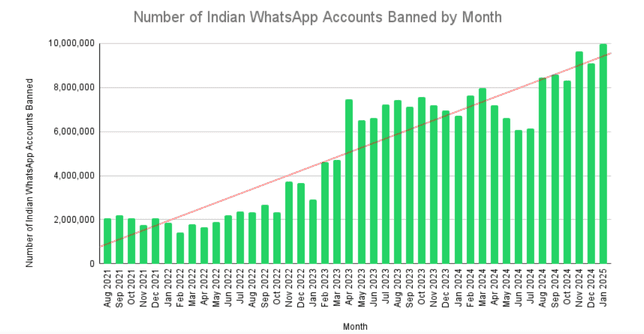
2. WhatsApp policy enforcement
WhatsApp actively enforces spam and abuse policies, so businesses should treat consent, relevance, and user feedback as core compliance signals.
Do not use unofficial bulk sending tools, scraped contact lists, random phone databases, or personal WhatsApp accounts for business-scale marketing. Use official WhatsApp Business API workflows and approved templates for outbound campaigns.
3. Legal and Regulatory Compliance
WhatsApp’s own rules are only one part of compliance. Depending on your country, industry, and customer location, you may also need to consider privacy, telecom, consumer protection, ecommerce, healthcare, finance, advertising, or data protection laws.
For example, regions with strict privacy rules may require clear consent records, separate marketing consent, opt-out logs, and transparent privacy notices. Regulated sectors may need additional care before sending WhatsApp campaigns.
Important: this guide is not legal advice. Use it as a practical compliance checklist, and consult legal counsel for regulated industries, high-volume campaigns, or cross-border marketing.
Staying compliant avoids legal penalties and protects your reputation.
What Changed for WhatsApp Marketing Compliance in 2026?
WhatsApp marketing compliance has become more practical and more performance-driven. Businesses now need to think beyond basic opt-in and approved templates. In 2026, compliance also means keeping campaign quality high, reducing user complaints, respecting message category rules, and avoiding over-messaging.
| Compliance Area | 2026 Requirement | What Businesses Should Do |
|---|---|---|
| User consent | Only message users who clearly opted in to receive WhatsApp messages from your business. | Store opt-in source, timestamp, consent copy, and message type permission. |
| Message categories | Use the correct category: Marketing, Utility, Authentication, or Service. | Do not send promotional content inside Utility or Authentication templates. |
| Customer service window | Service messages apply when users message your business and open a 24-hour support window. | After the window closes, use approved templates for business-initiated messages. |
| Frequency capping | Even opted-in users can block or report your business if you message too often. | Set campaign limits by use case, segment, source, and engagement level. |
| Unsubscribe handling | Businesses must respect opt-out requests received on or off WhatsApp. | Support STOP, UNSUBSCRIBE, and manual opt-outs from support or sales teams. |
| Quality rating | Negative user feedback can hurt template and number quality. | Monitor blocks, reports, failed messages, replies, opt-outs, and engagement. |
| Regional rules | Marketing rules can vary by country and industry. | Check local privacy, telecom, ecommerce, finance, healthcare, and advertising rules before scaling campaigns. |
Important: WhatsApp policy and regional laws can change. Review Meta’s latest WhatsApp Business Messaging Policy, your WhatsApp Manager notices, and local legal requirements before running high-volume campaigns.
Key Rules for WhatsApp Marketing Compliance
Before using WhatsApp for marketing, understand the core rules that protect your account, customers, and campaign performance.
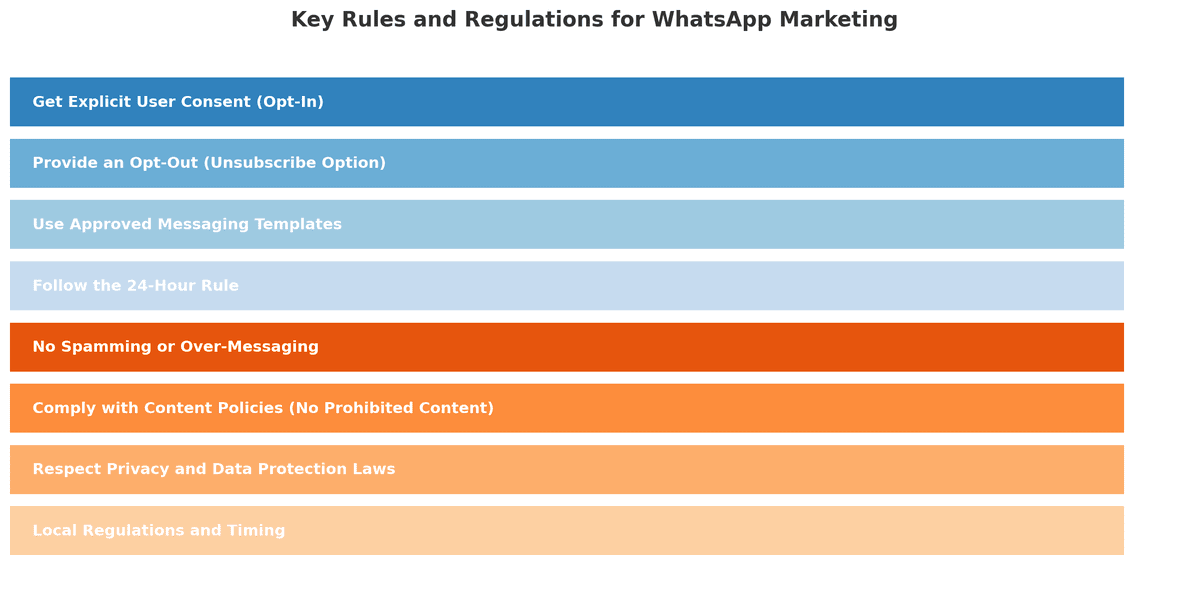
Before we get to the checklist, it’s important to understand the rules and regulations governing WhatsApp marketing. These come from two places: WhatsApp’s official policies and general marketing laws. Here are the key principles you must follow:
1. Get explicit user consent
Only message people who have specifically opted in to receive WhatsApp messages from your business. Consent should be a clear action, such as checking an unchecked box, submitting a form, scanning a QR code with clear consent text, replying YES, or starting a WhatsApp conversation with an opt-in confirmation.
No opt-in means no proactive WhatsApp marketing. Do not upload scraped lists, purchased lists, or old customer numbers unless you have clear permission to message them on WhatsApp.
2. Provide a clear opt-out mechanism
Every WhatsApp marketing flow should allow users to stop receiving messages. A simple instruction such as “Reply STOP to unsubscribe” is easy for customers to understand.
Your team should also honor manual unsubscribe requests. If a user says “do not message me,” “remove me,” or “stop sending offers,” treat it as an opt-out even if they do not use the exact keyword STOP.
3. Use approved templates for outbound campaigns
When you send business-initiated messages outside the customer service window, use approved WhatsApp message templates. Do not misuse a template approved for one purpose to send a different type of message.
For example, do not use an approved delivery update template to send a coupon. Use a proper Marketing template for promotions and a Utility template for transactional updates.
4. Respect the 24-hour customer service window
When a user messages your business, you can reply inside the 24-hour customer service window. Outside that window, you need approved templates for business-initiated messages.
This rule prevents unwanted follow-ups and helps WhatsApp maintain a better customer experience.
5. Avoid spam and over-messaging
Even if a user opted in, too many messages can create a bad experience. Over-messaging increases opt-outs, blocks, and reports. It can also reduce campaign performance.
Use frequency capping, segmentation, and campaign relevance checks before sending broadcasts.
6. Keep your business identity clear
Customers should immediately recognize who is messaging them. Keep your WhatsApp Business profile updated with accurate business name, website, email, phone number, and support contact information.
Do not impersonate another brand or use confusing sender identity.
7. Respect content and commerce policies
Do not send illegal, deceptive, abusive, discriminatory, misleading, or restricted content. If your business operates in a regulated industry, review WhatsApp policies and local law before sending campaigns.
8. Protect customer data
Phone numbers, names, order details, payment reminders, and support conversations are customer data. Store and process them responsibly. Use secure systems, limit access, and follow your privacy policy.
Now that we’ve covered the rules, let’s turn this into a practical checklist you can follow.
User Consent Checklist for WhatsApp Marketing
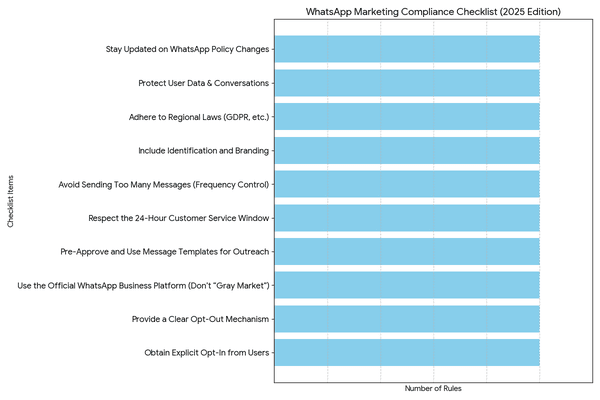
Consent is the foundation of WhatsApp marketing compliance. A user should clearly understand that they are agreeing to receive WhatsApp messages from your business.
| Consent Item | What It Means | Good Example |
|---|---|---|
| Business name | The user knows who will message them. | “I agree to receive WhatsApp updates from Sendwo.” |
| WhatsApp channel | The opt-in copy clearly mentions WhatsApp. | “Send me updates on WhatsApp.” |
| Message type | The user knows what kind of messages they will receive. | “Order updates, offers, reminders, and support messages.” |
| Active action | The user actively opts in. | Unchecked checkbox, reply YES, QR scan with clear consent text, or form submission. |
| Opt-out instruction | The user knows how to unsubscribe. | “Reply STOP anytime to unsubscribe.” |
| Consent record | Your business stores proof of opt-in. | Source, timestamp, phone number, consent copy version, and campaign source. |
Recommended opt-in copy:
Turn this learning into your next WhatsApp campaign.
Start with Sendwo’s free plan, explore WhatsApp broadcasts, automation, AI chatbot flows, and upgrade only when your business needs more power.
Yes, I agree to receive WhatsApp messages from {{Business Name}} about {{message type}}. I understand I can unsubscribe anytime by replying STOP.
For more opt-in examples, read the WhatsApp opt-in guide and explore WhatsApp Forms.
Examples of good opt-in sources
- Website forms with an unchecked WhatsApp consent box
- Checkout pages with separate order update and marketing consent
- Click-to-WhatsApp ads where users reply YES to subscribe
- QR codes with clear text explaining what users will receive
- Lead magnets such as PDFs, coupons, webinars, catalogs, or audits
- Customer support conversations where users agree to future updates
Unsubscribe and Opt-Out Handling Checklist
Every WhatsApp marketing system should make unsubscribe handling simple, fast, and reliable. If a user opts out, your business should stop sending the relevant WhatsApp messages to that user.
| Opt-Out Scenario | What to Do | Recommended Automation |
|---|---|---|
| User replies STOP | Mark the user as unsubscribed from marketing messages. | Apply label: Opted Out / Marketing Unsubscribed. |
| User replies UNSUBSCRIBE | Stop future campaign broadcasts. | Add to suppression list automatically. |
| User says “don’t message me” | Treat it as an unsubscribe request even if they do not use the exact keyword. | Train agents to manually apply opt-out labels. |
| User opts out through email or support ticket | Honor the opt-out even if it happens outside WhatsApp. | Sync unsubscribe status into Sendwo or CRM. |
| User unsubscribes from marketing only | Stop promotional campaigns but allow necessary transactional updates where permitted. | Use separate labels for marketing and transactional communication. |
| User blocks or reports the business | Suppress the contact and review campaign relevance. | Monitor blocks, reports, opt-out spikes, and campaign quality. |
Recommended unsubscribe confirmation:
You have been unsubscribed from WhatsApp marketing messages from {{Business Name}}. You may still receive important transactional or support updates where applicable.
Do not keep messaging users who have opted out. Repeated messaging after opt-out can increase complaints, reduce trust, and create policy risk.
Use the Official WhatsApp Business Platform
For serious WhatsApp marketing, use the official WhatsApp Business Platform or a trusted provider that works with WhatsApp Business API. Avoid unauthorized bulk sending tools, browser hacks, scraped lists, random sender numbers, or personal WhatsApp accounts used for business-scale marketing.
Official WhatsApp API workflows give businesses access to approved templates, structured campaigns, customer service window rules, delivery reporting, automation, inbox management, and better account safety.
Sendwo helps businesses use WhatsApp-first marketing, automation, chatbot flows, broadcasts, template campaigns, AI replies, live chat, and ecommerce workflows in a safer API-based setup.
Template Category Compliance in 2026
WhatsApp message category selection is a major compliance checkpoint. Using the wrong category can increase rejection, pricing mismatch, campaign delay, and user complaint risk.
| Message Category | Use It For | Do Not Use It For | Example |
|---|---|---|---|
| Marketing | Offers, promos, product launches, abandoned cart, retargeting, upsell, cross-sell, winback | OTP, password reset, purely transactional order updates | Hi {{1}}, our {{2}} sale is live. Use code {{3}} before {{4}}. |
| Utility | Order updates, payment updates, appointment reminders, delivery alerts, ticket updates | Discount codes, product promotions, upsells, unrelated CTAs | Hi {{1}}, your order #{{2}} has shipped. Track it here: {{3}}. |
| Authentication | OTP, login code, password reset, account verification, transaction verification | Marketing links, offers, product suggestions, general updates | {{1}} is your verification code. Do not share it with anyone. |
| Service | Replies inside the 24-hour customer service window after a user messages your business | Proactive outbound marketing outside the customer service window | Thanks for reaching out. Your appointment is confirmed for {{1}}. |
For more examples, read the WhatsApp template approval guide, WhatsApp template library, and WhatsApp message template guide.
Category mismatch examples
| Risky Message | Problem | Better Fix |
|---|---|---|
| Your order #{{1}} is shipped. Use SAVE20 for your next order. | Utility message contains a promotional offer. | Remove the offer or submit a separate Marketing template. |
| {{1}} is your OTP. Check our sale here: {{2}} | Authentication message contains marketing content. | Keep only the OTP and security text. |
| Hi {{1}}, you left {{2}} in your cart. Complete your order here: {{3}} | Cart recovery is conversion-focused. | Submit as Marketing. |
| Hi {{1}}, your appointment with {{2}} is confirmed for {{3}}. | Transactional update tied to a user action. | Submit as Utility. |
Respect the 24-Hour Customer Service Window
When a customer messages your business first, a 24-hour customer service window opens. During this window, your business can respond to the user’s inquiry. This is useful for support, sales assistance, product questions, booking help, and follow-up within the active conversation.
After the customer service window closes, you should use approved templates for business-initiated messages.
Good use of the customer service window
- Answering a customer’s product question
- Helping with an order issue
- Sharing appointment details after a user asks
- Continuing an active support conversation
- Asking whether the user wants to opt in for future updates
Risky use of the customer service window
- Sending unrelated offers after the support issue is solved
- Following up days later without a template
- Using support replies to push aggressive promotions
- Sending bulk messages manually to users who did not opt in
A good practice is to invite users to opt in during active conversations. For example:
Would you like to receive future order updates and offers from {{Business Name}} on WhatsApp? Reply YES to subscribe. You can reply STOP anytime to unsubscribe.
Frequency Capping for WhatsApp Marketing Campaigns
Frequency capping means limiting how often a user receives WhatsApp marketing messages from your business. Even if a user opted in, too many messages can cause blocks, spam reports, unsubscribes, and lower campaign quality.
There is no single perfect frequency for every business. A good frequency cap depends on the user’s opt-in source, message type, industry, purchase cycle, and engagement level.
| Campaign Type | Suggested Frequency Cap | Compliance Notes |
|---|---|---|
| Welcome sequence | 1–3 messages in the first few days after opt-in | Keep it educational and expectation-setting, not overly promotional. |
| Weekly promotional campaign | 1–2 marketing messages per week | Send only to users who opted in for promotional updates. |
| Abandoned cart recovery | 1–2 reminders per abandoned cart | Stop reminders if the user purchases or opts out. |
| Event or webinar reminders | Registration confirmation + 1–2 reminders before event | Keep reminders tied to the event the user registered for. |
| Appointment reminders | Confirmation + reminder before appointment | Use Utility templates and avoid adding unrelated promotions. |
| Reactivation campaign | 1–2 attempts in a defined reactivation window | Suppress users who do not engage or opt out. |
| High-value customer offers | Segment-based, not daily blasting | Use purchase history and engagement to keep offers relevant. |
Practical rule: if users stop replying, stop clicking, unsubscribe, or block your number, reduce frequency and improve targeting. WhatsApp marketing should feel helpful, not intrusive.
Frequency capping by engagement level
| User Segment | Suggested Approach | Reason |
|---|---|---|
| New opt-in | Send a short welcome or value-setting sequence. | The user recently gave permission and expects follow-up. |
| Active buyer | Send relevant order, support, loyalty, and product messages. | The user has recent engagement or purchase history. |
| Engaged subscriber | Send segmented offers or useful updates at a controlled frequency. | The user has opened, clicked, replied, or purchased recently. |
| Inactive subscriber | Send one reactivation attempt, then suppress if there is no engagement. | Repeated messages to inactive users increase quality risk. |
| Unsubscribed user | Do not send marketing campaigns. | Opt-out must be respected. |
Protect Your WhatsApp Quality Rating
WhatsApp marketing compliance is not only about getting permission before sending messages. It is also about how users react after receiving your messages. If users block, report, unsubscribe, or ignore your campaigns, your message quality and account reputation can suffer.
Your quality signals are affected by user experience. If a template or campaign feels irrelevant, too frequent, misleading, or unexpected, users are more likely to block or report it.
| Quality Signal | What It May Indicate | What to Do |
|---|---|---|
| High opt-out rate | Users did not expect the message or frequency is too high. | Reduce frequency, improve consent wording, and segment better. |
| High block/report rate | Campaign may feel spammy, irrelevant, or misleading. | Pause campaign, review copy, audience, and opt-in source. |
| Low reply rate | Message is not engaging or CTA is unclear. | Rewrite message with clearer value and better segmentation. |
| High failed messages | Contact list may be stale or numbers may be invalid. | Clean list and avoid sending to old or unverified contacts. |
| Template paused or disabled | Template may be receiving poor user feedback. | Stop using the template, rewrite it, and submit a better version. |
| Low engagement by source | One opt-in source may be weaker than others. | Compare website, CTWA, checkout, QR, and lead magnet opt-ins separately. |
Quality protection rule: start with smaller, relevant segments before scaling a campaign. Watch opt-outs, replies, clicks, blocks, reports, and failed messages before increasing volume.
How to protect quality before scaling broadcasts
- Start with your most engaged segment.
- Send to users with recent opt-in or recent activity first.
- Use clear sender identity and relevant message copy.
- Do not use misleading offers or exaggerated urgency.
- Check early opt-outs and replies before sending to larger lists.
- Pause campaigns that show poor feedback.
- Remove unsubscribed, invalid, stale, and unresponsive contacts from future promotions.
Data Privacy and Regional Compliance
WhatsApp marketing involves personal data, including phone numbers, names, order IDs, appointment information, preferences, and conversation history. Your business should handle this data responsibly.
Privacy checklist
- Publish a clear privacy policy.
- Explain how WhatsApp contact data will be used.
- Store opt-in source and timestamp.
- Limit access to customer data inside your team.
- Do not ask for passwords, CVV, card numbers, or sensitive private details over WhatsApp.
- Delete or suppress contacts when legally required.
- Use separate consent where required for marketing versus transactional messages.
- Review local privacy, telecom, and sector-specific laws before scaling campaigns.
Regional WhatsApp marketing rules and template availability can change by country, industry, and message category. Before sending campaigns to regulated or high-risk markets, review Meta’s latest policy notices and applicable local laws.
2026 WhatsApp Campaign Compliance Preflight Checklist
Use this checklist before every WhatsApp marketing campaign.
| Checklist Item | What to Confirm |
|---|---|
| Audience has opted in | Every recipient has given permission to receive WhatsApp messages. |
| Consent source is stored | You can identify whether opt-in came from website, checkout, CTWA, QR, support, or lead magnet. |
| Message category is correct | Marketing, Utility, Authentication, or Service is selected based on message intent. |
| Template is approved | The campaign uses an approved template for proactive outbound messaging. |
| Frequency cap is applied | The user has not received too many campaigns recently. |
| Unsubscribed users are excluded | STOP, opt-out, blocked, and manually suppressed contacts are removed from the audience. |
| Message matches consent | The campaign content matches what the user agreed to receive. |
| Brand identity is clear | The user can recognize the business and understand why they are receiving the message. |
| Links are safe | All URLs are HTTPS, branded, and relevant. No suspicious short links. |
| Quality signals will be monitored | You will track opt-outs, blocks, replies, failed messages, and engagement after sending. |
Simple campaign approval workflow
- Confirm the audience opted in.
- Check opt-in source and message type permission.
- Select the correct template category.
- Review template copy for clarity and compliance.
- Exclude unsubscribed and suppressed contacts.
- Apply frequency cap.
- Send to a smaller test segment first.
- Monitor quality signals.
- Scale only if early performance is healthy.
How Sendwo Helps You Run Compliant WhatsApp Campaigns
Sendwo helps businesses collect WhatsApp leads, segment contacts, use approved templates, manage opt-outs, run broadcast campaigns, automate replies, and track campaign performance from one WhatsApp-first dashboard.
With Sendwo, your business can manage:
- WhatsApp Forms for structured lead collection
- Website chat widget for converting visitors into WhatsApp conversations
- Click-to-WhatsApp Ads for ad-to-chat lead generation
- Labels and segmentation for targeted messaging
- WhatsApp templates for approved campaigns
- WhatsApp broadcast campaigns for segmented outreach
- Shared team inbox for customer replies
- Sendwo AI for AI-assisted replies and automation
- WhatsApp chatbot flows for lead qualification and support
Sendwo also supports ecommerce teams with Shopify WhatsApp integration, WooCommerce WhatsApp integration, abandoned cart templates, and COD confirmation templates.
FAQs About WhatsApp Marketing Compliance in 2026
1. Is WhatsApp marketing allowed in 2026?
Yes. WhatsApp marketing is allowed when businesses collect proper user consent, use official WhatsApp Business tools, send approved templates where required, respect opt-outs, and follow WhatsApp policies plus local laws.
2. Do I need opt-in before sending WhatsApp marketing messages?
Yes. Businesses should only send WhatsApp marketing messages to users who have clearly opted in to receive WhatsApp messages from that business.
3. What should WhatsApp opt-in copy include?
Good opt-in copy should mention your business name, WhatsApp as the channel, the type of messages users will receive, and how they can unsubscribe.
4. How should I handle WhatsApp unsubscribe requests?
Support keywords such as STOP and UNSUBSCRIBE, train agents to identify manual opt-out requests, suppress opted-out users from future campaigns, and honor opt-outs received outside WhatsApp too.
5. How often should I send WhatsApp marketing messages?
There is no universal frequency for every business. As a best practice, avoid daily promotional blasts, cap messages by campaign type, and monitor opt-outs, blocks, reports, and engagement.
6. What is frequency capping in WhatsApp marketing?
Frequency capping means limiting how many WhatsApp messages a user receives within a specific time period so campaigns do not feel spammy or intrusive.
7. What happens if users block or report my WhatsApp business number?
High blocks or reports can damage your quality signals and account reputation. Pause the campaign, review consent, improve targeting, reduce frequency, and rewrite templates before scaling again.
8. What are the WhatsApp message categories I should know?
The major message categories are Marketing, Utility, Authentication, and Service. Marketing is for promotions and retargeting, Utility is for transactional updates, Authentication is for OTPs, and Service applies inside the customer service window after a user messages your business.
9. Can I use Utility templates for promotional offers?
No. Utility templates should remain transactional and non-promotional. If the message contains an offer, discount, upsell, or abandoned cart recovery, it is usually Marketing.
10. Can I send WhatsApp campaigns to old customer lists?
Only if those customers gave proper permission to receive WhatsApp messages from your business. Old purchase history alone is not the same as clear WhatsApp marketing consent.
11. Can I buy WhatsApp contact lists for marketing?
No. Purchased or scraped contact lists create major compliance, deliverability, and reputation risk. Build your WhatsApp audience using opt-in forms, checkout consent, QR codes, Click-to-WhatsApp ads, and customer-initiated conversations.
12. How can Sendwo help with WhatsApp marketing compliance?
Sendwo helps businesses collect leads, segment contacts, manage templates, run broadcasts, automate replies, track campaign performance, and organize opt-outs from one WhatsApp-first dashboard.
Final Thought
WhatsApp marketing compliance in 2026 is about building trust at every step of the customer journey. Get permission before messaging, use the right message category, respect the customer service window, honor opt-outs, cap message frequency, protect quality rating, and monitor campaign feedback after every send.
The best WhatsApp marketing campaigns are not just compliant. They are expected, relevant, segmented, useful, and easy to unsubscribe from.
Use the checklist in this guide before every campaign. To collect leads, manage contacts, run approved broadcasts, and track replies from one dashboard, start free with Sendwo or explore WhatsApp marketing software.
Aditi Kamini
Aditi, a content marketer at SendWo, is a passionate writer and marketing enthusiast. She excels in driving revenue campaigns, building client relationships, and mastering content creation, SEO, customer service, and project management.