How to Collect WhatsApp Opt-ins Legally and Effectively
Learn how to collect WhatsApp opt-ins legally with examples for website forms, CTWA ads, QR codes, checkout, lead magnets, and Sendwo workflows.
 By Aditi Kamini
Published: July 24, 2025
Updated: June 7, 2026
17 min read
By Aditi Kamini
Published: July 24, 2025
Updated: June 7, 2026
17 min read
Learn how to collect WhatsApp opt-ins legally with examples for website forms, CTWA ads, QR codes, checkout, lead magnets, and Sendwo workflows.
WhatsApp opt-ins are the foundation of safe and effective WhatsApp marketing. Before a business sends promotional campaigns, order updates, reminders, support follow-ups, lead nurturing messages, or customer engagement broadcasts on WhatsApp, it should collect clear permission from the customer.
A WhatsApp opt-in means the user has agreed to receive WhatsApp messages from your business. This consent can come from a website form, checkout checkbox, Click-to-WhatsApp ad, QR code, lead magnet, customer support interaction, event form, or a direct WhatsApp message where the user confirms they want updates.
Collecting opt-ins correctly is important for three reasons. First, it helps your business follow WhatsApp Business Messaging Policy and applicable privacy laws. Second, it protects your WhatsApp quality rating by reducing spam complaints, blocks, and unsubscribes. Third, it builds a better list of people who actually want to hear from your brand.
This guide explains how to collect WhatsApp opt-ins legally and effectively, with practical examples for website forms, Click-to-WhatsApp ads, QR codes, checkout pages, lead magnets, support flows, source tracking, compliance checklists, and Sendwo-powered WhatsApp growth workflows.
If you want to collect, segment, and message WhatsApp leads from one dashboard, explore Sendwo, WhatsApp Forms, Click-to-WhatsApp Ads, and WhatsApp lead generation templates.
Table of Contents
- What Is a WhatsApp Opt-In?
- WhatsApp Opt-In Rules and Legal Requirements
- What Good WhatsApp Opt-In Copy Should Include
- Website Form Opt-In Examples
- Social Media and Email Opt-In Invitations
- Lead Magnet WhatsApp Opt-In Examples
- QR Code WhatsApp Opt-In Examples
- Customer Service Opt-In Examples
- Checkout WhatsApp Opt-In Examples
- Click-to-WhatsApp Ad Opt-In Examples
- How to Track WhatsApp Opt-In Sources
- WhatsApp Opt-In Best Practices
- WhatsApp Opt-In Collection Checklist
- How Sendwo Helps Collect and Manage WhatsApp Opt-Ins
- FAQs
What Is a WhatsApp Opt-In?
A WhatsApp opt-in is a customer’s permission to receive messages from your business on WhatsApp. In simple terms, the user agrees that your business can contact them on WhatsApp for specific types of messages.
These messages may include:
- Order confirmations
- Shipping and delivery updates
- Appointment reminders
- Payment reminders
- Support follow-ups
- Lead follow-ups
- Product offers
- Event reminders
- Educational content
- Customer feedback requests
- Abandoned cart reminders
- COD confirmation messages
The exact opt-in wording should tell users what they are signing up for. A person who agrees to receive order updates may not automatically expect daily marketing offers. That is why clear consent language matters.
WhatsApp Opt-In Rules and Legal Requirements
Collecting WhatsApp opt-ins legally means following WhatsApp’s platform rules and any applicable privacy or communication laws in the countries where your customers live.
At a practical level, your opt-in process should follow these principles:
- Get clear permission: The user should actively agree to receive WhatsApp messages.
- Identify your business: The opt-in copy should mention the business name.
- Explain message types: Tell users whether they will receive order updates, offers, reminders, support messages, or educational content.
- Avoid hidden consent: Do not hide WhatsApp permission inside broad terms and conditions.
- Do not use pre-checked boxes: Users should intentionally opt in.
- Allow opt-out: Give users a simple way to unsubscribe, such as replying STOP.
- Respect opt-outs: Remove or suppress users who unsubscribe from future WhatsApp messaging.
- Keep consent records: Store the opt-in source, timestamp, form copy, and message type consent where possible.
Important: This guide is not legal advice. WhatsApp policy and privacy laws may vary by country, customer type, and message type. If you operate in strict privacy regions, consult a legal or compliance expert before launching large-scale WhatsApp opt-in campaigns.
What Good WhatsApp Opt-In Copy Should Include
Before collecting WhatsApp opt-ins from website forms, checkout pages, QR codes, Click-to-WhatsApp ads, lead magnets, or support interactions, make sure your opt-in copy is clear and specific.
A good WhatsApp opt-in message should include:
- Your business name: Tell users exactly which business will contact them.
- The channel: Clearly mention that messages will be sent on WhatsApp.
- The message type: Explain whether they will receive order updates, offers, reminders, support messages, or educational content.
- User action: Use an unchecked checkbox, form submission, QR scan, button click, or user-sent WhatsApp message as the consent action.
- Opt-out instruction: Tell users they can unsubscribe anytime, such as by replying STOP.
- Privacy link: Link to your privacy policy wherever possible.
Simple opt-in copy format:
Yes, I agree to receive WhatsApp messages from {{Business Name}} about {{message type}}. I understand I can unsubscribe anytime by replying STOP.
This format is clear, consent-based, and easy to adapt for different business use cases.
Proven Strategies to Collect WhatsApp Opt-Ins Effectively
Now that we know the rules, let’s explore how to actually collect opt-ins. The goal is to integrate WhatsApp opt-in opportunities into your customer journey so that subscribing is easy and appealing. Here are some proven strategies:
1. Website Form Opt-In Examples
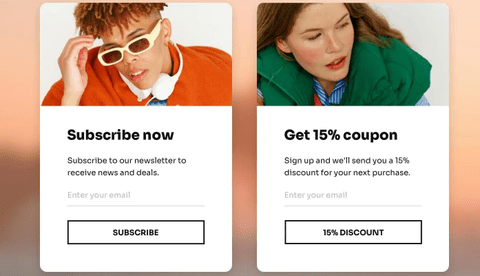
Website forms are one of the easiest places to collect WhatsApp opt-ins because the visitor is already interacting with your brand. You can add WhatsApp consent to newsletter forms, contact forms, demo forms, quote forms, webinar forms, and lead capture forms.
| Website Form Type | Opt-In Copy Example | Best For |
|---|---|---|
| Newsletter Form | Yes, I want to receive updates, offers, and helpful tips from {{Business Name}} on WhatsApp. I can unsubscribe anytime by replying STOP. | Blogs, SaaS, ecommerce, education, communities |
| Contact Form | Yes, {{Business Name}} can contact me on WhatsApp regarding my inquiry and related updates. | Service businesses, agencies, real estate, clinics, consultants |
| Demo Request Form | Yes, I agree to receive WhatsApp messages from {{Business Name}} about my demo request, pricing, setup, and product updates. | SaaS, B2B, software companies, agencies |
| Quote Request Form | Yes, I agree to receive quote details, follow-ups, and service updates from {{Business Name}} on WhatsApp. | Insurance, real estate, travel, local services, consultants |
| Webinar Form | Yes, send me webinar reminders, joining links, and related learning updates from {{Business Name}} on WhatsApp. | Education, coaches, SaaS, communities, consultants |
| Free Trial Form | Yes, I want to receive trial setup help, product tips, and account updates from {{Business Name}} on WhatsApp. | SaaS, software tools, apps, product-led businesses |
| Appointment Form | Yes, send me appointment confirmation, reminders, and follow-up updates from {{Business Name}} on WhatsApp. | Clinics, salons, consultants, coaches, service businesses |
Implementation tip: keep the WhatsApp checkbox unchecked by default. Do not hide WhatsApp consent inside your general terms and conditions. The user should clearly understand that they are agreeing to receive WhatsApp messages.
With Sendwo, you can connect website forms, WhatsApp forms, chat widgets, and lead capture workflows to build opted-in WhatsApp contact lists. Explore WhatsApp Forms, website chat widget, and WhatsApp lead generation templates.
2. Social Media and Email Opt-In Invitations
Your existing social media followers, email subscribers, and SMS contacts are potential WhatsApp subscribers if you invite them correctly. The key is to explain why WhatsApp will be useful and give users a clear opt-in action.
Social media opt-in examples
- Want faster updates on WhatsApp? Message us “JOIN” to receive {{Business Name}} updates, offers, and reminders.
- We now share important updates on WhatsApp. Tap the link in bio and reply YES to subscribe.
- Get WhatsApp-only updates from {{Business Name}}. Send “START” and we’ll confirm your subscription.
Email opt-in examples
- Prefer WhatsApp updates? Click here and reply YES to receive {{Business Name}} updates on WhatsApp.
- Get order alerts and exclusive offers on WhatsApp. Subscribe here and reply YES to confirm.
- Want reminders on WhatsApp instead of missing emails? Join our WhatsApp list here.
If users already receive your emails or SMS messages, do not automatically add them to WhatsApp marketing broadcasts. Invite them to opt in separately or clearly explain that they are choosing WhatsApp as an additional communication channel.
3. Lead Magnet WhatsApp Opt-In Examples
Lead magnets work well because users receive something valuable in exchange for sharing contact details and giving consent. This can include a free guide, checklist, coupon, webinar, calculator result, product catalog, PDF, audit, demo, or consultation.
The key is to make the WhatsApp consent separate, clear, and connected to the lead magnet. Do not hide WhatsApp permission inside a vague download form.
| Lead Magnet Type | Opt-In Copy Example | Follow-Up Message Example | Best For |
|---|---|---|---|
| Free PDF Guide | Send me the {{Guide Name}} PDF and related tips from {{Business Name}} on WhatsApp. | Hi {{1}}, here is your {{2}} guide: {{3}}. Reply STOP anytime to unsubscribe. | B2B, education, consultants, SaaS, agencies |
| Discount Coupon | Send my discount code and future offers from {{Store Name}} on WhatsApp. | Hi {{1}}, your discount code is {{2}}. Use it before {{3}} here: {{4}} | Ecommerce, retail, restaurants, salons |
| Free Audit | Send my audit result and related recommendations from {{Business Name}} on WhatsApp. | Hi {{1}}, thanks for requesting your audit. Our team will send your result and next steps here on WhatsApp. | Agencies, SaaS, consultants, B2B services |
| Webinar Registration | Send me webinar reminders, joining link, and learning resources from {{Business Name}} on WhatsApp. | Hi {{1}}, your registration for {{2}} is confirmed. Join link: {{3}} | Education, coaching, SaaS, communities |
| Product Catalog | Send me the product catalog and offers from {{Brand Name}} on WhatsApp. | Hi {{1}}, here is the {{2}} catalog: {{3}}. Reply if you need help choosing a product. | Retail, ecommerce, real estate, travel, B2B products |
| Calculator Result | Send my calculator result and related recommendations from {{Business Name}} on WhatsApp. | Hi {{1}}, your estimated result is ready. View details here: {{2}} | Finance, SaaS, ecommerce, agencies, real estate |
Best practice: if the lead magnet is educational, do not automatically assume the user wants promotional WhatsApp broadcasts forever. Clearly mention what future messages they will receive and give them an easy way to unsubscribe.
You can connect lead magnet forms with Sendwo using WhatsApp Forms, Google Sheets integration, WPForms integration, and Elementor forms integration.
4. QR Code WhatsApp Opt-In Examples
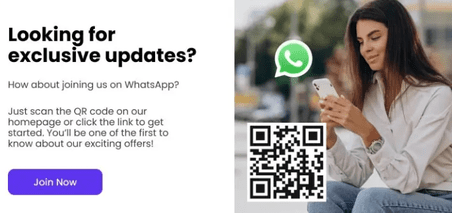
QR codes are useful when you want to collect WhatsApp opt-ins from offline locations, packaging, invoices, posters, events, product inserts, stores, restaurants, clinics, salons, or trade shows.
The QR code should either open a WhatsApp chat with a pre-filled message or open a dedicated WhatsApp opt-in landing page. The text near the QR code should clearly explain what the user is signing up for.
Turn this learning into your next WhatsApp campaign.
Start with Sendwo’s free plan, explore WhatsApp broadcasts, automation, AI chatbot flows, and upgrade only when your business needs more power.
| Placement | QR Code Text Example | Pre-Filled WhatsApp Message | Best For |
|---|---|---|---|
| Retail Counter | Scan to receive offers and new arrivals from {{Store Name}} on WhatsApp. | YES, I want WhatsApp updates from {{Store Name}}. | Retail stores, boutiques, local shops |
| Product Packaging | Scan to get product tips, warranty updates, and offers on WhatsApp. | YES, I want product updates from {{Brand Name}} on WhatsApp. | Ecommerce, electronics, beauty, consumer products |
| Clinic Reception | Scan to receive appointment reminders and clinic updates on WhatsApp. | YES, I want appointment updates from {{Clinic Name}} on WhatsApp. | Clinics, dentists, diagnostic centers |
| Event Booth | Scan to receive event updates, resources, and follow-up messages on WhatsApp. | YES, I want event updates from {{Business Name}} on WhatsApp. | Events, expos, seminars, webinars, workshops |
| Restaurant Table Tent | Scan to get menu updates, offers, and booking reminders on WhatsApp. | YES, I want WhatsApp updates from {{Restaurant Name}}. | Restaurants, cafes, cloud kitchens |
| Real Estate Brochure | Scan to receive price list, floor plans, and site visit updates on WhatsApp. | YES, I want project updates from {{Business Name}} on WhatsApp. | Real estate developers and brokers |
Best practice: do not place a QR code without context. A QR code that simply says “Scan me” does not clearly explain consent. Add a short promise near the QR code so users know what they will receive.
5. Customer Service Opt-In Examples
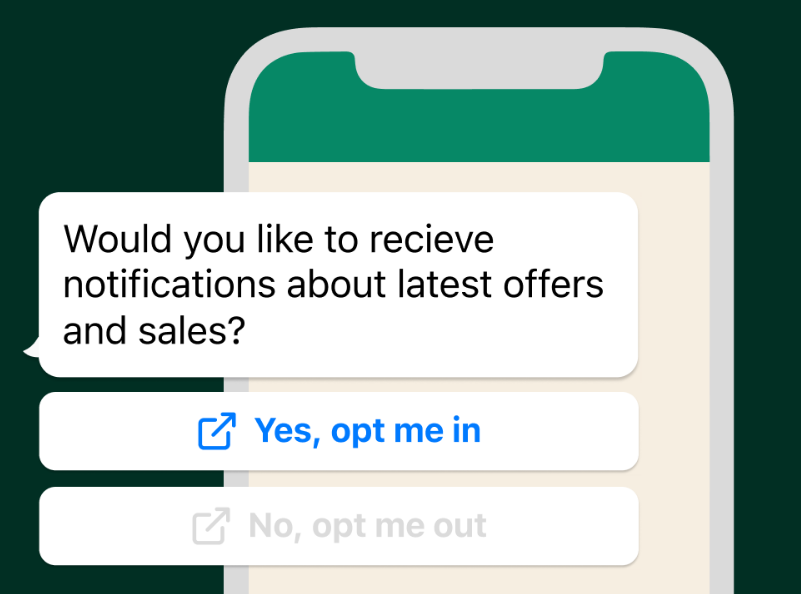
Customer service interactions are natural moments to request WhatsApp opt-in because the customer is already speaking with your business. This can happen after a live chat, support ticket, phone call, email conversation, or in-store service interaction.
| Support Moment | Opt-In Script Example | Best For |
|---|---|---|
| After ticket resolution | Glad we could help. Would you like to receive future support updates from {{Business Name}} on WhatsApp? Reply YES to confirm. | SaaS, ecommerce, agencies, support teams |
| After phone support | We can send your case update on WhatsApp for easier tracking. Reply YES if you agree to receive WhatsApp updates from {{Business Name}}. | Service businesses, clinics, B2B support, local businesses |
| After product inquiry | Would you like us to send product details, availability, and offers from {{Business Name}} on WhatsApp? Reply YES to opt in. | Retail, ecommerce, real estate, travel |
| After appointment request | We can send appointment confirmation and reminders on WhatsApp. Reply YES to receive updates from {{Business Name}}. | Clinics, salons, consultants, education counselors |
This approach works best when the user has just received value from your team. Keep the request optional, clear, and easy to confirm.
6. Checkout WhatsApp Opt-In Examples
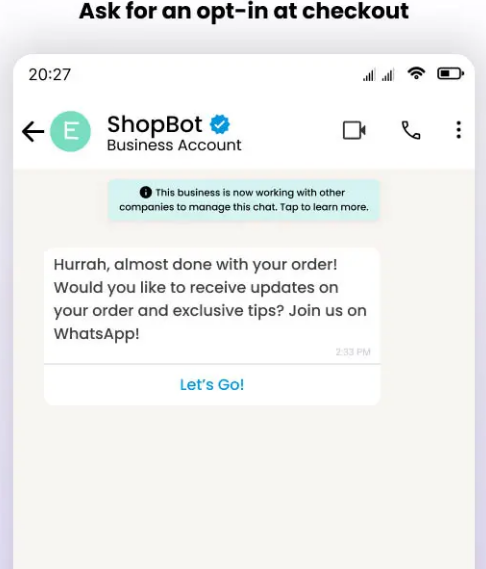
Checkout is one of the strongest places to collect WhatsApp opt-ins because the customer already expects order confirmation, shipping updates, payment alerts, delivery notifications, and support messages.
The safest approach is to separate transactional updates from promotional messages. A customer may want order updates but may not want marketing offers. If possible, offer separate checkboxes.
| Checkout Use Case | Opt-In Copy Example | Message Type | Recommended Checkbox Status |
|---|---|---|---|
| Order Updates | Send me order confirmation, shipping, delivery, and support updates from {{Store Name}} on WhatsApp. | Transactional / Utility | Unchecked by default |
| Marketing Offers | I also want to receive product offers, discounts, and new launch updates from {{Store Name}} on WhatsApp. | Marketing | Unchecked by default |
| COD Confirmation | Send my COD order confirmation and delivery updates on WhatsApp. | Transactional / Utility | Unchecked by default |
| Post-Purchase Thank You Page | Want faster order updates on WhatsApp? Click here to subscribe to order and delivery alerts from {{Store Name}}. | Transactional / Utility | User clicks to opt in |
| Repeat Purchase Offers | Send me WhatsApp offers, restock alerts, and product recommendations from {{Store Name}}. | Marketing | Unchecked by default |
Recommended ecommerce setup:
- Use one checkbox for order, delivery, and support updates.
- Use a second checkbox for marketing offers and product promotions.
- Store the opt-in source as “checkout.”
- Store timestamp, phone number, message category consent, and order ID.
- Give users a simple opt-out instruction such as “Reply STOP to unsubscribe.”
Sendwo can support ecommerce opt-in workflows through Shopify WhatsApp integration, WooCommerce WhatsApp integration, abandoned cart templates, and COD confirmation templates.
7. Click-to-WhatsApp Ad Opt-In Examples
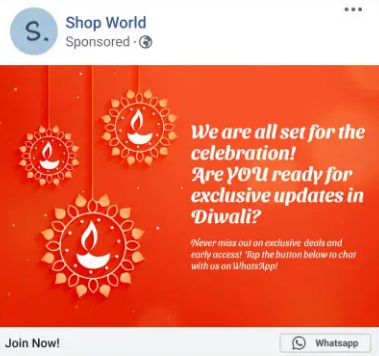
Click-to-WhatsApp ads are powerful because the user starts a WhatsApp conversation directly from a Facebook or Instagram ad. However, if you want to send future marketing messages, it is still safer to confirm the user’s opt-in inside the chat flow.
A good Click-to-WhatsApp opt-in flow has three parts: the ad promise, the first WhatsApp message, and a clear confirmation reply.
| Use Case | Ad Copy Example | WhatsApp Confirmation Message | Opt-In Action |
|---|---|---|---|
| Ecommerce Offer | Get today’s exclusive WhatsApp-only offer. Tap to claim. | Thanks for messaging {{Business Name}}. Reply YES to receive this offer and future WhatsApp updates from us. | User replies YES |
| Real Estate Lead | Get project pricing and floor plans on WhatsApp. | Hi, thanks for your interest in {{Project Name}}. Reply YES to receive project details, pricing, site visit updates, and follow-ups from {{Business Name}} on WhatsApp. | User replies YES |
| Education Webinar | Register for the free masterclass on WhatsApp. | Thanks for your interest in {{Webinar Name}}. Reply YES to receive webinar reminders, joining links, and learning updates from {{Business Name}} on WhatsApp. | User replies YES |
| Clinic Appointment | Book your appointment on WhatsApp. | Thanks for contacting {{Clinic Name}}. Reply YES to receive appointment confirmation, reminders, and follow-up updates on WhatsApp. | User replies YES |
| Travel Package | Get the latest {{Destination}} package details on WhatsApp. | Thanks for messaging {{Business Name}}. Reply YES to receive travel package details, pricing, itinerary updates, and offers on WhatsApp. | User replies YES |
Best practice: do not treat every ad click as permission for unlimited future promotional broadcasts. Use a simple confirmation message such as “Reply YES” so you have clearer proof of consent.
Sendwo can help you turn Click-to-WhatsApp conversations into segmented leads using labels, custom fields, chatbot flows, and follow-up campaigns. Explore Click-to-WhatsApp Ads, WhatsApp chatbot, and labels and segmentation.
How to Track WhatsApp Opt-In Sources
Collecting opt-ins is only half the work. You should also track where each opt-in came from so your future campaigns stay relevant and compliant.
| Opt-In Source | Suggested Label | Useful Data to Store | Recommended Follow-Up |
|---|---|---|---|
| Website form | Opt-in: Website Form | Page URL, form name, timestamp, consent copy version | Welcome message or requested resource |
| Click-to-WhatsApp ad | Opt-in: CTWA Ad | Campaign name, ad set, ad creative, keyword or audience, timestamp | Lead qualification or offer delivery |
| QR code | Opt-in: QR Code | QR location, store/event name, timestamp, pre-filled message | Welcome message or location-specific offer |
| Checkout | Opt-in: Checkout | Order ID, consent type, product category, timestamp | Order updates, COD confirmation, delivery alerts |
| Lead magnet | Opt-in: Lead Magnet | Lead magnet name, landing page, form submission time, interest category | Resource delivery and segmented nurture sequence |
| Support interaction | Opt-in: Support | Ticket ID, agent name, consent timestamp, topic | Support follow-up or customer satisfaction request |
Inside Sendwo, you can use labels, segmentation, contact fields, chatbot flows, and campaign analytics to organize opt-ins by source and send more relevant WhatsApp messages later.
WhatsApp Opt-In Best Practices
Collecting WhatsApp opt-ins is not just about growing a large contact list. The goal is to build a clean, consent-based, segmented list of people who expect and value your messages.
- Get explicit permission: Make sure the user actively agrees to WhatsApp messages.
- Be transparent: Mention your business name and message type clearly.
- Use separate consent when needed: Keep transactional updates and marketing offers separate when your business needs more clarity.
- Use double opt-in for high-risk flows: Ask users to reply YES after they submit a form or click an ad.
- Keep opt-in easy: Reduce unnecessary form fields and make confirmation simple.
- Make opt-out easier: Allow users to unsubscribe by replying STOP or using another simple method.
- Store consent records: Keep source, timestamp, copy version, and message type consent.
- Segment your audience: Send relevant messages based on opt-in source, interest, product, location, or customer journey.
- Respect frequency: Do not over-message users just because they opted in.
- Match future messages to consent: Send what the user agreed to receive.
WhatsApp Opt-In Collection Checklist
Use this checklist before launching any WhatsApp opt-in collection campaign.
| Checklist Item | What to Confirm |
|---|---|
| Business name is clear | The opt-in copy clearly mentions which business will send WhatsApp messages. |
| WhatsApp channel is mentioned | The user understands they are agreeing to receive WhatsApp messages. |
| Message type is explained | The copy says whether messages are order updates, offers, reminders, support updates, or educational content. |
| Checkbox is not pre-selected | The user must actively choose to opt in. |
| Consent source is stored | You store whether the opt-in came from form, CTWA, QR, checkout, lead magnet, or support. |
| Timestamp is stored | You keep a record of when the user opted in. |
| Opt-out method is available | The user can unsubscribe easily, such as by replying STOP. |
| Privacy policy is linked | Your form, landing page, or checkout flow links to your privacy policy. |
| Marketing consent is separate where needed | Transactional updates and promotional offers are separated if your business needs that clarity. |
| Follow-up matches consent | Your future WhatsApp campaigns match what the user agreed to receive. |
How Sendwo Helps Collect and Manage WhatsApp Opt-Ins
Collecting and managing WhatsApp opt-ins manually can become difficult as your list grows. Sendwo helps businesses collect WhatsApp leads, segment contacts, run approved broadcasts, automate replies, manage conversations, and track campaign performance from one WhatsApp-first dashboard.
With Sendwo, businesses can:
- Capture leads through WhatsApp Forms
- Convert website visitors with a website chat widget
- Run and manage Click-to-WhatsApp Ads
- Segment leads using labels and segmentation
- Send WhatsApp broadcast campaigns
- Use WhatsApp templates for approved message campaigns
- Automate lead follow-ups with WhatsApp chatbot flows
- Connect ecommerce workflows using Shopify WhatsApp integration and WooCommerce WhatsApp integration
- Manage replies inside a shared team inbox
Sendwo is a WhatsApp-first marketing, automation, chatbot, and customer communication platform built for businesses using the official WhatsApp Business API. It helps businesses grow safer WhatsApp API-based workflows instead of relying on risky or unclear messaging practices.
FAQs About WhatsApp Opt-In Collection
1. What does WhatsApp opt-in mean?
A WhatsApp opt-in means a person has agreed to receive WhatsApp messages from your business. This can include order updates, reminders, offers, support messages, educational content, or other message types depending on what they agreed to receive.
2. Is WhatsApp opt-in required before sending messages?
Yes. For proactive business messaging, you should collect permission before messaging users on WhatsApp. If a user messages your business first, you can respond inside the customer service window, but future marketing or broadcast messaging should be based on consent.
3. Can I collect WhatsApp opt-ins from website forms?
Yes. You can collect WhatsApp opt-ins from newsletter forms, contact forms, demo forms, quote forms, and lead capture forms. The opt-in copy should clearly mention your business name, WhatsApp as the channel, message type, and opt-out option.
4. Can Click-to-WhatsApp ads count as opt-ins?
Click-to-WhatsApp ads start a user-initiated conversation, but for future promotional broadcasts it is safer to confirm consent inside the chat. A simple message like “Reply YES to receive WhatsApp updates from {{Business Name}}” gives clearer proof of opt-in.
5. Can I collect WhatsApp opt-ins using QR codes?
Yes. QR codes are useful for offline and event-based opt-ins. Add clear text near the QR code explaining what the user will receive after scanning, such as offers, order updates, appointment reminders, or event updates.
6. Can I collect WhatsApp opt-ins at checkout?
Yes. Checkout is one of the best places to collect opt-ins because customers often want order confirmation, shipping updates, delivery alerts, and support messages. Use clear, unchecked consent checkboxes.
7. Should order updates and marketing offers have separate opt-ins?
It is a good practice to separate transactional order updates from promotional marketing offers, especially if your audience is in a stricter privacy region. This helps users understand exactly what they are agreeing to receive.
8. Can lead magnets be used to collect WhatsApp opt-ins?
Yes. Lead magnets such as PDFs, coupons, webinars, calculators, audits, and catalogs can collect WhatsApp opt-ins if the form clearly states that the user will receive WhatsApp messages from your business.
9. What opt-in data should I store?
Store the phone number, opt-in source, timestamp, consent copy version, page URL or campaign source, and message type consent. This helps with compliance and segmentation.
10. How can users opt out of WhatsApp messages?
You should give users a simple way to unsubscribe, such as replying STOP or using an unsubscribe option. Once a user opts out, honor the request and stop sending the relevant WhatsApp messages.
11. Can Sendwo help collect WhatsApp opt-ins?
Yes. Sendwo helps businesses collect and manage WhatsApp leads using forms, chat widgets, chatbot flows, integrations, labels, segmentation, ecommerce workflows, and broadcast campaigns.
Final Thought
WhatsApp opt-ins are not just a compliance requirement. They are the starting point for building a clean, engaged, and profitable WhatsApp audience. When users knowingly subscribe to your WhatsApp messages, they are more likely to read, reply, click, buy, book, and stay connected with your business.
The best opt-in strategy is simple: be clear, be useful, ask permission, store consent, respect opt-outs, and send messages that match what the user agreed to receive.
Use website forms, Click-to-WhatsApp ads, QR codes, checkout pages, lead magnets, and customer service conversations to collect permission naturally across the customer journey.
If you want to build a cleaner WhatsApp list and run campaigns from one dashboard, start free with Sendwo, explore WhatsApp Forms, or use the WhatsApp lead generation templates.
Aditi Kamini
Aditi, a content marketer at SendWo, is a passionate writer and marketing enthusiast. She excels in driving revenue campaigns, building client relationships, and mastering content creation, SEO, customer service, and project management.