How to Duplicate, Export, and Import a Bot in SendWo
Learn how to duplicate, export, and import a bot in Sendwo and reuse successful flows, back up automation, and save time with this easy tutorial.
 By Snehil Prakash
Published: October 29, 2025
3 min read
By Snehil Prakash
Published: October 29, 2025
3 min read
Learn how to duplicate, export, and import a bot in Sendwo and reuse successful flows, back up automation, and save time with this easy tutorial.
Managing multiple WhatsApp automation flows shouldn’t feel like starting from scratch every time.
SendWo helps you duplicate, export, and import any of your WhatsApp bots within seconds, enabling you to reuse, share, or migrate successful automation workflows across your different business accounts or campaigns.
This tutorial will help you understand 3 basic points:
- Duplicate an existing bot flow.
- Export your bot for backup or sharing.
- Import a bot flow using a JSON file.
Let’s dive in quickly!
Why It Matters
Here are the most common use cases:
- Deploy the same automation across multiple WhatsApp numbers or pages
- Create backups of your best-performing bots
- Share bot structures with your team or clients
- Reuse successful campaigns or templates
- Set up client bots faster as a reseller or agency
Step 1: How to Duplicate a Bot Flow in SendWo
Duplicating an existing flow lets you quickly clone the logic, messages, and structure of your bot. This step is perfect for testing or adapting a proven flow for another use case.
Follow the steps given below:
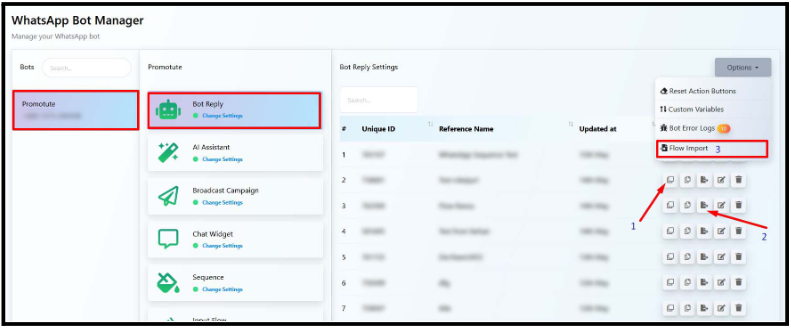
- Navigate to Chat Bot Manager from the left sidebar.
- Click on WhatsApp Bot.
- Select your connected WhatsApp number, say, for example, your brand account.
- Open Bot Reply to view all existing flows.
- Find the flow you wish to duplicate.
- Click the Duplicate icon (?) next to it.
A new bot flow will instantly appear, which will be an exact replica of your original one.
You can now edit the duplicated version, rename it, or modify messages to match your new campaign goals.
Step 2: How to Export a Bot Flow in SendWo
Exporting a bot flow allows you to save your work as a file, share it with teammates, or upload it to another SendWo account. This is also great for backups or template sharing.
Turn this learning into your next WhatsApp campaign.
Start with Sendwo’s free plan, explore WhatsApp broadcasts, automation, AI chatbot flows, and upgrade only when your business needs more power.
To export your bot flow, follow the steps below:
- Navigate to Bot Reply in your WhatsApp Bot section.
- Locate the flow you want to export.
- Click the Export icon (⬇️) beside it.
- A .txt file will automatically download to your computer.
Note: Data like API keys, template IDs, or tokens will not be included for security purposes.
Step 3: How to Import a Bot Flow in SendWo
Importing is the reverse of exporting. It lets you upload a bot flow (previously saved as a .txt file) into your SendWo dashboard.
Here’s how:
- While inside Bot Reply, click the Options dropdown on the top right.
- Choose Flow Import.
- Upload your .txt or .json bot flow file.
- Once uploaded, your imported bot will appear in the list automatically.
Important to Note: Before activating the imported flow, make sure all required WhatsApp message templates, actions, and variables exist under the new number or account. Otherwise, the bot may fail to execute certain responses.
Duplicating, exporting, and importing bots with SendWo empowers you to scale automation faster, maintain consistency, and save hours of setup time.
Sign up or log in to your SendWo dashboard and experience effortless automation!
1. Can you duplicate a bot flow for another WhatsApp number in SendWo?
Yes. You can duplicate or import a bot flow into any connected number in your SendWo account.
2. What if your exported bot contains templates not available on the new number?
The imported bot will still appear. However, it may not function correctly until you recreate or reassign the missing templates under that WhatsApp account.
3. Can you export multiple bot flows together?
Currently, you can export one bot flow at a time. However, SendWo’s product roadmap includes a bulk export/import option in upcoming updates.
4. Is it safe to share exported bot files with others?
Yes, as long as you double-check that no confidential URLs or tokens are embedded in custom actions before sharing.
Snehil Prakash
Snehil Prakash is an expert WhatsApp consultant with SendWo. He has expertise in implementing WhatsApp API for enterprise businesses and built automation, chatbot and AI powered solution.