How to Tag Everyone in WhatsApp Group - 3 Awesome Ways
Discover simple steps to how to Tag Everyone in WhatsApp Group instantly! Boost engagement with "@everyone" tricks, group settings, and pro tips.
 By Aditi Kamini
Published: December 20, 2025
Updated: March 24, 2026
9 min read
By Aditi Kamini
Published: December 20, 2025
Updated: March 24, 2026
9 min read

Discover simple steps to how to Tag Everyone in WhatsApp Group instantly! Boost engagement with "@everyone" tricks, group settings, and pro tips.
Imagine you need to notify every person in a large WhatsApp group about an urgent announcement. how to tag everyone in WhatsApp group each member one by one is tedious, and WhatsApp doesn’t offer a straightforward “mention all” button in standard groups. So how to tag everyone in WhatsApp group? In this guide, we’ll explore step-by-step methods and proven tricks – both official and creative – to ensure your message reaches all members. We’ll cover built-in features like broadcast lists and Communities, manual mentions, and even third-party tools (likeSendWo) that can help you broadcast messages at scale. By the end, you’ll know exactly how to reach every member of a WhatsApp group without missing a person.
1. Why You Might Need to Tag Everyone
how to tag everyone in WhatsApp group is useful for important updates or urgent alerts. For example:
- Urgent Announcements – Safety alerts, exam cancellations, or time-sensitive news. Tagging all members ensures no one misses it.
- Event Planning – Wedding invitations, class reunions, or community events often need a quick RSVP from the entire group. A group-wide ping can boost responses.
- Work or School Groups – Team leads and teachers may need to reach every student or colleague about meeting changes or deadlines. Tagging all makes sure everyone sees the notice.
- Customer or Fan Communities – Businesses or communities using how to tag everyone in WhatsApp group often want to broadcast offers or updates to all members.
In each case, notifying all group members at once prevents information gaps. However, because WhatsApp lacks a one-click “notify everyone” feature (aside from certain Community tools), group admins must use workarounds to achieve the same effect.
2. Understanding WhatsApp Mentions and Notifications
On WhatsApp, typing @ in a group chat brings up the list of members. Selecting a name mentions that person, and they receive a notification even if the group is muted. This is useful for calling out individuals, but not all at once. Unlike some chat apps, WhatsApp standard groups don’t have a built-in “@everyone” command anymore. (WhatsApp briefly tested an “@everyone” feature, but it was officially removed from regular groups.)
That means in a normal group chat you can only mention one person at a time. If you need to reach every member, you’ll have to either manually mention everyone, use other WhatsApp features, or rely on a broadcasting tool. We’ll go through each of these options below.
3. Official Methods to Notify All Group Members
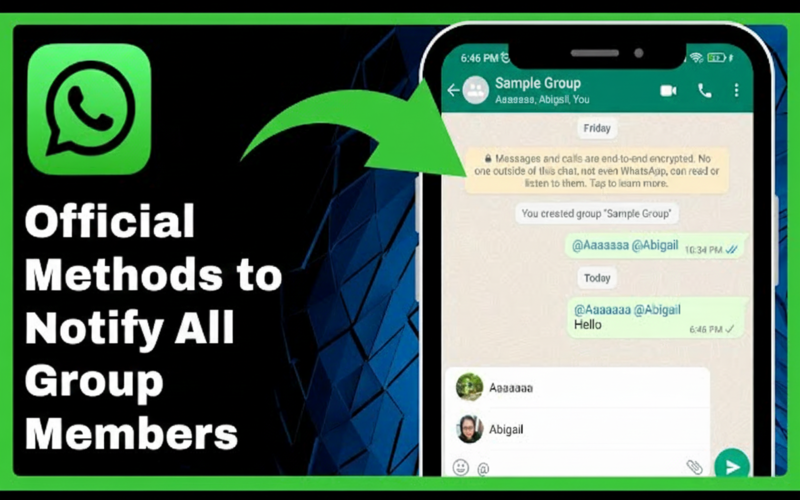
Even though there’s no single “tag all” button in a normal group chat, WhatsApp offers a few official ways to notify a large audience:
WhatsApp is gradually rolling out an “Everyone” mention in some versions. To try this:
- Step 1: Update your WhatsApp to the latest version (or join the beta program for early features).
- Step 2: Open the group chat and tap the message box. Type the @ symbol.
- Step 3: Look carefully at the suggestion list. If WhatsApp supports group-wide mentions for you, you might see an “Everyone” option or the group’s name listed.
- Step 4: Tap Everyone or the group name, type your message, and send. This will notify all members at once (in some tests this even overrides mute settings).
If you see an @everyone or group-name suggestion, you’ve found the easiest solution tohow to tag everyone in WhatsApp group. Unfortunately, this feature isn’t available to everyone yet. If you don’t see it, move on to the next methods.
Use WhatsApp Communities (Announcement Group)
WhatsApp Communities include a special Announcement Group where admins can broadcast to all members of the community. If your group is part of a WhatsApp Community and you’re an admin, you can effectively notify everyone by mentioning the group name:
- Open the subgroup (that you manage) inside the Community.
- In the message box, type @ and look for the group’s name in the popup list.
- Tap the group name; this tags all participants in that subgroup simultaneously.
- Write and send your message as usual.
This is currently the only official “tag everyone” method on WhatsApp – but it only works within Communities. If you don’t use WhatsApp Communities, skip to the next option.
Broadcast List (One-to-One Delivery)
A Broadcast List sends a private copy of your message to each recipient. It’s not a group chat mention, but it ensures everyone gets the message. To use a broadcast list:
- Go to the Chats screen, tap the ⋮ menu (Android) or Lists (iOS), and choose New Broadcast.
- Select the contacts (up to 256) you want to notify and tap Create.
- Type your message and send it.
Each person receives your message as a normal one-on-one chat (so they don’t see others). Remind recipients to save your number in their contacts – otherwise they won’t get your broadcast message. This method is perfect for private announcements: everyone is notified, but replies come individually. Unlike group tagging, broadcasts won’t interrupt a muted group chat because they are direct messages.
Turn this learning into your next WhatsApp campaign.
Start with Sendwo’s free plan, explore WhatsApp broadcasts, automation, AI chatbot flows, and upgrade only when your business needs more power.
Manually Mention Everyone
If the above methods aren’t an option, the old-fashioned way is to manually mention each person:
- In the group chat, type @ and select the first person’s name.
- Repeat the @ mention for each additional member you want to notify.
- Write your message and send it once all are mentioned.
This works, but it’s tedious in large groups. Techpoint notes it’s the only remaining method for standard groups if “Everyone” isn’t available. For very large chats, consider splitting into smaller subgroups or enlisting co-admins to tag in parts.
4. How to Tag Everyone in WhatsApp Group Step-by-Step
Update WhatsApp: Ensure you have the latest app version (or join the beta) to access any new mention features.
- Look for “Everyone”: Open the group, tap @, and see if “Everyone” or the group name appears in the suggestions. If it does, select it, type your message, and hit send. Try Communities: If you’re in a WhatsApp Community, mention the group’s name as shown above. This will ping all sub-group members.
- Use Broadcast Lists: If you need one-to-one delivery, create a Broadcast List (Chats → Menu → New Broadcast), add contacts, and send your messag. Remember, recipients must save your number to receive broadcasts.
- Manual Mentions: Finally, if nothing else works, type @ and mention each name you want to notify. It’s manual but effective for small to midsize groups.
If you manage many groups or large audiences, consider WhatsApp Business API tools. Platforms like SendWo let you use official bulk messaging features to reach hundreds or thousands of contacts at once. These solutions avoid WhatsApp’s limits on manual tagging and ensure you comply with messaging policies.
5. Best Practices and Tips
Tagging everyone is powerful but should be used wisely:
- Be Selective: Only use group-wide mentions for important or urgent updates. Casual chit-chat or minor news can overwhelm members.
- Keep It Concise: When you notify all, keep the message short and clear. State your point or call-to-action right away, so people don’t have to scroll.
- Respect Time and Tone: Avoid spamming. Schedule announcements at reasonable hours. A friendly, respectful tone is more effective.
- Test First: Try any new method or message on a smaller group (or a test account) before sending to everyone.
- Use Official Tools: Don’t rely on hacky scripts or bots. WhatsApp can ban accounts that use unauthorized mass-tagging tools. Instead, stick with WhatsApp features (mentions, broadcasts) or approved Business API solutions.
- Encourage Saving Numbers: For broadcasts, remind people to save your contact. Unreceived messages often happen because recipients haven’t saved the sender’s number.
- Combine Approaches: You can mix methods – for example, use a broadcast list and tag a few admins in the group. Just ensure people know where to respond.
Example Scenario:
Jane, a community manager, must announce a sudden meeting change to her 50-member how to tag everyone in WhatsApp group. First, she tries typing @ in the group chat. No “Everyone” appears. Jane then creates a Broadcast List of all 50 members (after making sure they have her number saved). She sends the new meeting details via broadcast so everyone gets it privately. Finally, she drops a short post in the group chat tagging a few key team leads by name to encourage further discussion. This approach ensures the message reached all members (via broadcast) and sparks group replies (via mentions).
Conclusion
- In 2025, how to tag everyone in WhatsApp group isn’t a mystery, but it does require the right method. If an official “Everyone” mention is available in your app, use it for a single-click notification. Otherwise, rely on WhatsApp’s features: Broadcast Lists for private one-to-one messages, or the Announcement Group within a Community for public posts. Manual mentions (@name) work too but can be slow for big groups.
- For businesses and power users, consider a professional tool like SendWo. SendWo’s platform supports bulk WhatsApp broadcasts using the official Business API, letting you message customer lists efficiently without tagging individuals. With SendWo you can schedule templates, segment your audience, and ensure delivery – all fully compliant.
- No matter which method you choose, always use tagging responsibly: keep messages concise, respect your audience’s time, and follow WhatsApp’s guidelines. With these tips, you’ll confidently reach every member of how to tag everyone in WhatsApp group.
(FAQ)
Q: H ow to tag everyone in WhatsApp group at once?
A: Not directly in a standard group chat. WhatsApp removed the universal @everyone tag for regular groups. The only way to tag all at once is via a Community’s announcement group (by mentioning the group name) or by using workarounds like broadcast lists.
Q: How do Broadcast Lists differ from tagging?
A: A Broadcast List sends your message as a private message to each person (up to 256 contacts). Recipients see it as a one-on-one chat. In contrast, mentioning someone (@name) is done inside a group chat. Broadcasts require the receiver to have your number saved.
Q: Can muted group members still receive a mention?
A: Yes. A mention creates an @ notification, so even if a member has the group muted, they’ll see your name in the message notification. (Note: some experimental "tag all" features may override mutes in testing.)
Q: What if I try to use a script or tool to tag everyone?
A: Be careful. Unofficial mass-tagging scripts or bots can violate WhatsApp’s terms and get your account restricted. Always use WhatsApp’s official methods (broadcast lists, communities) or an approved API service like SendWo.
Q: How many people can I have in a Broadcast List?
A: You can add up to 256 contacts in a Broadcast List. If you need to reach more people, send multiple lists or use a business API solution.
Q: Who can send messages in a WhatsApp Announcement Group?
A: Only the Community admins can post announcements in the Community’s Announcement Group. All members in the Community can see those posts.
Aditi Kamini
Aditi, a content marketer at SendWo, is a passionate writer and marketing enthusiast. She excels in driving revenue campaigns, building client relationships, and mastering content creation, SEO, customer service, and project management.