The approval is buried in a WhatsApp thread. The final presentation is in Google Drive. A customer update is sitting in Salesforce. Someone discussed the same issue in Slack yesterday.
Nothing is technically “lost.” The problem is that nobody knows where the current answer lives.
That problem gets worse as the software stack grows. Okta’s 2025 Businesses at Work research found that its average customer used 101 applications, while organizations with 2,000 or more employees averaged 247 apps. In that environment, adding another knowledge base rarely fixes the underlying issue. It can simply create one more place to search.
Enterprise search takes a different approach. Instead of asking employees to remember which system contains a piece of knowledge, it creates a searchable layer across authorized company information. Modern systems can connect documents, messages, tickets, CRM records, databases, intranets, and other repositories while applying the access permissions attached to that content.
For organizations where useful work conversations spill into WhatsApp and other messaging tools, however, there is an important catch: search can only find information that the organization can legitimately capture, index, and make available. That distinction matters.
An information silo is often described as a database or system that does not exchange information effectively with related systems. In the workplace, the practical definition is simpler: useful knowledge exists, but the person who needs it cannot easily discover it.
Modern companies tend to develop several kinds of silos at once.
The second problem is easy to underestimate.
Imagine that a sales manager sends a revised pricing spreadsheet by email. A regional manager asks a question about it in WhatsApp. The answer is discussed there, and the final pricing decision appears later in Salesforce.
Searching the spreadsheet alone does not reconstruct the decision.
This is one reason leading enterprise-search products increasingly emphasize multi-source retrieval instead of better document search. IBM defines enterprise search around retrieving relevant information from disparate organizational sources. Elastic describes connectors, indexing, permissions, structured and unstructured content, semantic search, and unified retrieval as core parts of the architecture.
There is also a measurable cost to poor findability. McKinsey’s often-cited research found that knowledge-intensive workers spent roughly one-fifth of their work time searching for and gathering information. Its analysis also estimated that making internal social knowledge searchable could reduce information-search time substantially. The study is older, from 2012, so it should be treated as a historical benchmark rather than a measurement of every modern workplace. The underlying search problem has hardly disappeared as app counts have grown.
Enterprise search does not have to move every document, conversation, and record into one giant repository.
That is one of its biggest advantages.
Instead, a search platform can connect to existing systems, ingest or index their authorized content, enrich that content with metadata, and provide a common retrieval experience. Employees get one place to begin a question even though the underlying information may remain in several systems.
Consider a query such as:
“What did we finally agree to offer the Acme account after the pricing review?”
Traditional search may require several attempts:
A well-connected enterprise search system can retrieve relevant information across those sources in one search flow, provided the employee has access to them. AI-based systems can also use semantic retrieval to understand meaning beyond exact keyword matches and generate an answer grounded in retrieved company information.
This changes the economics of information silos.
The company may still have separate systems. Salesforce remains Salesforce. Drive remains Drive. Jira remains Jira. Search reduces the cost of those boundaries by giving employees a common discovery layer across them. Coveo, Elastic, Sinequa, IBM, and other enterprise-search providers describe connectors, unified retrieval, indexing, relevance, and permission handling as central to this model.
Modern AI adds another useful layer. Instead of returning twenty potentially relevant documents and leaving the employee to read each one, retrieval-augmented systems can synthesize an answer from retrieved material and point back to its sources. The quality of that answer still depends heavily on the quality, freshness, coverage, and permissions of the underlying retrieval system.
That is why companies evaluating an enterprise AI platform for connected workplace knowledge should look beyond the conversational interface and examine what the system can connect to, how quickly information is updated, and how existing access rules are handled. Glean, for example, says its enterprise AI connects with more than 100 business tools, including Google Workspace, Microsoft 365, Slack, Salesforce, Jira, and ServiceNow.
WhatsApp deserves separate treatment because “search across workplace tools” can sound easier than it really is.
Personal WhatsApp messages and calls use end-to-end encryption. Meta states that the content remains between participants and cannot be read by WhatsApp or Meta. An enterprise-search platform therefore cannot simply crawl every employee’s private WhatsApp history in the same way that an authorized connector might index a company-managed repository.
There are really two different questions:
Can employees use WhatsApp to ask an enterprise AI system a question?
and
Can the enterprise AI system search historical WhatsApp conversations as a source of company knowledge?
Those are not the same technical capability.
The first uses WhatsApp as an interface. The employee sends a query, and a connected enterprise system retrieves information from approved company sources.
The second requires the business conversation itself to have been captured through an approved, technically supported, legally appropriate mechanism before enterprise search can retrieve it.
This distinction matters most in organizations where employees use WhatsApp informally for customer conversations, approvals, field operations, vendor discussions, or internal coordination.
Enterprise search cannot repair a governance gap after the information has disappeared. If an important decision exists only on an unmanaged personal phone and was never captured by an approved business system, the search engine has nothing authorized to index.
The issue can also extend beyond productivity. In regulated financial services, the U.S. Securities and Exchange Commission has taken enforcement action over failures to preserve required off-channel electronic communications. SEC officials have specifically discussed smartphone chat applications such as WhatsApp in connection with the agency’s off-channel communications initiative.
That does not mean every business needs to archive every WhatsApp conversation. Legal and recordkeeping duties differ by jurisdiction, industry, message type, account type, and organizational policy. It does mean that companies should solve the capture and governance question before treating WhatsApp as another searchable knowledge repository.
A sensible architecture looks more like this:
approved communication channel → compliant capture or system of record → permission-aware index → enterprise search
That is much safer than treating enterprise search as a backdoor into personal communications.
The mechanics become clearer when you look at what leading enterprise-search pages consistently emphasize.
First come connectors. A search service needs a reliable way to reach applications such as Microsoft 365, Google Workspace, Salesforce, Slack, Jira, ServiceNow, Confluence, databases, and document repositories. Connectors can crawl or synchronize content, while APIs can support systems that do not have an out-of-the-box integration.
Next comes indexing and enrichment. The system extracts searchable content and useful metadata, including titles, authors, timestamps, entities, document types, projects, and other context. Modern platforms increasingly add semantic representations so a user does not need to know the exact words used in the original document.
Then comes relevance.
Suppose an employee searches for “current parental leave rules.”
There might be dozens of matches:
A useful enterprise-search system has to do more than find the phrase “parental leave.” It needs signals that help determine which result is current, authoritative, relevant to the employee, and permitted for that person to view. IBM and Interact both identify permissions as a central enterprise-search requirement, while modern platforms also use relevance and personalization signals.
Finally comes answer generation, when AI is used.
The safest pattern is retrieval first, generation second. Relevant company sources are found, then an AI model uses those retrieved sources to produce an answer. Source visibility remains valuable because employees should be able to inspect the policy, ticket, document, or conversation behind an important answer.
In other words, the real product is not the search box.
It is the machinery behind the search box.
The fastest way to disappoint employees is to launch enterprise search across everything at once and assume relevance will take care of itself.
Start with a problem people already complain about.
A practical rollout can follow this sequence:
Useful measurements include successful-search rate, zero-result queries, time to useful answer, repeated internal questions, source freshness, adoption, and the percentage of AI answers that can be traced to authoritative material. Search analytics can also expose missing content and areas where employees repeatedly fail to find what they need.
One metric deserves special attention: searches that end with a colleague being asked the same question anyway.
That usually points to one of three problems: the information is missing, employees do not trust the result, or the search system has surfaced the wrong source.
Fixing those failures can do more for knowledge sharing than simply indexing another million files.
What is enterprise search?
Enterprise search is technology that lets employees find information stored across multiple internal company systems through a common search experience. Depending on the platform, those sources can include documents, messages, databases, CRMs, knowledge bases, tickets, intranets, and other repositories. Modern systems typically combine connectors, indexing, relevance ranking, semantic search, and permission controls.
How does enterprise search reduce information silos?
It makes knowledge stored in separate systems discoverable through a shared retrieval layer. Employees do not have to know which application contains the answer before starting their search. The original systems can remain separate, while the search layer connects their authorized information.
Can enterprise search search WhatsApp messages?
Potentially, but only when the relevant business communications can be captured through an authorized and supported mechanism. Consumer WhatsApp communications are end-to-end encrypted, so an enterprise-search platform cannot simply access private conversations outside the normal participant and data-access model. Organizations using WhatsApp for business should establish governance, retention, privacy, and integration requirements before assuming those conversations can become searchable enterprise knowledge.
What features matter most in enterprise search software?
Broad connector support is important, but it is only the beginning. Permission-aware retrieval, strong indexing, semantic relevance, freshness, natural-language querying, source visibility, administration, analytics, and support for custom applications all affect whether employees will actually trust and use the search experience.
Enterprise search works best when a company stops asking employees to memorize its information architecture.
People should be able to ask a normal question and find the best authorized answer, whether the supporting evidence originated in a document repository, CRM, ticket, email, or workplace conversation.
WhatsApp exposes the boundary of that promise particularly well. Search can connect fragmented knowledge, but only after the organization has made that knowledge available in a legitimate, governed, searchable form.
Solve that part first, and information silos become far less expensive to live with.
Imagine closing a property deal without a single phone call. You send a quick WhatsApp message to a prospect with a short video tour of a new listing, answer their questions in real-time, and schedule a viewing – all within a single chat. This isn’t a far-fetched scenario, it’s the reality of real estate marketing in 2025. With nearly 3 billion people using WhatsApp monthly, the platform has become a goldmine for realtors aiming to connect with clients instantly and personally. WhatsApp messages boast open rates as high as 98%, about five times higher than email, and WhatsApp marketing campaigns achieve conversion rates between 45% and 60%, far outperforming traditional methods. In an industry where response speed and personal rapport can make or break a sale, WhatsApp emerges as a game-changer. This comprehensive guide will walk you through powerful WhatsApp marketing campaign ideas for real estate that truly convert – backed by stats, examples, and best practices to elevate your strategy.
Real estate is all about timely communication and trust-building. WhatsApp’s unique advantages align perfectly with these needs:
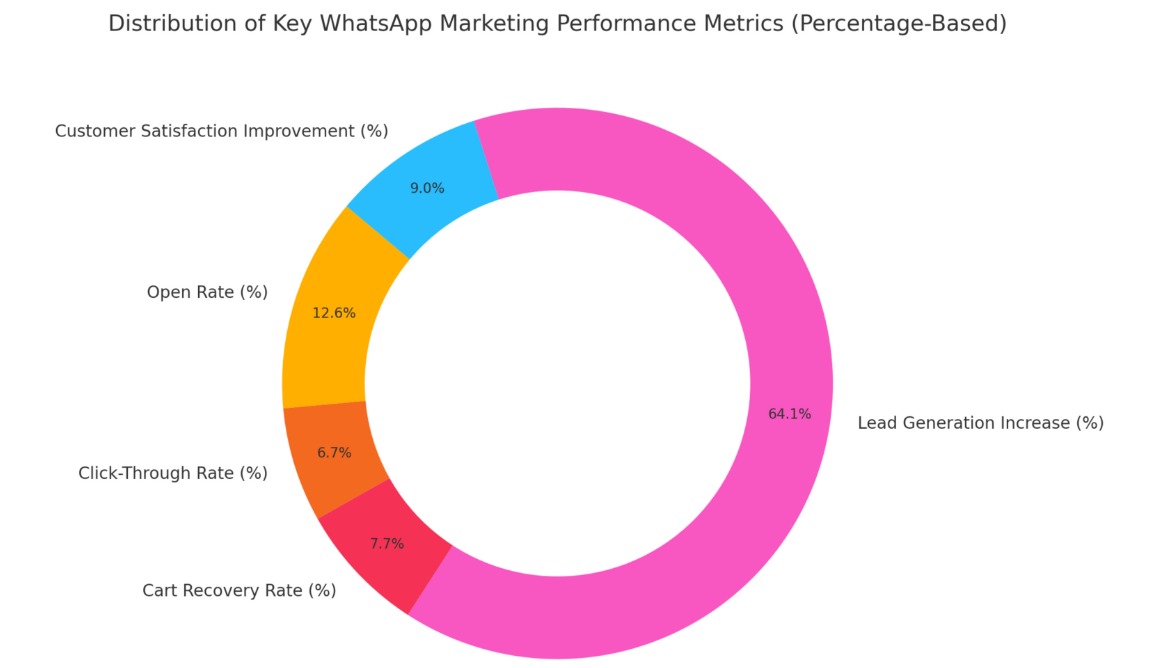
In short, WhatsApp combines the wide reach of mass marketing with the personal touch of a phone call. It’s fast, interactive, and customer-friendly, making it an ideal tool to capture and convert real estate leads in today’s mobile-driven world.
To run effective WhatsApp campaigns, start by setting up the right foundation with WhatsApp Business (a free app) or the WhatsApp Business API for larger teams. Here’s how to lay the groundwork:
With your WhatsApp Business set up and contacts primed, you’re ready to deploy targeted campaigns. Next, let’s dive into specific WhatsApp marketing campaign ideas for real estate that drive engagement and conversions.
SendWo: To simplify adoption, platforms like SendWo offer an all-in-one WhatsApp marketing solution built specifically for high-volume real estate marketers. With SendWo, you can launch personalized broadcasts, automate lead nurturing sequences, manage multiple agent logins, and ensure compliance – all from a single, intuitive dashboard. Unlike starting from scratch with raw APIs, SendWo provides instant access to WhatsApp Business API features without technical complexity, making it ideal for fast-moving real estate teams.
Below are actionable campaign ideas, each designed to engage prospects and gently push them down the funnel – from initial interest to closing the deal. These ideas blend creative use of WhatsApp’s features with real estate marketing savvy.
An example of a Click-to-WhatsApp ad for real estate: A user sees a property ad on Instagram and taps the WhatsApp button, instantly opening a chat with the agent to schedule a site visit. This seamless transition from ad to chat removes the usual friction of lead forms and waiting times. Prospects jump straight into conversation while their interest is hot.
How to execute: Run Facebook or Instagram ads with a “Send Message on WhatsApp” CTA instead of a traditional lead form. For example, advertise a new listing with a stunning photo, and when users click, it opens a WhatsApp chat with a pre-filled greeting like “Hi, I’m interested in [Property Name].” Your team (or chatbot) can respond instantly with details and invite them to a viewing.
Why it converts: By engaging prospects in real time, you capitalize on their peak interest. There’s evidence that Click-to-WhatsApp ads dramatically boost conversions – such campaigns delivered up to 40% higher conversion rates compared to traditional web lead forms. It makes sense: instead of filling a form and waiting hours for a call back, the prospect is chatting with you within seconds. This immediacy builds trust and momentum. Plus, you skip the inbox clutter; all communication stays in a single WhatsApp thread that’s easy for the client to follow.
Pro Tip: Use an auto-reply template for inbound ad traffic. For example, the moment someone messages from your ad, have WhatsApp Business send an instant reply: “Thanks for your interest in 123 Maple Street Home. Are there any specific questions I can answer, or would you like to schedule a tour?”. Prompting an action keeps the conversation flowing. Remember, speed is crucial – responding to a new lead within 5 minutes can make them 21× more likely to convert, and WhatsApp helps you achieve that lightning-fast response.
Every time you get a new listing or plan an open house, consider your WhatsApp contacts as an exclusive audience to announce it to. A WhatsApp Broadcast lets you send a message to many recipients individually (they receive it like a private message, not in a group). This is perfect for blasting out “Just Listed” alerts, price reductions, or upcoming open house events to all interested leads at once.
How to execute: Segment your contact list by buyer preferences and create broadcast lists (WhatsApp allows broadcast to up to 256 contacts per list). For instance, have a list for “Downtown Condos Prospects” and another for “Suburban Family Homes Leads.” When you get a property that fits a segment, send a concise broadcast: include a catchy description, one great photo, and a call-to-action like “Message me to book a viewing this week!” Because it’s a broadcast, replies come back individually, letting you handle inquiries one-on-one.
Why it converts: Broadcasting ensures no one misses out on a new opportunity. Unlike email blasts that might sit unread, WhatsApp messages likely get seen immediately (with ~70–80% open rates for broadcasts). It creates a sense of exclusivity and urgency – your contacts feel they’ve received a personal tip. For example, “New 4-Bedroom Listing just hit the market in [Neighborhood] at $X. Be among the first to see it – open house this Sat!” Such timely alerts can drive quick action, especially in a competitive market. One real estate campaign even saw a 33% boost in leads by adding WhatsApp QR codes to “For Sale” signs and print flyers – showing that when you make it easy for people to get info via WhatsApp, more of them convert into inquiries. Realtors can also place a circular QR code on brochures, site banners, open house standees, newspaper ads, or property window stickers to move offline interest into WhatsApp quickly. For example, a QR code can open a chat for booking a visit, viewing a video tour, downloading a floor plan, or asking for pricing details.
Best Practice: Don’t overdo the broadcasts. Limit them to truly new or important updates (nobody wants daily pings of stale inventory). Always provide value: include something useful like a video tour link, a limited-time offer (“pre-book your slot”), or valuable info (“This area’s homes are up 5% YoY, great investment potential!”). And of course, ensure the recipients have opted in to these updates, so your messages are welcome.
When buyers can’t physically attend a showing, virtual tours via WhatsApp can bridge the gap and win them over. Use WhatsApp to send video walkthroughs of properties, 360° photos, or even do live video calls from the property. This campaign idea is especially powerful for out-of-town buyers or busy professionals – they can tour a home right from their phone.
How to execute: For each key listing, prepare a short video tour (1–2 minutes) showcasing the highlights – e.g., driving up the curb, panning through each beautiful room, and the backyard view. When a prospect expresses interest in that type of property, offer to WhatsApp them the video. You can also proactively broadcast a “Virtual Open House”: e.g., “Can’t visit 123 Maple Street in person? Reply TOUR and I’ll send you a virtual walkthrough!”. On WhatsApp, you can send up to 16 MB videos (a few minutes in decent quality) – or share a link to a longer video hosted elsewhere if needed. For a live experience, schedule a WhatsApp video call and walk the client through in real time, letting them ask questions (“Could you show the view from the balcony again?”).
Why it converts: Visuals are compelling – listings with video get 49% more qualified leads on average. By delivering that video directly in WhatsApp, you ensure it gets seen and not lost in an email spam folder. A virtual tour helps buyers picture themselves in the home, creating an emotional connection. It also qualifies leads faster: serious buyers will engage after seeing the tour (setting up next steps), while window-shoppers may opt out – saving you time. Clients appreciate the convenience and personal touch; even remote buyers can say “I feel like I’ve walked through the house already.” This increased confidence leads to quicker decisions – one stat found video walkthroughs increased buyer confidence by 28%, meaning your WhatsApp video tours can nudge indecisive prospects towards making an offer or at least a physical visit.
Pro Tip: Optimize your videos for mobile viewing – use good lighting, keep the camera steady, and highlight unique features quickly (don’t assume viewers will watch a 10-minute slow tour). You might even add captions or voice-over pointing out key specs (“3BR, 2BA, 2,000 sqft – Newly renovated kitchen”). Also, consider using WhatsApp Status (the Stories-like feature) to post short teaser clips or panorama photos of your best listings – your contacts browsing their WhatsApp may see the status and be enticed to inquire.
Think of a WhatsApp chatbot as your always-on assistant that can engage new prospects instantly, even at 2 AM. Setting up a simple automated chatbot can qualify leads (by asking what they’re looking for) and answer common questions. This ensures no lead falls through the cracks when you’re not available to reply immediately.
How to execute: Using the WhatsApp Business API (or third-party tools), configure a chatbot flow for new chats or specific keywords. For example, when someone messages “Hello” or scans your WhatsApp QR code, the bot can greet them: “Hi! Welcome to [Your Realty]. Are you looking to buy, sell, or rent?” – and then branch accordingly. For buyers, it might ask budget, preferred location, bedrooms, etc., just like a pre-qualification form. It can also handle FAQs: If a user asks a common question like “What’s the process to buy a home?” or “What are your fees?”, the bot instantly provides a helpful answer or link. You can program buttons/menu for easy navigation (e.g., “1️⃣ See current listings, 2️⃣ Schedule a call, 3️⃣ Our office location”).
Why it converts: Speed and convenience. In real estate, response time is critical – a study showed replying to inquiries within 5 minutes can massively boost conversion odds. A chatbot ensures instant engagement even if you’re busy. It can capture the lead’s key details and intent on the spot, so you can prioritize hot leads. For example, if the bot finds out someone has a $500k budget and is pre-approved for a loan, that’s a high-value lead to call first thing in the morning. Additionally, a well-designed bot provides value by answering questions right away – improving customer satisfaction. It’s like having a receptionist who never sleeps. Some businesses report huge improvements in lead generation efficiency; one analysis found implementing WhatsApp chatbots can boost lead generation by over 500% (by automating initial outreach and follow-ups). While 500% is extreme, even a fraction of that means more leads nurtured without extra human effort.
Tip: Make sure the bot handoff to a human is smooth. For instance, if the prospect indicates high interest or types something the bot can’t handle (“Can I see the property tomorrow?”). The bot should politely say a human agent will get back ASAP. Also, periodically review chatbot transcripts to refine it – ensure it’s asking relevant questions and not losing users. A friendly tone goes a long way (e.g., “I’m Zoe, the virtual assistant for XYZ Realty!” gives a humanized touch).
Not every lead will be ready to convert immediately. This is where a WhatsApp drip campaign comes in – a series of scheduled, personalized messages to nurture your leads over time. Done right, these follow-ups keep you on the prospect’s radar and gently guide them toward a decision, all while feeling personal rather than pushy.
How to execute: Say you meet prospects at a property expo or they sign up on your website. Instead of one-and-done contact, set up a follow-up sequence. For example:
Use WhatsApp Business’s labels and broadcast lists to manage this. You can manually send these or use automation if available. Always personalize with their name and any specific criteria (e.g., “that 3-bedroom near the park you liked is still available”).
Why it converts: People often need multiple touches before committing in real estate. WhatsApp drips keep the conversation warm without requiring a phone call each time. Because messages feel one-to-one, they don’t come off as spammy as mass emails. The key is each message should add value – whether it’s useful info, a new opportunity, or a friendly check-in. Over time, this builds trust and positions you as a helpful expert, not just a salesperson. By the time the lead is ready to act, you’ll be the agent they remember because you stayed in touch. Consider bolding key info or questions in your messages to draw attention (WhatsApp supports bold text formatting). Also, include CTAs like “Would you like to schedule a viewing? Just let me know.” to prompt the next step.
Stat to note: WhatsApp’s high engagement means your follow-ups are more likely to be read – recall that WhatsApp messages have ~75–80% average open rates (often within minutes). Compare that to how many drip marketing emails go straight to trash. By nurturing leads in the chat app they use daily, you dramatically increase the odds of conversion when the timing is right.
Nothing builds trust like social proof. Turn your happy clients into your advocates by sharing their success stories on WhatsApp – and encourage referrals through a friendly campaign. Real estate is a referral-heavy business, and WhatsApp is an intimate way to request and reward those valuable word-of-mouth leads.
How to execute (testimonials): After a successful closing, ask your client if they’d mind sharing a brief review or audio message about their experience. Then, with permission, share this testimonial with prospects in your WhatsApp conversations or broadcasts. For instance, you might send a voice note from a satisfied buyer (or a screenshot of their kind words) to a lead who’s on the fence: “Hi [Lead], I know buying a home is a big decision. One of my recent clients, [Name], had a similar situation – here’s what they said after finding their home with our help… [attach audio clip or quote].” This personal touch can reassure anxious buyers that you deliver results.
How to execute (referrals): Create a WhatsApp message campaign for past clients, e.g., “Hi [Name], hope you’re loving your new home! If you know anyone looking to buy or sell in [Area], let me know – I’d love to help them (and I have a small thank you gift for any referral).” The message is friendly and low-pressure. You can even make it a mini referral program announcement: “This month, we’re giving $100 gift cards to clients who refer someone that becomes awhoer or seller. It’s our way of saying thanks for your trust!” Because it’s WhatsApp, it feels like a personal outreach rather than a mass email blast.
Why it works: People are more likely to trust recommendations from friends or reviews from real customers. Seeing or hearing a genuine testimonial over WhatsApp can tip the scales – it’s real and unedited, coming through the same channel as messages from one’s friends and family. As for referrals, WhatsApp is perfect because your past clients likely still have you saved in their contacts and perhaps occasionally view your Status updates. A gentle nudge via chat keeps you top-of-mind. Even if they don’t have a referral right away, you’ve reopened a line of communication (maybe they themselves will become repeat clients). Many realtors find that a significant chunk of business comes from referrals, so a periodic WhatsApp outreach here can pay off.
Note: Always be courteous and genuine in these messages. Use the client’s name, be warm, and avoid sounding like a corporate chain message. Something like, “Hi John! It’s been a few months since you moved – hope you and the family are settled in. I wanted to drop a quick note…” is a nice opener. This human-friendly tone aligns with WhatsApp being a casual platform, and it increases the likelihood of a positive response.
For agents dealing with high-end clients or a strong base of repeat investors, consider forming an exclusive WhatsApp Group as a VIP club. This group could be a space where you share off-market listings, investment opportunities, or early-bird alerts before they go public. The idea is to make members feel special and in-the-know, driving loyalty and conversions for these top-tier leads.
How to execute: Invite a select list of trusted clients (with their consent) to a WhatsApp group named something like “Premium Property Insider Club” or “Top Deals [CityName].” In this group, post occasional curated content: e.g., “Investment Deal: 4-unit apartment building coming to market next week, not listed online yet. Cap rate ~6%. Ping me if interested for details.” or “VIP Preview: Townhouse hitting MLS Friday at $800k, sharing here first in case it fits what you’re looking for.” Group members can ask questions, and you or your team can respond for everyone’s benefit (if one person asks, others might be wondering too).
Why it converts: Exclusivity creates urgency and value. Members feel they have a competitive edge by being in the group. When you drop a hot offer, you may get immediate bites like “I’m interested, let’s talk,” converting to viewings or bids before the broader market even knows about it. It leverages FOMO (fear of missing out) in a positive way – if someone sees others in the group expressing interest, they may act faster too. Moreover, the group fosters a community vibe among your clients, who may even share insights or network with each other, all facilitated by you. This strengthens your relationship with them; they’re more likely to stick with you for transactions because you’ve given them this added value service.
Manage it well: Set clear group rules to prevent spam or off-topic chatter. Perhaps keep the group announce-only (you as the admin post, others can only message you privately), if you worry about noise. Or moderate discussions politely. Since these are VIPs, response quality matters – be ready to promptly address questions posted in the group. Finally, keep the content high quality and not too frequent – you might share something once or twice a week at most, ensuring every post is worth their attention.
Those are some of the most effective WhatsApp campaign ideas tailored for real estate. From capturing fresh leads instantly to nurturing and closing deals, WhatsApp can be present at every stage of the customer journey. But beyond specific campaigns, success often comes down to following best practices, which we’ll touch on next.
Implementing the above ideas will yield results, but keep these overarching best practices in mind to truly excel:
By adhering to these best practices, you ensure that your WhatsApp marketing remains effective, professional, and appreciated by your contacts. Now, let’s wrap up with a quick recap and a call-to-action for you.
WhatsApp isn’t just another communication tool – it’s rapidly becoming the preferred channel for real estate engagement. By tapping into its enormous user base and real-time capabilities, savvy agents and brokers can nurture leads more naturally and close deals faster than ever. We’ve explored how strategies like click-to-chat ads, broadcast listings, virtual tours, chatbots, and personalized follow-ups can create a powerful sales funnel entirely within WhatsApp. The common thread is clear: convenience and personalization convert. When you make it effortless for prospects to reach you, get information, and build a relationship – all on their mobile devices – you remove the typical barriers that slow down deals.
It’s time to put these ideas into action. Start with one or two campaigns (for example, set up a broadcast for your next open house or integrate a WhatsApp link in your Facebook ad) and see the difference in response. Monitor the engagement, refine your approach using the best practices provided, and gradually expand your WhatsApp strategy.
Ready to elevate your real estate marketing? Don’t wait for competitors to beat you to it. Embrace WhatsApp as your secret weapon for higher conversions. Whether you’re an independent realtor or a large agency, these WhatsApp campaign ideas can help you turn casual chats into signed contracts. Implement them today, and watch your client responses and closing rates soar. In the age of instant communication, be the agent who’s just a WhatsApp message away – your future clients will love the experience, and your bottom line will too.
Start your WhatsApp marketing campaign now and join the ranks of realtors who are sealing deals in their WhatsApp chats. Happy selling! ?
Absolutely. WhatsApp’s effectiveness lies in its widespread use and high engagement. Clients are comfortable chatting on WhatsApp, and messages have extremely high open and read rates (often above 90%). Realtors report that prospects respond faster and more frequently on WhatsApp than via email or voicemail. Its multimedia features also make it easy to share property photos, videos, and documents instantly. In short, WhatsApp enables real-time, personal communication, which is key in real estate dealings. When used correctly (with permission-based contacts and valuable content), it can significantly boost lead conversion and client satisfaction.
There are several proven ways to get leads via WhatsApp:
a. Click-to-Chat Ads: Run Facebook/Instagram ads that open a WhatsApp conversation. These capture leads in real time as interested viewers message you directly.
b. WhatsApp QR Codes: Place a WhatsApp QR on your website, flyers, or “For Sale” signs. When scanned, it lets potential buyers instantly message you. This reduces friction – one campaign saw a 33% increase in leads by using QR codes on physical signage.
c. Broadcast Value Content: Offer something valuable via WhatsApp signup – like “Subscribe on WhatsApp for hot new listings and price drops.” By promoting this on your social media or website, you attract people to opt in. Once they do, you can nurture them with targeted broadcasts.
d. Networking & Referrals: Simply let your circle know you’re available on WhatsApp. Add a WhatsApp contact button in your email signature and on business cards. Happy past clients can easily forward your WhatsApp contact or messages to friends who might be looking, generating referral leads.
WhatsApp marketing has exploded into a powerful channel for e-commerce. Messages sent on WhatsApp boast open rates around 98%, which is roughly 5× higher than email. That means nearly every message you send can be seen and acted on. In fact, studies show 45–60% of users click through on WhatsApp messages, compared to only ~2–5% for email. And when customers connect with your brand over chat, 66% of them end up making a purchase. In short, WhatsApp combines massive reach and conversational one-to-one engagement to drive real sales.
With such results on the table, any e-commerce business should take note. Platforms like SendWo make it easy to tap into this opportunity: they connect your online store to WhatsApp (via the official API) so you can broadcast messages, set up automated flows, and engage customers at scale. In this guide, we’ll walk through a complete pre-campaign checklist and step-by-step strategy to craft a high-converting WhatsApp campaign—from setting clear goals to sending your first messages. You’ll learn actionable tips for targeting, personalization, automation (including abandoned-cart recovery), and even sample message templates. Let’s dive in and start converting more sales with WhatsApp!
Before you hit “send,” set yourself up for success. A solid checklist ensures you’re targeting the right customers with the right offer. Here are the key steps to take before launching your WhatsApp campaign:
A key to WhatsApp success is making each customer feel like you’re talking directly to them. Leverage the intimate, conversational nature of chat to your advantage. Here’s how to write messages that convert:
To boost conversions, target the right message to the right segment. Use your customer data to data-drive your audience selection:
By targeting segments thoughtfully, your message feels relevant and timely—key for driving action. One study found that personalized cart reminders via chat can convert 15–25% of abandoners, far above the typical <10% from email. In fact, using WhatsApp for cart recovery often yields a 20–25% conversion rate, meaning you can recover a huge chunk of otherwise lost sales.
Once you know who you’re talking to and what to say, automate the conversation so it runs hands-free. Automation ensures your customers get the right message at the right moment, even when you’re offline. Here’s how to set it up:
Platforms like SendWo make this easy. You can drag-and-drop to create multi-message flows and even inject AI-powered responses. For example, you might program a flow that waits 1 hour after cart abandonment, sends a friendly reminder, then after another 24 hours sends a discount code to seal the deal. By automating these steps, you recover sales 24/7 without manual work. Case in point: brands using chat automation report conversion rates up to 7× higher than before!
Cart abandonment is a massive challenge – roughly 70% of online carts are abandoned. That’s potential revenue sitting idle. WhatsApp’s immediacy and personalization make it ideal for cart recovery:
This approach pays off. Studies show 15–25% of cart abandoners convert when you use WhatsApp reminders, far above the typical <10% on email. In fact, Omnichat reports an average 25% conversion rate on WhatsApp cart campaigns. Since the average online cart abandonment rate is ~70%, even recovering a fraction of those abandons means a big revenue bump. For example, a store used WhatsApp to recover abandoned carts and saw a 10× increase in conversion (while tripling revenue)!
Actionable Tip: Integrate your store with SendWo’s cart recovery webhook (or a similar plugin). That way, whenever a cart is left, the system automatically adds that contact to your “abandoned cart” flow. Then SendWo can deliver the reminders you scripted – without lifting a finger.
Here are ready-made message templates you can customize for your first WhatsApp campaigns. Swap in your brand name, products, and links to make them your own:
- Welcome / Opt-in Incentive:
“? Hi [Name]! Thanks for joining [Brand]’s WhatsApp list. As a welcome gift, here’s a 10% off code WELCOME10 for your first order: [shop link]. I’ll share product tips and special offers here. Feel free to ask me any questions!”- New Product Announcement:
“? Hey [Name], exciting news! Our new [Product Name] is now live. It’s [brief highlight of benefits]. Tap to see a demo and snag yours before we sell out: [link].”- Limited-Time Sale / Promotion:
“FLASH SALE ?: Hi [Name], just for our WhatsApp friends: 20% off everything in our store today only. Use code VIP20 at checkout: [link]. Happy shopping!”- Abandoned Cart Reminder (first message):
“Hey [Name], it looks like you left [Product] in your cart. I’ve saved it for you ? Complete your purchase here: [cart link]. Let me know if you have any questions!”- Abandoned Cart Follow-up (with discount):
“Just checking in – the [Product] you liked is almost gone! ? Use code SAVE10 for 10% off your order if you buy in the next 12 hours: [cart link].”- Re-Engagement / Win-Back:
“Hi [Name], we miss you! It’s been a while since your last order at [Brand]. Enjoy free shipping on your next purchase – just use FREESHIP at checkout. Browse our latest collection: [link].”- Order Confirmation / Shipping Update:
“✅ Hi [Name], good news – your order #[1234] is confirmed! We’ll notify you when it ships. Meanwhile, you can view details here: [order link]. Thanks for shopping with us!”- Feedback / Review Request:
“Hi [Name], hope you’re loving your new [Product]! If you have a moment, we’d appreciate your feedback. How is everything so far? ?”
Use these as a starting point. Feel free to add emojis, images of products, or a brief welcome GIF. The key is to be clear, friendly, and concise. Over time, you can refine these messages based on what gets the best response.
Building a high-converting WhatsApp campaign is within reach. By following these steps – planning carefully, personalizing each message, automating key flows (like abandoned carts), and using targeted templates – you can unlock the power of conversational commerce for your business.
Platforms like SendWo make it easy to put this all into practice. As an official WhatsApp Business API partner, SendWo lets you send unlimited personalized broadcasts, build automated chat flows (with AI support), and even create interactive carousels. Their free plan means you can start experimenting at no cost.
Now it’s your turn: map out one campaign, gather a small segment of customers, and send that first helpful tip or offer. Monitor the clicks and replies, learn from the data, and scale up gradually. With the right approach, WhatsApp can supercharge your sales and customer relationships. Happy messaging!
WhatsApp marketing can be very effective. Messages sent via WhatsApp are opened and read far more often than email: open rates hover around 98%, and click-through/conversion rates are typically 5–6× higher than email. In practice, many brands see 15–25% conversion from WhatsApp cart recovery and promotional messages. Moreover, research shows 66% of consumers have made a purchase after communicating with a business on WhatsApp. In summary, because customers prefer engaging brands on WhatsApp, well-crafted WhatsApp campaigns tend to drive strong engagement and sales.
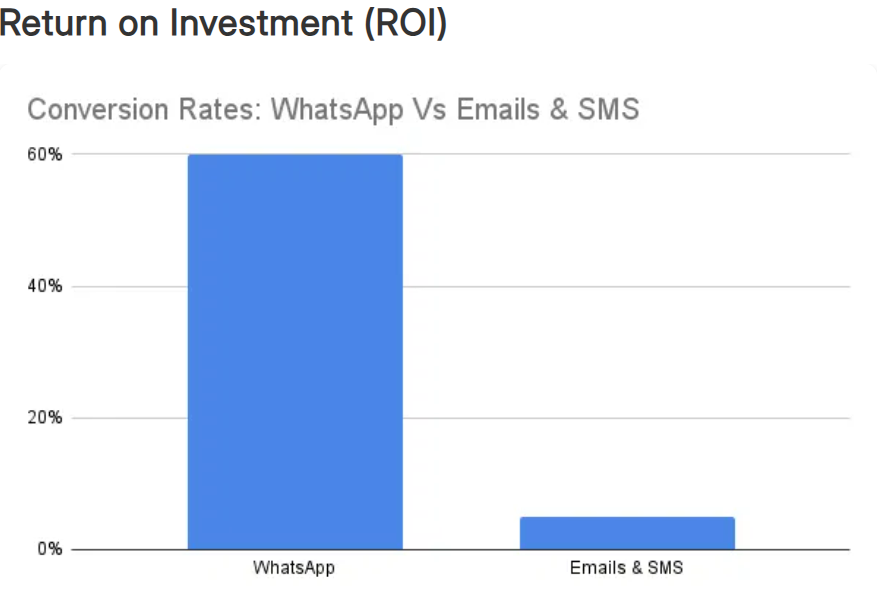
For many e-commerce use cases, yes. WhatsApp messages enjoy far higher engagement than email. For example, one report found WhatsApp campaigns can achieve 45–60% conversion or click-through rates, versus only ~2–5% for typical email or SMS campaigns. The two-way, conversational nature of WhatsApp also helps. Customers get instant notifications and can reply or ask questions right away, unlike one-way emails. In practical terms, brands often see much faster and higher conversions on WhatsApp. That said, email still has its place (longer content, newsletters, etc.), but for immediate offers and reminders, WhatsApp is usually more powerful.
Begin by choosing a WhatsApp API platform (like SendWo) that integrates with your business systems. Then:
1. Get Opt-In: Make sure customers have subscribed to receive your messages (e.g. via signup forms or at checkout).
2. Connect Your Store: Integrate your e-commerce platform (Shopify, WooCommerce, etc.) with the WhatsApp tool. This lets you trigger messages from events (like a cart abandonment or new order).
3. Build Flows: In your WhatsApp tool, create automated workflows. For example, set up a flow that triggers when a cart is left. Write the message content (e.g. “You left items in your cart!”) and schedule it to send 1 hour later.
4. Test: Send test messages to yourself. Make sure the text, images, and links look right and the automation triggers correctly.
5. Launch Gradually: Start with a small segment. For instance, send a “welcome” message to new sign-ups. Track opens and clicks, refine your messaging, then roll out to larger segments.
Most WhatsApp platforms have guides or templates for automation. SendWo, for example, provides an easy drag-and-drop flow builder and even AI chatbot features to automate replies. The general process is: integrate, create or import message templates, set triggers (like “cart abandoned”), and go!
Boosting sales on WhatsApp comes down to engagement and personalization:
1. Timely Offers: Use WhatsApp to send flash sales, exclusive deals, or event reminders. A timely, personal message (like a sale ending soon) can prompt immediate purchases.
2. Abandoned Cart Messages: Recover lost revenue by reminding customers about their carts (often with an incentive). WhatsApp’s immediacy leads to recovery rates of ~15–25%.
3. Cross-Selling & Upselling: After a purchase, use WhatsApp to recommend related products or accessories. For example, “Thanks for your order! Did you know we have matching [product]?” This can drive additional sales.
4. Conversational Commerce: Let customers ask questions via chat before they buy. Quick answers can remove doubts and speed up decision-making.
5. Re-Engagement: Periodically message lapsed customers with a special offer or new arrival. A personal note (“We miss you, [Name]! Here’s 10% off”) can bring them back.
6. Rich Media Catalogs: WhatsApp allows you to send a mini-catalog. Showcasing items with images and “Buy Now” links can simplify buying.
By treating WhatsApp as a conversion channel rather than just a broadcast channel – focusing on one-to-one conversation and timely messages – you create a direct path from chat to checkout. Remember to track results (clicks, sales per campaign) and keep refining your approach.
